
Asus RT-AC66U: instruction
Class: Computer equipment, hardware, accessories
Type:
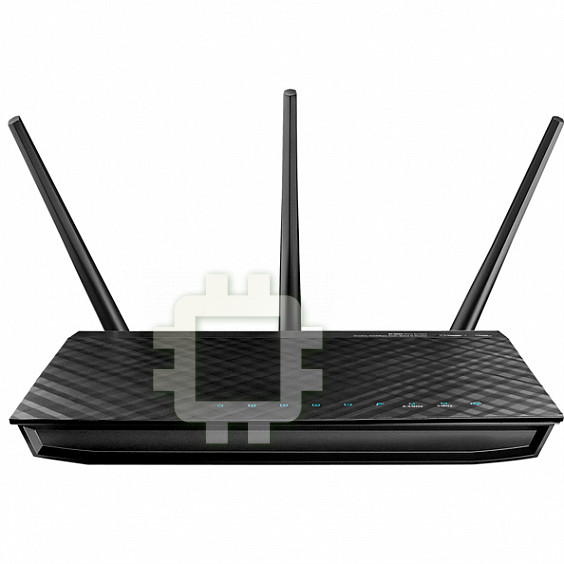
Manual for Asus RT-AC66U
Table of contents
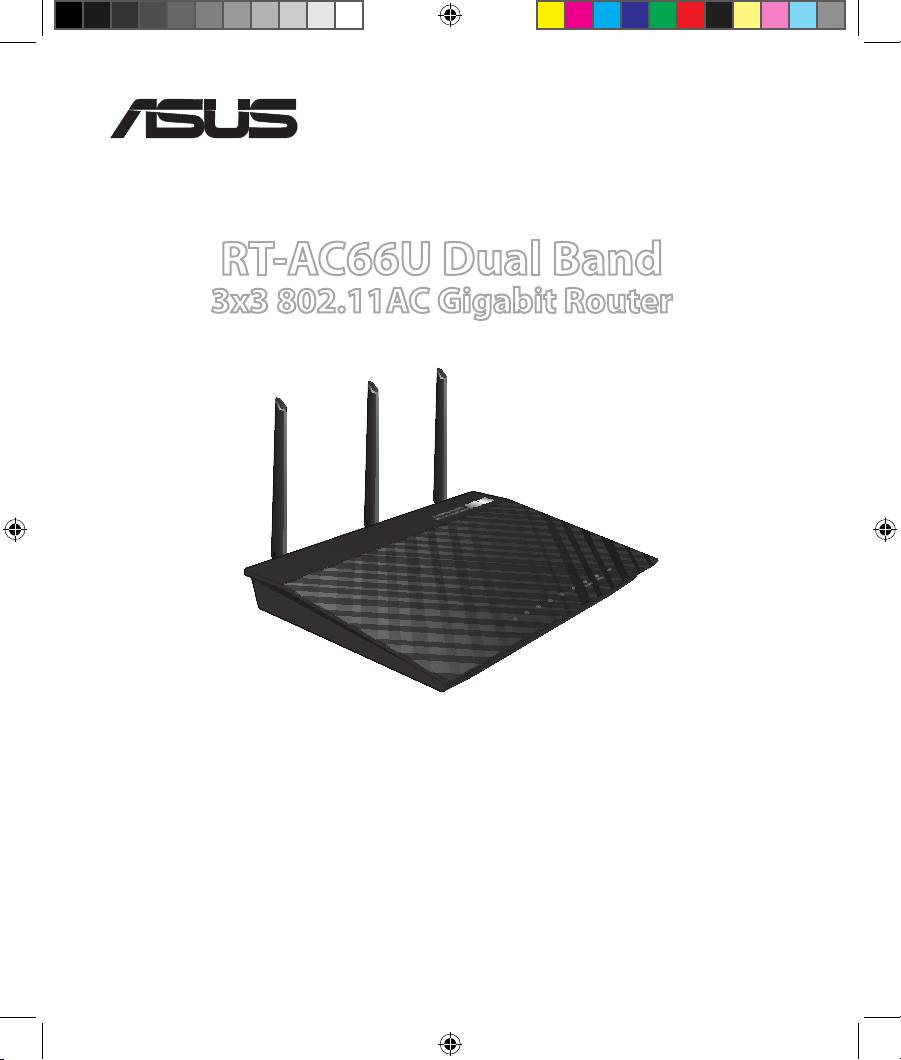
RT-AC66U Dual Band
3x3 802.11AC Gigabit Router
Quick Start Guide
®
EEU8262/ second Edition / April 2013
EEU8262_RT-AC66U_QSG_v2.indd 1 4/18/13 1:41:24 PM
EEU8262_RT-AC66U_QSG_v2.indd 2 4/18/13 1:41:24 PM
EC Declaration of Conformity
We, the undersigned,
Manufacturer:
ASUSTeK COMPUTER INC.
Address, City:
4F, No. 150, LI-TE Rd., PEITOU, TAIPEI 112, TAIWAN
Country:
TAIWAN
Authorized representative in Europe:
ASUS COMPUTER GmbH
Address, City:
HARKORT STR. 21-23, 40880 RATINGEN
Country:
GERMANY
declare the following apparatus:
Product name : Dual Band 3*3 802.11AC Gigabit Router
Model name : RT-AC66U
conform with the essential requirements of the following directives:
2004/108/EC-EMC Directive
EN 55022:2010
EN 55024:2010
EN 61000-3-2:2006+A2:2009
EN 61000-3-3:2008
EN 55013:2001+A1:2003+A2:2006
EN 55020:2007+A11:2011
1999/5/EC-R &TTE Directive
EN 300 328 V1.7.1(2006-10)
EN 301 489-1 V1.9.2(2011-09)
EN 300 440-1 V1.6.1(2010-08)
EN 301 489-3 V1.4.1(2002-08)
EN 300 440-2 V1.4.1(2010-08)
EN 301 489-4 V1.4.1(2009-05)
EN 301 511 V9.0.2(2003-03)
EN 301 489-7 V1.3.1(2005-11)
EN 301 908-1 V5.2.1(2011-05)
EN 301 489-9 V1.4.1(2007-11)
EN 301 908-2 V5.2.1(2011-07)
EN 301 489-17 V2.1.1(2009-05)
EN 301 893 V1.6.1(2011-11)
EN 301 489-24 V1.5.1(2010-09)
EN 302 544-2 V1.1.1(2009-01)
EN 302 326-2 V1.2.2(2007-06)
EN 302 623 V1.1.1(2009-01)
EN 302 326-3 V1.3.1(2007-09)
EN 50360:2001
EN 301 357-2 V1.4.1(2008-11)
EN 62479:2010
EN 302 291-1 V1.1.1(2005-07)
EN 50385:2002
EN 302 291-2 V1.1.1(2005-07)
EN 62311:2008
2006/95/EC-LVD Directive
EN 60950-1 / A12:2011
EN 60065:2002 / A12:2011
2009/125/EC-ErP Directive
Regulation (EC) No. 1275/2008
Regulation (EC) No. 278/2009
Regulation (EC) No. 642/2009
2011/65/EU-RoHS Directive
Ver. 130208
CE marking
(EC conformity marking)
Position : CEO
Name : Jerry Shen
Declaration Date: 15/03/2013
Year to begin affixing CE marking:2013
Signature :
__________
EEU8262_RT-AC66U_QSG_v2.indd 3 4/18/13 1:41:26 PM
EC Declaração de Conformidade
Nós, os abaixo assinados,
Fabricante:
ASUSTeK COMPUTER INC.
Morada, Cidade:
4F, No. 150, LI-TE Rd., PEITOU, TAIPEI 112, TAIWAN
País:
TAIWAN
Representante autorizado na Europa:
ASUS COMPUTER GmbH
Morada, Cidade:
HARKORT STR. 21-23, 40880 RATINGEN
País:
GERMANY
declaramos que o seguinte produto:
Nome do Produto : Router Gigabit 802.11AC 3*3 Duas Bandas
Modelo : RT-AC66U
se encontra em conformidade com as exigências essenciais das seguintes directrizes:
2004/108/EC-EMC Directive
EN 55022:2010
EN 55024:2010
EN 61000-3-2:2006+A2:2009
EN 61000-3-3:2008
EN 55013:2001+A1:2003+A2:2006
EN 55020:2007+A11:2011
1999/5/EC-R &TTE Directive
EN 300 328 V1.7.1(2006-10)
EN 301 489-1 V1.9.2(2011-09)
EN 300 440-1 V1.6.1(2010-08)
EN 301 489-3 V1.4.1(2002-08)
EN 300 440-2 V1.4.1(2010-08)
EN 301 489-4 V1.4.1(2009-05)
EN 301 511 V9.0.2(2003-03)
EN 301 489-7 V1.3.1(2005-11)
EN 301 908-1 V5.2.1(2011-05)
EN 301 489-9 V1.4.1(2007-11)
EN 301 908-2 V5.2.1(2011-07)
EN 301 489-17 V2.1.1(2009-05)
EN 301 893 V1.6.1(2011-11)
EN 301 489-24 V1.5.1(2010-09)
EN 302 544-2 V1.1.1(2009-01)
EN 302 326-2 V1.2.2(2007-06)
EN 302 623 V1.1.1(2009-01)
EN 302 326-3 V1.3.1(2007-09)
EN 300 330-1 V1.7.1(2010-02)
EN 301 357-2 V1.4.1(2008-11)
EN 300 330-2 V1.5.1(2010-02)
EN 302 291-1 V1.1.1(2005-07)
EN 50360:2001
EN 302 291-2 V1.1.1(2005-07)
EN 62479:2010
EN 50385:2002
EN 62311:2008
2006/95/EC-LVD Directive
EN 60950-1 / A12:2011
EN 60065:2002 / A12:2011
2009/125/EC-ErP Directive
Regulation (EC) No. 1275/2008
Regulation (EC) No. 278/2009
Regulation (EC) No. 642/2009
2011/65/EU-RoHS Directive
Ver. 130208
CE marking
(EC conformity marking)
Position : CEO
Name : Jerry Shen
Declaration Date: 15/03/2013
Signature :
__________
Year to begin affixing CE marking:2013
EEU8262_RT-AC66U_QSG_v2.indd 4 4/18/13 1:41:26 PM
EC Uygunluk Beyan
Biz, bu imza altndakiler
Üretici:
ASUSTeK COMPUTER INC.
Adres, ùehir:
4F, No. 150, LI-TE Rd., PEITOU, TAIPEI 112, TAIWAN
Ülke:
TAYVAN
Avrupa’daki Yetkili:
ASUS COMPUTER GmbH
Adres, ùehir:
HARKORT STR. 21-23, 40880 RATINGEN
Ülke:
ALMANYA
Aúa÷daki ürünün:
Ürün ad : Çift Kanal 3*3 802.11AC Gigabit Yönlendirici
Model ad : RT-AC66U
Aúa÷daki direktiflerin gereksinimlerine uydu÷unu deklare ederiz:
2004/108/EC-EMC Direktifi
EN 55022:2010
EN 55024:2010
EN 61000-3-2:2006+A2:2009
EN 61000-3-3:2008
EN 55013:2001+A1:2003+A2:2006
EN 55020:2007+A11:2011
1999/5/EC-R &TTE Direktifi
EN 300 328 V1.7.1(2006-10)
EN 301 489-1 V1.9.2(2011-09)
EN 300 440-1 V1.6.1(2010-08)
EN 301 489-3 V1.4.1(2002-08)
EN 300 440-2 V1.4.1(2010-08)
EN 301 489-4 V1.4.1(2009-05)
EN 301 511 V9.0.2(2003-03)
EN 301 489-7 V1.3.1(2005-11)
EN 301 908-1 V5.2.1(2011-05)
EN 301 489-9 V1.4.1(2007-11)
EN 301 908-2 V5.2.1(2011-07)
EN 301 489-17 V2.1.1(2009-05)
EN 301 893 V1.6.1(2011-11)
EN 301 489-24 V1.5.1(2010-09)
EN 302 544-2 V1.1.1(2009-01)
EN 302 326-2 V1.2.2(2007-06)
EN 302 623 V1.1.1(2009-01)
EN 302 326-3 V1.3.1(2007-09)
EN 50360:2001
EN 301 357-2 V1.4.1(2008-11)
EN 62479:2010
EN 302 291-1 V1.1.1(2005-07)
EN 50385:2002
EN 302 291-2 V1.1.1(2005-07)
EN 62311:2008
2006/95/EC-LVD Direktifi
EN 60950-1 / A12:2011
EN 60065:2002 / A12:2011
2009/125/EC-ErP Direktifi
Regulation (EC) No. 1275/2008
Regulation (EC) No. 278/2009
Regulation (EC) No. 642/2009
2011/65/EU-RoHS Direktifi
Ver. 130208
CE iúareti
(EC uygunluk iúareti)
Pozisyon : CEO
øsim : Jerry Shen
Deklarasyon Tarihi: 15/03/2013
ømza :
__________
CE iúaretinin baslmaya baúland÷ yl:2013
EEU8262_RT-AC66U_QSG_v2.indd 5 4/18/13 1:41:27 PM
Table of contents
English .............................................................................................8
Български ......................................................................................18
Čeština .............................................................................................28
Eesti ..................................................................................................38
Magyar ............................................................................................48
Latviski ............................................................................................58
Lietuvių ...........................................................................................68
Polski ................................................................................................78
Română ...........................................................................................88
Русский ...........................................................................................98
Slovensky........................................................................................108
Türkçe ..............................................................................................118
Українська .....................................................................................128
Hrvatski ...........................................................................................138
Srpski ...............................................................................................148
Slovenščina ....................................................................................158
EEU8262_RT-AC66U_QSG_v2.indd 6 4/18/13 1:41:28 PM
Note / Забележка / Poznámka /märkus / Megjegyzés/
piezīme/ Pastaba/ Uwaga/ Notă/
Примечание
/ Obs/not/
Примітка
/NAPOMENA / BELEŠKA /OPOMBA
• For more details, refer to the user manual included in the
support CD.
•
За повече информация, вижте ръководството на потребителя,
намиращо се на помощния CD диск.
• Podrobnější informace viz uživatelská příručka na podpůrném
disku CD.
• Täpsemat teavet leiate seadmega kaasnenud tugijuhendi CD-lt.
• A további részleteket illetően tekintse meg a támogató CD-n
lévő felhasználói útmutatót.
• Detalizētāku informāciju meklējiet atbalsta CD esošajā lietotāja
rokasgrāmatā.
• Išsamiau žr. vartotojo vadovą, esantį šiame pagalbos
kompaktiniame (CD) diske.
• Dalsze szczegółowe informacje znajdują się w podręczniku
użytkownika na pomocniczym dysku CD.
•
Pentru mai multe detalii, consultaţi manualul de utilizare inclus pe CD-
ul suport.
•
Для получения дополнительной информации обратитесь к
руководству пользователя на компакт-диске.
•
Viac podrobností nájdete v návode na obsluhu na CD s
podporou.
•
Daha fazla ayrıntı için destek CD'sinde bulunan kullanıcı
kılavuzuna bakın.
•
Детальніше див. посібник користувача на компакт-диску
підтримки
.
• Dodatne pojedinosti potražite u korisničkom priručniku na CD-u
podrške.
• Za više detalja, pogledajte uputstvo za korišćenje koje se nalazi
na CD-u za podršku.
• Za več podrobnosti glejte uporabniški priročnik na priloženem
CD-ju.
EEU8262_RT-AC66U_QSG_v2.indd 7 4/18/13 1:41:28 PM
English
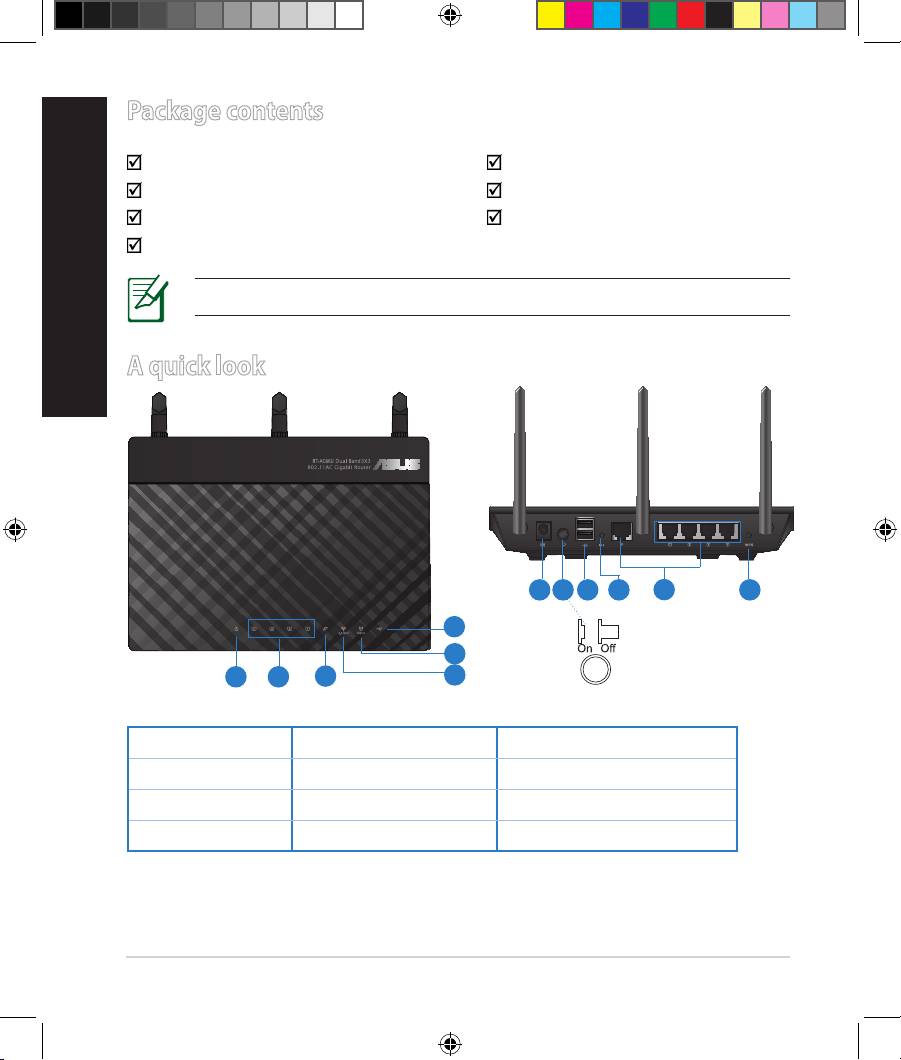
Package contents
RT-AC66U AC adapter
Network cable Quick Start Guide
Support CD (User Manual/utilities) Warranty card
Stand
NOTE: If any of the items is damaged or missing, contact your retailer.
A quick look
7 9 10 12
8
11
6
5
1 2
3
4
1) Power LED 5) 5GHz LED 9) USB 2.0 ports
2) LAN LED 6) USB 2.0 LED 10) Reset button
3) WAN LED 7) Power (DC-IN) port 11) Internet & LAN ports
4) 2.4GHz LED 8) Power switch 12) WPS button
8
EEU8262_RT-AC66U_QSG_v2.indd 8 4/18/13 1:41:31 PM
NOTES:
•
USB External HDD/Flash disk:
• The wireless router works with most USB HDDs/Flash disks up to
2TB and supports read-write access for FAT16, FAT32, EXT2, EXT3,
and NTFS.
• To safely remove the USB disk, launch the web GUI
(http://192.168.1.1), then in the Network Map page's upper right
corner, click the USB icon and click Eject USB 1.
English
• Incorrect removal of the USB disk may cause data corruption.
• For the list of le system and hard disk partitions that the
wireless router supports, visit http://event.asus.com/networks/
disksupport
• For the list of printers that the wireless router supports, visit
http://event.asus.com/networks/printersupport
9
EEU8262_RT-AC66U_QSG_v2.indd 9 4/18/13 1:41:32 PM
English
Positioning your wireless router
For the best wireless signal transmission between the wireless router and the
network devices connected to it, ensure that you:
• Place the wireless router in a centralized area for a maximum wireless coverage
for the network devices.
• Keep the device away from metal obstructions and away from direct sunlight.
• Keep the device away from 802.11g or 20MHz only Wi-Fi devices, 2.4GHz
computer peripherals, Bluetooth devices, cordless phones, transformers,
heavy-duty motors, uorescent lights, microwave ovens, refrigerators, and other
industrial equipment to prevent signal interference or loss.
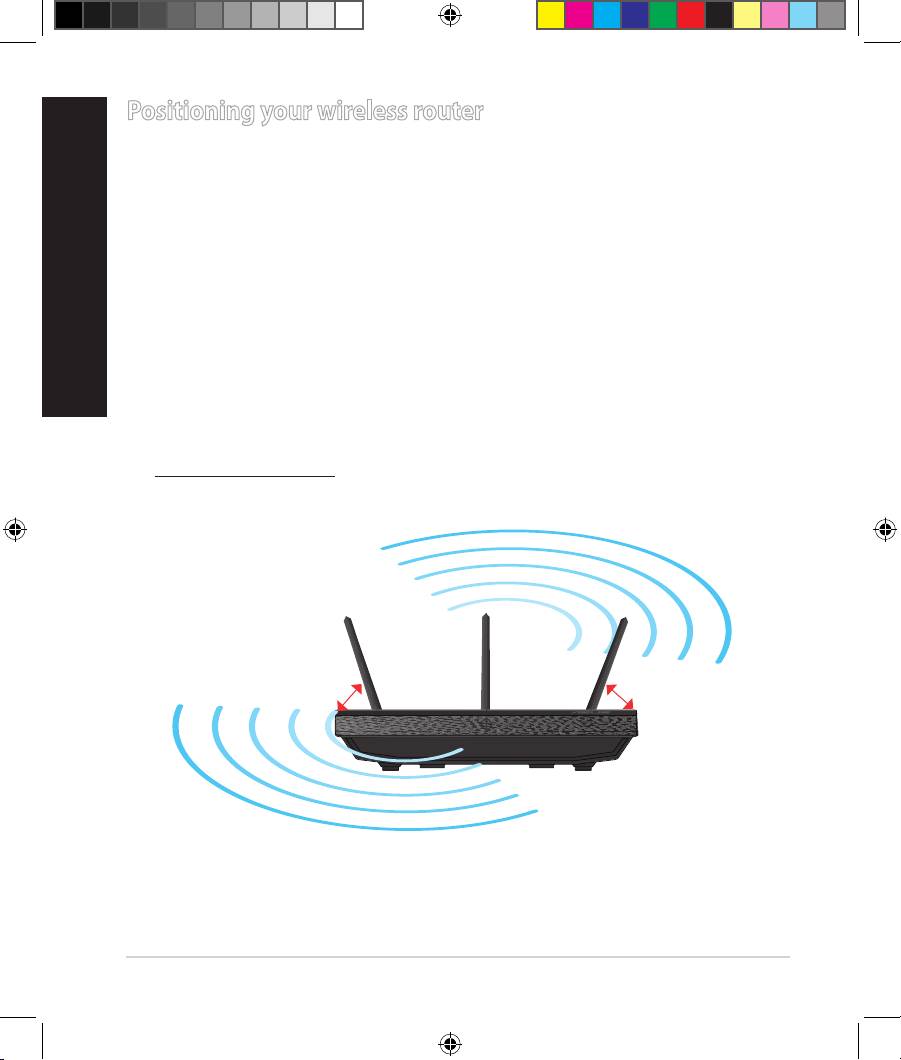
• To ensure the best wireless signal, orient the three detachable antennas as
shown in the drawing below.
• For optimum performance, adjust the internal cooling system. Refer to the user
manual for details.
• Always update to the latest rmware. Visit the ASUS website at
http://www.asus.com to get the latest rmware updates.
0
90
0
45
0
45
10
EEU8262_RT-AC66U_QSG_v2.indd 10 4/18/13 1:41:34 PM
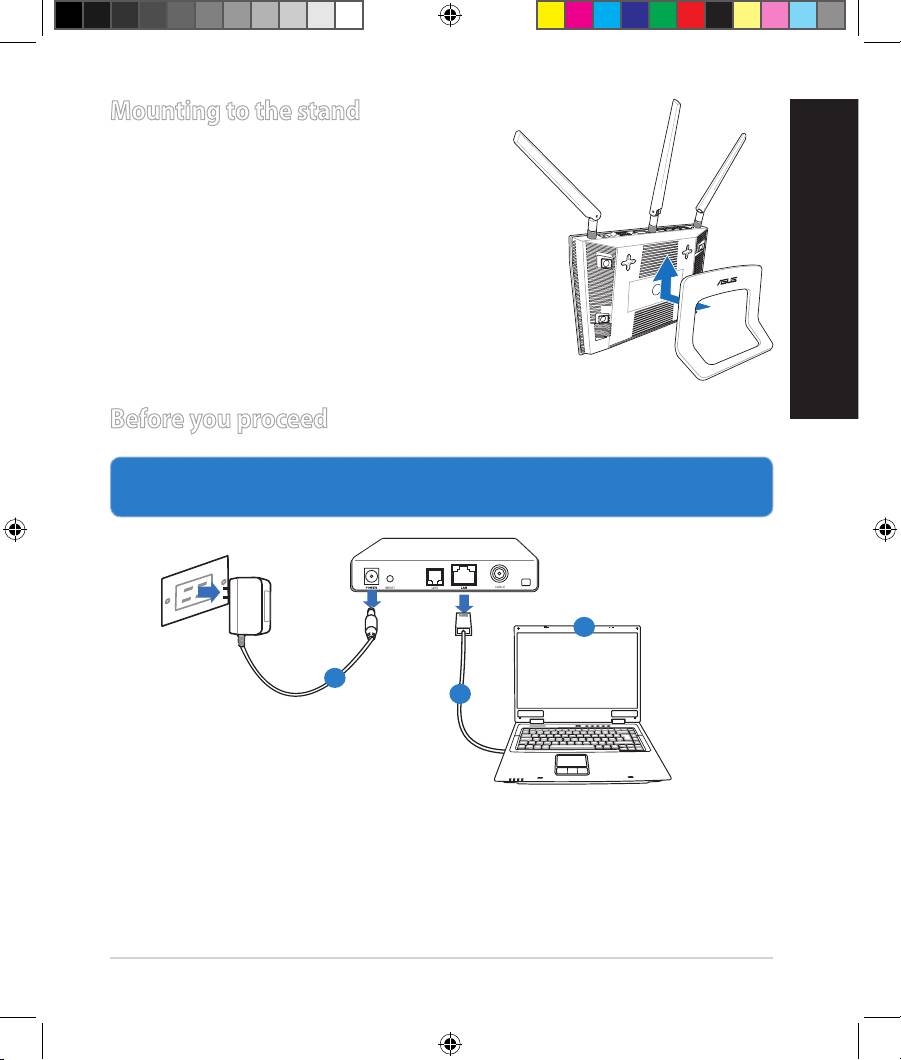
Mounting to the stand
• Align and insert the stand’s mounting hooks
to the wireless router’s mounting holes.
Before you proceed
1. Unplug and disconnect the wires/cables from your existing modem setup
and release your computer’s outmoded IP address.
a: Unplug the AC adapter from the power outlet and disconnect it from your
cable/ADSL modem.
b: Disconnect the network cable from your cable/ADSL modem.
c: Reboot your computer (recommended).
11
Modem
OFF
!
English
c
a
b
EEU8262_RT-AC66U_QSG_v2.indd 11 4/18/13 1:41:36 PM
English
WARNING! Before disconnecting the wires/cables, ensure that your
cable/ADSL modem has been turned o for at least two minutes. If your
modem has a backup battery, remove it as well.
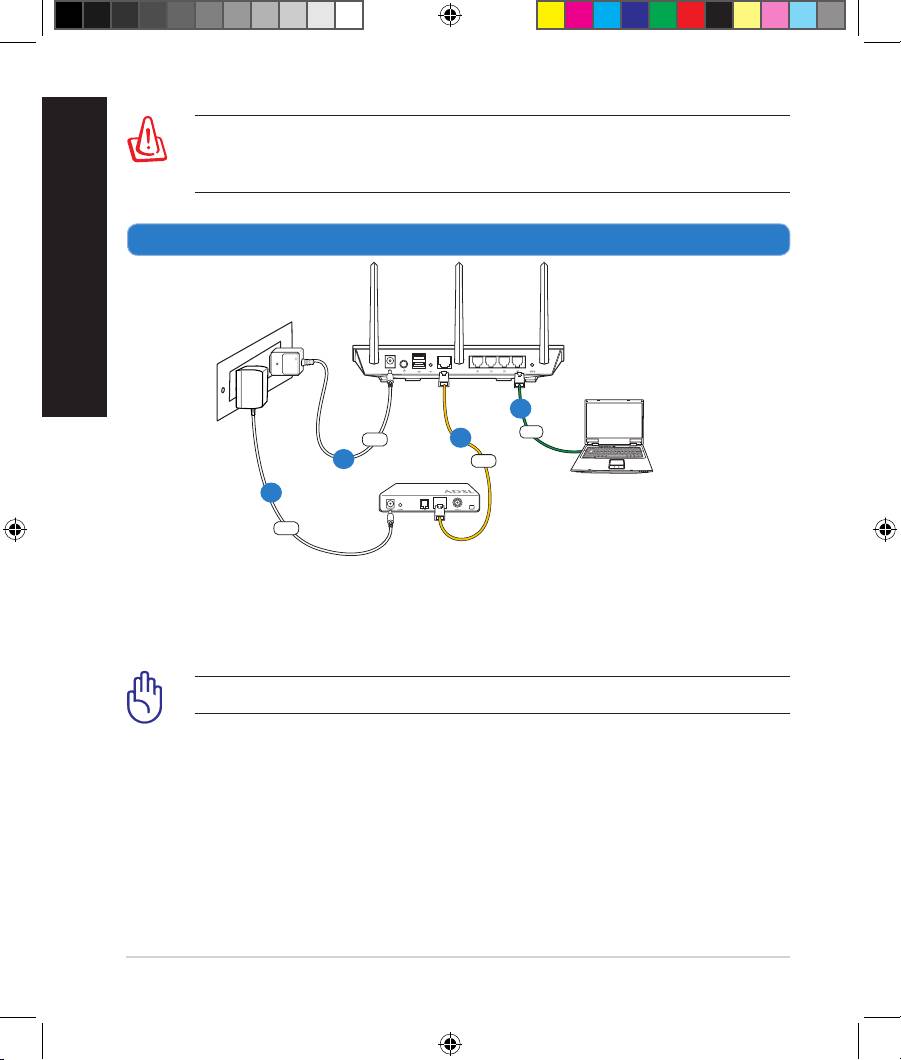
2. Set up your wireless environment.
a: Insert your wireless router’s AC adapter to the DC-IN port and plug it to a
power outlet.
b: Using the bundled network cable, connect your computer to your wireless
router’s LAN port.
IMPORTANT! Ensure that the WAN and LAN LEDs are blinking.
c: Using another network cable, connect your modem to your wireless router’s
WAN port.
d: Insert your modem’s AC adapter to the DC-IN port and plug it to a power
outlet.
12
Wall Power Outlet
RT-AC66U
LAN
Power
WAN
Modem
Computer
Power
b
c
a
d
EEU8262_RT-AC66U_QSG_v2.indd 12 4/18/13 1:41:38 PM
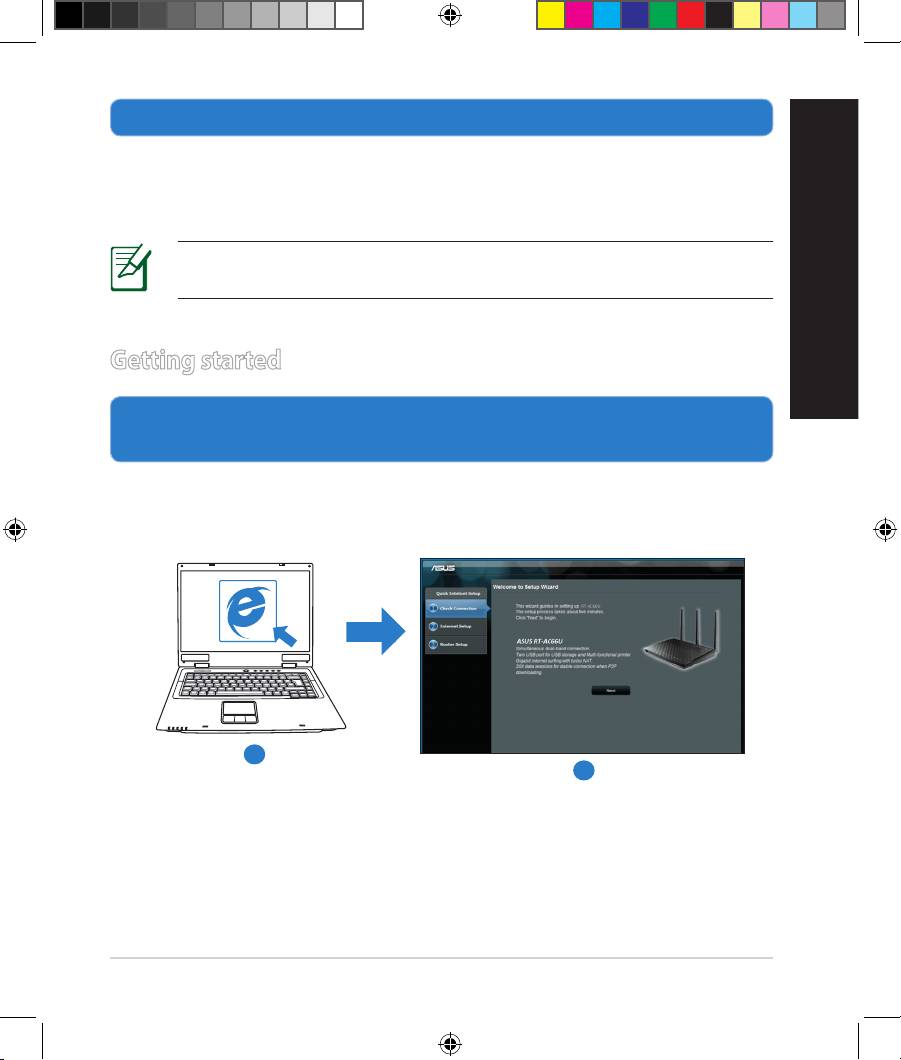
3. Disable some settings on your computer.
A. Disable the proxy server, if enabled.
B. Set the TCP/IP settings to automatically obtain an IP address.
C. Disable the dial-up connection, if enabled.
NOTE: For more details on disabling your computer settings, refer to
Frequently Asked Questions (FAQs).
English
Getting started
1. Congure your wireless settings via the wireless router’s web graphics
user interface (web GUI).
a: Launch your web browser such as Internet Explorer, Firefox, Google Chrome,
or Safari.
a
b
13
EEU8262_RT-AC66U_QSG_v2.indd 13 4/18/13 1:41:41 PM
English
NOTE: If QIS does not launch automatically, follow these steps to
manually launch QIS:
• On your web browser, key in
http://192.168.1.1 and run the Quick
Internet Setup (QIS) Wizard again.
• Disable the proxy settings, dial-up connection, and set your TCP/IP
settings to automatically obtain an IP address. For more details, refer
to the FAQs section or use the Setup Wizard in the support CD for
auto-diagnosis.
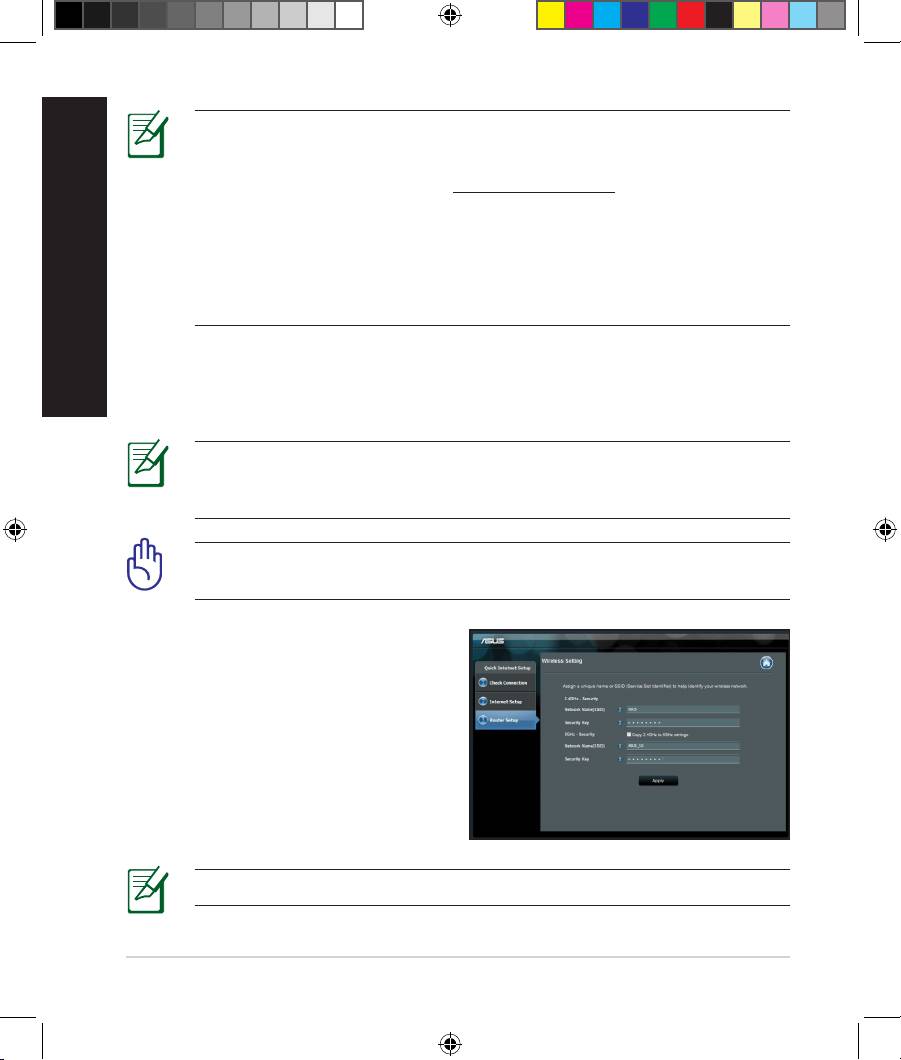
b: The wireless router’s Quick Internet Setup (QIS) feature automatically detects
if your ISP connection type is Dynamic IP, PPPoE, PPTP, L2TP, and Static IP.
Key in the necessary information for your connection type.
NOTE: The auto-detection of your ISP connection type takes place
when you congure the wireless router for the rst time or when your
wireless router is reset to its default settings.
IMPORTANT! Obtain the necessary information about your Internet
connection type from your Internet Service Provider (ISP).
c: Assign the network name (SSID) and
security key for your 2.4GHz and
5GHz wireless connection. Click Ap-
ply when done.
d: Your Internet and wireless settings
are displayed. Click Next to con-
tinue.
e: Read the wireless network con-
nection tutorial. When done, click
Finish.
NOTE: You can assign a network name with up to 32 characters.
14
EEU8262_RT-AC66U_QSG_v2.indd 14 4/18/13 1:41:42 PM
Frequently Asked Questions (FAQs)
After following the steps, I still cannot access the wireless router’s web
graphics user interface (web GUI) to congure the wireless router settings.
Ensure that your PC’s proxy settings are disabled and your PC’S IP address is
obtained from the DHCP server automatically. for details on disabling the proxy
settings, visit the ASUS Support site at http://support.asus.com. For details on
using the DHCP server to obtain IP addresses automatically, refer to your Win-
dows® or Mac operating system’s help feature.
The client cannot establish a wireless connection with the router.
English
Out of Range:
• Put the router closer to the wireless client.
• Try to change the channel settings.
Authentication:
• Use wired connection to connect to the router.
• Check the wireless security settings.
• Press the Reset button at the rear panel for more than ve seconds.
Cannot nd the router:
• Press the Reset button at the rear panel for more than ve seconds.
• Check the setting in the wireless adapter such as SSID and encryption
settings.
Cannot access the Internet via wireless LAN adapter.
• Move the router closer to the wireless client.
• Check whether the wireless adapter is connected to the correct wireless
router.
• Check whether the wireless channel in use conforms to the channels avail-
able in your country/area.
• Check the encryption settings.
• Check if the ADSL or Cable connection is correct.
15
EEU8262_RT-AC66U_QSG_v2.indd 15 4/18/13 1:41:42 PM
• Retry using another Ethernet cable.
English
If the ADSL “LINK” light blinks continuously or stays o, Internet access is
not possible - the Router is unable to establish a connection with the ADSL
network.
• Ensure that all your cables are all properly connected .
• Disconnect the power cord from the ADSL or cable modem, wait a few min-
utes, then reconnect the cord.
• If the ADSL light continues to blink or stays OFF, contact your ADSL service
provider.
Network name or encryption keys are forgotten.
• Try setting up the wired connection and conguring the wireless encryption
again.
• Press the Reset button of the wireless router for more than ve seconds.
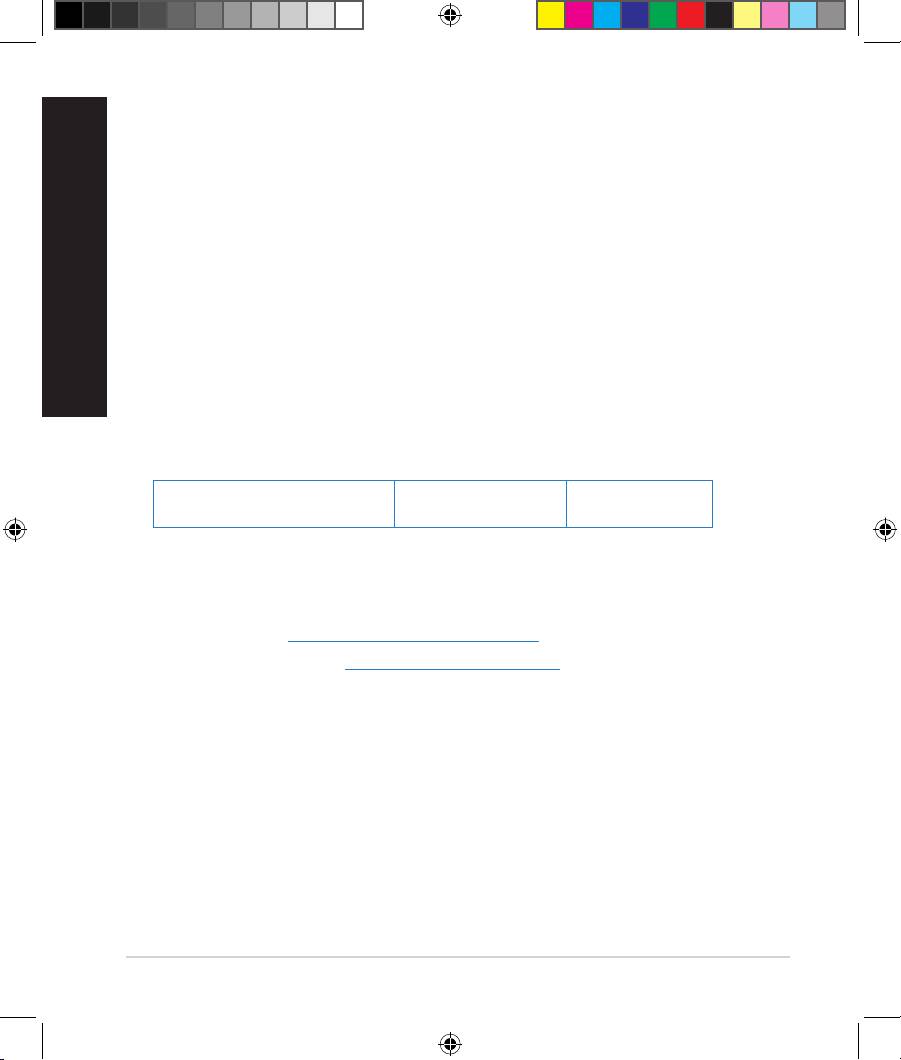
• Factory default settings:
User name / Password:
IP address:
SSID: ASUS
admin / admin
192.168.1.1
Where can I nd more information about the wireless router?
• User Manual in the support CD
• Online FAQ site: http://support.asus.com/faq
• Technical Support site: http://support.asus.com
• Customer Hotline: Refer to the Support Hotline in this Quick Start Guide
16
EEU8262_RT-AC66U_QSG_v2.indd 16 4/18/13 1:41:43 PM
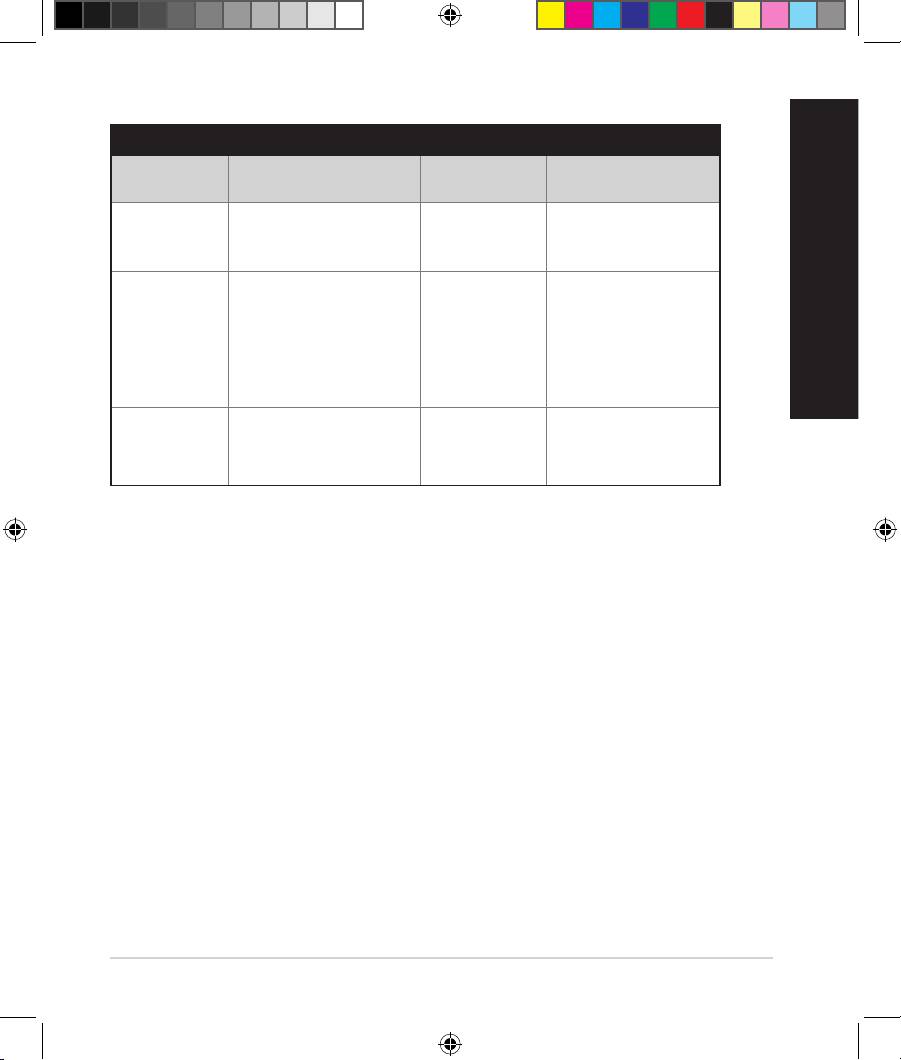
SUPPORT HOTLINE
Area Hotline Number Support
Availability
Languages
Taiwan 0800-093-456;
Traditional
Mon. to Fri.
02-81439000
Chinese
9:00-12:00;
13:30-18:00
USA/
1-812-282-2787 English Mon. to Fri.
Canada
8:30-12:00am EST
(5:30am-9:00pm PST)
Sat. to Sun.
English
9:00am-6:00pm EST
(6:00am-3:00pm PST)
Brazil 4003 0988 (Capital) Portuguese
Mon. to Fri.
9:00am-18:00
0800 880 0988
(demais localidades)
17
EEU8262_RT-AC66U_QSG_v2.indd 17 4/18/13 1:41:43 PM
български
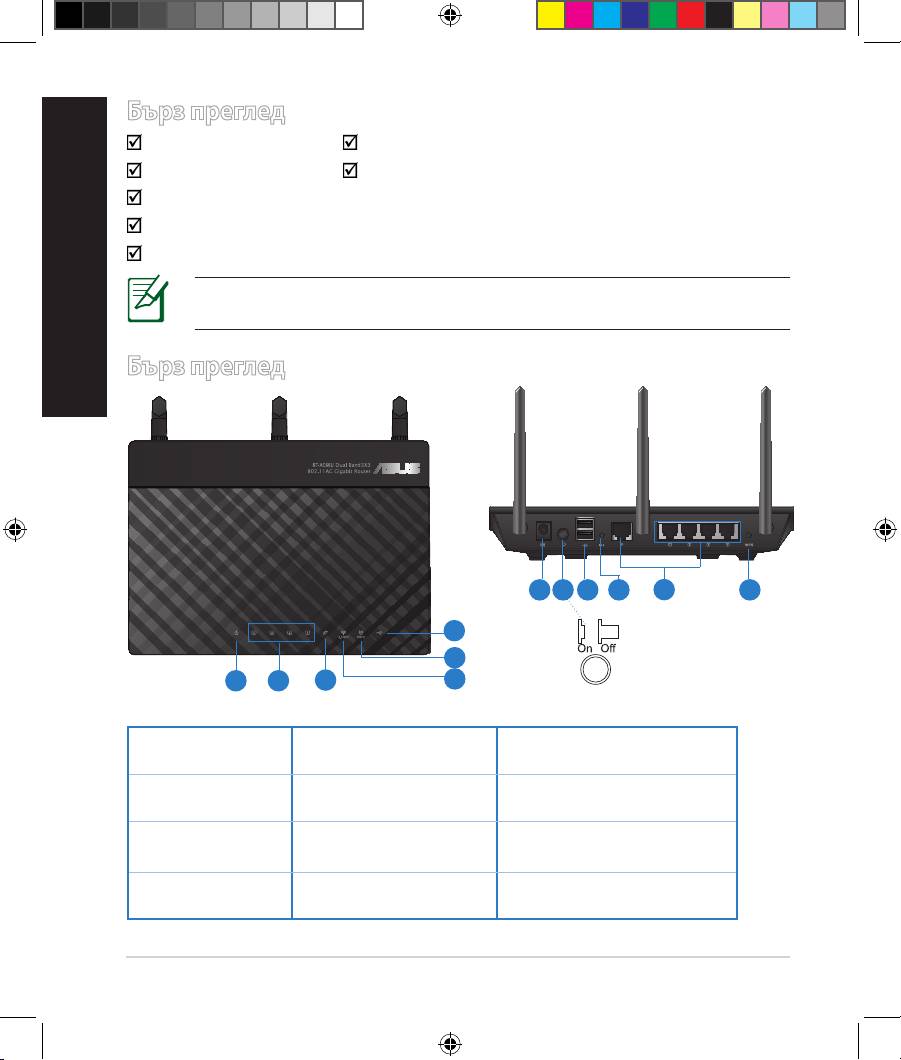
Бърз преглед
RT-AC66U Адаптер за променлив ток
Мрежов кабел Ръководство за бърз старт
Помощен CD диск (Ръководство на потребителя/помощни програми)
Гаранционна карта
Стойка
ЗАБЕЛЕЖКА: Ако някой от компонентите е повреден или липсва,
свържете се с Вашия търговски представител.
Бърз преглед
7 9 10 12
8
11
6
5
1 2
3
4
1) Индикатор
5) 5GHz индикатор 9) USB 2.0 портове
на
2) LAN
6) USB 2.0 индикатор 10) Бутон за нулиране
индикатор
3) WAN
7) Порт захранване
11) Портове Интернет
индикатор
(DC-IN)
и LAN
4) 2.4GHz
8) Power switch 12) WPS бутон
индикатор
18
EEU8262_RT-AC66U_QSG_v2.indd 18 4/18/13 1:41:44 PM
ЗАБЕЛЕЖКИ:
•
USB Външен хард / флаш диск:
• Безжичният рутер работи с повечето USB хард дискове и флаш
дискове до 2 TB и поддържа достъп четене-писане за FAT16,
FAT32, EXT2, EXT3 и NTFS.
• За сигурно изключване на USB диска стартирайте
потребителския интерфейс от мрежата GUI (http://192.168.1.1),
след това на страница Network Map (Карта на мрежата) в
горния десен ъгъл щракнете иконата на USB и щракнете Eject
български
USB 1 (Изхвърляне на USB 1).
• Неправилното изваждане на USB диска може да предизвика
повреждане на данните.
• Списъка на системните и дискови раздели, поддържани от
безжичния рутер, можете да намерите на http://event.asus.
com/networks/disksupport
• Списъка на принтерите, поддържани от безжичния рутер, можете
да намерите на
http://event.asus.com/networks/printersupport
19
EEU8262_RT-AC66U_QSG_v2.indd 19 4/18/13 1:41:45 PM
Разположение на безжичния рутер
български
За постигане на максимално добро предаване на безжичните сигнали
между безжичния рутер и свързаните с него мрежови устройства трябва:
• Да поставите безжичния рутер на централно място за максимално покритие
на мрежовите устройства.
• Рутерът да е отдалечен от метални прегради и да не е изложен на слънчева
светлина.
• Рутерът да е отдалечен от Wi-Fi устройства 802.11g или 20MHz, компютърни
периферни устройства 2.4GHz, Bluetooth (блутут) устройства, безжични
телефони, трансформатори, мощни мотори, флуоресцентни лампи,
микровълнови печки, хладилници и други промишлени машини за
избягване на смущенията или загубите на сигнала.
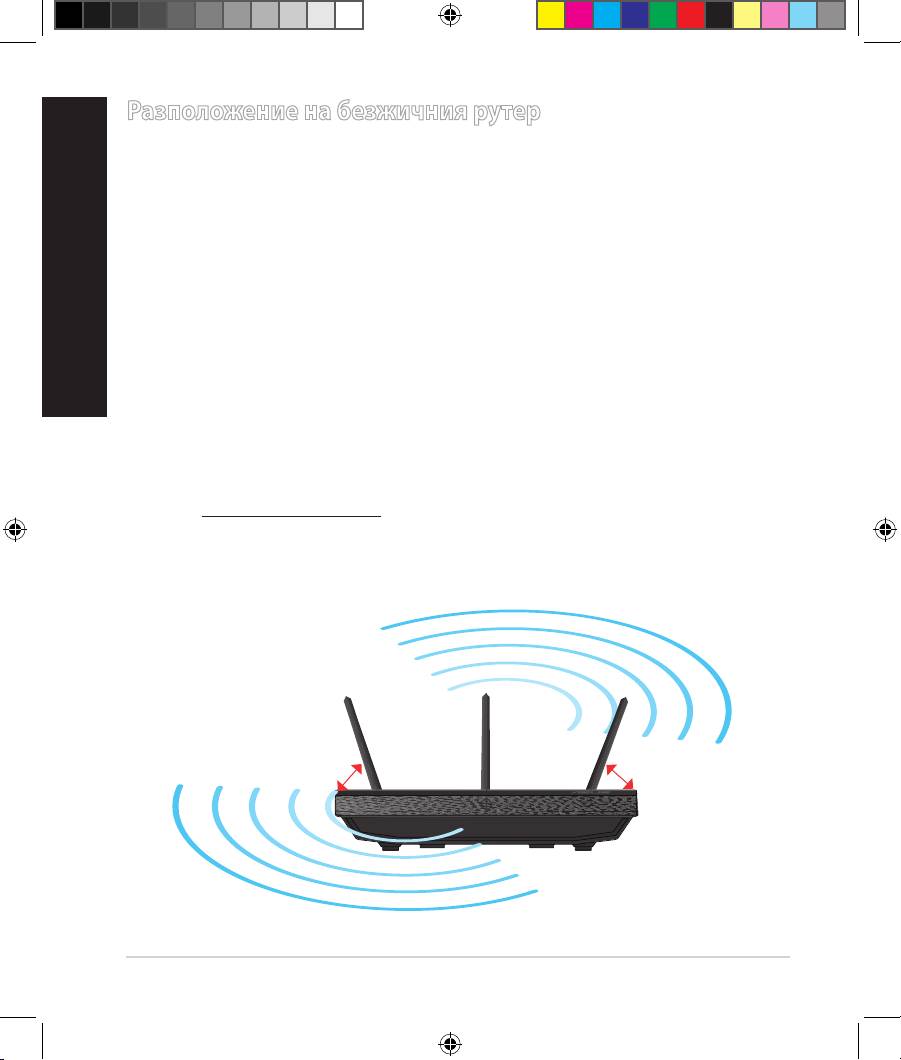
• За осигуряване на максимално добър сигнал трите свалящи се антени да се
ориентират както е показано на схемата по-долу.
• За оптимална да се регулира вътрешната охлаждаща система. Повече
подробности са дадени в ръководството на потребителя.
• Винаги използвайте най-новите версии на фърмуера. Посетете сайта на
ASUS http://www.asus.com за сваляне на последните версии на фърмуера.
0
90
0
45
0
45
20
EEU8262_RT-AC66U_QSG_v2.indd 20 4/18/13 1:41:45 PM


