
Asus P5V-VM DH: AP Launch Button and AP Launch Menu
AP Launch Button and AP Launch Menu: Asus P5V-VM DH
Table of contents
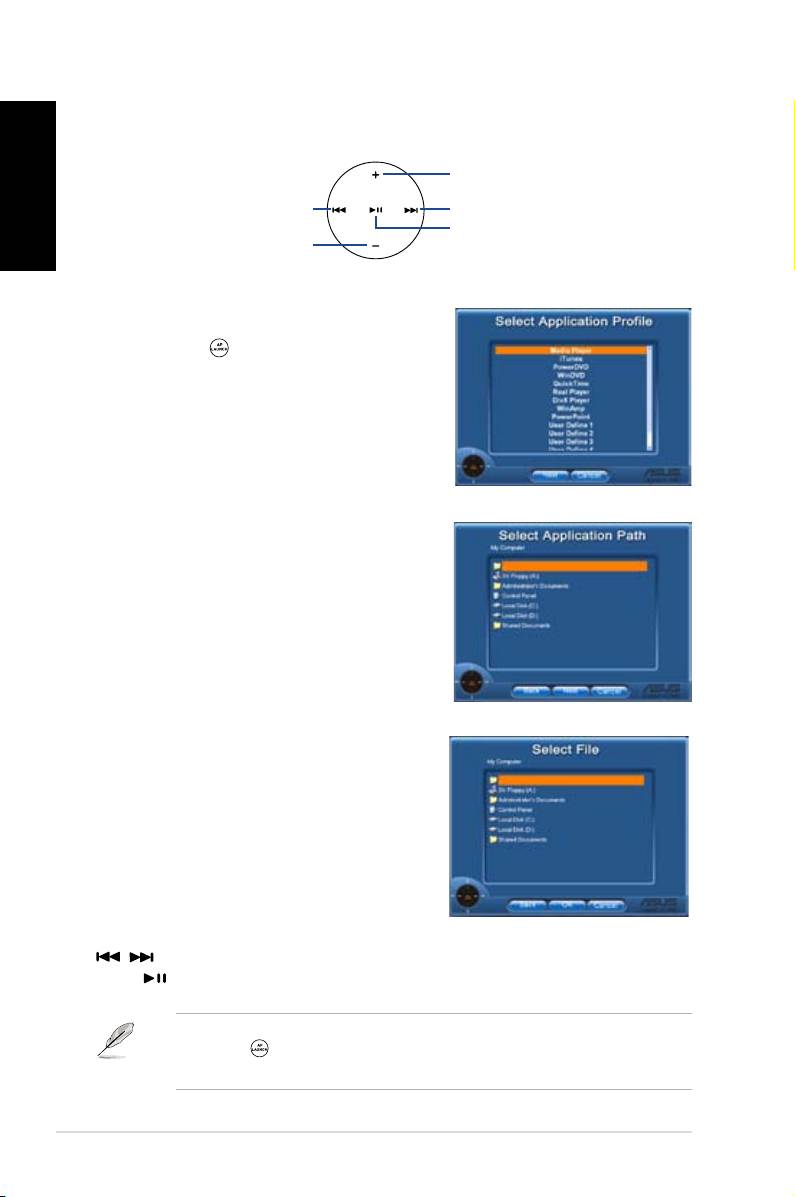
AP Launch Button and AP Launch Menu
Navigate with the media control zone.
English
upward
leftward
rightward
enter
downward
Select Application Prole
After you press on the remote control, an
applicationprolewillbedisplayedonthe
screen. Use the remote control to navigate and
initiate a desired application.
Select Application Path
If the software fails to locate the executable
leoftheapplicatonattherst-timeuse,the
Select Application Path screen will appear.
Specify the correct path on screen.
Select File
After selecting the correct path, you should
selectthecorrectexecutablele(.exe)ofthe
application for launching the application.
Iftheexecutableleislocatedbythesoftware
successfully or you have already set up
correctly in advance, this screen will show up
directly when the application is chosen. After
selectingadesiredle,folderorCDROM,use
/ to choose Back/OK/Cancel and then
press toconrm.
• For music listening, making playlists beforehand is suggested.
• Press again toclosetheapplicationandagaintore-launchtheprole
menu.
6
DH Remote
