
Asus GX1108N: Connecting network devices
Connecting network devices: Asus GX1108N
Table of contents
Connecting network devices
English
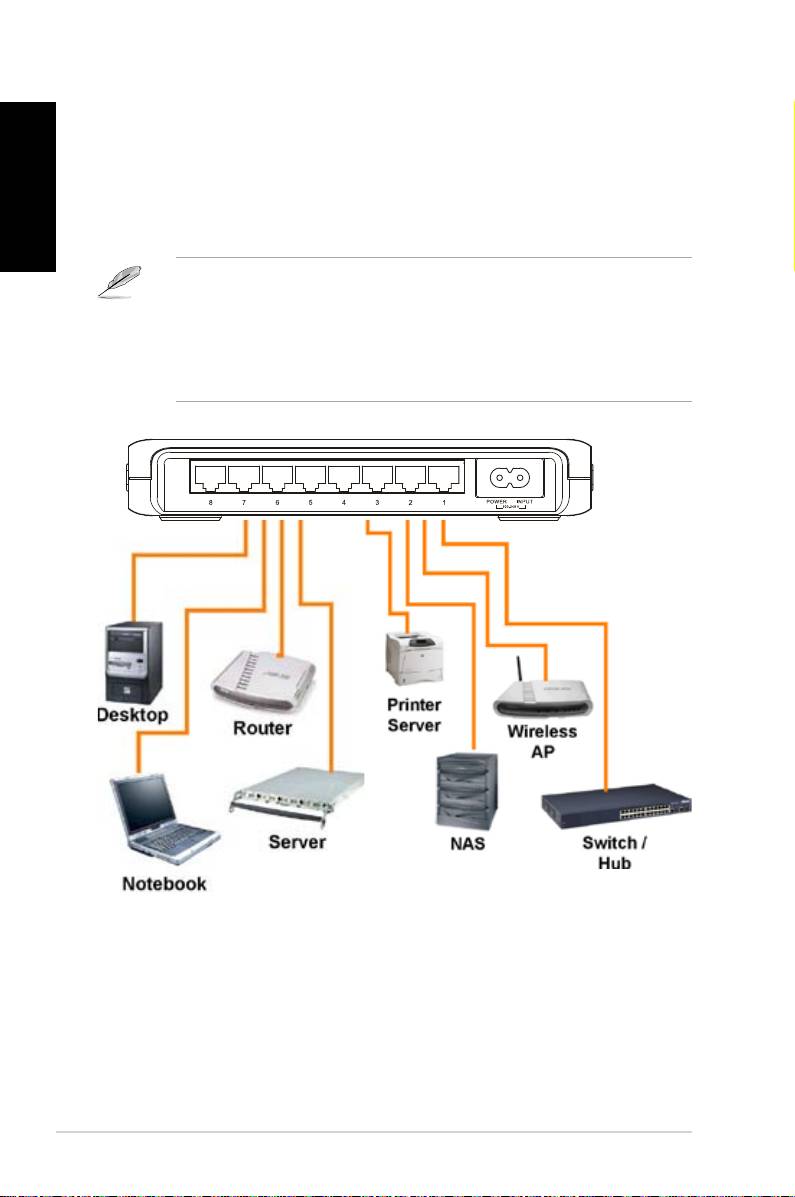
ToconnectnetworkdevicestotheGX1105NorGX1108Nswitch:
1. ConnectoneendoftheEthernetcabletoanEthernetportontheswitch
rearpanel.ConnecttheotherendtotheEthernetportofthenetwork
device.Repeatthissteptoconnectadditionalnetworkdevices.
NOTES
• UseCategory5straight-throughEthernetcablesforwiringsoasto
ensureconnectionspeedbetweentheswitchandthenetworkdevices.
• Youcanuseeithercorssoverorstraight-throughcabletoconnectother
networkdevicessuchasbridges,switches,hubsandPCs.
2. Plugoneendofthepowercabletothepowerconnectorontheswitchrear
panel,thenplugtheotherendtoapoweroutlet.
3. ThePowerLEDindicatorandtheLANLEDindicatorsofactiveEthernet
portslightupwhentheswitchispoweredonandactivenodesare
connectedtotheLANports.RefertothefrontpanelillustrationsandLED
tableinpage4forthemeaningofLEDindicators.
6 Quick Start Guide
