
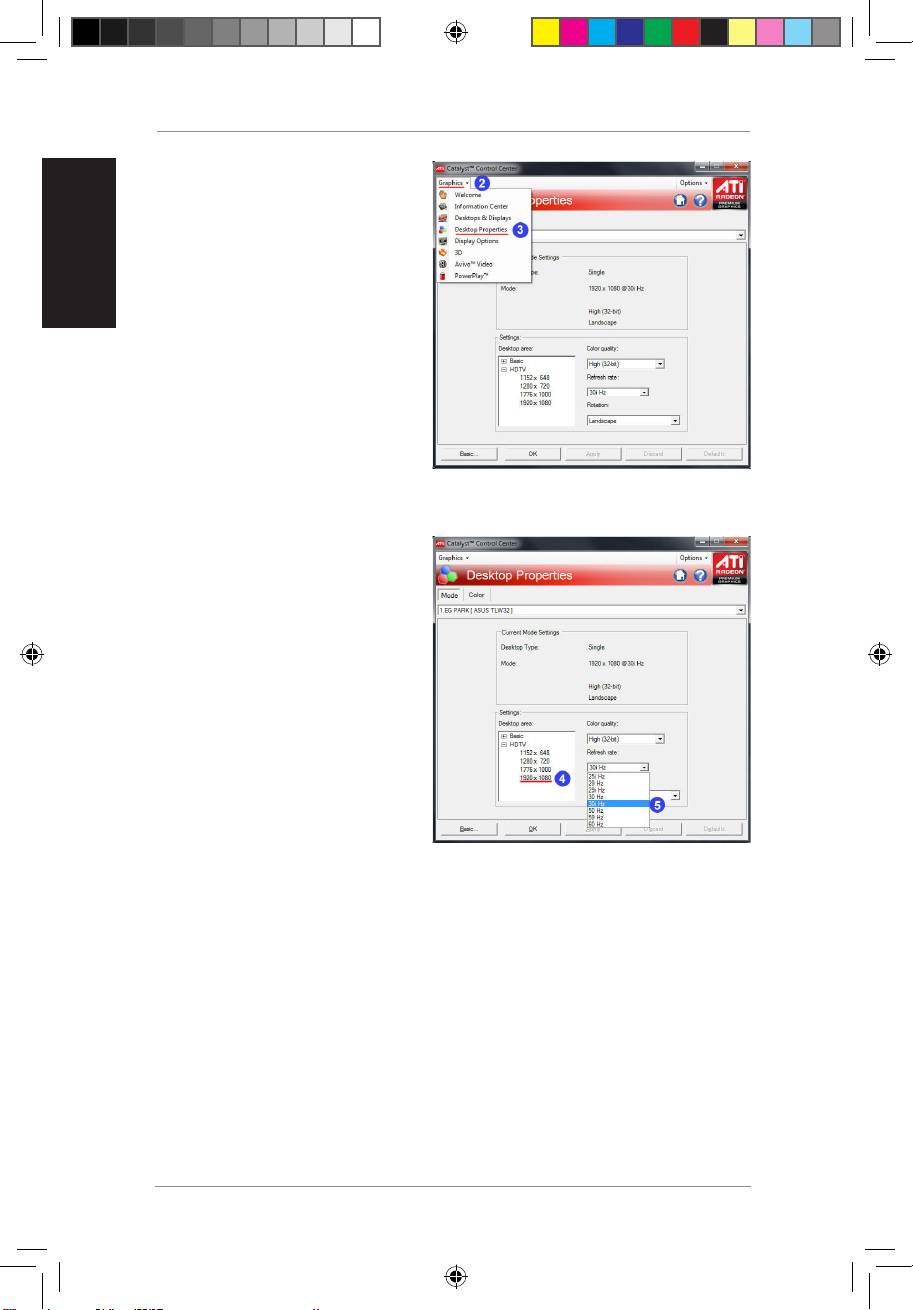
Asus BR-HD3: 2. Click Graphics 3. Select Desktop Properties 4. From the Desktop area field, select 1920 X 1080 5. FromtheRefreshratedropdown list,select 30i Hz
2. Click Graphics 3. Select Desktop Properties 4. From the Desktop area field, select 1920 X 1080 5. FromtheRefreshratedropdown list,select 30i Hz: Asus BR-HD3
Table of contents
- Setting up PS3 and XBox to 1080i output
- Setting up your computer to 1080i output 1. Right-click anywhere on Windows desktop,andclick Screen resolution 2. Click Advanced settings
- 3. Click List All Modes. 4. Select 1920 by 1080, True color (32 Bit), 30Hertz (Interlaced)
- Using NVIDIA utility Using ATI utility 1. L a u n c h t h e ATi C o n t r ol Center.Select Advanced
- 2. Click Graphics 3. Select Desktop Properties 4. From the Desktop area field, select 1920 X 1080 5. FromtheRefreshratedropdown list,select 30i Hz
BR-HD3 Wireless HDMI Kit Supplementary Guide
English
6
2. Click
Graphics
.
3. Select
Desktop Properties
.
4. From the Desktop area field,
select
1920 X 1080
.
5. FromtheRefreshratedropdown
list,select
30i Hz
.
Q5328_BR-HD3_FAQ.indb 6 2/9/10 3:29:29 PM
Top 10 manuals
100.00
NZXT HALE90 1000W99.99
Samsung SM-R38099.97
AEG BSB 18C99.97
Dell 2700W99.97
Smeg KSEC70X99.96
Beurer HDE 4099.96
Pyramida KH 50 v.299.96
MSI CSM-H81M-P3299.96
AEG HR 562799.95
Melissa 640-048