
Asus T5-P5G41E: Installing an expansion card Installing a hard disk drive
Installing an expansion card Installing a hard disk drive: Asus T5-P5G41E
Table of contents
- Internal components Removing the cover
- Lifting the power supply unit Installing a CPU Installing an Intel CPU
- Installing an AMD CPU Installing the CPU fan and heatsink assembly Installing an Intel CPU heatsink and fan
- Installing an AMD CPU heatsink and fan Installing a DIMM
- Installing an expansion card Installing a hard disk drive
- Installing an optical drive Reinstalling the cover
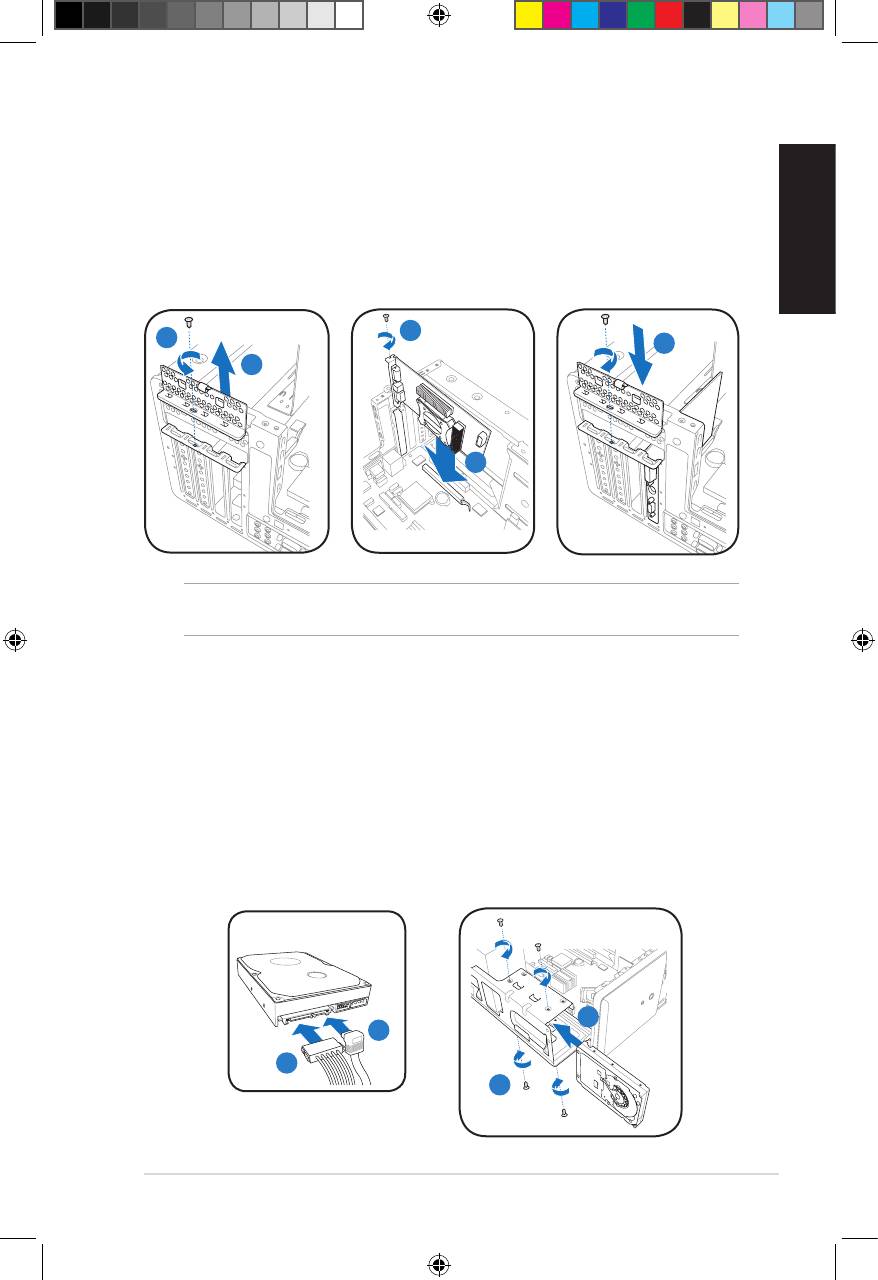
Installing an expansion card
1. Locate and remove one metal bracket lock screw.
2. Remove the metal bracket lock.
3. Alignthecardconnectorwiththeslot,thenpressrmly.
4. Secure the card with one screw.
English
5. Replace the metal braket lock, then secure it with one screw.
4
1
5
2
3
IMPORTANT. This chassis supports PCI Express x 16 cards with 192mm x 19mm or
smaller dimensions only.
Installing a hard disk drive
1. Connect the SATA signal (1A) and power (1B) plugs to the connectors at the
back of the SATA hard disk drives.
2. Locate the HDD tray.
3. Insert a hard disk drive (with the HDD PCB facing the top of the chassis) to
the tray, then secure it with four screws.
4. Connect the SATA signal cable to the SATA connector on the motherboard, and
tighten all the cables with the plastic coils.
SATA
3
1A
1B
3
7Installation manual
u5335_T5_series_qsg.indb 7 1/29/10 3:56:06 PM


