
Asus ROG Xonar Phoebus: 2.1 Card Installation 2.1.1 Installing the Xonar Phoebus Card
2.1 Card Installation 2.1.1 Installing the Xonar Phoebus Card: Asus ROG Xonar Phoebus
Table of contents
- English ............................................................................................... 1
- 1. Introduction 1.1 System requirements 1.2 Package contents
- No Item Description
- 2.1 Card Installation 2.1.1 Installing the Xonar Phoebus Card
- 2.1.2 Connecting the TV Tuner Card
- 3. Driver Installation 3.1 Installing the Xonar Phoebus Card Driver 3.2 Uninstalling or Reinstalling the Xonar Phoebus Card Driver
English
6
ASUS Xonar Phoebus Quick Start Guide
2.1 Card Installation
Before you proceed with the following installation steps, it’s recommended that you
disable your onboard audio device in your BIOS settings, or uninstall any other sound
cards on your PC. (For BIOS setting or uninstallation of other sound cards, please refer
to the user manuals of your motherboard and sound card)
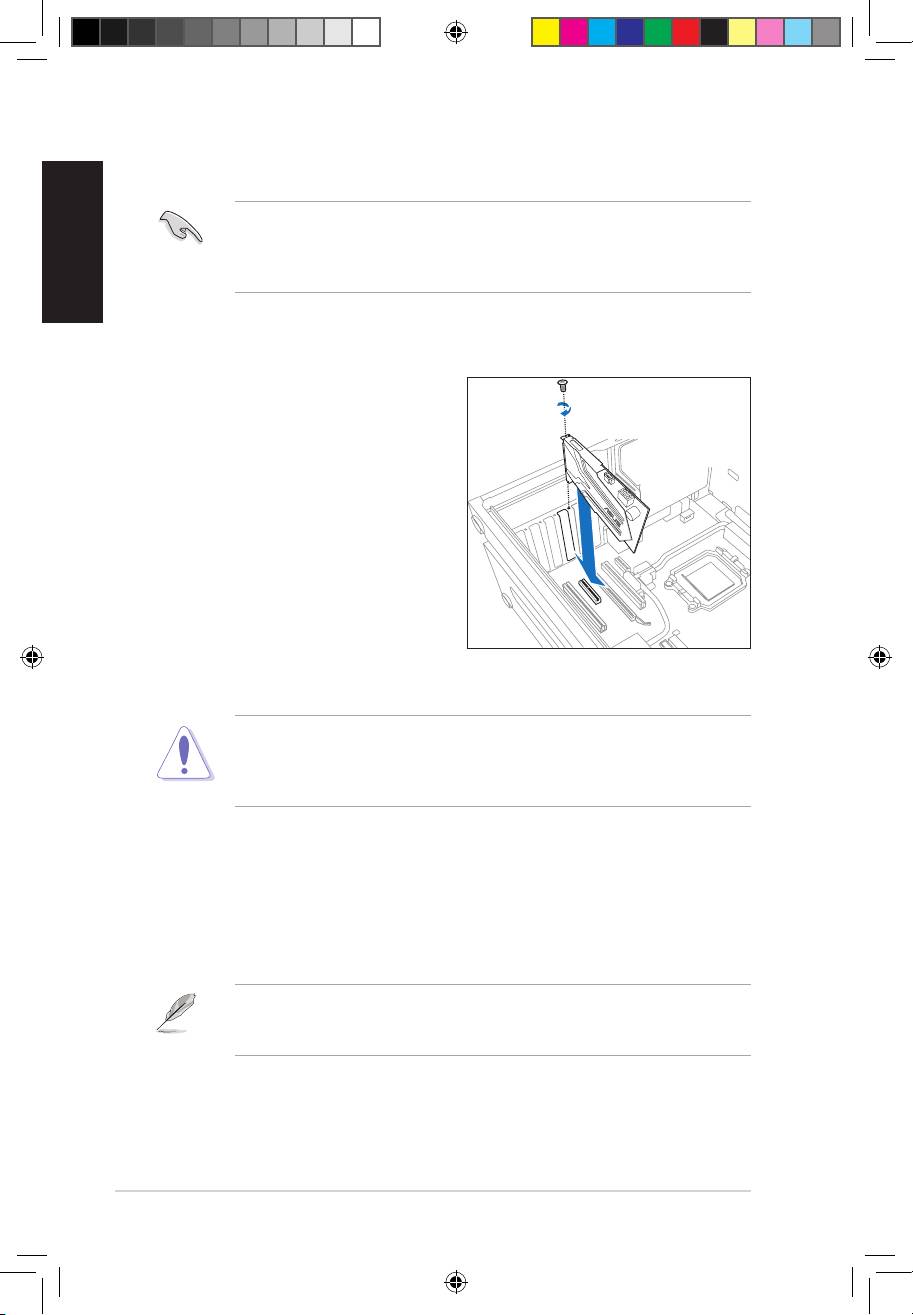
2.1.1 Installing the Xonar Phoebus Card
To install the Xonar Phoebus audio card:
1. Power OFF the computer, the monitor,
and all other peripheral devices
connected to your computer.
2. Unplug the computer power cord from
your computer and power outlet.
3. Touch the metal back or side panel of
the computer to avoid static electricity.
4. Remove the chassis cover.
5. Remove the metal bracket from
an available PCIE slot for the Xonar
Phoebus audio card.
6. Carefully insert the audio card into the PCIE slot. Ensure the audio card sits
properly in place.
Do not force the audio card into the slot. Make sure that the gold pins of the card’s
PCI Express connector are aligned with the motherboard’s PCI Express connector
before you insert the card into the PCI Express slot. If it does not t properly, gently
remove it and try again.
7. Secure the audio card with screws and the metal bracket.
8. Put back the chassis cover.
9. Reconnect all cables.
10. Plug the power cord to the computer and to a power outlet.
11. Power ON the computer.
The PCI Express high-quality audio card requires additional power from your
computer. If the power cable is not connected properly, the audio card will not work
at all.
U7062_Xonar-Phoebus_QSG.indb 6 18.01.2012 16:12:22 Uhr
