
Asus HS-W1: Package contents Getting to know your headset
Package contents Getting to know your headset: Asus HS-W1
Table of contents
- Package contents Getting to know your headset
- Charging the battery
- Pairing the wireless headset and the USB wireless dongle
- Specications
English
Package contents
• 1 x HS-W1 USB Wireless Headset
• 1 x Mini-USB charging cable
• 1 x USB wireless dongle
• 1 x Quick Start Guide
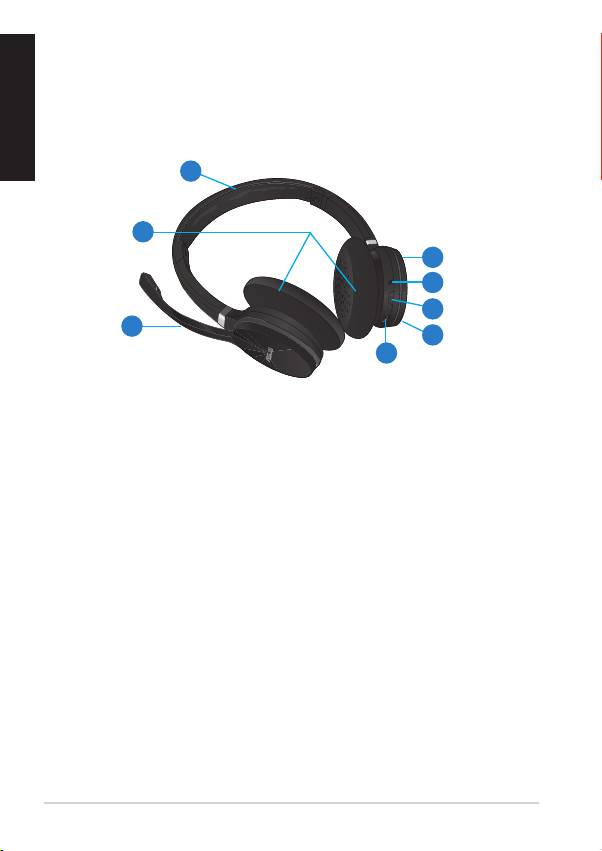
Getting to know your headset
1
2
5
6
7
3
8
4
1. Adjustable headband
Allows you to adjust the headset for a snug t on your head.
2. Ear cups
Provides you with an enhanced audio experience.
3. Microphone
Use the microphone for a two-way communication.
4. Mini-USB port
Use this port to connect the bundled mini-USB cable to your computer’s
USB port to charge your wireless headset’s battery.
5. Volume up (+)
Press (+) to increase the volume.
6. Status indicators
• Solid red light: Battery is charging. The red light is o when the
battery is fully charged.
• Solid green light: Devices are in the pairing mode.
• Fast ashing green light: Devices are waiting to be paired.
• Slow ashing green light: Devices are not paired.
2
Quick Start Guide
