
Asus HS-W1: Charging the battery
Charging the battery: Asus HS-W1
Table of contents
7. Power button
Press this button to turn your wireless headset on/o or to pair it with
your computer.
8. Volume down (-)
Press (-) to decrease the volume.
English
Charging the battery
1
2
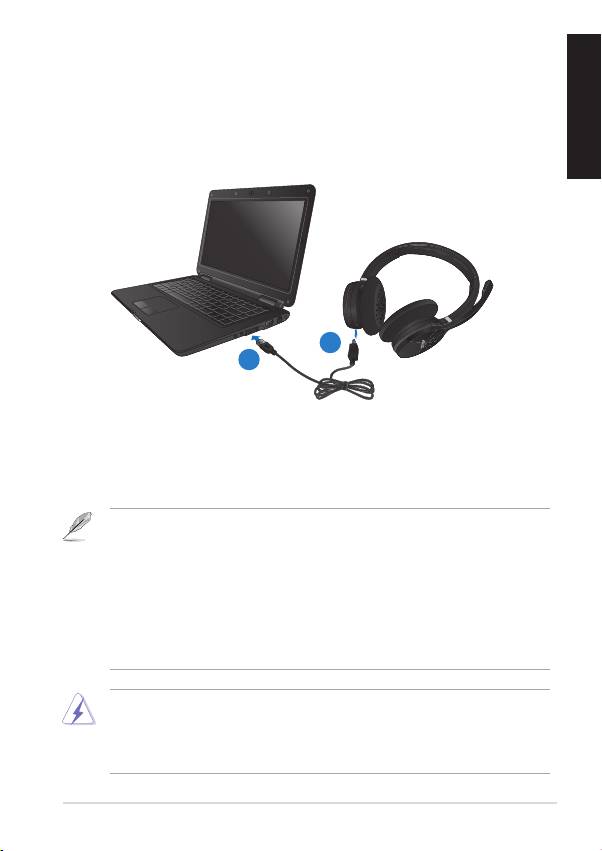
To charge the battery:
1. Connect the mini-USB cable in the wireless headset’s mini-USB port.
2. Connect the other end of the mini-USB cable into your computer’s USB
port.
NOTES:
• Charge the battery for six hours before using your wireless
headset for the rst time.
• If the battery is completely used up, charge it for approximately
three hours.
• The battery power will slowly be depleted even if you do not use
the wireless headset.
WARNING: DO NOT attempt to repair the wireless headset or
replace the rechargeable battery. The rechargeable battery should
be replaced only by an authorized service personnel. Please contact
the ASUS Service Center for service information.
ASUS HS-W1 USB Wireless Headset
3
