
Asus GigaX1105N: Hardware Front panel Table 1 LED indicators Rear panel
Hardware Front panel Table 1 LED indicators Rear panel: Asus GigaX1105N
Table of contents
- Introduction Features Package contents
- Technical specifications
- Hardware Front panel Table 1 LED indicators Rear panel
- Figure 5. Wall-mount installation
- Connecting network devices
- Troubleshooting
- Glossary
Hardware
Front panel
English
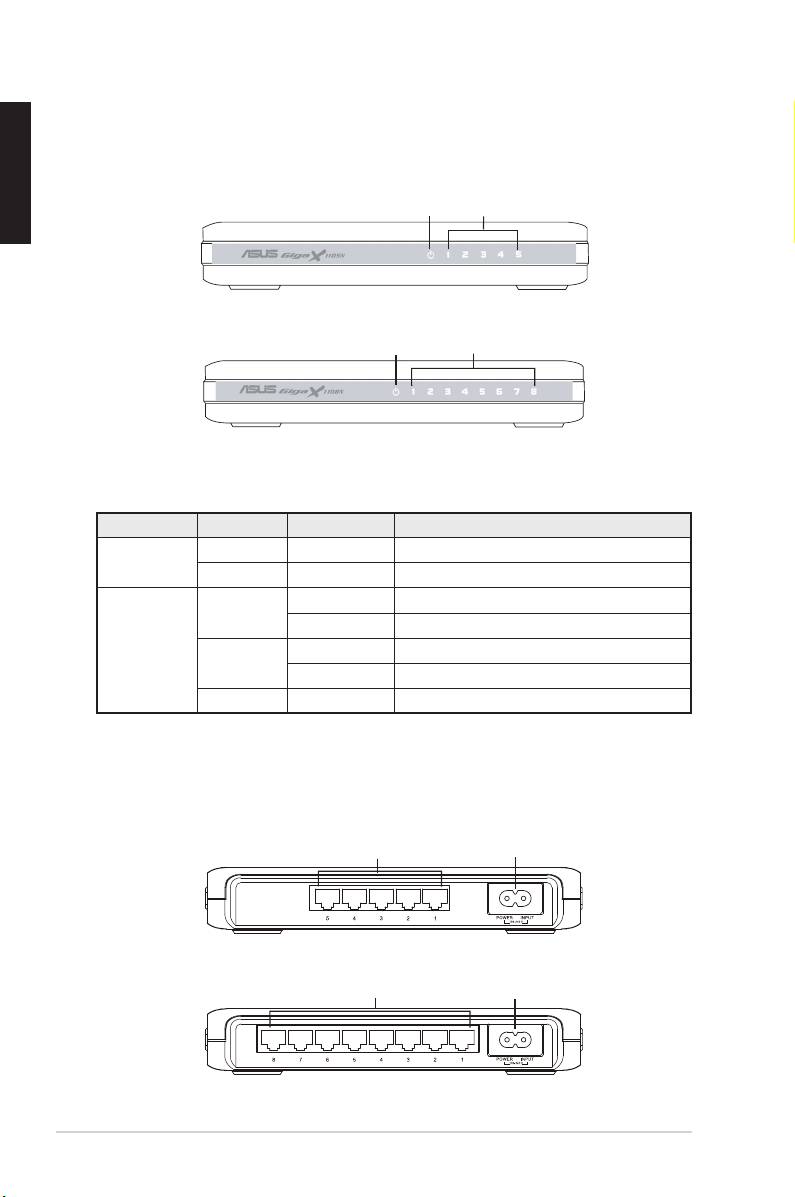
The front panels of GigaX1105N and GigaX1108N include LED indicators that
shows the working condition of the switch.
Power LAN
Figure 1. GigaX1105N front panel
Power LAN
Figure 2. GigaX1108N front panel
Table 1 LED indicators
LED Color Status Description
Power Green ON The switch is powered ON
OFF The switch is powered OFF
LAN Green ON Link established at 1000Mbps
Flashing Transmitting data at 1000Mbps
Amber ON Link established at 100Mbps
Flashing Transmitting data at 100Mbps
OFF No device connected
Rear panel
The rear panel of GigaX1105N and GigaX1108N contains five or eight RJ-45
Ethernet ports and a power connector.
Ethernet ports
Power connector
Figure 3. GigaX1105N rear panel
Ethernet ports
Power connector
Figure 4. GigaX1108N rear panel
4 Quick Start Guide
