
Asus GX1105B: instruction
Class: Networks, communications, telecommunications, internet, security
Type:
Manual for Asus GX1105B
Table of contents

Index
1. English ...........................................................................1
2. Français .........................................................................
9
3. Deutsch ........................................................................17
4. Italiano ..........................................................................25
5. Español ........................................................................33
6. Türkçe ..........................................................................41
7. Русский .......................................................................49
8. 繁體中文 .......................................................................57
9. 日本語 ..........................................................................65
10.한국어 ..........................................................................73
11. Česky ...........................................................................81
12.Magyar .........................................................................89
13. Bahasa Indonesia ........................................................
97
14.BahasaMalaysia ........................................................
105
15.ไทย .............................................................................113
16. Polski ..........................................................................121
17. Português ...................................................................129
18. Română ......................................................................137

GX1108B
GX1105B
10/100/1000Mbps Gigabit Ethernet Switch
Quick Installation Guide
Copyright © 2008 ASUSTeK COMPUTER INC. All Rights Reserved.

English
Introduction
ThankyouforpurchasingtheASUSGX1105BorGX1108BgigabitSwitch!
TheGX1105BandGX1108Barepowerful,high-performanceGigabit
Ethernetswitch,capableof10Mbps,100Mbpsor1000Mbps,featuresauto-
negotiation,autoMDI/MDI-Xfunction,plug-and-play,store-and-forward
switchingmode,anddedicated10/100/1000Mbpsconnection.
Features
• 5x10/100/1000MbpsRJ-45ports(GX1105B)
• 8x10/100/1000MbpsRJ-45ports(GX1108B)
• SupportsAuto-Negotiationfor10/100/1000Mbps
• SupportsAuto-MDIXforeachport
• SupportFull/Halfduplextransfermodefor10and100Mbps
• SupportFullduplextransfermodefor1000Mbps
• Fullwirespeedreceptionandtransmission
• Supportsjumboframeupto9.6KB
• 4KentryMACaddresstablewithauto-learningandagingfunction
• Fan-lessdesignforquietoperationenvironment
• IEEE802.3xowcontrolforfull-duplex
• Backpressureowcontrolforhalf-duplex
• Desktoporwallmountplacementoptions
• SupportVIPport:Highperformancepriorityportforgamingandfast
dataconnections.(Port1)
• SmartPowerSaving:Idleportsautomaticallypowerdownwhennotin
usetoconservepower.
2

Package contents
BeforeinstallingtheGX1105B/GX1108Bswitch,checkyourpackagefor
English
thefollowingitems.
• ASUSGX1105BorGX1108BSwitchx1
• DCAdaptorx1
• Userguidex1
• Mountingscrewsx2;screwsize:M3*19mm(B)W-NI2#
NOTE
.Contact your retailer ifany of theitems is damaged or
missing.
3

English
Technical specications
Data Transfer Rates
10Mbps,100Mbpsand1000Mbps
LAN Port
5/8*10/100/1000MbpsRJ-45ports
Protocol
•IEEE802.310Base-T
•IEEE802.3u100Base-TX
•IEEE802.3ab1000Base-T
•IEEE802.3xFullDuplexFlowControl
•JumboFrameSupport(9.6KB)
Performance
•Bandwidth:10Gbpsfor5-port,16Gbpsfor
8-port
•ForwardRate(10Mbpsport):14,800packets/
sec
•ForwardRate(100Mbpsport):148,000
packets/sec
•ForwardRate(1000Mbpsport):1,488,000
packets/sec
PacketBufferMemory:112KBfor5port,144KB
for8port
MACAddressTable:4K
Switching Method
StoreandForward
Form Factor
Desktopplacement,Wallmounting
Environmental Speci-
•OperatingTemperature:0°C~40°Cambient
cations
•Humidity:5%~95%(non-condensing)
•StorageTemperature:0°C~70°C
Status LEDs
PowerLED,LinkandActivityindicatorsforeach
port
Dimension
165.6mm x 117.3mm x 32.5mm
Power Adaptor
12W,DCexternal:12V1A
Safety & EMI
CE,FCC,C-Tick,UL,MIC
4
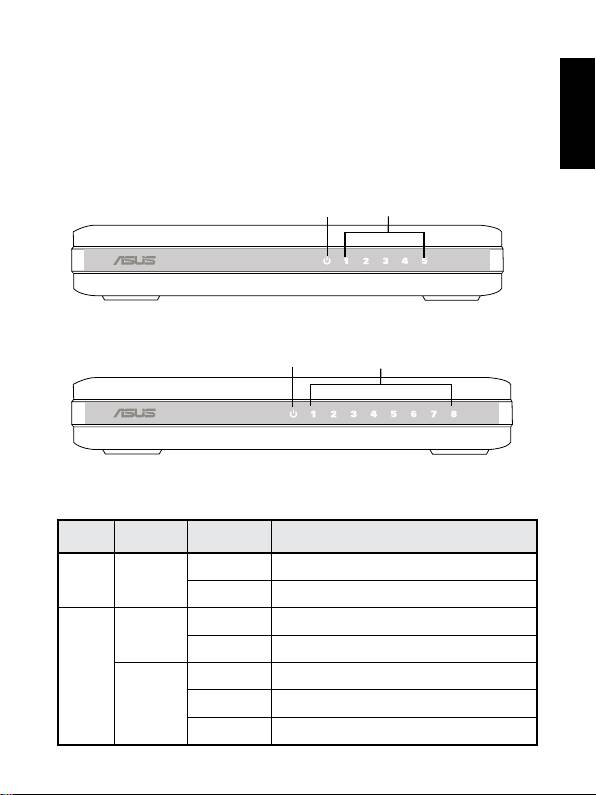
Hardware
Front panel
English
ThefrontpanelsofGX1105BandGX1108BincludeLEDindicatorsthat
showstheworkingconditionoftheswitch.
Table 1 LED indicators
LED Color Status Description
Power Green ON TheswitchispoweredON
OFF TheswitchispoweredOFF
LAN Green ON Linkestablishedat1000Mbps
Blinking Transmittingdataat1000Mbps
Amber ON Linkestablishedat10/100Mbps
Blinking Transmittingdataat10/100Mbps
OFF Nodeviceconnected
5
Power
LAN
GX
11
05 b
Figure 1. GX1105B front panel
Power
LAN
GX
11
08 b
Figure 2. GX1108B front panel
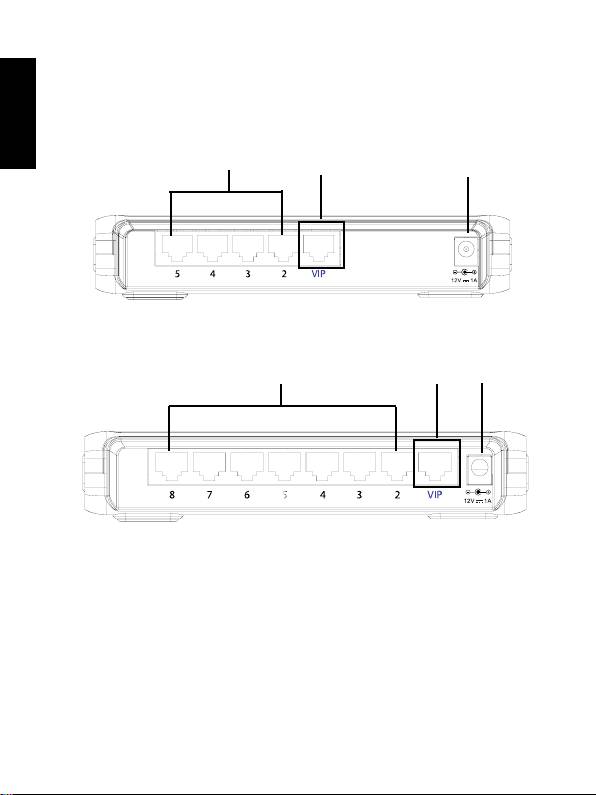
Rear panel
English
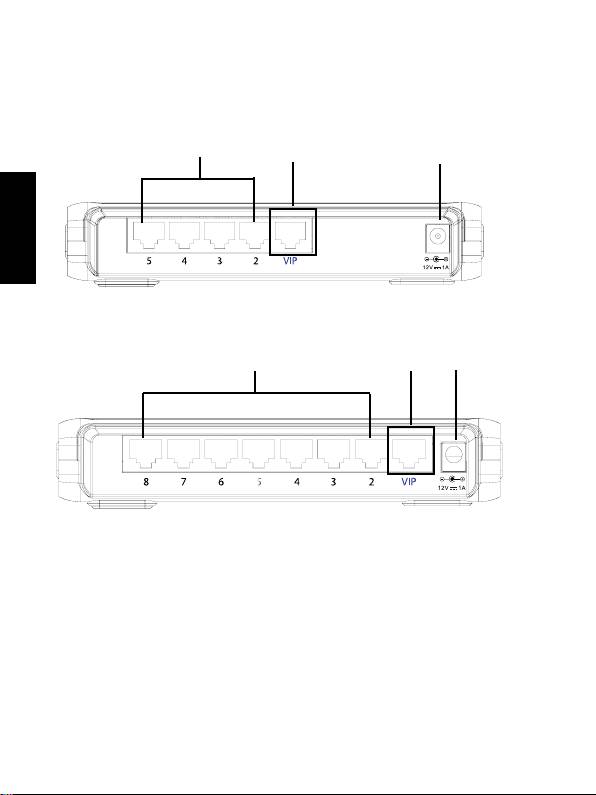
Therear panel ofGX1105BandGX1108Bcontains fiveor eight RJ-45
Ethernetportsandapowerconnector.
Ethernet ports
VIP port
Power
Figure 3. GX1105B rear panel
Ethernet ports
VIP port
Power
Figure 4. GX1108B rear panel
Placement options
Desktop placement
PlacetheGX1105B/GX1108Bswitchonaatandstablesurface.Make
surethatthelocationmeetstheoperatingenvironmentspecication.See
“Technicalspecications“fordetails.
6
English
7
BottomSide
117.0mm
1
Securetwoscrewsonthewall
Latchtheswitch
2
ontothescrews.
5.3mm
2.95mm
18.75mm
2mm
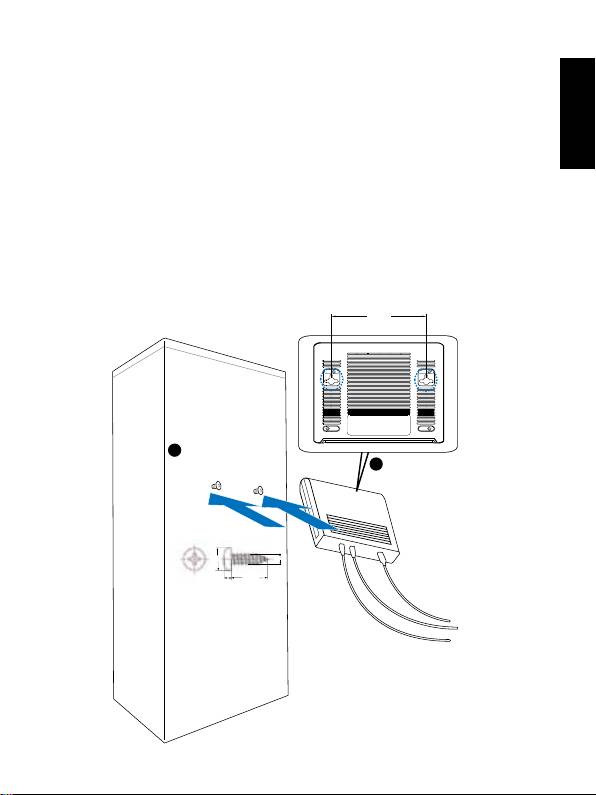
Wall mounting
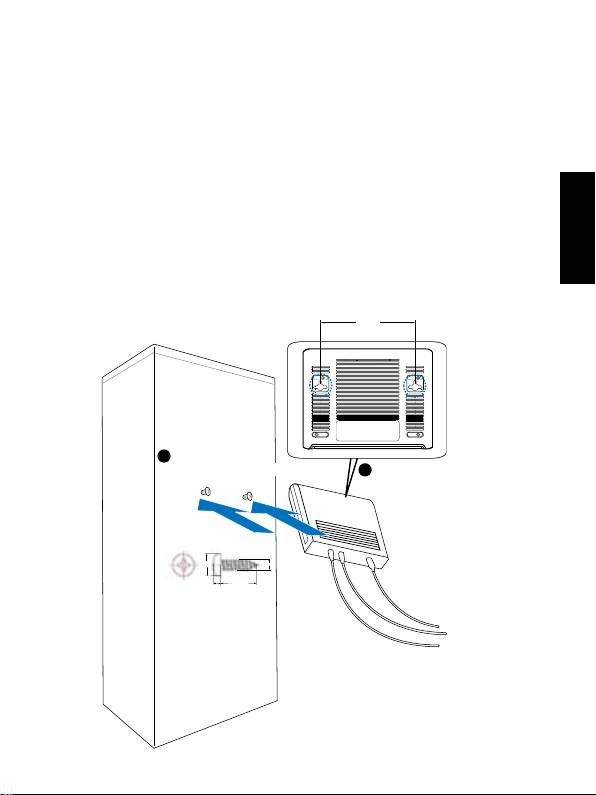
YoucanmounttheGX1105B/GX1108Bswitchonawallwiththesupplied
mountingscrews.
Ethernet ports
VIP port
Power
Tomounttheswitchonawall:
1. Measurethedistancebetweenthetwohooksonthebottomoftheswitch.
2. Markthescrewpositiononthewallwiththesamedistanceinbetween.
3. Securethesuppliedscrewsonthewalluntilonly1/4isshowing.
4. LatchthehooksoftheGX1105B/GX1108Bontothescrews.
Ethernet ports
Power
VIP port

English
Power connecting
Plugthecircleendofthepoweradapterrmlyintothepowerportonthe
GX1105BorGX1108Bswitchrearpanel,andtheotherendintoanelectric
serviceoutlet,thenthesystemisready.
Connecting network devices
TheGX1105BorGX1108Bswitchfeaturesauto-MDI/MDIXcrossover
detectionfunctionandprovidesplug-and-playcapability.Youcan
immediatelyuseanyofthefeaturesofthisproductsimplybypluggingthe
networkcables(RJ-45)intothecomputersandtheswitch.
8

GX1108B
GX1105B
Switch Gigabit Ethernet 10/100/1000Mbps
Guide d'installation rapide
Copyright © 2008 ASUSTeK COMPUTER INC. Tous droits réservés.

Introduction
Mercipourvotreachatd'unswitchASUSGX1105B/GX1108B!LeGX1105B
etleGX1108BsontdesswitchsGigabitEthernetpuissantsethautement
performants,capablesd’atteindredesvitessesde10Mbps,100Mbpsou
1000Mbps.Ilsintègrentaussiunefonctiond’auto-négociation,d’autoMDI/
Français
MDI-X,plug-and-play,unmodedecommutationstore-and-forward,etune
connexion10/100/1000Mbpsdédiée.
Caractéristiques
• 5xportsRJ-4510/100/1000Mbps(GX1105B)
• 8xportsRJ-4510/100/1000Mbps(GX1108B)
• Supportel’auto-négociationenmode10/100/1000Mbps
• SupportMDIXautomatiquesurchaqueport
• SupportelesmodesdetransfertFull/Halfduplexsurtouslesportsen
mode10et100Mbps
• SupportelemodedetransfertFullduplexsurtouslesportsenmode
1000Mbps
• Transmissionetréception“FullWireSpeed”
• InfrastructureJumboFramejusqu’à9.6KB
• Tableaud'adressageMAC4Kavecfonctionsauto-learningetaging
• Conceptionsansventilateurpourunenvironnementsilencieux
• ContrôledeuxIEEE802.3xenmodefull-duplex
• Contrôledeux“BackPressure”enmodehalf-duplex
• Optiondeplacementsurbureauouenxationmurale
• SupportdeportVIP:Portdeprioritéhautementperformantpourlejeu
etlesconnexionsdedonnéesrapides(port1)
• Fonctiond’économied’énergieintelligente:Lesportsinactifsetnon
utiliséssontautomatiquementdésactivéspouréconomiserdel’énergie.
10

Contenu de la boîte
Avantd’installerleswitchGX1105B/GX1108B,vériezquelaboîte
contientbienlesélémentssuivants:
• SwitchASUSGX1105BouGX1108Bx1
• Adaptateurd’alimentationx1
• Guided’utilisationx1
• Visdemontagex2(Typedevis:M3*19mm(B)W-NI2#)
Français
NOTE
. Si l’undeséléments ci-dessus étaitmanquantou end-
ommagé,contactezvotrerevendeur.
11

Spécications techniques
Taux de transfert
10Mbps,100Mbpset1000Mbps
Port LAN
5/8*ports10/100/1000MbpsRJ-45
Protocole
•IEEE802.310Base-T
Français
•IEEE802.3u100Base-TX
•IEEE802.3ab1000Base-T
• IEEE 802.3x contrôledeuxFullDuplex
• SupportJumboFrame(9.6KB)
Performances
• Bande passante:10Gbpspourle5-ports,16
Gbpspourle8-ports
• Tauxdetransfert(port10Mbps):14,800
paquets/sec
• Tauxdetransfert(port100Mbps):148,000
paquets/sec
• Tauxdetransfert(port1000Mbps):1,488,000
paquets/sec
Mémoiretampondespaquets:112Kopourle5
ports,144Kopourle8-ports
Tableaud'adressageMAC:4K
Méthode de
StoreandForward
commutation
Format
Placementsurbureau,xationmurale
Spécications
• Températuredefonctionnement:0°C~40°C
environnementales
•Humidité:5%~95%(sans condensation)
• Températuredestockage:0°C~70°C
LED de statut
Indicateursd’alimentation,delien,et d’activite
pourchaqueport
Dimensions
165.6mm x 117.3mm x 32.5mm
Adaptateur
12W,courant continu externe:12V1A
d’alimentation
Sécurité & EMI
CE,FCC,C-Tick,UL,MIC
12
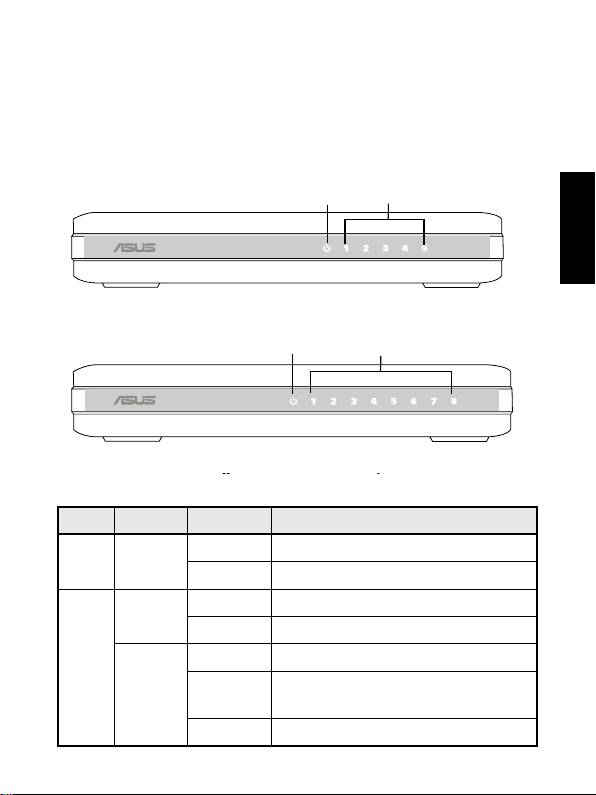
Matériel
Panneau avant
LepanneauavantduGX1105B/GX1108BintègredesindicateursLED
afchantlestatutdefonctionnementduswitch.
Français
Tableau 1 Indicateurs LED
LED Couleur Statut Description
Alim. Vert Allumé L'unitéestallumée
Eteint L'unitéestéteinte
LAN Vert Allumé Lienà1000Mbps
Clignotant Transmissiondedonnéesà1000Mbps
Ambré Allumé Lienà10/100Mbps
Clignotant Transmissiondedonnéesà
10/100Mbps
Eteint Pasdepériphériqueconnecté
13
Power
LAN
GX
11
05 b
Figure 1. GX1105B front panel
Power
LAN
GX
11
08 b
Figure 2. GX1108B front panel
Figure 1. Panneau avant du GX1105B
Figure 2. Panneau avant du GX1108B
Panneau arrière
Le panneau arrière duGX1105B/GX1108Bintègre cinqàhuit (selon le
modèle)portsEthernetRJ-45etunconnecteurd'alimentation.
Ports Ethernet
Port VIP
Alimentation
Français
Figure 3. Panneau arrière du GX1105B
Ports Ethernet Alimentation
Port VIP
Figure 4. Panneau arrière du GX1108B
Options de placement
Sur bureau
PlacezleGX1105B/GX1108Bsurunesurfaceplaneetstable.Assurez-
vousquel’emplacementcorrespondauxspécicationsrelativesà
l’environnementd’opération.Voirlasection“Spécicationstechniques“pour
plusdedétails.
14
Fixation murale
VouspouvezaussiplacerleGX1105B/GX1108Bsurunmuràl’aidedes
visfournies.
Pourxerleswitchsurunmur:
1. Mesurezladistanceentrelesdeuxouverturessituéessousleswitch.
2. Marquezlapositiondesvissurlemuraveclamêmedistance.
3. Fixezlesvisfourniessurlemurau3/4.
Français
4. PositionnezlesouverturesduGX1105B/GX1108Bsurlesvis.
15
BottomSide
117.0mm
1
Securetwoscrewsonthewall
Latchtheswitch
2
ontothescrews.
5.3mm
2.95mm
18.75mm
2mm
Ouvertures du switch
Positionnez les
Fixez les deux vis sur le mur
ouvertures sur les vis

Connexion de l’alimentation
Connectezuneextrémitéducordond’alimentationaujackd’alimentation
duswitchGX1105B/GX1108B,puisbranchezl’autreextrémitéàuneprise
électriquemurale.
Français
Connecter des périphériques
réseau
LeswitchGX1105B/GX1108Bintègreunefonctiond’auto-MDI/MDIXet
descapacitésplug-and-play.Vouspouvezimmédiatementutiliserunedes
fonctionsdeceproduitenconnectantvotreordinateuràvotreswitchviaun
ouplusieurscâblesréseau(RJ-45).
16

GX1108B
GX1105B
10/100/1000Mbps Gigabit-Ethernet-Switch
Schnellinstallationsanleitung
Copyright © 2008 ASUSTeK COMPUTER INC. Alle Rechte vorbehalten.

Einleitung
VielenDankdafür,dassSiedenASUSGX1105BoderGX1108BGigabit-
Switchgekaufthaben!DerGX1105BundGX1108Bsindleistungsstarke,
Hochleistungs-Gigabit-Ethernet-Switchs,fähigzu10Mbps,100Mbps
oder1000Mbps,AutomatischerVerhandlung,automatischerMDI/MDI-
X-Funktion,Plug&Play,speichern-undweiterleiten-Switch-Modusund
eigenständiger10/100/1000Mbps-Verbindung.
Funktionen
Deutsch
• 5x10/100/1000MbpsRJ-45-Ports(GX1105B)
• 8x10/100/1000MbpsRJ-45-Ports(GX1108B)
• UnterstütztautomatischeVerhandlungfür10/100/1000Mbps
• UnterstütztAuto-MDIXfürjedenPort
• UnterstütztVoll-/Halb-Duplex-Transfermodusfür10und100Mbps
• UnterstütztVollduplextransfermodusfür1000Mbps
• VolleKabelgeschwindigkeitfürsendenundempfangen
• UnterstütztJumbo-Framebitzu9.6kb
• 4kMAC-AdresseneintragstabellemitautomatischerLern-und
Alterungsfunktion
• LüfterlosesDesignfüreineleiseBetriebsumgebung
• IEEE802.3x-FlußkontrollefürVollduplex
• Rückstau-FlußkontrollefürHalbduplex
• Schreibtisch-oderWandmontageoptionen
• VIP-Anschluss-Unterstützung:HochleistungsanschlüssezumSpielen
undfürschnellereDatenübertragung.(Anschluss1)
• GeschicktesEnergiesparen:FreieAnschlüsseschaltensich,wennsie
nichtbenutztwerden,automatischab,umStromzusparen.
18

Verpackungsinhalt
BevorSiedenGX1105B/GX1108B-Switchinstallieren,überprüfenSiebitte
dieVerpackungaufdiefolgendenTeile.
• 1xASUSGX1105BoderGX1108BSwitchx1
• 1xNetzteil
• 1xBenutzeranleitung
• 2xBefestigungsschrauben;Schraubengröße:M3*19mm(B)W-NI2#
HINWEIS
.SetzenSiesichmitIhremHändlerinVerbindung,falls
einesderTeilefehltoderbeschädigtist.
Deutsch
19
