
Asus xonar u7: 4.2.2 Connecting 5.1 channel headphones
4.2.2 Connecting 5.1 channel headphones: Asus xonar u7
Table of contents
- 1. Introduction 1.1 Package contents 1.2 System requirements
- 2. Hardware
- No Item Description
- 3. Driver Installation
- 4. Connecting Speakers and Peripherals 4.1 Input connection 4.1.1 Connecting to a USB 2.0 port on your computer No Item Description
- 4.1.2 Connecting digital audio systems
- 4.1.3 Connecting microphone / Line-In No Item Description
- 4.2 Output connection 4.2.1 Connecting Stereo Headphones
- 4.2.2 Connecting 5.1 channel headphones
- 4.2.3 Connecting analog speaker systems
-
- Connecting 5.1 channel speakers
- Connecting 7.1 channel speakers
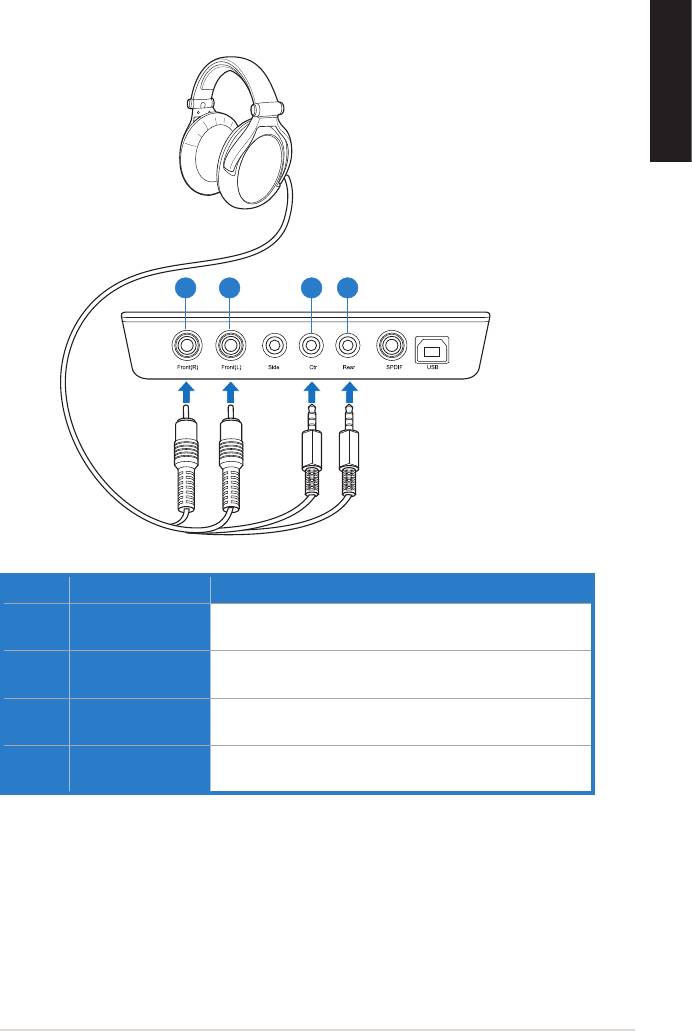
4.2.2 Connecting 5.1 channel headphones
English
21 3 4
No Item Description
1 Front (R) Out port Connects to the front right input port of 5.1 channel
headphones using the RCA cable.
2 Front (L) Out port Connects to the front left input port of 5.1 channel
headphones using the RCA cable.
3 Center/Subwoofer
Connect the Center/Bass-channel 3.5mm plug of your
Out port
5.1 channel headphone into this jack.
4 Rear Surround
Connects to the rear surround input port of your 5.1
Out port
channel headphone.
ASUS Xonar U7 Quick Start Guide
11
Top 10 manuals
100.00
NZXT HALE90 1000W99.99
Samsung SM-R38099.97
AEG BSB 18C99.97
Dell 2700W99.97
Smeg KSEC70X99.96
Beurer HDE 4099.96
Pyramida KH 50 v.299.96
MSI CSM-H81M-P3299.96
AEG HR 562799.95
Melissa 640-048


