
Asus Xonar D1: 1.5.3 Connecting digital speakers SPDIF Out 1.5.4 Connecting Line-In audio sources
1.5.3 Connecting digital speakers SPDIF Out 1.5.4 Connecting Line-In audio sources: Asus Xonar D1
Table of contents
- 1.1 System requirements 1.2 Package contents
- 1.3 Card installation
- 1.4 Driver installation 1.4.1 Installing the audio card driver
- 1.5 Connecting audio device 1.5.1 Back ports 1.5.2 Connecting analog speakers 2 Speakers
- 2.1 Speakers 4 Speakers
- 4.1 Speakers 5.1 Speakers
- 6.1 Speakers 7.1 Speakers
- 1.5.3 Connecting digital speakers SPDIF Out 1.5.4 Connecting Line-In audio sources
- 1.5.5 Connecting headphone / microphone
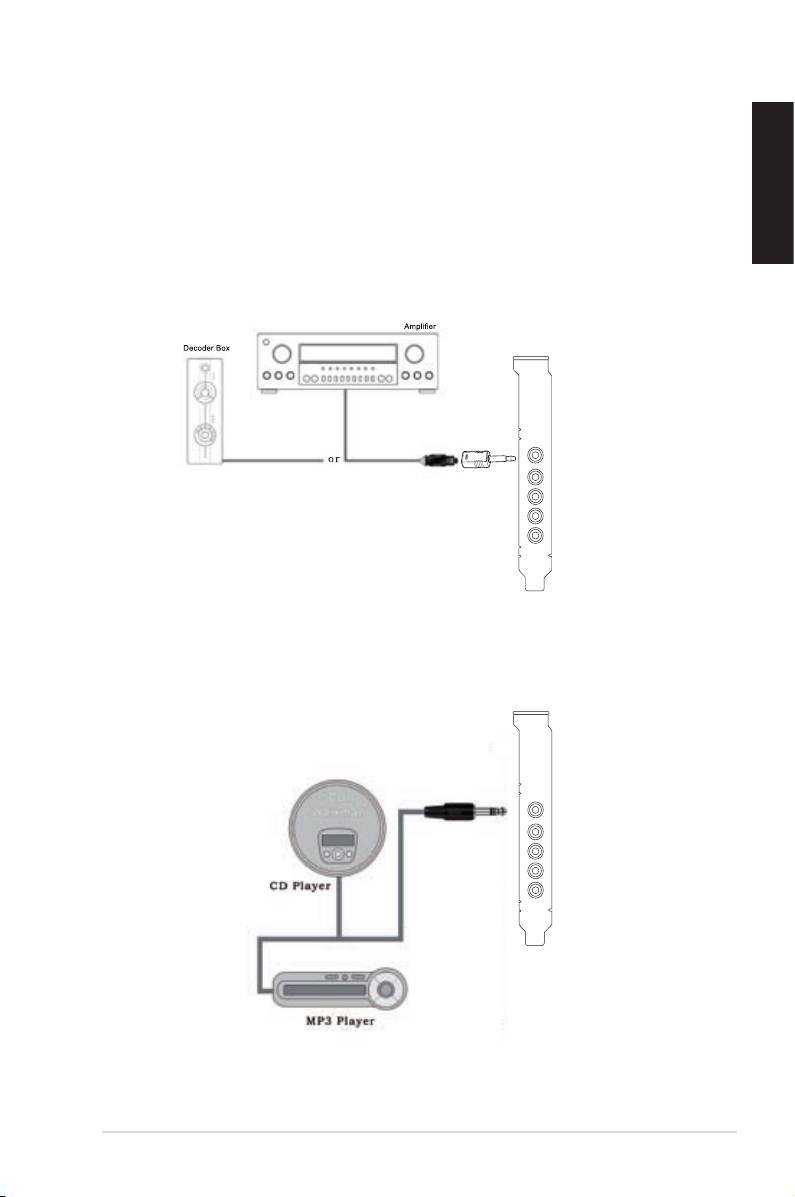
1.5.3 Connecting digital speakers
SPDIF Out
Plug the optical TOSLINK adapter into the S/PDIF-Out port. Then, connect your
decoder’sS/PDIFInporttotheopticaladapterwiththeTOSLINKopticalcable.
English
SPDIF Out
1.5.4 Connecting Line-In audio sources
Line In
ASUS Xonar D1 Quick start guide
9
Top 10 manuals
100.00
NZXT HALE90 1000W99.99
Samsung SM-R38099.97
AEG BSB 18C99.97
Dell 2700W99.97
Smeg KSEC70X99.96
Beurer HDE 4099.96
Pyramida KH 50 v.299.96
MSI CSM-H81M-P3299.96
AEG HR 562799.95
Melissa 640-048