
Asus WL-160N: Quick Start Guide Windows XP Wireless Options
Quick Start Guide Windows XP Wireless Options: Asus WL-160N
Table of contents
- Installation Procedures Installing the WLAN utilities and driver Reading the WLAN status indicators
- Quick Start Guide Windows XP Wireless Options
- Quick Start Guide
- Quick Start Guide FCC Warning Statement
2
ASUS WLAN Adapter
English
Quick Start Guide
Windows
®
XP Wireless Options
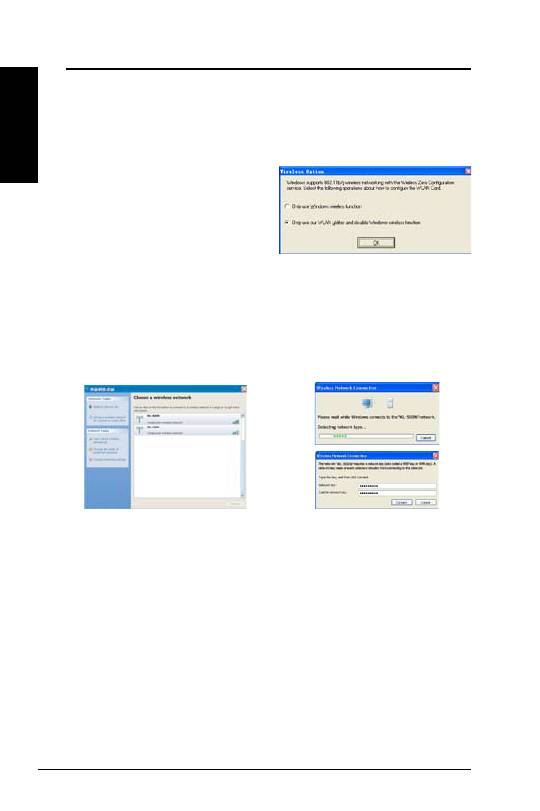
The wireless options window shown below is only available for Windows
®
XP.
It appears when you run the Control Center utility at the first time. Select the
utility you want to use for configuring your WLAN Adapter.
Only use Windows wireless function
–
Only use Windows
®
XP Wireless
Zero Configuration service to configure
the WLAN Adapter.
Only use our WLAN utilities and
disable XP wireless function
–
Only use ASUS WLAN utilities to configure the WLAN Adapter.
(recommended)
Configuring with Windows
®
Wireless Zero Configuration service
If you want to configure your WLAN Adapter via Windows
®
Wireless Zero
Configuration (WZC) service, follow the instruction below to make the settings.
2. A window prompts out asking
you for the key if you have set up
encryption on your wireless router,
input the keys and click
Connect
.
The connection is complete.
1. Double-click the wireless network
icon on the task bar to view available
networks.Select the AP and click
Connect
.
