
Asus Vintage-AE1: Installing a CPU Installing system memory
Installing a CPU Installing system memory: Asus Vintage-AE1
Table of contents
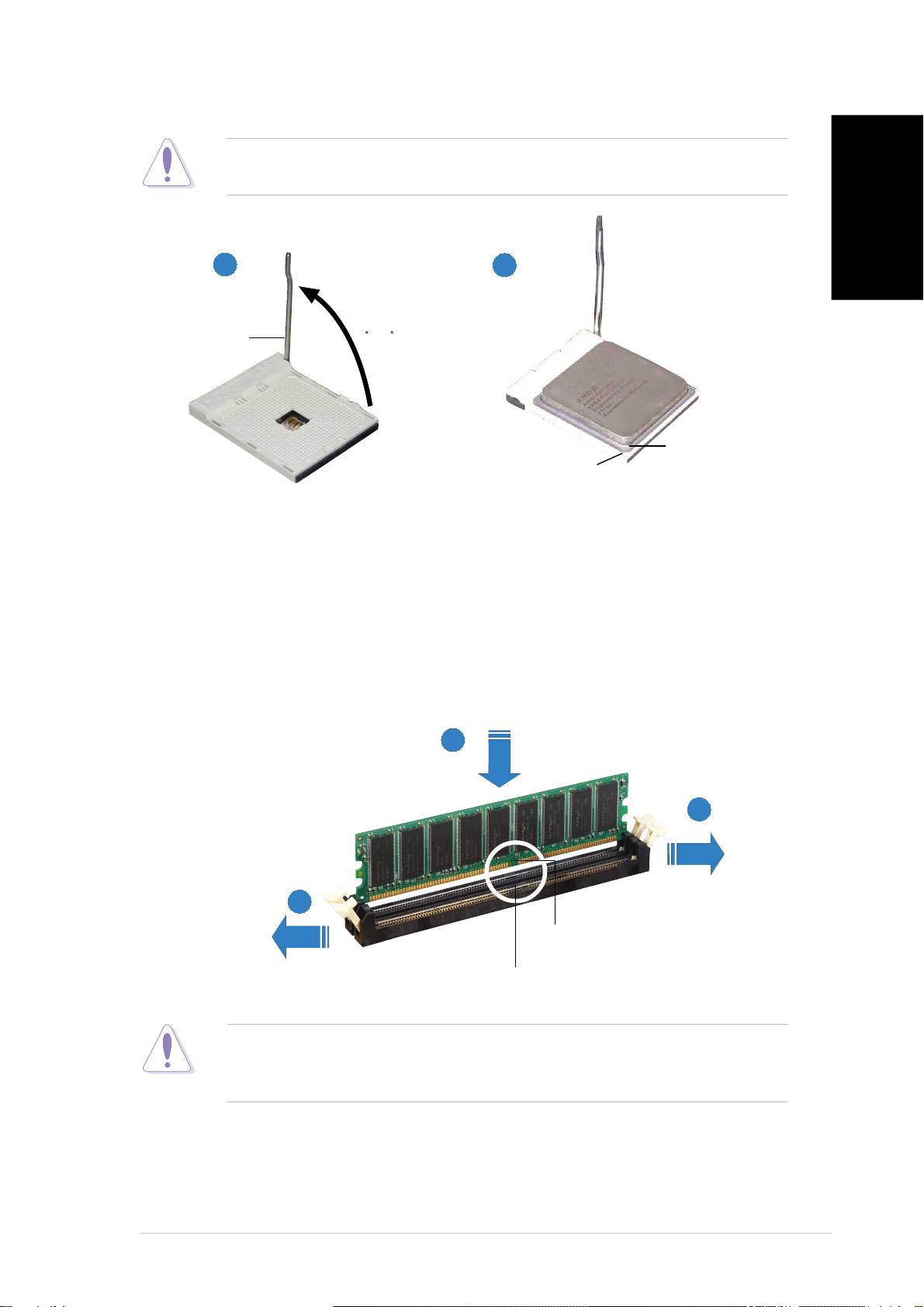
Installing a CPU
CAUTION.CAUTION.
CAUTION.CAUTION.
CAUTION. Incorrect installation of the CPU into the socket may bend
the pins and severely damage the CPU!
English
11
11
1
22
22
2
Socket LeverSocket Lever
Socket LeverSocket Lever
Socket Lever
90 -100
Gold triangleGold triangle
Gold triangleGold triangle
Gold triangle
Small triangleSmall triangle
Small triangleSmall triangle
Small triangle
Lift up the socket lever to a
Position the CPU above the socket
90°-100° angle.
such that the CPU corner with the
gold triangle matches the socket
corner with a small triangle.
Installing system memory
22
22
2
11
11
1
11
11
1
DIMM notchDIMM notch
DIMM notchDIMM notch
DIMM notch
Socket breakSocket break
Socket breakSocket break
Socket break
CAUTION.CAUTION.
CAUTION.CAUTION.
CAUTION. A DDR DIMM is keyed with a notch so that it fits in only one
direction. DO NOT force a DIMM into a socket to avoid damaging the
DIMM.
vv
vv
v
