
Asus V4-M3N8200: Front panel features Rear panel features
Front panel features Rear panel features: Asus V4-M3N8200
Table of contents
- Front panel features Rear panel features
- Internal components
- Selecting the voltage Removing the side cover and front panel assembly
- Installing a CPU
- Installing an AMD CPU Installing the CPU fan and heatsink assembly
- Installing an AMD CPU heatsink and fan
- Installing a DIMM Installing an expansion card
- Installing storage drives
- Reinstalling the front panel assembly and side cover
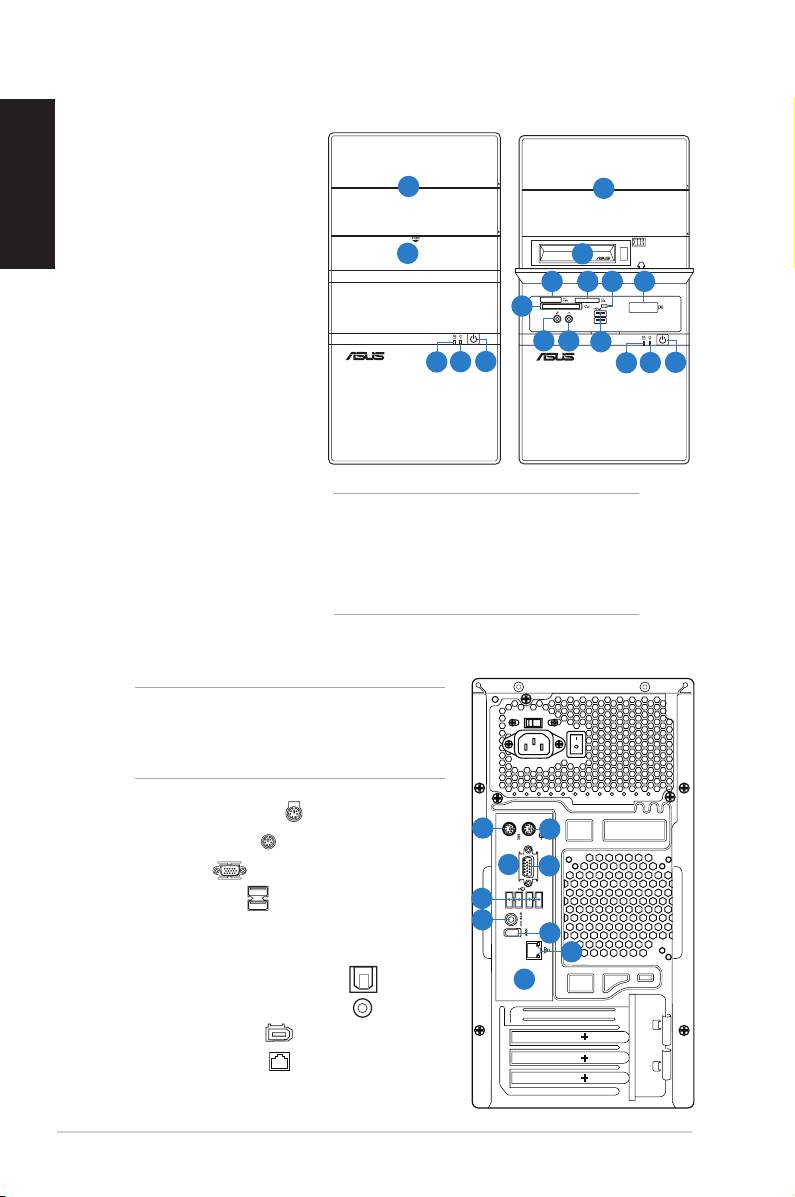
Front panel features
English
1. 5.25-inch drive bay cover
2. 3.5-inch drive bay cover
1
1
3. Portable hard disk drive*Portable hard disk drive*
®
4. MemoryStick
/,Memory
Stick Pro™ card slot™ card slot card slot
2
3
5. Secure Digital™/
4
5
6
7
Multimedia Card slot
8
6. Card reader LED
9
10
11
7. Infrared window*
12
13
14
12
13
14
®
8. CompactFlash
/
Microdrive™ card slot
9. Microphone port
10. Headphone portHeadphone port
11. USB 2.0 ports**
NOTE:
12. HDD LED
* The portable hard disk drive and the
13. Power LED
Infrared function are optional.
14. Power button
** Some models may have two additional USBSome models may have two additional USB
2.0 ports and/or one IEEE 1394a port.
Rear panel features
NOTE: The rear panel ports and their locations
may vary, depending on the model of your
system. For detailed descriptions, refer to the
system User Guide.
1. PS/2 keyboard port ( )
1
2
2. PS/2 mouse port ( )
8
3
3. VGA port ( )
4
4. USB 2.0 ports ( )
(some models may
5
have four rear USB 2.0 ports)
6
5. One of the following ports:
7
• Optical S/PDIF Out port ( )
9
• Coaxial S/PDIF Out port ( )
6. IEEE 1394a port ( )
(some models only)
7. LAN (RJ-45) port ( )
2
Installation manual
