
Asus PC (Desktop Barebone) P2-P5945G: Front panel features Front panel features Rear panel features
Front panel features Front panel features Rear panel features: Asus PC (Desktop Barebone) P2-P5945G
Table of contents
- Front panel features Front panel features Rear panel features
- Internal components Removing the cover
- Removing the front panel cover Removing the storage drive assembly Removing the CPU fan and heatsink
- Installing the CPU Installing a DIMM
- Installing an expansion card Installing optical and storage drives
- Reinstalling the storage drive assembly
- Reinstalling the front panel cover Reinstalling the cover
English
2 Installation manual
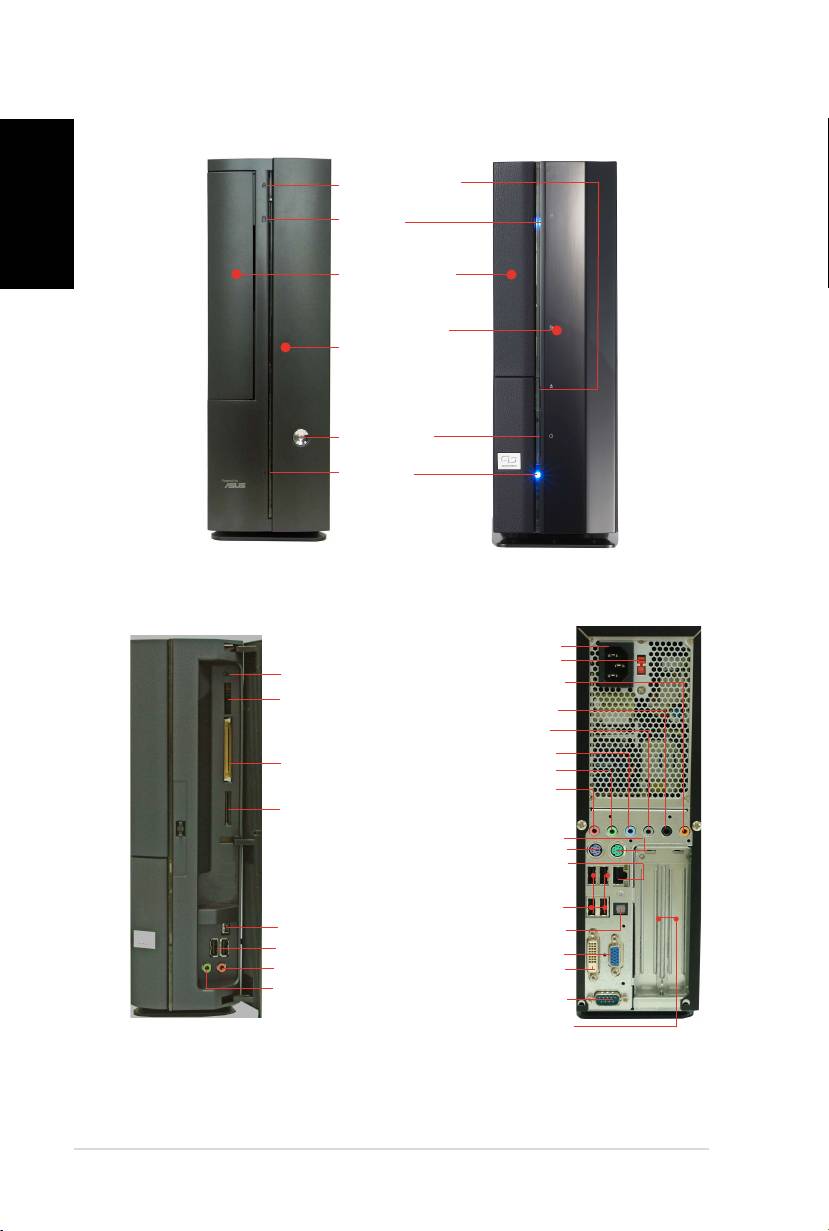
Front panel features
Close
Optical drive eject
button
HDD LED
Optical drive bay
cover
Press to open the
front panel cover
Power button
Power LED
Front panel features
Rear panel features
Open
Power connector
Voltage selector*
Reset button
Center/Sub out
MS/MS Pro card slot
Rear Surround L/R
Side Surround L/R
Line In
®
CompactFlash
card
Line Out
slot
Rear MIC
SD/MMC card slot
PS/2 mouse port
PS/2 keyboard port
LAN (RJ-45) port
USB 2.0 ports
4-pin IEEE 1394 port
SPDIF Out port
USB 2.0 ports
VGA port
Headphone port
DVI-D port
Microphone port
Serial port
PCI slot metal brackets
* The system’s power supply unit has a
115 V/230 V voltage selector switch located near the power connector. Use this switch
to select the correct system input voltage according to the voltage supply in your area.
