
Asus P5ND2 SE: 1. Diagramma disposizione scheda madre
1. Diagramma disposizione scheda madre: Asus P5ND2 SE
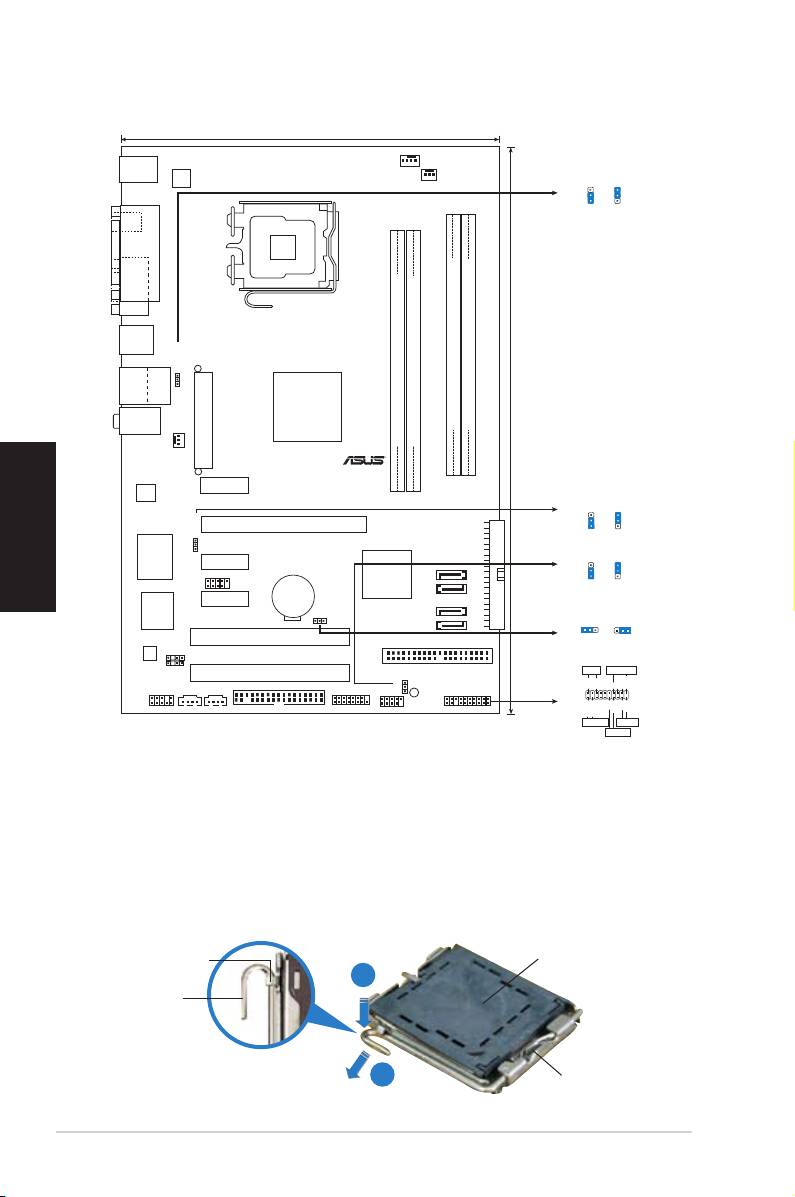
1. Diagramma disposizione scheda madre
Italiano
2. Installazione della CPU
®
Attenersi alle seguenti fasi per installare un processore Intel
nel pacchetto
775.
1. Premere la levetta di carico con il pollice (A), poi spostarla e sinistra (B)
nché è liberata dalla linguetta di trattenimento.
Linguetta di
Copertura PnP
trattenimento
A
Levetta di
carico
B
B
Questo lato del modulo deve
essere rivolto verso sé stessi.
8
ASUS P5ND2 SE
19.6cm (8.0in)
CPU_FAN
PS/2KBMS
ATX12V
PWR_FAN
T: Mouse
B: Keyboard
USBPW1234
3
2
2
1
+5V
+5VSB
(Default)
SPDIF_O1
LGA775
PARALLEL PORT
COM1
USB12
USBPW1234
Bottom:
Top:
USB3
RJ-45
USB4
nVIDIA
Top:Line In
Crush19
Center:Line Out
Ultra
Below:Mic In
CHA_FAN
DDR2 DIMM_B1 (128 bit,240-pin module)
DDR2 DIMM_B2 (128 bit,240-pin module)
EATXPWR
DDR2 DIMM_A1 (128 bit,240-pin module)
DDR2 DIMM_A2 (128 bit,240-pin module)
R
30.5cm (12.0in)
PCIEX1_1
RTL8111B
P5ND2 SE
USBPW78
3
2
2
PCIEX16
1
USBPW78
+5V
+5VSB
(Default)
SEC_IDE
USBPW56
PCIEX1_2
3
2
2
Super I/O
USB78
MCP51
SATA4
1
+5V
+5VSB
CR2032 3V
SATA3
(Default)
Lithium Cell
PCIEX1_3
CMOS Power
4Mb
SATA2
CLRTC
BIOS
CLRTC
SATA1
2 31 2
PCI1
Normal Clear CMOS
PRI_IDE
(Default)
AD1986A
CHASSIS
SPDIF_OUT
PLED SPEAKER
PCI2
SB_PWR
AAFP
CD AUX
GAME
PLED+
PLED-
+5V
Ground
Ground
Speaker
USBPW56
NEL
FLOPPY
USB56
PANEL
PWR
Ground
Reset
Ground
IDE_LED+
IDE_LED-
IDE_LED
RESET
PWRSW
* Requires an ATX power supply
Table of contents
- 1. Schéma de la Carte Mère
- 3. Mémoire Système
- 4. Informations du BIOS
- 1. Motherboard-Layout
- 3. Arbeitsspeicher
- 4. BIOS-Informationen
- 1. Diagramma disposizione scheda madre
- 3. Memoria di sistema
- 4. Informazioni sul BIOS
- 1. Distribución de la placa base
- 3. Memoria de sistema
- 4. Información de la BIOS
- 1. Схемасистемнойплаты 2. Установкапроцессора
- 3. Системнаяпамять
- 4. Базоваясистемаввода/вывода(BIOS)
- 1. Disposição da placa-principal 2. Instalação da CPU
- 3. Memória do sistema
- 4. Informação da BIOS
- 1. Planpłytygłównej
- 3. Pamięć systemowa.
- 4. InformacjeBIOS
- 1. Rozvrženízákladnídesky
- 3. Systémovápamět’
- 4. InformaceoBIOSu
- 1. Az alaplap felépítése
- 3. Rendszermemória
- 4. BIOS információk
- 1. Схеманадъннатаплатка
- 3. Системнапамет
- 4. BIOSинформация
- 1. 2. Instalarea CPU
- 3. Memoria sistemului
-
- 1. Izgled matične ploče 2. Instalacija procesora
- 3. Sistemskamemorija
- 4. BIOS
