
Asus P3-PE5: Front/Rear panel features
Front/Rear panel features: Asus P3-PE5
Table of contents
- Front/Rear panel features
- Internal components
- Removing the cover Removing the front panel cover
- Installing a CPU
- Installing the CPU fan and heatsink assembly Installing a DIMM
- Installing an expansion card Installing an optical drive Installing a SATA hard disk drive
- Reinstalling the front panel cover Reinstalling the cover
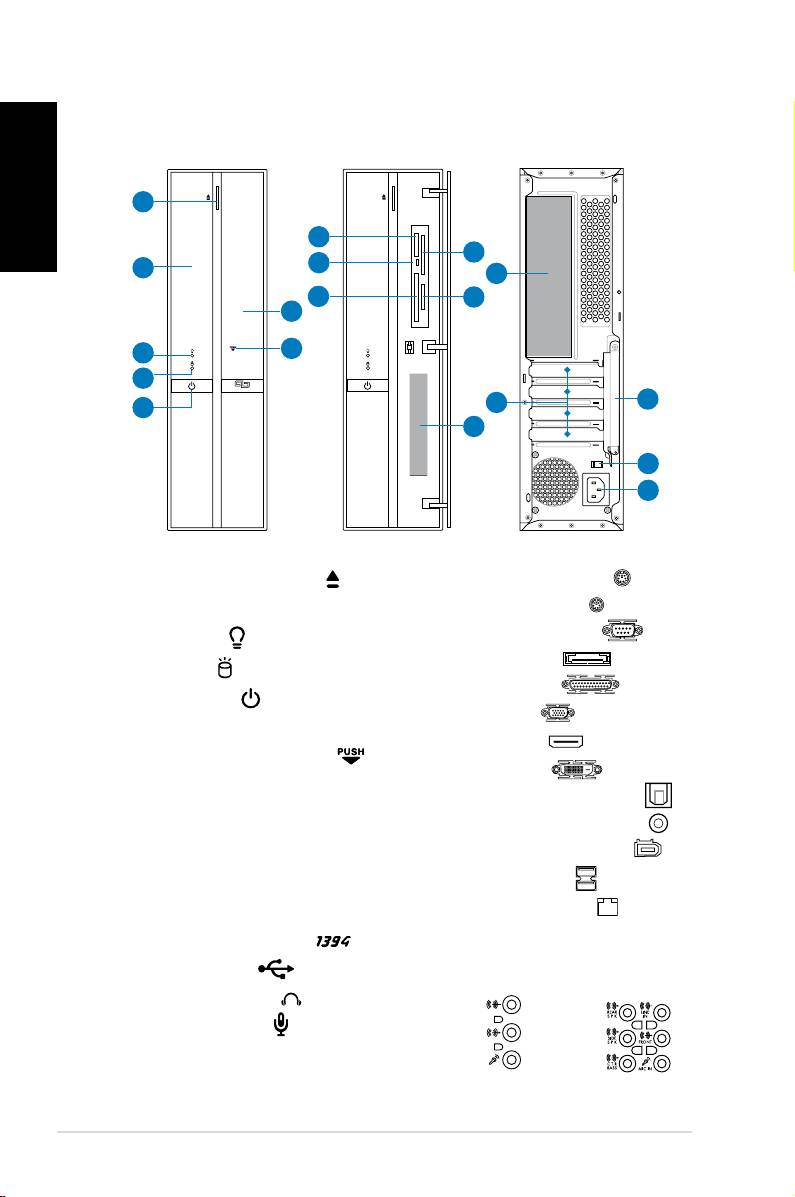
Front/Rear panel features
Front (Close)
Front (Open)
Rear
English
15
16
1. Optical drive eject button ( )
2. Optical drive bay cover
3. Power LED (
)
4. HDD LED (
)
5. Power button ( )
6. Front panel cover
7. Open the front panel cover (
)
®
8. Memory Stick
/Pro™card slot (MS)
9. Card reader LED (
R/W)
®
10. CompactFlash
card slot (CF)
®
11. SmartMedia
card slot (SM)
12. Secure Digital™/MultimediaCard
slot (SD/MMC)
13.* • 4-pin IEEE 1394a port (
)
• USB 2.0 ports (
)
• Headphones jack (
)
• Microphone jack (
)
2 Installation manual
'9;9(GXKHUTK
1
8
11
9
2
14
10
12
6
7
3
4
5
13
39
93
8=
9*33)
),
17
18
14.* • PS/2 keyboard port ( )
• PS/2 mouse port (
)
• Serial (COM) port (
)
• E-SATA port (
)
• Parallel port (
)
• VGA port (
)
• HDMI port (
)
• DVI-D port (
)
• Optical S/PDIF Out port (
)
• Coaxial S/PDIF Out port (
)
• 6-pin IEEE 1394a port (
)
• USB 2.0 ports (
)
• LAN (RJ-45) port (
)
• One of the following audio
jacks congurations:
• 6-channel • 8-channel
