
Asus GigaX1016: Hardware Description Front Panel LED Indicators Table 1 LED indicators
Hardware Description Front Panel LED Indicators Table 1 LED indicators: Asus GigaX1016
Table of contents
- Introduction
- Hardware Description Front Panel LED Indicators Table 1 LED indicators
- Rear Panel Placement options Connecting network devices
- Network Application
- Technical Specification
3
Hardware Description
This section introduces the physical features of GigaX1016 Switch.
Front Panel
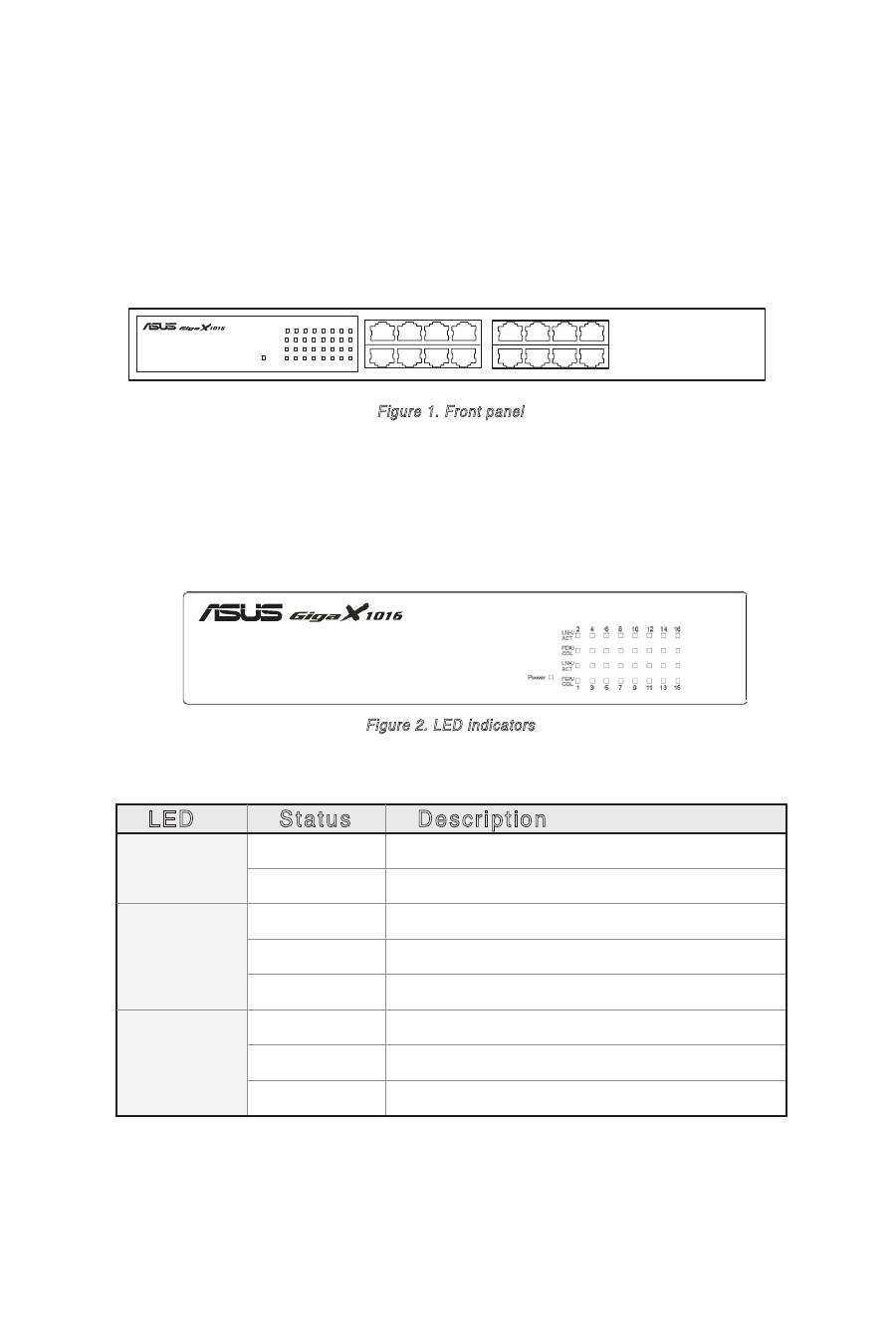
The front panel of GigaX1016 Switch consists of sixteen RJ-45 10/100Mbps
ports and LED indicators showing realtime status of the Switch.
1
2
3
4
5
6
7
8
9
10
11
12
13
14
15
16
Figure 1. Front panel
LED Indicators
The LED Indicators provides real-time information ragarding the Switch
status. The following table provides status of the different LEDs and their
descriptions.
LED
Status
Description
POWER
Green
Power is ON
OFF
Power is not connected
LNK/ACT
Green
Device connected
Blinking
The port is receiving or transmitting data
OFF
No device attached
FDX/COL
Orange
The port is operating in full-duplex mode
Blinking
Collision of packets occurs in the port
OFF
No device attached or in half duplex mode
Figure 2. LED indicators
Table 1 LED indicators
