
Asus ES-101: Data Out port: Power Out port: LED indicator: DIPswitch:
Data Out port: Power Out port: LED indicator: DIPswitch:: Asus ES-101
Table of contents
- Overview
- Hardware Description
- Data Out port: Power Out port: LED indicator: DIPswitch:
- Installation
- Technical Specification
•
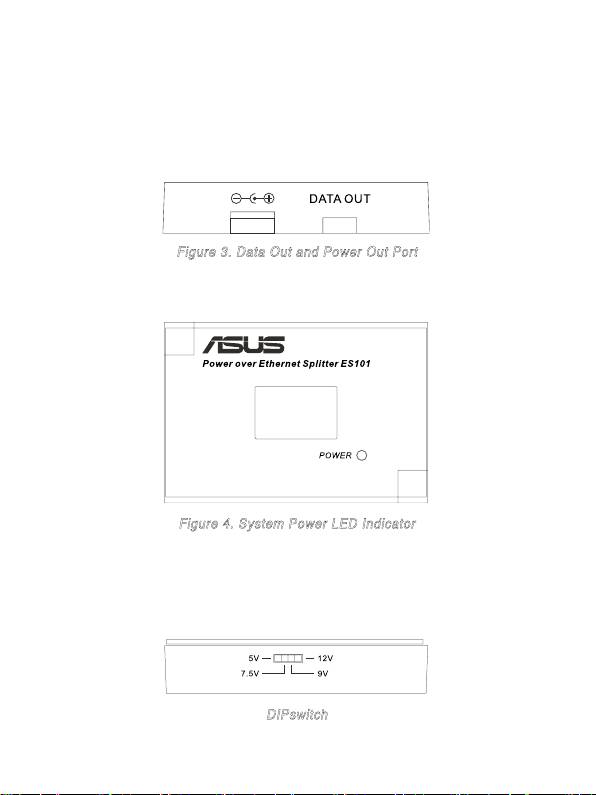
Data Out port:
An RJ-45 Ethernet port with fixed RJ-45 cable for
connection with PD devices.
•
Power Out port:
The power jack that transmits power to devices which
work under 5V, 7.5V, 9V or 12V. It supports two types of power cable: 5.5
x2.0mm and 5.5x2.5mm, both included in the package of PoE Splitter.
Figure 3. Data Out and Power Out Port
•
LED indicator:
The Power LED.
Figure 4. System Power LED Indicator
•
DIPswitch:
Output voltage switch. It provides four levels of power
output – 5V, 7.5V, 9V and 12V. The default voltage is set to 5V. Before
you adjust the Dipswitch, make sure the PoE Splitter is powered off.
DIPswitch
4
Top 10 manuals
100.00
NZXT HALE90 1000W99.99
Samsung SM-R38099.97
AEG BSB 18C99.97
Dell 2700W99.97
Smeg KSEC70X99.96
Beurer HDE 4099.96
Pyramida KH 50 v.299.96
MSI CSM-H81M-P3299.96
AEG HR 562799.95
Melissa 640-048