
Asus Audio Card Xonar D2X: Connecting headphone / microphone Connecting Line-In audio sources
Connecting headphone / microphone Connecting Line-In audio sources: Asus Audio Card Xonar D2X
Table of contents
- 1.1 Installation requirements
- When removing the power cable from the Xonar D2X audio card, make sure to pull outward the 4-pin header rst, then unplug it from the power connector as the following pictures show. Do not forcefully remove the header from the power connector; doing so may pull up the power connector from the audio card and cause damage!
- 1.3 Driver installation
- 1.4 Connecting speakers
- 2.1 Speakers 4 Speakers
- 4.1 Speakers 5.1 Speakers
- 6.1 Speakers 7.1 Speakers
- For Digital Speakers SPDIF Out SPDIF In
- Connecting headphone / microphone Connecting Line-In audio sources
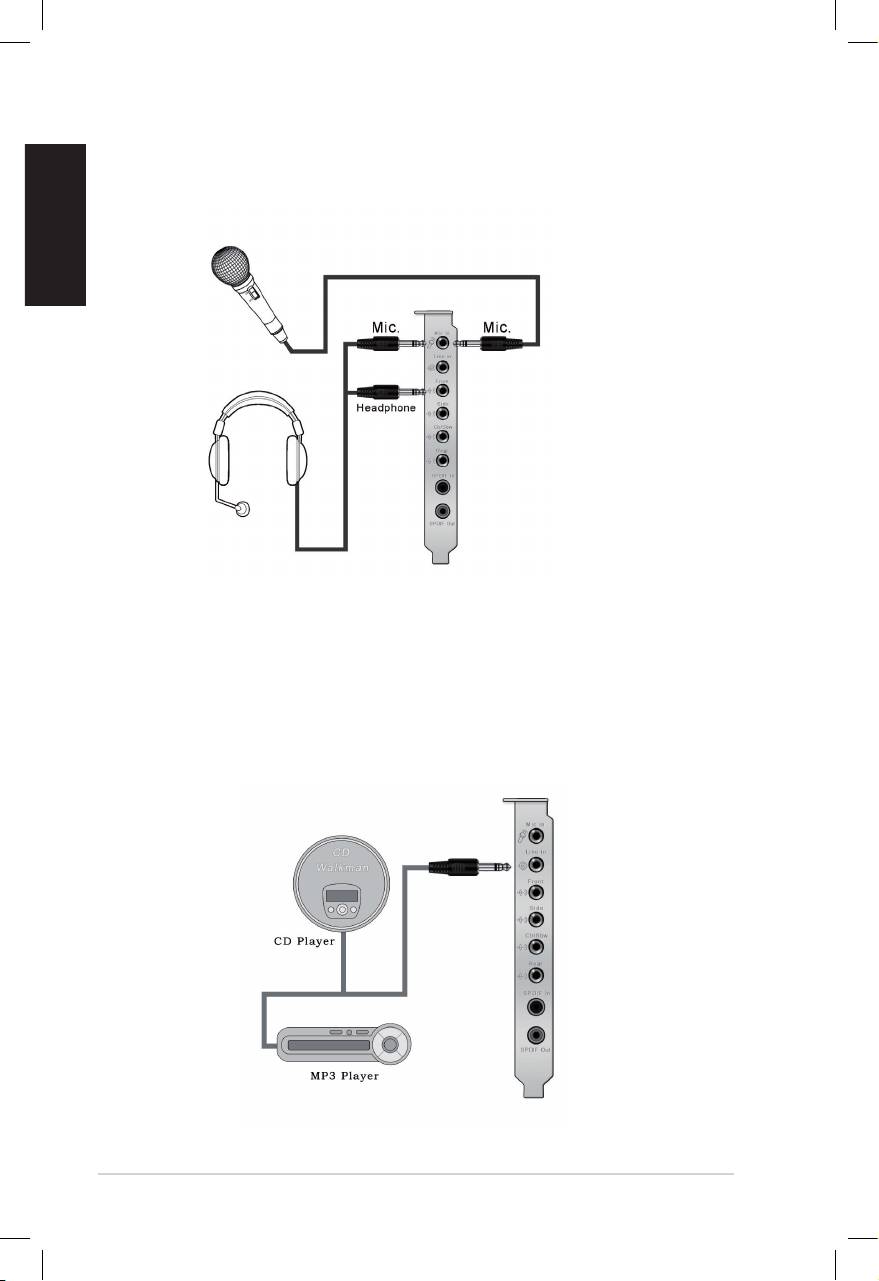
Connecting headphone / microphone
English
Connecting Line-In audio sources
10
ASUS Xonar D2X Quick Installation Guide
Top 10 manuals
100.00
NZXT HALE90 1000W99.99
Samsung SM-R38099.97
AEG BSB 18C99.97
Dell 2700W99.97
Smeg KSEC70X99.96
Beurer HDE 4099.96
Pyramida KH 50 v.299.96
MSI CSM-H81M-P3299.96
AEG HR 562799.95
Melissa 640-048