
Asus Asteio D20: Asus Media Center PC Quick Start Guide
Asus Media Center PC Quick Start Guide: Asus Asteio D20
Table of contents
- Asus Media Center PC Quick Start Guide
- Asus Media Center PC Quick Start Guide
- Asus Media Center PC Quick Start Guide
- Asus Media Center PC Quick Start Guide
Asus Media Center PC Quick Start Guide
Wall to cable TV Set-top Box OR Satellite Box to VCR
B
D
L
C
B
D
C
E
F
C
G
H
C
F
K
J
J
C
C
G
H
M
E
C
I
C
Ultra Spee
d
RECORDER
D V D + R D L
A
A
A Wall
B Cable outlet
C Coaxial cable
D Set-top box/Satellite In
E Set-top box/Satellite Out
F VCR In
G VCR Out
H TV In
I Splitter In
J Splitter Out
K TV In jack on the back of the Media Center PC
L Remote control sensor cable
M Remote control sensor
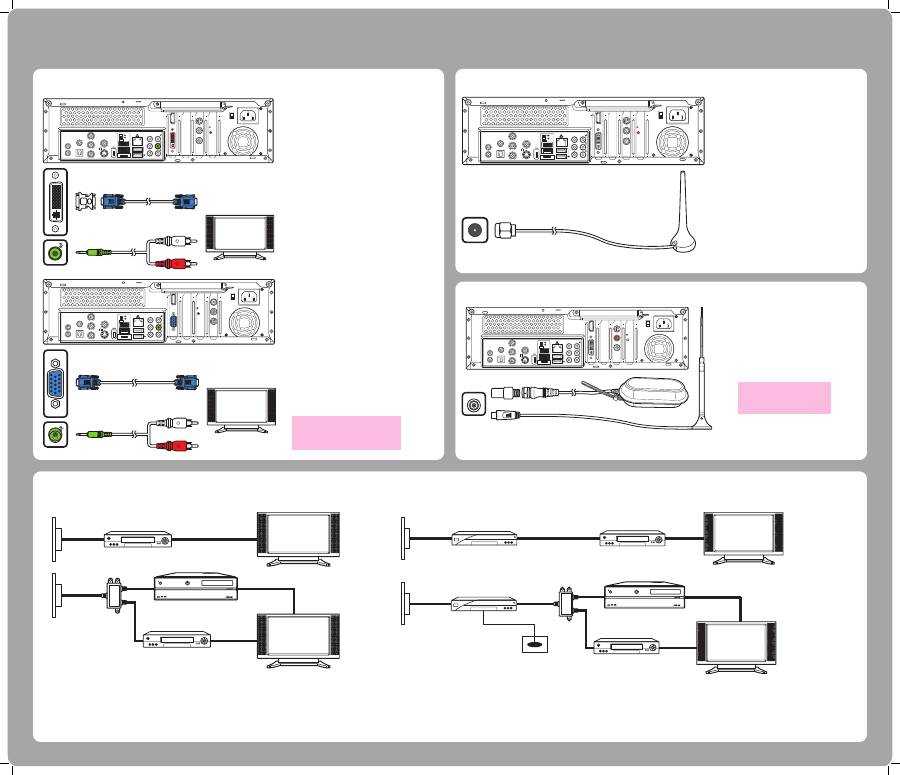
Connecting Digital/FM Antenna
1. Fasten the NTSC to PAL
converter to the
digital/FM antenna.
2. Connect the antenna
to TV jack on the
back of your Media
Center PC as shown.
T V 1
15
2 . 0
2 . 0
2 . 0
E - S ATA
V I D E O O U T
R E A R
C E N T E R
H D M I
V I D E O - I N
S I D E
S / P D I F
Y
P b
P r
I R 1
I R 2
S / P D I F
s
T V 1
T V 2
Connecting WLAN
1. Fasten the external antenna
provided to the WLAN
connector on the back of your
Media Center PC.
2. The LED indicator starts
flashing indicating
the reception of WLAN signals.
15
2 . 0
2 . 0
2 . 0
E - S ATA
V I D E O O U T
R E A R
C E N T E R
H D M I
V I D E O - I N
S I D E
S / P D I F
Y
P b
P r
I R 1
I R 2
S / P D I F
s
T V 1
T V 2
Connecting the TV signal source
Wall to VCR to TV
A Wall
B Cable outlet
C Coaxial cable
D VCR In
E VCR Out
F TV In
G Splitter In
H Splitter Out
I TV In jack on the back of the Media Center PC
B
G
C
B
D
C
E
F
C
D
I
H
H
C
C
E
F
C
A
A
Ultra Spee
d
RECORDER
D V D + R D L
Connecting the Monitor
Connect the VGA adapter to
the DVI connector on the back
of your Media Center PC. Then
connect your monitor to the
Media Center PC using a VGA
cable.
Connecting to a Monitor Using
DVI Out
15
2 . 0
2 . 0
2 . 0
E - S ATA
V I D E O O U T
R E A R
C E N T E R
H D M I
T V 1
T V 2
S I D E
S / P D I F
Y
P b
P r
I R 1
I R 2
S / P D I F
s
V I D E O - I N
Connecting to a Monitor Using
VGA Out
Connect the DVI adapter to
the VGA connector on the
back of your Media Center PC.
Then connect your monitor to
the Media Center PC using a
DVI cable.
15
2 . 0
2 . 0
2 . 0
E - S ATA
V I D E O O U T
R E A R
C E N T E R
H D M I
V I D E O - I N
S I D E
S / P D I F
Y
P b
P r
I R 1
I R 2
S / P D I F
s
T V 1
T V 2
3
Note:
The cables and connector location
are for illustrative purposes only.
Connectors may vary by model.
Note:
The antennas shown here are
for illustrative purposes only.
Packaged antenna may vary.
