
Pioneer VSX-LX70: Connection
Connection: Pioneer VSX-LX70
Connection
02
Chapter 2:
Connection
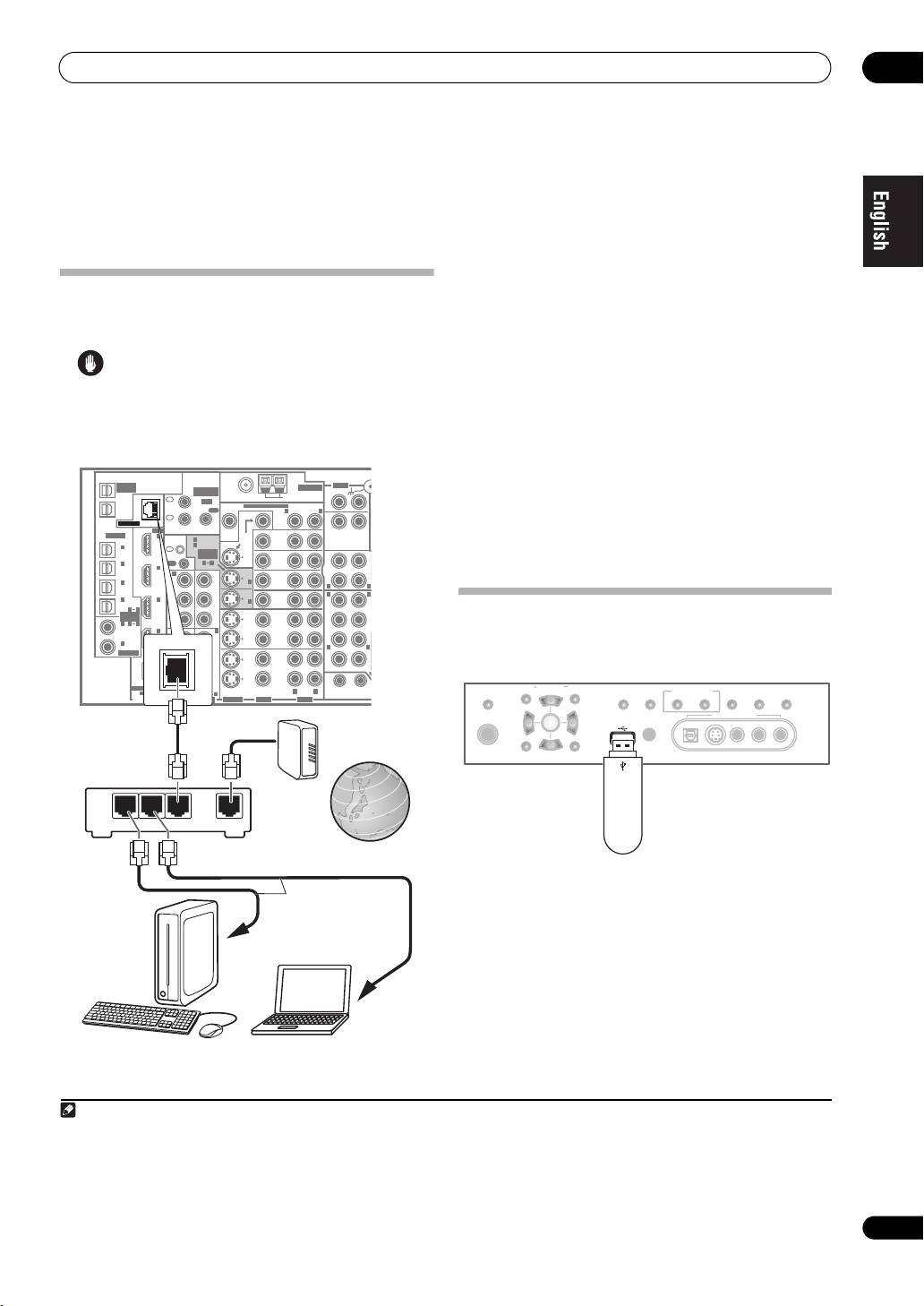
By connecting this receiver to the network via the LAN
terminal, you can play back audio files stored on
Connecting to the network through
components on the network, including your PC, and
LAN interface
1
listen to Internet radio stations.
Connect the LAN terminal on this receiver to the LAN
Caution
terminal on your router (with or without the built-in DHCP
• Before making or changing the connections, switch
server function) with a straight LAN cable (CAT 5 or
off the power and disconnect the power cord from the
higher).
power outlet. Plugging in should be the final step.
Turn on the DHCP server function of your router. In case
your router does not have the built-in DHCP server
VSX-LX70
function, it is necessary set up the network manually. For
details, see Setting up the network on page 10.
OUT1
ZONE3
FM UNBAL 75 Ω
AM LOOP
OUT2
CD
OUT
IN
The specifications of a LAN terminal
MONI-
TOR
OUT
MONI-
TOR
OUT
DVD/ LD
IN
LAN terminal . . . . . . . . . . . . . . . . . . . . . . . . . . . .Ethernet jack
BD
10BASE-T/100BASE-TX
CD-R/
TAPE/
TV/SAT
MD
IN
VIDEO /
GAME 1
SUB W.
CENTE
OUT
Using the USB interface
VCR 1
DVR/
IN
2
It is possible to listen to two-channel audio
using the
OUT
USB interface on the front of this receiver.
VCR 2
DVR/
IN
3
En
R
VSX_LX70_net.book Page 3 Tuesday, June 5, 2007 10:47 AM
MULTI-ZONE
& SOURCE
AUDI O
/REC SEL
MULTI-ZONE
ANTENNA
& SOURCE
PHONO
IN
1
IR
MULTI-ZONE & SOURCE
ZONE2ZONE2
IN
MAIN
OUT
R
L
IN
LAN (10/100)
2
HDMI
ZONE2
OPTICAL
IN
1
CONTROL
IN
1
(
DVD/LD
)
IN
1
IN
2
(
BD
)
(TV/
SAT
)
IN
ASSIGN-
ABLE
OUT
IN
2
OUT
1
2
IN
(
BD
)
IN
2
IN
1
OUT
IN
3
Y
Y
IN
1
IN
(
DVR/
R
L
VCR 1
)
(
LD
DVD/
)
R
L
IN
4
IN
3
P
B
P
B
IN
2
F
(
CD-R
)
IN
1
4
ASSIGN-
ABLE
PR
PR
IN
1
21
(
DVD/
SUR-
LD
)
IN
4
IN
2
IN
3
ROUND
IN
2
(
CD
)
Y
Y
COAXIAL
(
BD
)
LR
OUT
P
B
P
B
SURROUND BACK
PR
PR
ASSIGNABLE
1
(
VIDEO/GAME
1)
R L
(
DC OUT 12V/
12 V TRIGGER
2
AUDIO VIDEO
PARAMETER
MULTI – ZONE &
41
ASSIGNABLE
31
(TUNE)
SOURCE/REC SEL
SIGNAL
SB ch
STEREO/
DIGITAL
COMPONENT VIDEO
S-VIDEO
VIDEO AUDI O
TOTAL 50 mA MAX
)
TUNER EDITSPEAKERS BAND
CONTROL ON/OFF
SELECT
PROCESSING
F.S.SURR
PHONES
VIDEO/GAME 2 INPUT
(ST) (ST)
ENTER
USB
MCACC
SETUP MIC
LAN cable
Modem
(sold separately)
SETUP
(TUNE)
RETURN
DIGITAL IN S-VIDEO VIDEO L RAUDIO
Router
This receiver
LAN
321
WAN
USB mass
storage device
Internet
LAN cable
(sold separately)
to LAN port
to LAN port
PC 1
PC 2
Note
1 • To listen to Internet radio stations, you must sign a contract with an ISP (Internet Service Provider) beforehand.
• Video files cannot be played back.
• With Windows Media Connect or Windows Media Player 11, you can even play back copyrighted audio files on this receiver.
2 • Compatible USB devices include external magnetic hard drives, portable flash memory (particularly keydrives) and digital audio players (MP3 players)
of format FAT16/32. It is not possible to connect this unit to a personal computer for USB playback.
• Pioneer cannot guarantee compatibility (operation and/or bus power) with all USB mass storage devices and assumes no responsibility for any loss of
data that may occur when connected to this receiver.
Table of contents
- Features
- Connection
- Playback with Home Media Gallery
- Setup
- Additional information
- Caractéristiques
- Raccordement
- Lecture avec Home Media Gallery
- Paramétrage
- Informations supplémentaires
- Merkmale
- Anschlüsse
- Wiedergabe mit Home Media Gallery
- Einstellung
- Zusätzliche Informationen
- Funzionalità
- Collegamento
- Riproduzione con Home Media Gallery
- Impostazione
- Informazioni aggiuntive
- Características
- Conexión
- Reproducción con Home Media Gallery
- Configuración
- Información adicional
- Kenmerken
- Aansluiting
- Afspelen met Home Media Gallery
- Instellingen
- Aanvullende informatie
- Особенности
- Подключение
- Воспроизведение через Home Media Gallery
- Настройка
- Дополнительная информация


