
Pioneer VSX-LX70: Additional information
Additional information: Pioneer VSX-LX70
VSX_LX70_net.book Page 13 Tuesday, June 5, 2007 10:47 AM
Additional information
05
Chapter 5:
Additional information
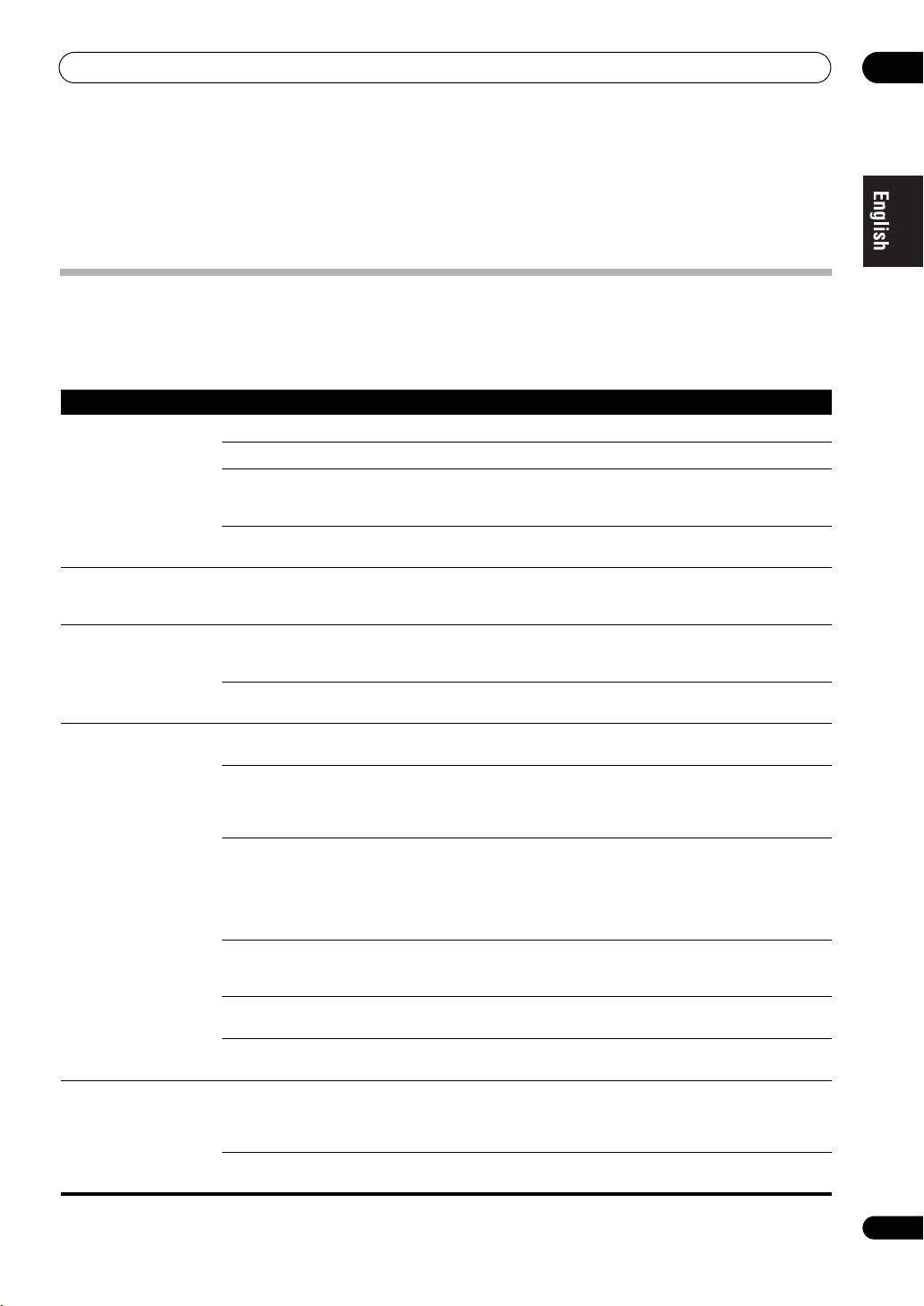
Troubleshooting
Refer to the following information if you come up with a problem. Operational mistakes may be misunderstood as
mechanical problems. Also, the cause of a problem may lie elsewhere other than this receiver. Check your audio
components on the network as well as your USB memory device. If problems persist or if the following information
does not provide you with an appropriate remedy, consult with your nearest Pioneer service center.
Symptoms Causes Remedies Refer to
Cannot access the network. The LAN cable is not firmly connected. Firmly connect the LAN cable. 3
The router is not switched on. Switch on the router. —
Internet security software is currently installed in
There are cases where a component with
—
the connected component.
Internet security software installed cannot be
accessed.
The audio component on the network which has
Switch on the audio component on the network
—
been switched off is switched on.
before switching on this receiver.
Playback does not start
The component is currently disconnected from
Check whether the component is properly
—
while ‘Connecting...’
this receiver or the power supply.
connected to this receiver or the power supply.
continues to be displayed.
The PC or Internet radio is
The corresponding IP address is not properly set. Switch on the built-in DHCP server function of
10
not properly operated.
your router, or set up the network manually
according to your network environment.
The IP address is being automatically
The automatic configuration process takes time.
—
configured.
Please wait.
The audio files stored on
Windows Media Player 11 is not currently
Install Windows Media Player 11 on your PC. 4
components on the network,
installed on your PC.
such as a PC, cannot be
played back.
Audio files were recorded in formats other than
Play back audio files recorded in MP3, WAV
—
MP3, WAV (LPCM only), MPEG-4 AAC, FLAC,
(LPCM only), MPEG-4 AAC, FLAC, or WMA. Note
and WMA.
that some audio files recorded in these formats
may not be played back on this receiver.
Audio files recorded in MPEG-4 AAC or FLAC are
Audio files recorded in MPEG-4 AAC or FLAC
Refer to the
being played back on Windows Media Player 11
cannot be played back on Windows Media Player
operation
or Windows Media Connect.
11 or Windows Media Connect. Try using
manual
another server.
supplied
with your
server.
The component connected to the network is not
Check whether the component is affected by
—
properly operated.
special circumstances or is in the sleep mode.
Try rebooting the component if necessary.
The component connected to the network does
Try changing the settings for the component
—
not permit file sharing.
connected to the network.
The folder stored on the component connected
Check the folder stored on the component
—
to the network has been deleted or damaged.
connected to the network.
Cannot access the
The component connected to the network is not
If the client is automatically authorized, you need
—
component connected to
properly set.
to enter the corresponding information again.
the network.
Check whether the connection status is set to
“Do not authorize”.
There are no playable audio files on the
Check the audio files stored on the component
—
component connected to the network.
connected to the network.
13
En

VSX_LX70_net.book Page 14 Tuesday, June 5, 2007 10:47 AM
05
Additional information
Symptoms Causes Remedies Refer to
Audio playback is
The audio file currently being played back was
Check whether the audio file was recorded in a
8
undesirably stopped or
not recorded in a format playable on this
format supported by this receiver.
disturbed.
receiver.
Check whether the folder has been damaged or
corrupted.
Note that there are cases where even the audio
files listed as playable on this receiver cannot be
played back or displayed.
The LAN cable is currently disconnected. Connect the LAN cable properly. 3
There is heavy traffic on the network with the
Use 100BASE-TX to access the components on
—
Internet being accessed on the same network.
the network.
Cannot access Windows
You are currently logged onto the domain
Instead of logging onto the domain, log onto the
5
Media Player 11.
through your PC with Windows XP installed.
local machine.
Cannot listen to Internet
The firewall settings for components on the
Check the firewall settings for components on
—
radio stations
network are currently in operation.
the network.
You are currently disconnected from the
Check the connection settings for components
10
Internet.
on the network, and consult with your network
service provider if necessary.
The broadcasts from an Internet radio station are
There are cases where you cannot listen to some
7, 15
stopped or interrupted.
Internet radio stations even when they are listed
in the list of Internet radio stations on this
receiver.
The folders/files stored on a
The folders/files are currently stored in a region
Store the folders/files in the FAT region. —
USB memory device are not
other than the FAT (File Allocation Table) region.
displayed.
The number of levels in a folder is more than 8. Limit the maximum number of levels in a folder
6
to 8.
There are more than 2000 folders/files stored in a
Limit the maximum number of folders/files
6
single folder.
stored in a single folder to 2000.
The audio files are copyrighted. Copyrighted audio files stored on a USB memory
6
device cannot be played back.
A USB memory device is not
The USB memory device does not support the
Try using a USB memory device compatible with
3
recognized.
mass storage class specifications.
the mass storage class specifications. Note that
there are cases where even the audio files stored
on a USB memory device compatible with the
mass storage class specifications are not played
back on this receiver.
Connect the USB memory device and switch on
3
this receiver.
A USB hub is currently being used. This receiver does not support a USB hub. 3
This receiver recognizes the USB memory device
Switch off and on again this receiver. —
as a fraud.
A USB memory device is
Some formats of a USB memory device,
Check whether the format of your USB memory
3
connected and displayed,
including FAT 12, NTFS, and HFS, cannot be
device is either FAT 16 or FAT 32. Note that the
but the audio files stored on
played back on this receiver.
FAT 12, NTFS, and HFS formats cannot be played
the USB memory device
back on this receiver.
cannot be played back.
The file format cannot be properly played back
See the list of file formats that can be played
8
on this receiver.
back on this receiver.
The Home Media Gallery
The remote control is not currently set to the
Press and hold SHIFT and press iPod to set the
6
cannot be operated with the
Home Media Gallery mode.
remote control to the Home Media Gallery mode.
buttons on the remote
control.
14
En

VSX_LX70_net.book Page 15 Tuesday, June 5, 2007 10:47 AM
Additional information
05
About status messages
Refer to the following information when you come up with a status message while operating the Home Media Gallery.
Status messages Descriptions
Please Wait A component on the network, including a PC, is currently being connected. Wait for a while.
Connection Down The selected category or Internet radio station cannot be accessed.
File Format Error Cannot be played back for some reasons.
Track Not Found The selected song has not been found anywhere on the network.
Server Error The selected server cannot be accessed.
Server Disconnected The server has been disconnected.
USB Error The amount of electricity consumption for a USB memory device is too large.
empty There are no files stored in the selected folder.
Preset Not Stored The selected Internet radio station is not currently registered and saved.
Network Problem There is a problem with the network settings. Check the network settings. The message also appears
then the network settings of this receiver have been changed. In this case, please wait.
Out of Range The value entered is beyond the permitted range of the network settings.
License Error The license for the contents to be played back is invalid.
15
En

VSX_LX70_net.book Page 16 Tuesday, June 5, 2007 10:47 AM
05
Additional information
LAN
LAN is an abbreviation for the Local Area Network, which
Glossary
is a computer network covering a small geographical
area, like a home, office, or group of buildings. Current
Default Gateway
LANs are most likely to be based on switched IEEE 802.3
Default Gateway is a node on a computer network that
Ethernet technology, running at 10, 100, or 1000 Mbit/s,
serves as an access point to another network. A default
or on IEEE 802.11 Wi-Fi technology.
gateway (such as a computer and router) is used to
forward all traffic that is not addressed to a station within
MAC (Media Access Control) address
the local subnet.
An address attached to the port of any device. The MAC
address cannot be changed.
DHCP (Dynamic Host Configuration Protocol)
Server
Neural Surround
A DHCP server is a server that allocates IP addresses to
Neural Surround represents the latest advancement in
hosts (network devices). In most cases, a broadband
surround technology and has been adopted by FM Radio
router serves as a DHCP server in a home network.
and Neural Music Direct for broadcasts of surround
recordings and live events.
DLNA
Neural Surround employs psychoacoustic frequency
The Digital Living Network Alliance (DLNA) is a cross-
domain processing which allows delivery of a more
industry organization of consumer electronics,
detailed sound stage with superior localization of
computing industry and mobile device companies.
surround elements. System playback is scalable from
Digital Living provides consumers with easy sharing of
stereo up to state-of-the-art multichannel surround.
digital media through a wired or wireless network in the
home.
Subnet mask
The DLNA certification logo makes it easy to find
The IP address is divided into the network address part
products that comply with the DLNA Interoperability
and the host address part. The subnet mask is expressed
Guidelines. This unit complies with DLNA Interoperability
as ‘255.255.255.0’. In most cases, the subnet mask is
Guidelines v1.0.
automatically assigned by the DHCP server.
DNS
vTuner
DNS is an abbreviation for the Domain Name System,
vTuner is an online database service that allows you to
which stores and associates many types of information
listen to radio on the Internet. vTuner lists thousands of
with domain names. Most importantly, DNS translates
stations from over 100 different countries around the
domain names (computer hostnames or sitenames,
globe.
such as www.pioneerelectronics.com) to IP addresses
“This product is protected by certain intellectual property
(such as 202.221.192.106).
rights of NEMS and BridgeCo. Use or distribution of such
technology outside of this product is prohibited without a
Ethernet
license from NEMS and BridgeCo or an authorized
A frame-based computer networking technology for local
subsidiary.”
area networks (LANs). This player supports 100BASE-TX
and 10BASE-T.
FLAC
FLAC (Free Lossless Audio Codec) is an audio format
allows lossless codec. Audio is compressed in FLAC
without any loss in quality. For more details about FLAC,
visit the following website: http://flac.sourceforge.net/
IP (Internet Protocol) address
A unique number that devices use in order to identify and
communicate with each other on a network utilizing the
Internet Protocol standard, such as ‘192.168.0.1’. No
duplicate numbers are allowed in the network.
16
En

VSX_LX70_net.book Page 17 Tuesday, June 5, 2007 10:47 AM
Additional information
05
Windows Media
Windows Media is a multimedia framework for media
About FLAC
creation and distribution for Microsoft Windows.
Windows Media is either a registered trademark or
FLAC Decoder
trademark of Microsoft Corporation in the U.S. and/or
Copyright © 2000, 2001, 2002, 2003, 2004, 2005, 2006,
other countries. Use an application licensed by Microsoft
2007 Josh Coalson
Corporation to author, distribute, or play Windows Media
formatted content. Using an application unauthorized by
Redistribution and use in source and binary forms, with
Microsoft Corporation is subject to malfunction.
or without modification, are permitted provided that the
following conditions are met:
Windows Media DRM
• Redistributions of source code must retain the above
Windows Media DRM is a DRM (Digital Rights
copyright notice, this list of conditions and the
Management) service for the Windows Media platform. It
following disclaimer.
is designed to provide secure delivery of audio and/or
• Redistributions in binary form must reproduce the
video content over an IP network to a PC or other
above copyright notice, this list of conditions and the
playback device in such a way that the distributor can
following disclaimer in the documentation and/or
control how that content is used. The WMDRM-protected
other materials provided with the distribution.
content can only be played back on a component
• Neither the name of the Xiph.org Foundation nor the
supporting the WMDRM service.
names of its contributors may be used to endorse or
promote products derived from this software without
Windows Media Player 11/
specific prior written permission.
Windows Media Connect
THIS SOFTWARE IS PROVIDED BY THE COPYRIGHT
Windows Media Connect is software to deliver music,
HOLDERS AND CONTRIBUTORS “AS IS” AND ANY
photos and movies from a Microsoft Windows XP
EXPRESS OR IMPLIED WARRANTIES, INCLUDING, BUT
computer to home stereo systems and TVs.
NOT LIMITED TO, THE IMPLIED WARRANTIES OF
With this software, you can play back files stored on the
MERCHANTABILITY AND FITNESS FOR A PARTICULAR
PC through various devices wherever you like in your
PURPOSE ARE DISCLAIMED. IN NO EVENT SHALL THE
home.
FOUNDATION OR CONTRIBUTORS BE LIABLE FOR ANY
At this time you cannot download the Windows Media
DIRECT, INDIRECT, INCIDENTAL, SPECIAL, EXEMPLARY,
Connect software from Microsoft’s website. If your server
OR CONSEQUENTIAL DAMAGES (INCLUDING, BUT NOT
currently does not have Windows Media Connect
LIMITED TO, PROCUREMENT OF SUBSTITUTE GOODS OR
installed, install Windows Media Player 11 (for Windows
SERVICES; LOSS OF USE, DATA, OR PROFITS; OR
XP) instead. This software can be downloaded from
BUSINESS INTERRUPTION) HOWEVER CAUSED AND ON
Microsoft’s website.
ANY THEORY OF LIABILITY, WHETHER IN CONTRACT,
For more information check the official Microsoft
STRICT LIABILITY, OR TORT (INCLUDING NEGLIGENCE OR
website.
OTHERWISE) ARISING IN ANY WAY OUT OF THE USE OF
THIS SOFTWARE, EVEN IF ADVISED OF THE POSSIBILITY
OF SUCH DAMAGE.
17
En
Table of contents
- Features
- Connection
- Playback with Home Media Gallery
- Setup
- Additional information
- Caractéristiques
- Raccordement
- Lecture avec Home Media Gallery
- Paramétrage
- Informations supplémentaires
- Merkmale
- Anschlüsse
- Wiedergabe mit Home Media Gallery
- Einstellung
- Zusätzliche Informationen
- Funzionalità
- Collegamento
- Riproduzione con Home Media Gallery
- Impostazione
- Informazioni aggiuntive
- Características
- Conexión
- Reproducción con Home Media Gallery
- Configuración
- Información adicional
- Kenmerken
- Aansluiting
- Afspelen met Home Media Gallery
- Instellingen
- Aanvullende informatie
- Особенности
- Подключение
- Воспроизведение через Home Media Gallery
- Настройка
- Дополнительная информация


