
Pioneer KRL-37V: Watching TV Daily operation
Watching TV Daily operation: Pioneer KRL-37V
Table of contents
- OPERATION MANUAL Contents
- Introduction
- Introduction
- Introduction Controlling other equipment using the supplied remote control unit Presetting manufacture codes Manufacture codes
- Introduction
- Using with other equipment (STB) Using with other equipment (VCR)
- Using with other equipment (DVD/DVR)
- Introduction
- Preparation
- Preparation CAUTION Cautions regarding the remote control unit
- Installation precautions
- Quick guide
- Quick guide Supplying power to the antenna Bundling the cables
- Checking signal strength and channel strength Confirm the following before turning on the power
- Watching TV Daily operation
- Watching TV EPG (Electronic Programme Guide) EPG Overview Useful settings for using EPG
- Selecting a programme using EPG
- Timer recording using EPG
- Using the MHEG-5 application (UK Teletext
- Connecting external devices NOTE
- Connecting external devices HDMI connection Component connection S-VIDEO/VIDEO connection
- Controlling devices with SCART using i/o link.A SCART connection
- Speaker/amplifier connection
- Connecting external devices Inserting a smart card
- HDMI CONTROL Controlling HDMI devices using HDMI CONTROL
- HDMI CONTROL connection
- MODE D’EMPLOI
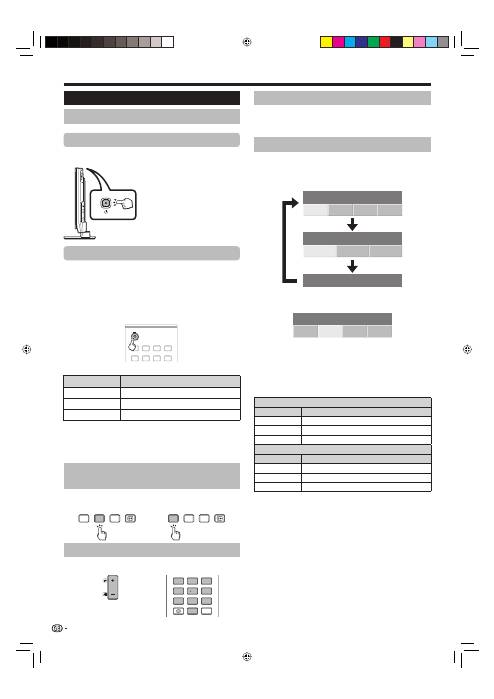
Watching TV
Selecting a sound mode
DTV mode:
If multi sound modes are received, each time you
press
t
the mode switches as follows.
Audio (ENG) : STEREO
L/R
L
R
LR
Audio (ENG) : CH A
CH A
CH B
CH AB
Audio (ENG) : MONO
Press
c
/
d
to select L or R sound when the STEREO
or DUAL MONO screen is displayed.
Audio (ENG) : STEREO
L/R
L
R
LR
NOTE
The sound mode screen disappears in six seconds.
Selectable items vary depending on the received broadcasts.
ATV mode:
Each time you press
t
, the mode switches as
shown in the following tables.
NICAM TV broadcasts selection
Signal
Selectable items
Stereo
NICAM STEREO, MONO
Bilingual
NICAM CH A, NICAM CH B, NICAM CH AB, MONO
Monaural
NICAM MONO, MONO
A2 TV broadcasts selection
Signal
Selectable items
Stereo
STEREO, MONO
Bilingual
CH A, CH B, CH AB
Monaural
MONO
NOTE
When no signal is input, the sound mode will display “MONO”.
E
•
•
E
•
Watching analogue
broadcasts
E
Watching digital
broadcasts
E
TV
DTV
RADIO
TV
DTV
RADIO
P
4
5
6
7
8
9
1
2
3
0
P.INFO
INFO
Daily operation
Switching on/off
Turning on/off the power
Press
a
on the TV.
Switch it off by pressing
a
on the TV.
Standby mode
To standby mode
If the TV is switched on, you can switch it to standby
by pressing
a
(TV)
on the remote control unit.
Switching on from standby
From standby, press
a
(TV)
on the remote control unit.
1
2
3
4
5
6
7
8
TV
INPUT
1
2
3
4
5
6
7
8
INPUT
TV indicator status
TV indicator
Status
ON (Blue)
Power on
STANDBY (Red)
Standby
SLEEP (Orange)
Sleep timer is on
NOTE
If you are not going to use this TV for a long period of time, be sure
to remove the AC cord from the AC outlet.
A small amount of electric power is still consumed even when
a
is
turned off.
E
E
•
•
Switching between analogue and
digital broadcasts
Changing channels
With 0–9:
With P
k
/
l
:
Selecting an external video source
Once the connection is made, press
INPUT1–8
on the
remote control unit or
b
on the TV to switch over to
the appropriate external source.
16
NOTE
When turning off the power using
a
on the TV, EPG data (Electronic
programme guide) will be lost, and
programmed timer recordings will
not be performed by the TV.
•
KRL3237V_GB.indd 16
KRL3237V_GB.indd 16
2008/06/13 14:49:50
2008/06/13 14:49:50
