
Pioneer KRL-37V: Introduction
Introduction: Pioneer KRL-37V
Table of contents
- OPERATION MANUAL Contents
- Introduction
- Introduction
- Introduction Controlling other equipment using the supplied remote control unit Presetting manufacture codes Manufacture codes
- Introduction
- Using with other equipment (STB) Using with other equipment (VCR)
- Using with other equipment (DVD/DVR)
- Introduction
- Preparation
- Preparation CAUTION Cautions regarding the remote control unit
- Installation precautions
- Quick guide
- Quick guide Supplying power to the antenna Bundling the cables
- Checking signal strength and channel strength Confirm the following before turning on the power
- Watching TV Daily operation
- Watching TV EPG (Electronic Programme Guide) EPG Overview Useful settings for using EPG
- Selecting a programme using EPG
- Timer recording using EPG
- Using the MHEG-5 application (UK Teletext
- Connecting external devices NOTE
- Connecting external devices HDMI connection Component connection S-VIDEO/VIDEO connection
- Controlling devices with SCART using i/o link.A SCART connection
- Speaker/amplifier connection
- Connecting external devices Inserting a smart card
- HDMI CONTROL Controlling HDMI devices using HDMI CONTROL
- HDMI CONTROL connection
- MODE D’EMPLOI
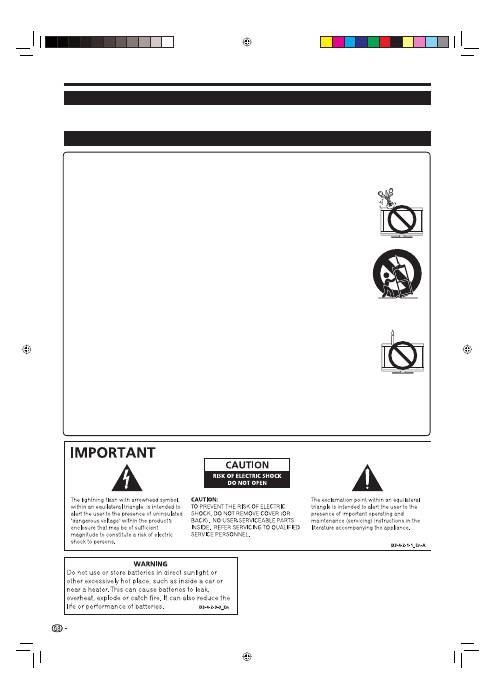
Cleaning—Unplug the AC cord from the AC outlet before cleaning the product. Use a damp cloth to clean the product.
Do not use liquid cleaners or aerosol cleaners.
Water and moisture—Do not use the product near water, such as bathtub, washbasin, kitchen sink, laundry tub,
swimming pool and in a wet basement.
Do not place vases or any other water-filled containers on this product. The water may spill onto the
product causing fire or electric shock.
Stand—Do not place the product on an unstable cart, stand, tripod or table. Doing so can cause the
product to fall, resulting in serious personal injuries as well as damage to the product. Use only a cart,
stand, tripod, bracket or table recommended by the manufacturer or sold with the product. When
mounting the product on a wall, be sure to follow the manufacturer’s instructions. Use only the mounting
hardware recommended by the manufacturer.
When relocating the product placed on a cart, it must be moved with utmost care. Sudden stops,
excessive force and uneven floor surface can cause the product to fall from the cart.
Ventilation—The vents and other openings in the cabinet are designed for ventilation. Do not cover or
block these vents and openings since insufficient ventilation can cause overheating and/or shorten the
life of the product. Do not place the product on a bed, sofa, rug or other similar surface, since they
can block ventilation openings. This product is not designed for built-in installation; do not place the
product in an enclosed place such as a bookcase or rack, unless proper ventilation is provided or the
manufacturer’s instructions are followed.
The LCD panel used in this product is made of glass. Therefore, it can break when the product is
dropped or impact applied. If the LCD panel is broken, be careful not to be injured by broken glass.
Heat sources—Keep the product away from heat sources such as radiators, heaters, stoves and other heat-generating
products (including amplifiers).
To prevent fire, never place any type of candle or naked flames on the top or near the TV set.
To prevent fire or shock hazard, do not place the AC cord under the TV set or other heavy items.
Do not display a still picture for a long time, as this could cause an afterimage to remain.
There is power consumption always if main plug is connected.
Servicing—Do not attempt to service the product yourself. Removing covers can expose you to high
voltage and other dangerous conditions. Request a qualified person to perform servicing.
The LCD panel is a very high technology product, giving you fine picture details.
Due to the very large number of pixels, occasionally a few non-active pixels may appear on the screen as a fixed point of
blue, green or red. This is within product specifications and does not constitute a fault.
Precautions when transporting the TV
When transporting the TV, never carry it by holding onto the speakers. Be sure to always carry the TV by two people holding
it with two hands—one hand on each side of the TV.
•
•
•
•
•
•
•
•
•
•
•
•
•
Introduction
Dear Pioneer customer
Thank you for your purchase of the Pioneer Flat screen TV. To ensure safety and many years of trouble-free
operation of your product, please read the Important Safety Precautions carefully before using this product.
Important Safety Precautions
2
KRL3237V_GB.indd 2
KRL3237V_GB.indd 2
2008/06/13 14:49:20
2008/06/13 14:49:20
