
Pioneer KRL-37V: Introduction
Introduction: Pioneer KRL-37V
Table of contents
- OPERATION MANUAL Contents
- Introduction
- Introduction
- Introduction Controlling other equipment using the supplied remote control unit Presetting manufacture codes Manufacture codes
- Introduction
- Using with other equipment (STB) Using with other equipment (VCR)
- Using with other equipment (DVD/DVR)
- Introduction
- Preparation
- Preparation CAUTION Cautions regarding the remote control unit
- Installation precautions
- Quick guide
- Quick guide Supplying power to the antenna Bundling the cables
- Checking signal strength and channel strength Confirm the following before turning on the power
- Watching TV Daily operation
- Watching TV EPG (Electronic Programme Guide) EPG Overview Useful settings for using EPG
- Selecting a programme using EPG
- Timer recording using EPG
- Using the MHEG-5 application (UK Teletext
- Connecting external devices NOTE
- Connecting external devices HDMI connection Component connection S-VIDEO/VIDEO connection
- Controlling devices with SCART using i/o link.A SCART connection
- Speaker/amplifier connection
- Connecting external devices Inserting a smart card
- HDMI CONTROL Controlling HDMI devices using HDMI CONTROL
- HDMI CONTROL connection
- MODE D’EMPLOI
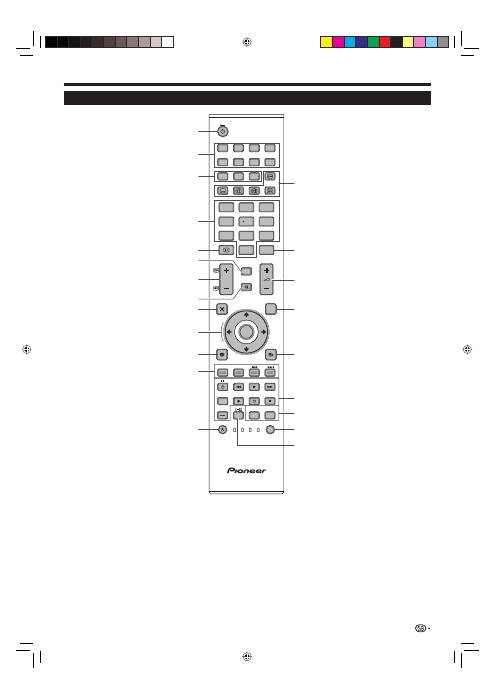
Introduction
TV
DTV
RADIO
1
2
3
4
5
6
7
8
TV
INPUT
4
5
6
7
8
9
1
2
3
0
P.INFO
INFO
P
CH RETURN
EXIT
DVD TOPMENU/
GUIDE
EPG
ENTER
HOME
MENU
MENU
RETURN
CTRL
HDMI
REC STOP
HDD
AV
SELECTION
CM SKIP
DVD
TOOLS
SCREEN
SIZE
SOURCE
TV
STB DVR VCR
DVD
SELECT
1
2
3
4
12
5
7
9
11
13
10
6
8
14
19
20
15
17
18
21
22
16
a
(TV) (Standby/On)
(Page 16)
INPUT1–8
Select an input source (Page 16).
Buttons for mode switch
TV
Press to access conventional
analogue TV mode.
DTV
Press to access digital TV mode.
RADIO
DTV: Switch between Radio and
Data mode.
When only data broadcasting (no
radio broadcasting) is transmitted
by DVB, the radio broadcasting
will be skipped.
0–9 numeric buttons
Set the channel.
Enter desired numbers.
Set the page in teletext mode.
When the five Nordic countries
(Sweden, Norway, Finland,
Denmark, or Iceland) are selected
in the country setting from “Auto
Installation” (page 32), DTV
services are four digits. When
another country is selected, DTV
services are three digits.
p
(INFO)
Press to display the station
information (channel number, signal,
etc.) in the upper right corner of the
screen (Page 37).
CH RETURN
Press to return to the previously
selected channel or external input.
P
k
/
l
(
e
/
f
)
Select the TV channel.
Select the page in teletext mode.
e
(Mute)
TV sound on/off.
g
(EXIT)
Exit the “HOME MENU” screen.
a
/
b
/
c
/
d
(Cursor)
Select a desired item on the setting
screen.
ENTER
Execute a command within the
“HOME MENU” screen.
ATV/DTV: Display the programme
list when no other “HOME MENU”
screen is running.
h
(HOME MENU)
“HOME MENU” screen on/off.
1
2
3
•
4
•
5
6
7
8
9
0
Q
Buttons for useful operations
1
(Subpage)
(Page 20)
[
(Subtitle)
Switch subtitle languages on/off
(Pages 20 and 34).
k
(Reveal hidden Teletext)
(Page 20)
3
(Freeze/Hold)
Press to freeze a moving image on
the screen.
Teletext: Stop updating teletext
pages automatically or release the
hold mode.
m
(Teletext)
ATV: Display analogue teletext (Page
20).
DTV: Select MHEG-5 and teletext for
DTV (Page 20).
P. INFO
Press to display programme
information which is transmitted
through digital video broadcasting in
the upper left corner of the screen
(DTV only).
i
k
/
l
(Volume)
Increase/decrease TV volume.
EPG
DTV: Display the EPG screen (Pages
17–19).
6
(RETURN)
Return to the previous “HOME
MENU” screen.
Buttons for HDMI CONTROL
If external equipment is connected
via HDMI cables and is HDMI
CONTROL compatible, you can use
these HDMI CONTROL buttons. See
pages 26 and 28 for details.
Buttons for picture adjustments
SCREEN SIZE
Select a screen size (Pages 35 and
39).
AV SELECTION
Select a video setting (Page 31).
SELECT
Switch the selection among
TV
,
STB
,
DVD/DVR
, and
VCR
, so that
you can control other connected
equipment, using the supplied
remote control unit (Page 4–7).
t
(Sound mode)
Select a sound multiplex mode
(Page 16).
R
T
Y
U
I
O
P
A
S
Remote control unit
Colour (Red/Green/Yellow/Blue)
buttons
The coloured buttons are
correspondingly used to select the
coloured items on the screen (e.g.
EPG, MHEG-5, Teletext).
a
(SOURCE)
(Pages 6–7)
W
E
NOTE
Press and hold both
9
and
18
on the remote control unit to show “100Hz” demonstration in a dual screen.
•
3
KRL3237V_GB.indd 3
KRL3237V_GB.indd 3
2008/06/13 14:49:23
2008/06/13 14:49:23
