
Pioneer KRL-37V: Using with other equipment (STB) Using with other equipment (VCR)
Using with other equipment (STB) Using with other equipment (VCR): Pioneer KRL-37V
Table of contents
- OPERATION MANUAL Contents
- Introduction
- Introduction
- Introduction Controlling other equipment using the supplied remote control unit Presetting manufacture codes Manufacture codes
- Introduction
- Using with other equipment (STB) Using with other equipment (VCR)
- Using with other equipment (DVD/DVR)
- Introduction
- Preparation
- Preparation CAUTION Cautions regarding the remote control unit
- Installation precautions
- Quick guide
- Quick guide Supplying power to the antenna Bundling the cables
- Checking signal strength and channel strength Confirm the following before turning on the power
- Watching TV Daily operation
- Watching TV EPG (Electronic Programme Guide) EPG Overview Useful settings for using EPG
- Selecting a programme using EPG
- Timer recording using EPG
- Using the MHEG-5 application (UK Teletext
- Connecting external devices NOTE
- Connecting external devices HDMI connection Component connection S-VIDEO/VIDEO connection
- Controlling devices with SCART using i/o link.A SCART connection
- Speaker/amplifier connection
- Connecting external devices Inserting a smart card
- HDMI CONTROL Controlling HDMI devices using HDMI CONTROL
- HDMI CONTROL connection
- MODE D’EMPLOI
Introduction
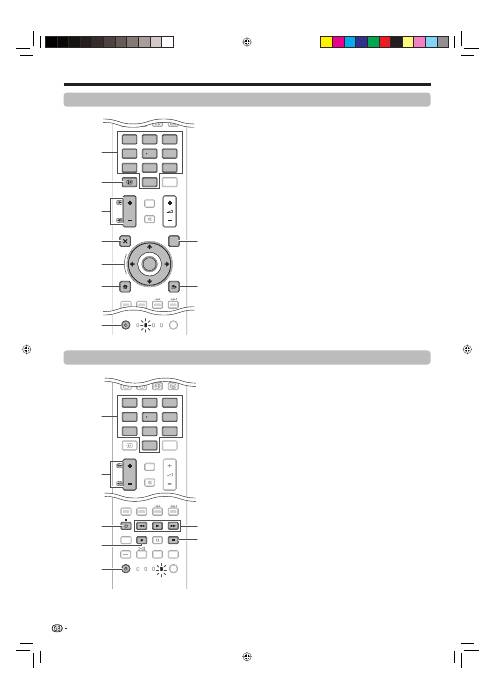
Using with other equipment (STB)
TV
DTV
RADIO
4
5
6
7
8
9
1
2
3
0
P.INFO
INFO
P
CH RETURN
EXIT
DVD TOPMENU/
GUIDE
EPG
ENTER
HOME
MENU
MENU
RETURN
SOURCE
TV
STB DVR VCR
DVD
SELECT
TV
DTV
RADIO
P.INFO
CH RETURN
TV
DVR VCR
DVD
SELECT
1
2
3
4
6
7
5
8
9
Using with other equipment (VCR)
TV
DTV
RADIO
4
5
6
7
8
9
1
2
3
0
P.INFO
INFO
P
CH RETURN
CTRL
HDMI
REC STOP
HDD
AV
SELECTION
CM SKIP
DVD
TOOLS
SCREEN
SIZE
SOURCE
TV
STB DVR VCR
DVD
SELECT
TV
DTV
RADIO
P.INFO
INFO
CH RETURN
CTRL
HDMI
REC STOP
HDD
AV
SELECTION
CM SKIP
DVD
TOOLS
SCREEN
SIZE
TV
STB DVR
DVD
SELECT
5
3
4
7
6
2
1
STB (set-top box) control buttons
When in the STB mode, the buttons on the remote
control unit function as below.
0–9
Function as the numeric buttons.
INFO
Press to display information on the current broadcasting.
P
k
/
l
Press to tune in a higher or lower channel.
EXIT
Press to exit the broadcasting menu screen or the
broadcasting guide screen.
ENTER
Press to activate the selected function.
a
/
b
/
c
/
d
Press to select items on the broadcasting menu screen
or the broadcasting guide screen.
MENU
Press to display the broadcasting menu screen.
SOURCE
a
Turns the set-top box on and off.
GUIDE
Press to display the broadcasting guide screen.
RETURN
When the broadcasting menu screen is in display, press
to restore the immediately previous screen.
E
1
2
3
4
5
6
7
8
9
VCR control buttons
When in the VCR mode, the buttons on the remote
control unit function as below.
0–9
Function as the numeric buttons.
P
k
/
l
Press to select channels of the TV tuner on the VCR.
l
(PAUSE/STILL)
Set pauses and still pictures.
p
(REC)
Start recording.
SOURCE
a
Turn the power of the VCR on and off.
m
(REW)
Rewind the tape and allows picture search.
n
(PLAY)
Start playback.
o
(FF)
Fast-forward the tape and allows picture search.
r
(STOP)
Stop playback.
E
1
2
3
4
5
6
7
6
KRL3237V_GB.indd 6
KRL3237V_GB.indd 6
2008/06/13 14:49:25
2008/06/13 14:49:25
