
Pioneer KRL-37V: Connecting external devices Inserting a smart card
Connecting external devices Inserting a smart card: Pioneer KRL-37V
Table of contents
- OPERATION MANUAL Contents
- Introduction
- Introduction
- Introduction Controlling other equipment using the supplied remote control unit Presetting manufacture codes Manufacture codes
- Introduction
- Using with other equipment (STB) Using with other equipment (VCR)
- Using with other equipment (DVD/DVR)
- Introduction
- Preparation
- Preparation CAUTION Cautions regarding the remote control unit
- Installation precautions
- Quick guide
- Quick guide Supplying power to the antenna Bundling the cables
- Checking signal strength and channel strength Confirm the following before turning on the power
- Watching TV Daily operation
- Watching TV EPG (Electronic Programme Guide) EPG Overview Useful settings for using EPG
- Selecting a programme using EPG
- Timer recording using EPG
- Using the MHEG-5 application (UK Teletext
- Connecting external devices NOTE
- Connecting external devices HDMI connection Component connection S-VIDEO/VIDEO connection
- Controlling devices with SCART using i/o link.A SCART connection
- Speaker/amplifier connection
- Connecting external devices Inserting a smart card
- HDMI CONTROL Controlling HDMI devices using HDMI CONTROL
- HDMI CONTROL connection
- MODE D’EMPLOI
Connecting external devices
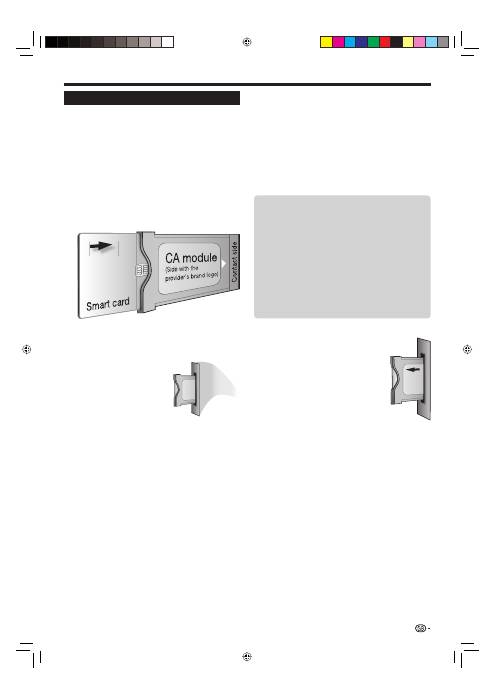
Inserting a smart card
In order to receive coded digital stations, a Common
Interface Module (CA Module) and a smart card must
be inserted in the Common Interface slot of the TV
(Page 14).
The CA Module and the smart card are not supplied
accessories. They are usually available from your
dealers.
Inserting the smart card into the CA Module
With the side with the gold coloured contact
chip facing the side of the CA Module marked
with the provider’s logo, push the smart card
into the CA Module as far as it will go. Note the
direction of the arrow printed on the smart card.
Inserting the CA Module in the Common
Interface slot
Carefully insert the CA
Module in the Common
Interface slot with the
contact side forward. The
logo on the CA Module
must be facing forward
from the rear of the TV.
Do not use excessive
force. Make sure the
module is not bent in the
process.
1
2
Checking CA Module information
NOTE
Make sure that the CA Module is properly inserted.
This menu is only available for digital stations.
Press
h
and the “HOME MENU” screen
displays.
Press
a
/
b
to select “Digital Setup”.
The content of this menu depends on the provider of
the CA Module.
Press
a
/
b
to select “CI Menu”, and then press
ENTER
.
Removing the CA Module
Remove the cover from the rear of
the TV.
Remove the module from the TV.
Replace the cover.
•
•
1
2
•
3
1
2
3
25
Module
General information on CA Module displays.
Menu
Adjustment parameters of each smart card
displays.
Enquiry
You can input numerical values such as passwords
here.
NOTE
The content of each screen depends on the provider of
the CA Module.
E
E
E
•
KRL3237V_GB.indd 25
KRL3237V_GB.indd 25
2008/06/13 14:50:10
2008/06/13 14:50:10
