
Pioneer KRL-37V: Quick guide
Quick guide: Pioneer KRL-37V
Table of contents
- OPERATION MANUAL Contents
- Introduction
- Introduction
- Introduction Controlling other equipment using the supplied remote control unit Presetting manufacture codes Manufacture codes
- Introduction
- Using with other equipment (STB) Using with other equipment (VCR)
- Using with other equipment (DVD/DVR)
- Introduction
- Preparation
- Preparation CAUTION Cautions regarding the remote control unit
- Installation precautions
- Quick guide
- Quick guide Supplying power to the antenna Bundling the cables
- Checking signal strength and channel strength Confirm the following before turning on the power
- Watching TV Daily operation
- Watching TV EPG (Electronic Programme Guide) EPG Overview Useful settings for using EPG
- Selecting a programme using EPG
- Timer recording using EPG
- Using the MHEG-5 application (UK Teletext
- Connecting external devices NOTE
- Connecting external devices HDMI connection Component connection S-VIDEO/VIDEO connection
- Controlling devices with SCART using i/o link.A SCART connection
- Speaker/amplifier connection
- Connecting external devices Inserting a smart card
- HDMI CONTROL Controlling HDMI devices using HDMI CONTROL
- HDMI CONTROL connection
- MODE D’EMPLOI
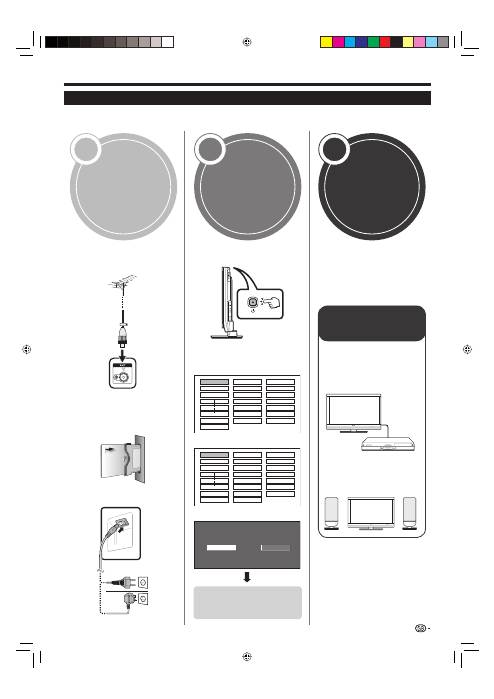
Quick guide
1 2 3
Initial installation overview
Follow the steps below one by one when using the TV for the first time. Some steps may not be necessary
depending on your TV installation and connection.
Connect an antenna cable to
the antenna terminal (Page
14).
If necessary, insert a smart
card into the Common
Interface slot to watch
scrambled broadcasts (Pages
14 and 25).
Connect the AC cord to the TV
(Page 14).
n
o
p
Turn on the power using
a
on
the TV (Page 16).
Run the initial auto installation
(Page 15).
Language setting
English
Italiano
Svenska
Country setting
Austria A B/G
Finland FIN B/G
Greece GR
B/G
Channel search setting
Analogue Search
Digital Search
n
o
✔
✔
✔
Congratulations!
Now you can watch TV.
If necessary, adjust the
antenna to attain maximum
signal reception (Page 15).
n
o
13
Preparation
Power on and
run the auto
installation
Watch TV
Connect
external devices
Connect external
devices such as a
DVD player/recorder
as instructed (Pages
21–23).
Connect external
audio devices such as
speakers/amplifier as
instructed (Pages 21
and 24).
n
o
Start searching
channels
KRL3237V_GB.indd 13
KRL3237V_GB.indd 13
2008/06/13 14:49:41
2008/06/13 14:49:41
