
Pioneer KRL-37V: Connecting external devices NOTE
Connecting external devices NOTE: Pioneer KRL-37V
Table of contents
- OPERATION MANUAL Contents
- Introduction
- Introduction
- Introduction Controlling other equipment using the supplied remote control unit Presetting manufacture codes Manufacture codes
- Introduction
- Using with other equipment (STB) Using with other equipment (VCR)
- Using with other equipment (DVD/DVR)
- Introduction
- Preparation
- Preparation CAUTION Cautions regarding the remote control unit
- Installation precautions
- Quick guide
- Quick guide Supplying power to the antenna Bundling the cables
- Checking signal strength and channel strength Confirm the following before turning on the power
- Watching TV Daily operation
- Watching TV EPG (Electronic Programme Guide) EPG Overview Useful settings for using EPG
- Selecting a programme using EPG
- Timer recording using EPG
- Using the MHEG-5 application (UK Teletext
- Connecting external devices NOTE
- Connecting external devices HDMI connection Component connection S-VIDEO/VIDEO connection
- Controlling devices with SCART using i/o link.A SCART connection
- Speaker/amplifier connection
- Connecting external devices Inserting a smart card
- HDMI CONTROL Controlling HDMI devices using HDMI CONTROL
- HDMI CONTROL connection
- MODE D’EMPLOI
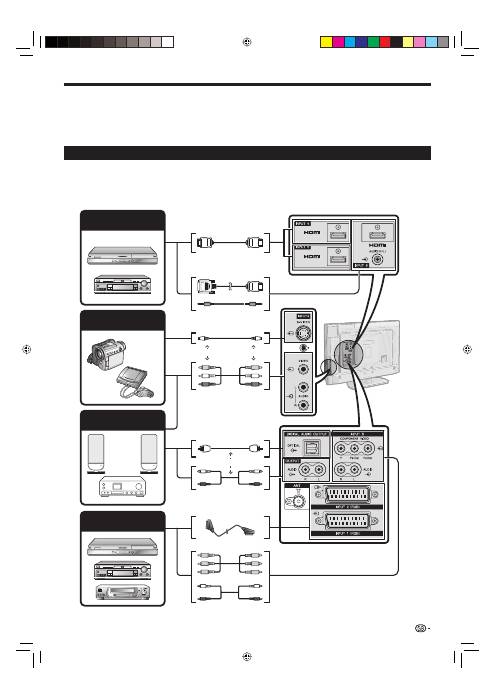
Connecting external devices
Before connecting ...
Be sure to turn off the TV and any devices before making any connections.
Firmly connect a cable to a terminal or terminals.
Carefully read the operation manual of each external device for possible connection types. This also helps you
get the best possible audiovisual quality to maximise the potential of the TV and the connected device.
Refer to page 39 for connecting a PC to the TV.
Introduction to connections
The TV is equipped with the terminals as shown below. Find the cable corresponding the TV’s terminal and
connect the device.
NOTE
The cables illustrated in pages 21–24 are commercially available items.
E
•
•
•
•
•
When using an S-video cable, you also need to connect an audio cable (R/L).
*
21
HDMI device (Page 22)
Game console or
camcorder (Page 22)
Audio device (Page 24)
HDMI-certified cable
DVI/HDMI Cable
ø 3.5 mm stereo minijack cable
S-video cable
*
AV cable
*
Audio cable
Optical audio cable
SCART cable
or
Component cable
Audio cable
Video recording device
(Pages 22 and 23)
or
or
KRL3237V_GB.indd 21
KRL3237V_GB.indd 21
2008/06/13 14:50:01
2008/06/13 14:50:01
