
Pioneer KRL-37V: Preparation CAUTION Cautions regarding the remote control unit
Preparation CAUTION Cautions regarding the remote control unit: Pioneer KRL-37V
Table of contents
- OPERATION MANUAL Contents
- Introduction
- Introduction
- Introduction Controlling other equipment using the supplied remote control unit Presetting manufacture codes Manufacture codes
- Introduction
- Using with other equipment (STB) Using with other equipment (VCR)
- Using with other equipment (DVD/DVR)
- Introduction
- Preparation
- Preparation CAUTION Cautions regarding the remote control unit
- Installation precautions
- Quick guide
- Quick guide Supplying power to the antenna Bundling the cables
- Checking signal strength and channel strength Confirm the following before turning on the power
- Watching TV Daily operation
- Watching TV EPG (Electronic Programme Guide) EPG Overview Useful settings for using EPG
- Selecting a programme using EPG
- Timer recording using EPG
- Using the MHEG-5 application (UK Teletext
- Connecting external devices NOTE
- Connecting external devices HDMI connection Component connection S-VIDEO/VIDEO connection
- Controlling devices with SCART using i/o link.A SCART connection
- Speaker/amplifier connection
- Connecting external devices Inserting a smart card
- HDMI CONTROL Controlling HDMI devices using HDMI CONTROL
- HDMI CONTROL connection
- MODE D’EMPLOI
Preparation
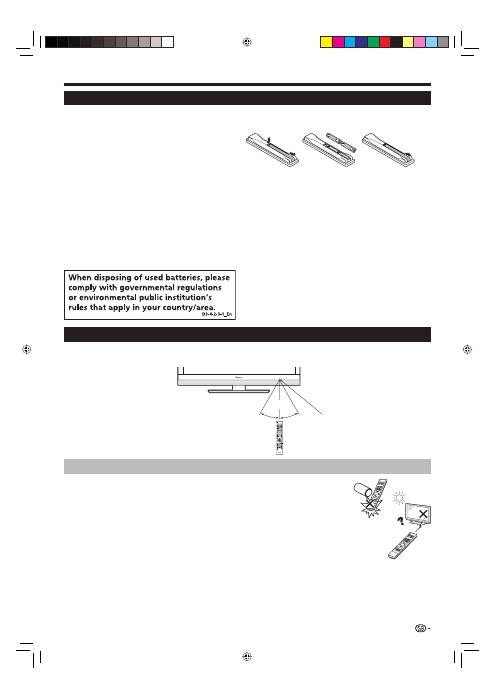
Inserting the batteries
Before using the TV for the first time, insert two supplied “AA” size alkaline batteries. When the batteries become
depleted and the remote control unit fails to operate, replace the batteries with new “AA” size batteries.
Open the battery cover.
Insert two supplied “AA” size alkaline batteries.
Place batteries with their terminals corresponding to the
(
e
) and (
f
) indications in the battery compartment.
Close the battery cover.
CAUTION
Improper use of batteries can result in chemical leakage or explosion. Be sure to follow the instructions below.
Do not mix batteries of different types. Different types of batteries have different characteristics.
Do not mix old and new batteries. Mixing old and new batteries can shorten the life of new batteries or cause
chemical leakage in old batteries.
Remove batteries as soon as they have worn out. Chemicals that leak from batteries can cause a rash. If you
find any chemical leakage, wipe thoroughly with a cloth.
The batteries supplied with this product may have a shorter life expectancy due to storage conditions.
If you will not be using the remote control unit for an extended period of time, remove the batteries from it.
When replacing the batteries, use alkaline batteries instead of zinc-carbon ones.
1
2
•
3
•
•
•
•
•
•
Cautions regarding the remote control unit
Do not expose the remote control unit to shock. In addition, do not expose the
remote control unit to liquids, and do not place in an area with high humidity.
Do not install or place the remote control unit under direct sunlight. The heat may
cause deformation of the unit.
The remote control unit may not work properly if the remote control sensor of the
TV is under direct sunlight or strong lighting. In such cases, change the angle of the
lighting or the TV, or operate the remote control unit closer to the remote control
sensor.
•
•
•
SOURCE
TV
STB DVR VCR
DVD
SELECT
HOME
MENU
MENU
RETURN
EXIT
DVD TOPMENU/
GUIDE
EPG
P
4
5
6
7
8
9
0
P.INFO
1
2
3
INFO
CH RETURN
TV
CTRL
HDMI
REC STOP
HDD
AV
SELECTION
CM SKIP
DVD
TOOLS
SCREEN
SIZE
DTV
RADIO
1
2
3
4
5
6
7
8
TV
INPUT
ENTER
30°
30°
Using the remote control unit
Use the remote control unit by pointing it towards the remote control sensor. Objects between the remote control
unit and sensor may prevent proper operation.
11
5 m
Remote control sensor
KRL3237V_GB.indd 11
KRL3237V_GB.indd 11
2008/06/13 14:49:38
2008/06/13 14:49:38
