
Pioneer KRL-37V: Checking signal strength and channel strength Confirm the following before turning on the power
Checking signal strength and channel strength Confirm the following before turning on the power: Pioneer KRL-37V
Table of contents
- OPERATION MANUAL Contents
- Introduction
- Introduction
- Introduction Controlling other equipment using the supplied remote control unit Presetting manufacture codes Manufacture codes
- Introduction
- Using with other equipment (STB) Using with other equipment (VCR)
- Using with other equipment (DVD/DVR)
- Introduction
- Preparation
- Preparation CAUTION Cautions regarding the remote control unit
- Installation precautions
- Quick guide
- Quick guide Supplying power to the antenna Bundling the cables
- Checking signal strength and channel strength Confirm the following before turning on the power
- Watching TV Daily operation
- Watching TV EPG (Electronic Programme Guide) EPG Overview Useful settings for using EPG
- Selecting a programme using EPG
- Timer recording using EPG
- Using the MHEG-5 application (UK Teletext
- Connecting external devices NOTE
- Connecting external devices HDMI connection Component connection S-VIDEO/VIDEO connection
- Controlling devices with SCART using i/o link.A SCART connection
- Speaker/amplifier connection
- Connecting external devices Inserting a smart card
- HDMI CONTROL Controlling HDMI devices using HDMI CONTROL
- HDMI CONTROL connection
- MODE D’EMPLOI
Quick guide
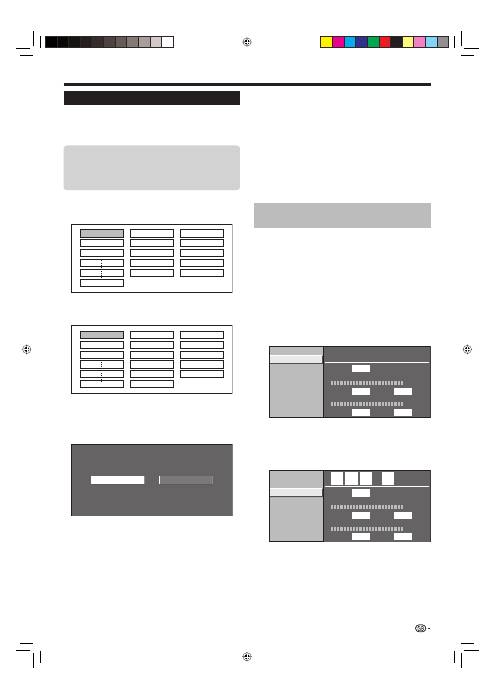
Initial auto installation
When the TV is powered on for the first time after
purchase, the initial auto installation wizard appears.
Follow the menus and make the necessary settings
one after another.
Press
a
on the TV.
The initial auto installation wizard appears.
Setting the OSD language.
English
Italiano
Svenska
Press
a
/
b
/
c
/
d
to select the desired language,
and then press
ENTER
.
Setting the country (Location of the TV).
Austria A B/G
Finland FIN B/G
Greece GR
B/G
Press
a
/
b
/
c
/
d
to select your country or area,
and then press
ENTER
.
This setting screen only appears during the first
installation.
Starting channel search.
Analogue Search
Digital Search
Press
c
/
d
to select “Digital Search” or
“Analogue Search”, and then press
ENTER
.
If you want to search for more broadcasts, execute
“Additional Search” from the “Programme Setup”
menu (Pages 32 and 33).
To watch both analogue broadcasts and digital
broadcasts, you should perform the channel search
setting for each format.
EXAMPLE
If you execute “Digital Search” in the initial auto
installation wizard, you should perform “Analogue
Search” from “Auto Installation” under the “Setup”
menu.
1
•
2
3
•
4
•
•
•
The TV searches for, sorts and stores all the
receivable TV stations according to their settings
and the connected antenna.
To abort the initial auto installation in progress, press
6
(RETURN)
.
NOTE
If you turn off the power on the TV after performing step 4,
the initial auto installation wizard does not appear. The auto
installation function allows you to execute the installation
again from the “Setup” menu (Page 32).
The initial auto installation wizard will go off if you leave
the TV unattended for 30 minutes before searching for
channels in step 5.
Checking signal strength and
channel strength
If you install a DVB-T antenna for the first time or
relocate it, you should adjust the alignment of the
antenna to receive a good reception while checking
the antenna setup screen.
Press
h
and the “HOME MENU” screen
displays.
Press
a
/
b
to select “Setup”.
Press
a
/
b
to select “Antenna Setup-DIGITAL”,
and then press
ENTER
.
Checking signal strength
Press
a
/
b
to select “Signal Strength”.
Signal Strength
Supply Voltage
Channel Strength
Signal Strength
Quality
Current
Max.
0
CH No.
21
0
Current
Max.
0
0
Checking channel strength
Press
a
/
b
to select “Channel Strength”, and
then press
ENTER
.
You can input a specified frequency band using the
0
–
9
numeric buttons.
Signal Strength
Supply Voltage
Channel Strength
Signal Strength
Quality
Current
Max.
0
CH No.
21
0
Current
Max.
0
0
4
7
4
.
0
MHz
Position and align the antenna so that the
maximum possible values for “Signal Strength”
and “Quality” are obtained.
NOTE
The values of “Signal Strength” and “Quality” indicate when
to check the appropriate alignment of the antenna.
5
•
•
•
1
2
3
E
E
•
4
•
15
Confirm the following before turning
on the power
Is the antenna cable connected?
Is the AC cord plugged in?
E
E
KRL3237V_GB.indd 15
KRL3237V_GB.indd 15
2008/06/13 14:49:48
2008/06/13 14:49:48
