
Pioneer KRL-37V: Preparation
Preparation: Pioneer KRL-37V
Table of contents
- OPERATION MANUAL Contents
- Introduction
- Introduction
- Introduction Controlling other equipment using the supplied remote control unit Presetting manufacture codes Manufacture codes
- Introduction
- Using with other equipment (STB) Using with other equipment (VCR)
- Using with other equipment (DVD/DVR)
- Introduction
- Preparation
- Preparation CAUTION Cautions regarding the remote control unit
- Installation precautions
- Quick guide
- Quick guide Supplying power to the antenna Bundling the cables
- Checking signal strength and channel strength Confirm the following before turning on the power
- Watching TV Daily operation
- Watching TV EPG (Electronic Programme Guide) EPG Overview Useful settings for using EPG
- Selecting a programme using EPG
- Timer recording using EPG
- Using the MHEG-5 application (UK Teletext
- Connecting external devices NOTE
- Connecting external devices HDMI connection Component connection S-VIDEO/VIDEO connection
- Controlling devices with SCART using i/o link.A SCART connection
- Speaker/amplifier connection
- Connecting external devices Inserting a smart card
- HDMI CONTROL Controlling HDMI devices using HDMI CONTROL
- HDMI CONTROL connection
- MODE D’EMPLOI
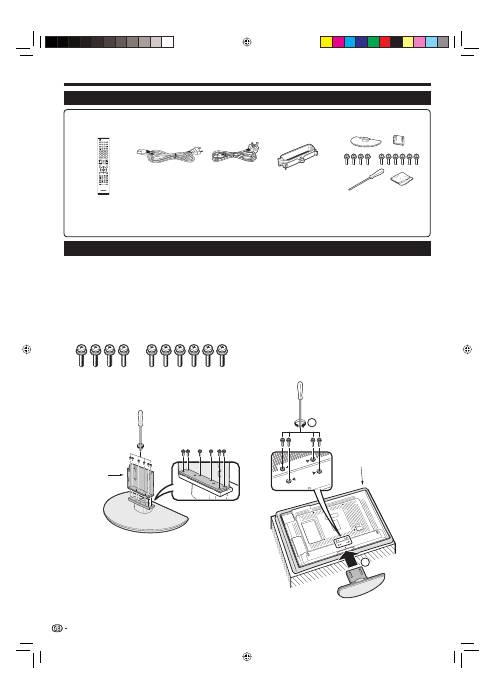
Confirm that there are ten screws with the stand
unit.
Attach the supporting post for the stand unit
onto the base using the six screws with the
screw driver (supplied) as shown.
1
2
Preparation
Inserting the stand.
Insert the stand into the openings on the
bottom of the TV (Hold the stand so it will
not drop from the edge of the base area).
Insert and tighten the four short screws into
the four holes on the rear of the TV.
3
1
2
1
2
NOTE
To detach the stand unit, perform the steps in reverse
order.
•
Supplied accessories
Attaching the stand unit
Before attaching (or detaching) the stand, unplug the AC cord from the AC INPUT terminal.
Before performing work, spread cushioning over the surface on which you will be laying the TV. This will prevent
it from being damaged.
CAUTION
Attach the stand in the correct direction.
Be sure to follow the instructions. Incorrect installation of the stand may result in the TV falling over.
•
•
•
•
10
Remote control unit
(
g
1)
AC cord (
g
2)
Stand unit (
g
1)
Cable clamp (
g
1)
Pages 3 and 11
Page 10
Page 14
Page 14
Operation manual (This publication)
Warranty card
•
•
“AA” size alkaline battery (
g
2) ... Page 11
•
SOURCE
TV
STB DVR VCR
DVD
SELECT
HOME
MENU
MENU
RETURN
EXIT
DVD TOPMENU/
GUIDE
EPG
P
4
5
6
7
8
9
0
P.INFO
1
2
3
INFO
CH RETURN
TV
CTRL
HDMI
REC STOP
HDD
AV
SELECTION
CM SKIP
DVD
TOOLS
SCREEN
SIZE
DTV
RADIO
1
2
3
4
5
6
7
8
TV
INPUT
ENTER
Supporting
post
Soft
cushion
KRL3237V_GB.indd 10
KRL3237V_GB.indd 10
2008/06/13 14:49:35
2008/06/13 14:49:35
