
Pioneer KRL-37V: Installation precautions
Installation precautions: Pioneer KRL-37V
Table of contents
- OPERATION MANUAL Contents
- Introduction
- Introduction
- Introduction Controlling other equipment using the supplied remote control unit Presetting manufacture codes Manufacture codes
- Introduction
- Using with other equipment (STB) Using with other equipment (VCR)
- Using with other equipment (DVD/DVR)
- Introduction
- Preparation
- Preparation CAUTION Cautions regarding the remote control unit
- Installation precautions
- Quick guide
- Quick guide Supplying power to the antenna Bundling the cables
- Checking signal strength and channel strength Confirm the following before turning on the power
- Watching TV Daily operation
- Watching TV EPG (Electronic Programme Guide) EPG Overview Useful settings for using EPG
- Selecting a programme using EPG
- Timer recording using EPG
- Using the MHEG-5 application (UK Teletext
- Connecting external devices NOTE
- Connecting external devices HDMI connection Component connection S-VIDEO/VIDEO connection
- Controlling devices with SCART using i/o link.A SCART connection
- Speaker/amplifier connection
- Connecting external devices Inserting a smart card
- HDMI CONTROL Controlling HDMI devices using HDMI CONTROL
- HDMI CONTROL connection
- MODE D’EMPLOI
Installation precautions
Observe the following precautions when installing with
any items such as the optional stand.
When using other stands, brackets or equivalent
items
Consult your dealer.
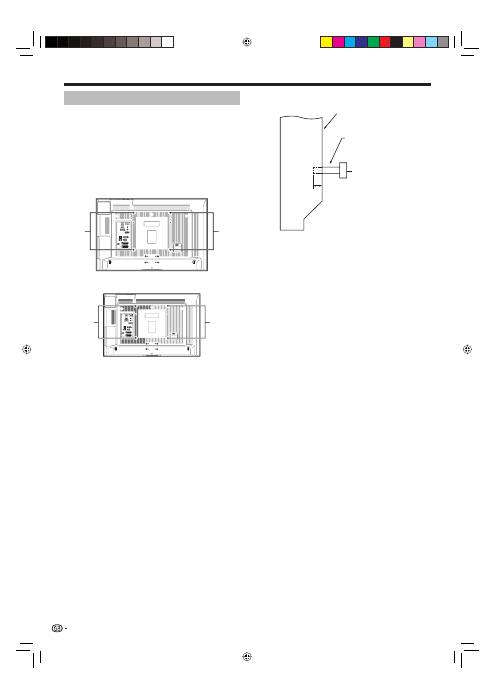
The following mounting holes can be used for the
installation.
Rear view
(KRL-37V)
(KRL-32V)
NOTE
The mounting holes can be used after removing the
black seals and the screws.
CAUTION
Use M6 screws, which go 12 mm to 15 mm in
depth from the mounting surface of the flat screen
TV. See the side view shown to the right.
Be careful not to block the ventilation opening at the
rear of the flat screen TV.
Be sure to install the flat screen TV on a flat surface
because the LCD panel used in this product is made
of glass.
The screw holes other than the illustrations above
are to be used only for the specified products. Never
use them for mounting non-specified products.
NOTE
Pioneer shall not be liable for any personal injury
or product damage that results from the use of
mounting items.
•
•
•
•
•
•
•
•
Mounting
holes
Mounting
holes
Mounting
holes
Mounting
holes
Preparation
Side view
Flat
screen
TV
Mounting surface
Mounting bracket
(or equivalent item)
M6 screw
12 mm to 15 mm
12
KRL3237V_GB.indd 12
KRL3237V_GB.indd 12
2008/06/13 14:49:40
2008/06/13 14:49:40
