
Asus Xonar DS: 1. Package contents 2. System requirements 3. Hardware introduction 3.1 Xonar DS card layout
1. Package contents 2. System requirements 3. Hardware introduction 3.1 Xonar DS card layout: Asus Xonar DS
Table of contents
- Table of content English ................................................................................................1
- 1. Package contents 2. System requirements 3. Hardware introduction 3.1 Xonar DS card layout
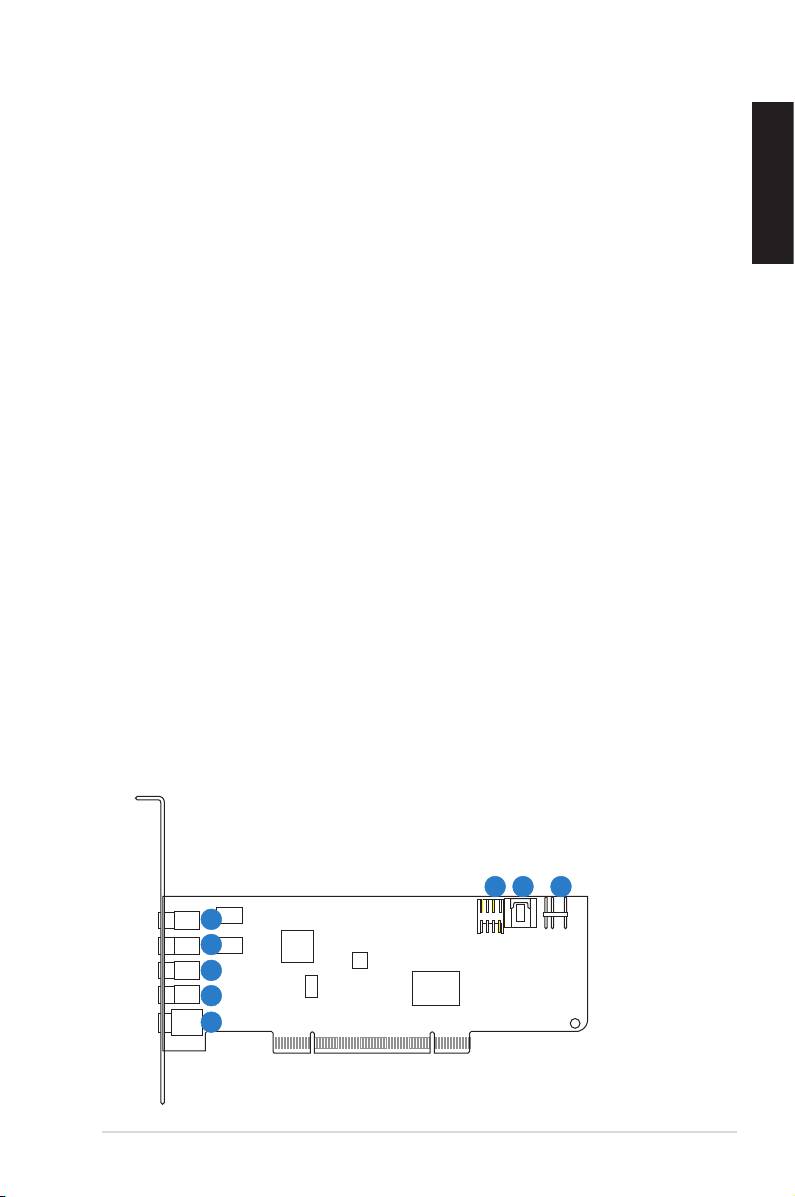
- No Item Description
- 3.2 Card installation Installing the Xonar DS card 4. Driver installation Installing the Xonar DS card driver
1. Package contents
Check your ASUS Xonar DS audio card package for the following items:
• ASUS Xonar DS PCI audio card
• S/PDIF TOSLINK optical adapter x1
• LowProleBracketx1
English
• Support CD
• Quick Start Guide
2. System requirements
To ensure a successful installation of the Xonar DS card, your computer must meet
the following requirements:
• One PCI 2.2 (or higher) compatible slot for the audio card
®
®
• Microsoft
Windows
Vista (32/64bit) / XP (32/64bit) / MCE2005
®
®
®
• Intel
Pentium
4 1.4 GHz or AMD
Athlon 1400 CPU or faster CPU
• 256MB(orabove)DRAMsystemmemory
• 60MBavailableHDDspacefordriverinstallationpackage
• CD-ROMdrive(orDVD-ROMdrive)forsoftwareinstallation
• High-quality headphones, powered analog speakers, or a Dolby Digital or DTS
decoder,toenjoytheultra-highdelitysoundofthecard
3. Hardware introduction
3.1 Xonar DS card layout
6
7 8
1
2
3
4
5
ASUS Xonar DS Quick Start Guide
3
