
Asus WL-138G: Reading the ASUS WLAN Status Indicators Orientating the Antenna
Reading the ASUS WLAN Status Indicators Orientating the Antenna: Asus WL-138G
Table of contents
- English ................................................................. 1
- System Requirements The Product Package Installation Procedures
- Installing the ASUS WLAN Card Utilities & Driver
- Reading the ASUS WLAN Status Indicators Orientating the Antenna
- ASUS WLAN Utility Quick Start
Quick Install Guide
English
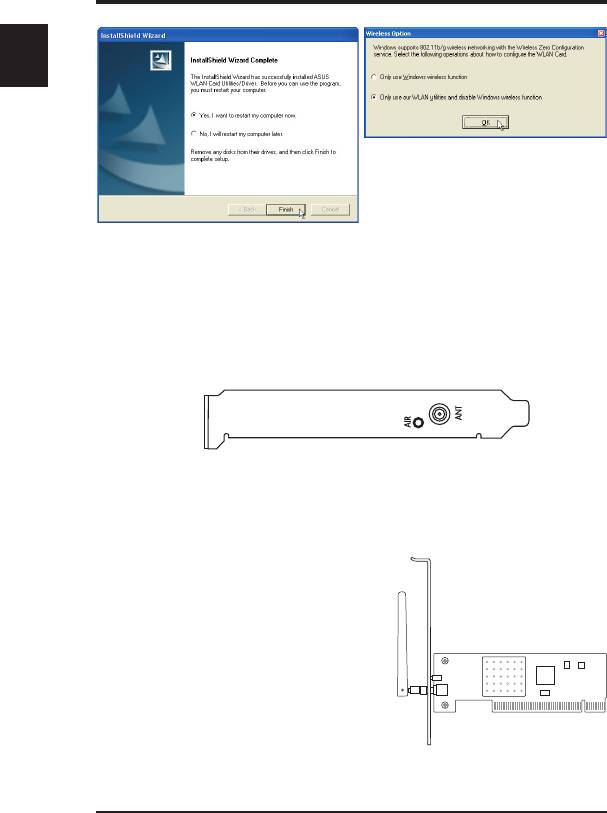
7. When the program is launched for
the first time, you will be asked
which function to use. Select to
use our WLAN utilities for more
functionality.
6. When Setup is complete, click Finish
to exit the installation wizard.
Reading the ASUS WLAN Status Indicators
The ASUS WLAN card consists of one AIR indicator that shows
the status of the ASUS WLAN Card.
OFF: No wireless activity.
Blinking: Transmitting or receiving wireless data.
Orientating the Antenna
The ASUS WLAN Card has one
external antenna. It is recommended
that you adjust the external antenna
straight up for maximum range and
higher link quality.
4 ASUS WLAN Card
Top 10 manuals
100.00
NZXT HALE90 1000W99.99
Samsung SM-R38099.97
AEG BSB 18C99.97
Dell 2700W99.97
Smeg KSEC70X99.96
Beurer HDE 4099.96
Pyramida KH 50 v.299.96
MSI CSM-H81M-P3299.96
AEG HR 562799.95
Melissa 640-048


