
Asus WL-107G: Quick Start Guide
Quick Start Guide: Asus WL-107G
Table of contents
Quick Start Guide
English
English
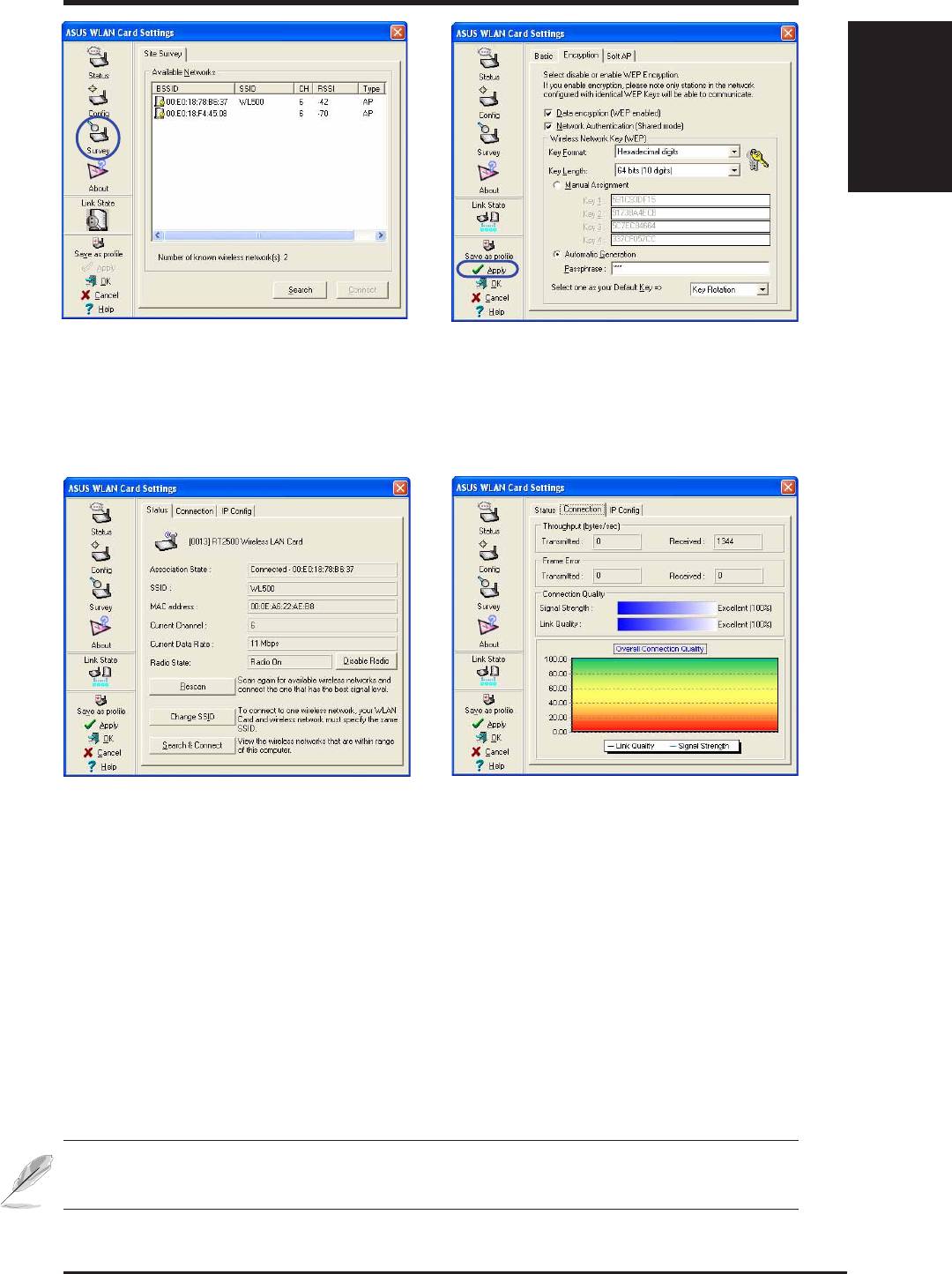
3. Use “Site Survey” if you don’t know the
4. Encryption settings must also match those
name of your access point(s).
set in the access point. Ask your network
administrator about settings if necessary.
Click Apply to save your settings
5. Check the “Status” page to see the “Asso-
6. You can also see the connection quality on
ciation State”. It should show “Connected -
the “Connection” page. Click OK to exit the
xx:xx:xx:xx:xx:xx”.
utility.
NOTE: Please refer to the User’s Manual for details on WEP/WPA
settings and details on using the WLAN utility.
ASUS WLAN Card
5
Top 10 manuals
100.00
NZXT HALE90 1000W99.99
Samsung SM-R38099.97
AEG BSB 18C99.97
Dell 2700W99.97
Smeg KSEC70X99.96
Beurer HDE 4099.96
Pyramida KH 50 v.299.96
MSI CSM-H81M-P3299.96
AEG HR 562799.95
Melissa 640-048


