
Asus WAVI: Table of Contents
Table of Contents: Asus WAVI
Table of contents
- Table of Contents

Table of Contents
Safety information .....................................................................................................4
English
ASUS WAVI Specifications summary ....................................................................5
Getting to know your ASUS WAVI .........................................................................6
Package contents ..........................................................................................6
WAVI features ...............................................................................................................7
Receiver ............................................................................................................7
Transmitter ......................................................................................................7
Using your ASUS WAVI ..............................................................................................8
Notices ......................................................................................................................... 10
ASUS Contact information ................................................................................... 13
ASUS WAVI
3
Safety information
English
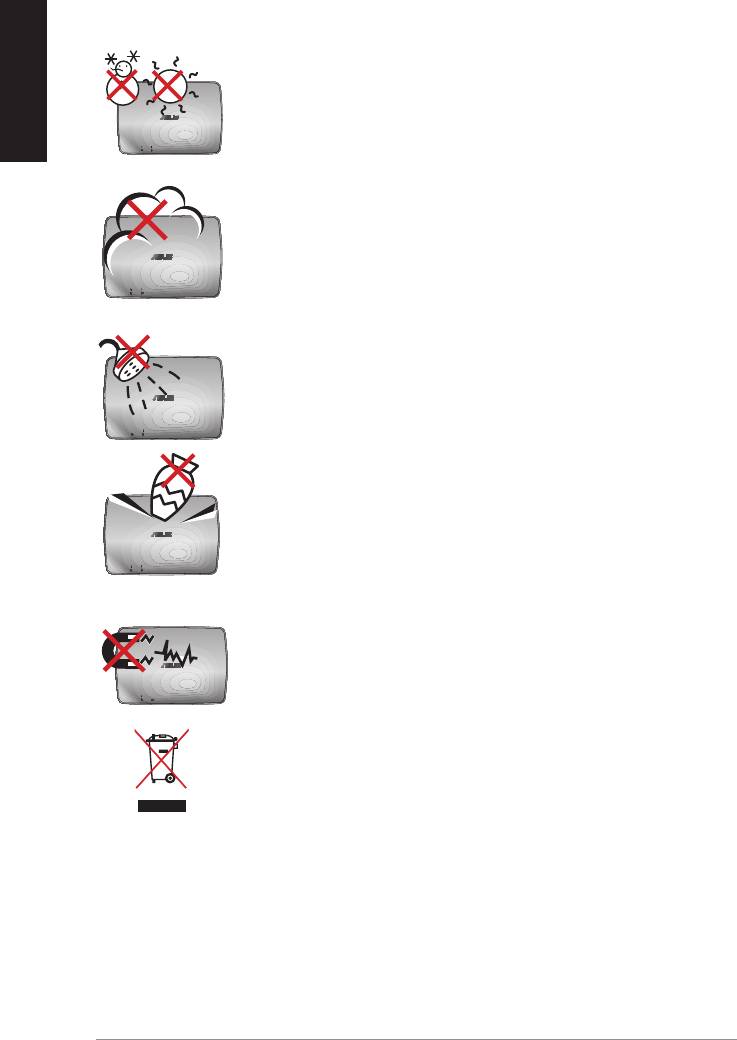
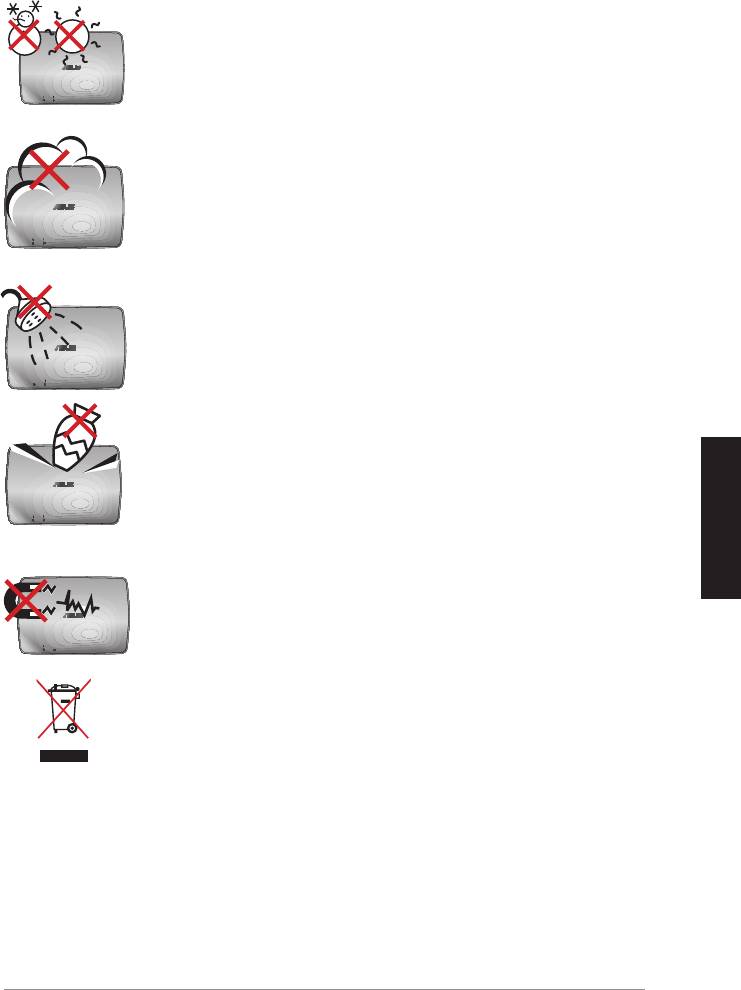
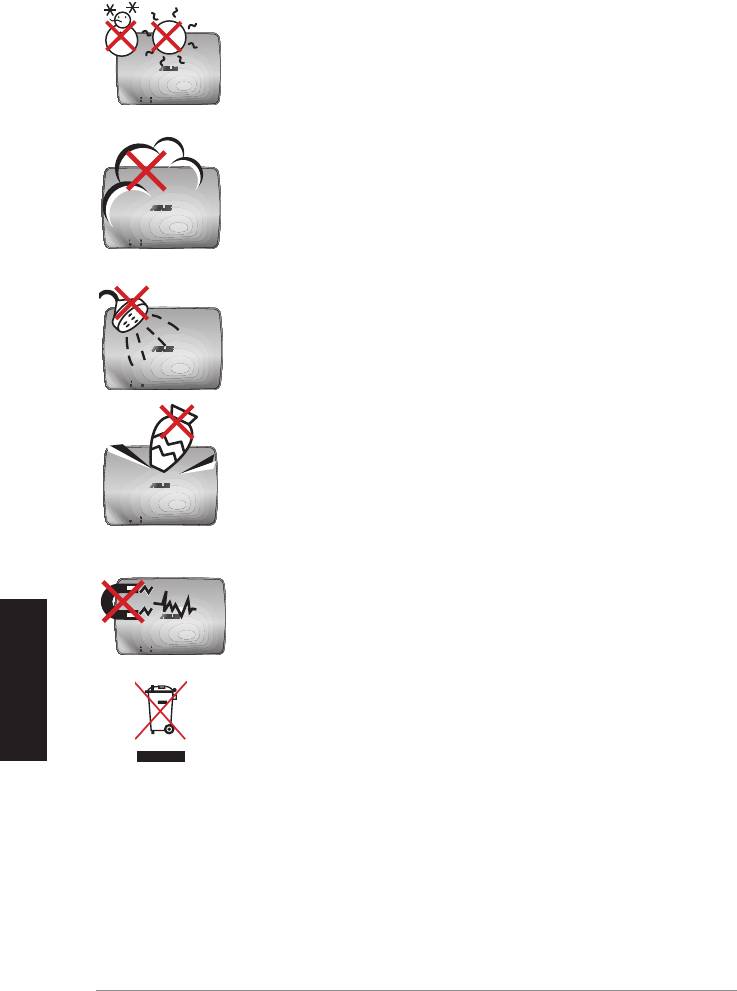
SAFE TEMP: The ASUS WAVI should only be used in
environments with ambient temperatures between
5°C (41°F) and 35°C (95°F).
DO NOT expose to dirty or dusty environments. DO NOT
operate during a gas leak.
DO NOT expose to or use near liquids, rain, or moisture.
DO NOT place or drop objects on top and do not shove
any foreign objects into the ASUS WAVI.
DO NOT expose to strong magnetic or electrical fields.
DO NOT throw the ASUS WAVI in municipal waste. Check
local regulations for disposal of electronic products.
4
ASUS WAVI

ASUS WAVI Specifications summary
Resolution TV: 1080p, 1080i, 720p, 576p, 480p
3D Video: 1080p @ 24Hz
Audio
7.1 channels 192 KHz 24-bit, AC-3 and DTS Dolby
English
Wireless HDMI technology
AMIMON WHDI 5GHz 4T5R (256-bit or 128-bit AES encryption)
Transmission distance
up to 25 meters (Line of sight)
Delay time
<1ms
Power supply
Transmitter and Receiver: 12V, 2A 24W adapters
Power consumption
Transmitter and Receiver: 24W
I/O ports
Transmitter:
- USB port x 1 (for connecting to a computer’s
USB port)
- HDMI port x 1
- DC-In port x 1
- Power LED x 1*
- Wireless LED x 1*
Receiver:
- LAN port x 1
- USB ports x 2
- HDMI port x 1
- DC-In port x 1
- Power LED x 1*
- Wireless LED x 1*
* The power LED / Wireless LED turns blue to indicate successful
connection and turns orange if the connection was failed. The
signal strength will be displayed on the screen.
NOTE: Specifications are subject to change without prior notice.
ASUS WAVI
5
Getting to know your ASUS WAVI
English
ASUS WAVI allows you to wirelessly extend or share your audio/video sources
from your computer to a high-definition external display up to 25 meters
(within line of sight) for a latency-free (<1ms) full high-definition 1080p video
and crsytal-clear audio transmissions. It allows you to enjoy video games and
movies from your computer to your high-definition external display.
NOTE: For a full 1080p wireless high-definition audio and video
transmissions up to 25 meters, ensure that the receiver is positioned
within a clear line of sight to the transmitter.
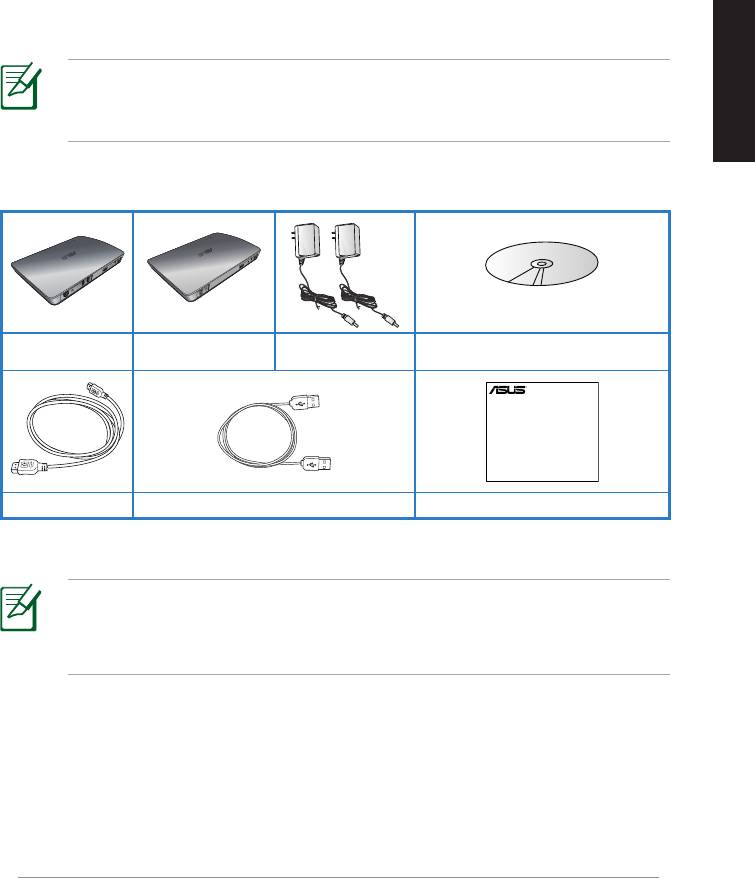
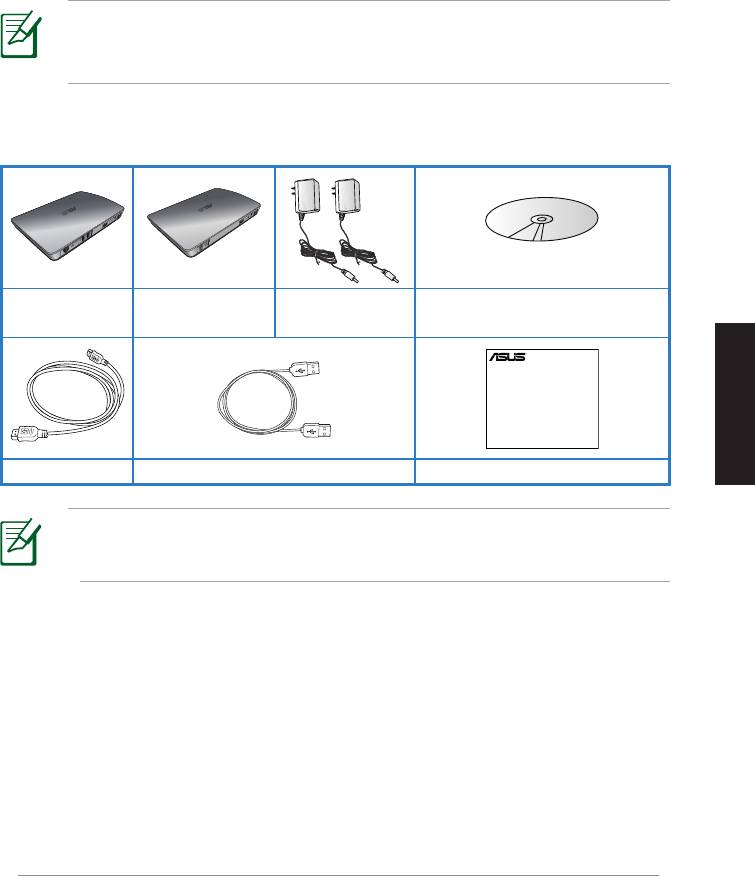
Package contents
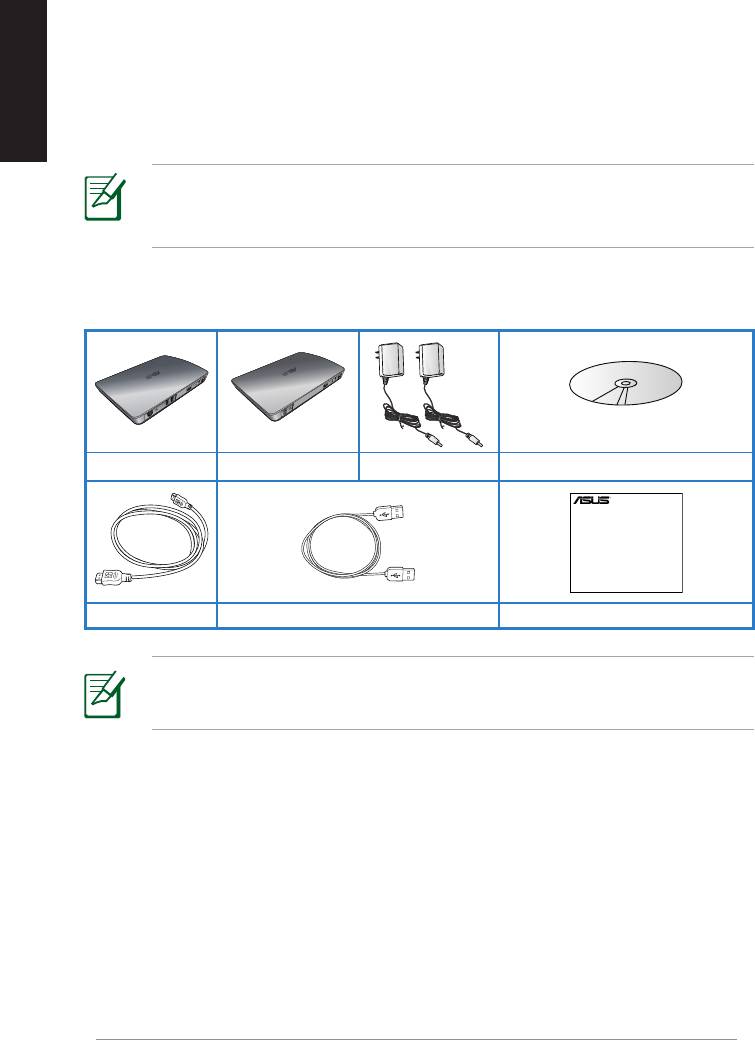
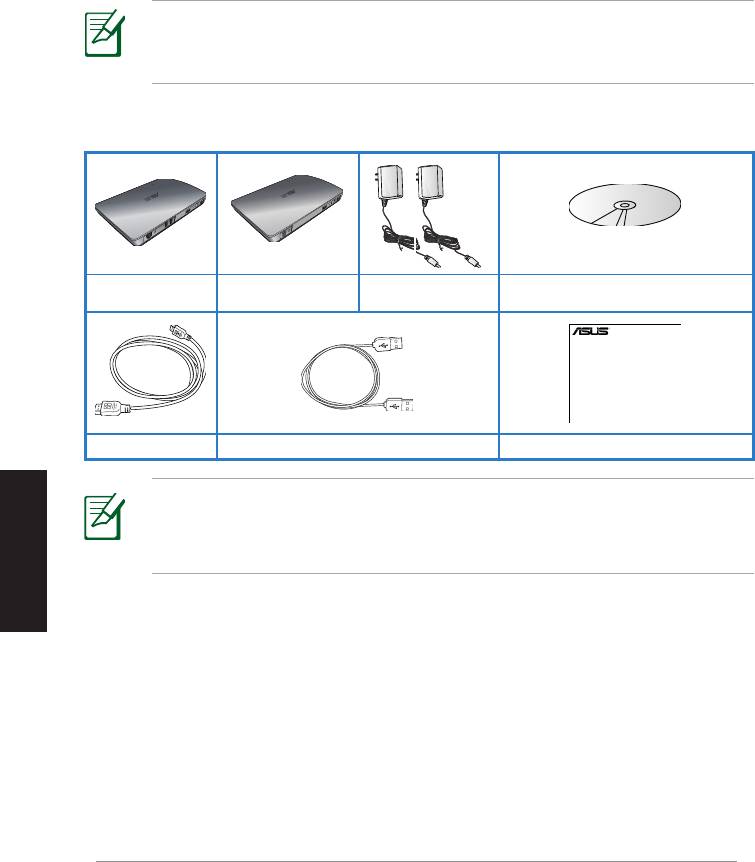
WAVI receiver WAVI transmitter AC adapter x 2 Support CD (User Manual & Driver)
NOTES:
• If any of the items is damaged or missing, contact your retailer.
6
ASUS WAVI
WAVI
3D Wireless PC-to-TV Kit
Quick Start Guide
HDMI cable x 2 USB cable Quick Start Guide
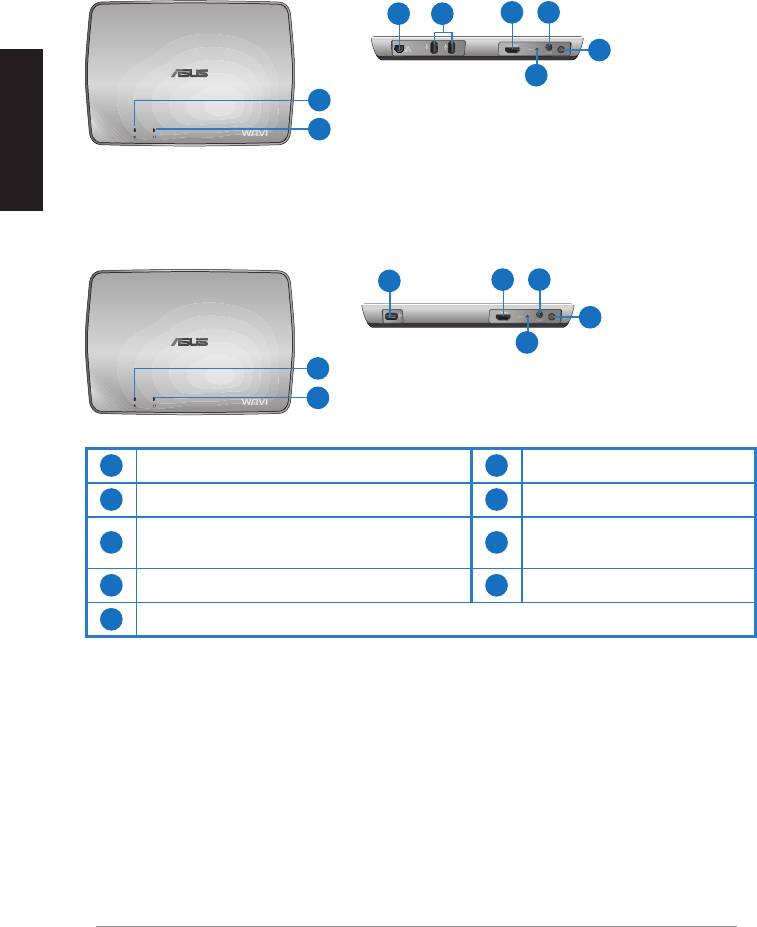
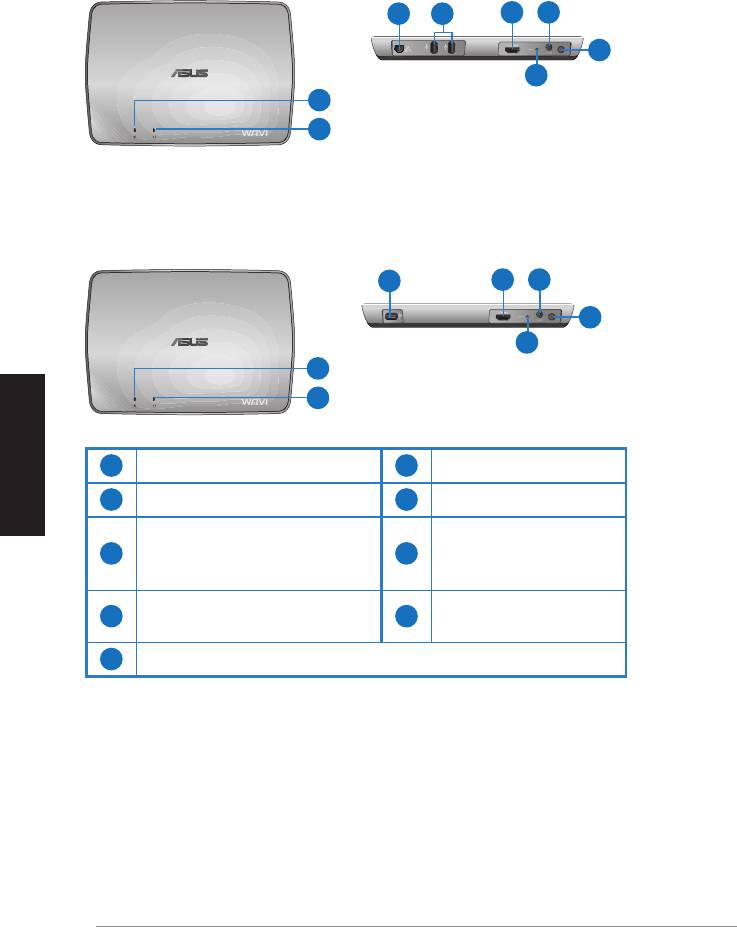
WAVI features
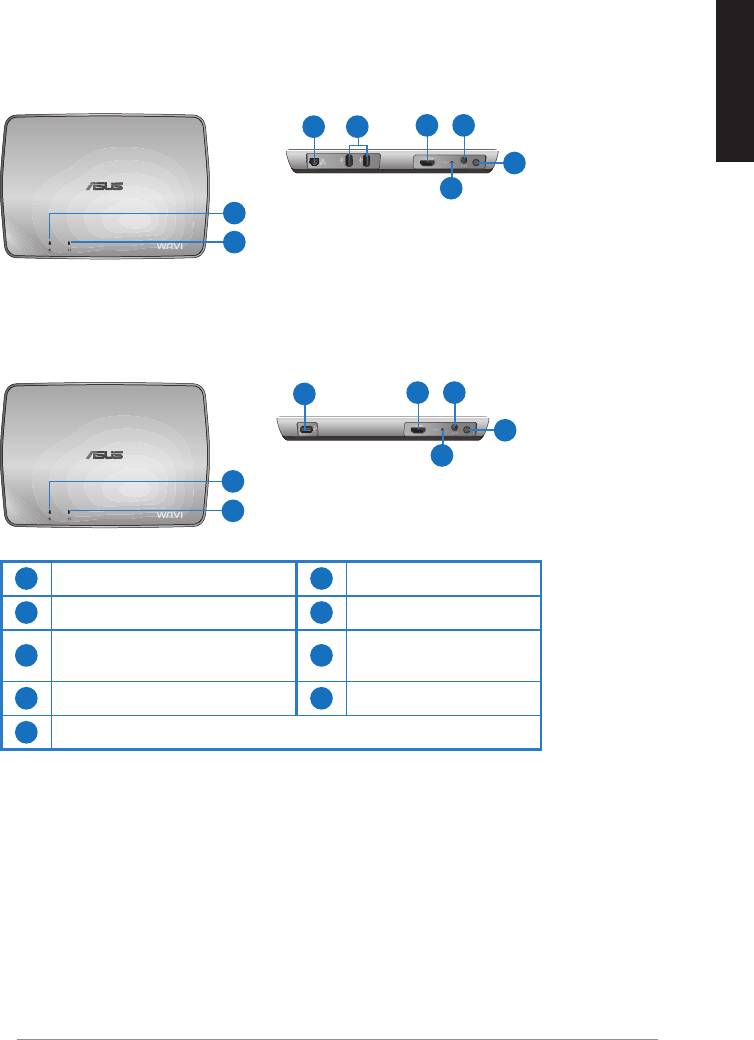
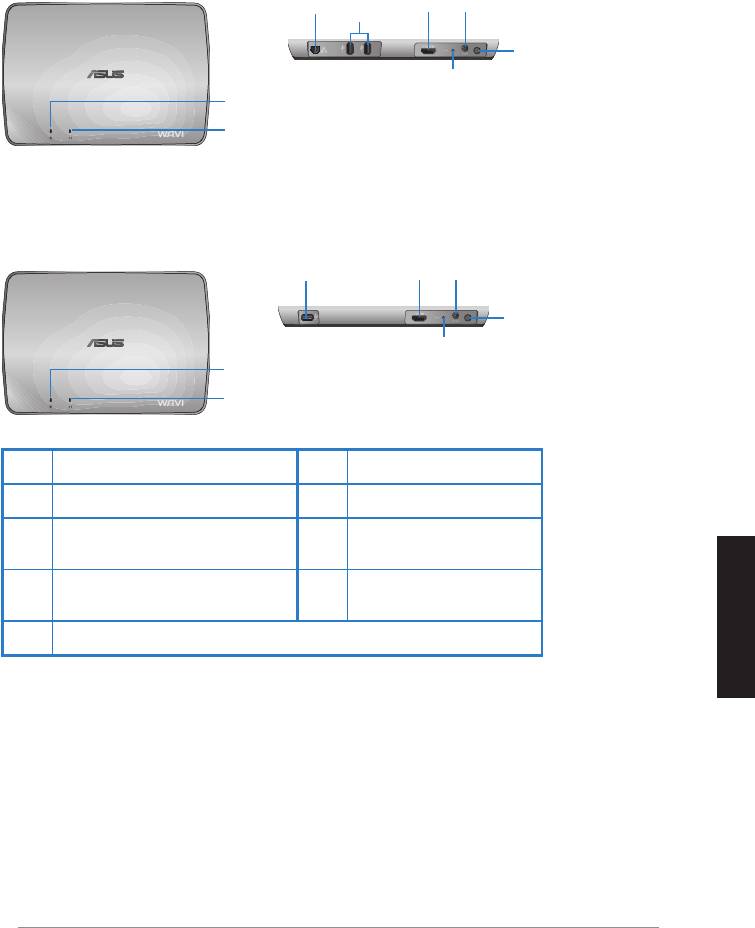
Receiver
Front view
Rear view
English
3 5
6 7
8
9
1
2
Transmitter
Front view
Rear view
4
6 7
8
9
1
2
1
6
Power LED
HDMI port
2
Wireless LED
7
DC-In port
LAN port
3
8
Power button
(for firmware update only)
4
9
USB port (connect to PC)
Reset button
5
USB ports (connect to other devices)
ASUS WAVI
7
English
8
ASUS WAVI
ON
OFF
Using your ASUS WAVI
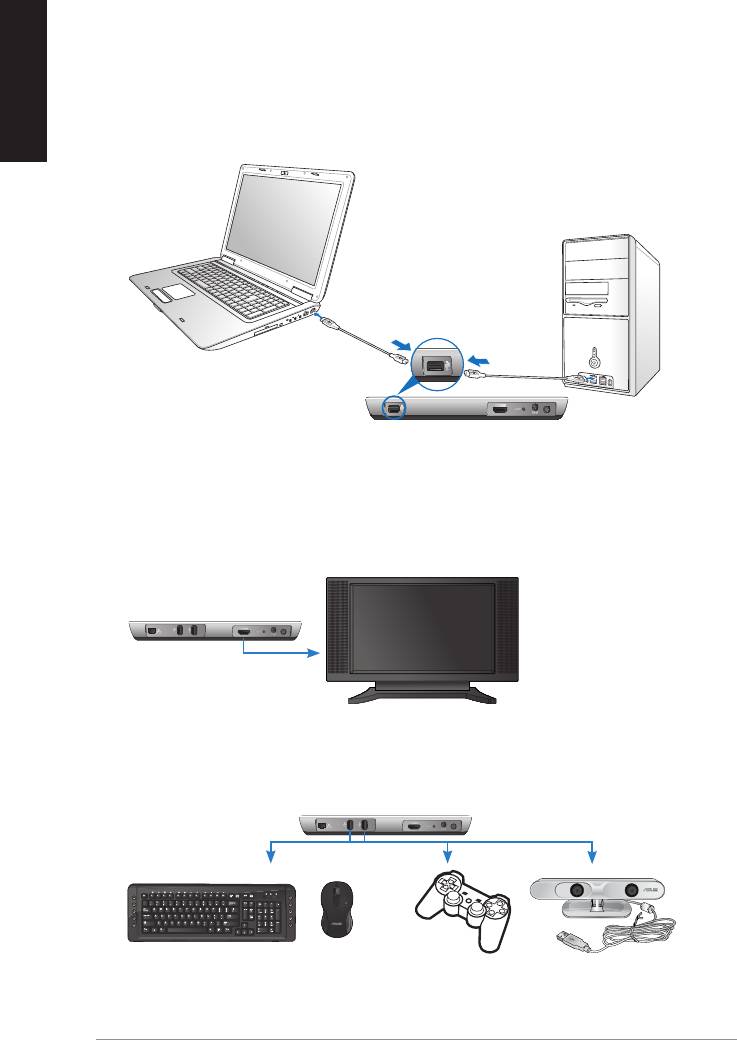
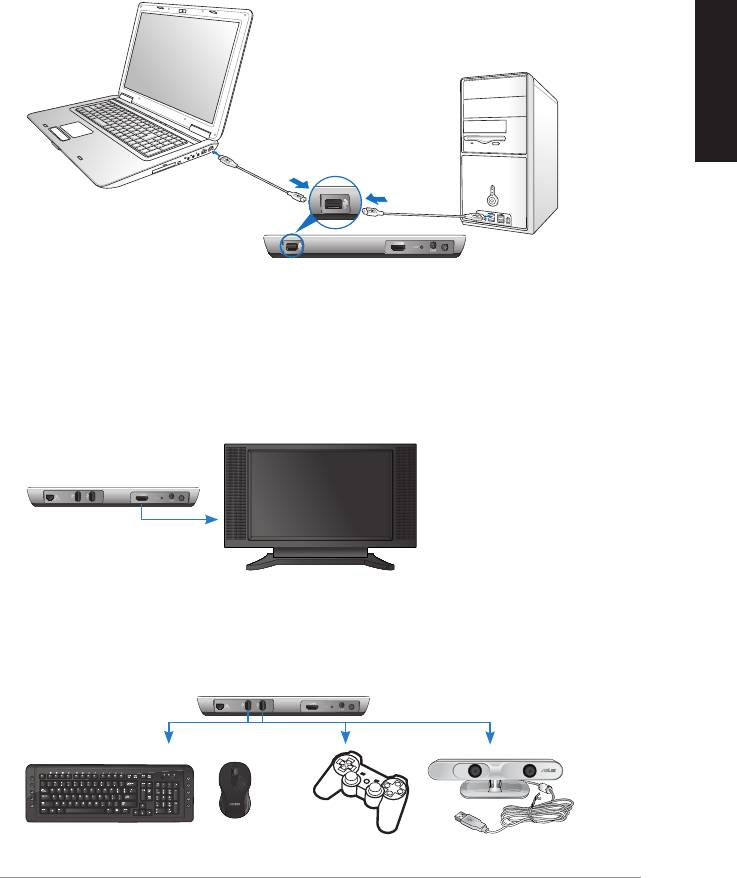
To use your ASUS WAVI:
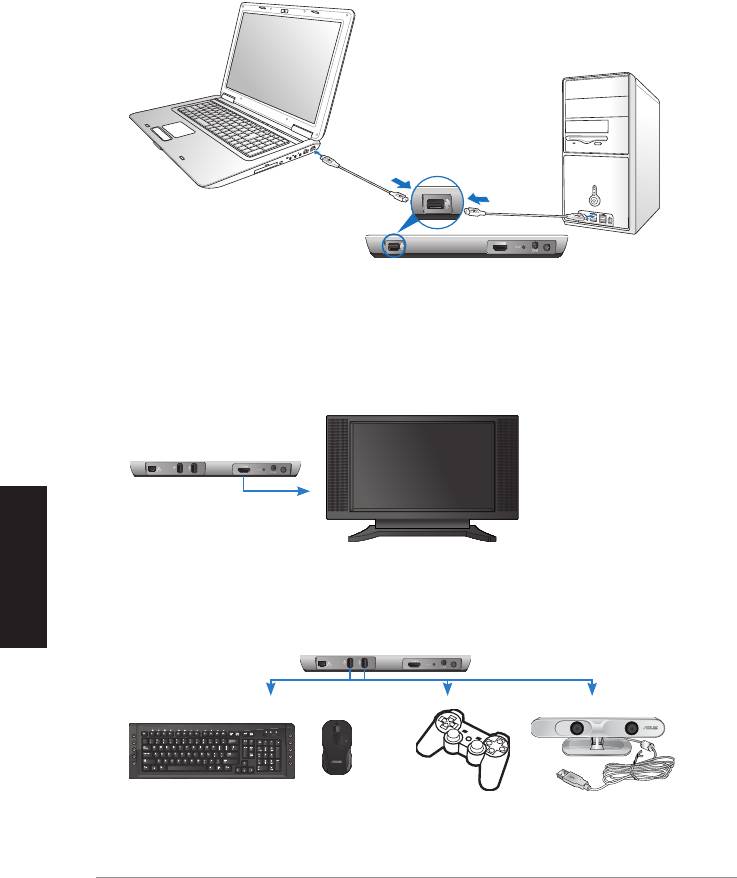
1. Install the WAVI driver from the bundled support CD.
2. Using the bundled USB cable, connect your WAVI transmitter's USB port
to your notebook or desktop PC's USB port.
USB port
Transmitter
3. Using the bundled HDMI cable, connect your WAVI transmitter's HDMI
port to your notebook or desktop PC's HDMI port.
4. Connect your TV to your WAVI receiver using the bundled HDMI cable,
and then set your TV to HDMI mode.
WAVI receiver
HDTV
5. If you want to use other devices, connect them to your WAVI receiver as
shown below.
C
WAVI receiver
USB Keyboard / Mouse Gamepad ASUS Xtion
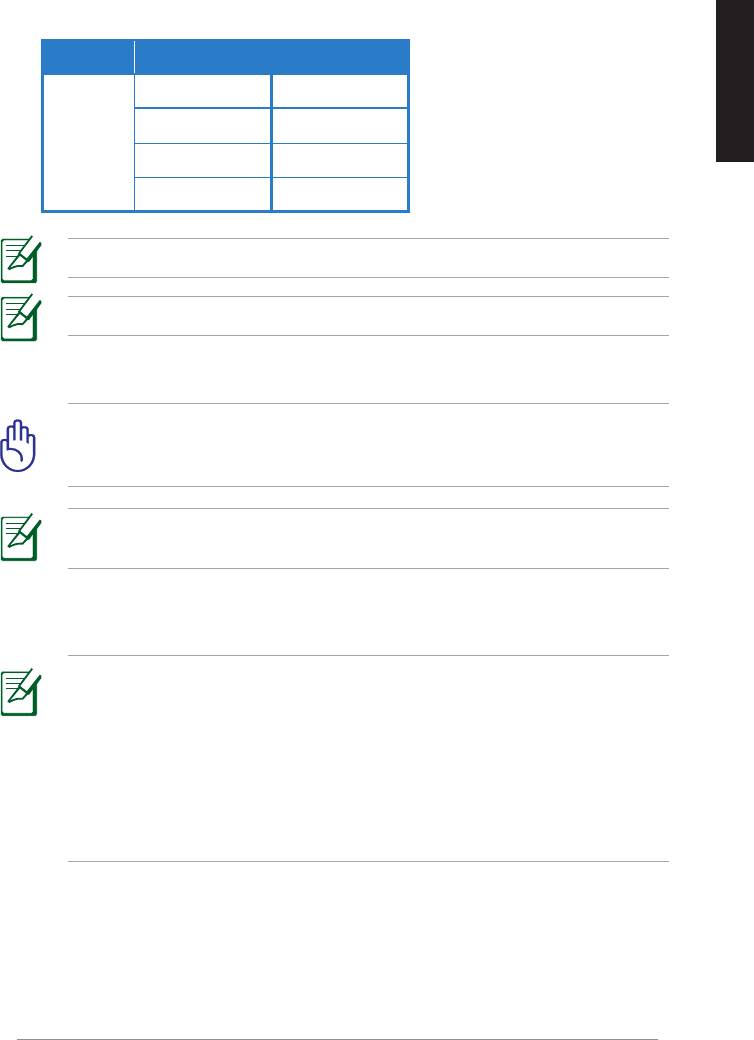
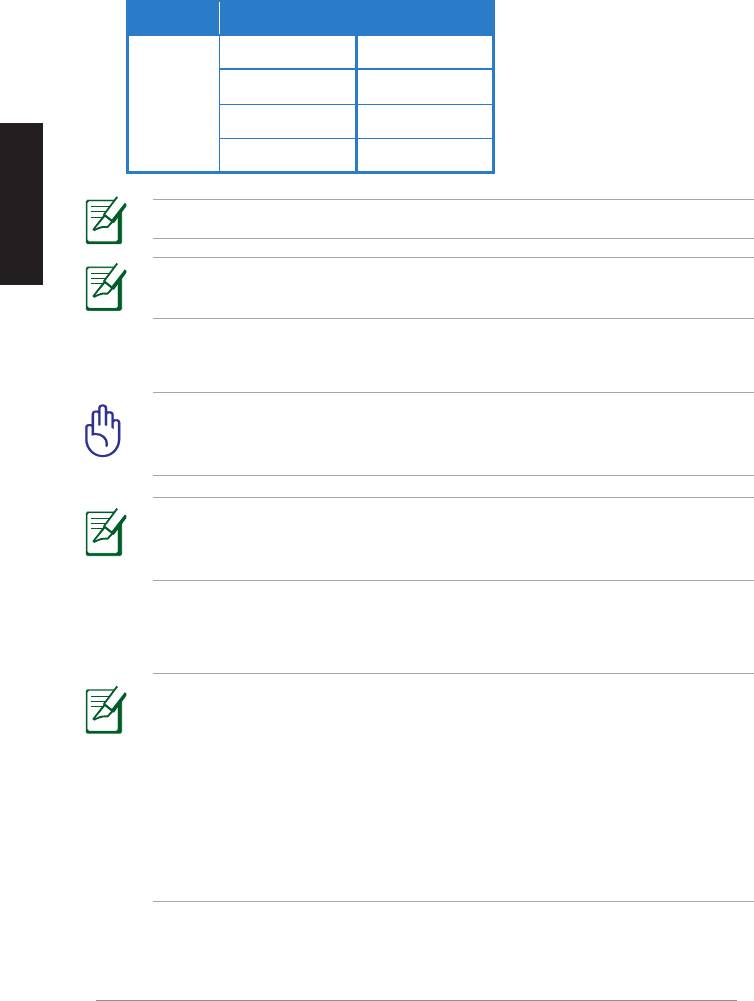
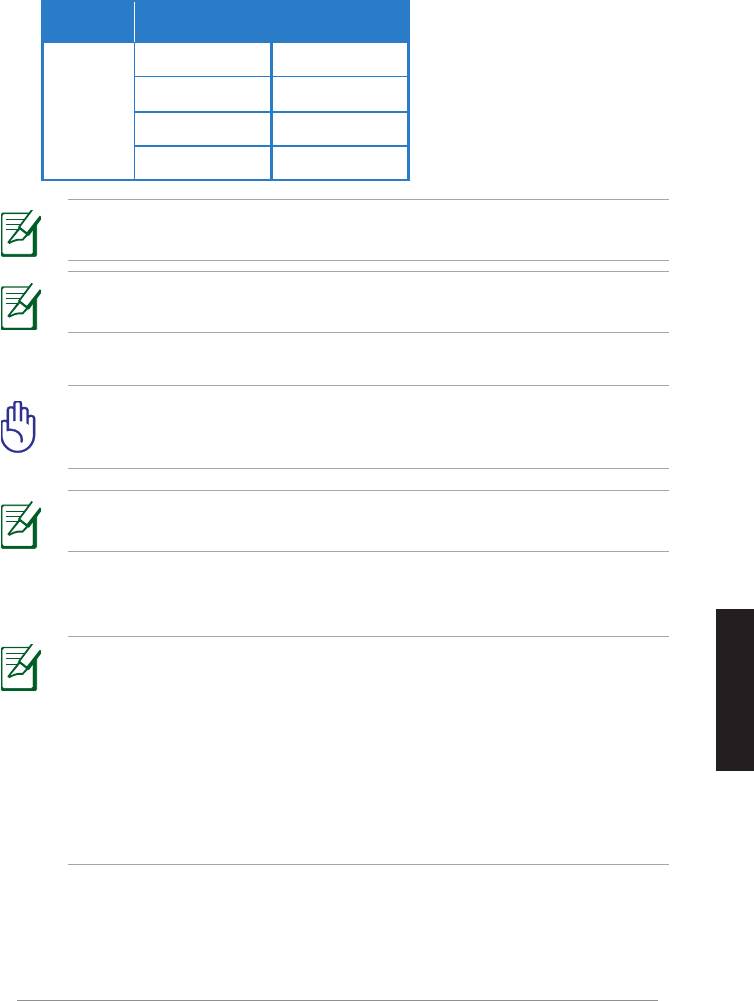
See the table below for the supported wireless keyboard and mouse models.
Brand Wireless keyboard and mouse models
WT400 WT410
English
WT45 WT450
ASUS
W4000 BX700
W4500 M-A65
NOTE: The above list is subject to change without prior notice.
NOTE: Do not connect a USB flash drive to your WAVI receiver.
6. Turn on your WAVI transmitter and receiver.
IMPORTANT! Ensure that you connect the bundled AC adapters to
the WAVI transmitter and receiver. Ensure that you plug the bundled
AC adapters to the correct power rating.
NOTE: The power LED / Wireless LED turns blue to indicate successful
connection and turns orange if the connection was failed.
7. Set your notebook or desktop PC's default sound playback device to
HDMI output.
NOTES:
To change the audio settings:
• For Windows 7 / Vista, click Control Panel > Hardware and Sound
> Sound. From the Playback tab, select HDMI output as the default
sound playback device.
• For Windows XP, click Control Panel > Sounds and Audio devices >
Audio. Select HDMI output under Sound Playback.
ASUS WAVI
9

Notices
English
REACH
Complying with the REACH (Registration, Evaluation, Authorisation, and
Restriction of Chemicals) regulatory framework, we published the chemical
substances in our products at ASUS REACH website at
http://csr.asus.com/english/REACH.htm.
Federal Communications Commission Interference Statement
This device complies with FCC Rules Part 15. Operation is subject to the
following two conditions:
• This device may not cause harmful interference.
• This device must accept any interference received, including
interference that may cause undesired operation.
This equipment has been tested and found to comply with the limits for a class
B digital device, pursuant to Part 15 of the Federal Communications Commission
(FCC) rules. These limits are designed to provide reasonable protection against
harmful interference in a residential installation. This equipment generates,
uses, and can radiate radio frequency energy and, if not installed and used
in accordance with the instructions, may cause harmful interference to radio
communications. However, there is no guarantee that interference will not occur
in a particular installation. If this equipment does cause harmful interference
to radio or television reception, which can be determined by turning the
equipment off and on, the user is encouraged to try to correct the interference
by one or more of the following measures:
• Reorient or relocate the receiving antenna.
• Increase the separation between the equipment and receiver.
• Connect the equipment into an outlet on a circuit different from that to
which the receiver is connected.
• Consult the dealer or an experienced radio/TV technician for help.
CAUTION: Any changes or modifications not expressly approved
by the party responsible for compliance could void the user’s
authority to operate the equipment.
10
ASUS WAVI

FCC Radiation Exposure Statement
This equipment complies with FCC radiation exposure limits set forth for an
uncontrolled environment. This equipment should be installed and operated
with minimum distance 20cm between the radiator & your body.
English
This transmitter must not be co-located or operating in conjunction with any
other antenna or transmitter. If the device is going to be operated in 5.15 ~
5.25GHz frequency range, then it is restricted to an indoor environment only.
RF Exposure warning
• The equipment complies with FCC RF exposure limits set forth for an
uncontrolled environment.
• The equipment must be co-located or operated in conjunction with any
other antenna or transmitter.
IC Radiation Exposure Statement for Canada
This equipment complies with IC radiation exposure limits set forth for an
uncontrolled environment. To maintain compliance with IC RF exposure
compliance requirements, please avoid direct contact to the transmitting
antenna during transmitting. End users must follow the specific operating
instructions for satisfying RF exposure compliance.
Operation is subject to the following two conditions:
• This device may not cause interference.
• This device must accept any interference, including interference that
may cause undesired operation of the device.
This device should be used only as specified within this manual to meet RF
exposure requirements. Using this device in a manner inconsistent with this
manual could lead to excessive RF exposure conditions.
This device and its antenna(s) must not be co-located or operating in
conjunction with any other antenna or transmitter.
Country Code selection feature to be disabled for products marketed to the
US/CANADA.
If the device is going to be operated in 5.15 ~ 5.25GHz frequency range, then
it is restricted to an indoor environment only.
This Class [B] digital apparatus complies with Canadian ICES-003.
Cet appareil numérique de la classe [B] est conforme à la norme NMB-003 du
Canada
ASUS WAVI
11

NCC警語
English
Declaration of Conformity for R&TTE directive 1999/5/EC
Hereby, ASUS declares that this product is in compliance with the essential
requirements and other relevant provisions of Directive 1995/5/EC.
This device will be sold in the following EEA (European Economic Area)
countries: Austria, Italy, Belgium, Liechtenstein, Denmark, Luxembourg,
Finland, Netherlands, France, Norway, Germany, Portugal, Greece, Spain,
Iceland, Sweden, Ireland, United Kingdom, Cyprus, Czech Republic,
Estonia, Hungary, Latvia, Lithuania, Malta, Slovakia, Poland, and Slovenia.
CE Mark Warning
This is a Class B product, in a domestic environment, this product may cause
radio interference, in which case the user may be required to take adequate
measures.
CAUTION: The device for the band 5150-5350 MHz is only for indoor
use.
12
ASUS WAVI

ASUS Contact information
ASUSTeK COMPUTER INC. (Asia Pacific)
Address 15 Li-Te Road, Peitou, Taipei, Taiwan 11259
Telephone +886-2-2894-3447
Fax +886-2-2890-7798
English
Website www.asus.com.tw
Technical Support
Telephone +86-21-3842-9911
Online support support.asus.com
ASUS COMPUTER INTERNATIONAL (America)
Address 800 Corporate Way, Fremont, CA 94539, USA
Telephone +1-510-739-3777
Fax +1-510-608-4555
Website usa.asus.com
Technical Support
Telephone +1-812-282-2787
Support fax +1-812-284-0883
Online support support.asus.com
ASUS COMPUTER GmbH (Germany and Austria)
Address Harkort Str. 21-23, D-40880 Ratingen, Germany
Fax +49-2102-9599-11
Online contact www.asus.com.de/sales
Technical Support
Telephone (Component) +49-1805-010923*
Telephone (System/
Notebook/Eee/LCD) +49-1805-010920*
Support fax +49-2102-959911
Online support www.asus.com.de/support
Website www.asus.com.de/news
* EUR 0.14/minute from a German fixed landline; EUR 0.42/minute from a mobile phone.
Manufacturer:
ASUSTeK Computer Inc.
Tel: +886-2-2894-3447
Address: No. 150, LI-TE RD., PEITOU, TAIPEI 112, TAIWAN
Authorised
ASUS Computer GmbH
representative
Address: HARKORT STR. 21-23, 40880 RATINGEN,
in Europe:
GERMANY
ASUS WAVI
13
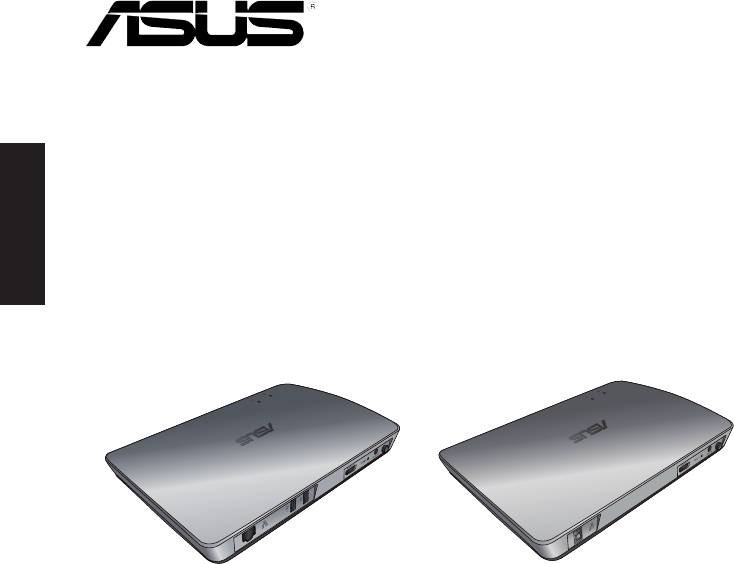
Français
WAVI
(Wireless Audio Video Interface)
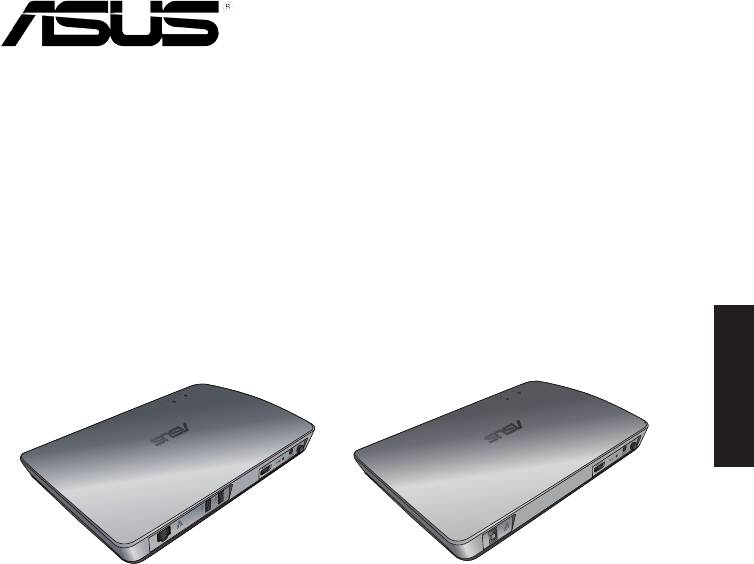
Récepteur WAVI Émetteur WAVI
Manuel de l’utilisateur

F6186
Première édition
Février 2011
Français
Copyright © 2011 ASUSTeK COMPUTER INC. Tous droits réservés.
Aucun extrait de ce manuel, incluant les produits et logiciels qui y sont décrits, ne peut
être reproduit, transmis, transcrit, stocké dans un système de restitution, ou traduit dans
quelque langue que ce soit sous quelque forme ou quelque moyen que ce soit, à l’
exception de la documentation conservée par l’acheteur dans un but de sauvegarde, sans
la permission écrite expresse de ASUSTeK COMPUTER INC. (“ASUS”).
La garantie sur le produit ou le service ne sera pas prolongée si (1) le produit est réparé,
modifié ou altéré, à moins que cette réparation, modification ou altération ne soit
autorisée par écrit par ASUS; ou (2) si le numéro de série du produit est dégradé ou
manquant.
ASUS FOURNIT CE MANUEL “TEL QUE” SANS GARANTIE D’AUCUNE SORTE, QU’ELLE SOIT
EXPRESSE OU IMPLICITE, COMPRENANT MAIS SANS Y ETRE LIMITE LES GARANTIES OU
CONDITIONS DE COMMERCIALISATION OU D’APTITUDE POUR UN USAGE PARTICULIER. EN
AUCUN CAS ASUS, SES DIRECTEURS, CADRES, EMPLOYES OU AGENTS NE POURRONT ÊTRE
TENUS POUR RESPONSABLES POUR TOUT DOMMAGE INDIRECT, SPECIAL, SECONDAIRE OU
CONSECUTIF (INCLUANT LES DOMMAGES POUR PERTE DE PROFIT, PERTE DE COMMERCE,
PERTE D‘UTILISATION DE DONNEES, INTERRUPTION DE COMMERCE ET EVENEMENTS
SEMBLABLES), MEME SI ASUS A ETE INFORME DE LA POSSIBILITE DE TELS DOMMAGES
PROVENANT DE TOUT DEFAUT OU ERREUR DANS CE MANUEL OU DU PRODUIT.
LES SPECIFICATIONS ET INFORMATIONS CONTENUES DANS CE MANUEL SONT FOURNIES
A TITRE INFORMATIF SEULEMENT, ET SONT SUJETTES A CHANGEMENT A TOUT MOMENT
SANS AVERTISSEMENT ET NE DOIVENT PAS ETRE INTERPRETEES COMME UN ENGAGEMENT
DE LA PART D’ASUS. ASUS N‘ASSUME AUCUNE RESPONSABILITE POUR TOUTE ERREUR OU
INEXACTITUDE QUI POURRAIT APPARAITRE DANS CE MANUEL, INCLUANT LES PRODUITS
ET LOGICIELS QUI Y SONT DECRITS.
Les produits et noms de sociétés qui apparaissent dans ce manuel ne sont utilisés que
dans un but d’identification ou d’explication dans l’intérêt du propriétaire, sans intention
de contrefaçon.
ASUS WAVI
15

Table des matières
Informations relatives à la sécurité ................................................................... 17
Résumé des spécifications du ASUS WAVI ...................................................... 18
Faire connaisance avec votre ASUS WAVI ....................................................... 19
Français
Contenu de la boîte ...................................................................................19
Caractéristiques physiques du ASUS WAVI .................................................... 20
Récepteur.......................................................................................................20
Émetteur ........................................................................................................20
Utiliser votre ASUS WAVI ....................................................................................... 21
Notices ......................................................................................................................... 23
Informations de contact ASUS ............................................................................ 26
16
ASUS WAVI
Informations relatives à la sécurité
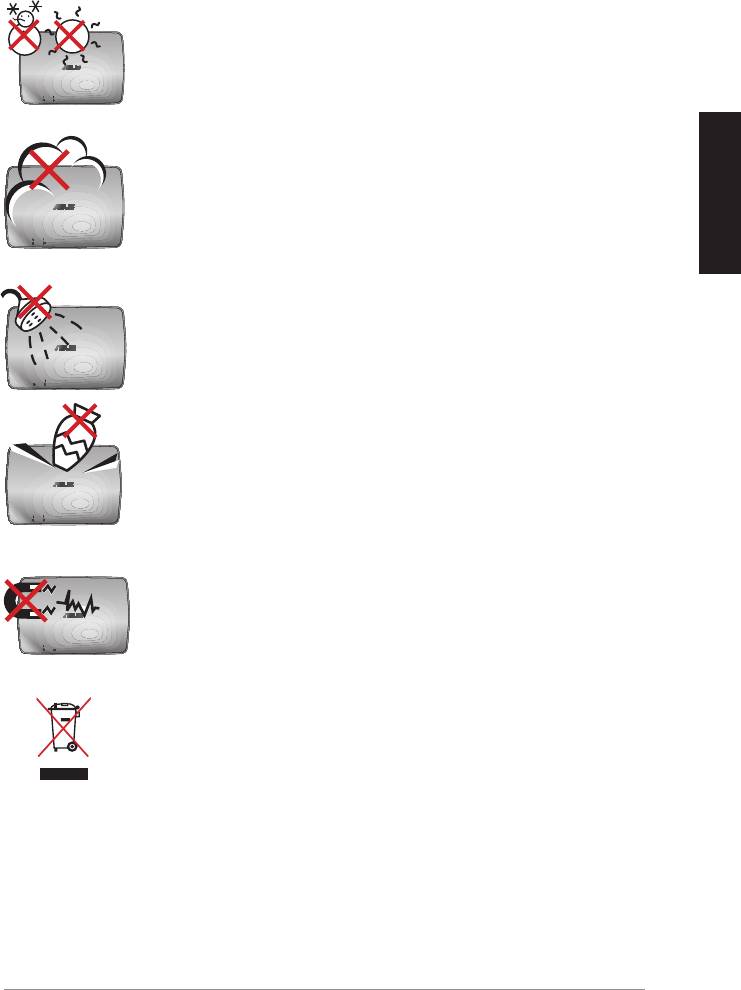
SAFE TEMP: Le ASUS WAVI ne doit être utilisé que dans
des environnements dont la température ambiante est
comprise entre 5°C (41°F) et 35°C (95°F).
NE PAS exposer à des environnements sales ou
poussiéreux. NE PAS utiliser l’appareil lors d'une fuite de
gaz
Français
NE PAS exposer l'appareil à des liquides, à la pluie ou à
l'humidité.
NE PAS placer ou faire tomber d'objets au-dessus et
n'insérez pas de corps étranger dans le ASUS WAVI.
NE PAS exposer à un aimant ou à des champs magnétiques
forts.
NE PAS mettre ce produit au rebut avec les déchets
municipaux. Consultez les réglementations locales pour la
mise au rebut des produits électroniques.
ASUS WAVI
17
Résumé des spécifications du ASUS WAVI
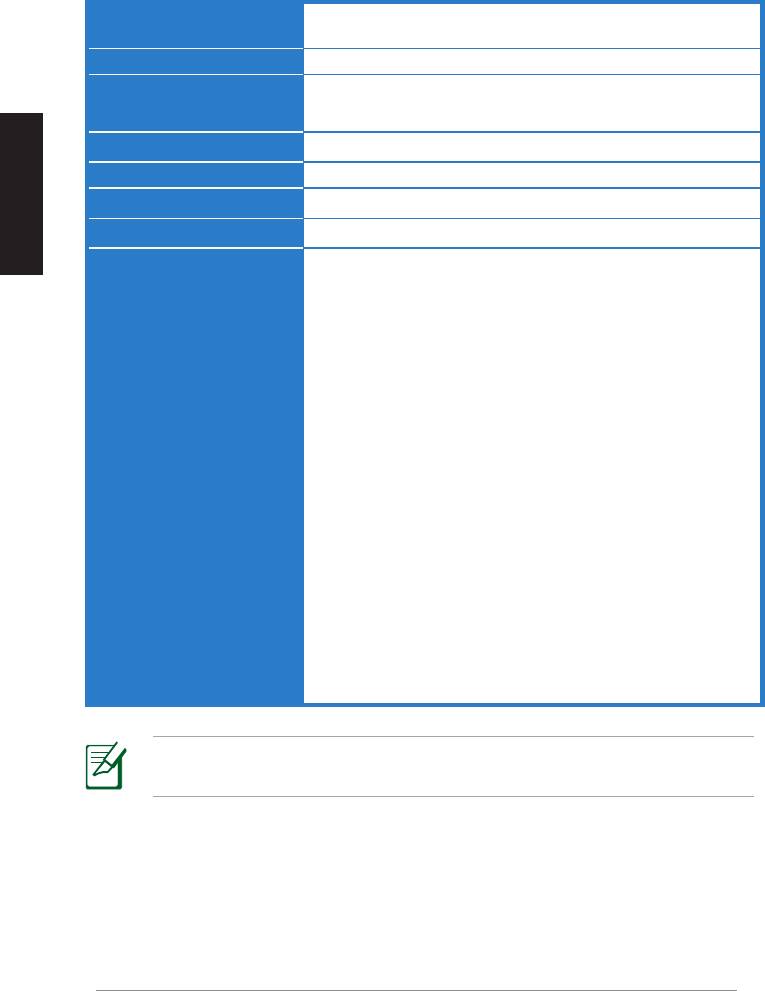
Résolution TV / moniteur : 1080p, 1080i, 720p, 576p, 480p
Vidéo 3D : 1080p @ 24Hz
Audio
7.1 canaux, 192 KHz 24-bits, AC-3 et DTS Dolby
Technologie HDMI sans fil
AMIMON WHDI 5GHz 4T5R (Chiffrement AES 256-bits ou 128-bits)
Français
Distance de transmission
Jusqu’à 25 mètres (en visibilité directe)
Temps de réponse
<1ms
Adaptateur secteur
Émetteur et récepteur : adaptateurs 12V, 2A 24W
Consommation électrique
Émetteur et récepteur : 24W
Ports d’E/S
Émetteur :
- Port USB x 1 (pour la connexion au port USB d’un ordinateur)
- Port HDMI x 1
- Prise d’alimentation CC x 1
- Voyant lumineux d’alimentation x 1*
- Voyant lumineux de connexion réseau sans fil x 1*
Récepteur:
- Port LAN x 1
- Ports USB x 2
- Port HDMI x 1
- Prise d’alimentation CC x 1
- Voyant lumineux d’alimentation x 1*
- Voyant lumineux de connexion réseau sans fil x 1*
* Les voyants d'alimentation et de connexion réseau sans fil
s'allument de couleur bleue pour indiquer qu'une connexion a
été établie et de couleur orange si celle-ci a échouée. La qualité
du signal sans fil apparaît à l’écran.
REMARQUE : Les spécifications sont sujettes à changement sans avis
préalable.
18
ASUS WAVI
Faire connaisance avec votre ASUS WAVI
Le ASUS WAVI vous permet de transmettre du contenu audio/vidéo sans fil
entre votre ordinateur et un périphérique d’affichage externe HD avec une
portée maximale de 25 mètres (en visibilité directe) et un temps de latence
quasi-inexistant (<1ms) pour profiter de contenu vidéo en Full HD 1080p et
des transmissions audio épurées. Vous pouvez désormais profitez de vos
jeux vidéo et de vos films sur un périphérique d’affichage externe en haute
définition à partir de votre ordinateur.
REMARQUE : Pour garantir une bonne qualité de transmission
audio/vidéo HD 1080p (jusqu'à 25 mètres), assurez-vous de placer le
récepteur en visibilité directe de l'émetteur.
Français
Contenu de la boîte
Adaptateurs
CD de support (incluant manuel
Récepteur WAVI Émetteur WAVI
secteur x 2
d’utilisation et pilotes)
REMARQUES
:
• Contactez votre revendeur si l’un des éléments ci-dessus est
endommagé ou manquant.
ASUS WAVI
19
WAVI
3D Wireless PC-to-TV Kit
Quick Start Guide
Câbles HDMI x 2 Câble USB Guide de démarrage rapide
Caractéristiques physiques du ASUS WAVI
Récepteur
Vue avant
Vue arrière
3 5
6 7
8
Français
9
1
2
Émetteur
Vue avant
Vue arrière
4
6 7
8
9
1
2
1
6
Voyant d’alimentation
Port HDMI
2
Voyant de connexion réseau sans fil
7
Prise d’alimentation
Port réseau
3
8
Bouton Marche/Arrêt
(réservé à la mise à jour du firmware)
4
9
Port USB (connexion à l'ordinateur)
Bouton de réinitialisation
5
Ports USB (connexion à d'autres périphériques)
20
ASUS WAVI
Français
ASUS WAVI
21
ON
OFF
Utiliser votre ASUS WAVI
Pour utiliser votre ASUS WAVI :
1. Installez le pilote WAVI à partir du CD de support.
2. À l'aide du câble USB fourni, connectez le port USB de l'émetteur WAVI à
l'un des ports USB de votre ordinateur.
Port USB
Émetteur
3. À l'aide du câble HDMi fourni, connectez le port HDMi de l'émetteur
WAVI à l'un des ports HDMi de votre ordinateur.
4. Connectez votre périphérique d'affichage externe au récepteur WAVI à
l'aide du câble HDMI fourni, puis placez votre périphérique d'affichage
en mode HDMI.
Récepteur WAVI
TV/Moniteur HD
5. Si vous souhaitez utiliser d’autres périphériques, connectez-les au récepteur
WAVI de la manière suivante :
C
Récepteur WAVI
Clavier / Souris USB Manette de jeu ASUS Xtion
Le tableau ci-dessous liste les claviers et les souris sans fil compatibles
Marque Modèles de souris et claviers sans fil
WT400 WT410
WT45 WT450
ASUS
W4000 BX700
Français
W4500 M-A65
REMARQUE : La liste ci-dessus peut être modifiée sans avis préalable.
REMARQUE : NE PAS connecter de périphériques de stockage USB
au récepteur WAVI..
6. Allumez le récepteur et l'émetteur WAVI.
IMPORTANT ! Assurez-vous de connecter les adaptateurs secteur au
récepteur et à l'émetteur WAVI et de respecter la puissance nominale
appropriée.
REMARQUE : Les voyants d'alimentation et de connexion réseau
sans fil s'allument de couleur bleue pour indiquer qu'une connexion
a été établie et de couleur orange si celle-ci a échouée.
7. Définissez la sortie audio de votre ordinateur sur HDMI.
REMARQUES
:
Pour modifier la sortie audio de votre ordinateur :
• Sous Windows 7 / Vista, allez dans Panneau de configuration >
Matériel et audio > Son. Dans l'onget Lecture, définissez HDMI
comme sortie audio par défaut.
• Sous Windows XP, allez dans Panneau de configuration> Sons et
périphériques audio > onglet Audio. Sélectionnez HDMI dans le
menu déroulant du champ Lecture audio.
22
ASUS WAVI
Notices
REACH
En accord avec le cadre réglementaire REACH (Enregistrement, Evaluation,
Autorisation, et Restriction des produits chimiques), nous publions la liste des
substances chimiques contenues dans nos produits sur le site ASUS REACH :
http://csr.asus.com/english/REACH.htm.
Rapport de la Commission Fédérale des Communications (FCC)
Ce dispositif est conforme à l’alinéa 15 des règles établies par la FCC.
L'opération est sujette aux deux conditions suivantes :
• Ce dispositif ne peut causer d'interférence nuisible, et
Français
• Ce dispositif se doit d'accepter toute interférence reçue, incluant toute
interférence pouvant causer des résultats indésirables.
Cet équipement a été testé et s'est avéré être conforme aux limites établies
pour un dispositif numérique de classe B, conformément à l'alinéa 15 des
règles de la FCC. Ces limites sont conçues pour assurer une protection
raisonnable contre les interférences nuisibles à une installation réseau. Cet
équipement génère, utilise et peut irradier de l'énergie à fréquence radio.
Il peut causer une interférence nocive aux communications radio s’il n’est
pas installé et utilisé selon les instructions du fabricant. Cependant, il n'est
pas exclu qu'une interférence se produise lors d'une installation particulière.
Si cet équipement cause une interférence nuisible aux signaux radio ou
télévisé, ce qui peut-être déterminé par l'arrêt puis le réamorçage de
l’appareil, l'utilisateur est encouragé à essayer de corriger l'interférence de la
manière suivante :
• Réorienter ou replacer l'antenne de réception.
• Augmenter l'espace de séparation entre l'équipement et le récepteur.
• Relier l’équipement à une sortie sur un circuit différent de celui auquel le
récepteur est relié.
• Consulter le revendeur ou un technicien spécialisé radio/TV pour
obtenir de l’aide.
ATTENTION : Les changements ou les modifications apportés à
cette unité qui n’ont pas été expressément approuvés par la partie
responsable de la conformité pourraient annuler l’autorité de
l’utilisateur à manipuler cet équipement.
ASUS WAVI
23

Directives FCC concernant l’exposition aux fréquences radio
Afin de se conformer aux directives de la FCC en matière d’exposition aux
fréquences radio, cet appareil doit être installé et fonctionner en respectant
une distance minimale de 20 cm entre le radiateur et votre corps.
Ce dispositif et son(ses) antenne(s) ne doivent pas être placé(s) ensemble
ni opérer conjointement avec d’autres antennes ou émetteurs. Le
fonctionnement sur la bande des 5.15 ~ 5.25GHz est restreint à une
Français
utilisation en intérieur.
Avertissement d’exposition aux ondes radio
• Cet équipement est conforme aux limitations en matière d'exposition
aux fréquences radio instaurées pour un environnement non contrôlé.
• Ce dispositif et son(ses) antenne(s) ne doivent pas être placé(s)
ensemble ni opérer conjointement avec d’autres antennes ou émetteurs.
Déclaration d'Industrie Canada relative à l’exposition aux
radiations
Cet équipement a été testé et s'est avéré être conforme aux limites
d'Industrie Canada en terme d’exposition aux radiations dans un
environnement non contrôlé. Afin de rester en conformité avec ces
exigences, évitez tout contact direct avec l’antenne pendant la transmission.
L’utilisateur doit suivre les instructions de fonctionnement de ce manuel
d’utilisation.
Le fonctionnement est sujet aux deux conditions suivantes :
• Cet appareil ne doit pas créer d’interférences et
• doit tolérer tout type d’interférences, incluant les interférences pouvant
déclencher une opération non désirée de l’appareil.
Afin d’éviter les interférences radio avec le service sous licence (c’est-à-dire le
partage de canal avec les systèmes de téléphonie satellite), cet appareil doit
être impérativement utilisé en intérieur et à distance des fenêtres pour une
protection maximale. Si l’équipement (ou son antenne
d’émission) est utilisé en extérieur, il est soumis aux licences d’utilisation.
Cet appareil et son antenne ne doivent pas être co-localisés ou opérés
conjointement avec d'autres antennes ou émetteurs.
Country Code selection feature to be disabled for products marketed to the
US/CANADA.
This Class [B] digital apparatus complies with Canadian ICES-003.
Cet appareil numérique de la classe [B] est conforme à la norme NMB-003 du
Canada
24
ASUS WAVI
NCC警語
經型式認證合格之低功率射頻電機,非經許可,公司、商號或使用者均不
得擅自變更頻率、
加大功率或變更原設計之特性及功能。
低功率射頻電機之使用不得影響飛航安全及干擾合法通信;經發現有干擾
現象時,應立即
停用,並改善至無干擾時方得繼續使用。
前項合法通信,指依電信法規定作業之無線電通信。
Français
低功率射頻電機須忍受合法通信或工業、科學及醫療用電波輻射性電機設
備之干擾。
在 5.25-5.35 秭赫頻帶內操作之無線資訊傳輸設備,限於室內使用。
無線資訊傳輸設備忍受合法通信之干擾且不得干擾合法通信;如造成干
擾,應立即停用,俟無干擾之虞,始得繼續使用。
無線資訊傳設備的製造廠商應確保頻率穩定性,如依製造廠商使用手冊上
所述正常操作,發射的信號應維持於操作頻帶中
Déclaration de conformité (Directive R&TTE 1999/5/CE)
ASUS déclare par la présente que le que ce produit est conforme aux pré- que ce produit est conforme aux pré-est conforme aux pré-
requis essentiels et autres dispositions pertinentes de la Directive 1995/5/CE.
Cet appareil sera commercialisé dans les pays de l’Espace Économique
Européen suivants : Autriche, Italie, Belgique, Liechtenstein, Danemark,
Luxembourg, Finlande, Pays-Bas, France, Norvège, Allemagne, Portugal,
Grèce, Espagne, Islande, Suède, Irlande, Royaume-Uni, Chypre,
République tchèque, Estonie, Hongrie, Lettonie, Lituanie, Malte,
Slovaquie, Pologne et Slovénie.
Avertissement marque CE
Ceci est un produit de Classe B. Dans un environnement domestique, ce produit
peut causer des interférences radio, auquel cas l’utilisateur pourra être amené
à prendre les mesures adéquates.
ATTENTION : Les appareils destinés à la bande des 5130-5350 MHz
ne peuvent être utilisés qu’en intérieur.
ASUS WAVI
25
Informations de contact ASUS
ASUSTeK COMPUTER INC. (Asie Pacifique)Asie Pacifique)
Adresse
15 Li-Te Road, Peitou, Taipei, Taiwan 11259
Téléphone
+886-2-2894-3447
Fax +886-2-2890-7798
Site Web
www.asus.com.tw
Support technique
Français
Téléphone
+86-21-3842-9911
Support en ligne
support.asus.com
ASUS COMPUTER INTERNATIONAL (Amérique)
Adresse
800 Corporate Way, Fremont, CA 94539, USA
Telephone +1-510-739-3777
Fax +1-510-608-4555
Site Web
usa.asus.com
Support technique
Téléphone
+1-812-282-2787
Fax +1-812-284-0883
Support en ligne
support.asus.com
ASUS France SARL
Adresse
10, Allée de Bienvenue, 93160 Noisy Le Grand, France
Téléphone
+
33 (0) 1 49 32 96 50
Site Web
www.france.asus.com
Support technique
Téléphone +33 (0) 8 21 23 27 87
Fax +33 (0) 1 49 32 96 99
Support en ligne
support.asus.com
Fabricant
ASUSTeK Computer Inc.
Tél : +886-2-2894-3447
Adresse : No. 150, LI-TE RD., PEITOU, TAIPEI 112, TAIWAN
Représentant
ASUS Computer GmbH
légal en Europe
Adresse : HARKORT STR. 21-23, 40880 RATINGEN,
ALLEMAGNE
26
ASUS WAVI
WAVI
(Wireless Audio Video Interface)
(Drahtlose Audio Video Schnittstelle)
Deutsch
WAVI Empfänger WAVI Sender
Handbuch

G6186
Erste Ausgabe
Februar 2011
Copyright © 2011 ASUSTeK Computer Inc. Alle Rechte vorbehalten. Kein Teil dieses
Handbuchs, einschließlich der darin beschriebenen Produkte und Software, darf ohne
Deutsch
ausdrückliche, schriftliche Genehmigung von ASUSTeK COMPUTER INC. (“ASUS”) in
irgendeiner Form, ganz gleich auf welche Weise, vervielfältigt, übertragen, abgeschrieben,
in einem Wiedergewinnungssystem gespeichert oder in eine andere Sprache übersetzt
werden.
Produktgarantien oder Service werden nicht geleistet, wenn: (1) das Produkt repariert,
modifiziert oder abgewandelt wurde, außer schriftlich von ASUS genehmigte
Reparaturen, Modifizierung oder Abwandlungen; oder (2) die Seriennummer des
Produkts unkenntlich gemacht wurde oder fehlt.
ASUS STELLT DIESES HANDBUCH “SO, WIE ES IST”, OHNE DIREKTE ODER INDIREKTE
GARANTIEN, EINSCHLIESSLICH, JEDOCH NICHT BESCHRÄNKT AUF GARANTIEN ODER
KLAUSELN DER VERKÄUFLICHKEIT ODER TAUGLICHKEIT FÜR EINEN BESTIMMTEN ZWECK,
ZUR VERFÜGUNG. UNTER KEINEN UMSTÄNDEN HAFTET ASUS, SEINE DIREKTOREN,
VORSTANDSMITGLIEDER, MITARBEITER ODER AGENTEN FÜR INDIREKTE, BESONDERE,
ZUFÄLLIGE ODER SICH ERGEBENDE SCHÄDEN (EINSCHLIESSLICH SCHÄDEN AUF GRUND
VON PROFITVERLUST, GESCHÄFTSVERLUST, BEDIENUNGSAUSFALL ODER DATENVERLUST,
GESCHÄFTSUNTERBRECHUNG UND ÄHNLICHEM), AUCH WENN ASUS VON DER
WAHRSCHEINLICHKEIT DERARTIGER SCHÄDEN AUF GRUND VON FEHLERN IN DIESEM
HANDBUCH ODER AM PRODUKT UNTERRICHTET WURDE.
SPEZIFIKATIONEN UND INFORMATIONEN IN DIESEM HANDBUCH DIENEN
AUSSCHLIESSLICH DER INFORMATION, KÖNNEN JEDERZEIT OHNE ANKÜNDIGUNG
GEÄNDERT WERDEN UND DÜRFEN NICHT ALS VERPFLICHTUNG SEITENS ASUS
AUSGELEGT WERDEN. ASUS ÜBERNIMMT FÜR EVENTUELLE FEHLER ODER
UNGENAUIGKEITEN IN DIESEM HANDBUCH KEINE VERANTWORTUNG ODER HAFTUNG,
EINSCHLIESSLICH DER DARIN BESCHRIEBENEN PRODUKTE UND SOFTWARE.
In diesem Handbuch angegebene Produkt- und Firmennamen können u.U. eingetragene
Warenzeichen oder Urheberrechte der entsprechenden Firmen sein und dienen nur der
Identifizierung oder Erklärung zu Gunsten des Eigentümers, ohne Rechte verletzen zu
wollen.
28
ASUS WAVI

Inhaltsverzeichnis
Sicherheitsinformationen ..................................................................................... 30
ASUS WAVI Spezifikationsübersicht .................................................................. 31
Kennenlernen des ASUS WAVI ............................................................................ 32
Lieferumfang ................................................................................................32
WAVI-Merkmale ........................................................................................................ 33
Empfänger .....................................................................................................33
Sender .............................................................................................................33
ASUS WAVI verwenden .......................................................................................... 34
Notices ......................................................................................................................... 36
ASUS Kontaktinformationen ............................................................................... 39
Deutsch
ASUS WAVI
29
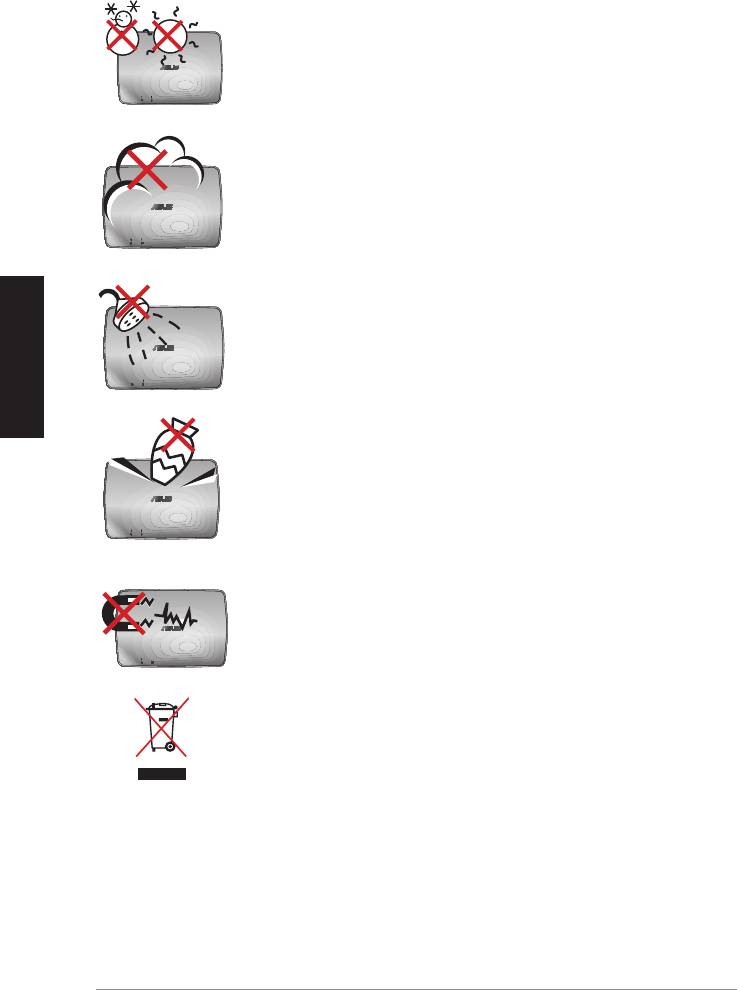
Sicherheitsinformationen
ZULÄSSIGE TEMP: ASUS WAVI sollte nur in Umgebungen
mit einer Temperatur zwischen 5°C (41°F) und 35°C (95°F)
verwendet werden.
KEINER schmutzigen oder staubigen Umgebung
aussetzen. KEIN Betrieb während eines Gaslecks.
Deutsch
KEIN Aussetzen zu oder Betreiben in der nähe von
Flüssigkeiten, Regen oder Feuchtigkeit.
KEINE Gegenstände auf die Oberfläche fallenlassen und
keine Fremdgegenstände in den ASUS WAVI einführen.
KEINEN starken magnetischen oder elektrischen Feldern
aussetzen.
ASUS WAVI NICHT im normalen Hausmüll entsorgen.
Erkundigen Sie sich nach lokalen Regelungen zur
Entsorgung von Elektroschrott.
30
ASUS WAVI

ASUS WAVI Spezifikationsübersicht
Auflösung TV: 1080p, 1080i, 720p, 576p, 480p
3D Video: 1080p @ 24Hz
Audio
7.1-Kanal 192 KHz 24-bit, AC-3 und DTS Dolby
Drahtlose HDMI-Technologie
AMIMON WHDI 5GHz 4T5R (256-bit oder 128-bit AES-Kodierung)
Übertragungsreichweite
bis zu 25 Meter (Sichtlinie)
Verzögerung
<1ms
Stromversorgung
Sender und Empfänger: 12V, 2A 24W Adapter
Stromverbrauch
Sender und Empfänger: 24W
E/A-Anschlüsse
Sender:
- USB-Anschluss x 1 (für Verbindungen mit USB-Anschlüssen
eines Computers)
- HDMI-Anschluss x 1
- DC-In-Anschluss (Stromeingang) x 1
- Strom-LED x 1*
Deutsch
- Drahtlos-LED x 1*
Empfänger:
- LAN-Anschluss x 1
- USB-Anschlüsse x 2
- HDMI-Anschluss x 1
- DC-In-Anschluss (Stromeingang) x 1
- Strom-LED x 1*
- Drahtlos-LED x 1*
* Die Strom-LED / Drahtlos-LED leuchtet beim erfolgreichen
Verbindungsaufbau blau und beim fehlgeschlagenen
Verbindungsaufbau orange. Die Signalstärke wird auf dem
Bildschirm angezeigt.
HINWEIS: Die Spezifikationen können ohne Vorankündigung
geändert werden.
ASUS WAVI
31
Kennenlernen des ASUS WAVI
Mit ASUS WAVI können Sie Audio-/Videoinhalte Ihres Computers drahtlos an
ein externes High-Definition Anzeigegerät im (Sicht)Abstand von bis zu 25m
für latenzfreie (<1ms) und hochauflösende 1080p Video- und kristallklare
Audioübertragung freigeben oder erweitern. Damit können Sie 3D-Videos
und Videospiele Ihres Computers voll genießen.
HINWEIS: Für volle, drahtlose 1080p High-Definition Audio-
und Videoübertragung von bis zu 25 Meter sollte der Empfänger in
klarer Sichtlinie zum Sender positioniert werden.
Lieferumfang
Deutsch
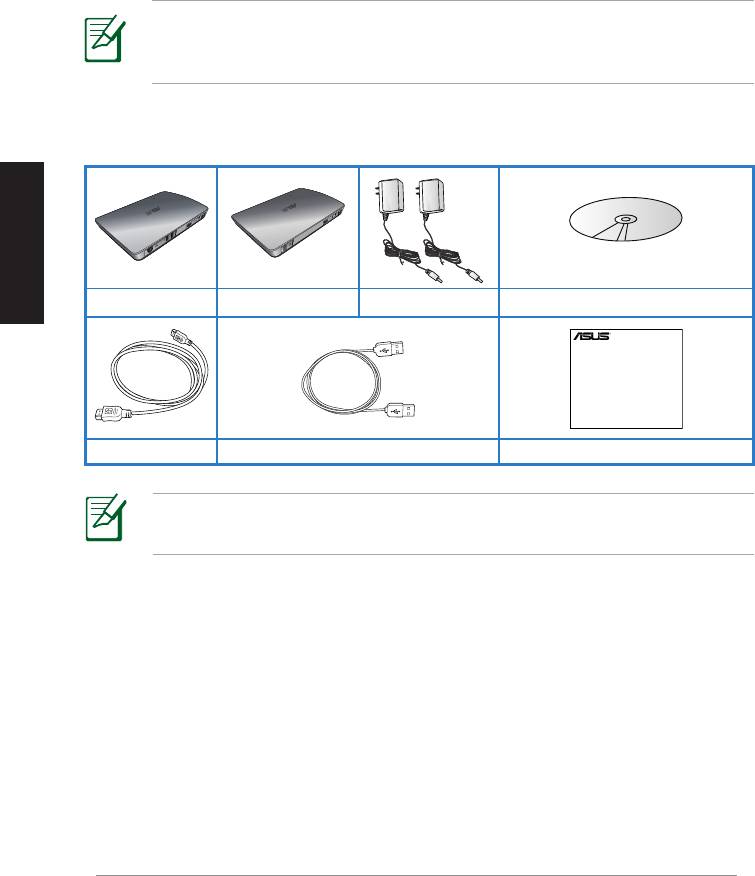
WAVI-Empfänger WAVI-Sender Stromdapter x 2 Support-CD (Handbuch & Treiber)
HINWEIS: Falls Artikel beschädigt oder nicht vorhanden sind,
wenden Sie sich an Ihren Händler.
32
ASUS WAVI
WAVI
3D Wireless PC-to-TV Kit
Quick Start Guide
HDMI-Kabel x 2 USB-Kabel Schnellstarthilfe
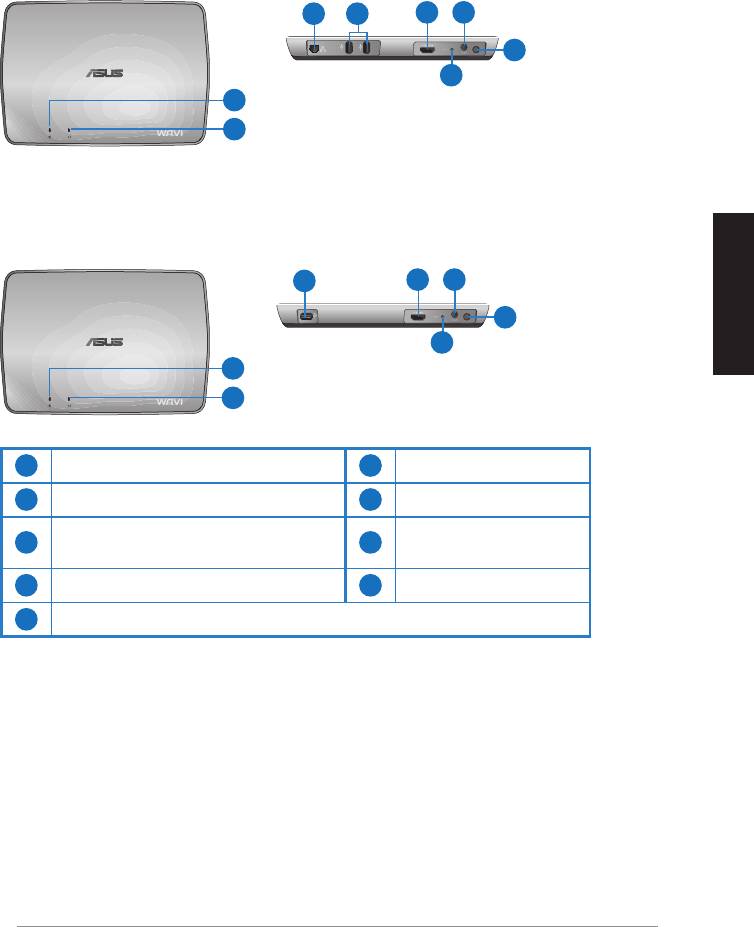
WAVI-Merkmale
Empfänger
Vorderseite
Rückseite
3 5
6 7
8
9
1
2
Sender
Vorderseite
Rückseite
4
6 7
8
Deutsch
9
1
2
1
6
Strom-LED
HDMI-Anschluss
2
Drahtlos-LED
7
Stromeingang
LAN-Anschluss
3
8
Einschalttaste
(Nur für Firmware-Updates)
4
9
USB-Anschluss (PC-Verbindung)
Reset-Taste
5
USB-Anschlüsse (andere Geräte)
ASUS WAVI
33
Deutsch
34
ASUS WAVI
ON
OFF
ASUS WAVI verwenden
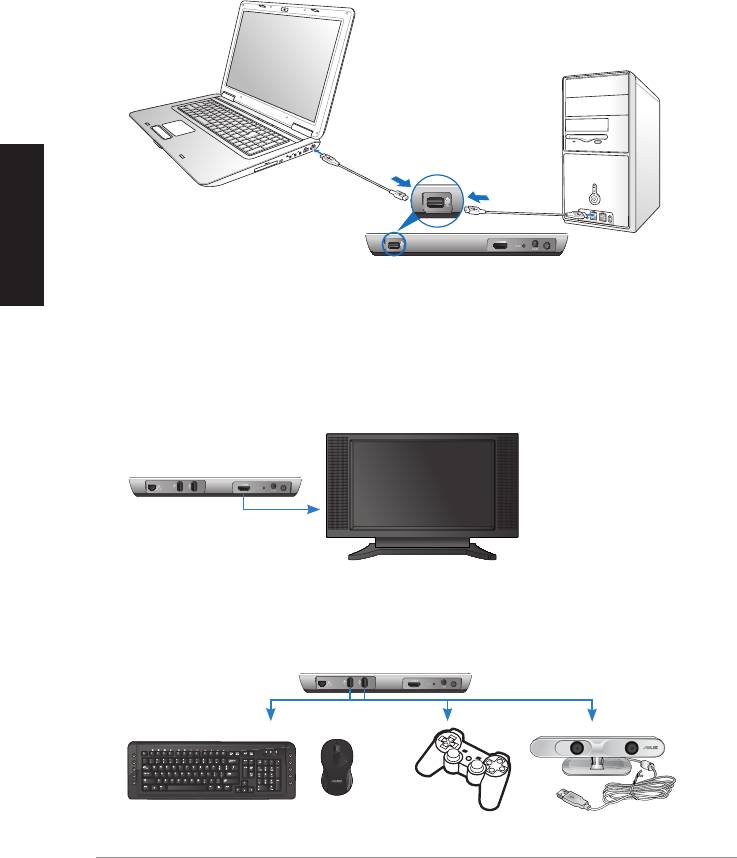
So verwenden Sie den ASUS WAVI:
1. Installieren Sie den WAVI-Treiber von der mitgelieferten Support-CD.
2. Verwenden Sie das mitgelieferte USB-Kabel, um den USB-Anschluss
Ihres WAVI-Senders mit einem USB-Anschluss Ihres Notebook oder
Desktop PCs zu verbinden.
USB-Anschluss
Sender
3. Verwenden Sie das mitgelieferte HDMI-Kabel, um den USB-Anschluss
Ihres WAVI-Senders mit dem HDMI-Anschluss Ihres Notebook oder
Desktop PCs zu verbinden.
4. Verwenden Sie das mitgelieferte HDMI-Kabel, um den WAVI-Empfänger
mit dem TV zu verbinden und setzen Sie den Fernseher auf HDMI-Modus.
WAVI-Empfänger
HDTV
5. Falls Sie weitere Geräte verwenden möchten, verbinden Sie diese, wie
unten angezeigt, mit dem WAVI-Empfänger.
C
WAVI-Empfänger
USB-Tastatur / -Maus Gamepad ASUS Xtion
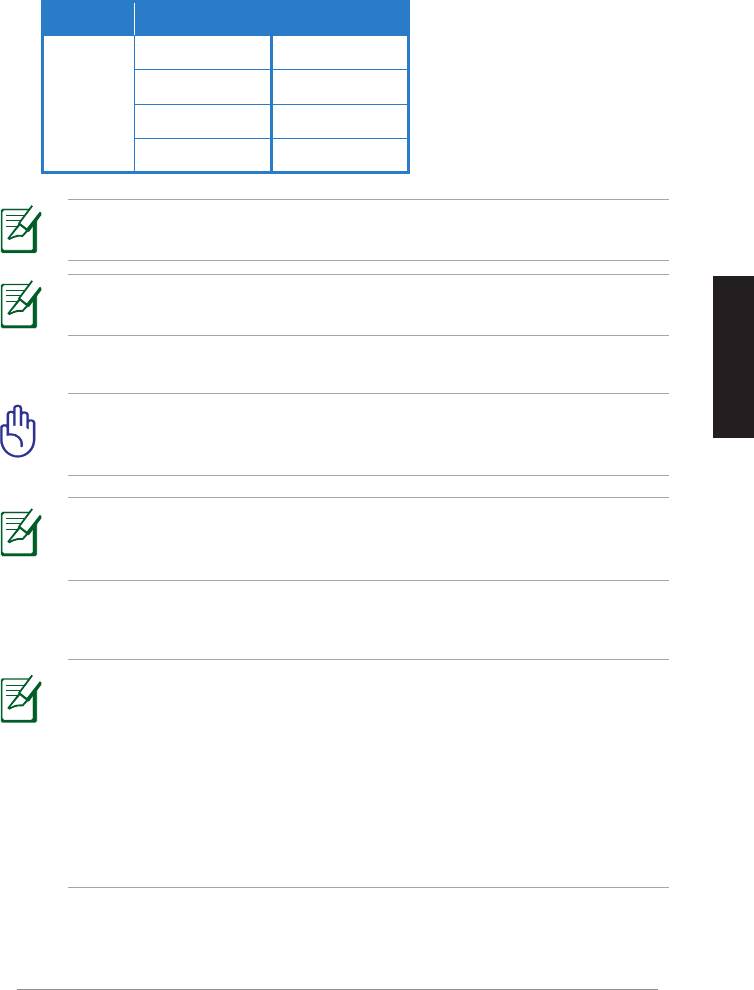
Für unterstützte, drahtlose Tastatur- und Mausmodelle beziehen Sie sich auf die
nachfolgende Tabelle.
Marke Drahtlostastatur und -maus
WT400 WT410
WT45 WT450
ASUS
W4000 BX700
W4500 M-A65
HINWEIS: Die hier angebotenen Informationen können ohne
Vorankündigung geändert werden.
HINWEIS: Verbinden Sie kein USB-Flashlaufwerk mit Ihrem
WAVI-Empfänger.
6. Schalten Sie den WAVI-Sender/-Empfänger ein.
Deutsch
WICHTIG! Sie sollten die mitgelieferten Stromadapter mit dem
WAVI-Sender/-Empfänger verbinden. Versorgen Sie die Stromadapter
mit passender Stromnennleistung (Spannung).
HINWEIS: Die Strom-LED / Drahtlos-LED leuchtet beim
erfolgreichen Verbindungsaufbau blau und beim fehlgeschlagenen
Verbindungsaufbau orange.
7. Stellen Sie das Standard Sound-Wiedergabegerät Ihres Notebook oder
Computer PCs auf HDMI-Ausgabe ein.
HINWEISE:
So passen Sie die Audioeinstellungen an:
• Klicken Sie bei Windows 7 / Vista auf Systemsteuerung > Hardware
und Sound > Sound. Wählen Sie in der Auswahl Wiedergabe HDMI-
Ausgabe als die Standardwiedergabe für den Sound.
• Klicken Sie bei Windows XP auf Systemsteuerung > Sounds und
Audiogeräte > Audio. Wählen Sie bei Soundwiedergabe HDMI-
Ausgabe.
ASUS WAVI
35
Notices
REACH
Complying with the REACH (Registration, Evaluation, Authorisation, and
Restriction of Chemicals) regulatory framework, we published the chemical
substances in our products at ASUS REACH website at
http://csr.asus.com/english/REACH.htm.
Federal Communications Commission Interference Statement
This device complies with FCC Rules Part 15. Operation is subject to the
following two conditions:
• This device may not cause harmful interference.
• This device must accept any interference received, including
interference that may cause undesired operation.
Deutsch
This equipment has been tested and found to comply with the limits for a class
B digital device, pursuant to Part 15 of the Federal Communications Commission
(FCC) rules. These limits are designed to provide reasonable protection against
harmful interference in a residential installation. This equipment generates,
uses, and can radiate radio frequency energy and, if not installed and used
in accordance with the instructions, may cause harmful interference to radio
communications. However, there is no guarantee that interference will not occur
in a particular installation. If this equipment does cause harmful interference
to radio or television reception, which can be determined by turning the
equipment off and on, the user is encouraged to try to correct the interference
by one or more of the following measures:
• Reorient or relocate the receiving antenna.
• Increase the separation between the equipment and receiver.
• Connect the equipment into an outlet on a circuit different from that to
which the receiver is connected.
• Consult the dealer or an experienced radio/TV technician for help.
CAUTION: Any changes or modifications not expressly approved
by the party responsible for compliance could void the user’s
authority to operate the equipment.
36
ASUS WAVI

FCC Radiation Exposure Statement
This equipment complies with FCC radiation exposure limits set forth for an
uncontrolled environment. This equipment should be installed and operated
with minimum distance 20cm between the radiator & your body.
This transmitter must not be co-located or operating in conjunction with any
other antenna or transmitter. If the device is going to be operated in 5.15 ~
5.25GHz frequency range, then it is restricted to an indoor environment only.
RF Exposure warning
• The equipment complies with FCC RF exposure limits set forth for an
uncontrolled environment.
• The equipment must be co-located or operated in conjunction with any
other antenna or transmitter.
IC Radiation Exposure Statement for Canada
This equipment complies with IC radiation exposure limits set forth for an
uncontrolled environment. To maintain compliance with IC RF exposure
compliance requirements, please avoid direct contact to the transmitting
Deutsch
antenna during transmitting. End users must follow the specific operating
instructions for satisfying RF exposure compliance.
Operation is subject to the following two conditions:
• This device may not cause interference.
• This device must accept any interference, including interference that
may cause undesired operation of the device.
This device should be used only as specified within this manual to meet RF
exposure requirements. Using this device in a manner inconsistent with this
manual could lead to excessive RF exposure conditions.
This device and its antenna(s) must not be co-located or operating in
conjunction with any other antenna or transmitter.
Country Code selection feature to be disabled for products marketed to the
US/CANADA.
If the device is going to be operated in 5.15 ~ 5.25GHz frequency range, then
it is restricted to an indoor environment only.
This Class [B] digital apparatus complies with Canadian ICES-003.
Cet appareil numérique de la classe [B] est conforme à la norme NMB-003 du
Canada
ASUS WAVI
37
NCC警語
經型式認證合格之低功率射頻電機,非經許可,公司、商號或使用者均不
得擅自變更頻率、
加大功率或變更原設計之特性及功能。
低功率射頻電機之使用不得影響飛航安全及干擾合法通信;經發現有干擾
現象時,應立即
停用,並改善至無干擾時方得繼續使用。
前項合法通信,指依電信法規定作業之無線電通信。
低功率射頻電機須忍受合法通信或工業、科學及醫療用電波輻射性電機設
備之干擾。
Deutsch
在 5.25-5.35 秭赫頻帶內操作之無線資訊傳輸設備,限於室內使用。
無線資訊傳輸設備忍受合法通信之干擾且不得干擾合法通信;如造成干
擾,應立即停用,俟無干擾之虞,始得繼續使用。
無線資訊傳設備的製造廠商應確保頻率穩定性,如依製造廠商使用手冊上
所述正常操作,發射的信號應維持於操作頻帶中
Declaration of Conformity for R&TTE directive 1999/5/EC
Hereby, ASUS declares that this product is in compliance with the essential
requirements and other relevant provisions of Directive 1995/5/EC.
This device will be sold in the following EEA (European Economic Area)
countries: Austria, Italy, Belgium, Liechtenstein, Denmark, Luxembourg,
Finland, Netherlands, France, Norway, Germany, Portugal, Greece, Spain,
Iceland, Sweden, Ireland, United Kingdom, Cyprus, Czech Republic,
Estonia, Hungary, Latvia, Lithuania, Malta, Slovakia, Poland, and Slovenia.
CE Mark Warning
This is a Class B product, in a domestic environment, this product may cause
radio interference, in which case the user may be required to take adequate
measures.
CAUTION: The device for the band 5150-5350 MHz is only for
indoor use.
38
ASUS WAVI
ASUS Kontaktinformationen
ASUSTeK COMPUTER INC. (Asia Pacific)
Adresse 15 Li-Te Road, Peitou, Taipei, Taiwan 11259
Telefon +886-2-2894-3447
Fax +886-2-2890-7798
Webseite www.asus.com.tw
Technische Unterstützung
Telefon +86-21-3842-9911
Online-Support support.asus.com
ASUS COMPUTER INTERNATIONAL (Amerika)
Adresse 800 Corporate Way, Fremont, CA 94539, USA
Telefon +1-510-739-3777
Fax +1-510-608-4555
Webseite usa.asus.com
Technische Unterstützung
Telefon +1-812-282-2787
Support-Fax +1-812-284-0883
Online-Support support.asus.com
Deutsch
ASUS COMPUTER GmbH (Deutschland und Österreich)
Adresse Harkort Str. 21-23, D-40880 Ratingen, Deutschland
Fax +49-2102-9599-11
Online-Kontakt www.asus.com.de/sales
Technische Unterstützung
Telefon (Komponenten) +49-1805-010923*
Telefon (System/
Notebook/Eee/LCD) +49-1805-010920*
Support-Fax +49-2102-959911
Online-Support www.asus.com.de/support
Webseite www.asus.com.de/news
* 0,14 Euro/Minute aus dem dt. Festnetz, Mobilfunk max. 0.42 Euro/Minute.
Hersteller:
ASUSTeK Computer Inc.
Tel: +886-2-2894-3447
Adresse: No. 150, LI-TE RD., PEITOU, TAIPEI 112, TAIWAN
Autorisierte
ASUS Computer GmbH
Vertretung in
Adresse: HARKORT STR. 21-23, 40880 RATINGEN,
Europa:
Deutschland
ASUS WAVI
39
WAVI
(Interfaccia Wireless Audio Video)
Italiano
Italiano
Italiano
Ricevitore WAVI Trasmettitore WAVI
Italiano
Manuale Utente

I6186
Prima Edizione
Febbraio 2011
Copyright © 2011 ASUSTeK Computer Inc. Tutti i Diritti Riservati.
Alcuna parte di questo manuale, compresi i prodotti e i software in esso descritti, può
essere riprodotta,trasmessa, trascritta, archiviata in un sistema di recupero o tradotta in
alcuna lingua, in alcuna forma e in alcun modo, fatta eccezione per la documentazione
conservata dall’ acquirente a scopi di backup, senza l’espressa autorizzazione scritta di
ASUSTeK COMPUTER INC. (“ASUS”).
L’assistenza o la garanzia del prodotto non sarà valida nei seguenti casi: (1) il prodotto è
Italiano
stato riparato, modificato o alterato, salvo che tale riparazione,modifica o alterazione non
Italiano
sia autorizzata per iscritto da ASUS; o (2) il numero di serie del prodotto manchi o sia stato
reso illeggibile.
ASUS FORNISCE QUESTO MANUALE ”COSI’ COM’E’ ”, SENZA GARANZIA DI ALCUN TIPO,
Italiano
ESPLICITA O IMPLICITA, INCLUDENDO SENZA LIMITAZIONE LE GARANZIE O CONDIZIONI
Italiano
IMPLICITE DI COMMERCIABILITA’ O IDONEITA’ A UN PARTICOLARE SCOPO. IN NESSUN CASO
ASUS, I SUOI DIRIGENTI, FUNZIONARI, IMPIEGATI O DISTRIBUTORI SONO RESPONSABILI PER
QUALSIASI DANNO INDIRETTO, PARTICOLARE, ACCIDENTALE O CONSEGUENTE (COMPRESI
DANNI DERIVANTI DA PERDITA DI PROFITTO, PERDITA DI CONTRATTI,PERDITA D’USO O DI
DATI, INTERRUZIONE DELL’ ATTIVITA’ E SIMILI), ANCHE SE ASUS E’ STATA AVVISATA DELLA
POSSIBILITA’ CHE TALI DANNI SI POSSANO VERIFICARE IN SEGUITO A QUALSIASI DIFETTO O
ERRORE NEL PRESENTE MANUALE O NEL PRODOTTO .
LE SPECIFICHE E LE INFORMAZIONI CONTENUTE IN QUESTO MANUALE SONO FORNITE A
SOLO USO INFORMATIVO E SONO SOGGETTE A CAMBIAMENTI IN QUALSIASI MOMENTO,
SENZA PREAVVISO, E NON POSSONO ESSERE INTERPRETATE COME UN IMPEGNO DA PARTE
DI ASUS. ASUS NON SI ASSUME ALCUNA RESPONSABILITA’ E NON SI FA CARICO DI NESSUN
ERRORE O INESATTEZZA CHE POSSA COMPARIRE IN QUESTO MANUALE, COMPRESI I
PRODOTTI E I SOFTWARE CONTENUTI AL SUO INTERNO.
I prodotti e nomi delle aziende che compaiono in questo manuale possono o meno
essere marchi registrati o diritti d’autore delle rispettive aziende, e sono usati solo a scopo
identificativo o illustrativo a beneficio dell’utente, senza alcuna intenzione di violazione dei
diritti di alcuno.
ASUS WAVI
41

Deutsch
Italiano
Italiano
42
ASUS WAVI
Italiano
Italiano
Condizioni e Limiti di Copertura della Garanzia sul Prodotto
Le condizioni di garanzia variano a seconda del tipo di prodotto e sono specificatamente
indicate nel Certificato di Garanzia allegato, cui si fa espresso rinvio.
Inoltre la presente garanzia non è valida in caso di danni o difetti dovuti ai seguenti fattori:
(a) uso non idoneo, funzionamento o manutenzione improprio, incluso senza limitazioni l’
utilizzo del prodotto con una finalità diversa da quella conforme alle istruzioni di ASUSTeK
COMPUTER INC. in merito all’idoneità di utilizzo e alla manutenzione; (b) installazione o
utilizzo del prodotto in modo non conforme aglli standard tecnici o di sicurezza vigenti
nell’ Area Economica Europea e in Svizzera; (c) collegamento a rete di alimentazione
con tensione non corretta; (d) utilizzo del prodotto con accessori di terzi, prodotti o
dispositivi ausiliari o periferiche; (e) tentativo di riparazione effettuato da una qualunque
terza parte diversa dai centri di assistenza ASUSTeK COMPUTER INC. autorizzati; (f )
incidenti,fulmini,acqua, incendio o qualsiasi altra causa il cui controllo non dipende da
ASUSTeK COMPUTER INC.; abuso, negligenza o uso commerciale.
La presente Garanzia non è valida per l’assistenza tecnica o il supporto per l’ utilizzo del
prodotto, compreso l’utilizzo dell’ hardware o del software. L’assistenza e il supporto
disponibili (se previsti), nonchè le spese e gli altri termini relativi all’ assistenza e al
supporto (se previsti) verranno specificati nella documentazione destinata al cliente
fornita a corredo con il Prodotto.
E’ responsabilità dell’utente, prima ancora di richiedere l’assistenza, effettuare il backup
dei contenuti presenti sul Prodotto, inclusi i dati archiviati o il software installato nel
prodotto. ASUSTeK COMPUTER INC. non è in alcun modo responsabile per qualsiasi danno,
perdita di programmi, dati o altre informazioni archiviate su qualsiasi supporto o parte del
prodotto per il quale viene richiesta l’assistenza; ASUSTeK COMPUTER INC.non è in alcun
modo responsabile delle conseguenze di tali danni o perdite, incluse quelle di attività, in
caso di malfunzionamento di sistema, errori di programmi o perdita di dati.
E’ responsabilità dell’utente, prima ancora di richiedere l’assistenza, eliminare eventuali
funzioni, componenti, opzioni, modifiche e allegati non coperti dalla presente Garanzia,
prima di far pervenire il prodotto a un centro servizi ASUSTeK COMPUTER INC. ASUSTeK
COMPUTER INC. non è in alcun modo responsabile di qualsiasi perdita o danno ai
componenti sopra descritti.
ASUSTeK COMPUTER INC. non è in alcun modo responsabile di eliminazioni, modifiche
o alterazioni ai contenuti presenti sul Prodotto compresi eventuali dati o applicazioni
prodottesi durante le procedure di riparazione del Prodotto stesso. Il Prodotto verrà
restituito all’utente con la configurazione originale di vendita, in base alle disponibilità di
software a magazzino.

Italiano
Italiano
Licenza Software
I prodotti ASUS possono essere corredati da software, secondo la tipologia del prodotto.
I software, abbinati ai prodotti, sono in versione “OEM”: Il software OEM viene concesso
in licenza all’utente finale, come parte integrante del prodotto; ciò significa che non può
essere trasferito ad altri sistemi hardware e che, in caso di rottura, di furto o in ogni altra
situazione che lo renda inutilizzabile, anche la possibilità di utilizzare il prodotto OEM
viene compromessa.
Chiunque acquisti, unitamente al prodotto, un software OEM, è tenuto ad osservare i
termini e le condizioni del contratto di licenza tra il proprietario del software e l’utente
finale, denominato “EULA” (End User Licence Agreement), visualizzato a video, durante la
fase di installazione del software stesso. Si avvisa che l’accettazione, da parte dell’ utente,
delle condizioni dell’ EULA, ha luogo al momento dell’ nstallazione del software stesso.
Italiano
Italiano
ASUS WAVI
43

Deutsch
Italiano
Italiano
44
ASUS WAVI
Italiano
Italiano
Sommario
Norme di Sicurezza ................................................................................................. 45
Specifiche tecniche di ASUS WAVI ..................................................................... 46
Descrizione di ASUS WAVI .................................................................................... 47
Contenuto della confezione ...................................................................47
Caratteristiche WAVI ............................................................................................... 48
Ricevitore .......................................................................................................48
Trasmettitore ................................................................................................48
Utilizzo di ASUS WAVI ............................................................................................. 49
Comunicazioni .......................................................................................................... 51
Contatti ASUS ............................................................................................................ 54
Italiano
Italiano
Norme di Sicurezza
TEMP. SICUREZZA: ASUS WAVI dovrebbe essere utilizzato
in ambienti con temperature comprese fra 5°C (41°F) e
35°C (95°F).
NON tenere ASUS WAVI in ambienti non puliti o polverosi.
NON utilizzarlo in caso di fuga di gas.
NON utilizzare ASUS WAVI in prossimità di liquidi e NON
esporlo a pioggia o umidità.
NON collocare o rovesciare oggetti sulla superificie di
Italiano
ASUS WAVI e non conficcarvi alcun oggetto estraneo.
Italiano
NON esporre ASUS WAVI a forti campi magnetici o elettrici.
NON gettare ASUS WAVI nei cestini comunali.Controllare
le normative locali in materia di smaltimento dei prodotti
elettronici.
ASUS WAVI
45

Deutsch
Italiano
Italiano
46
ASUS WAVI
Italiano
Italiano
Specifiche tecniche di ASUS WAVI
Risoluzione TV: 1080p, 1080i, 720p, 576p, 480p
3D Video: 1080p @ 24Hz
Audio
7.1 canali 192 KHz 24-bit, AC-3 e DTS Dolby
Tecnologia Wireless HDMI
AMIMON WHDI 5GHz 4T5R (crittografia 256-bit o 128-bit AES)
Distanza di Trasmissione
sino a 25 metri (Line of sight)
Ritardo
<1ms
Alimentazione
Trasmettitore e Ricevitore: adattatori da 12V, 2A 24W
Consumo
Trasmettitore e Ricevitore: 24W
Porte I/O
Trasmettitore:
- Porta USB x 1 (per la connessione con una porta USB del
computer)
- Porta HDMI x 1
- Porta DC-In x 1
- LED Alimentazione x 1*
- LED Wireless x 1*
Ricevitore:
- Porta LAN x 1
- Porte USB x 2
- Porta HDMI x 1
- Porta DC-In x 1
- LED Alimentazione x 1*
- LED Wireless x 1*
* Il LED di alimentazione/Wireless diventa blu in caso di
connessione riuscita e arancione in caso di connessione non
riuscita. L’intensità del segnale è visualizzata sullo schermo.
NOTA: Le specifiche sono soggette a variazioni senza preavviso.
Italiano
Italiano
Descrizione di ASUS WAVI
ASUS WAVI consente di trasmettere in modalità wireless e senza latenza (<1ms)
video ad altissima definizione e audio cristallino da un computer su un monitor
esterno, situato sino a 25 metri entro la linea visiva. In questo modo, è possibile
guardare film e divertirsi con i giochi elettronici riprodotti da un computer su
un dispositivo di visualizzazione esterno ad alta definizione.
NOTA: Per trasmissioni audio e video ad alta definizione wireless
1080p fino a 25 metri, accertarsi che il ricevitore sia posizionato entro
una chiara linea visiva rispetto al trasmettitore.
Contenuto della confezione
CD di supporto
Ricevitore WAVI Trasmettitore WAVI 2 trasformatori CA
(Manuale Utente e Driver)
Italiano
Italiano
NOTA:
• In caso di articoli danneggiati o mancanti, consultare il rivenditore.
ASUS WAVI
47
WAVI
3D Wireless PC-to-TV Kit
Quick Start Guide
Cavo HDMI x 2 Cavo USB Guida rapida
Deutsch
Italiano
Italiano
48
ASUS WAVI
Italiano
Italiano
Caratteristiche WAVI
Ricevitore
Vista anteriore
Vista posteriore
3 5
6 7
8
9
1
2
Trasmettitore
Vista anteriore
Vista posteriore
4
6 7
8
9
1
2
1
6
LED alimentazione
Porta HDMI
2
LED Wireless
7
Porta CC in
Porta LAN
3
8
(solo per aggiornare il
Pulsante accensione
rmware)
Porta USB (connessione
4
9
Pulsante di ripristino
al PC)
5
Porte USB (connessione ad altri dispositivi)
Italiano
Italiano
Italiano
Italiano
ASUS WAVI
49
ON
OFF
Utilizzo di ASUS WAVI
Per utilizzare ASUS WAVI:
1. Installare il driver WAVI dal CD di supporto in dotazione.
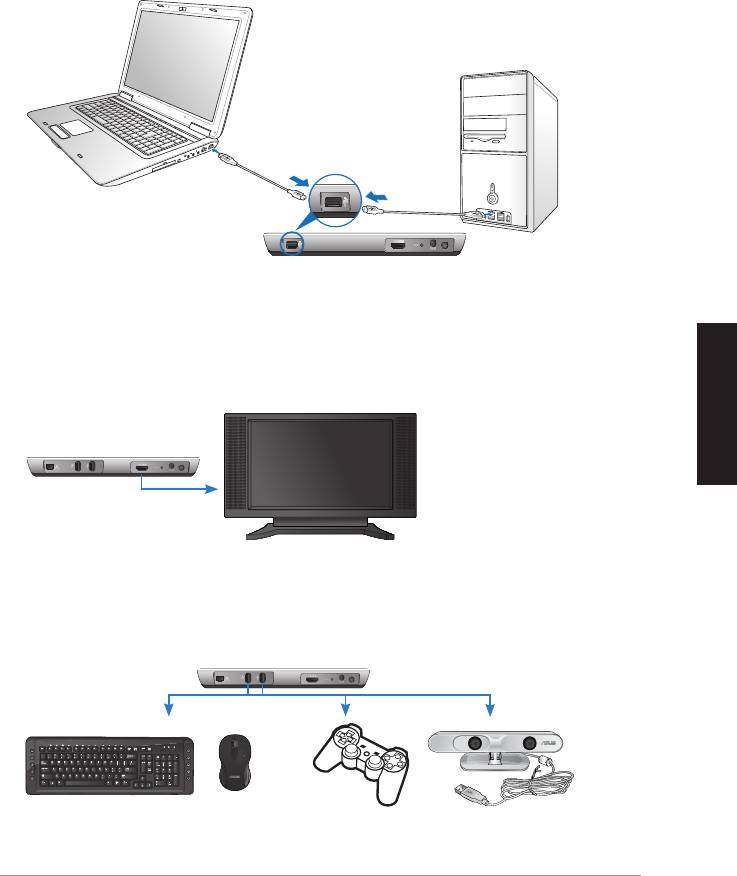
2. Mediante il cavo USB in dotazione, collegare la porta USB del trasmettitore
WAVI alla porta USB del proprio notebook o desktop PC.
Porta USB
Trasmettitore
3. Mediante il cavo HDMI in dotazione, collegare la porta HDMI del
trasmettitore WAVI alla porta HDMI del proprio notebook o desktop PC.
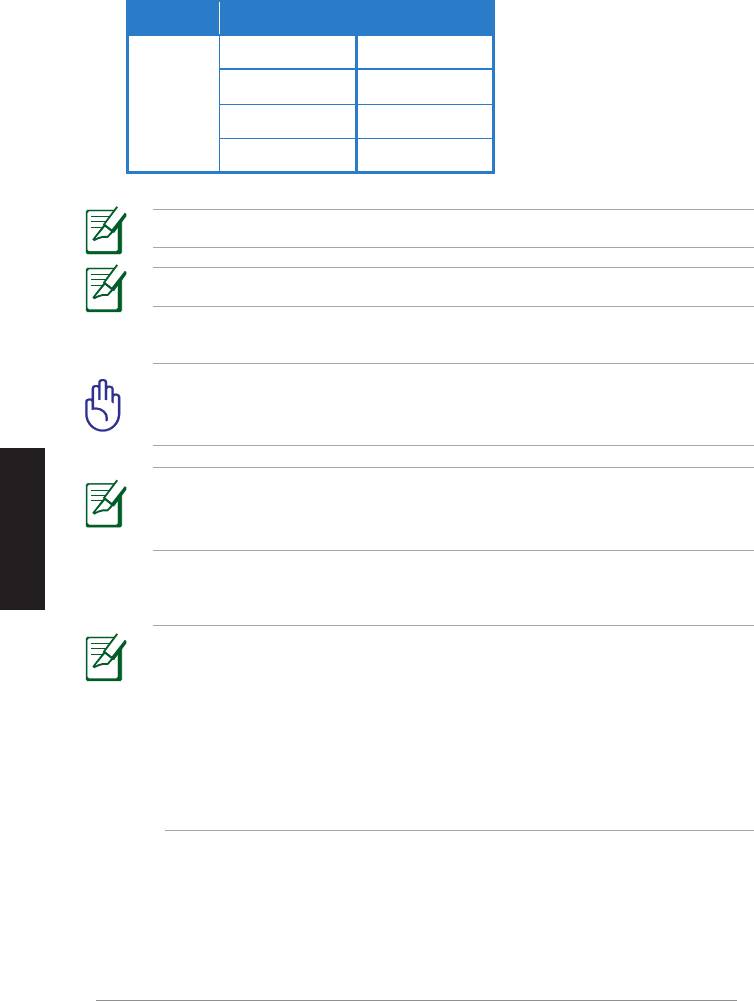
4. Collegare la TV al ricevitore WAVI tramite il cavo HDMI in dotazione, quindi
impostare la TV in modalità HDMI.
Ricevitore WAVI
HDTV
5. Per utilizzare altri dispositivi, collegarli al ricevitore WAVI come indicato
nella gura sottostante.
C
Ricevitore WAVI
Tastiera/Mouse USB Controller
ASUS Xtion
Deutsch
Italiano
Italiano
50
ASUS WAVI
Italiano
Italiano
Nella tabella sottostante sono indicati i modelli di mouse e tastiera wireless supportati.
Marchio Modelli di mouse e tastiere Wireless
WT400 WT410
WT45 WT450
ASUS
W4000 BX700
W4500 M-A65
NOTA: I modelli indicati sono soggetti a variazioni senza preavviso.
NOTA: Non collegare una unità flash USB al ricevitore WAVI.
6. Accendere trasmettitore e ricevitore WAVI.
IMPORTANTE! Accertarsi di aver collegato i trasformatori CA in
dotazione al trasmettitore e al ricevitore WAVI, nonchè alla corretta
sorgente di alimentazione.
NOTA: Il LED di alimentazione/Wireless diventa blu ad indicare una
connessione riuscita e diventa arancione in caso di connessione non
riuscita.
7. Impostare il dispositivo di riproduzione audio predenito del notebook
o desktop PC sull’uscita HDMI.
NOTE:
Per modificare le impostazioni audio:
• Per Windows 7 / Vista, fare clic su Pannello di controllo > Hardware
e suoni > Audio. Dalla scheda Riproduzione, selezionare l’uscita HDMI
come dispositivo di riproduzione audio predefinito.
• Per Windows XP, fare clic su Pannello di controllo > Suoni e dispositivi
audio > Audio. Selezionare l’uscita HDMI sotto Riproduzione audio.

Italiano
Italiano
Comunicazioni
REACH
Nel rispetto del regolamento REACH (Registration, Evaluation, Authorisation
and Restriction of Chemicals),le sostanze chimiche contenute nei prodotti
ASUS sono state pubblicate nel sito web ASUS REACH, al seguente indirizzo:
http://csr.asus.com/english/REACH.htm.
Dichiarazione FCC (Federal Communications Commission)
Questo apparecchio rispetta i requisiti indicati nel regolamento FCC - Parte
15. Il funzionamento è soggetto alle seguenti due condizioni:
• Questo apparecchio non causa interferenze dannose.
• Questo apparecchio accetta qualsiasi interferenza ricevuta, comprese
quelle che potrebbero causare un comportamento indesiderato.
I collaudi cui è stato sottoposto questo apparecchio ne dimostrano la conformità
ai limiti stabiliti per i dispositivi digitali di Classe B, come indicato dalla parte
15 delle Norme FCC. Questi limiti sono stati definiti per offrire una ragionevole
protezione contro interferenze dannose quando l’apparecchio viene usato in
ambienti residenziali. Questo apparecchio genera, usa e può emettere energia
in radiofrequenza e, se non viene installato e utilizzato come indicato dal
manuale d’uso, può provocare interferenze dannose alle comunicazioni radio.
Italiano
Non è tuttavia possibile garantire che non si verifichino interferenze in casi
particolari. Se questo apparecchio causa interferenze dannose alla ricezione di
programmi radiofonici e televisivi, fatto verificabile spegnendo e riaccendendo
l’apparecchio stesso, si consiglia l’utente di provare a correggere l’interferenza
Italiano
in uno o più dei modi seguenti:
• Riorientare o riposizionare l’antenna di ricezione.
• Allontanare l’apparecchio dal ricevitore.
• Collegare l’apparecchio ad una diversa presa di corrente in modo che
apparecchio e ricevitore si trovino su circuiti diversi.
• Consultare il rivenditore o un tecnico radio/TV qualificato per assistenza.
ATTENZIONE: Eventuali modifiche o cambiamenti, non espressamente
approvati dall’autorità responsabile per l’omologazione, potrebbero
invalidare il diritto dell’utente all’utilizzo di questo apparecchio.
ASUS WAVI
51

Deutsch
Italiano
Italiano
52
ASUS WAVI
Italiano
Italiano
Dichiarazione Precauzioni per l’Esposizione a RF della FCC
Questo apparecchio è conforme ai limiti FCC per l’esposizione alle radiazioni,
evidenziati per un ambiente non controllato. Deve essere installato e funzionare
ad una distanza minima di 20cm tra la sorgente emissiva e il corpo.
Questo trasmettore non deve essere collocato o funzionare insieme ad altre
antenne o trasmettitori. Se si utilizza il dispositivo nella gamma di frequenze
5.15 ~ 5.25GHz, l’uso è limitato ad ambienti chiusi.
Avvertenza sull’esposizione a radiofrequenza
• Questo apparecchio è conforme ai limiti FCC per l’esposizione alle
radiazioni, evidenziati per un ambiente non controllato.
• Questo trasmettore non deve essere collocato o funzionare insieme ad
altre antenne o trasmettitori.
Dichiarazione per l’Esposizione a Radiazioni IC (Canada)
Questo apparecchio è confome ai limiti per l’esposizione a radiazioni IC, stabiliti
per un ambiente non controllato. Per mantenere la conformità con i requisiti
previsti per l‘esposizione a radiofrequenza IC, si prega di evitare il contatto
diretto con l’antenna trasmittente, in fase di trasmissione. L’utente deve attenersi
strettamente alle specifiche istruzioni operative in materia.
Il funzionamento è soggetto alle seguenti due condizioni:
• Questo apparecchio non causa interferenze dannose;
• Questo apparecchio accetta qualsiasi interferenza ricevuta, comprese
quelle che potrebbero causare un comportamento indesiderato.
Per soddisfare i requisiti per l’esposizione a RF, questo dispositivo deve essere
utilizzato soltanto come specificato in questo manuale. Un impiego diverso da
quello indicato nel manuale potrebbe causare un’eccessiva esposizione a RF.
Questo trasmettitore non deve essere collocato o funzionare insieme ad altre
antenne o trasmettitori.
La funzione di selezione del Codice Paese deve essere disattivata per i prodotti
commercializzati negli Stati Uniti e in Canada.
Se si utilizza il dispositivo nella gamma di frequenze 5.15 ~ 5.25GHz, l’uso è
limitato ad ambienti chiusi.
Questo apparecchio digitale di classe [B] è conforme alla normativa canadese
ICES-003.
Italiano
Italiano
NCC警語
Italiano
Dichiarazione di Conformità per la direttiva R&TTE 1999/5/EC
ASUS dichiara che questo prodotto soddisfa i requisiti essenziali e le disposizioni
in materia previste dalla Direttiva 1995/5/EC.
Italiano
Questo dispositivo sarà distribuito nei seguenti paesi della Comunità Europea:
Austria, Italia, Belgio, Liechtenstein, Danimarca, Lussemburgo, Finlandia,
Paesi Bassi, Francia, Norvegia, Germania, Portogallo, Grecia, Spagna, Islanda,
Svezia, Irlanda, Regno Unito, Cipro, Repubblica Ceca, Estonia, Ungheria,
Lettonia, Lituania, Malta, Slovacchia, Polonia e Slovenia.
Avviso Marchio CE
Questo è un prodotto di Classe B e, in un ambiente domestico, potrebbe causare
interferenze radio. In tal caso potrebbe essere richiesta all’utente l’adozione di
misure adeguate.
ATTENZIONE: L’uso di questo dispositivo nella banda 5150-5350 MHz
è limitato ad ambienti interni.
ASUS WAVI
53
Contatti ASUS
ASUSTeK COMPUTER INC. (Asia Pacifico)
Indirizzo 15 Li-Te Road, Peitou, Taipei, Taiwan 11259
Telefono +886-2-2894-3447
Fax +886-2-2890-7798
Sito web www.asus.com.tw
Supporto Tecnico
Telefono +86-21-3842-9911
Supporto Online support.asus.com
ASUS COMPUTER INTERNATIONAL (America)
Indirizzo 800 Corporate Way, Fremont, CA 94539, USA
Telefono +1-510-739-3777
Fax +1-510-608-4555
Sito web usa.asus.com
Supporto Tecnico
Telefono +1-812-282-2787
Fax Supporto +1-812-284-0883
Supporto Online support.asus.com
ASUSTeK ITALY S.r.l. (Italia)
Deutsch
Italiano
Indirizzo Strada Statale Padana Superiore, 28
20063 Cernusco sul Naviglio (MI)
Supporto Tecnico
Telefono Notebook/Eee 199 400 089*
Italiano
Telefono Altri Prodotti 199 400 059*
Sito web www.asus.it
* Per chiamare da reti fisse Telecom Italia e Colt, il costo è di 0,12 euro al minuto iva inclusa e la durata
massima della telefonata non dovrà essere superiore a 120 minuti; per le chiamate da cellulare, il costo
dipende dal vostro operatore d'accesso.
Produttore:
ASUSTeK Computer Inc.
Tel: +886-2-2894-3447
Address: No. 150, LI-TE RD., PEITOU, TAIPEI 112, TAIWAN
Rappresentante
ASUS Computer GmbH
autorizzato
Address: HARKORT STR. 21-23, 40880 RATINGEN,
in Europa:
GERMANY
54
ASUS WAVI
WAVI
(Беспроводной аудио видео интерфейс)
WAVI приемник WAVI передатчик
Русский
Руководство пользователя

DeutschРусский
56
ASUS WAVI
R6186
Первое издание
Февраль 2011
Copyright © 2011 ASUSTeK Computer Inc. Все права защищены. Любая часть этого
руководства, включая оборудование и программное обеспечение, описанные в нем, не
может быть дублирована, передана, преобразована, сохранена в системе поиска или
переведена на другой язык в любой форме или любыми средствами, кроме документации,
хранящейся покупателем с целью резервирования, без специального письменного
разрешения ASUSTeK Computer Inc. (“ASUS”).
Гарантия прекращается если: (1)изделие отремонтировано, модифицировано или изменено
без письменного разрешения ASUS; (2)серийный номер изделия поврежден, неразборчив
либо отсутствует.
ASUS предоставляет данное руководство "как есть" без гарантии любого типа, явно
выраженной или подразумеваемой, включая неявные гарантии или условия получения
коммерческой выгоды или пригодности для конкретной цели, но не ограничиваясь этими
гарантиями и условиями. Ни при каких обстоятельствах компания ASUS, ее директора,
должностные лица, служащие или агенты не несут ответственности за любые косвенные,
специальные, случайные или являющиеся следствием чего-либо убытки (включая убытки
из-за потери прибыли, потери бизнеса, потери данных, приостановки бизнеса и т.п.),
даже если ASUS сообщила о возможности таких убытков, возникающих из- за любой
недоработки или ошибки в данном руководстве или продукте.
Технические характеристики и сведения, содержащиеся в данном руководстве,
представлены только для информативного использования, и могут быть изменены в
любое время без уведомления, и не должны быть истолкованы как обязательства ASUS.
ASUS не берет на себя никакой ответственности или обязательств за любые ошибки
или неточности в данном руководстве, включая изделия или программное обеспечение,
описанные в нем.
Продукты и названия корпораций, имеющиеся в этом руководстве могут быть
зарегистрированными торговыми знаками или авторскими правами соответствующих
компаний, и используются только для идентификации или объяснения без намерений
что- либо нарушить.

Содержание
Информация о правилах безопасности ............................................... 58
Спецификация ASUS WAVI ................................................................ 59
Знакомство с ASUS WAVI .................................................................. 60
Комплект поставки .....................................................................60
Знакомство с WAVI .............................................................................. 61
Приемник .....................................................................................61
Передатчик ..................................................................................61
Использование ASUS WAVI ................................................................ 62
Уведомления .......................................................................................... 64
Контактная информация ASUS ........................................................... 67
Русский
ASUS WAVI
57
DeutschРусский
58
ASUS WAVI
Информация о правилах безопасности
Допустимый температурный диапазон: Рекомендуется
использовать продукт при температуре от 5°C (41°F) до
35°C (95°F).
НЕ помещайте продукт в пыльную или грязную среду. НЕ
пользуйтесь компьютером во время утечки газа.
НЕ подвергайте воздействию и не используйте поблизости
от жидкостей, под дождем и в условиях повышенной
влажности.
НЕ ставьте и не роняйте предметы на поверхность устройства
и не засовывайте в него посторонние предметы.
НЕ подвергайте компьютер воздействию сильных
магнитных или электрических полей.
Не выбрасывайте продукт вместе с бытовым мусором.
Ознакомьтесь с правилами утилизации таких продуктов.

Спецификация ASUS WAVI
Разрешение
ТВ: 1080p, 1080i, 720p, 576p, 480p
3D видео: 1080p @ 24Гц
Audio
7.1 каналов 192 кГц 24-бит, AC-3 и DTS Dolby
Технология беспроводного
AMIMON WHDI 5 ГГц 4T5R (256/128-битное AES
HDMI
шифрование)
Дальность
до 25 метров (в прямой видимости)
Задержка
<1 мс
Блок питания
Передатчик и приемник: Блок питания 12V, 2A
Потребляемая мощность
Передатчик и приемник: 24Вт
Порты ввода/вывода
Передатчик:
- USB порт X 1 (для подключения к компьютеру)
- HDMI порт X 1
- Разъем питания х 1
- Индикатор питания х 1*
- Индикатор сигнала х 1*
Приемник:
- LAN порт х 1
- USB-порты х 2
- HDMI порт х 1
- Разъем питания х 1
- Индикатор питания х 1*
- Индикатор сигнала х 1*
* Индикатор cигнала загорится синим при успешном
подключении или оранжевым при не успешном. Мощность
сигнала отображается на экране.
Русский
ПРИМЕЧАНИЕ: Спецификация может быть изменена без
предварительного уведомления.
ASUS WAVI
59
DeutschРусский
60
ASUS WAVI
Знакомство с ASUS WAVI
ASUS WAVI обеспечивает беспроводную передачу видеосигнала высокой
четкости и кристально чистого звука с Вашего компьютера на внешний
дисплей, расположенный на расстоянии до 25 метров (в пределах прямой
видимости) без задержки (<1 мс). Это позволяет играть в компьютерные
игры и смотреть фильмы непосредственно на Вашем HDMI-совместимом
устройстве.
ПРИМЕЧАНИЕ: Для беспроводной передачи full 1080p аудио/
видеосигнала на расстояние до 25 метров, убедитесь, что приемник
расположен в прямой видимости от передатчика.
Комплект поставки
Компакт-диск (руководство
WAVI приемник WAVI передатчик Блок питания x 2
пользователя и драйвер)
ПРИМЕЧАНИЯ:
• Если какие-либо элементы комплекта поставки отсутствуют или
повреждены, обратитесь к продавцу.
WAVI
3D Wireless PC-to-TV Kit
Quick Start Guide
HDMI кабель x 2 USB кабель Краткое руководство
Знакомство с WAVI
Приемник
Вид спереди
Вид сзади
3 5
6 7
8
9
1
2
Передатчик
Вид спереди
Вид сзади
4
6 7
8
9
1
2
1
Индикатор питания
6
Разъем HDMI
2
Индикатор сигнала
7
Разъем питания
LAN порт (только для
3
8
Кнопка питания
обновления прошивки)
Порт USB (подключение
4
9
Кнопка сброса
к ПК)
5
USB порты (подключение других устройств)
Русский
ASUS WAVI
61
DeutschРусский
62
ASUS WAVI
ON
OFF
Использование ASUS WAVI
Для использования ASUS WAVI:
1. Установите драйвер WAVI с поставляемого компакт-диска.
2. Подключите USB порт WAVI передатчика к USB порту Вашего
компьютера с помощью поставляемого в комплекте USB кабеля.
Порт USB
Передатчик
3. Подключите HDMI порт WAVI передатчика к HDMI порту Вашего
компьютера с помощью поставляемого в комплекте HDMI кабеля.
4. Подключите WAVI приемник к телевизору с помощью поставляемого в
комплекте HDMI кабеля, затем установите телевизор в режим HDMI.
WAVI приемник
HDTV
5. Если Вы хотите использовать другие устройства, подключите их к WAVI
приемнику, как показано ниже.
C
WAVI приемник
USB клавиатура / мышь
Геймпад ASUS Xtion
Модели поддерживаемых беспроводных клавиатур и мышей при ведены в таблице ниже.
Модели беспроводной клавиатуры
Бренд
и мыши
WT400 WT410
WT45 WT450
ASUS
W4000 BX700
W4500 M-A65
ПРИМЕЧАНИЕ: Приведенный выше список может быть изменен
без предварительного уведомления.
ПРИМЕЧАНИЕ: Не подключайте флэш-накопитель USB к WAVI
приемнику.
6. Включите WAVI передатчик и WAVI приемник.
ВАЖНО! Убедитесь, что Вы подключили блоки питания к WAVI
передатчику и WAVI приемнику. Убедитесь, что Вы подключили
блоки питания к розеткам с соответствующим напряжением.
ПРИМЕЧАНИЕ: Индикатор сигнала загорится синим при успешном
подключении или оранжевым при не успешном.
7. На Вашем компьютера установите выход HDMI в качестве устройства
воспроизведения звука по умолчанию.
ПРИМЕЧАНИЯ:
Для изменения аудио настроек:
• Для Windows 7 / Vista перейдите в Панель управления > Оборудование
Русский
и звук > Звук. На вкладке Воспроизведение выберите выход HDMI в
качестве устройства воспроизведения звука по умолчанию.
• Для Windows XP перейдите в Панель управления > Звуки и
аудиоустройства > Аудио. В разделе Воспроизведение звука выберите
HDMI выход в качестве устройства по умолчанию.
ASUS WAVI
63

DeutschРусский
64
ASUS WAVI
Уведомления
REACH
Согласно регламенту ЕС REACH (Registration, Evaluation, Authorization, and
Restriction of Chemicals – Регистрация, Оценка, Разрешения и Ограничения
на использование Химических веществ), на сайте ASUS REACH размещен
список химических веществ содержащихся в продуктах ASUS: http://csr.
asus.com/english/REACH.htm.
Федеральная комиссия по средствам связи: Положение о
воздействии помех
Данное устройство соответствует части 15 Правил FCC. Эксплуатация
оборудования допустима при соблюдении следующих условий:
• Данное устройство не должно создавать помех.
• На работу устройства могут оказываться внешние помехи, включая те,
которые могут вызвать нежелательные режимы его работы.
Данное оборудование было протестировано и сочтено соответствующим
ограничениям по цифровым устройствам класса В в соответствии с частью
15 Правил FCC. Эти ограничения рассчитаны на обеспечение защиты в
разумных пределах от вредоносных воздействий при установке в жилом
помещении. Данное оборудование создает, использует и может излучать
энергию в радиодиапазоне, которая, при установке или использовании данного
оборудования не в соответствии с инструкциями производителя, может
создавать помехи в радиосвязи. Тем не менее, невозможно гарантировать
отсутствие помех в каждом конкретном случае. В случае, если данное
оборудование действительно вызывает помехи в радио или телевизионном
приеме, что можно проверить, включив и выключив данное оборудование,
пользователю рекомендуется попытаться удалить помехи следующими
средствами:
• Переориентировать или переместить принимающую антенну.
• Увеличить расстояние между данным прибором и приемником.
• Подключить данное оборудование к розетке другой электроцепи, нежели
та, к которой подключен приемник.
• Проконсультироваться с продавцом или квалифицированным радио/ ТВ
техником.
ОСТОРОЖНО: Изменения или дополнения к данному пункту, не
согласованные, непосредственно, со стороной, ответственной за
соответствие правилам, могут сделать недействительным право
пользователя на пользование данным оборудованием.

Федеральная комиссия по связи: требования к воздействию
радиочастоты
Это оборудование совместимо с ограничениями FCC по радиоизлучению,
установленными для неконтролируемого окружения. Это оборудование
должно быть установлено и работать на расстоянии не менее 20 см от Вашего
тела.
Передатчик не должен располагаться рядом с другими антеннами и
передатчиками. Это устройство работает в диапазоне частот с 5.15 по 5.25ГГц
и должно использоваться только в помещении.
Воздействие радиочастоты
• Это оборудование совместимо с ограничениями FCC по радиоизлучению,
установленными для неконтролируемого окружения.
• Устройство и его антенна не должны располагаться рядом с другими
антеннами и передатчиками.
Промышленный стандарт (IC) для Канады
Это оборудование соответствует ограничениям IC по радиоизлучению,
установленными для нерегулируемой среды. Для удовлетворения требованиям
IC RF, пожалуйста, избегайте прямого контакта с антенной во время передачи.
Конечные пользователи должны следовать инструкциям по эксплуатации для
уменьшения воздействия радиочастоты.
Эксплуатация оборудования допустима при соблюдении следующих
условий:
• Данное устройство не должно создавать помех.
• На работу устройства могут оказываться внешние помехи, включая те,
которые могут вызвать нежелательные режимы его работы.
Это устройство должно использоваться как указано в этом руководстве для
соответствия требованиям стандарту по воздействию радиочастотной энергии.
Использование устройства не в соответствии с этим руководством может
привести к чрезмерному воздействию радиочастотной энергии.
Русский
Устройство и его антенна не должны располагаться рядом с другими
антеннами и передатчиками.
Функция выбора кода страны отключена для продуктов, маркированных для
US/CANADA.
Это устройство работает в диапазоне частот с 5.15 по 5 .25ГГц и должно
использоваться только в помещении.
Это цифровое устройство класса [B] соответствует канадским нормам ICES-003.
ASUS WAVI
65

DeutschРусский
66
ASUS WAVI
NCC警語
Заявление соответствия европейской директиве (R&TTE 1999/5/
EC)
Компания ASUS заявляет, что этот продукт соответствует основным
требованиям и другим соответствующим условиям директивы 1995/5/EC.
Это устройство будет продаваться в следующих ЕЭЗ (Европейская
экономическая зона) странах: Австрия, Италия, Бельгия, Лихтенштейн,
Дания, Люксембург, Финляндия, Нидерланды, Франция, Норвегия,
Германия, Португалия, Греция, Испания, Исландия
, Швеция, Ирландия, Великобритания, Кипр, Чехия, Эстония, Венгрия,
Латвия, Литва, Мальта, Словакия, Польша и Словения.
CE Предупреждение
Это продукт класса В, который может вызывать радиопомехи, в этом случае
пользователь должен принять соответствующие меры.
ОСТОРОЖНО:Устройство, использующее диапазон частот
5150-5350 МГц предназначено для использования только внутри
помещений.

Контактная информация ASUS
ASUSTeK COMPUTER INC. (Азия-Океания)
Адрес 15 Li-Te Road, Peitou, Taipei, Taiwan 11259
Телефон +886-2-2894-3447
Факс +886-2-2890-7798
Сайт www.asus.com.tw
Техническая поддержка
Телефон +86-21-3842-9911
Онлайн поддержка support.asus.com
ASUS COMPUTER INTERNATIONAL ( Америка)
Адрес 800 Corporate Way, Fremont, CA 94539, USA
Телефон +1-510-739-3777
Факс +1-510-608-4555
Сайт usa.asus.com
Техническая поддержка
Телефон +1-812-282-2787
Факс +1-812-284-0883
Онлайн поддержка support.asus.com
ASUS COMPUTER GmbH (Германия и Австрия)
Адрес Harkort Str. 21-23, D-40880 Ratingen, Germany
Факс +49-2102-9599-11
Онлайн контакт www.asus.com.de/sales
Техническая поддержка
Телефон (компоненты) +49-1805-010923*
Телефон (система/
ноутбук/Eee/ LCD +49-1805-010920*
Факс +49-2102-959911
Онлайн поддержка www.asus.com.de/support
Сайт www.asus.com.de/news
* 0.14 евро в минуту для стационарных телефонов, EUR 0.42 евро в
Русский
минуту для мобильных телефонов.
Производитель:
ASUSTeK Computer Inc.
Тел:
+886-2-2894-3447
Адрес:
No. 150, LI-TE RD., PEITOU, TAIPEI 112,
TAIWAN
Официальный
ASUS Computer GmbH
представитель
Адрес:
HARKORT STR. 21-23, 40880 RATINGEN,
в Европе:
GERMANY
ASUS WAVI
67
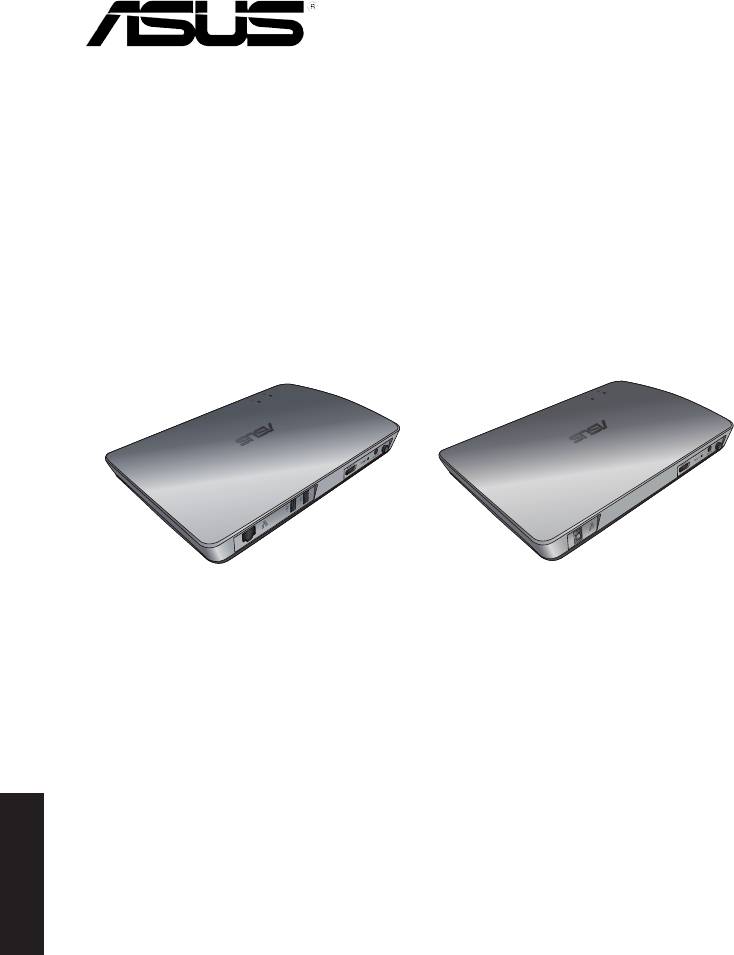
WAVI
(Interfaz inalámbrica de transmisión
de audio y vídeo)
Receptor WAVI Transmisor WAVI
Español
Manual del usuario

S6186
Primera edición
Febrero 2011
Copyright © 2011 ASUSTeK Computer Inc. Todos los derechos reservados.
Se prohíbe la reproducción, transmisión, transcripción, almacenamiento en un sistema
de recuperación o traducción a cualquier idioma de este manual, íntegra o parcialmente,
incluidos los productos y el software que en él se describen, de ninguna forma ni a
través de ningún medio, a excepción de que tales actividades sean llevadas a cabo por el
comprador con nes de conservación, sin autorización expresa por escrito de ASUSTeK
Computer Inc. (“ASUS”).
La garantía y los servicios de reparación vinculados al producto no serán de aplicación
si: (1) el producto ha sido reparado, modicado o alterado, a excepción de que tal
reparación, modicación o alteración haya sido autorizada por escrito por ASUS; o (2)
no sea posible determinar el número de serie del producto o aquél no se encuentre
presente.
ASUS PROPORCIONA ESTE MANUAL “TAL CUAL”, SIN GARANTÍAS DE NINGÚN TIPO, NI
EXPRESAS NI IMPLÍCITAS, INCLUIDAS, ENTRE OTRAS, LAS GARANTÍAS IMPLÍCITAS O
CONDICIONES DE COMERCIABILIDAD O AJUSTE A UNA FINALIDAD EN PARTICULAR.
NI ASUS, NI SUS DIRECTORES, RESPONSABLES, EMPLEADOS O AGENTES SERÁN
RESPONSABLES DE NINGÚN DAÑO INDIRECTO, ESPECIAL, ACCIDENTAL O CONSECUENTE
(INCLUIDOS AQUÉLLOS DERIVADOS DE PÉRDIDAS DE BENEFICIOS, PÉRDIDAS DE
OPORTUNIDADES COMERCIALES, IMPOSIBILIDAD DE USAR EL EQUIPO, PÉRDIDAS
DE DATOS, INTERRUPCIONES DE LA ACTIVIDAD COMERCIAL Y OTROS PERJUICIOS DE
CARÁCTER SIMILAR), AÚN CUANDO ASUS HAYA SIDO ADVERTIDA DE LA POSIBILIDAD DE
QUE TALES DAÑOS TENGAN LUGAR COMO RESULTADO DE ALGÚN DEFECTO O ERROR EN
ESTE MANUAL O EN EL PRODUCTO.
LAS ESPECIFICACIONES Y LA INFORMACIÓN QUE CONTIENE ESTE MANUAL SE PONEN A
DISPOSICIÓN DEL PROPIETARIO CON FINES EXCLUSIVAMENTE INFORMATIVOS; AMBAS
SE ENCUENTRAN SUJETAS A CAMBIOS EN CUALQUIER MOMENTO SIN AVISO PREVIO Y
NO DEBEN CONSIDERARSE UN COMPROMISO EMPRENDIDO POR ASUS. ASUS NO ASUME
RESPONSABILIDAD U OBLIGACIÓN ALGUNA EN RELACIÓN CON AQUELLOS ERRORES O
IMPRECISIONES QUE ESTE MANUAL PUDIERA CONTENER, INCLUIDOS LOS PRODUCTOS Y
EL SOFTWARE QUE EN ÉL SE DESCRIBEN.
Los nombres de productos y empresas que aparecen en este manual podrían ser o no
Español
marcas comerciales registradas o estar vinculados a derechos de autor en posesión de
sus respectivas empresas propietarias; su uso se lleva a cabo exclusivamente con nes
de identicación y explicación y en benecio del propietario del producto, sin intención
alguna de infringir los derechos indicados.
ASUS WAVI
69

Índice
Información de seguridad .................................................................................... 71
Resumen de especicaciones de la interfaz ASUS WAVI ........................... 72
ASUS WAVI - Primer contacto .............................................................................. 73
Contenido del paquete .............................................................................73
Características del dispositivo WAVI ................................................................. 74
Receptor .........................................................................................................74
Transmisor .....................................................................................................74
ASUS WAVI, modo de empleo ............................................................................. 75
Notices ......................................................................................................................... 77
Información de contacto con ASUS .................................................................. 80
Español
70
ASUS WAVI
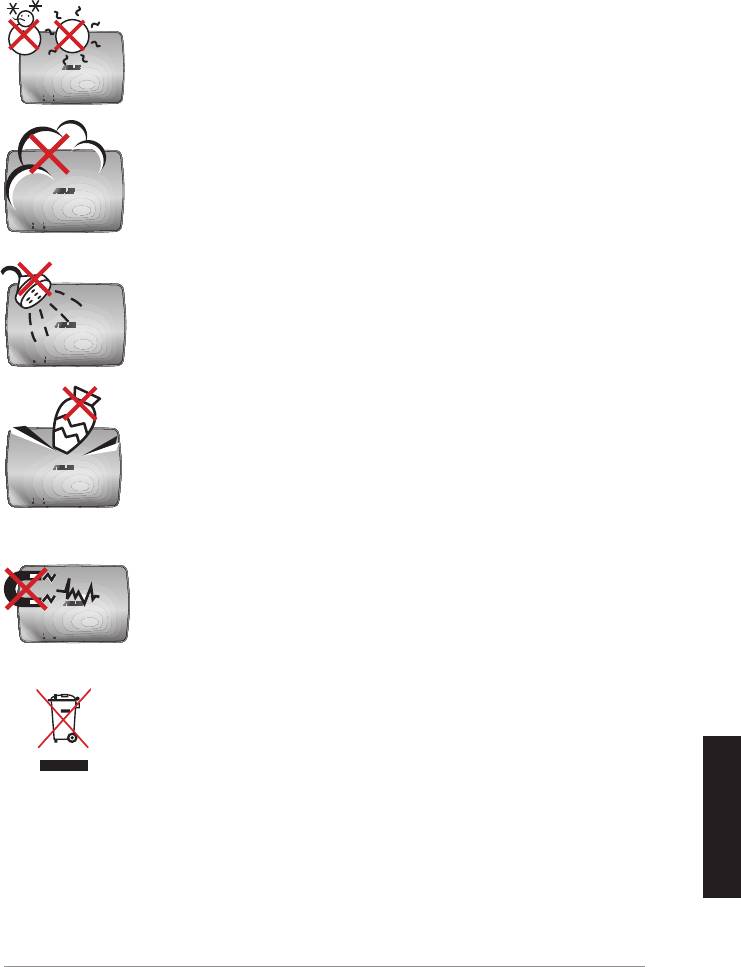
Información de seguridad
TEMPERATURA DE SEGURIDAD: El uso de la interfaz
ASUS WAVI debe tener lugar exclusivamente en entornos
cuya temperatura ambiental se encuentre comprendida
entre 5 °C (41 °F) y 35 °C (95 °F).
NO exponga los dispositivos a entornos sucios o
polvorientos. NO los use durante una fuga de gas.
NO exponga los dispositivos a líquidos, la lluvia o la
humedad, ni HAGA USO DE ELLOS cerca de ninguno de
tales elementos.
NO coloque ni deje caer objetos sobre la parte superior de
los dispositivos que componen la interfaz ASUS WAVI ni
introduzca objetos extraños en el interior de los mismos.
NO exponga los dispositivos a campos magnéticos o
eléctricos de gran intensidad.
NO deseche los dispositivos que componen la interfaz
ASUS WAVI como residuos convencionales. Consulte las
normativas relacionadas con la eliminación de productos
electrónicos en vigor en su lugar de residencia.
Español
ASUS WAVI
71

Resumen de especicaciones de la interfaz ASUS WAVI
Resolución TV: 1080p, 1080i, 720p, 576p y 480p
Vídeo 3D: 1080p @ 24 Hz
Audio
7.1 canales, 192 KHz, 24 bits; AC-3 y DTS Dolby
Tecnología HDMI inalámbrica
WHDI 4T5R de AMIMON, 5 GHz (con cifrado AES de 256 o 128
bits)
Distancia de transmisión
Hasta 25 metros (con línea de visión directa)
Retardo
<1ms
Fuente de alimentación
Transmisor y receptor: adaptadores (12 V, 2 A, 24 W)
Consumo de energía
Transmisor y receptor: 24 W
Puertos de E/S
Transmisor:
- Puerto USB x 1 (permite conectar el dispositivo al puerto USB
de un equipo informático)
- Puerto HDMI x 1
- Puerto de entrada de CC x 1
- Indicador LED de encendido x 1*
- Indicador LED de conexión inalámbrica x 1*
Receptor:
- Puerto LAN x 1
- Puertos USB x 2
- Puerto HDMI x 1
- Puerto de entrada de CC x 1
- Indicador LED de encendido x 1*
- Indicador LED de conexión inalámbrica x 1*
* Los indicadores LED de encendido/conexión inalámbrica
se iluminan en color azul cuando la conexión se establece
correctamente y en color naranja si la conexión sufre un error.
La intensidad de la señal se mostrará en la pantalla.
NOTA: Las especicaciones anteriores pueden verse sujetas a
Español
cambios sin aviso previo.
72
ASUS WAVI
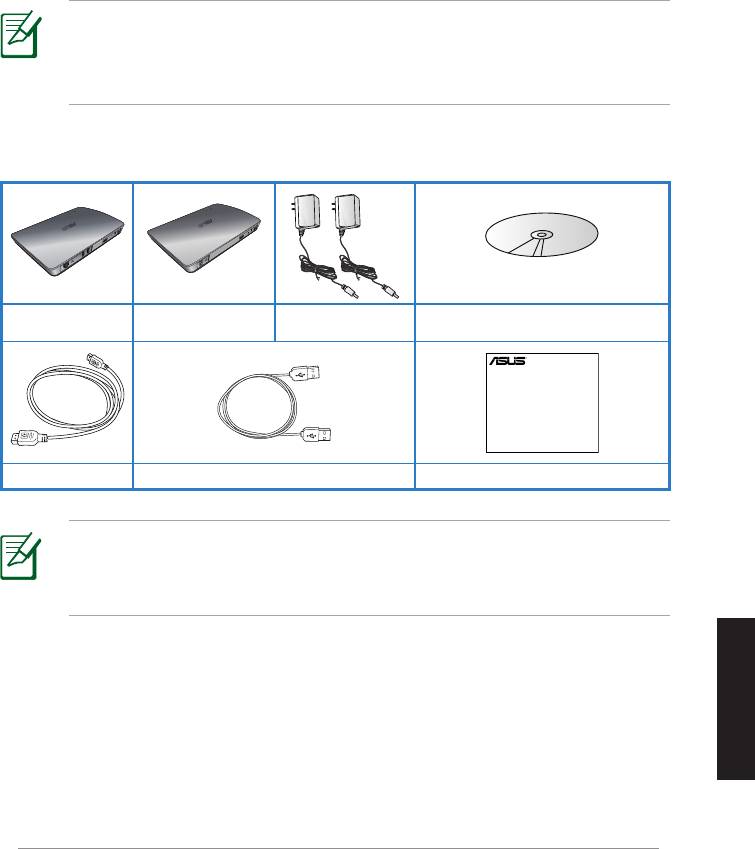
Adaptador de CA
CD de soporte (manual del usuario
Receptor WAVI Transmisor WAVI
x 2
y controlador)
Español
ASUS WAVI
73
WAVI
3D Wireless PC-to-TV Kit
Quick Start Guide
ASUS WAVI - Primer contacto
ASUS WAVI permite reproducir y compartir de forma inalámbrica contenidos
de audio y vídeo desde su PC en una pantalla externa de alta denición a una
distancia de hasta 25 metros (dentro de la línea de visión), proporcionando
transmisiones de audio y vídeo de alta denición 1080p con una latencia
inferior a 1ms. Este dispositivo permite disfrutar de videojuegos y películas
3D desde su PC.
NOTA: Para conseguir transmisiones inalámbricas de audio y vídeo HD
1080p a una distancia de hasta 25 metros, asegúrese de que el receptor
está ubicado de forma que tenga una línea de visión despejada hasta
el transmisor.
Contenido del paquete
Cable HDMI x 2 Cable USB Guía de inicio rápido
NOTAS:
• Si cualquiera de los artículos falta o se encuentra dañado, póngase en
contacto con su distribuidor.
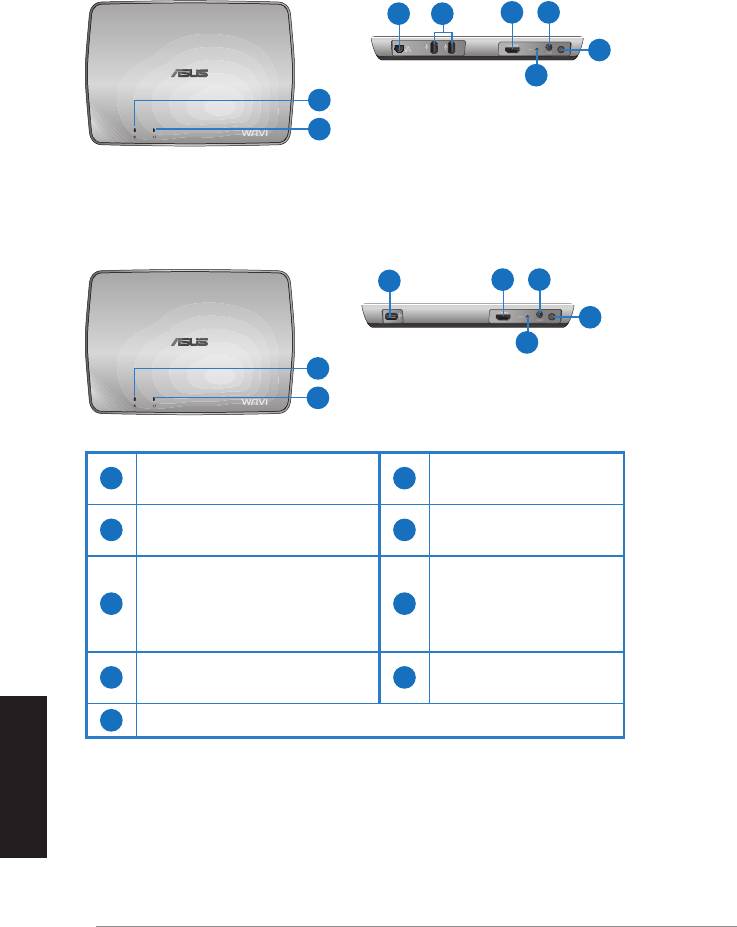
Características del dispositivo WAVI
Receptor
Vista frontal
Vista posterior
3 5
6 7
8
9
1
2
Transmisor
Vista frontal
Vista posterior
4
6 7
8
9
1
2
LED de encendido y
1
6
Puerto HDMI
apagado
LED de conexión
Puerto de entrada
2
7
inalámbrica
de CC
Puerto LAN
(solamente para
Botón de
3
8
actualizaciones de
alimentación
rmware)
Puerto USB (para conectar
4
9
Botón Restablecer
a su PC)
5
Puertos USB (para conectar a otros dispositivos)
Español
74
ASUS WAVI
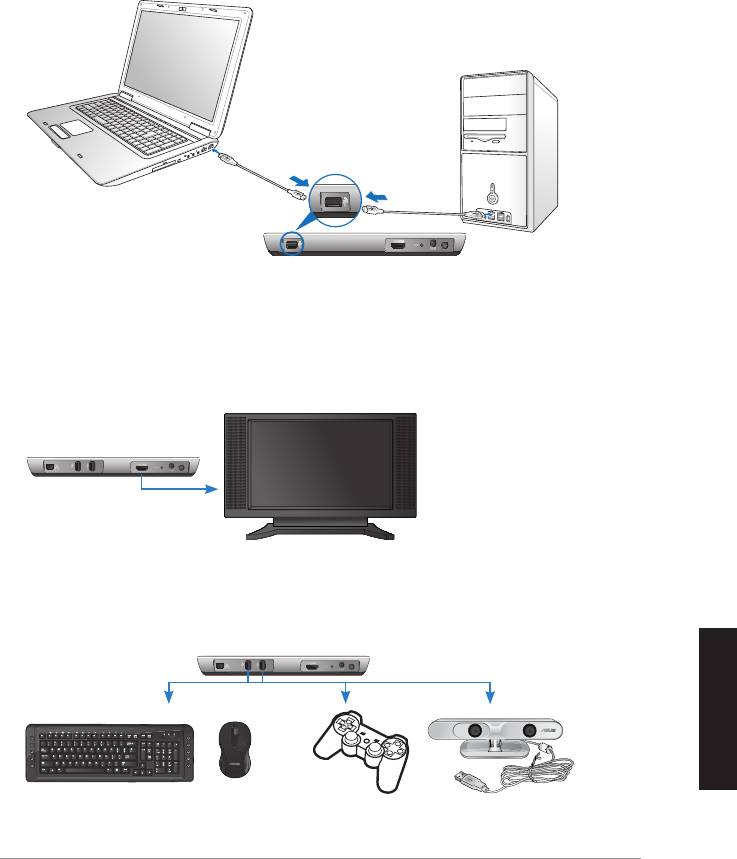
Español
ASUS WAVI
75
ON
OFF
ASUS WAVI, modo de empleo
Uso de su ASUS WAVI:
1. Instale el controlador de su dispositivo WAVI contenido en el CD de
soporte.
2. Mediante el cable USB incluido, conecte el puerto USB del transmisor
WAVI al puerto USB del equipo de sobremesa o portátil.
Puerto USB
Transmisor
3. Mediante el cable HDMI incluido, conecte el puerto HDMI del transmisor
WAVI al puerto HDMI del equipo de sobremesa o portátil.
4. Conecte el televisor al receptor del dispositivo WAVI utilizando el cable
HDMI incluido y, a continuación, congure el televisor en el modo HDMI.
Receptor WAVI
HDTV
5. Si desea utilizar otros dispositivos, conéctelos al receptor WAVI tal y
como se muestra a continuación.
C
Receptor WAVI
Teclado / Ratón USB Control de mandos ASUS Xtion
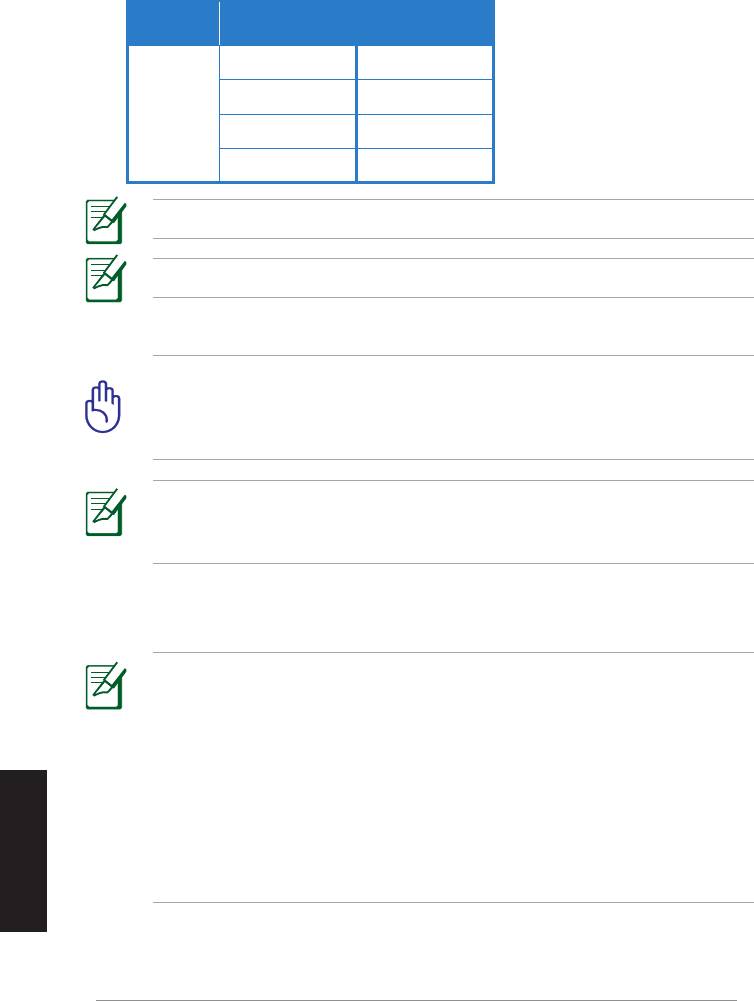
Consulte en la tabla siguiente los modelos de teclado y ratón inalámbrico compatibles.
Modelos de teclado y ratón
Marca
inalámbrico
WT400 WT410
WT45 WT450
ASUS
W4000 BX700
W4500 M-A65
NOTA: La lista anterior puede verse sujeta a cambios sin aviso previo.
NOTA: No conecte una unidad ash USB al receptor WAVI.
6. Encienda el transmisor y receptor WAVI.
¡IMPORTANTE! Asegúrese de conectar los adaptadores de CA incluidos
al transmisor y receptor WAVI. Asegúrese de enchufar los adaptadores
de CA incluidos a una fuente de alimentación con los valores nominales
adecuados.
NOTA: El LED de encendido y apagado o el LED de conexión
inalámbrica se ilumina en azul para indicar que la conexión se ha
realizado correctamente y en naranja si la conexión es errónea.
7. Congure el dispositivo de reproducción de sonido predeterminado del
equipo para emplear la salida HDMI.
NOTAS:
Para cambiar la conguración de audio:
• En Windows 7 y Vista haga clic en Control Panel (Panel de control) >
Hardware and Sound (Hardware y sonido) > Sound (Sonido). En la
cha Reproducción, seleccione la salida HDMI como el dispositivo de
Español
reproducción de sonido predeterminado.
• En Windows XP, haga clic en Control Panel (Panel de control) >
Sounds and Audio devices (Dispositivos de sonido y audio) >
Audio. En Reproducción de sonido, seleccione la salida HDMI.
76
ASUS WAVI

Notices
REACH
Complying with the REACH (Registration, Evaluation, Authorisation, and
Restriction of Chemicals) regulatory framework, we published the chemical
substances in our products at ASUS REACH website at
http://csr.asus.com/english/REACH.htm.
Federal Communications Commission Interference Statement
This device complies with FCC Rules Part 15. Operation is subject to the
following two conditions:
• This device may not cause harmful interference.
• This device must accept any interference received, including
interference that may cause undesired operation.
This equipment has been tested and found to comply with the limits for a class
B digital device, pursuant to Part 15 of the Federal Communications Commission
(FCC) rules. These limits are designed to provide reasonable protection against
harmful interference in a residential installation. This equipment generates,
uses, and can radiate radio frequency energy and, if not installed and used
in accordance with the instructions, may cause harmful interference to radio
communications. However, there is no guarantee that interference will not occur
in a particular installation. If this equipment does cause harmful interference
to radio or television reception, which can be determined by turning the
equipment o and on, the user is encouraged to try to correct the interference
by one or more of the following measures:
• Reorient or relocate the receiving antenna.
• Increase the separation between the equipment and receiver.
• Connect the equipment into an outlet on a circuit dierent from that to
which the receiver is connected.
• Consult the dealer or an experienced radio/TV technician for help.
CAUTION: Any changes or modications not expressly approved
by the party responsible for compliance could void the user’s
authority to operate the equipment.
Español
ASUS WAVI
77

FCC Radiation Exposure Statement
This equipment complies with FCC radiation exposure limits set forth for an
uncontrolled environment. This equipment should be installed and operated
with minimum distance 20cm between the radiator & your body.
This transmitter must not be co-located or operating in conjunction with any
other antenna or transmitter. If the device is going to be operated in 5.15 ~
5.25GHz frequency range, then it is restricted to an indoor environment only.
RF Exposure warning
• The equipment complies with FCC RF exposure limits set forth for an
uncontrolled environment.
• The equipment must be co-located or operated in conjunction with any
other antenna or transmitter.
IC Radiation Exposure Statement for Canada
This equipment complies with IC radiation exposure limits set forth for an
uncontrolled environment. To maintain compliance with IC RF exposure
compliance requirements, please avoid direct contact to the transmitting
antenna during transmitting. End users must follow the specic operating
instructions for satisfying RF exposure compliance.
Operation is subject to the following two conditions:
• This device may not cause interference.
• This device must accept any interference, including interference that
may cause undesired operation of the device.
This device should be used only as specied within this manual to meet RF
exposure requirements. Using this device in a manner inconsistent with this
manual could lead to excessive RF exposure conditions.
This device and its antenna(s) must not be co-located or operating in
conjunction with any other antenna or transmitter.
Country Code selection feature to be disabled for products marketed to the
US/CANADA.
Español
If the device is going to be operated in 5.15 ~ 5.25GHz frequency range, then
it is restricted to an indoor environment only.
This Class [B] digital apparatus complies with Canadian ICES-003.
Cet appareil numérique de la classe [B] est conforme à la norme NMB-003 du
Canada
78
ASUS WAVI

NCC警語
Declaration of Conformity for R&TTE directive 1999/5/EC
Hereby, ASUS declares that this product is in compliance with the essential
requirements and other relevant provisions of Directive 1995/5/EC.
This device will be sold in the following EEA (European Economic Area)
countries: Austria, Italy, Belgium, Liechtenstein, Denmark, Luxembourg,
Finland, Netherlands, France, Norway, Germany, Portugal, Greece, Spain,
Iceland, Sweden, Ireland, United Kingdom, Cyprus, Czech Republic, Estonia,
Hungary, Latvia, Lithuania, Malta, Slovakia, Poland, and Slovenia.
CE Mark Warning
This is a Class B product, in a domestic environment, this product may cause
radio interference, in which case the user may be required to take adequate
measures.
Español
CAUTION: The device for the band 5150-5350 MHz is only for indoor
use.
ASUS WAVI
79

Información de contacto con ASUS
ASUSTeK COMPUTER INC. (Asia-Pacíco)
Domicilio de la compañía 15 Li-Te Road, Peitou, Taipei, Taiwan 11259
General (tel) +886-2-2894-3447
Fax +886-2-2890-7798
Dirección web
www.asus.com.tw
Asistencia técnica
General (tel) +86-21-38429911
Asistencia en línea
support.asus.com
ASUS COMPUTER INTERNATIONAL (América)
Domicilio de la compañía 800 Corporate Way, Fremont, CA 94539, USA
General (tel) +1-510-739-3777
Fax +1-510-608-4555
Dirección web
usa.asus.com
Asistencia técnica
General (tel) +1-812-282-2787
Asistencia (fax) +1-812-284-0883
Asistencia en línea
support.asus.com
ASUS COMPUTER GmbH (Alemania y Austria)
Domicilio de la compañía Harkort Str. 21-23, D-40880 Ratingen, Germany
Fax +49-2102-959911
Contacto en línea www.asus.de/sales
Asistencia técnica
Teléfono de componentes +49-1805-010923
Teléfono (Sistemas /
notebook/Eee/LCD) +49-1805-010920*
Asistencia (fax) +49-2102-9599-11
Asistencia en línea
www.asus.com.de/support
Dirección web www.asus.com.de/news
* Coste de la llamada: 0,14 €/minuto desde una línea de teléfono jo en Alemania; 0,42
€/minuto desde un teléfono móvil.
Español
Fabricante
ASUSTeK Computer Inc.
Tel: +886-2-2894-3447
Domicilio de
No. 150, LI-TE RD., PEITOU, TAIPEI 112, TAIWAN
la compañía:
Representante
ASUS Computer GmbH
autorizado en
Domicilio de
HARKORT STR. 21-23, 40880 RATINGEN, GERMANY
Europa
la compañía:
80
ASUS WAVI
Português
WAVI
(Interface Áudio e Vídeo Sem Fios)
Receptor WAVI Transmissor WAVI
Manual do Utilizador

PG6186
Português
Primeira edição
Fevereiro
de
2011
Copyright © 2011 ASUSTeK Computer Inc. Reservados todos os direitos.
Nenhuma parte deste manual, incluindo os produtos e software aqui descritos, pode
ser reproduzida, transmitida, transcrita, armazenada num sistema de recuperação, ou
traduzida para outro idioma por qualquer forma ou por quaisquer meios, excepto a
documentação mantida pelo comprador como cópia de segurança, sem o consentimento
expresso e por escrito da ASUSTeK COMPUTER INC.(“ASUS”).
A garantia do produto ou a manutenção não será alargada se: (1) o produto for reparado,
modicado ou alterado, a não ser que tal reparação, modicação ou alteração seja
autorizada por escrito pela ASUS; ou (2) caso o número de série do produto tenha sido
apagado ou esteja em falta.
A ASUS FORNECE ESTE MANUAL “TAL COMO ESTÁ” SEM QUALQUER TIPO DE GARANTIA
QUER EXPRESSA QUER IMPLÍCITA, INCLUINDO MAS NÃO LIMITADA ÀS GARANTIAS
IMPLÍCITAS OU CONDIÇÕES DE PRÁTICAS COMERCIAIS OU ADEQUABILIDADE PARA UM
DETERMINADO FIM. EM CIRCUNSTÂNCIA ALGUMA PODE A ASUS, SEUS DIRECTORES,
OFICIAIS, EMPREGADOS OU AGENTES SER RESPONSABILIZADA POR QUAISQUER
DANOS INDIRECTOS, ESPECIAIS, ACIDENTAIS OU CONSEQUENTES.(INCLUINDO DANOS
PELA PERDA DE LUCROS, PERDA DE NEGÓCIO, PERDA DE UTILIZAÇÃO OU DE DADOS,
INTERRUPÇÃO DA ACTIVIDADE, ETC.) MESMO QUE A ASUS TENHA SIDO ALERTADA PARA
A POSSIBILIDADE DE OCORRÊNCIA DE TAIS DANOS, RESULTANTES DE QUALQUER DEFEITO
OU ERRO NESTE MANUAL OU NO PRODUTO.
AS ESPECIFICAÇÕES E INFORMAÇÕES CONTIDAS NESTE MANUAL SÃO FORNECIDAS
APENAS PARA FINS INFORMATIVOS E ESTÃO SUJEITAS A ALTERAÇÃO EM QUALQUER
ALTURA SEM AVISO PRÉVIO, NÃO CONSTITUINDO QUALQUER OBRIGAÇÃO POR PARTE
DA ASUS. A ASUS NÃO ASSUME QUALQUER RESPONSABILIDADE POR QUAISQUER ERROS
OU IMPRECISÕES QUE POSSAM APARECER NESTE MANUAL, INCLUINDO OS PRODUTOS E
SOFTWARE NELE DESCRITOS.
Os nomes dos produtos e das empresas mencionados neste manual podem ou não
ser marcas registadas ou estarem protegidos por direitos de autor que pertencem às
respectivas empresas. Estes nomes são aqui utilizados apenas para ns de identicação
ou explicação, para benefício dos proprietários e sem qualquer intenção de violação dos
direitos de autor.
82
ASUS WAVI

Índice
Informações de segurança ................................................................................... 84
Resumo das especicações do ASUS WAVI .................................................... 85
Português
Conheça o seu ASUS WAVI ................................................................................... 86
Conteúdo da embalagem ........................................................................86
Características do WAVI ......................................................................................... 87
Receptor .........................................................................................................87
Transmissor ...................................................................................................87
Utilização do seu ASUS WAVI ............................................................................... 88
Notices ......................................................................................................................... 90
Informação sobre o software .............................................................................. 93
ASUS WAVI
83
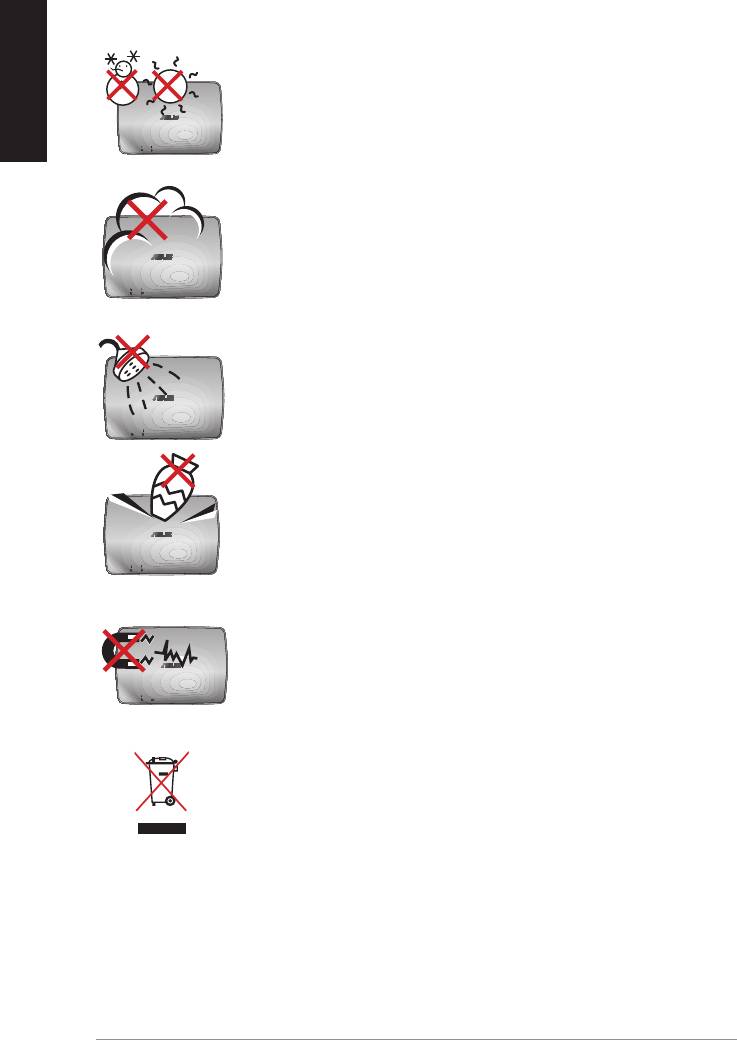
Português
Informações de segurança
TEMPERATURA SEGURA: O ASUS WAVI deve ser utilizado
apenas em ambientes com temperaturas entre 5ºC e 35ºC.
NÃO exponha a sujidade nem a ambientes com pó. NÃO
utilize o aparelho se existir alguma fuga de gás.
NÃO exponha a, ou utilize perto de líquidos, chuva ou
humidade.
NÃO coloque nem deixe cair objectos em cima do
aparelho e não introduza quaisquer objectos estranhos no
ASUS WAVI.
NÃO exponha a fortes campos magnéticos ou eléctricos.
NÃO elimine o ASUS WAVI junto com o lixo doméstico.
Consulte os regulamentos relativos à eliminação de
produtos electrónicos.
84
ASUS WAVI

Resumo das especicações do ASUS WAVI
Resolução TV: 1080p, 1080i, 720p, 576p, 480p
Vídeo 3D: 1080p a 24Hz
Áudio
7.1 canais 192KHz 24 bits, AC-3 e DTS Dolby
Tecnologia HDMI sem os
Português
WHDI AMIMON 5GHz 4T5R (encriptação AES 256 bits ou 128
bits)
Distância de transmissão
até 25 metros (sem obstáculos)
Atraso
<1ms
Fonte de alimentação
Transmissor e receptor: Transformadores de 12V, 2A 24W
Consumo de energia
Transmissor e receptor: 24W
Portas de entrada/saída
Transmissor:
- Porta USB x 1 (para ligação à porta USB de um computador)
- Porta HDMI x 1
- Porta de Entrada DC x 1
- LED de alimentação x 1*
- LED Sem Fios x 1*
Receptor:
- Porta LAN x 1
- Portas USB x 2
- Porta HDMI x 1
- Porta de Entrada DC x 1
- LED de alimentação x 1*
- LED Sem Fios x 1*
* O LED de alimentação / LED Sem Fios acende com a cor azul
para indicar uma ligação com êxito, e acende com a cor
laranja caso a ligação tenha falhado. A força do sinal será
exibida no ecrã.
NOTA: As especicações estão sujeitas a alterações sem aviso prévio.
ASUS WAVI
85
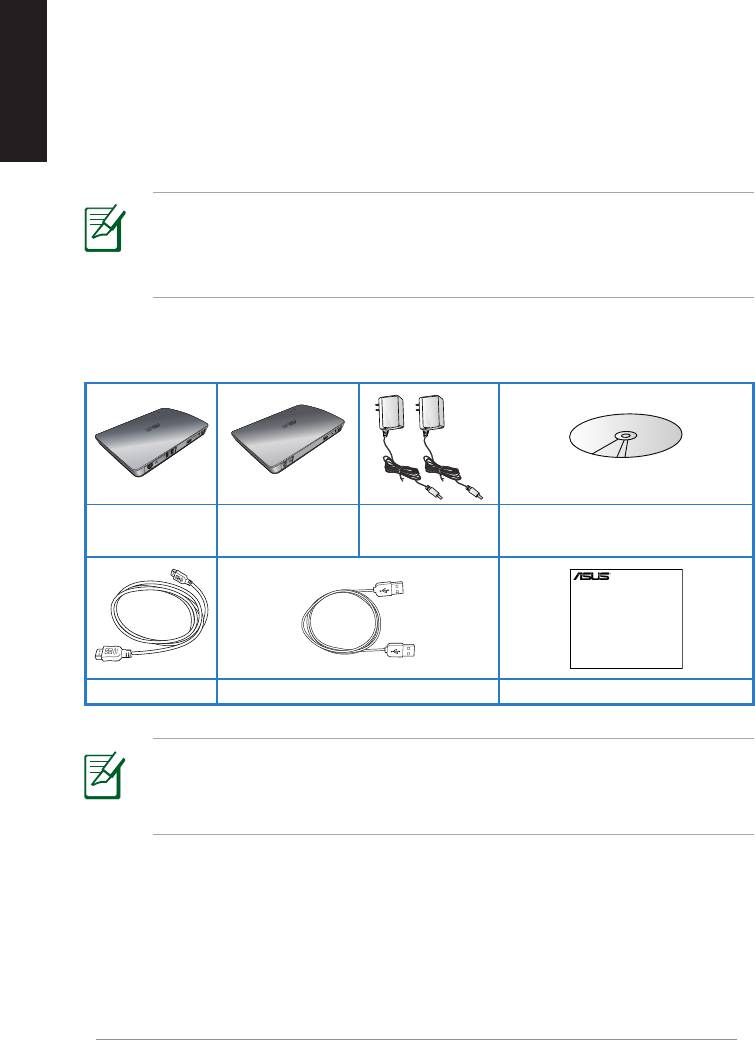
Português
Transformador
CD de suporte (Manual do
Receptor WAVI Transmissor WAVI
AC x 2
utilizador e Controladores)
86
ASUS WAVI
WAVI
3D Wireless PC-to-TV Kit
Quick Start Guide
Conheça o seu ASUS WAVI
O ASUS WAVI permite-lhe expandir ou partilhar de uma forma sem os as
suas fontes de áudio/vídeo a partir do seu computador para um ecrã externo
de alta denição até uma distância de 25 metros (sem obstáculos) e obter
transmissões de vídeo de alta denição com 1080p e transmissões de áudio
cristalino sem latência (<1ms). Permite-lhe desfrutar de jogos de vídeo e
lmes em 3D a partir do seu computador.
NOTA: Para transmissões sem os de áudio e vídeo de alta denição
com 1080p até uma distância de 25 metros, certique-se de que o
receptor e o transmissor se encontram posicionados sem quaisquer
obstáculos entre si.
Conteúdo da embalagem
Cabo HDMI x 2 Cabo USB Guia de consulta rápida
NOTAS:
• Caso algum item esteja danicado ou em falta, contacte o seu
revendedor.
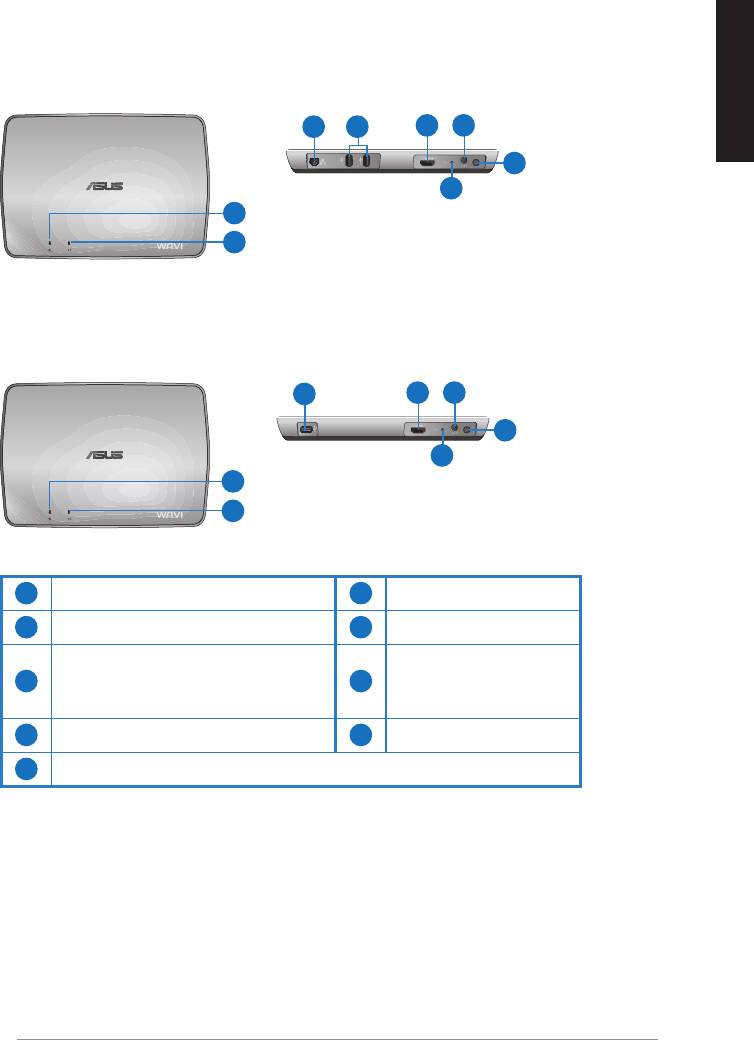
Características do WAVI
Receptor
Vista frontal
Vista posterior
3 5
6 7
Português
8
9
1
2
Transmissor
Vista frontal
Vista posterior
4
6 7
8
9
1
2
1
LED de alimentação
6
Porta HDMI
2
LED Sem Fios
7
Porta de entrada DC
Porta LAN
Botão de
3
(apenas para actualizações de
8
alimentação
rmware)
4
Porta USB (ligação ao PC)
9
Botão de reposição
5
Portas USB (ligação a outros dispositivos)
ASUS WAVI
87
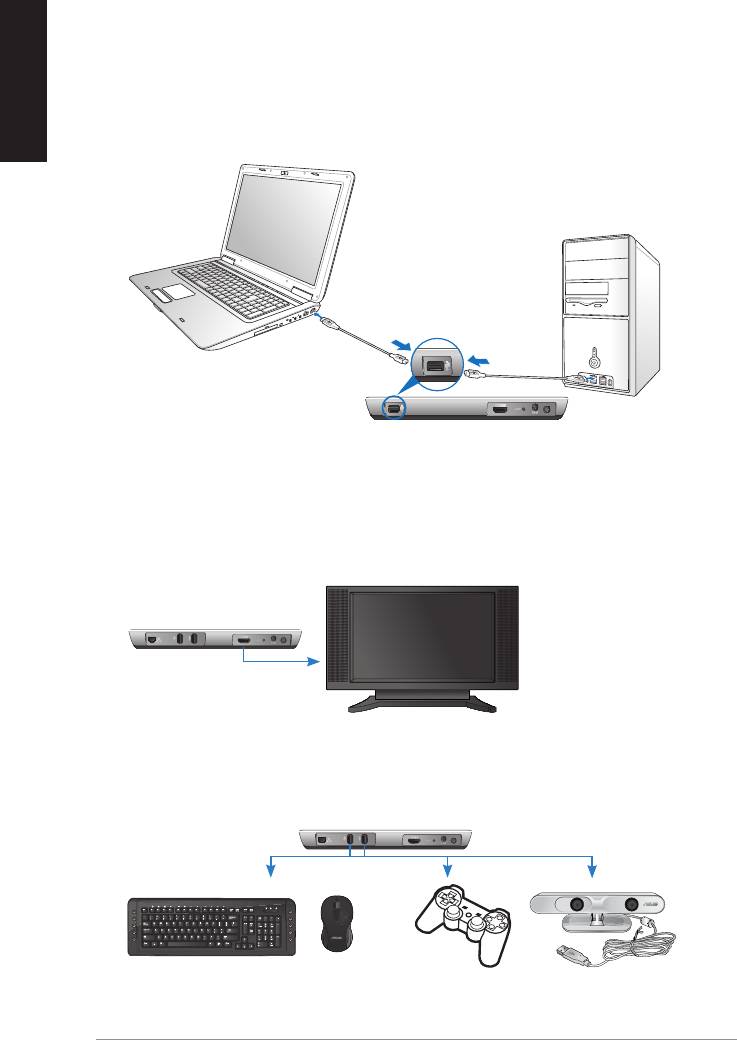
Português
88
ASUS WAVI
ON
OFF
Utilização do seu ASUS WAVI
Porta USB
Transmissor
Receptor WAVI
HDTV
C
Para utilizar o seu ASUS WAVI:
1. Instale o controlador WAVI a partir do CD de suporte incluído.
2. Utilizando o cabo USB incluído, ligue a porta USB do transmissor WAVI à
porta USB do seu computador portátil ou computador de secretária.
3. Utilizando o cabo HDMI incluído, ligue a porta HDMI do transmissor
WAVI à porta HDMI do seu computador portátil ou computador de
secretária.
4. Ligue a sua TV ao receptor WAVI através do cabo HDMI incluído e de
seguida coloque-a no modo HDMI.
5. Se pretender utilizar outros dispositivos, ligue-os ao seu receptor WAVI
tal como indicado abaixo.
Receptor WAVI
Teclado / Rato USB Comando para jogos ASUS Xtion
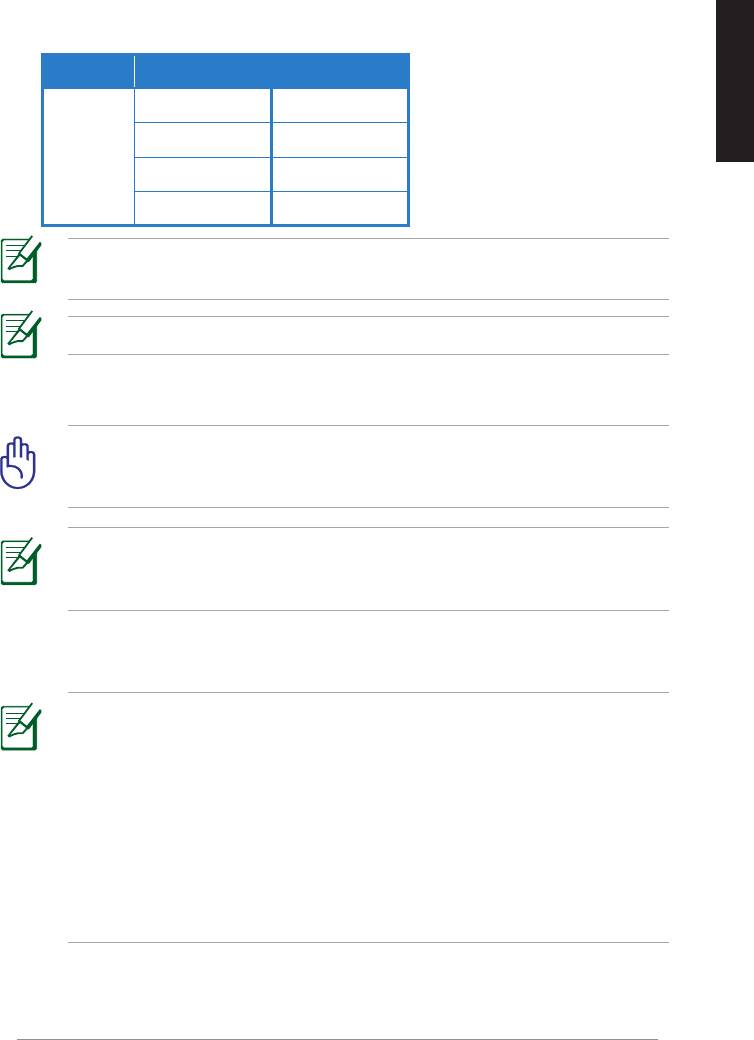
Consulte a tabela abaixo para saber quais os modelos de teclado e rato sem os
suportados.
Marca Modelos de teclado e rato sem fios
WT400 WT410
WT45 WT450
Português
ASUS
W4000 BX700
W4500 M-A65
NOTA:
A lista apresentada acima está sujeita a alterações sem aviso
prévio.
NOTA: Não ligue uma unidade ash USB ao seu receptor WAVI.
6. Ligue o receptor e o transmissor WAVI.
IMPORTANTE! Assegure-se de que liga os transformadores AC
incluídos ao transmissor e receptor WAVI. Assegure-se de que liga os
transformadores AC incluídos a tomadas com a tensão correcta.
NOTA: O LED de alimentação / LED Sem Fios acende com a cor azul
para indicar uma ligação com êxito, e acende com a cor laranja caso a
ligação tenha falhado.
7. Congure o dispositivo de reprodução de som do seu computador
portátil ou computador de secretária para saída por HDMI.
NOTAS:
Para alterar as congurações de áudio:
• No Windows 7 / Vista, clique em Control Panel (Painel de controlo)
> Hardware and Sound (Hardware e Som) > Sound (Som). No
separador Reprodução, seleccione saída HDMI como o dispositivo
predenido de reprodução de som.
• No Windows XP, clique em Control Panel (Painel de controlo) >
Sounds and Audio devices (Sons e dispositivos de áudio) > Audio
(Áudio). Em Reprodução de som, seleccione a saída HDMI.
ASUS WAVI
89

Português
Notices
REACH
Complying with the REACH (Registration, Evaluation, Authorisation, and
Restriction of Chemicals) regulatory framework, we published the chemical
substances in our products at ASUS REACH website at
http://csr.asus.com/english/REACH.htm.
Federal Communications Commission Interference Statement
This device complies with FCC Rules Part 15. Operation is subject to the
following two conditions:
• This device may not cause harmful interference.
• This device must accept any interference received, including
interference that may cause undesired operation.
This equipment has been tested and found to comply with the limits for a class
B digital device, pursuant to Part 15 of the Federal Communications Commission
(FCC) rules. These limits are designed to provide reasonable protection against
harmful interference in a residential installation. This equipment generates,
uses, and can radiate radio frequency energy and, if not installed and used
in accordance with the instructions, may cause harmful interference to radio
communications. However, there is no guarantee that interference will not occur
in a particular installation. If this equipment does cause harmful interference
to radio or television reception, which can be determined by turning the
equipment o and on, the user is encouraged to try to correct the interference
by one or more of the following measures:
• Reorient or relocate the receiving antenna.
• Increase the separation between the equipment and receiver.
• Connect the equipment into an outlet on a circuit dierent from that to
which the receiver is connected.
• Consult the dealer or an experienced radio/TV technician for help.
CAUTION: Any changes or modications not expressly approved
by the party responsible for compliance could void the user’s
authority to operate the equipment.
90
ASUS WAVI

FCC Radiation Exposure Statement
This equipment complies with FCC radiation exposure limits set forth for an
uncontrolled environment. This equipment should be installed and operated
with minimum distance 20cm between the radiator & your body.
This transmitter must not be co-located or operating in conjunction with any
Português
other antenna or transmitter. If the device is going to be operated in 5.15 ~
5.25GHz frequency range, then it is restricted to an indoor environment only.
RF Exposure warning
• The equipment complies with FCC RF exposure limits set forth for an
uncontrolled environment.
• The equipment must be co-located or operated in conjunction with any
other antenna or transmitter.
IC Radiation Exposure Statement for Canada
This equipment complies with IC radiation exposure limits set forth for an
uncontrolled environment. To maintain compliance with IC RF exposure
compliance requirements, please avoid direct contact to the transmitting
antenna during transmitting. End users must follow the specic operating
instructions for satisfying RF exposure compliance.
Operation is subject to the following two conditions:
• This device may not cause interference.
• This device must accept any interference, including interference that
may cause undesired operation of the device.
This device should be used only as specied within this manual to meet RF
exposure requirements. Using this device in a manner inconsistent with this
manual could lead to excessive RF exposure conditions.
This device and its antenna(s) must not be co-located or operating in
conjunction with any other antenna or transmitter.
Country Code selection feature to be disabled for products marketed to the
US/CANADA.
If the device is going to be operated in 5.15 ~ 5.25GHz frequency range, then
it is restricted to an indoor environment only.
This Class [B] digital apparatus complies with Canadian ICES-003.
Cet appareil numérique de la classe [B] est conforme à la norme NMB-003 du
Canada
ASUS WAVI
91

Português
NCC警語
Declaration of Conformity for R&TTE directive 1999/5/EC
Hereby, ASUS declares that this product is in compliance with the essential
requirements and other relevant provisions of Directive 1995/5/EC.
This device will be sold in the following EEA (European Economic Area)
countries: Austria, Italy, Belgium, Liechtenstein, Denmark, Luxembourg,
Finland, Netherlands, France, Norway, Germany, Portugal, Greece, Spain,
Iceland, Sweden, Ireland, United Kingdom, Cyprus, Czech Republic,
Estonia, Hungary, Latvia, Lithuania, Malta, Slovakia, Poland, and
Slovenia.
CE Mark Warning
This is a Class B product, in a domestic environment, this product may cause
radio interference, in which case the user may be required to take adequate
measures.
CAUTION: The device for the band 5150-5350 MHz is only for indoor
use.
92
ASUS WAVI

Informação sobre o software
ASUSTeK COMPUTER INC. (Ásia Pacíco)
Endereço
15 Li-Te Road, Peitou, Taipei, Taiwan 11259
Telefone +886-2-2894-3447
Fax +886-2-2890-7798
Português
Web site
www.asus.com.tw
Assistência técnica
Telefone +86-21-38429911
Assistência online
support.asus.com
ASUS COMPUTER INTERNATIONAL (América)
Endereço 800 Corporate Way, Fremont, CA 94539, USA
Telefone +1-510-739-3777
Fax +1-510-608-4555
Web site
usa.asus.com
Assistência técnica
Telefone
+1-812-282-2787
Fax da assistência +1-812-284-0883
Assistência online support.asus.com
ASUS COMPUTER GmbH (Alemanha & Áustria)
Endereço Harkort Str. 21-23, D-40880 Ratingen, Germany
Fax +49-2102-959911
Contacto online www.asus.com.de/sales
Assistência técnica
Telefone (Component) +49-1805-010923*
Telefone (Sistema/
Portáteis/Eee/LCD) +49-1805-010920*
Fax da assistência +49-2102-959911
Assistência online www.asus.com.de/support
Web site www.asus.com.de/news
* 0,14 EUR/minuto a partir da rede telefónica xa na Alemanha; 0,42 EUR/minuto a partir de um
telemóvel.
Fabricante
ASUSTeK Computer Inc.
Tel: +886-2-2894-3447
Morada: No. 150, LI-TE RD., PEITOU, TAIPEI 112, TAIWAN
Representante
ASUS Computer GmbH
autorizado na
Morada: HARKORT STR. 21-23, 40880 RATINGEN, GERMANY
Europa
ASUS WAVI
93
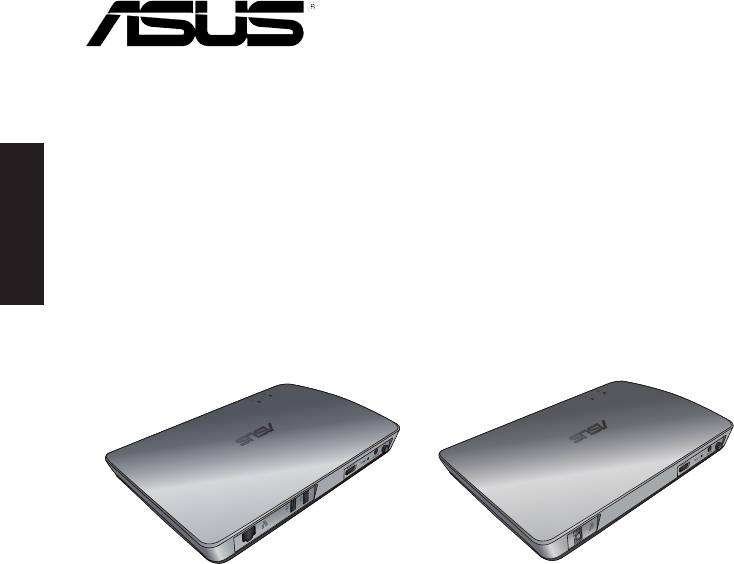
Nederlands
WAVI
(Wireless Audio Video Interface)
WAVI-ontvanger WAVI-zender
Gebruikershandleiding

DU6186
Eerste uitgave
Februari 2011
Copyright © 2011 ASUSTeK Computer Inc. Alle rechten voorbehouden.
Nederlands
Geen enkel deel van deze handleiding, met inbegrip van de producten en de software
die hierin is beschreven, mag zonder de uitdrukkelijke schriftelijke toestemming van
ASUSTeK Computer Inc. ("ASUS") worden gereproduceerd, verzonden, getranscribeerd,
opgeslagen in een ophaalsysteem of in enige taal worden vertaald in enige vorm of
door enig middel, behalve documentatie die door de koper wordt gebruikt voor back-
updoeleinden.
De productgarantie of service zal niet worden verleend als: (1) het product is gerepareerd,
gewijzigd of aangepast, tenzij dergelijke reparaties, wijzigingen of aanpassingen
schriftelijk zijn toegestaan door ASUS; of (2) als het serienummer van het product
onleesbaar is gemaakt of verwijderd.
ASUS BIEDT DEZE HANDLEIDING “ZOALS ZE IS” ZONDER ENIGE GARANTIES,
HETZIJ UITDRUKKELIJK OF IMPLICIET, MET INBEGRIP VAN, MAAR NIET BEPERKT
TOT DE IMPLICIETE GARANTIES OF VOORWAARDEN VOOR VERKOOPBAARHEID OF
GESCHIKTHEID VOOR EEN BEPAALD DOEL. IN GEEN GEVAL ZAL ASUS, HAAR DIRECTEURS,
FUNCTIONARISSEN, WERKNEMERS OF AGENTEN AANSPRAKELIJK ZIJN VOOR ENIGE
INDIRECTE, SPECIALE, INCIDENTELE OF GEVOLGSCHADE (INCLUSIEF SCHADE DOOR
WINSTDERVING, VERLIES VAN HANDEL, VERLIES VAN GEBRUIK OF GEGEVENS,
ONDERBREKING VAN HANDEL EN DERGELIJKE), ZELFS ALS ASUS OP DE HOOGTE WERD
GEBRACHT VAN DE MOGELIJKHEID VAN DERGELIJKE SCHADE DIE VOORTVLOEIT UIT
FOUTEN IN DEZE HANDLEIDING OF DEFECTEN AAN HET PRODUCT.
DE SPECIFICATIES EN INFORMATIE DIE IN DEZE HANDLEIDING ZIJN OPGENOMEN, ZIJN
UITSLUITEND INFORMATIEF BEDOELD EN OP ELK OGENBLIK EN ZONDER KENNISGEVING
ONDERHEVIG AAN WIJZIGINGEN. ZE MOGEN NIET WORDEN BESCHOUWD ALS EEN
VERBINTENIS DOOR ASUS. ASUS AANVAARDT GEEN VERANTWOORDELIJKHEID OF
AANSPRAKELIJKHEID VOOR FOUTEN OF ONNAUWKEURIGHEDEN DIE MOGELIJK IN DEZE
HANDLEIDING ZIJN VERMELD, INCLUSIEF DE PRODUCTEN EN SOFTWARE DIE ERIN ZIJN
BESCHREVEN.
Producten en bedrijfsnamen die in deze handleiding zijn vermeld, zijn mogelijk
geregistreerde handelsmerken of auteursrechten van hun respectieve bedrijven en
worden uitsluitend gebruikt voor identicatie of toelichting en in het voordeel van de
eigenaar, zonder de bedoeling te hebben een inbreuk te plegen op hun rechten.
ASUS WAVI
95

Inhoudsopgave
Veiligheidsinformatie ............................................................................................. 97
ASUS WAVI specicatieoverzicht ........................................................................ 98
Nederlands
Kennismaken met de ASUS WAVI ...................................................................... 99
Inhoud van de verpakking ......................................................................99
Kenmerken van WAVI ...........................................................................................100
Ontvanger ..................................................................................................100
Zender ..........................................................................................................100
Uw ASUS WAVI gebruiken ..................................................................................101
Notices .......................................................................................................................103
ASUS contact informatie .....................................................................................106
96
ASUS WAVI
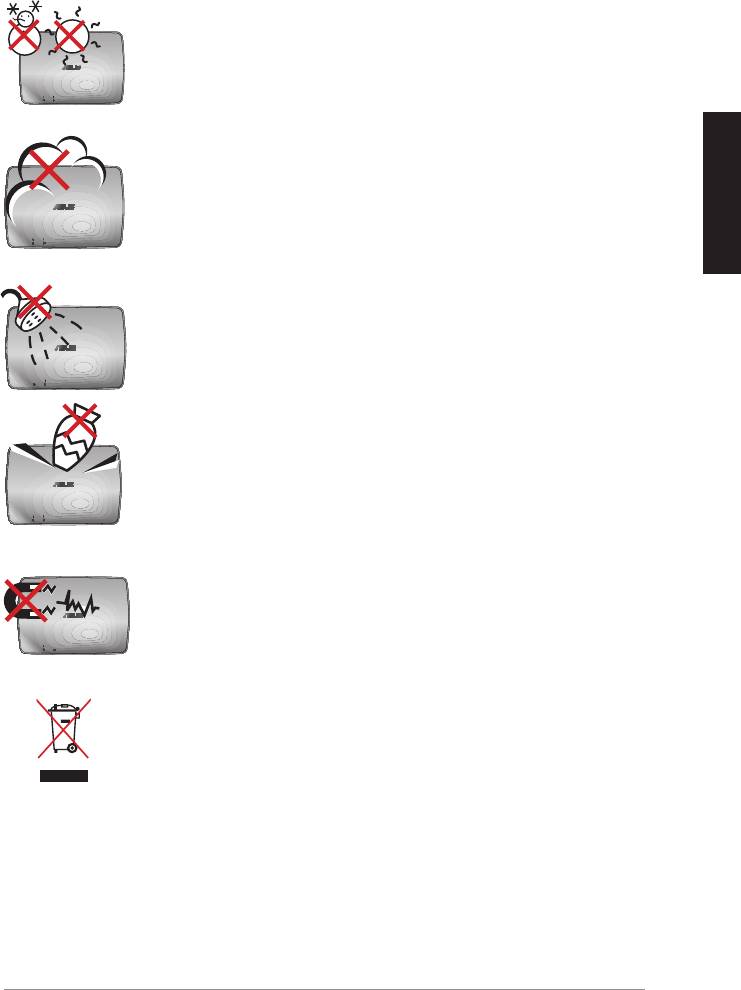
Veiligheidsinformatie
VEILIGHEIDSTEMP: De ASUS WAVI mag
alleen in omgevingen worden gebruikt met
omgevingstemperaturen tussen 5°C (41°F) en 35°C (95°F).
NIET aan vieze of stoge omgevingen blootstellen. NIET
tijdens een gaslekkage bedienen.
Nederlands
NIET blootstellen aan of gebruiken in de nabijheid van
vloeistof, regen of vocht.
NIET bovenop objecten plaatsen of laten vallen en geen
vreemde voorwerpen in de ASUS WAVI duwen.
NIET aan krachtige magnetische of elektrische velden
blootstellen.
De ASUS WAVI NIET weggooien bij het huishoudelijk afval.
Raadpleeg de lokale voorschriften voor het verwijderen
van elektronische producten.
ASUS WAVI
97
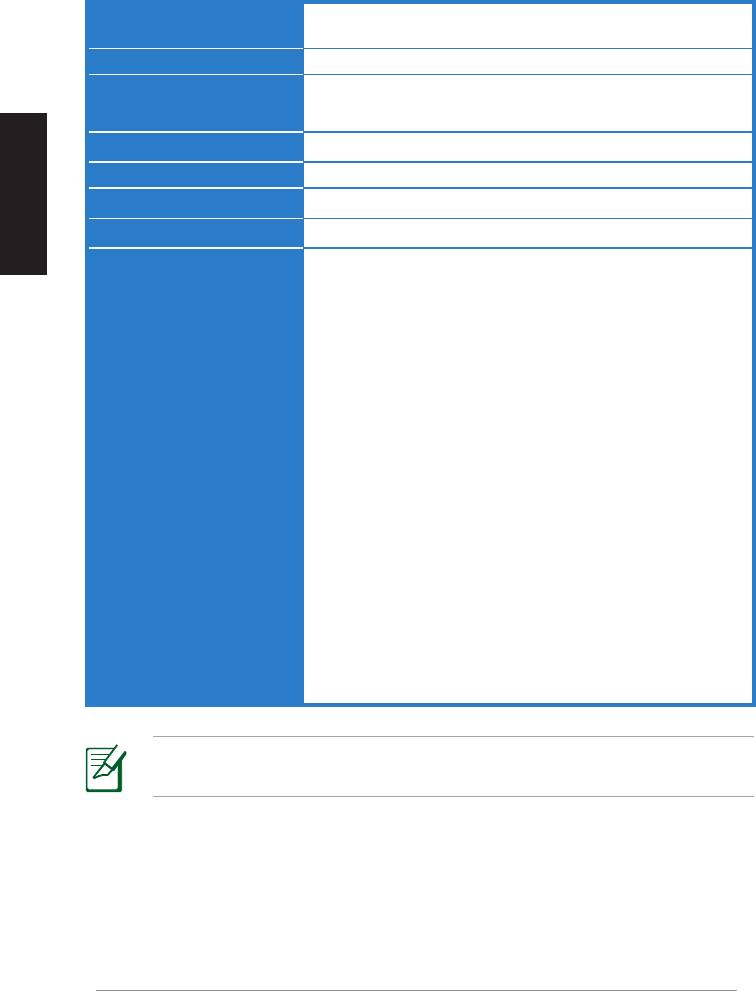
ASUS WAVI specicatieoverzicht
Resolutie TV: 1080p, 1080i, 720p, 576p, 480p
3D Video: 1080p @ 24Hz
Audio
7.1 kanalen 192KHz 24-bit, AC-3 en DTS Dolby
Draadloze HDMI-technologie
AMIMON WHDI 5GHz 4T5R (256-bit if 128-bit AES-codering)
Nederlands
Zendafstand
tot 25 meter (gezichtslijn)
Vertragingstijd
<1ms
Voeding
Zender en ontvanger: 12V, 2A 24W adapters
Energieverbruik
Zender en ontvanger: 24W
I/O-poorten
Zender:
- USB-poort x 1 (om op een USB-poort van een computer aan
te sluiten)
- HDMI-poort x 1
- Gelijkstroomingang x 1
- Voedings-LED x 1*
- Draadloze LED x 1*
Ontvanger:
- LAN-poort x 1
- USB-poorten x 2
- HDMI-poort x 1
- Gelijkstroomingang x 1
- Voedings-LED x 1*
- Draadloze LED x 1*
* De voedings-LED / Draadloze LED brandt blauw om een
succesvolle verbinding aan te geven en brandt oranje als de
verbinding is mislukt. De signaalsterkte wordt op het scherm
weergegeven.
OPMERKING: De specicaties zijn onderhevig aan wijzigingen
zonder voorafgaande kennisgeving.
98
ASUS WAVI
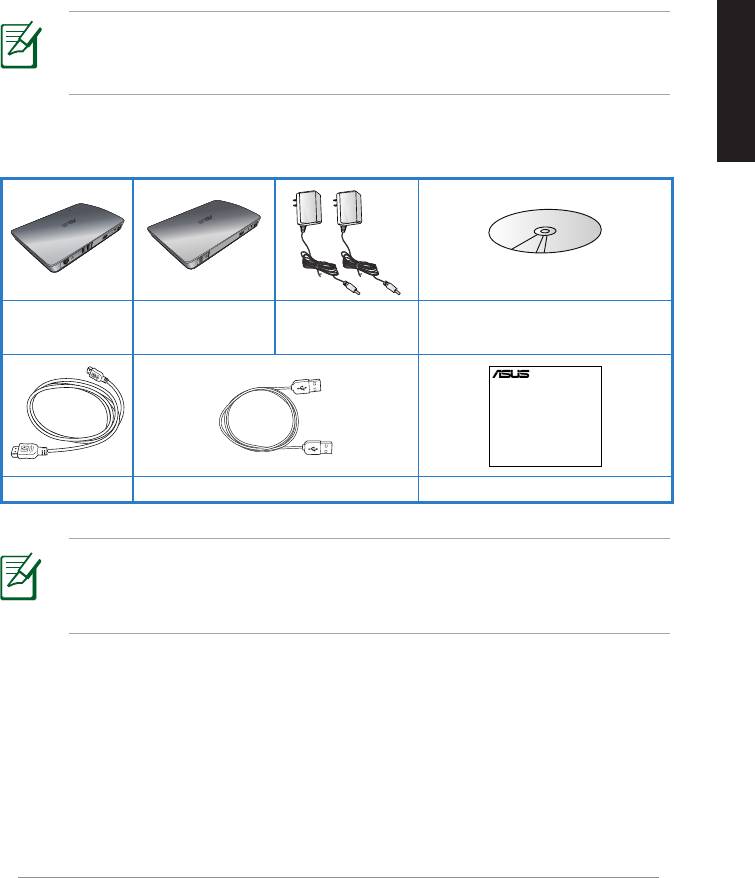
Nederlands
2
Ondersteunings-cd (handleiding
WAVI-ontvanger WAVI-zender
voedingsapparaten
en stuurprogramma)
ASUS WAVI
99
WAVI
3D Wireless PC-to-TV Kit
Quick Start Guide
Kennismaken met de ASUS WAVI
Met ASUS WAVI kunt u uw audio/videobronnen draadloos uitbreiden en
delen vanaf uw computer naar een extern scherm met hoge denitie, tot een
afstand van 25 meter (binnen zicht), voor vertragingsvrije (<1ms) video van
1080p en kristalheldere audio-uitzendingen. U kunt gebruik maken van 3D-
videospellen en lms van uw computer.
OPMERKING: Voor volledige draadloze audio- en video-uitzendingen
met hoge denitie van 1080p, tot een afstand van 25 meter, zorgt u
ervoor dat de ontvinger binnen zicht van de zender is geplaatst.
Inhoud van de verpakking
2 HDMI-kabels USB-kabel Snelle startgids
OPMERKINGEN:
• Is een van de artikelen beschadigd of ontbreekt er iets, neem dan
contact op met de leverancier.
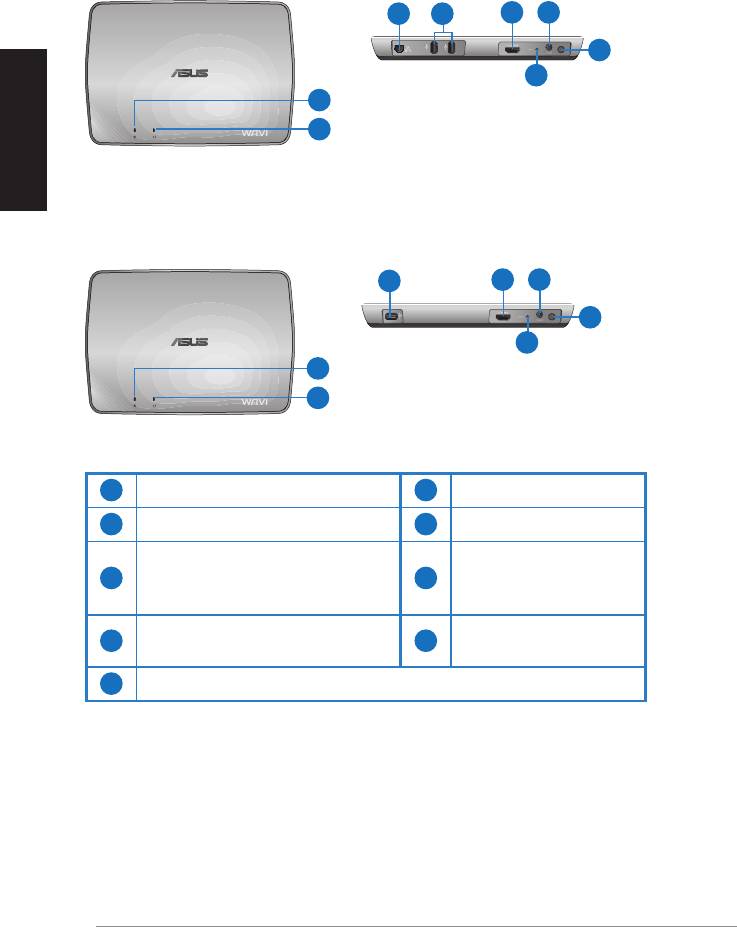
Kenmerken van WAVI
Ontvanger
Voorzijde
Achterzijde
3 5
6 7
8
Nederlands
9
1
2
Zender
Voorzijde
Achterzijde
4
6 7
8
9
1
2
1
Voedingsled
6
HDMI-aansluiting
2
Draadloze LED
7
Voedingsingang
LAN-aansluiting
3
(alleen voor bijwerken van
8
Hoofdschakelaar
rmware)
USB-aansluiting (verbinding
4
9
Resetknop
met computer)
5
USB-aansluitingen (verbinding met andere apparaten)
100
ASUS WAVI
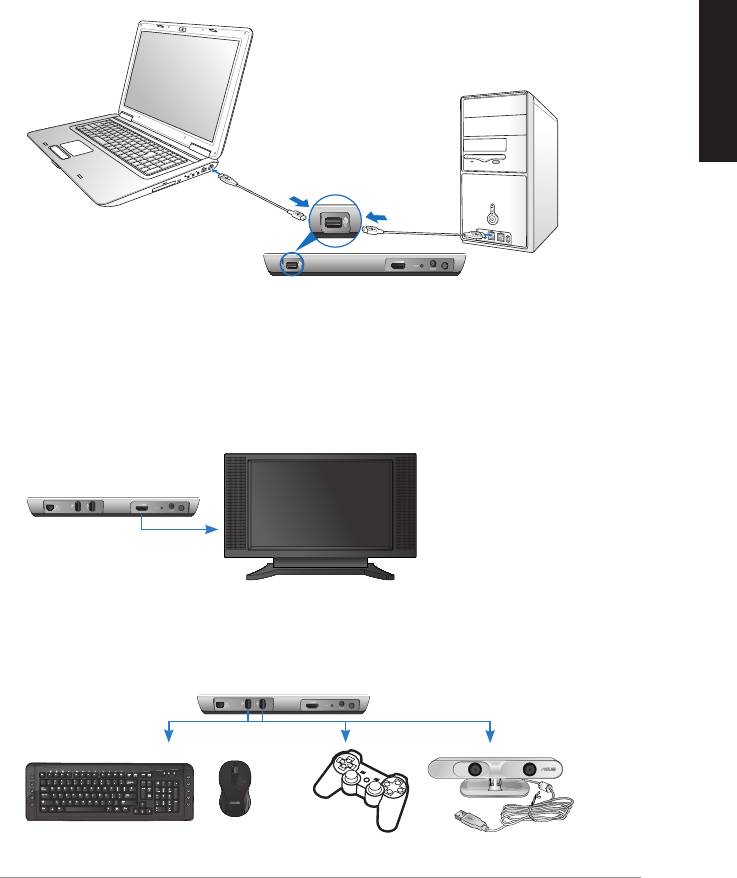
Nederlands
ASUS WAVI
101
ON
OFF
USB-aansluiting
Zender
WAVI-ontvanger
HDTV
C
Uw ASUS WAVI gebruiken
U gebruikt de ASUS WAVI als volgt:
1. Installeer het WAVI-stuurprogramma met de meegeleverde
ondersteunings-cd.
2. Sluit de USB-aansluiting van de WAVI-zender met de meegeleverde USB-
kabel aan op de USB-aansluiting van uw notebook of bureaucomputer.
3. Sluit de HDMI-aansluiting van de WAVI-zender met de meegeleverde
HDMI-kabel aan op de
HDMI-aansluiting van uw notebook of bureaucomputer.
4. Sluit de televisie aan op de WAVI-ontvanger met de meegeleverde
HDMI-kabel en stel de televisie in op HDMI.
5. Wilt u andere apparaten aansluiten, sluit ze dan op de WAVI-ontvanger
aan zoals hieronder getoond.
WAVI-ontvanger
USB-toetsenbord / -muis Gamepad ASUS Xtion
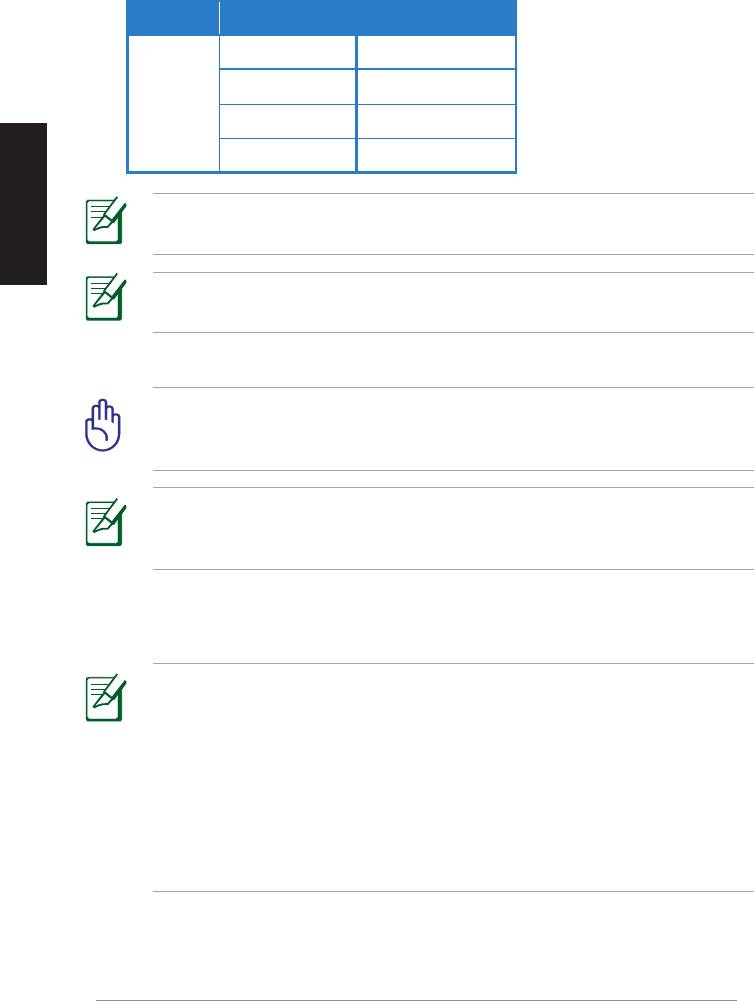
Zie de tabel hieronder voor de ondersteunde draadloze toetsenbord- en muismodellen.
Merk Draadloze toetsenbord- en muismodellen
WT400 WT410
WT45 WT450
ASUS
W4000 BX700
Nederlands
W4500 M-A65
OPMERKING: De lijst hierboven wordt zonder voorafgaande
kennisgeving gewijzigd.
OPMERKING: Sluit geen USB-flashdrive op de WAVI-ontvanger
aan.
6. Zet de WAVI-zender en –ontvanger aan.
BELANGRIJK! denk er aan dat u de meegeleverde
voedingsapparaten op de WAVI-zender en –ontvanger aansluit. Steek
de voedingsapparaten in een stopcontact met de juiste netspanning.
OPMERKING: de voedingsled/draadloze LED wordt blauw om
een succesvolle verbinding aan te geven en wordt oranje als de
verbinding niet goed is.
7. Stel de geluidskaart van de notebook of bureaucomputer in op HDMI-
uitgang.
OPMERKINGEN:
De audio-instellingen veranderen:
• Onder Windows 7 / Vista, klik op Control Panel (Conguratiescherm)
> Hardware and Sound (Hardware en geluid) > Sound (Geluid). Kies
in de tab Afspelen de HDMI-uitgang als afspeelapparaat.
• Onder Windows XP, klik op Control Panel (Conguratiescherm) >
Sounds and Audio devices (Geluid en audio-apparaten) > Audio.
Kies onder Geluid afspelen de HDMI-uitgang.
102
ASUS WAVI
Notices
REACH
Complying with the REACH (Registration, Evaluation, Authorisation, and
Restriction of Chemicals) regulatory framework, we published the chemical
substances in our products at ASUS REACH website at
http://csr.asus.com/english/REACH.htm.
Federal Communications Commission Interference Statement
This device complies with FCC Rules Part 15. Operation is subject to the
following two conditions:
• This device may not cause harmful interference.
Nederlands
• This device must accept any interference received, including
interference that may cause undesired operation.
This equipment has been tested and found to comply with the limits for a class
B digital device, pursuant to Part 15 of the Federal Communications Commission
(FCC) rules. These limits are designed to provide reasonable protection against
harmful interference in a residential installation. This equipment generates,
uses, and can radiate radio frequency energy and, if not installed and used
in accordance with the instructions, may cause harmful interference to radio
communications. However, there is no guarantee that interference will not occur
in a particular installation. If this equipment does cause harmful interference
to radio or television reception, which can be determined by turning the
equipment o and on, the user is encouraged to try to correct the interference
by one or more of the following measures:
• Reorient or relocate the receiving antenna.
• Increase the separation between the equipment and receiver.
• Connect the equipment into an outlet on a circuit dierent from that to
which the receiver is connected.
• Consult the dealer or an experienced radio/TV technician for help.
CAUTION: Any changes or modications not expressly approved
by the party responsible for compliance could void the user’s
authority to operate the equipment.
ASUS WAVI
103

FCC Radiation Exposure Statement
This equipment complies with FCC radiation exposure limits set forth for an
uncontrolled environment. This equipment should be installed and operated
with minimum distance 20cm between the radiator & your body.
This transmitter must not be co-located or operating in conjunction with any
other antenna or transmitter. If the device is going to be operated in 5.15 ~
Nederlands
5.25GHz frequency range, then it is restricted to an indoor environment only.
RF Exposure warning
• The equipment complies with FCC RF exposure limits set forth for an
uncontrolled environment.
• The equipment must be co-located or operated in conjunction with any
other antenna or transmitter.
IC Radiation Exposure Statement for Canada
This equipment complies with IC radiation exposure limits set forth for an
uncontrolled environment. To maintain compliance with IC RF exposure
compliance requirements, please avoid direct contact to the transmitting
antenna during transmitting. End users must follow the specic operating
instructions for satisfying RF exposure compliance.
Operation is subject to the following two conditions:
• This device may not cause interference.
• This device must accept any interference, including interference that
may cause undesired operation of the device.
This device should be used only as specied within this manual to meet RF
exposure requirements. Using this device in a manner inconsistent with this
manual could lead to excessive RF exposure conditions.
This device and its antenna(s) must not be co-located or operating in
conjunction with any other antenna or transmitter.
Country Code selection feature to be disabled for products marketed to the
US/CANADA.
If the device is going to be operated in 5.15 ~ 5.25GHz frequency range, then
it is restricted to an indoor environment only.
This Class [B] digital apparatus complies with Canadian ICES-003.
Cet appareil numérique de la classe [B] est conforme à la norme NMB-003 du
Canada
104
ASUS WAVI
NCC警語
Nederlands
Declaration of Conformity for R&TTE directive 1999/5/EC
Hereby, ASUS declares that this product is in compliance with the essential
requirements and other relevant provisions of Directive 1995/5/EC.
This device will be sold in the following EEA (European Economic Area)
countries: Austria, Italy, Belgium, Liechtenstein, Denmark, Luxembourg,
Finland, Netherlands, France, Norway, Germany, Portugal, Greece, Spain,
Iceland, Sweden, Ireland, United Kingdom, Cyprus, Czech Republic,
Estonia, Hungary, Latvia, Lithuania, Malta, Slovakia, Poland, and
Slovenia.
CE Mark Warning
This is a Class B product, in a domestic environment, this product may cause
radio interference, in which case the user may be required to take adequate
measures.
CAUTION: The device for the band 5150-5350 MHz is only for indoor
use.
ASUS WAVI
105

ASUS contact informatie
ASUSTeK COMPUTER INC. (Azië en gebied Stille Oceaan)
Adres 15 Li-Te Road, Peitou, Taipei, Taiwan 11259
Telefoon +886-2-2894-3447
Fax +886-2-2890-7798
Web site
www.asus.com.tw
Technisch Ondersteuning
Nederlands
Telefoon +86-21-38429911
Online ondersteuning
support.asus.com
ASUS COMPUTER INTERNATIONAL (America)
Adres 800 Corporate Way, Fremont, CA 94539, USA
Telefoon +1-812-282-3777
Fax +1-510-608-4555
Web site
usa.asus.com
Technisch Ondersteuning
Telefoon
+1-812-282-2787
Fax ondersteuning +1-812-284-0883
Online ondersteuning support.asus.com
ASUS COMPUTER GmbH (Germany and Austria)
Adres Harkort Str. 21-23, D-40880 Ratingen, Germany
Fax
+49-2102-9599-11
Web site www.asus.de
Online contact
www.asus.com.de/sales
Technisch Ondersteuning
Telefoon (Component) +49-1805-010923*
Telefoon (System/
Notebook/Eee/LCD) +49-1805-010920*
Fax ondersteuning
+49-2102-959911
Online ondersteuning
www.asus.com.de/support
Web site
www.asus.com.de/news
*EUR 0,14/minuut vanaf een vaste Duitse landlijn; EUR 0,42/minuut vanaf een mobiele
telefoon.
Fabrikant
ASUSTeK Computer Inc.
Tel: +886-2-2894-3447
Adres: No. 150, LI-TE RD., PEITOU, TAIPEI 112,
TAIWAN
Erkende
ASUS Computer GmbH
vertegenwoordiger
Adres: HARKORT STR. 21-23, 40880 RATINGEN,
in Europa
GERMANY
106
ASUS WAVI
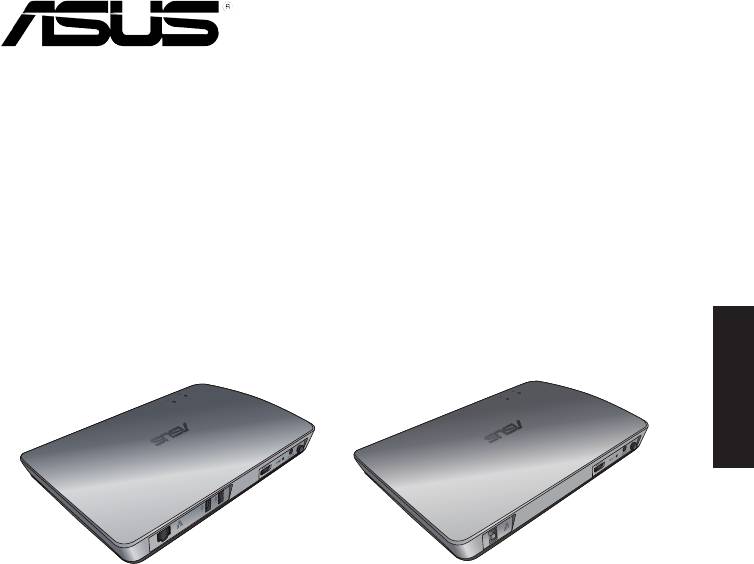
WAVI
(Bezprzewodowy interfejs Audio Video)
Polski
Odbiornik WAVI Nadajnik WAVI
Podręcznik użytkownika

PL6186
Wydanie pierwsze
Luty 2011
Copyright © 2011 ASUSTeK Computer Inc. Wszelkie prawa zastrzeżone.
Żadnej z części tego podręcznika, włącznie z opisem produktów i oprogramowania,
nie można powielać, przenosić, przetwarzać, przechowywać w systemie odzyskiwania
Polski
danych lub tłumaczyć na inne języki, w jakiejkolwiek formie lub w jakikolwiek sposób,
za wyjątkiem wykonywania kopii zapasowej dokumentacji otrzymanej od dostawcy, bez
wyraźnego, pisemnego pozwolenia ASUSTeK COMPUTER INC. (“ASUS”).
Gwarancja na produkt lub usługa gwarancyjna nie zostanie wydłużona, jeśli: (1) produkt
był naprawiany, modykowany lub zmieniany, jeśli wykonane naprawy, modykacje lub
zmiany zostały wykonane bez pisemnej autoryzacji ASUS; lub, gdy (2) została uszkodzona
lub usunięta etykieta z numerem seryjnym.
ASUS UDOSTĘPNIA TEN PODRĘCZNIK W STANIE “JAKI JEST”, BEZ UDZIELANIA
JAKICHKOLWIEK GWARANCJI, ZARÓWNO WYRAŹNYCH JAK I DOMNIEMANYCH,
WŁĄCZNIE, ALE NIE TYLKO Z DOMNIEMANYMI GWARANCJAMI LUB WARUNKAMI
PRZYDATNOŚCI HANDLOWEJ LUB DOPASOWANIA DO OKREŚLONEGO CELU. W
ŻADNYM PRZYPADKU FIRMA ASUS, JEJ DYREKTORZY, KIEROWNICY, PRACOWNICY LUB
AGENCI NIE BĘDĄ ODPOWIADAĆ ZA JAKIEKOLWIEK NIEBEZPOŚREDNIE, SPECJANE,
PRZYPADKOWE LUB KONSEKWENTNE SZKODY (WŁĄCZNIE Z UTRATĄ ZYSKÓW,
TRANSAKCJI BIZNESOWYCH, UTRATĄ MOŻLIWOŚCI KORZYSTANIA LUB UTRACENIEM
DANYCH, PRZERWAMI W PROWADZENIU DZIAŁANOŚCI ITP.) NAWET, JEŚLI FIRMA ASUS
UPRZEDZAŁA O MOŻLIWOŚCI ZAISTNIENIA TAKICH SZKÓD, W WYNIKU JAKICHKOLWIEK
DEFEKTÓW LUB BŁĘDÓW W NINIEJSZYM PODRĘCZNIKU LUB PRODUKCIE.
SPECYFIKACJE I INFORMACJE ZNAJDUJĄCE SIĘ W TYM PODRĘCZNIKU, SŁUŻĄ WYŁĄCZNIE
CELOM INFORMACYJNYM I MOGĄ ZOSTAĆ ZMIENIONE W DOWOLNYM CZASIE, BEZ
POWIADOMIENIA, DLATEGO TEŻ, NIE MOGĄ BYĆ INTERPRETOWANE JAKO WIĄŻĄCE
FIRMĘ ASUS DO ODPOWIEDZIALNOŚCI. ASUS NIE ODPOWIADA ZA JAKIEKOLWIEK
BŁĘDY I NIEDOKŁADNOŚCI, KTÓRE MOGĄ WYSTĄPIĆ W TYM PODRĘCZNIKU, WŁĄCZNIE Z
OPISANYMI W NIM PRODUKTAMI I OPROGRAMOWANIEM.
Produkty i nazwy rm pojawiające się w tym podręczniku mogą, ale nie muszą być
zastrzeżonymi znakami towarowymi lub prawami autorskimi ich odpowiednich
właścicieli i używane są wyłącznie w celu identykacji lub wyjaśnienia z korzyścią dla ich
właścicieli i bez naruszania ich praw.
108
ASUS WAVI

Spis treści
Informacje o bezpieczeństwie ..........................................................................110
Sumaryczna specykacja ASUS WAVI .............................................................111
Poznanie ASUS WAVI ............................................................................................112
Zawartość opakowania ..........................................................................112
Właściwości WAVI ..................................................................................................113
Odbiornik ....................................................................................................113
Nadajnik ......................................................................................................113
Używanie ASUS WAVI ...........................................................................................114
Notices .......................................................................................................................116
ASUS Contact information .................................................................................119
Polski
ASUS WAVI
109
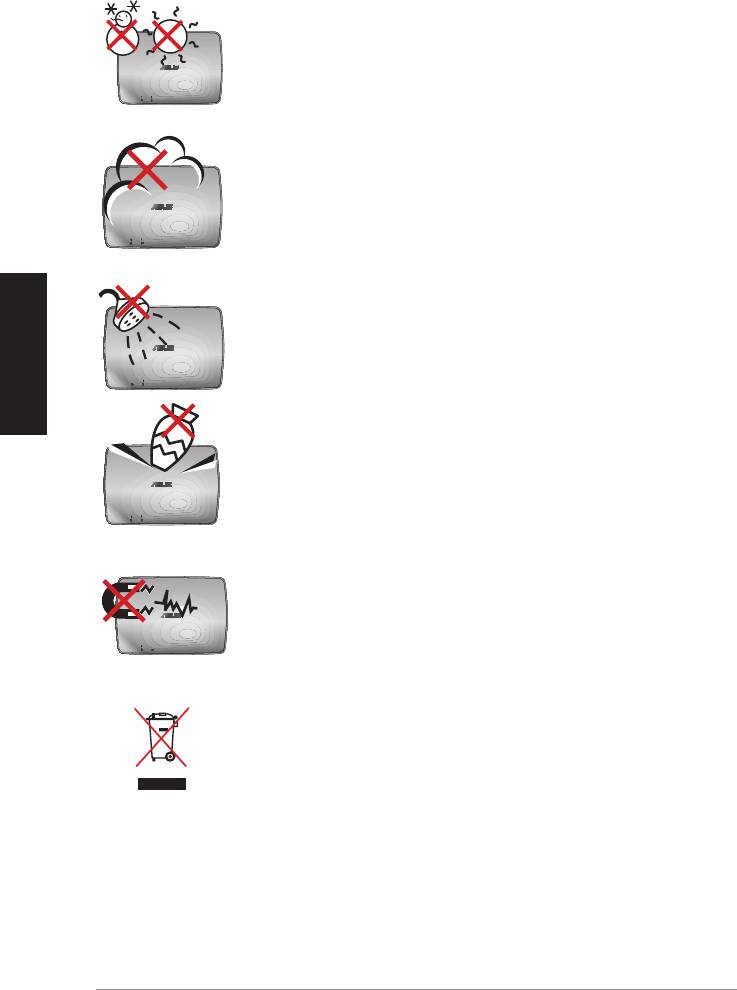
Informacje o bezpieczeństwie
SAFE TEMP (BEZPIECZNA TEMPERATURA): ASUS WAVI
można używać wyłącznie w miejscach o temperaturze
otoczenia w zakresie 5°C (41°F) do 35°C (95°F).
NIE należy narażać urządzenia na brud lub kurz. NIE należy
używać urządzenia podczas wycieku gazu.
Polski
NIE należy narażać na oddziaływanie lub używać w
pobliżu płynów, deszczu lub wilgoci.
NIE należy dopuszczać do upuszczania na urządzenie
obiektów i nie należy wkładać do ASUS WAVI jakichkolwiek
obcych obiektów.
NIE należy narażać urządzenia na silne pola magnetyczne
lub elektryczne.
NIE należy wyrzucać zużytego urządzenia ASUS WAVI
do śmieci miejskich. Należy sprawdzić lokalne przepisy
dotyczące usuwania produktów elektronicznych.
110
ASUS WAVI

Sumaryczna specykacja ASUS WAVI
Rozdzielczość TV: 1080p, 1080i, 720p, 576p, 480p
3D Video: 1080p @ 24Hz
Audio
7.1 kanałowy 192KHz 24-bitowy, AC-3 i DTS Dolby
Technologia bezprzewodowa
AMIMON WHDI 5GHz 4T5R (szyfrowanie AES 256-bitowe lub
HDMI
128-bitowe)
Odległość transmisji
do 25 metrów (W linii widzenia)
Czas opóźnienia
<1ms
Zasilanie
Nadajnik i odbiornik: adaptery 12V, 2A 24W
Zużycie energii
Nadajnik i odbiornik: 24W
Porty We/Wy
Nadajnik:
- Port USB x 1 (podłączanie do portu USB komputera)
- Port HDMI x 1
- Port wejścia prądu stałego x 1
- Dioda LED zasilania x 1*
Polski
- Dioda LED połączenia bezprzewodowego x 1*
Odbiornik:
- Port LAN x 1
- Porty USB x 2
- Port HDMI x 1
- Port wejścia prądu stałego x 1
- Dioda LED zasilania x 1*
- Dioda LED połączenia bezprzewodowego x 1*
* Dioda LED zasilania /dioda LED połączenia bezprzewodowego
zmienia kolor na niebieski, wskazując pomyślne połączenie i
na pomarańczowy, jeśli połączenia nie udało się zawiązać. Na
ekranie wyświetlana jest siła sygnału.
UWAGA: Specykacje mogą zostać zmienione bez uprzedzenia.
ASUS WAVI
111
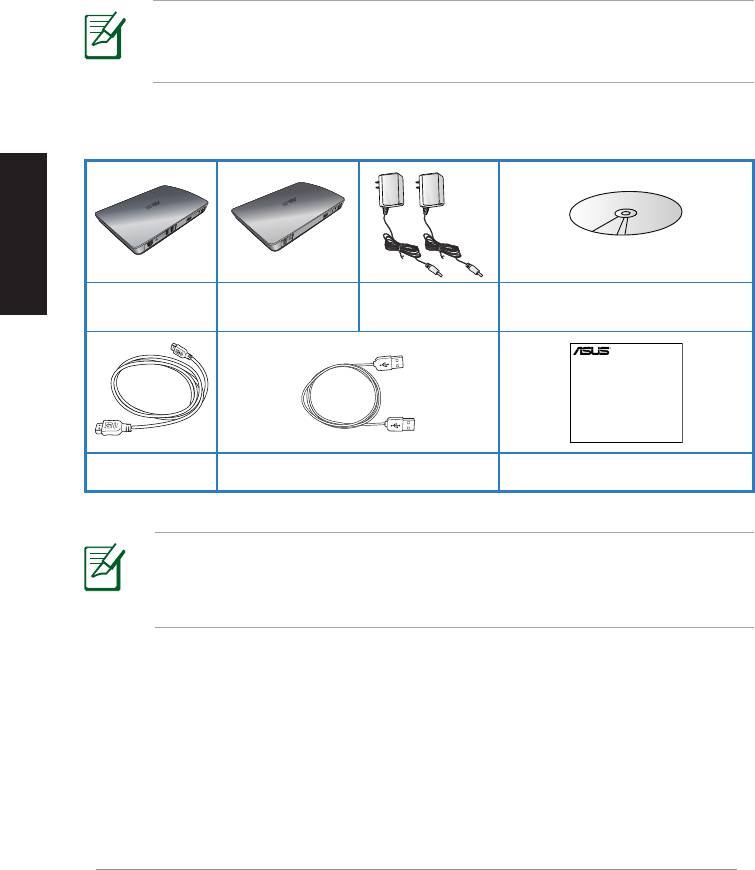
Polski
Adapter prądu
Pomocniczy dysk CD (Podręcznik
Odbiornik WAVI Nadajnik WAVI
zmiennego x 2
użytkownika i sterownik)
112
ASUS WAVI
WAVI
3D Wireless PC-to-TV Kit
Quick Start Guide
Poznanie ASUS WAVI
ASUS WAVI umożliwia bezprzewodowe rozszerzenie lub udostępnianie
źródeł audio/video z komputera do wysokiej rozdzielczości zewnętrznego
wyświetlacza, z odległości do 25 metrów (w zasięgu widzenia), dla uzyskania
bez opóźnień (<1ms) wysokiej jakości video 1080p i kryształowo czystych
transmisji audio. Umożliwia to używanie z komputera gier video 3D i lmów.
UWAGA: W celu zapewniania wysokiej jakości bezprzewodowej
transmisji audio i video 1080p z odległości do 25 metrów, odbiornik
należy ustawić w linii czystego widzenia z nadajnikiem.
Zawartość opakowania
Kabel HDMI x 2 Kabel USB Instrukcja szybkiego uruchomienia
UWAGI:
• Jeśli którykolwiek z elementów jest uszkodzony lub nie ma go w
opakowaniu należy skontaktować się ze sprzedawcą.
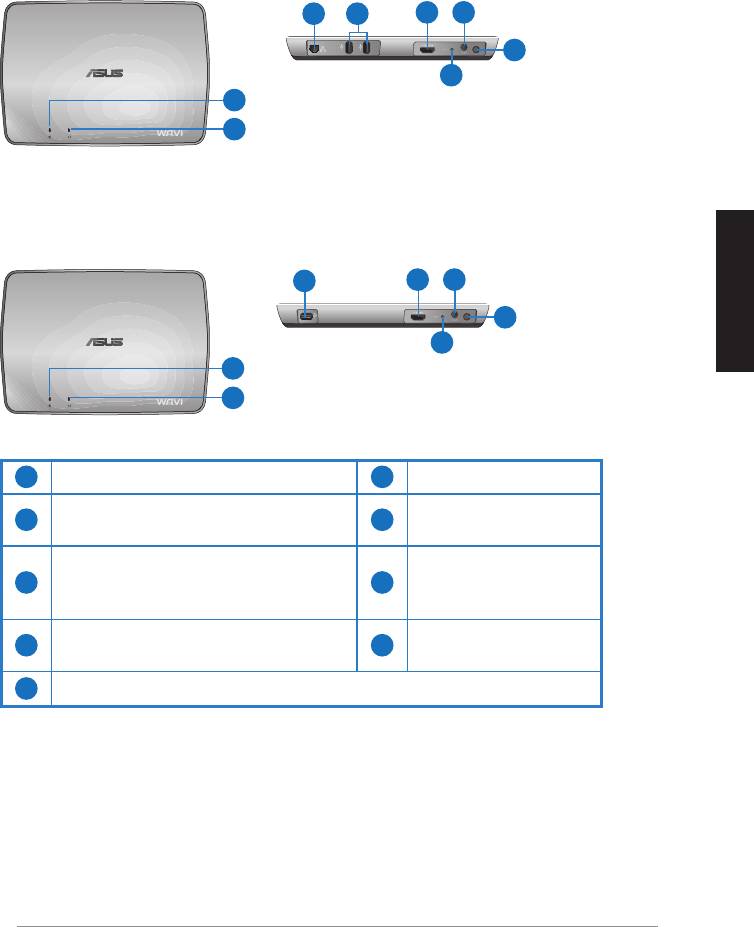
Właściwości WAVI
Odbiornik
Widok z przodu
Widok z tyłu
3 5
6 7
8
9
1
2
Nadajnik
Widok z przodu
Widok z tyłu
4
6 7
8
Polski
9
1
2
1
Dioda LED zasilania
6
Port HDMI
Dioda LED połączenia
Port wejścia prądu
2
7
bezprzewodowego
stałego
Port LAN
3
(wyłącznie do aktualizacji
8
Przycisk zasilania
rmware)
Port USB (połączenie z
4
9
Przycisk Reset
komputerem PC)
5
Porty USB (połączenie z innymi urządzeniami)
ASUS WAVI
113
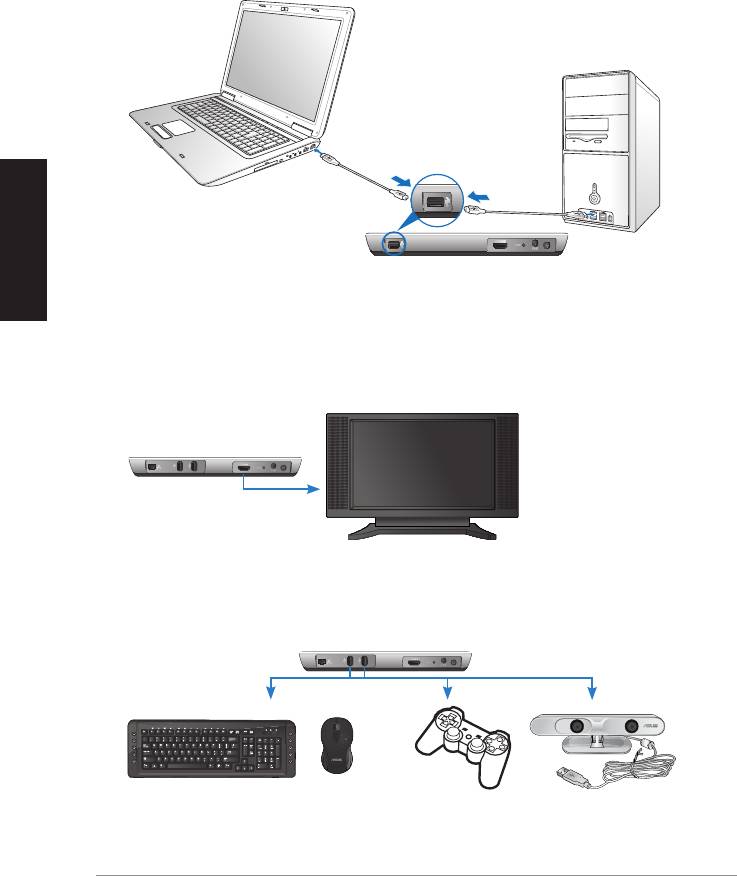
Polski
114
ASUS WAVI
ON
OFF
Port USB
Nadajnik
Odbiornik WAVI
HDTV
C
Używanie ASUS WAVI
Aby używać ASUS WAVI:
1. Zainstaluj sterownik WAVI z dostarczonego, pomocniczego dysku CD.
2. Używając dostarczonego kabla USB, połącz port USB nadajnika WAVI z
portem USB komputera notebook lub desktop PC.
3. Używając dostarczonego kabla HDMI, połącz port HDMI nadajnika WAVI
z portem HDMI komputera notebook lub desktop PC.
4. Podłącz telewizor do odbiornika WAVI dostarczonym kablem HDMI, a
następnie ustaw telewizor na tryb HDMI.
5. Aby używać innych urządzeń, podłącz je do odbiornika WAVI, jak na
ilustracji poniżej.
Odbiornik WAVI
Klawiatura/mysz USB Gamepad ASUS Xtion
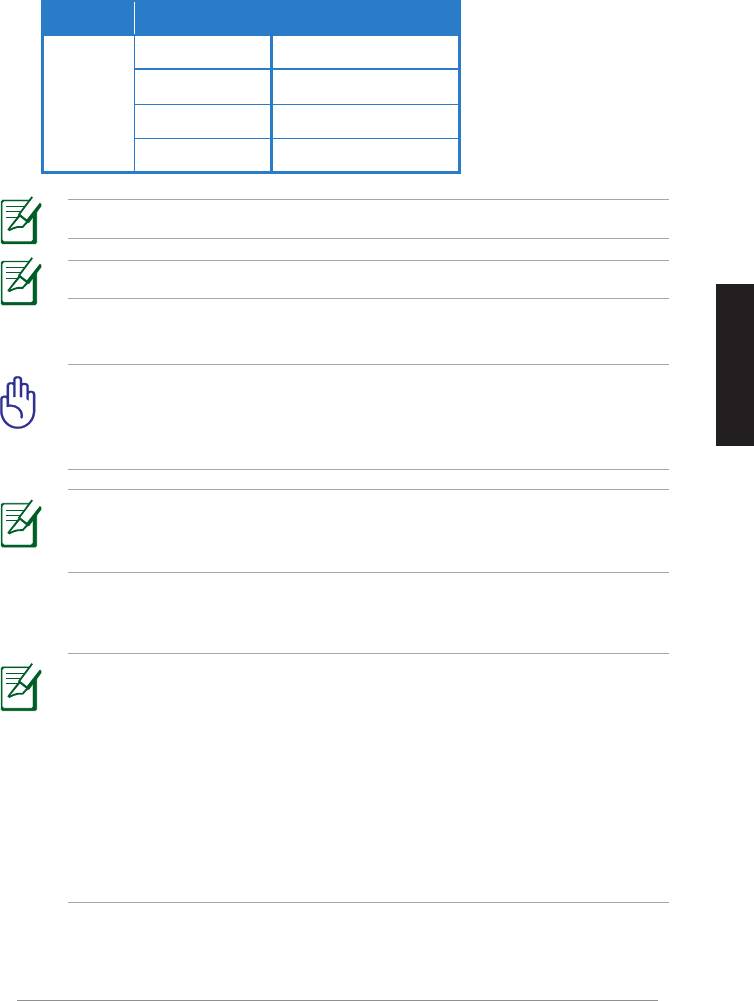
Sprawdź w tabeli poniżej obsługiwane modele bezprzewodowych klawiatur i myszy.
Marka Modele bezprzewodowych klawiatur i myszy
WT400 WT410
WT45 WT450
ASUS
W4000 BX700
W4500 M-A65
UWAGA: Lista powyżej może zostać zmieniona bez powiadomienia.
UWAGA: Do odbiornika WAVI nie należy podłączać napędu ash USB.
6. Włącz nadajnik WAVI i odbiornik.
WAŻNE! Należy sprawdzić, czy podłączone zostały do nadajnika
Polski
i odbiornika WAVI dostarczone adaptery prądu zmiennego. Należy
sprawdzić, czy adaptery prądu zmiennego zostały podłączone do
zasilania o prawidłowych parametrach.
UWAGA: Zmiana koloru diody LED zasilania/diody LED połączenia
bezprzewodowego na niebieski, wskazuje pomyślne połączenie, a
zmiana koloru na pomarańczowy brak połączenia.
7. Ustaw domyślne urządzenie odtwarzania dźwięku komputera notebook
lub desktop PC na wyjście HDMI.
UWAGI:
Aby zmienić ustawienia audio:
• Dla Windows 7 / Vista, kliknij Control Panel (Panel sterowania)
> Hardware and Sound (Sprzęt i dźwięk) > Sound (Dźwięk).
W zakładce Odtwarzanie, wybierz wyjście HDMI, jako domyślne
urządzenie odtwarzania dźwięku.
• Dla Windows XP, kliknij Control Panel (Panel sterowania) > Sounds
and Audio devices (Dźwięki i urządzenia audio) > Audio. Wybierz
wyjście HDMI w opcji Sound Playback (Odtwarzanie dźwięku).
ASUS WAVI
115

Notices
REACH
Complying with the REACH (Registration, Evaluation, Authorisation, and
Restriction of Chemicals) regulatory framework, we published the chemical
substances in our products at ASUS REACH website at
http://csr.asus.com/english/REACH.htm.
Federal Communications Commission Interference Statement
This device complies with FCC Rules Part 15. Operation is subject to the
following two conditions:
• This device may not cause harmful interference.
• This device must accept any interference received, including
interference that may cause undesired operation.
Polski
This equipment has been tested and found to comply with the limits for a class
B digital device, pursuant to Part 15 of the Federal Communications Commission
(FCC) rules. These limits are designed to provide reasonable protection against
harmful interference in a residential installation. This equipment generates,
uses, and can radiate radio frequency energy and, if not installed and used
in accordance with the instructions, may cause harmful interference to radio
communications. However, there is no guarantee that interference will not occur
in a particular installation. If this equipment does cause harmful interference
to radio or television reception, which can be determined by turning the
equipment o and on, the user is encouraged to try to correct the interference
by one or more of the following measures:
• Reorient or relocate the receiving antenna.
• Increase the separation between the equipment and receiver.
• Connect the equipment into an outlet on a circuit dierent from that to
which the receiver is connected.
• Consult the dealer or an experienced radio/TV technician for help.
CAUTION: Any changes or modications not expressly approved
by the party responsible for compliance could void the user’s
authority to operate the equipment.
116
ASUS WAVI

FCC Radiation Exposure Statement
This equipment complies with FCC radiation exposure limits set forth for an
uncontrolled environment. This equipment should be installed and operated
with minimum distance 20cm between the radiator & your body.
This transmitter must not be co-located or operating in conjunction with any
other antenna or transmitter. If the device is going to be operated in 5.15 ~
5.25GHz frequency range, then it is restricted to an indoor environment only.
RF Exposure warning
• The equipment complies with FCC RF exposure limits set forth for an
uncontrolled environment.
• The equipment must be co-located or operated in conjunction with any
other antenna or transmitter.
IC Radiation Exposure Statement for Canada
This equipment complies with IC radiation exposure limits set forth for an
uncontrolled environment. To maintain compliance with IC RF exposure
compliance requirements, please avoid direct contact to the transmitting
Polski
antenna during transmitting. End users must follow the specic operating
instructions for satisfying RF exposure compliance.
Operation is subject to the following two conditions:
• This device may not cause interference.
• This device must accept any interference, including interference that
may cause undesired operation of the device.
This device should be used only as specied within this manual to meet RF
exposure requirements. Using this device in a manner inconsistent with this
manual could lead to excessive RF exposure conditions.
This device and its antenna(s) must not be co-located or operating in
conjunction with any other antenna or transmitter.
Country Code selection feature to be disabled for products marketed to the
US/CANADA.
If the device is going to be operated in 5.15 ~ 5.25GHz frequency range, then
it is restricted to an indoor environment only.
This Class [B] digital apparatus complies with Canadian ICES-003.
Cet appareil numérique de la classe [B] est conforme à la norme NMB-003 du
Canada
ASUS WAVI
117
NCC警語
Polski
Declaration of Conformity for R&TTE directive 1999/5/EC
Hereby, ASUS declares that this product is in compliance with the essential
requirements and other relevant provisions of Directive 1995/5/EC.
This device will be sold in the following EEA (European Economic Area)
countries: Austria, Italy, Belgium, Liechtenstein, Denmark, Luxembourg,
Finland, Netherlands, France, Norway, Germany, Portugal, Greece, Spain,
Iceland, Sweden, Ireland, United Kingdom, Cyprus, Czech Republic,
Estonia, Hungary, Latvia, Lithuania, Malta, Slovakia, Poland, and
Slovenia.
CE Mark Warning
This is a Class B product, in a domestic environment, this product may cause
radio interference, in which case the user may be required to take adequate
measures.
CAUTION: The device for the band 5150-5350 MHz is only for indoor
use.
118
ASUS WAVI
ASUS Contact information
ASUSTeK COMPUTER INC. (Azja i Pacyk)
Adres 15 Li-Te Road, Peitou, Taipei, Taiwan 11259
Telefon +886-2-2894-3447
Faks +886-2-2890-7798
Strona internetowa www.asus.com.tw
Pomoc techniczna
Telefon +86-21-38429911
Wsparcie online support.asus.com
ASUS COMPUTER INTERNATIONAL (Ameryka)
Adres 800 Corporate Way, Fremont, CA 94539, USA
Telefon +1-510-739-3777
Faks +1-510-608-4555
Strona internetowa usa.asus.com
Pomoc techniczna
Telefon +1-812-282-2787
Polski
Fax (wsparcie) +1-812-284-0883
Wsparcie online support.asus.com
ASUS COMPUTER GmbH (Niemcy & Austria)
Adres Harkort Str. 21-23, D-40880 Ratingen, Germany
Faks +49-2102-9599-11
Kontakt online www.asus.com.de/sales
Pomoc techniczna
Telefon (Podzespół) +49-1805-010923*
Telefon (System/
Notebook/Eee/LCD) +49-1805-010920*
Fax (wsparcie) +49-2102-959911
Wsparcie online www.asus.com.de/support
Strona internetowa www.asus.com.de/news
* EUR 0,14/min z Niemiec z telefonu stacjonarnego; EUR 0,42/min z telefonu komórkowego.
Producent
ASUSTeK Computer Inc.
Telefon: +886-2-2894-3447
Adres: No. 150, LI-TE RD., PEITOU, TAIPEI 112, TAIWAN
Authorised
ASUS Computer GmbH
representative
Adres: HARKORT STR. 21-23, 40880 RATINGEN, GERMANY
in Europe:
ASUS WAVI
119
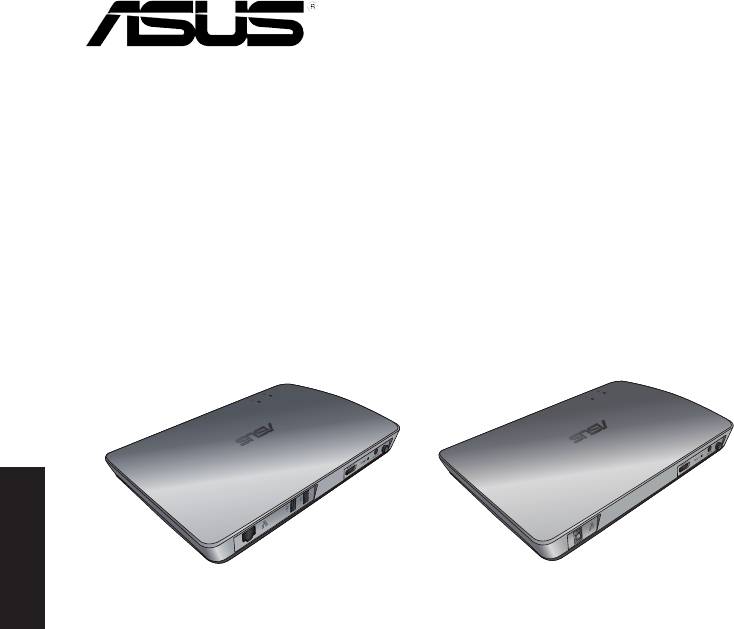
WAVI
(bezdrátové rozhraní zvuku a videa)
Čeština
Přijímač WAVI Vysílač WAVI
Uživatelská příručka

CZ6186
První vydání
Únor 2011
©
Copyright
2011 ASUSTeK Computer Inc. Všechna práva vyhrazena.
Žádná část této příručky, včetně popsaných výrobků a softwaru, nesmí být kopírována,
přenášena, přepisována, ukládána do paměťového zařízení nebo překládána do
jakéhokoliv jazyka v žádné formě ani žádnými prostředky vyjma dokumentace, které
kupující vytvoří jako zálohu, bez výslovného písemného souhlasu společnosti ASUSTeK
Computer Inc. („ASUS“).
V následujících případech nebude záruka na výrobek nebo servis prodloužena: (1)
byla provedena oprava, úprava nebo změna výrobku, která nebyla písemně povolena
společností ASUS; nebo (2) sériové číslo výrobku je poškozeno nebo chybí.
Čeština
ASUS POSKYTUJE TUTO PŘÍRUČKU „TAK, JAK JE“, BEZ ZÁRUKY JAKÉHOKOLI DRUHU, AŤ
VÝSLOVNÉ NEBO VYPLÝVAJÍCÍ, VČETNĚ, ALE NIKOLI JEN, PŘEDPOKLÁDANÝCH ZÁRUK
NEBO PODMÍNEK PRODEJNOSTI A VHODNOSTI PRO URČITÝ ÚČEL. V ŽÁDNÉM PŘÍPADĚ
NEBUDE FIRMA ASUS, JEJÍ ŘEDITELÉ, VEDOUCÍ PRACOVNÍCI, ZAMĚSTNANCI ANI
ZÁSTUPCI ODPOVÍDAT ZA ŽÁDNÉ NEPŘÍMÉ, ZVLÁŠTNÍ, NAHODILÉ NEBO NÁSLEDNÉ
ŠKODY (VČETNĚ ZA ZTRÁTU ZISKŮ, ZTRÁTU PODNIKATELSKÉ PŘÍLEŽITOSTI, ZTRÁTU
POUŽITELNOSTI ČI ZTRÁTU DAT, PŘERUŠENÍ PODNIKÁNÍ A PODOBNĚ), I KDYŽ BYLA
FIRMA ASUS UPOZORNĚNA NA MOŽNOST TAKOVÝCH ŠKOD ZPŮSOBENÝCH JAKOUKOLIV
VADOU V TÉTO PŘÍRUČCE NEBO VE VÝROBKU.
TECHNICKÉ ÚDAJE A INFORMACE OBSAŽENÉ V TÉTO PŘÍRUČCE JSOU POSKYTNUTY JEN
PRO INFORMACI, MOHOU SE KDYKOLIV ZMĚNIT BEZ PŘEDCHOZÍHO UPOZORNĚNÍ, A
NEMĚLY BY BÝT POVAŽOVÁNY ZA ZÁVAZEK FIRMY ASUS. ASUS NEODPOVÍDÁ ZA ŽÁDNÉ
CHYBY A NEPŘESNOSTI, KTERÉ SE MOHOU OBJEVIT V TÉTO PŘÍRUČCE, VČETNĚ VÝROBKŮ
A SOFTWARU V PŘÍRUČCE POPSANÝCH.
Výrobky a názvy rem v této příručce mohou, ale nemusí být obchodními známkami
nebo copyrighty příslušných rem, a používají se zde pouze pro identikaci a objasnění a
ve prospěch jejich majitelů, bez záměru poškodit cizí práva.
ASUS WAVI
121

Obsah
Bezpečnostní informace .....................................................................................123
Přehled technických údajů ASUS WAVI .........................................................124
Seznámení s ASUS WAVI ......................................................................................125
Obsah krabice ...........................................................................................125
Funkce WAVI ............................................................................................................126
Přijímač ........................................................................................................126
Vysílač ..........................................................................................................126
Používání ASUS WAVI ...........................................................................................127
Notices .......................................................................................................................129
Kontaktní informace společnosti ASUS .........................................................132
Čeština
122
ASUS WAVI
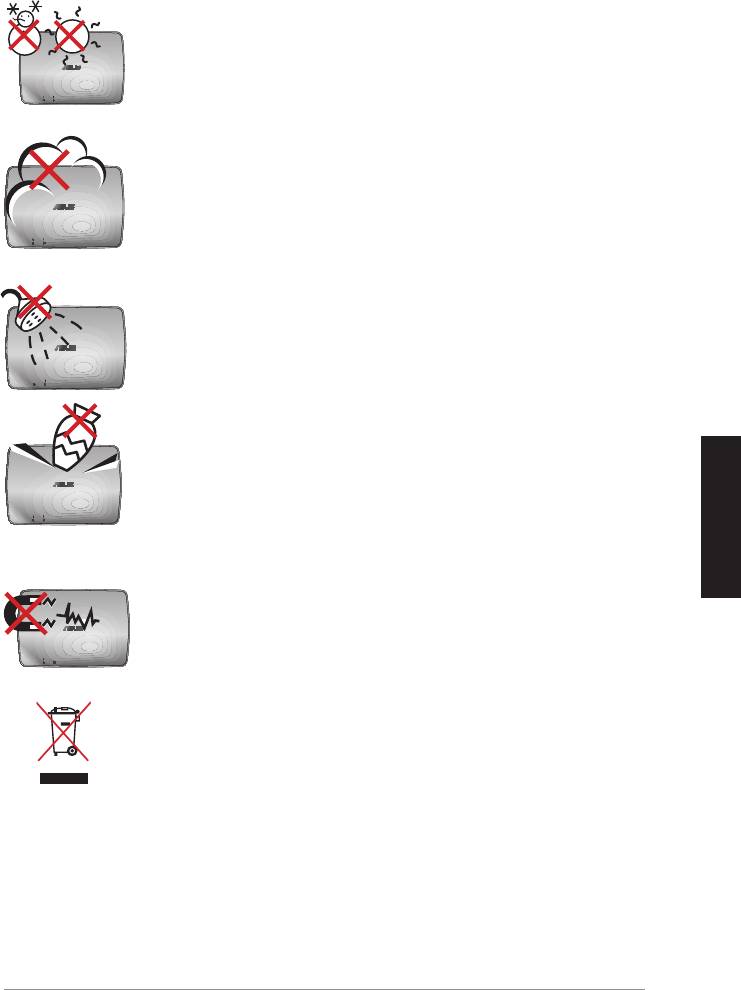
Bezpečnostní informace
BEZPEČNÁ TEPLOTA: Zařízení ASUS WAVI používejte
pouze v prostředích s okolní teplotou mezi 5°C (41°F) a
35°C (95°F).
NEVYSTAVUJTE špinavému ani prašnému prostředí.
NEPOUŽÍVEJTE během úniku plynu.
NEVYSTAVUJTE ani nepoužívejte blízko tekutin, deště nebo
vlhkosti.
NEDÁVEJTE ani neupouštějte předměty na horní stranu
zařízení ASUS WAVI ani do něj nezastrkujte žádné cizí
objekty.
Čeština
NEVYSTAVUJTE silným magnetickým ani elektrickým
polím.
NEVHAZUJTE ASUS WAVI do komunálního odpadu.
Seznamte se s místními předpisy pro likvidaci
elektronických výrobků.
ASUS WAVI
123
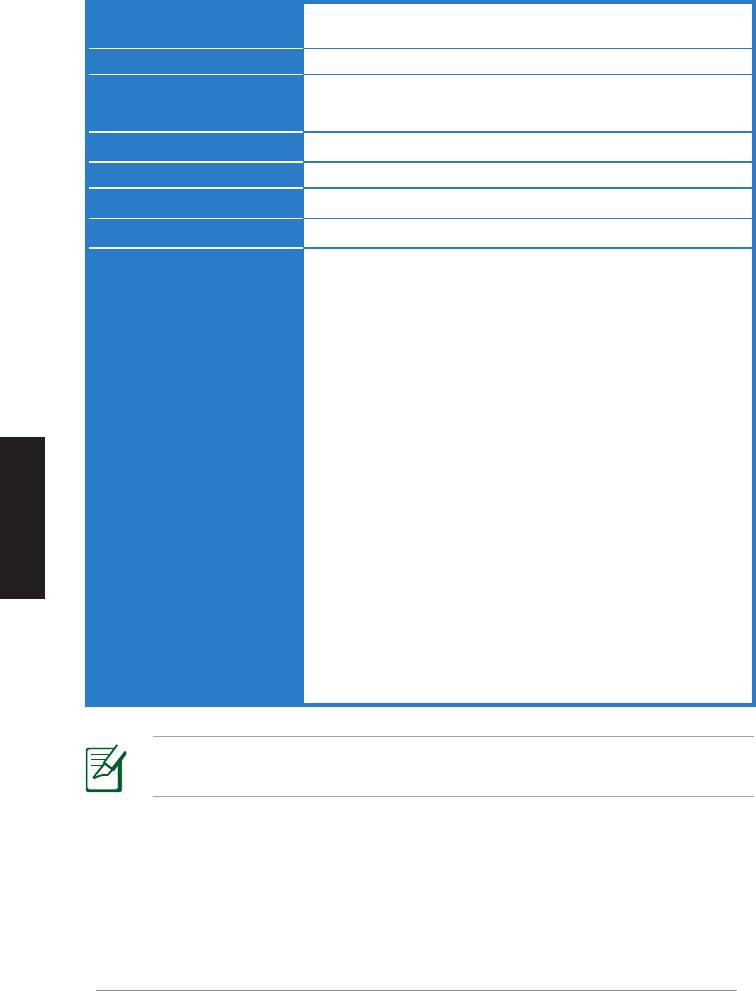
Přehled technických údajů ASUS WAVI
Rozlišení TV: 1080p, 1080i, 720p, 576p, 480p
3D video: 1080p při 24 Hz
zvuk
7.1 kanálů 192 kHz 24 bitů, AC-3 a DTS Dolby
Bezdrátová HDMI
AMIMON WHDI 5 GHz 4T5R (256bitové nebo 128bitové AES
technologie
šifrování)
Dosah vysílání
až 25 metrů (na dohled)
Čas zpoždění
< 1 ms
Napájení
Vysílač a přijímač: adaptéry 12V, 2A 24W
Příkon
Vysílač a přijímač: 24W
Porty I/O
Vysílač:
- port USB x 1 (pro připojení k portu USB počítače)
- port HDMI x 1
- port vstupu stejnosměrného napájení x 1
- indikátor LED napájení x 1*
- indikátor LED bezdrátového připojení x 1*
Přijímač:
Čeština
- port LAN x 1
- porty USB x 2
- port HDMI x 1
- port vstupu stejnosměrného napájení x 1
- indikátor LED napájení x 1*
- indikákor LED bezdrátového připojení x 1*
* Když indikátor LED napájení / LED bezdrátového připojení
svítí modře, znamená to, že připojení bylo úspěšné; když svítí
oranžově, znamená to, že připojení se nezdařilo. Na displeji se
zobrazí síla signálu.
POZNÁMKA: Změny technických údajů bez předchozího upozornění
vyhrazeny.
124
ASUS WAVI
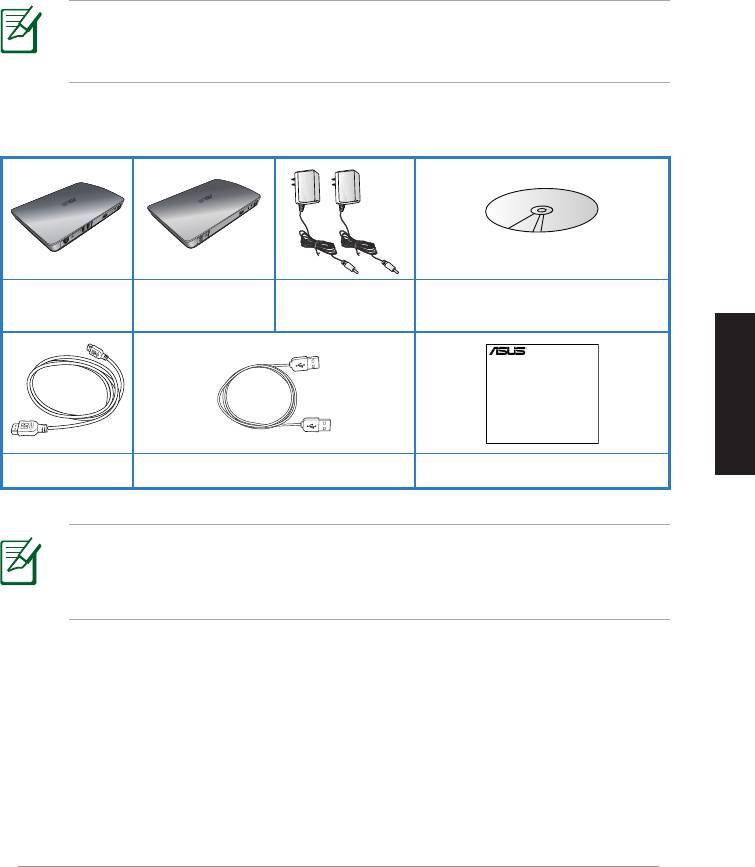
Adaptér střídavého
Podpůrný disk CD (uživatelská
Přijímač WAVI
Vysílač WAVI
napájení x 2
příručka a ovladač)
Čeština
ASUS WAVI
125
WAVI
3D Wireless PC-to-TV Kit
Quick Start Guide
Seznámení s ASUS WAVI
ASUS WAVI umožňuje bezdrátově rozšiřovat dosah nebo sdílet zdroje zvuku/
videa z počítače do externího zobrazovacího zařízení s vysokým rozlišením až
do 25 metrů (na dohled) pro přenosy videa v plném vysokém rozlišení 1080p
bez zpoždění (< 1 ms) a křišťálově čistého zvuku. Umožňuje hrát 3D videohry
a lmy z počítače.
POZNÁMKA:
Pro přenosy videa v plném vysokém rozlišení 1080p a
zvuku do 25 metrů musí být přijímač umístěn na dohled
od vysílače.
Obsah krabice
Kabel HDMI x 2 Kabel USB Stručná příručka
POZNÁMKY:
• Pokud je některá z položek poškozena nebo chybí, se obraťte na
prodejce.
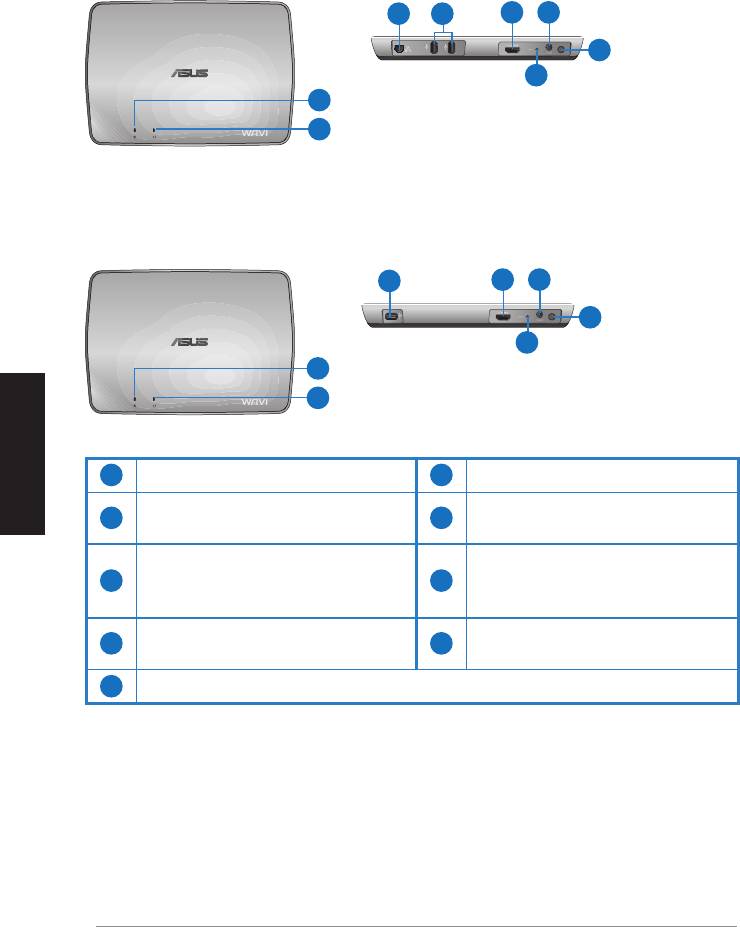
Funkce WAVI
Přijímač
Pohled zepředu
Pohled zezadu
3 5
6 7
8
9
1
2
Vysílač
Pohled zepředu
Pohled zezadu
4
6 7
8
9
1
2
Čeština
1
Indikátor LED napájení
6
Port HDMI
Indikátor LED bezdrátového
Port vstupu stejnosměrného
2
7
připojení
napájení
Port LAN
3
(pouze pro aktualizaci
8
Vypínač
rmwaru)
Port USB (pro připojení k
4
9
Resetovací tlačítko
počítači)
5
Porty USB (pro připojení k dalším zařízením)
126
ASUS WAVI
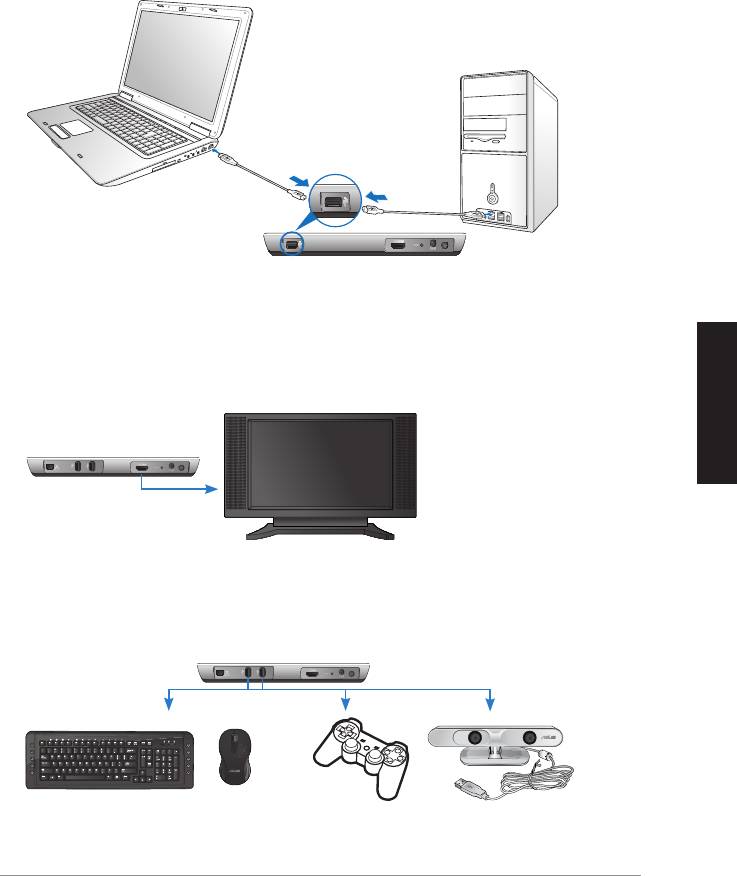
Čeština
ASUS WAVI
127
ON
OFF
Port USB
Vysílač
Přijímač WAVI
HDTV
C
Používání ASUS WAVI
Pokyny pro používání ASUS WAVI:
1. Nainstalujte ovladač WAVI z dodaného podpůrného disku CD.
2. Pomocí dodaného kabelu USB připojte port USB vysílače WAVI k portu
USB notebooku nebo stolního počítače.
3. Pomocí dodaného kabelu HDMI připojte port HDMI vysílače WAVI k
portu HDMI notebooku nebo stolního počítače.
4. Připojte TV k přijímači WAVI pomocí dodaného kabelu HDMI a potom
nastavte TV na režim HDMI.
5. Chcete-li používat další zařízení, připojte je k přijímači WAVI podle
následujícího obrázku.
Přijímač WAVI
Klávesnice / myš USB Herní ovladač ASUS Xtion
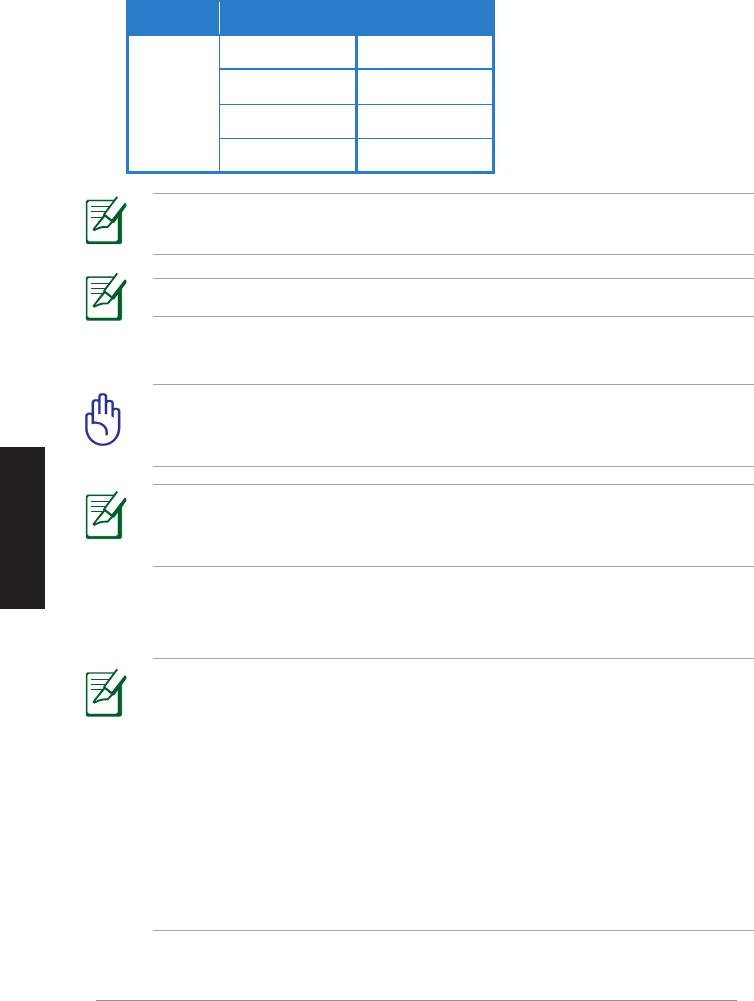
V následující tabulce jsou uvedeny podporované modely bezdrátových klávesnic a myší.
Značka Modely bezdrátových klávesnic a myší
WT400 WT410
WT45 WT450
ASUS
W4000 BX700
W4500 M-A65
POZNÁMKA: Změny výše uvedeného seznamu bez předchozího
upozornění vyhrazeny.
POZNÁMKA: K přijímači WAVI nepřipojujte žádnou jednotku USB ash.
6. Zapněte vysílač a přijímač WAVI.
DŮLEŽITÉ! Připojte dodané adaptéry střídavého napájení k vysílači
a přijímači WAVI. Dodané adaptéry střídavého napájení připojte ke
správnému zdroji napájení.
Čeština
POZNÁMKA: Když indikátor LED napájení / LED bezdrátového
připojení svítí modře, znamená to, že připojení bylo úspěšné; když
svítí oranžově, znamená to, že připojení se nezdařilo.
7. Nastavte výchozí zařízení pro přehrávání zvuku v notebooku nebo ve
stolním počítači na výstup HDMI.
POZNÁMKY:
Pokyny pro změny nastavení zvuku:
• V operačním systému Windows 7 / Vista klepněte na Control Panel
(Ovládací panely) > Hardware and Sound (Hardware a zvuk) >
Sound (Zvuk). Na kartě Playback (Přehrávání) vyberte výstup HDMI
jako výchozí zařízení pro přehrávání zvuku.
• V operačním systému Windows XP klepněte na Control Panel
(Ovládací panely) > Sounds and Audio devices (Zvuky a zvuková
zařízení) > Audio (Zvuk). Vyberte výstup HDMI v části Sound Playback
(Přehrávání zvuku).
128
ASUS WAVI

Notices
REACH
Complying with the REACH (Registration, Evaluation, Authorisation, and
Restriction of Chemicals) regulatory framework, we published the chemical
substances in our products at ASUS REACH website at
http://csr.asus.com/english/REACH.htm.
Federal Communications Commission Interference Statement
This device complies with FCC Rules Part 15. Operation is subject to the
following two conditions:
• This device may not cause harmful interference.
• This device must accept any interference received, including
interference that may cause undesired operation.
This equipment has been tested and found to comply with the limits for a class
B digital device, pursuant to Part 15 of the Federal Communications Commission
(FCC) rules. These limits are designed to provide reasonable protection against
harmful interference in a residential installation. This equipment generates,
uses, and can radiate radio frequency energy and, if not installed and used
in accordance with the instructions, may cause harmful interference to radio
communications. However, there is no guarantee that interference will not occur
in a particular installation. If this equipment does cause harmful interference
to radio or television reception, which can be determined by turning the
equipment o and on, the user is encouraged to try to correct the interference
by one or more of the following measures:
Čeština
• Reorient or relocate the receiving antenna.
• Increase the separation between the equipment and receiver.
• Connect the equipment into an outlet on a circuit dierent from that to
which the receiver is connected.
• Consult the dealer or an experienced radio/TV technician for help.
CAUTION: Any changes or modications not expressly approved
by the party responsible for compliance could void the user’s
authority to operate the equipment.
ASUS WAVI
129

FCC Radiation Exposure Statement
This equipment complies with FCC radiation exposure limits set forth for an
uncontrolled environment. This equipment should be installed and operated
with minimum distance 20cm between the radiator & your body.
This transmitter must not be co-located or operating in conjunction with any
other antenna or transmitter. If the device is going to be operated in 5.15 ~
5.25GHz frequency range, then it is restricted to an indoor environment only.
RF Exposure warning
• The equipment complies with FCC RF exposure limits set forth for an
uncontrolled environment.
• The equipment must be co-located or operated in conjunction with any
other antenna or transmitter.
IC Radiation Exposure Statement for Canada
This equipment complies with IC radiation exposure limits set forth for an
uncontrolled environment. To maintain compliance with IC RF exposure
compliance requirements, please avoid direct contact to the transmitting
antenna during transmitting. End users must follow the specic operating
instructions for satisfying RF exposure compliance.
Čeština
Operation is subject to the following two conditions:
• This device may not cause interference.
• This device must accept any interference, including interference that
may cause undesired operation of the device.
This device should be used only as specied within this manual to meet RF
exposure requirements. Using this device in a manner inconsistent with this
manual could lead to excessive RF exposure conditions.
This device and its antenna(s) must not be co-located or operating in
conjunction with any other antenna or transmitter.
Country Code selection feature to be disabled for products marketed to the
US/CANADA.
If the device is going to be operated in 5.15 ~ 5.25GHz frequency range, then
it is restricted to an indoor environment only.
This Class [B] digital apparatus complies with Canadian ICES-003.
Cet appareil numérique de la classe [B] est conforme à la norme NMB-003 du
Canada
130
ASUS WAVI
NCC警語
Declaration of Conformity for R&TTE directive 1999/5/EC
Hereby, ASUS declares that this product is in compliance with the essential
requirements and other relevant provisions of Directive 1995/5/EC.
Čeština
This device will be sold in the following EEA (European Economic Area)
countries: Austria, Italy, Belgium, Liechtenstein, Denmark, Luxembourg,
Finland, Netherlands, France, Norway, Germany, Portugal, Greece, Spain,
Iceland, Sweden, Ireland, United Kingdom, Cyprus, Czech Republic,
Estonia, Hungary, Latvia, Lithuania, Malta, Slovakia, Poland, and
Slovenia.
CE Mark Warning
This is a Class B product, in a domestic environment, this product may cause
radio interference, in which case the user may be required to take adequate
measures.
CAUTION: The device for the band 5150-5350 MHz is only for indoor
use.
ASUS WAVI
131
Kontaktní informace společnosti ASUS
ASUSTeK COMPUTER INC.(Pacická Asie)
Adresa
15 Li-Te Road, Beitou, Taipei, Taiwan 11259
Telefon
+886-2-2894-3447
Fax +886-2-2890-7798
Webová stránka
www.asus.com.tw
Technická podpora
Telefon
+86-21-38429911
Podpora online
support.asus.com
ASUS COMPUTER INTERNATIONAL
(Amerika
)
Adresa
800 Corporate Way, Fremont, CA 94539, USA
Telefon
+1-510-739-3777
Fax +1-510-608-4555
Webová
usa.asus.com
Technická podpora
Telefon
+1-812-282-2787
Fax technické podpory
+1-812-284-0883
Podpora online
support.asus.com
ASUS COMPUTER GmbH
(Německo a Rakousko)
Čeština
Adresa
Harkort Str. 21-23, D-40880 Ratingen, Germany
Fax
+49-2102-9599-11
Kontakt online
www.asus.de/sales
Technická podpora
Telefon (Součást) +49-1805-010923*
Telefon (System/
Notebook/Eee/LCD)
+49-1805-010920*
Fax technické podpory
+49-2102-959911
Podpora online
www.asus.com.de/support
Webová stránka
www.asus.com.de/news
* EUR 0,14/min. z pevné sítě v Německu; EUR 0,42/min. z mobilního telefonu.
Výrobce:
ASUSTeK Computer Inc.
Telefon: +886-2-2894-3447
Adresa: No. 150, LI-TE RD., PEITOU, TAIPEI 112, TAIWAN
Autorizovaný
ASUS Computer GmbH
zástupce v
Adresa: HARKORT STR. 21-23, 40880 RATINGEN,
Evropě
GERMANY
132
ASUS WAVI
WAVI
(無線影音介面)
繁體中文

版權所有
‧
不得翻印 © 2011 華碩電腦
Offer to Provide Source Code of Certain Software
This product may contain copyrighted software that is licensed under the General Public
License (“GPL”) and under the Lesser General Public License Version (“LGPL”). The GPL and
LGPL licensed code in this product is distributed without any warranty. Copies of these licenses
are included in this product.
You may obtain the complete corresponding source code (as dened in the GPL) for the GPL
Software, and/or the complete corresponding source code of the LGPL Software (with the
complete machine-readable “work that uses the Library”) for a period of three years after our
last shipment of the product including the GPL Software and/or LGPL Software, which will be no
Deutsch
earlier than December 1, 2011, either
繁體中文
(1) for free by downloading it from http://support.asus.com/download;
or
(2) for the cost of reproduction and shipment, which is dependent on the preferred carrier and
the location where you want to have it shipped to, by sending a request to:
ASUSTeK Computer Inc.
Legal Compliance Dept.
15 Li Te Rd.,
Beitou, Taipei 112
Taiwan
In your request please provide the name, model number and version, as stated in the About
Box of the product for which you wish to obtain the corresponding source code and your contact
details so that we can coordinate the terms and cost of shipment with you.
The source code will be distributed WITHOUT ANY WARRANTY and licensed under the same
license as the corresponding binary/object code.
This offer is valid to anyone in receipt of this information.
ASUSTeK is eager to duly provide complete source code as required under various Free
Open Source Software licenses. If however you encounter any problems in obtaining the full
corresponding source code we would be much obliged if you give us a notication to the email
address gpl@asus.com, stating the product and describing the problem (please do NOT send
large attachments such as source code archives etc to this email address).
134
華碩 WAVI

目錄內容
繁體中文
華碩 WAVI
135
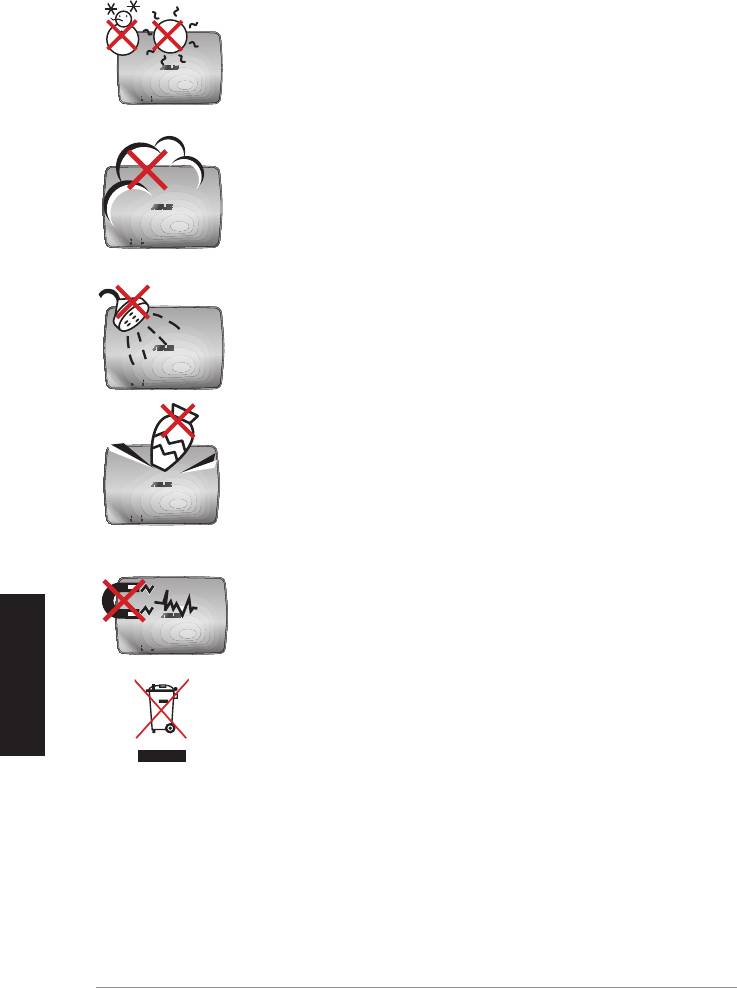
安全性須知
安全溫度
Deutsch
繁體中文
136
華碩 WAVI
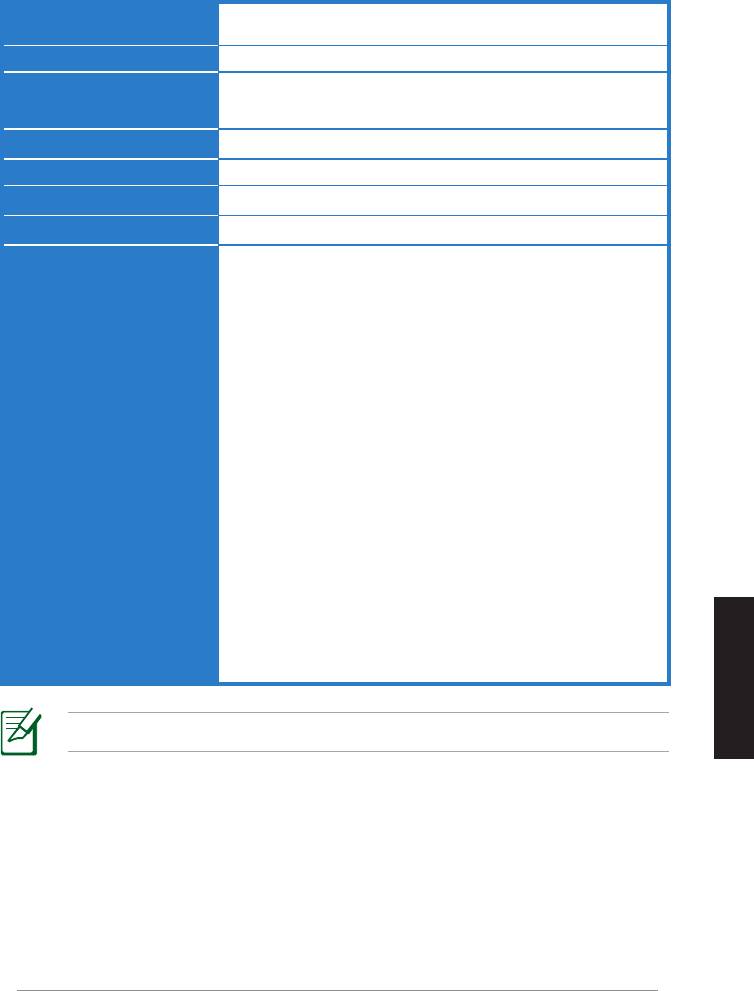
華碩 WAVI 規格列表
繁體中文
注意:
華碩 WAVI
137
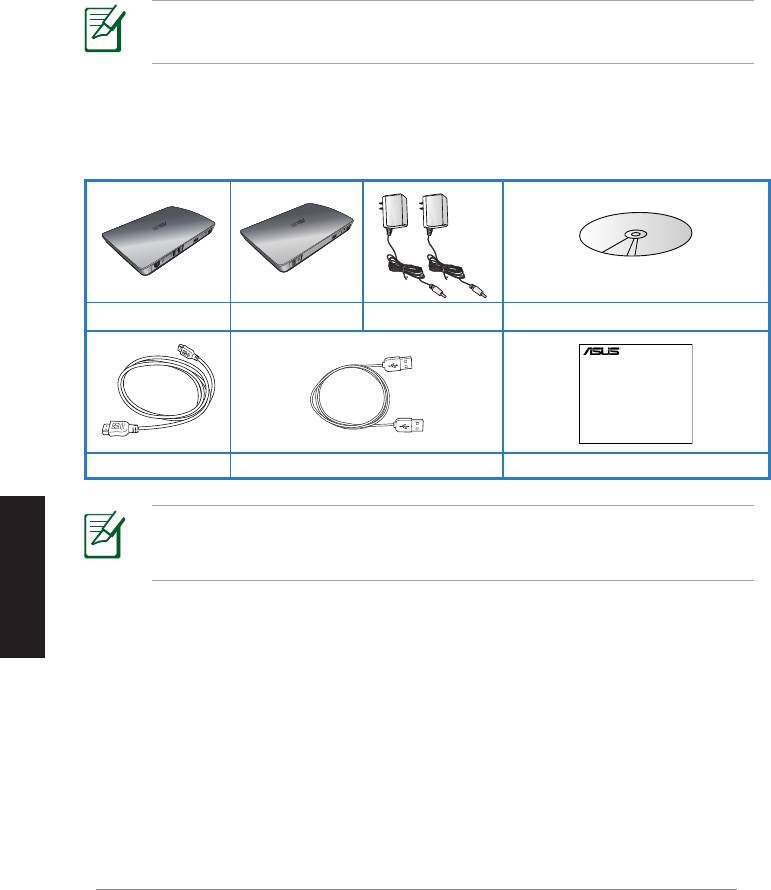
關於華碩 WAVI
注意:
包裝內容
Deutsch
繁體中文
注意:
138
華碩 WAVI
WAVI
3D Wireless PC-to-TV Kit
Quick Start Guide
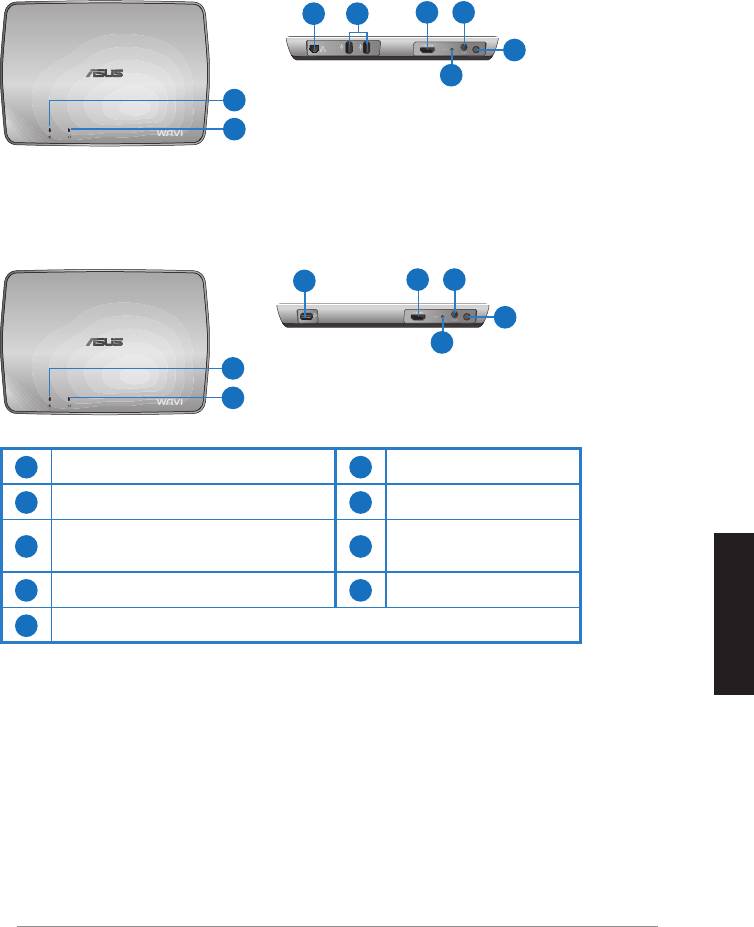
WAVI 特性
接收器
前視圖
後視圖
發送器
前視圖
後視圖
繁體中文
華碩 WAVI
139
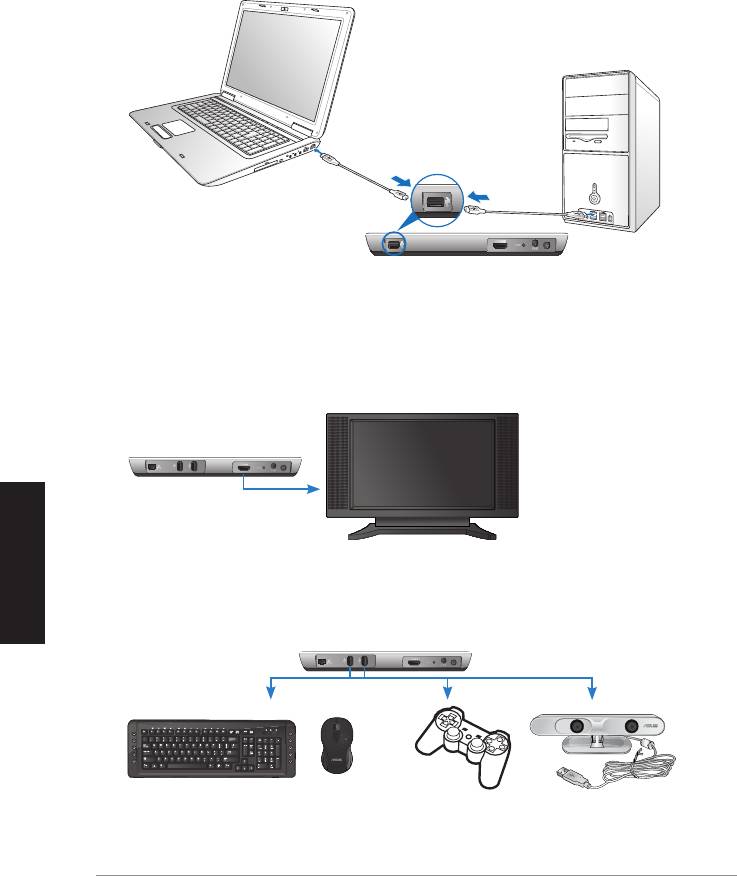
Deutsch
繁體中文
140
華碩 WAVI
ON
OFF
如何使用華碩 WAVI
請按以下步驟使用華碩 WAVI:
USB 端口
發送器
WAVI 接收器
HDTV
C
WAVI 接收器
USB 鍵盤 / 滑鼠 游戲 華碩 Xtion
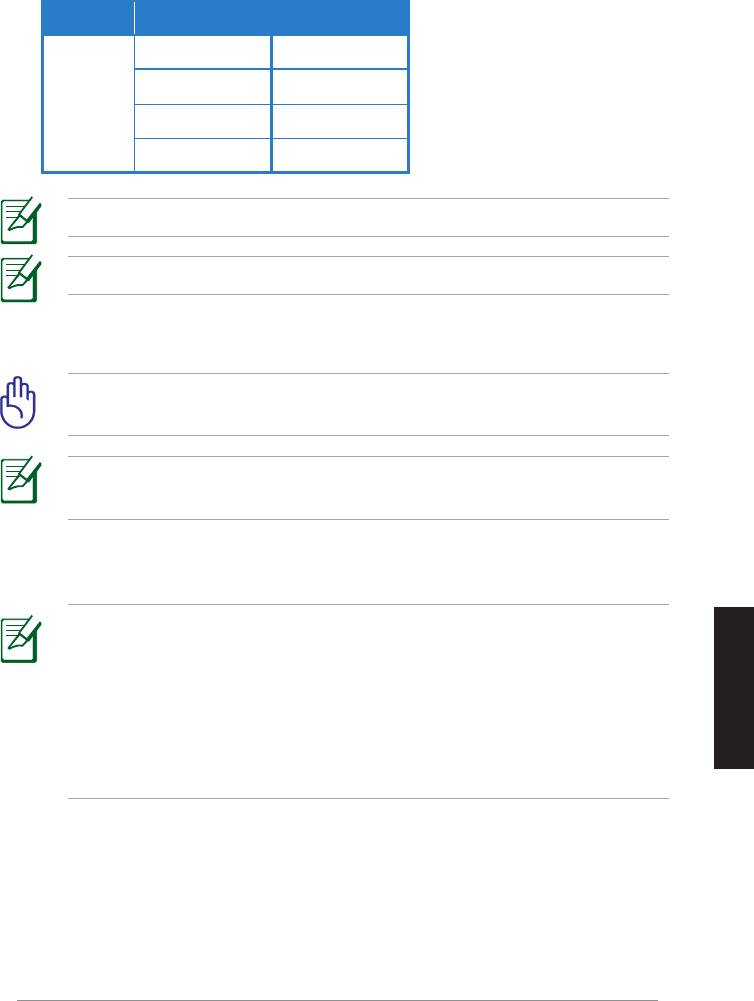
本產品建議使用的無線鍵盤滑鼠型號如下表:
廠商品牌 無線鍵盤 / 滑鼠型號
注意:
注意:
重要!
注意:
注意:
控制面板
硬體與聲音
音
效
聲音播放HDMI 輸出
繁體中文
控制面板聲音和音效裝置音
效聲音播放HDMI 輸出
華碩 WAVI
141

注意事項
REACH
http://csr.asus.com/english/REACH.html
Federal Communications Commission Interference Statement
This device complies with FCC Rules Part 15. Operation is subject to the
following two conditions:
• This device may not cause harmful interference.
• This device must accept any interference received, including
interference that may cause undesired operation.
This equipment has been tested and found to comply with the limits for a
class B digital device, pursuant to Part 15 of the Federal Communications
Commission (FCC) rules. These limits are designed to provide reasonable
protection against harmful interference in a residential installation. This
equipment generates, uses, and can radiate radio frequency energy and,
if not installed and used in accordance with the instructions, may cause
harmful interference to radio communications. However, there is no
guarantee that interference will not occur in a particular installation. If this
equipment does cause harmful interference to radio or television reception,
which can be determined by turning the equipment off and on, the user is
encouraged to try to correct the interference by one or more of the following
measures:
Deutsch
繁體中文
• Reorient or relocate the receiving antenna.
• Increase the separation between the equipment and receiver.
• Connect the equipment into an outlet on a circuit different from that to
which the receiver is connected.
• Consult the dealer or an experienced radio/TV technician for help.
CAUTION:
Any changes or modifications not expressly approved
by the party responsible for compliance could void the user’s
authority to operate the equipment.
142
華碩 WAVI

FCC Radiation Exposure Statement
This equipment complies with FCC radiation exposure limits set forth for an
uncontrolled environment. This equipment should be installed and operated
with minimum distance 20cm between the radiator & your body.
This transmitter must not be co-located or operating in conjunction with any
other antenna or transmitter. If the device is going to be operated in 5.15 ~
5.25GHz frequency range, then it is restricted to an indoor environment only.
RF Exposure warning
• The equipment complies with FCC RF exposure limits set forth for an
uncontrolled environment.
• The equipment must be co-located or operated in conjunction with any
other antenna or transmitter.
IC Radiation Exposure Statement for Canada
This equipment complies with IC radiation exposure limits set forth for an
uncontrolled environment. To maintain compliance with IC RF exposure
compliance requirements, please avoid direct contact to the transmitting
antenna during transmitting. End users must follow the specific operating
instructions for satisfying RF exposure compliance.
Operation is subject to the following two conditions:
• This device may not cause interference.
• This device must accept any interference, including interference that
may cause undesired operation of the device.
This device should be used only as specified within this manual to meet RF
exposure requirements. Using this device in a manner inconsistent with this
manual could lead to excessive RF exposure conditions.
This device and its antenna(s) must not be co-located or operating in
conjunction with any other antenna or transmitter.
繁體中文
Country Code selection feature to be disabled for products marketed to the
US/CANADA.
If the device is going to be operated in 5.15 ~ 5.25GHz frequency range, then
it is restricted to an indoor environment only.
This Class [B] digital apparatus complies with Canadian ICES-003.
Cet appareil numérique de la classe [B] est conforme à la norme NMB-003 du
Canada
華碩 WAVI
143

NCC 警語
Declaration of Conformity for R&TTE directive 1999/5/EC
Hereby, ASUS declares that this product is in compliance with the essential
requirements and other relevant provisions of Directive 1995/5/EC.
This device will be sold in the following EEA (European Economic Area)
Deutsch
繁體中文
countries: Austria, Italy, Belgium, Liechtenstein, Denmark, Luxembourg,
Finland, Netherlands, France, Norway, Germany, Portugal, Greece, Spain,
Iceland, Sweden, Ireland, United Kingdom, Cyprus, Czech Republic,
Estonia, Hungary, Latvia, Lithuania, Malta, Slovakia, Poland, and
Slovenia.
CE Mark Warning
This is a Class B product, in a domestic environment, this product may cause
radio interference, in which case the user may be required to take adequate
measures.
CAUTION:
The device for the band 5150-5350 MHz is only for indoor
use.
144
華碩 WAVI

華碩的連絡資訊
華碩電腦公司 ASUSTeK COMPUTER INC.(台灣)
市場訊息
技術支援
華碩電腦公司 ASUSTeK COMPUTER INC.(亞太地區)
市場訊息
技術支援
ASUS COMPUTER INTERNATIONAL(美國)
市場訊息
技術支援
ASUS COMPUTER GmbH(德國/奧地利)
市場訊息
技術支援
繁體中文
華碩 WAVI
145
WAVI
(無線影音界面)
WAVI 接收器 WAVI 發送器
Deutsch
簡体中文
用戶手冊

C6186
第一版
2011年 2 月
版權所有
‧
不得翻印 © 2011 華碩電腦
本產品的所有部分,包括配件與軟件等,其相關知識產權等歸華碩電腦公司(以下
簡稱華碩)或授權華碩使用的相關主體所有,未經權利主體許可,不得任意地仿製、
拷貝、摘抄或轉譯。本用戶手冊沒有任何形式的擔保、立場表達或其它暗示。若有任
何因本用戶手冊或其所提到之產品信息,所引起直接或間接的數據流失、利益損失或
事業終止,華碩及其所屬員工恕不為其擔負任何責任。除此之外,本用戶手冊所提到
的產品規格及信息只作參考,內容亦會隨時更新,恕不另行通知。
下列因素導致的產品故障或損壞不在免費保修範圍內:
A. 因天災(水災、火災、地震、雷擊、颱風等)、遇不可抗拒外力或人為之操作使
用不慎造成之損害。
B. 自行拆裝、修理、或將產品送至非華碩認証之維修點進行檢測維修。
C. 用戶擅自或請第三人修改、修復、變更規格及安裝、添加、擴充非本公司原廠
銷售、授權或認可之配件所引起之故障與損壞。
D. 因用戶自行安裝軟件及設定不當所造成之使用問題及故障。
E. 計算機病毒所造成之問題及故障。
F. 本公司保修識別標籤撕毀或無法辨認,涂改保修服務卡或與產品不符。
G. 要求華碩提供軟件安裝服務(用戶需自行提供原版軟件)、軟件故障排除或清除
密碼等。
H. 其它不正常使用所造成之問題及故障。
用戶手冊中所談論到的產品名稱僅做識別之用,而這些名稱可能是屬於其他公司的
註冊商標或是版權。
關於產品規格最新的升級信息請您到華碩的官方網站瀏覽或是直接與華碩公司聯
絡。
注意!倘若本產品上之產品序列號有所破損或無法辨識者,則該項產品
恕不保修!
簡体中文
華碩 WAVI
147

目錄內容
安全性須知 ........................................................................................................149
華碩 WAVI 規格列表 ....................................................................................150
關於華碩 WAVI ...............................................................................................151
包裝內容 ...............................................................................................151
WAVI 特性 ........................................................................................................152
接收器 ....................................................................................................152
發送器 ....................................................................................................152
如何使用華碩 WAVI ......................................................................................153
注意事項 ............................................................................................................155
華碩的聯絡信息 ..............................................................................................158
Deutsch
簡体中文
148
華碩 WAVI
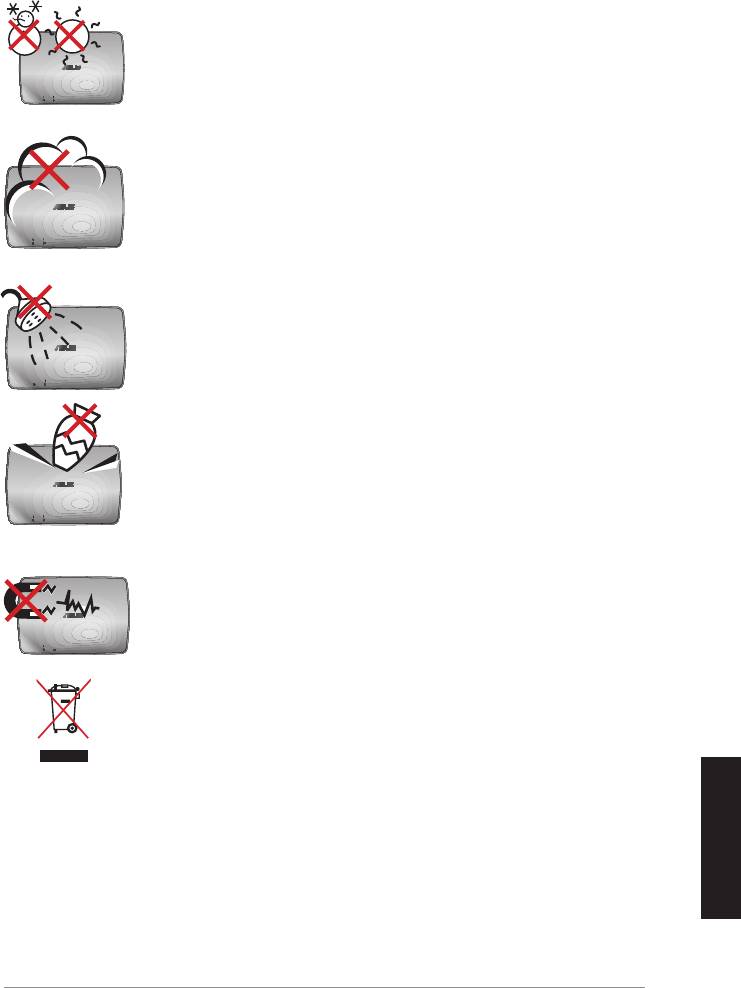
安全性須知
安全溫度:華碩 WAVI 只能在周邊溫度為 5°C (41°F) 至
35°C (95°F) 的環境中使用。
請勿曝露在灰塵環境中。不要在煤氣泄露的情況下使用。
請勿曝露在液體、雨水或在潮濕環境下使用。
請勿在其表面放置物品或將異物放入華碩 WAVI 內。
請勿曝露在強磁場或電磁環境中。
請勿將廢棄的華碩 WAVI 歸入市政垃圾。詳情請查詢當地
關於回收廢棄電子產品的規定。
簡体中文
華碩 WAVI
149
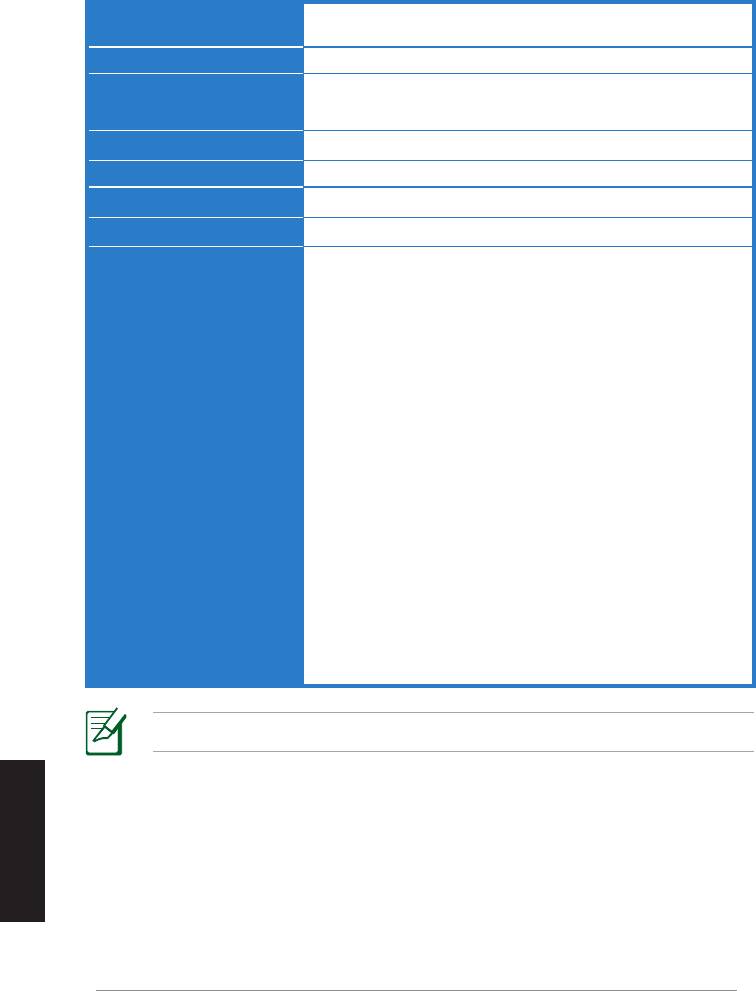
華碩 WAVI 規格列表
分辨率 電視:1080p、1080i、720p、576p、480p
3D 影像:1080p @ 24Hz
音頻
7.1 聲道 192 KHz 24-bit、AC-3 及 DTS Dolby
無線 HDMI 技術
AMIMON WHDI 5GHz 4T5R (256-bit 或 128-bit AES
加密)
發送距離
最遠 25 米(視線範圍內)
延遲
< 1 毫秒
電源
發送器與接收器:12V、2A 24W 適配器
耗電量
發送器與接收器:24W
I/O 端口
發送器:
- USB 端口 x 1(用於連接電腦的 USB 端口)
- HDMI 端口 x 1
- DC-In 端口 x 1
- 電源指示燈 x 1*
- 無線指示燈 x 1*
接收器:
- 網絡連接端口 x 1
- USB 端口 x 2
- HDMI 端口 x 1
- DC-In 端口 x 1
- 電源指示燈 x 1*
- 無線指示燈 x 1*
* 電源指示燈 / 無線指示燈變成藍色表明連接成功,
變成橙色表明連接失敗。信號強度將會顯示在屏幕
上。
注意:以上規格若有變動,恕不另行通知。
簡体中文
Deutsch
150
華碩 WAVI
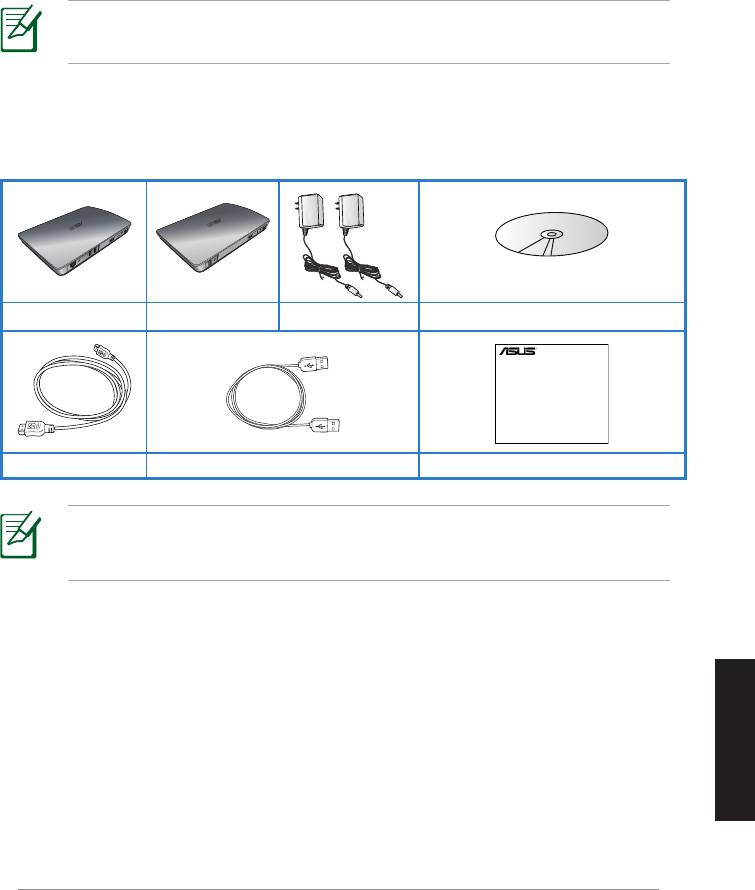
關於華碩 WAVI
華碩 WAVI 可讓您將影音資料通過無線的方式從電腦傳送或共享到距離 25
米(視線範圍內)內的外部高分辨率播放設備,體驗無延遲(< 1 毫秒)的
全高清 1080p 影音效果。您可以通過電腦在外接高清顯示設備上享受圖形
遊戲與電影帶來的樂趣。
注意: 若要使用距離達到 25 米的 1080p 無線全高清影音發送器,
請確認接收器位於發送器的視線範圍內。
包裝內容
WAVI 接收器 WAVI 發送器 電源適配器 x 2
隨機光盤(用戶手冊和驅動程序)
注意:
‧ 若任何一項配件有損壞或短缺,請盡快與您的經銷商聯系。
簡体中文
華碩 WAVI
151
WAVI
3D Wireless PC-to-TV Kit
Quick Start Guide
HDMI 數據線 x 2 USB 數據線
快速安裝指南
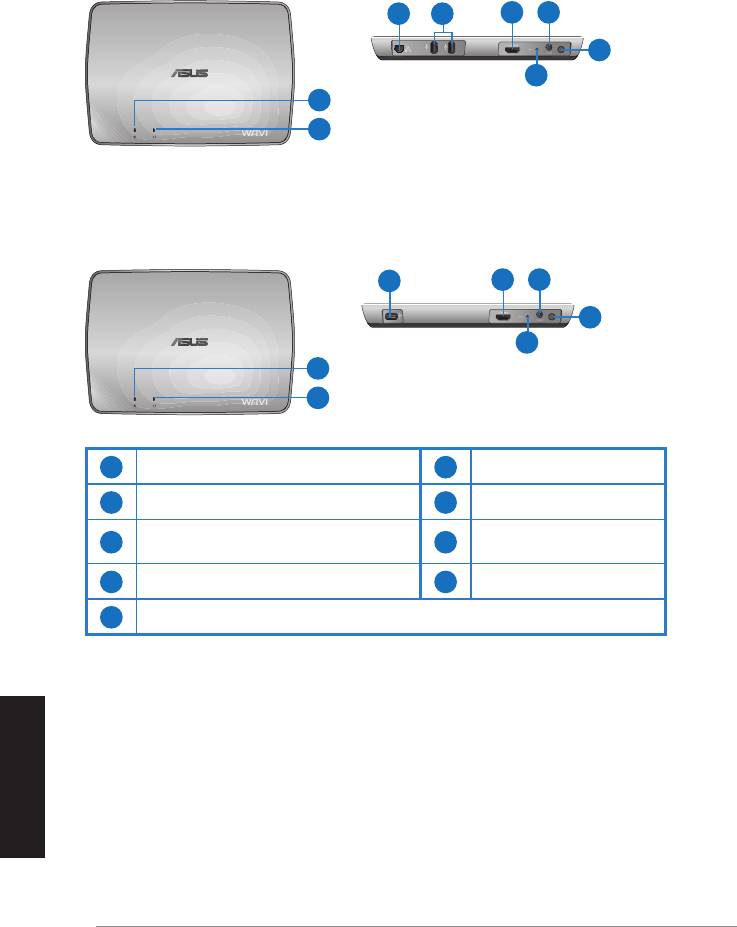
WAVI 特性
接收器
前視圖
後視圖
3 5
6 7
8
9
1
2
發送器
前視圖
後視圖
4
6 7
8
9
1
2
1
電源指示燈
6
HDMI 端口
2
無線指示燈
7
DC-In 端口
3
網絡端口(僅用於固件更新)
8
電源按紐
4
USB 端口(連接到PC)
9
重置按鈕
5
USB 端口(連接其它設備)
簡体中文
Deutsch
152
華碩 WAVI
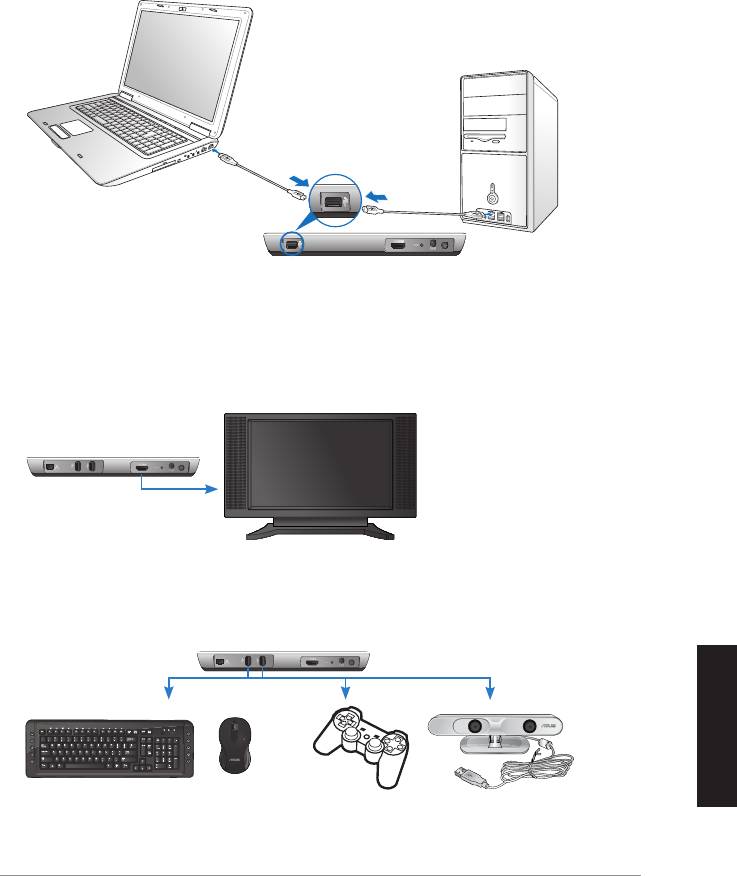
簡体中文
華碩 WAVI
153
ON
OFF
如何使用華碩 WAVI
請按以下步驟使用華碩 WAVI:
1. 從隨機光盤安裝 WAVI 驅動程序。
2. 用 USB 數據線將 WAVI 發送器連接到筆記本電腦或臺式機的 USB 端口
上。
USB 端口
發送器
3. 用 HDMI 數據線將 WAVI 發送器連接到筆記本電腦或臺式機的 HDMI 端
口上。
4. 用 HDMI 數據線將電視連接到 WAVI 接收器上,並將電視設置為 HDMI
模式。
WAVI 接收器
HDTV
5. 若您要使用其它設備,可將其連接到 WAVI 接收器上,如下圖所示。
C
WAVI 接收器
USB 鍵盤 / 鼠標 游戲手柄 華碩 Xtion
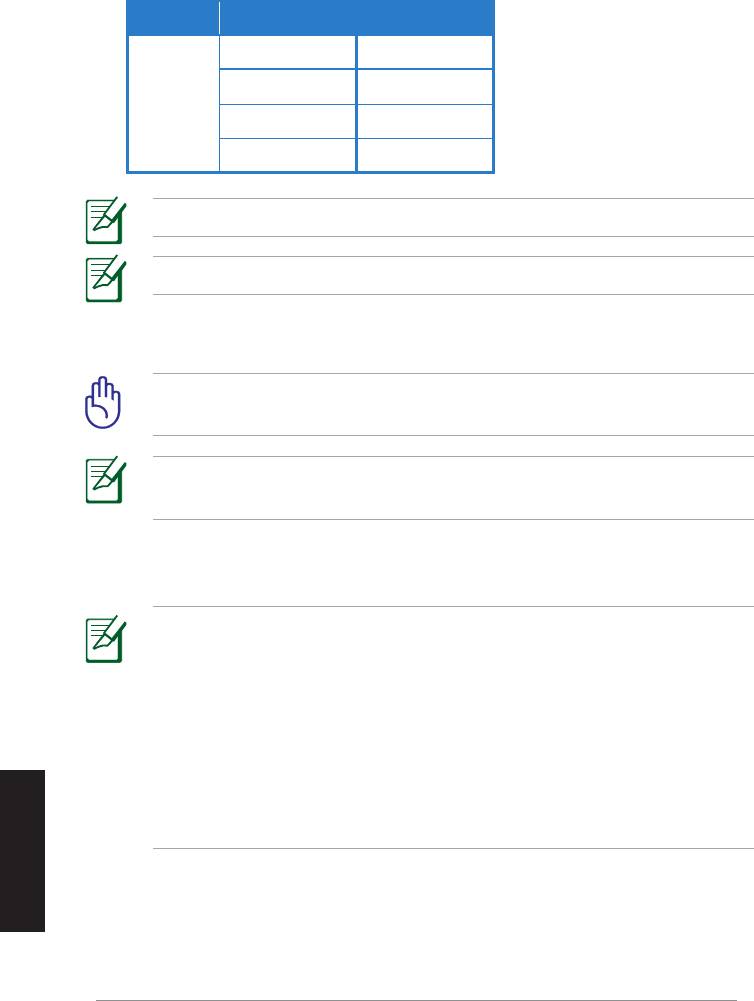
本產品建議使用的無線鍵盤鼠標型號如下表:
廠商品牌 無線鍵盤 / 鼠標型號
WT400 WT410
WT45 WT450
華碩
W4000 BX700
W4500 M-A65
注意:以上列表內容如有更改,恕不另行通知。
注意:請勿將 USB 閃存盤連接到 WAVI 接收器上。
6. 開啟 WAVI 發送器與接收器。
重要!請確認您已將電源適配器連接到 WAVI 發送器和接收器上,並
且電源適配器已連接到適合的電源。
注意:電源指示燈 / 無線指示燈顯示藍色表示連接成功, 顯示橙色
表示連接失敗。
7. 將筆記本電腦或臺式機的默認聲音播放設備設置為 HDMI 輸出。
注意:
請按以下步驟更改音頻設置:
‧ Windows 7 / Vista 操作系統下,點擊【控制面板】>【硬件和聲
音】>【音效】。在【聲音播放】頁,選擇【HDMI 輸出】作為默
認聲音播放設備。
‧ Windows XP 操作系統下,點擊【控制面板】>【聲音和音頻設
簡体中文
Deutsch
備】>【音效】。在【聲音播放】頁,選擇【HDMI 輸出】作為默
認聲音播放設備。
154
華碩 WAVI

注意事項
REACH
請遵守 REACH(Registration,Evaluation,Authorisation,and Restriction
of Chemicals)管理規範,我們會將產品中的化學物質公告在華碩 REACH
網站,詳細請參考
http://csr.asus.com/english/REACH.htm。
Federal Communications Commission Interference Statement
This device complies with FCC Rules Part 15. Operation is subject to the
following two conditions:
• This device may not cause harmful interference.
• This device must accept any interference received, including
interference that may cause undesired operation.
This equipment has been tested and found to comply with the limits for a
class B digital device, pursuant to Part 15 of the Federal Communications
Commission (FCC) rules. These limits are designed to provide reasonable
protection against harmful interference in a residential installation. This
equipment generates, uses, and can radiate radio frequency energy and,
if not installed and used in accordance with the instructions, may cause
harmful interference to radio communications. However, there is no
guarantee that interference will not occur in a particular installation. If this
equipment does cause harmful interference to radio or television reception,
which can be determined by turning the equipment off and on, the user is
encouraged to try to correct the interference by one or more of the following
measures:
• Reorient or relocate the receiving antenna.
• Increase the separation between the equipment and receiver.
• Connect the equipment into an outlet on a circuit different from that to
which the receiver is connected.
• Consult the dealer or an experienced radio/TV technician for help.
CAUTION:
Any changes or modifications not expressly approved
by the party responsible for compliance could void the user’s
authority to operate the equipment.
簡体中文
華碩 WAVI
155

FCC Radiation Exposure Statement
This equipment complies with FCC radiation exposure limits set forth for an
uncontrolled environment. This equipment should be installed and operated
with minimum distance 20cm between the radiator & your body.
This transmitter must not be co-located or operating in conjunction with any
other antenna or transmitter. If the device is going to be operated in 5.15 ~
5.25GHz frequency range, then it is restricted to an indoor environment only.
RF Exposure warning
• The equipment complies with FCC RF exposure limits set forth for an
uncontrolled environment.
• The equipment must be co-located or operated in conjunction with any
other antenna or transmitter.
IC Radiation Exposure Statement for Canada
This equipment complies with IC radiation exposure limits set forth for an
uncontrolled environment. To maintain compliance with IC RF exposure
compliance requirements, please avoid direct contact to the transmitting
antenna during transmitting. End users must follow the specific operating
instructions for satisfying RF exposure compliance.
Operation is subject to the following two conditions:
• This device may not cause interference.
• This device must accept any interference, including interference that
may cause undesired operation of the device.
This device should be used only as specified within this manual to meet RF
exposure requirements. Using this device in a manner inconsistent with this
manual could lead to excessive RF exposure conditions.
This device and its antenna(s) must not be co-located or operating in
conjunction with any other antenna or transmitter.
Country Code selection feature to be disabled for products marketed to the
US/CANADA.
簡体中文
Deutsch
If the device is going to be operated in 5.15 ~ 5.25GHz frequency range, then
it is restricted to an indoor environment only.
This Class [B] digital apparatus complies with Canadian ICES-003.
Cet appareil numérique de la classe [B] est conforme à la norme NMB-003 du
Canada
156
華碩 WAVI

NCC 警語
Declaration of Conformity for R&TTE directive 1999/5/EC
Hereby, ASUS declares that this product is in compliance with the essential
requirements and other relevant provisions of Directive 1995/5/EC.
This device will be sold in the following EEA (European Economic Area)
countries: Austria, Italy, Belgium, Liechtenstein, Denmark, Luxembourg,
Finland, Netherlands, France, Norway, Germany, Portugal, Greece, Spain,
Iceland, Sweden, Ireland, United Kingdom, Cyprus, Czech Republic,
Estonia, Hungary, Latvia, Lithuania, Malta, Slovakia, Poland, and
Slovenia.
CE Mark Warning
This is a Class B product, in a domestic environment, this product may cause
radio interference, in which case the user may be required to take adequate
measures.
簡体中文
CAUTION:
The device for the band 5150-5350 MHz is only for indoor
use.
華碩 WAVI
157

華碩的聯絡信息
華碩電腦(上海)有限公司 ASUSTEK COMPUTER (SHANGHAI)
CO., LTD(中國)
市場信息
技術支持
地址: 上海市閔行莘庄工業區春東路 508
電話: +86-21-34074610
號
(800-820-6655)
電話: +86-21-54421616
電子郵件: http://www.asus.com.cn/email
傳真: +86-21-54420099
在線支持: http://support.asus.com/techserv/
互聯網: http://www.asus.com.cn/
techserv.aspx
華碩電腦公司 ASUSTeK COMPUTER INC.(亞太地區)
市場信息
技術支持
地址: 台灣臺北市北投區立德路 15 號
電話: +86-21-38429911
電話: +886-2-2894-3447
傳真: +86-21-58668722, ext. 9101#
傳真: +886-2-2890-7798
在線支持: h t t p : / / s u p p o r t . a s u s . c o m /
電子郵件: info@asus.com.tw
techserv/techserv.aspx
互聯網: http://www.asus.com.tw
ASUS COMPUTER INTERNATIONAL(美國)
市場信息
技術支持
地址: 800 Corporate Way, Fremont,
電話: +1-812-282-2787
California 94539, USA
傳真: +1-812-284-0883
電話: +1-510-739-3777: +1-510-739-3777
在線支持: h t t p : / / s u p p o r t . a s u s . c o m /
傳真: +1-510-608-4555
techserv/techserv.aspx
互聯網: http://usa.asus.com: http://usa.asus.com
ASUS COMPUTER GmbH(德國/奧地利)
市場信息
技術支持
*
地址: Harkort Str. 21-23, D-40880
電話: +49-1805-010923(配件)
Ratingen, Deutschland
電話: +49-1805-010920(系統 / 筆記
*
簡体中文
Deutsch
傳真: +49-2102-959911
本電腦 / 易家族 / LCD)
互聯網: http://www.asus.de
傳真: +49-2102-9599-11
在線聯絡: h t t p : / / w w w . a s u s . d e / s a l e s
在線支持: h t t p : / / s u p p o r t . a s u s . c o m /
(僅回答市場相關事務的問題)
techserv/techserv.aspx
* 使用德國固定電話撥打每分鐘話費為 0.14 歐元,使用手機撥打每分鐘話費為 0.42 歐
元。
158
華碩 WAVI
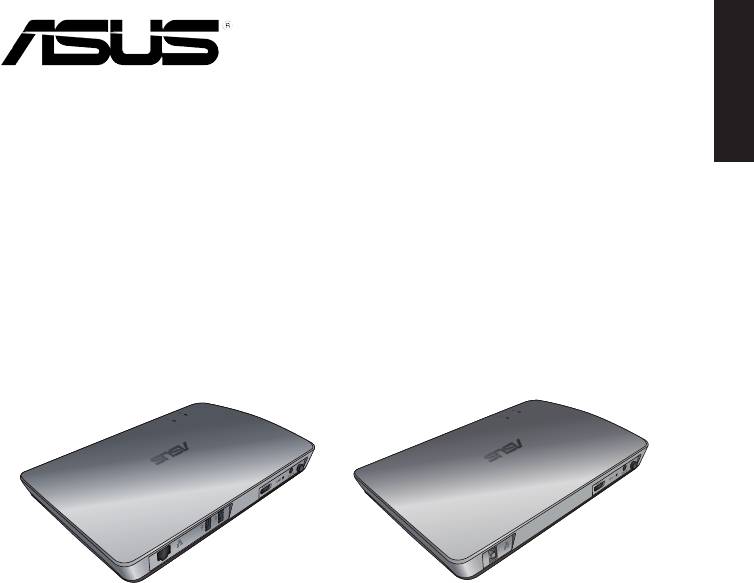
日本語
WAVI
(ワイヤレス・オーディオ・ビデオ・インターフェース)
WAVI レシーバー WAVI トランスミッター
ユーザーマニュアル

日本語
160
ASUS WAVI
J6186
初版
2011年2月
Copyright © 2011 ASUSTeK Computer Inc. All Rights Reserved.
バックアップの目的で利用する場合を除き、本書に記載されているハードウェア・ソフト
ウェアを含む、全ての内容は、ASUSTeK Computer Inc. (ASUS)の文書による許可なく、
編集、転載、引用、放送、複写、検索システムへの登録、他言語への翻訳などを行うこと
はできません。
製品保証サービスは以下のケースに対しては適用されません。
(1) ASUSが文書で指定した以外の第三者が製品を修理した場合、製品に改造や変更を加え
た場合
(2) 製品のシリアルナンバーが改ざんまたは剥がれている場合、または判読できない場合。
ASUSは、本マニュアルについて、明示の有無にかかわらず、いかなる保証もいたしませ
ん。ASUSの責任者、従業員、代理人は、本書の記述や本製品に起因するいかなる損害
(利益の損失、ビジネスチャンスの遺失、データの損失、業務の中断などを含む)に対し
て、その可能性を事前に指摘したかどうかに関りなく、責任を負いません。
本書の仕様や情報は、個人の使用目的にのみ提供するものです。また、予告なしに内容
は変更されることがあり、この変更についてASUSはいかなる責任も負いません。本書お
よびハードウェア、ソフトウェアに関する不正確な内容について、ASUSは責任を負いませ
ん。
本マニュアルに記載の製品名及び企業名は、登録商標や著作物として登録されている
場合がありますが、本書では、識別、説明、及びユーザーの便宜を図るために使用してお
り、これらの権利を侵害する意図はありません。

もくじ
安全上の注意 .................................................................................................. 162
日本語
ASUS WAVI 仕様一覧 ................................................................................... 163
製品の概要 ....................................................................................................... 164
パッケージの内容 ..............................................................................164
WAVI の特徴 .................................................................................................... 165
レシーバー ............................................................................................165
トランスミッター .................................................................................165
ASUS WAVI を使用する ................................................................................ 166
ご注意 ................................................................................................................ 168
ASUSコンタクトインフォメーション .......................................................... 171
ASUS WAVI
161
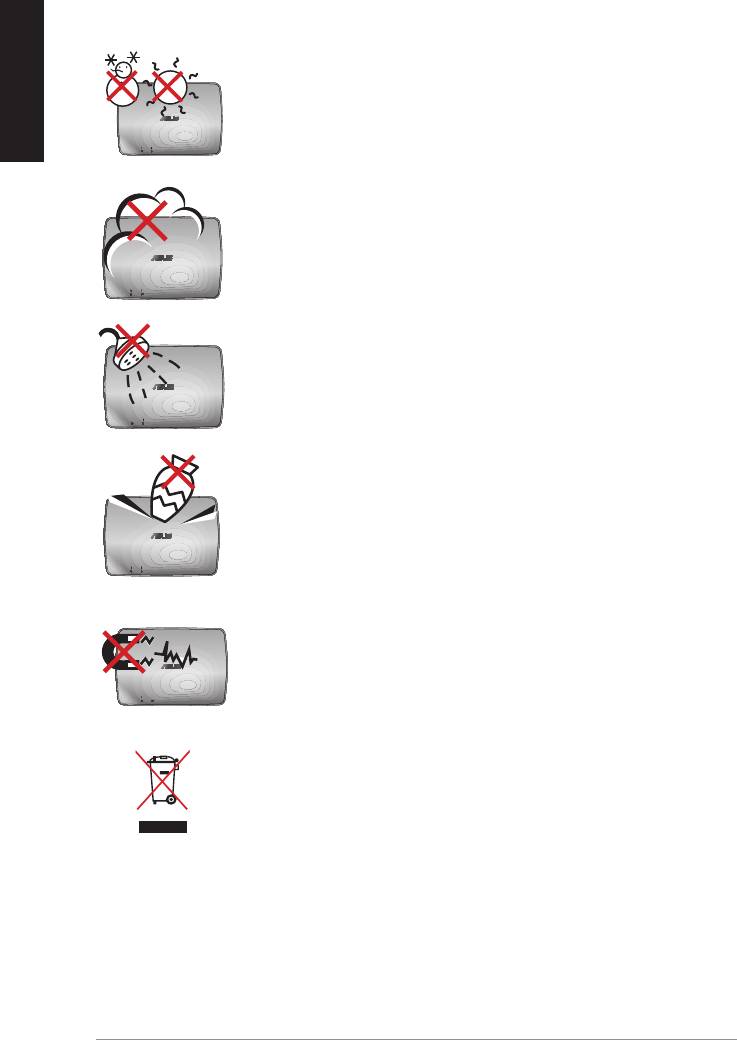
日本語
162
ASUS WAVI
安全上の注意
周囲温度:本機は5°C~35°Cの周囲温度でご使用くださ
い。
禁止:ホコリや汚れの多い環境下に置かないでください。
ガス漏れの恐れがある場所で使用しないでください。
禁止:液体・雨・湿気を避けてください。
禁止:本体を破損したり傷つけたりするような物を上から
落としたり、そのような恐れのある場所で本機を使用しな
いでください。
禁止: 強い磁気を近づけないでください。
禁止:本製品を一般ゴミとして廃止しないでください。リ
サイクル、廃棄の際は電子機器の廃棄に関する地域の条
例等に従ってください。

ASUS WAVI 仕様一覧
解像度 TV:1080p、1080i、720p、576p、480p
3D ビデオ:1080p @ 24Hz
オーディオ 8チャンネル(7.1チャンネル) 24bit/192KHz
日本語
Dolby® Digital(AC3)、DTS 対応
ワイヤレスHDMI テクノロジー
AMIMON WHDI™ テクノロジー
(5GHz帯利用、AES 256bit / 128bit による暗号化)
伝送距離
最大半径約25m(障害物がない状態)
表示遅延
1ms以下
電源
トランスミッター/レシーバー : ACアダプター DC12V 2A
消費電力
トランスミッター/レシーバー : 最大24W
I/Oポート
トランスミッター:
- USBポート×1(コンピューターとの接続用)
- HDMI ポート×1
- DC-INポート×1
- 電源LED×1*
- ワイヤレスLED×1*
レシーバー:
- LANポート×1
- USBポート×2
- HDMI ポート×1
- DC-INポート×1
- 電源LED ×1*
- ワイヤレスLED×1*
* 接続に成功すると、電源LED/ワイヤレスLEDはブルーに点灯します。接
続に失敗した場合はオレンジに点灯します。信号の強さは画面上に表
示されます。
製品は性能・機能向上のために、仕様及びデザインを予告なく変更
する場合があります。
ASUS WAVI
163
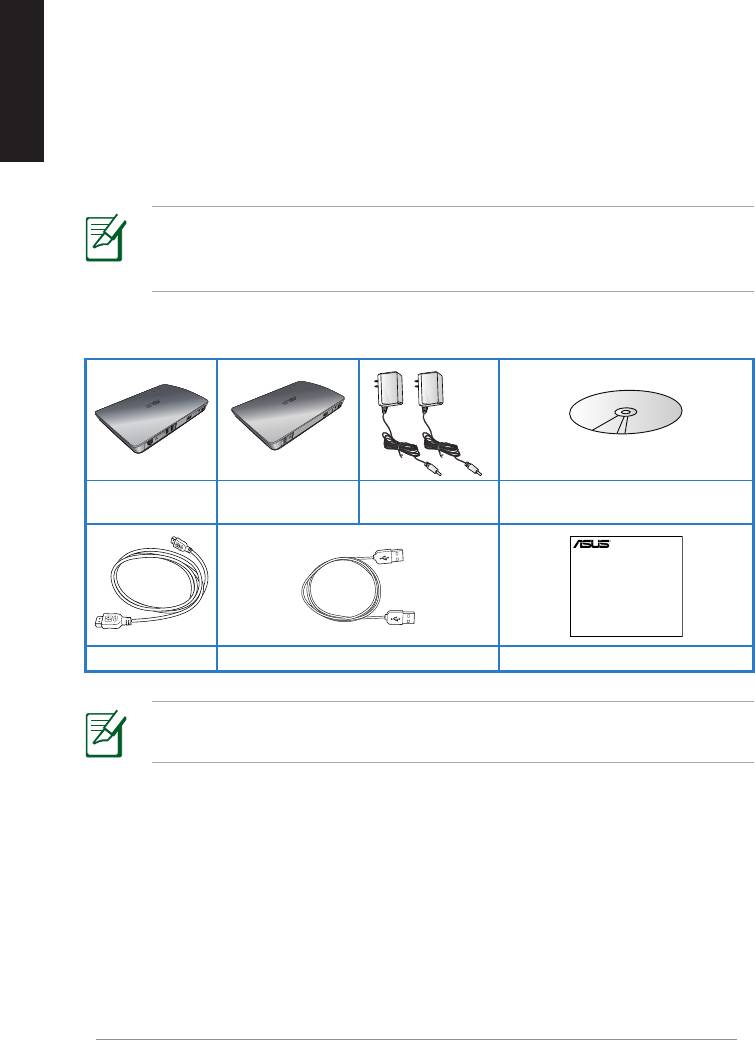
日本語
164
ASUS WAVI
製品の概要
ASUS WAVI は、HDMI出力をワイヤレス化しパソコンの映像と音声をワイヤ
レス接続で送受信します。WHDI(Wireless Home Digital Interface)採用で
障害物のない状態で最大半径約25m範囲でのワイヤレス接続が可能です。
この範囲内であれば表示遅延は1ms 以下に抑えられ1080/60pのフルHD動
画もスムーズに表示することが可能です。ASUS WAVI は3D機能もサポート
しているので、3D対応ディスプレイを接続して臨場感溢れる3Dビデオやゲ
ームをお楽しみいただけます。
1080/60pのフルHD動画をスムーズに表示するには、最大半径約
25m範囲内でレシーバーとトランスミッターとの間に遮蔽物や障害
となるものがない場所に設置してください。
パッケージの内容
サポートCD
WAVI レシーバー WAVI トランスミッター ACアダプター×2
(ユーザーマニュアルとドライバー)
付属品が足りないときや破損しているときは、販売店様にご連絡く
ださい。
WAVI
3D Wireless PC-to-TV Kit
Quick Start Guide
HDMI ケーブル×2 USBケーブル クイックスタートガイド
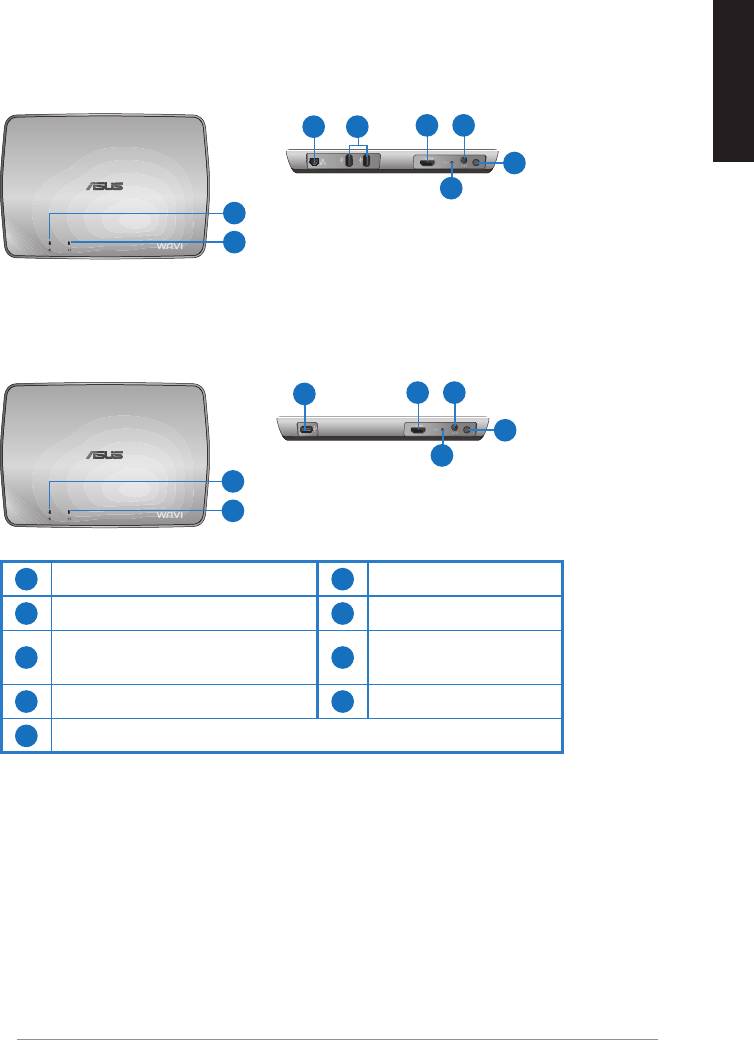
WAVI の特徴
レシーバー
前面
背面
日本語
3 5
6 7
8
9
1
2
トランスミッター
背面
前面
4
6 7
8
9
1
2
1
電源LED
6
HDMI ポート
2
ワイヤレスLED
7
DC-INポート
LANポート
3
8
電源ボタン
(ファームウェア更新専用)
4
USBポート(PC接続用)
9
リセットボタン
5
USBポート(デバイス接続用)
ASUS WAVI
165
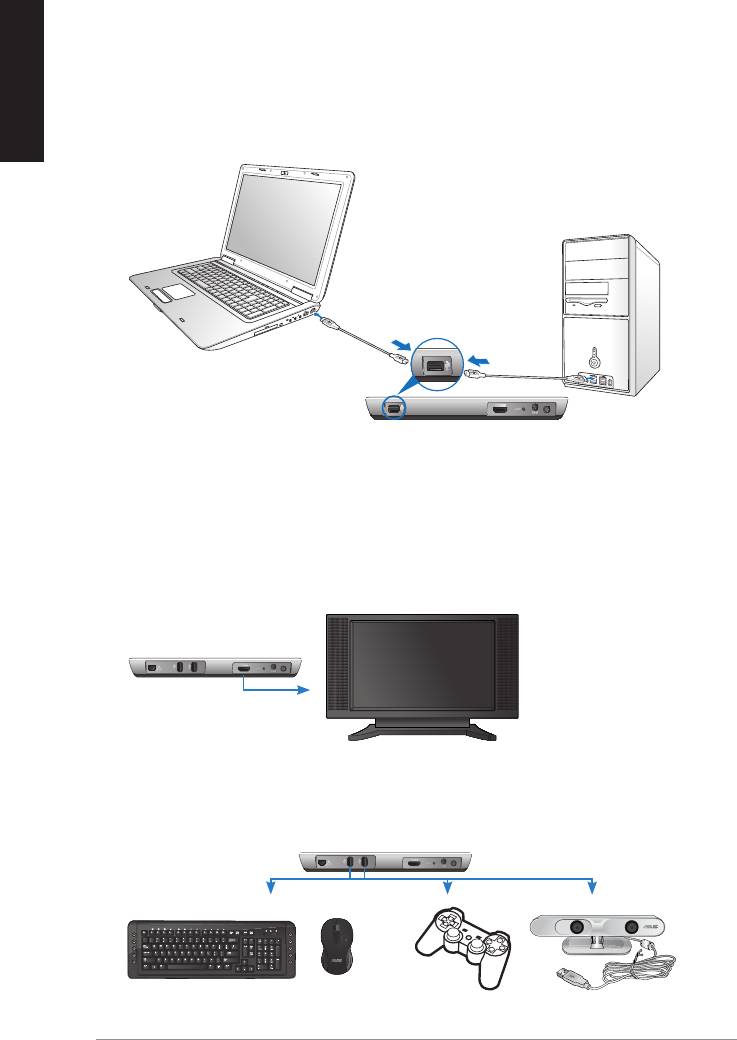
日本語
166
ASUS WAVI
ON
OFF
ASUS WAVI を使用する
手順
1. 付属のサポートCDに収録のWAVI ドライバーをインストールします。
2. 付属のUSBケーブルの一方をWAVI トランスミッターのUSBポート(PC接続
用)に接続し、もう一方をお使いのパソコンのUSBポートに接続します。
USBポート
トランスミッター
3. 付属のHDMIケーブルの一方をWAVI トランスミッターのHDMIポート
に接続し、もう一方をお使いのパソコンのHDMIポートに接続します。
4. 付属のHDMIケーブルの一方をWAVI レシーバーのHDMIポートに接続
し、もう一方をHDMI対応ディスプレイのHDMI入力端子に接続します。
また、ディスプレイの入力を「HDMI」に切り替えます。
WAVI レシーバー
HDTV
5. その他のデバイスを使用する場合は、以下のようにWAVI レシーバー
に接続します。
C
WAVI レシーバー
USBキーボード/マウス ゲームパッド ASUS Xtion
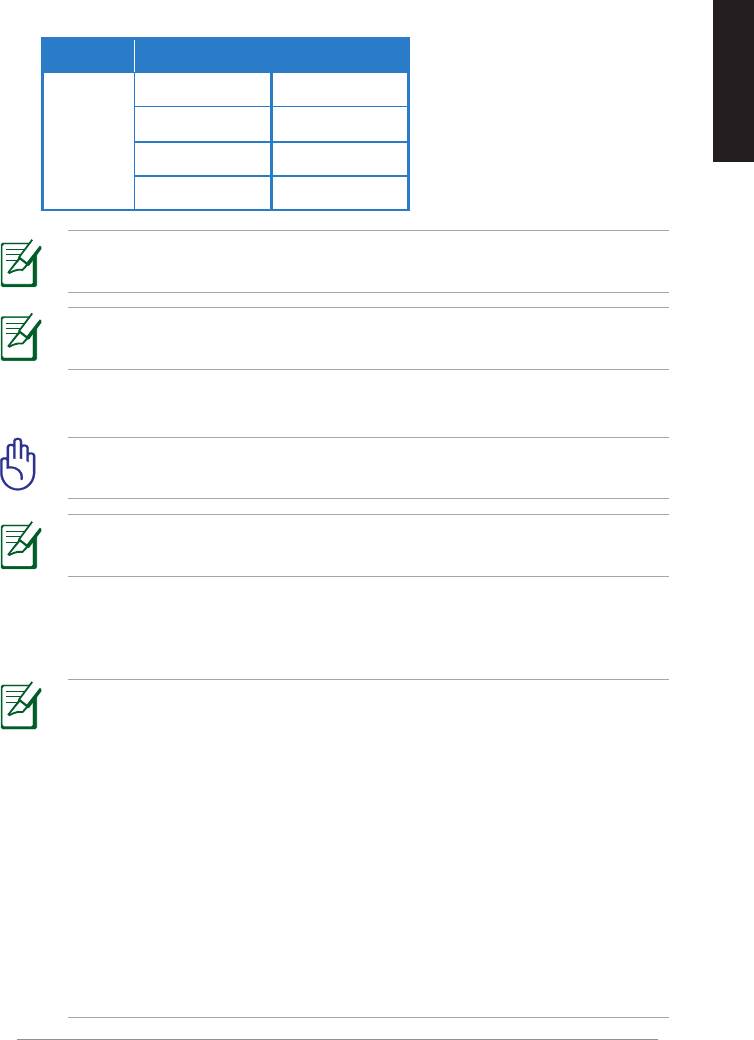
サポートするワイヤレスキーボードとマウスのモデル
ブランド ワイヤレスキーボードとマウスのモデル
WT400 WT410
日本語
WT45 WT450
ASUS
W4000 BX700
W4500 M-A65
サポートする製品は製品ファームウェアやご使用のコンピューター
など、お客様の環境により異なります。
USBフラッシュドライブなどの外付けドライブ・ストレージをWAVI
レシーバーに接続しないでください。
6. WAVI トランスミッターとレシーバーの電源をONにします。
重要:ACアダプターは必ず付属のものを使用し、それ以外のものは絶
対に使用しないでください。火災・感電の原因となることがあります。
接続に成功すると、電源LED/ワイヤレスLEDはブルーに点灯しま
す。接続に失敗した場合はオレンジに点灯します。
7. お使いのパソコンで、再生デバイスの既定値をHDMIに設定します。
再生デバイスの変更方法
• ・Windows 7 / Vista の場合
「スタートメニュー」→「コントロールパネル」→「ハードウェアとサウン
ド」→「サウンド」の順にクリックします。 「再生」タブをクリックし、一覧
より目的の再生デバイスをクリックして「既定値に設定」ボタンをクリ
ックします。
• Windows XP の場合
「スタートメニュー」→「コントロールパネル」→「サウンド、音声、および
オーディオ デバイス」→「サウンドとオーディオデバイス」の順にクリッ
クします。「オーディオ」タブをクリックし、
「音の再生」項目内の「既定のデバイス」一覧より目的の再生デバイ
スをクリックして「適用」ボタンをクリックします。。
ASUS WAVI
167

日本語
168
ASUS WAVI
ご注意
REACH
Complying with the REACH (Registration, Evaluation, Authorisation,
and Restriction of Chemicals) regulatory framework, we published
the chemical substances in our products at ASUS REACH website at
http://csr.asus.com/english/REACH.htm.
Federal Communications Commission Interference Statement
This device complies with FCC Rules Part 15. Operation is subject to the
following two conditions:
• This device may not cause harmful interference.
• This device must accept any interference received, including
interference that may cause undesired operation.
This equipment has been tested and found to comply with the limits for a
class B digital device, pursuant to Part 15 of the Federal Communications
Commission (FCC) rules. These limits are designed to provide reasonable
protection against harmful interference in a residential installation. This
equipment generates, uses, and can radiate radio frequency energy
and, if not installed and used in accordance with the instructions, may
cause harmful interference to radio communications. However, there is
no guarantee that interference will not occur in a particular installation.
If this equipment does cause harmful interference to radio or television
reception, which can be determined by turning the equipment o and on,
the user is encouraged to try to correct the interference by one or more
of the following measures:
• Reorient or relocate the receiving antenna.
• Increase the separation between the equipment and receiver.
• Connect the equipment into an outlet on a circuit dierent from
that to which the receiver is connected.
• Consult the dealer or an experienced radio/TV technician for help.
CAUTION: Any changes or modications not expressly
approved by the party responsible for compliance could void
the user’s authority to operate the equipment.

FCC Radiation Exposure Statement
This equipment complies with FCC radiation exposure limits set forth for an
uncontrolled environment. This equipment should be installed and operated
with minimum distance 20cm between the radiator & your body.
日本語
This transmitter must not be co-located or operating in conjunction with any
other antenna or transmitter. If the device is going to be operated in 5.15
~ 5.25GHz frequency range, then it is restricted to an indoor environment
only.
RF Exposure warning
• The equipment complies with FCC RF exposure limits set forth for an
uncontrolled environment.
• The equipment must be co-located or operated in conjunction with
any other antenna or transmitter.
IC Radiation Exposure Statement for Canada
This equipment complies with IC radiation exposure limits set forth for an
uncontrolled environment. To maintain compliance with IC RF exposure
compliance requirements, please avoid direct contact to the transmitting
antenna during transmitting. End users must follow the specic operating
instructions for satisfying RF exposure compliance.
Operation is subject to the following two conditions:
• This device may not cause interference.
• This device must accept any interference, including interference that
may cause undesired operation of the device.
This device should be used only as specied within this manual to meet RF
exposure requirements. Using this device in a manner inconsistent with this
manual could lead to excessive RF exposure conditions.
This device and its antenna(s) must not be co-located or operating in
conjunction with any other antenna or transmitter.
Country Code selection feature to be disabled for products marketed to
the US/CANADA.
If the device is going to be operated in 5.15 ~ 5.25GHz frequency range, then
it is restricted to an indoor environment only.
This Class [B] digital apparatus complies with Canadian ICES-003.
Cet appareil numérique de la classe [B] est conforme à la norme NMB-003
du Canada
ASUS WAVI
169
日本語
170
ASUS WAVI
NCC警語
Declaration of Conformity for R&TTE directive 1999/5/EC
Hereby, ASUS declares that this product is in compliance with the essential
requirements and other relevant provisions of Directive 1995/5/EC.
This device will be sold in the following EEA (European Economic Area)
countries: Austria, Italy, Belgium, Liechtenstein, Denmark, Luxembourg,
Finland, Netherlands, France, Norway, Germany, Portugal, Greece, Spain,
Iceland, Sweden, Ireland, United Kingdom, Cyprus, Czech Republic ,
Estonia, Hungary, Latvia, Lithuania, Malta , Slovakia, Poland, and
Slovenia.
CE Mark Warning
This is a Class B product, in a domestic environment, this product may
cause radio interference, in which case the user may be required to take
adequate measures.
CAUTION: The device for the band 5150-5350 MHz is only for
indoor use.
ASUSコンタクトインフォメーション
ASUSTeK COMPUTER INC.(アジア太平洋)
住所: 15 Li-Te Road, Peitou, Taipei, Taiwan 11259
電話: +886-2-2894-3447
ファックス: +886-2-2890-7798
日本語
Webサイト: www.asus.com.tw
テクニカルサポート
電話: +86-21-3842-9911
オンラインサポート: support.asus.com
ASUS COMPUTER INTERNATIONAL(アメリカ)
住所: 800 Corporate Way, Fremont, CA 94539, USA
電話: +1-510-739-3777
ファックス: +1-510-608-4555
Webサイト: usa.asus.com
テクニカルサポート
電話: +1-812-282-2787
サポートファックス: +1-812-284-0883
オンラインサポート: support.asus.com
ASUS COMPUTER GmbH(ドイツ、オーストリア)
住所: Harkort Str.21-23, D-40880 Ratingen, Germany
ファックス: +49-2102-9599-11
オンラインコンタクト: www.asus.com.de/sales
テクニカルサポート
電話(コンポーネント): +49-1805-010923*
電話(システム/NB/
Eee/LCD) +49-1805-010920*
サポートファックス: +49-2102-959911
オンラインサポート: www.asus.com.de/support
Webサイト: www.asus.com.de/news
* ドイツ国内の固定電話からは0.14ユーロ/分、携帯電話からは0.42ユーロ/分の通話料がかか
ります。
Manufacturer:
ASUSTeK Computer Inc.
Tel:
+886-2-2894-3447
Address:
No. 150, LI-TE RD., PEITOU, TAIPEI 112,
TAIWAN
Authorised
ASUS Computer GmbH
representative
Address:
HARKORT STR. 21-23, 40880 RATINGEN,
in Europe:
GERMANY
ASUS WAVI
171
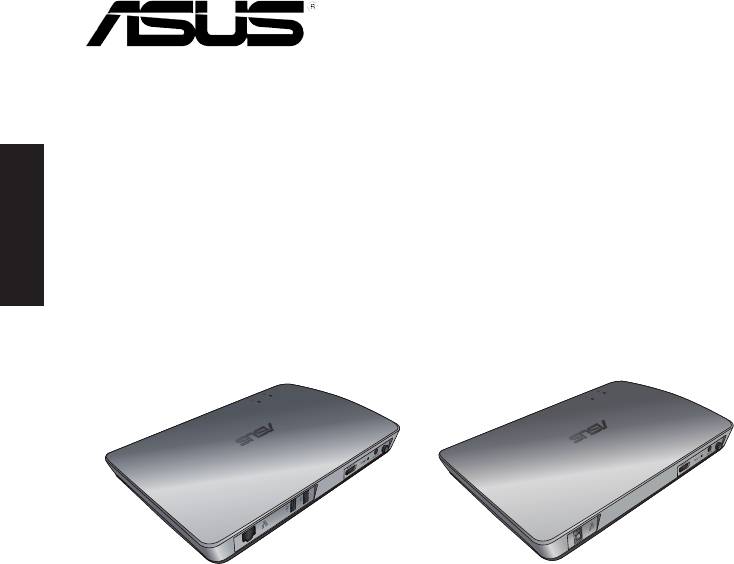
Ελληνικά
WAVI
(Wireless Audio Video Interface –
Ασύρματη Διεπαφή Ήχου Βίντεο)
Δέκτης WAVI Πομπός WAVI
Εγχειρίδιο χρήστη

GK6186
Πρώτη Έκδοση
Φεβρουάριος 2011
Copyright © 2011 ASUSTeK COMPUTER INC. Διατηρούνται όλα τα δικαιώματα μας.
Ελληνικά
Απαγορεύεται η αναπαραγωγή οποιουδήποτε τμήματος του παρόντος εγχειριδίου
συμπεριλαμβανομένων των προϊόντων και του λογισμικού που περιγράφονται σε
αυτό, καθώς και η μετάδοση, αντιγραφή, αποθήκευση σε σύστημα αποθήκευσης και
ανάκτησης, ή μετάφραση σε οποιαδήποτε γλώσσα υπο οποιαδήποτε μορφή και με
οποιοδήποτε μέσο, εκτός από την τεκμηρίωση που φυλάσσεται από τον κάτοχο για
λόγους εφεδρικούς, χωρίς την έγγραφη άδεια της εταιρίας ASUSTeK COMPUTER INC.
(“ASUS”).
Η εγγύηση ή το σέρβις για το προϊόν δεν πρόκειται να επεκταθεί σε περίπτωση που: (1)
το προϊόν έχει επισκευαστεί, τροποποιηθεί ή μεταβληθεί, εκτός και μια τέτοια επισκευή,
τροποποίηση ή μεταβολή έχει εγκριθεί γραπτώς από την ASUS, ή (2) ο αύξων αριθμός του
προϊόντος δεν είναι ευανάγνωστος ή δεν υπάρχει.
Η ASUS ΠΑΡΕΧΕΙ ΤΟ ΠΑΡΟΝ ΕΓΧΕΙΡΙΔΙΟ “ΩΣ ΕΧΕΙ” ΧΩΡΙΣ ΚΑΝΕΝΟΣ ΕΙΔΟΥΣ ΕΓΓΥΗΣΗ,
ΡΗΤΗ Ή ΣΙΩΠΗΡΗ, ΣΥΜΠΕΡΙΛΑΜΒΑΝΟΜΕΝΩΝ ΑΛΛΑ ΟΧΙ ΜΟΝΟ ΤΩΝ ΣΙΩΠΗΡΩΝ
ΕΓΓΥΗΣΕΩΝ ΠΕΡΙ ΕΜΠΟΡΕΥΣΙΜΟΤΗΤΑΣ Ή ΚΑΤΑΛΛΗΛΟΤΗΤΑΣ ΓΙΑ ΣΥΓΚΕΚΡΙΜΕΝΟ
ΣΚΟΠΟ. ΣΕ ΚΑΜΙΑ ΠΕΡΙΠΤΩΣΗ ΔΕΝ ΕΙΝΑΙ ΥΠΕΥΘΥΝΗ Η ASUS, ΟΙ ΔΙΕΥΘΥΝΤΕΣ ΤΗΣ, ΤΑ
ΣΤΕΛΕΧΗ, ΟΙ ΥΠΑΛΛΗΛΟΙ Ή ΑΛΛΟΙ ΣΥΝΤΕΛΕΣΤΕΣ ΓΙΑ ΚΑΘΕ ΕΜΜΕΣΗ, ΕΙΔΙΚΗ, ΤΥΧΑΙΑ Ή
ΚΑΤ' ΕΞΑΚΟΛΟΥΘΗΣΗ ΖΗΜΙΑ (ΣΥΜΠΕΡΙΛΑΜΒΑΝΟΜΕΝΩΝ ΖΗΜΙΩΝ ΑΠΌ ΑΠΩΛΕΙΕΣ Ή
ΚΕΡΔΗ, ΕΠΙΧΕΙΡΗΜΑΤΙΚΕΣ ΖΗΜΙΕΣ, ΖΗΜΙΕΣ ΛΟΓΩ ΑΠΩΛΕΙΑΣ ΔΕΔΟΜΕΝΩΝ, ΔΙΑΚΟΠΗ
ΕΠΙΧΕΙΡΗΣΙΑΚΗΣ ΛΕΙΤΟΥΡΓΙΑΣ ΚΑΙ ΑΛΛΑ ΠΑΡΟΜΟΙΑ), ΑΚΟΜΗ ΚΙ ΑΝ Η ASUS ΕΧΕΙ
ΕΝΗΜΕΡΩΘΕΙ ΓΙΑ ΤΗΝ ΠΙΘΑΝΟΤΗΤΑ ΠΑΡΟΜΟΙΩΝ ΖΗΜΙΩΝ ΠΟΥ ΠΡΟΕΡΧΟΝΤΑΙ ΑΠΌ
ΒΛΑΒΗ Ή ΛΑΘΟΣ ΤΟΥ ΠΑΡΟΝΤΟΣ ΕΓΧΕΙΡΙΔΙΟΥ Ή ΠΡΟΪΟΝΤΟΣ.
ΟΙ ΠΡΟΔΙΑΓΡΑΦΕΣ ΚΑΙ ΠΛΗΡΟΦΟΡΙΕΣ ΠΟΥ ΠΕΡΙΕΧΟΝΤΑΙ ΣΤΟ ΠΑΡΟΝ ΕΓΧΕΙΡΙΔΙΟ
ΠΑΡΕΧΟΝΤΑΙ ΜΟΝΟ ΓΙΑ ΕΝΗΜΕΡΩΤΙΚΟΥΣ ΣΚΟΠΟΥΣ, ΚΑΙ ΥΠΟΚΕΙΝΤΑΙ ΣΕ ΑΛΛΑΓΕΣ
ΣΕ ΟΠΟΙΑΔΗΠΟΤΕ ΧΡΟΝΙΚΗ ΣΤΙΓΜΗ ΧΩΡΙΣ ΠΡΟΗΓΟΥΜΕΝΗ ΕΙΔΟΠΟΙΗΣΗ ΚΑΙ ΔΕΝ
ΠΡΕΠΕΙ ΝΑ ΕΚΛΗΦΘΟΥΝ ΩΣ ΔΕΣΜΕΥΤΙΚΕΣ ΑΠΟ ΤΗΝ ΠΛΕΥΡΑ ΤΗΣ ASUS. Η ASUS ΔΕΝ
ΦΕΡΕΙ ΕΥΘΥΝΗ Ή ΥΠΑΙΤΙΟΤΗΤΑ ΓΙΑ ΟΠΟΙΑΔΗΠΟΤΕ ΣΦΑΛΜΑΤΑ Ή ΑΝΑΚΡΙΒΕΙΕΣ ΠΟΥ
ΠΙΘΑΝΟΝ ΝΑ ΕΜΦΑΝΙΖΟΝΤΑΙ ΣΤΟ ΠΑΡΟΝ ΕΓΧΕΙΡΙΔΙΟ, ΣΥΜΠΕΡΙΛΑΜΒΑΝΟΜΕΝΩΝ ΤΩΝ
ΠΡΟΪΟΝΤΩΝ ΚΑΙ ΤΟΥ ΛΟΓΙΣΜΙΚΟΥ ΠΟΥ ΠΕΡΙΓΡΑΦΕΤΑΙ ΣΕ ΑΥΤΟ.
Τα προϊόντα και οι εταιρικές ονομασίες που εμφανίζονται στο παρόν εγχειρίδιο αποτελούν ή δεν αποτελούν
κατοχυρωμένα σήματα ή πνευματικά δικαιώματα των αντίστοιχων εταιριών τους και χρησιμοποιούνται μόνο για
αναγνώριση ή επεξήγηση για το όφελος του κατόχου, χωρίς πρόθεση παραβίασης κανονισμών.
ASUS WAVI
173

Περιεχόμενα
Πληροφορίες ασφαλείας ....................................................................................175
Σύνοψη προδιαγραφών του ASUS WAVI .......................................................176
Γνωρίζοντας το ASUS WAVI ................................................................................177
Ελληνικά
Περιεχόμενα συσκευασίας ...................................................................177
Χαρακτηριστικά WAVI ..........................................................................................178
Δέκτης ..........................................................................................................178
Πομπός ........................................................................................................178
Χρήση του ASUS WAVI .........................................................................................179
Notices .......................................................................................................................181
Στοιχεία επικοινωνίας ...........................................................................................184
174
ASUS WAVI
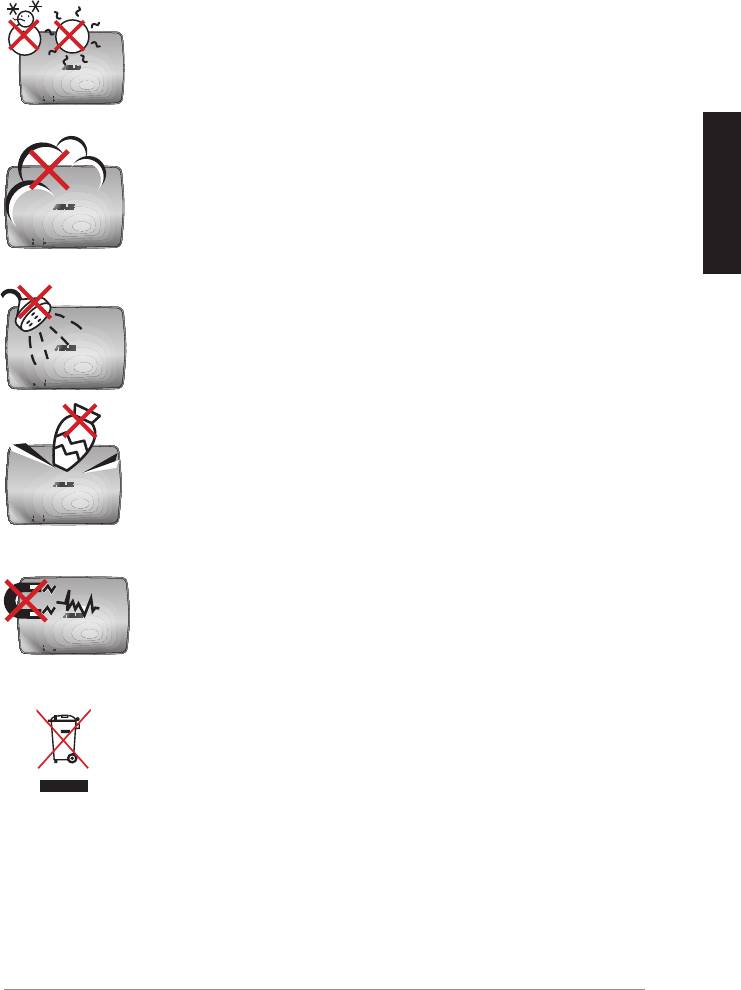
Πληροφορίες ασφαλείας
ΘΕΡΜ. ΑΣΦΑΛΕΙΑΣ: Το ASUS WAVI πρέπει να
χρησιμοποιείται μόνο σε περιβάλλοντα με θερμοκρασίες
μεταξύ 5°C (41°F) και 35°C (95°F).
ΜΗΝ το εκθέτετε σε βρώμικα ή σκονισμένα περιβάλλοντα.
ΜΗΝ το λειτουργείτε κατά τη διάρκεια διαρροής αερίου.
Ελληνικά
ΜΗΝ το εκθέτετε ή το χρησιμοποιείτε κοντά σε υγρά,
βροχή, ή υγρασία.
ΜΗΝ τοποθετείτε ή ρίχνετε αντικείμενα πάνω και μην
σπρώχνετε αντικείμενα μέσα στο ASUS WAVI.
ΜΗΝ εκθέτετε σε ισχυρά μαγνητικά ή ηλεκτρικά πεδία.
ΜΗΝ αποθέτετε το ASUS WAVI στα απορρίμματα του
δήμου της περιοχής σας. Ενημερωθείτε για τους τοπικούς
κανονισμούς απόθεσης ηλεκτρονικών προϊόντων ως
απορρίμματα.
ASUS WAVI
175

Σύνοψη προδιαγραφών του ASUS WAVI
Ανάλυση Τηλεόραση: 1080p, 1080i, 720p, 576p, 480p
Τρισδιάστατη (3D) εικόνα: 1080p @ 24Hz
Ήχος
7.1 κανάλια 192KHz 24-bit, AC-3 και DTS Dolby
Ασύρματη τεχνολογία HDMI
AMIMON WHDI 5GHz 4T5R (κρυπτογράφηση 256-bit ή 128-bit
AES)
Ελληνικά
Απόσταση μετάδοσης
Έως 25 μέτρα (με οπτική επαφή)
Χρόνος καθυστέρησης
<1ms
Τροφοδοσία
Πομπός και δέκτης: Μετασχηματιστές 12V, 2A 24W
Κατανάλωση ισχύος
Πομπός και δέκτης: 24W
Θύρες εισόδου/εξόδου Πομπός:
- Θύρα USB x 1 (για σύνδεση σε θύρα USB ηλεκτρονικού
υπολογιστή)
- Θύρα HDMI x 1
- Θύρα εισόδου DC x 1
- Λυχνία LED τροφοδοσίας x 1*
-Λυχνία LED ασύρματου δικτύου x 1*
Δέκτης:
- Θύρα LAN x 1
- Θύρες USB x 2
- Θύρα HDMI x 1
- Θύρα εισόδου DC x 1
- Λυχνία LED τροφοδοσίας x 1*
-Λυχνία LED ασύρματου δικτύου x 1*
* Η λυχνία LED τροφοδοσίας / η λυχνία LED ασύρματου δικτύου
ανάβει με μπλε χρώμα για να υποδείξει επιτυχή σύνδεση
και με πορτοκαλί χρώμα αν η σύνδεση έχει αποτύχει. Θα
εμφανιστεί στην οθόνη η ισχύς του σήματος.
ΣΗΜΕΙΩΣΗ: Οι προδιαγραφές υπόκεινται σε αλλαγές χωρίς
προηγούμενη ειδοποίηση.
176
ASUS WAVI
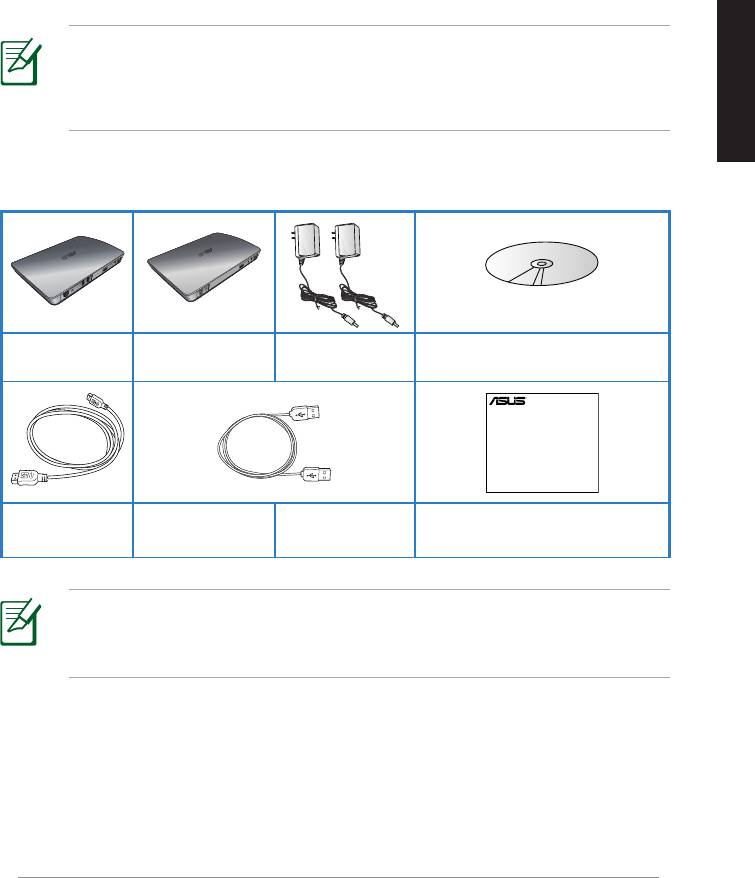
Ελληνικά
Μετασχηματιστής
CD Υποστήριξης (Eγχειρίδιο
Δέκτης WAVI Πομπός WAVI
AC x 2
χρήστη & πρόγραμμα οδήγησης)
ASUS WAVI
177
WAVI
3D Wireless PC-to-TV Kit
Quick Start Guide
Γνωρίζοντας το ASUS WAVI
Το ASUS WAVI σας δίνει τη δυνατότητα να επεκτείνετε ή να μοιράζεστε
ασύρματα τις πηγές ήχου/βίντεο από τον υπολογιστή σας σε μια εξωτερική
οθόνη υψηλής ανάλυσης σε απόσταση έως και 25 μέτρα (με οπτική επαφή)
για μεταδόσεις βίντεο πλήρως υψηλής ευκρίνειας 1080p και κρυστάλλινου
ήχου χωρίς καθυστέρηση (<1ms). Σας επιτρέπει να απολαμβάνετε παιχνίδια
βίντεο 3D και ταινίες από τον υπολογιστή σας.
ΣΗΜΕΙΩΣΗ: Για ασύρματη μετάδοση ήχου και βίντεο πλήρως
υψηλής ευκρίνειας 1080p σε απόσταση έως 25 μέτρα, βεβαιωθείτε
ότι ο δέκτης είναι τοποθετημένος με τέτοιο τρόπο ώστε να υπάρχει
καθαρή οπτική επαφή με τον πομπό.
Περιεχόμενα συσκευασίας
Μετασχηματιστής
CD Υποστήριξης (Eγχειρίδιο
Δέκτης WAVI Πομπός WAVI
AC x 2
χρήστη & πρόγραμμα οδήγησης)
ΣΗΜΕΙΩΣΕΙΣ:
• Εάν απουσιάζει ή εμφανίζει βλάβη οποιοδήποτε από τα στοιχεία,
επικοινωνήστε με το κατάστημα λιανικής πώλησης.
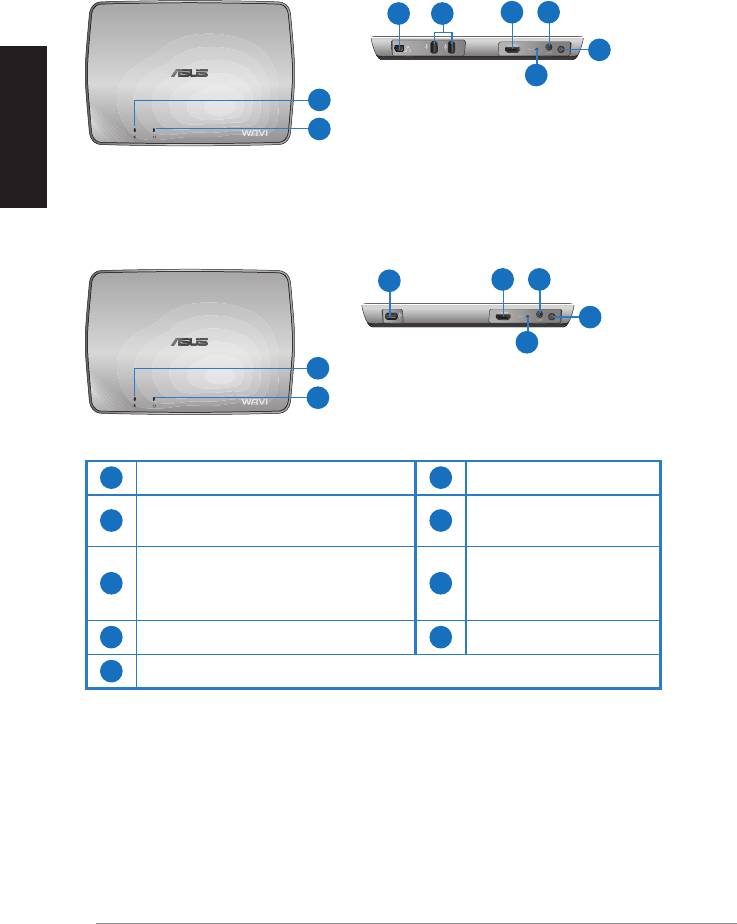
Χαρακτηριστικά WAVI
Δέκτης
Μπροστινή όψη
Πίσω όψη
3 5
6 7
8
Ελληνικά
9
1
2
Πομπός
Μπροστινή όψη
Πίσω όψη
4
6 7
8
9
1
2
1
Λυχνία LED Τροφοδοσίας
6
Θύρα HDMI
Λυχνία LED ασύρματου
Υποδοχή εισόδου
2
7
δικτύου
τροφοδοσίας DC
Θύρα LAN
3
(μόνο για ενημέρωση
8
Κουµπί λειτουργίας
υλικολογισμικού)
4
Θύρα USB (σύνδεση σε Η/Υ)
9
Κουμπί επαναφοράς
5
Θύρες USB (σύνδεση σε άλλες συσκευές)
178
ASUS WAVI
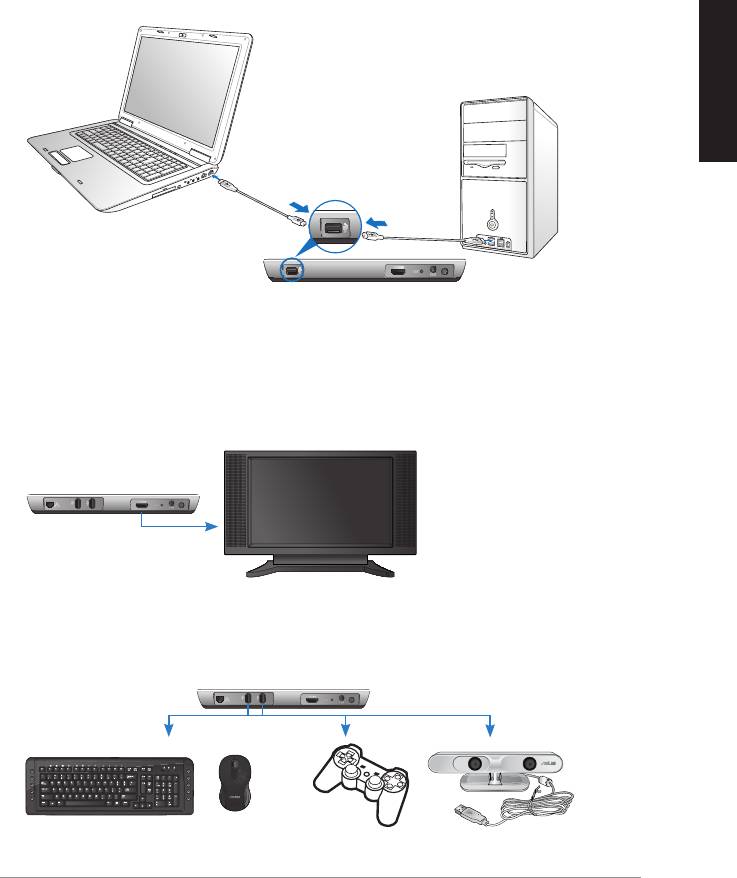
Ελληνικά
ASUS WAVI
179
ON
OFF
Θύρα USB
Πομπός
Δέκτης WAVI
HDTV
C
Χρήση του ASUS WAVI
Για να χρησιμοποιήσετε το ASUS WAVI:
1. Εγκαταστήστε το πρόγραμμα οδήγησης του WAVI από το CD
υποστήριξης που συμπεριλαμβάνεται.
2. Χρησιμοποιώντας το καλώδιο USB που συμπεριλαμβάνεται, συνδέστε τη
θύρα USB του πομπού WAVI στη θύρα USB του φορητού ή επιτραπέζιου
υπολογιστή.
3. Χρησιμοποιώντας το καλώδιο HDMI που συμπεριλαμβάνεται, συνδέστε
τη θύρα HDMI του πομπού WAVI στη θύρα HDMI του φορητού ή
επιτραπέζιου υπολογιστή.
4. Συνδέστε την Τηλεόρασή σας στο δέκτη WAVI χρησιμοποιώντας το
καλώδιο HDMI που συμπεριλαμβάνεται και ρυθμίστε την Τηλεόρασή
σας στη λειτουργία HDMI.
5. Αν θέλετε να χρησιμοποιήσετε άλλες συσκευές, συνδέστε τις στο δέκτη
WAVI όπως φαίνεται παρακάτω.
Δέκτης WAVI
Πληκτρολόγιο / Ποντίκι USB Gamepad ASUS Xtion
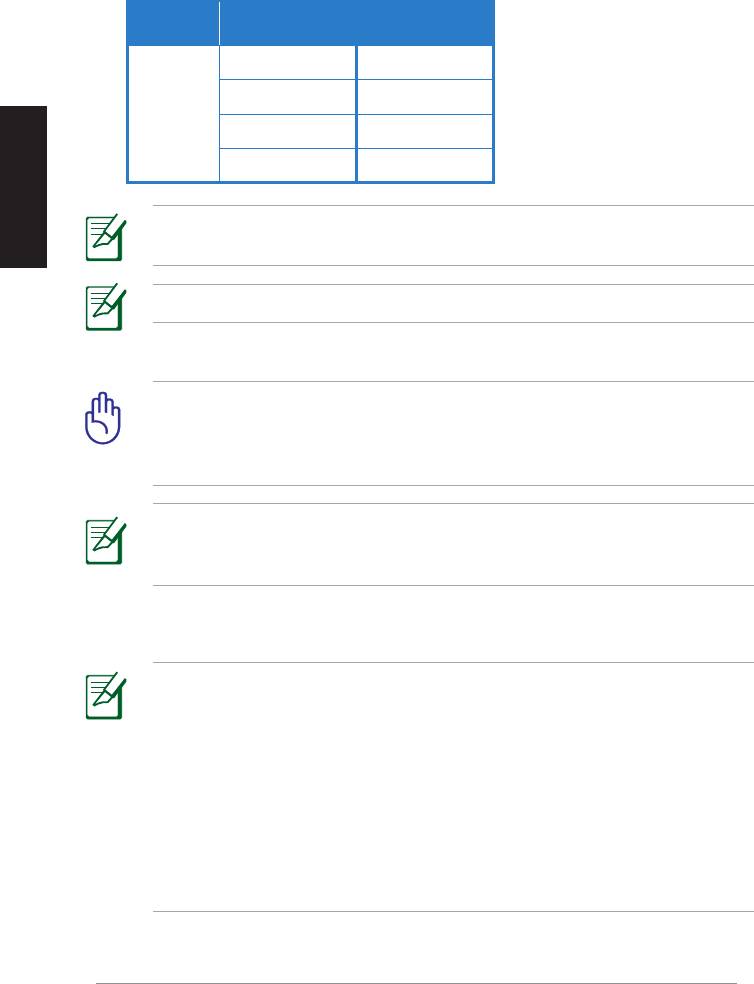
Ανατρέξτε στον παρακάτω πίνακα για τα υποστηριζόμενα μοντέλα ασύρματων
πληκτρολογίων και ποντικιών.
Μοντέλα ασύρματων πληκτρολογίων
Μάρκα
και ποντικιών
WT400 WT410
WT45 WT450
ASUS
Ελληνικά
W4000 BX700
W4500 M-A65
ΣΗΜΕΙΩΣΗ: Η παραπάνω λίστα υπόκειται σε αλλαγές χωρίς
προειδοποίηση.
ΣΗΜΕΙΩΣΗ: Μη συνδέετε μονάδα δίσκου USB ash στο δέκτη WAVI.
6. Ενεργοποιήστε τον πομπό και το δέκτη WAVI.
ΣΗΜΑΝΤΙΚΟ! Βεβαιωθείτε ότι έχετε συνδέσει τους μετασχηματιστές
AC, που συμπεριλαμβάνονται, στον πομπό και στο δέκτη WAVI.
Σιγουρευτείτε ότι οι μετασχηματιστές ρεύματος AC συνδέονται σε μια
πρίζα με τη σωστή ονομαστική ισχύ.
ΣΗΜΕΙΩΣΗ: Η λυχνία LED τροφοδοσίας / η λυχνία LED ασύρματου
δικτύου ανάβει με μπλε χρώμα για να υποδείξει επιτυχή σύνδεση και
με πορτοκαλί χρώμα αν η σύνδεση έχει αποτύχει.
7. Ρυθμίστε την προεπιλεγμένη συσκευή αναπαραγωγής του φορητού ή
επιτραπέζιου υπολογιστή σας σε έξοδο HDMI.
ΣΗΜΕΙΩΣΕΙΣ:
Για να αλλάξετε τις ρυθμίσεις ήχου:
• Για Windows 7 / Vista, κάντε κλικ στο Control Panel (Πίνακας ελέγχου)
> Hardware and Sound (Υλικό και Ήχος) > Sound (Ήχος). Από την
καρτέλα Αναπαραγωγής, επιλέξτε την έξοδο HDMI ως προεπιλεγμένη
συσκευή αναπαραγωγής ήχου.
• Για Windows XP, κάντε κλικ στο Control Panel (Πίνακας ελέγχου)
> Sounds and Audio devices (Ήχοι και Συσκευές ήχου) > Audio
(Ήχος). Επιλέξτε έξοδο HDMI στην Αναπαραγωγή Ήχου.
180
ASUS WAVI
Notices
REACH
Complying with the REACH (Registration, Evaluation, Authorisation, and
Restriction of Chemicals) regulatory framework, we published the chemical
substances in our products at ASUS REACH website at
http://csr.asus.com/english/REACH.htm.
Federal Communications Commission Interference Statement
This device complies with FCC Rules Part 15. Operation is subject to the
following two conditions:
• This device may not cause harmful interference.
Ελληνικά
• This device must accept any interference received, including
interference that may cause undesired operation.
This equipment has been tested and found to comply with the limits for a class
B digital device, pursuant to Part 15 of the Federal Communications Commission
(FCC) rules. These limits are designed to provide reasonable protection against
harmful interference in a residential installation. This equipment generates,
uses, and can radiate radio frequency energy and, if not installed and used
in accordance with the instructions, may cause harmful interference to radio
communications. However, there is no guarantee that interference will not occur
in a particular installation. If this equipment does cause harmful interference
to radio or television reception, which can be determined by turning the
equipment o and on, the user is encouraged to try to correct the interference
by one or more of the following measures:
• Reorient or relocate the receiving antenna.
• Increase the separation between the equipment and receiver.
• Connect the equipment into an outlet on a circuit dierent from that to
which the receiver is connected.
• Consult the dealer or an experienced radio/TV technician for help.
CAUTION: Any changes or modications not expressly approved
by the party responsible for compliance could void the user’s
authority to operate the equipment.
ASUS WAVI
181

FCC Radiation Exposure Statement
This equipment complies with FCC radiation exposure limits set forth for an
uncontrolled environment. This equipment should be installed and operated
with minimum distance 20cm between the radiator & your body.
This transmitter must not be co-located or operating in conjunction with any
other antenna or transmitter. If the device is going to be operated in 5.15 ~
Ελληνικά
5.25GHz frequency range, then it is restricted to an indoor environment only.
RF Exposure warning
• The equipment complies with FCC RF exposure limits set forth for an
uncontrolled environment.
• The equipment must be co-located or operated in conjunction with any
other antenna or transmitter.
IC Radiation Exposure Statement for Canada
This equipment complies with IC radiation exposure limits set forth for an
uncontrolled environment. To maintain compliance with IC RF exposure
compliance requirements, please avoid direct contact to the transmitting
antenna during transmitting. End users must follow the specic operating
instructions for satisfying RF exposure compliance.
Operation is subject to the following two conditions:
• This device may not cause interference.
• This device must accept any interference, including interference that
may cause undesired operation of the device.
This device should be used only as specied within this manual to meet RF
exposure requirements. Using this device in a manner inconsistent with this
manual could lead to excessive RF exposure conditions.
This device and its antenna(s) must not be co-located or operating in
conjunction with any other antenna or transmitter.
Country Code selection feature to be disabled for products marketed to the
US/CANADA.
If the device is going to be operated in 5.15 ~ 5.25GHz frequency range, then
it is restricted to an indoor environment only.
This Class [B] digital apparatus complies with Canadian ICES-003.
Cet appareil numérique de la classe [B] est conforme à la norme NMB-003 du
Canada
182
ASUS WAVI
NCC警語
Ελληνικά
Declaration of Conformity for R&TTE directive 1999/5/EC
Hereby, ASUS declares that this product is in compliance with the essential
requirements and other relevant provisions of Directive 1995/5/EC.
This device will be sold in the following EEA (European Economic Area)
countries: Austria, Italy, Belgium, Liechtenstein, Denmark, Luxembourg,
Finland, Netherlands, France, Norway, Germany, Portugal, Greece, Spain,
Iceland, Sweden, Ireland, United Kingdom, Cyprus, Czech Republic,
Estonia, Hungary, Latvia, Lithuania, Malta, Slovakia, Poland, and
Slovenia.
CE Mark Warning
This is a Class B product, in a domestic environment, this product may cause
radio interference, in which case the user may be required to take adequate
measures.
CAUTION: The device for the band 5150-5350 MHz is only for indoor
use.
ASUS WAVI
183
Στοιχεία επικοινωνίας
ASUSTeK COMPUTER INC. (Ειρηνικός)
Εταιρική διεύθυνση 15 Li-Te Road, Peitou, Taipei, Taiwan 11259
Γενικά (τηλ.) +886-2-2894-3447
Γενικά (φαξ) +886-2-2890-7798
Επικοινωνία μέσω διαδικτύου
www.asus.com.tw
Ελληνικά
Τεχνική υποστήριξη
Γενικά (τηλ.) +86-21-38429911
Υποστήριξη μέσω διαδικτύου
support.asus.com
ASUS COMPUTER INTERNATIONAL (Αμερική)
Εταιρική διεύθυνση 800 Corporate Way, Fremont, CA 94539, USA
Γενικά (τηλ.) +1-510-739-3777
Γενικά (φαξ) +1-510-608-4555
Επικοινωνία μέσω διαδικτύου
usa.asus.com
Τεχνική υποστήριξη
Γενικά (τηλ.)
+1-812-282-2787
Γενικά (φαξ) +1-812-284-0883
Υποστήριξη μέσω διαδικτύου
support.asus.com
ASUS COMPUTER GmbH (Γερμανία & Αυστρία)
Εταιρική διεύθυνση Harkort Str. 21-23, D-40880 Ratingen, Germany
Γενικά (φαξ)
+49-2102-9599-11
Επικοινωνία μέσω διαδικτύου
www.asus.com.de/sales
Technical Support
Τηλέφωνο ανταλλακτικών +49-1805-010923
Τηλέφωνο (Σύστημα/
Notebook/Eee/LCD) +49-1805-010920*
Γενικά (φαξ)
+49-2102-959911
Υποστήριξη μέσω διαδικτύου
www.asus.com.de/support
Επικοινωνία μέσω διαδικτύου
www.asus.com.de/news
* EUR 0,14/λεπτό από σταθερό τηλέφωνο στη Γερμανία. EUR 0,42/λεπτό από κινητόEUR 0,14/λεπτό από σταθερό τηλέφωνο στη Γερμανία. EUR 0,42/λεπτό από κινητό
τηλέφωνο.
Κατασκευαστής
ASUSTeK Computer Inc.
Τηλ: +886-2-2894-3447
Εταιρική
No. 150, LI-TE RD., PEITOU, TAIPEI 112, TAIWAN
διεύθυνση:
Εξουσιοδοτημένος
ASUS Computer GmbH
αντιπρόσωπος στην
Εταιρική
HARKORT STR. 21-23, 40880 RATINGEN,
Ευρώπη
διεύθυνση:
GERMANY
184
ASUS WAVI
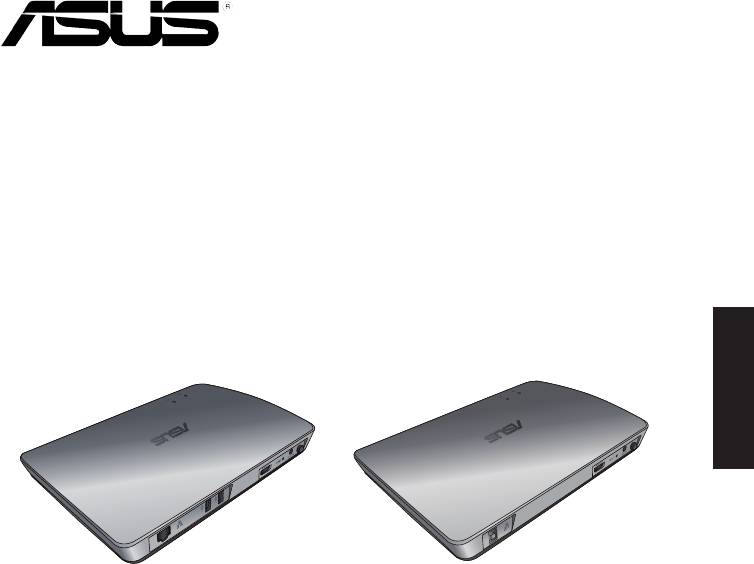
WAVI
(Бездротовий аудіо-відео інтерфейс)
Українська
Приймач WAVI Передатчик WAVI
Керівництво користувача

UA6186
Перше видання
Лютий 2011
Українська
Копірайт © 2011 ASUSTeK Computer Inc. Всі права застережено.
Жодна частина цього керівництва, включаючи описи виробів та ПЗ у ній, не
може бути відтворена, передана, переписана, збережена на пристрої пам'яті або
перекладена іншою мовою жодним способом і в жодній формі, крім тієї документації,
яку користувач зберігає для подальшого користування, без письмової згоди ASUSTeK
Computer Inc. (“ASUS”).
Гарантію на виріб та обслуговування не буде продовжено, якщо: (1) виріб
ремонтували, модифікували або видозмінили, крім тих випадків, коли ремонт,
модифікація або видозміни були письмово схвалені ASUS; або (2) серійний номер
виробу видалений або відсутній.
ASUS НАДАЄ ЦЕ КЕРІВНИЦТВО "ЯК Є", БЕЗ ЖОДНИХ ГАРАНТІЙ, ВИСЛОВЛЕНИХ АБО
ТАКИХ, ЩО МАЮТЬСЯ НА УВАЗІ, ВКЛЮЧАЮЧИ, АЛЕ НЕ ОБМЕЖУЮЧИСЬ ГАРАНТІЯМИ
АБО УМОВАМИ ТОВАРНОЇ ПРИДАТНОСТІ АБО ВІДПОВІДНОСТІ ПЕВНІЙ ЦІЛІ. ЗА
ЖОДНИХ ОБСТАВИН ASUS, ЙОГО ДИРЕКТОРИ, КЕРІВНИКИ, С ЛУЖБОВЦІ АБО АГЕНТИ
НЕ НЕСУТЬ ВІДПОВІДАЛЬНОСТІ ЗА БУДЬ-ЯКІ ПРЯМІ, ОСОБЛИВІ, ВИПАДКОВІ АБО
НАСЛІДКОВІ ПОШКОДЖЕННЯ (ВКЛЮЧАЮЧИ ВТРАТУ ПРИБУТКУ, ВТРАТУ БІЗНЕСУ,
ВТРАТУ ПРИДАТНОСТІ АБО ДАНИХ, ПЕРЕРВУ БІЗНЕСУ ТОЩО), НАВІТЬ ЯКЩО ASUS
ПОПЕРЕДЖАЛИ ПРО МОЖЛИВІСТЬ ВИНИКНЕННЯ ТАКИХ ПОШКОДЖЕНЬ ЧЕРЕЗ БУДЬ-
ЯКИЙ ДЕФЕКТ АБО ПОМИЛКУ В ЦЬОМУ КЕРІВНИЦТВІ АБО ВИРОБІ.
ТЕХНІЧНІ ХАРАКТЕРИСТИКИ ТА ІНФОРМАЦІЯ У ЦЬОМУ КЕРІВНИЦТВІ ПОДАНІ
ВИКЛЮЧНО ЯК ЗАГАЛЬНА ІНФОРМАЦІЯ І МОЖУТЬ ЗМІНЮВАТИСЯ БЕЗ
ПОПЕРЕДЖЕННЯ. ЇХ НЕ СЛІД РОЗГЛЯДАТИ ЯК ГАРАТНІЮ З БОКУ ASUS. ASUS НЕ НЕСЕ
ЖОДНОЇ ВІДПОВІДАЛЬНОСТІ ЗА БУДЬ-ЯКІ ПОМИЛКИ АБО НЕТОЧНОСТІ, ЯКІ МОЖУТЬ
ТРАПИТИСЯ В КЕРІВНИЦТВІ, ВКЛЮЧАЮЧИ ОПИСАНІ В НЬОМУ ВИРОБИ І ПЗ.
Назви вирбів та корпорацій у цьому керівництві можуть як бути, так і не бути
зареєстрованими торговими марками або копірайтами відповідних компаній
і використовуються лише для позначення або пояснення на користь їхнього
власника, без наміру порушити авторські права.
186
ASUS WAVI

Зміст
Інформація про безпеку ...................................................................................188
Підсумок технічних характеристик ASUS WAVI ......................................189
Знайомство з ASUS WAVI...................................................................................190
До комплекту входять ..........................................................................190
Особливі характеристики WAVI ....................................................................191
Приймач .....................................................................................................191
Передатчик ...............................................................................................191
Користування ASUS WAVI .................................................................................192
Notices .......................................................................................................................194
Контактна інформація виробника ...............................................................197
Українська
ASUS WAVI
187
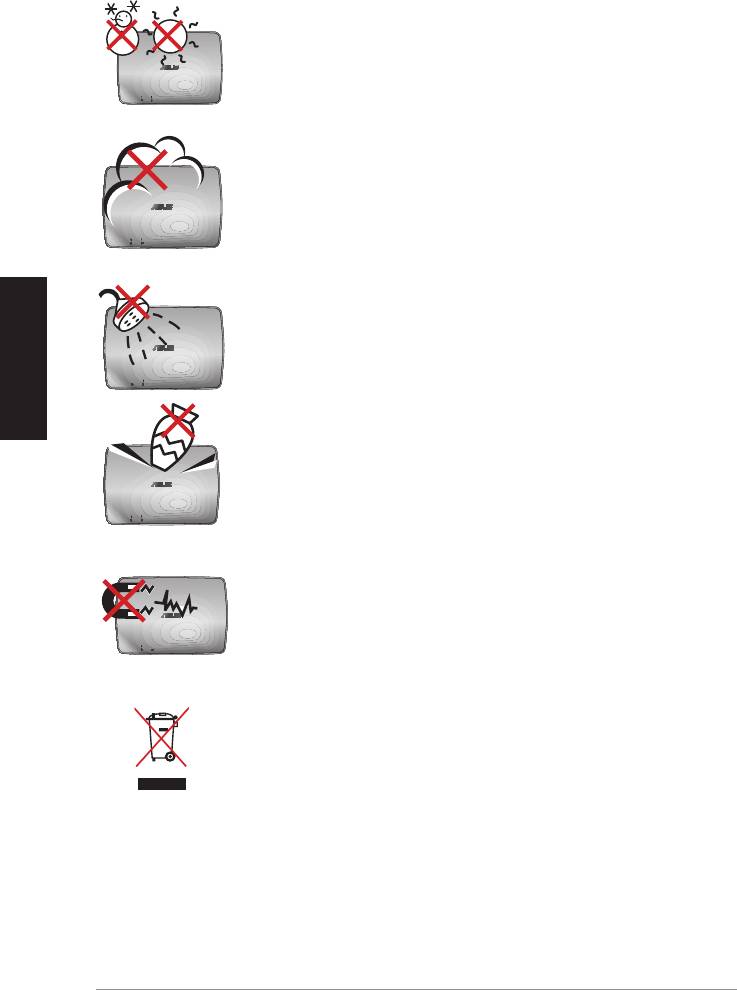
Інформація про безпеку
БЕЗПЕЧНА ТЕМПЕРАТУРА: Слід користуватися ASUS
WAVI лише в приміщеннях із температурою між 5°C
(41°F) і 35°C (95°F).
Бережіть від пилу і бруду. НЕ КОРИСТУЙТЕСЯ під час
витікання газу.
Українська
Бережіть від рідин, дощу або вологи.
НЕ розташовуйте і не кидайте предмети на ASUS WAVI і
не вставляйте до нього жодних сторонніх предметів.
Бережіть від сильних магнітних або електричних полів.
НЕ викидайте ASUS WAVI з побутовим сміттям.
Дізнайтеся місцеві правила про утилізацію електронних
виробів.
188
ASUS WAVI

Підсумок технічних характеристик ASUS WAVI
Чіткість ТБ: 1080p, 1080i, 720p, 576p, 480p
Відео 3D: 1080p, 24 Гц
Аудіо
7.1 каналів, 192 кГц, 24 біти, АС-3 та DTS Dolby
Бездротова технологія
AMIMON WHDI 5 ГГц 4T5R (криптографічний захист 256-біт
HDMI
або 128-біт AES)
Відстань передачі
До 25 метрів (промінь огляду)
Час затримки
<1 мсек.
Живлення
Передатчик або приймач: Адаптери 12 В, 2 А, 24 Вт
Енергоспоживання
Передатчик або приймач: 24 Вт
Порти I/O
Передатчик:
- Порт USB x 1 (для підключення до порту USB комп’ютера)
- Порт HDMI x 1
- Порт входу постійного струму x 1
- Світлодіод живлення x 1*
- Світлодіод бездротового зв’язку x 1*
Українська
Приймач:
- Порт локальної мережі x 1
- Порти USB x 2
- Порт HDMI x 1
- Порт входу постійного струму x 1
- Світлодіод живлення x 1*
- Світлодіод бездротового зв’язку x 1*
* Світлодіод живлення/бездротового зв’язку синіє, коли
підключення встановлено, і стає оранжевим, якщо
підключення не вдалося. Силу сигналу показано на екрані.
ПРИМІТКА: Технічні характеристики можуть змінитися без
попередження.
ASUS WAVI
189
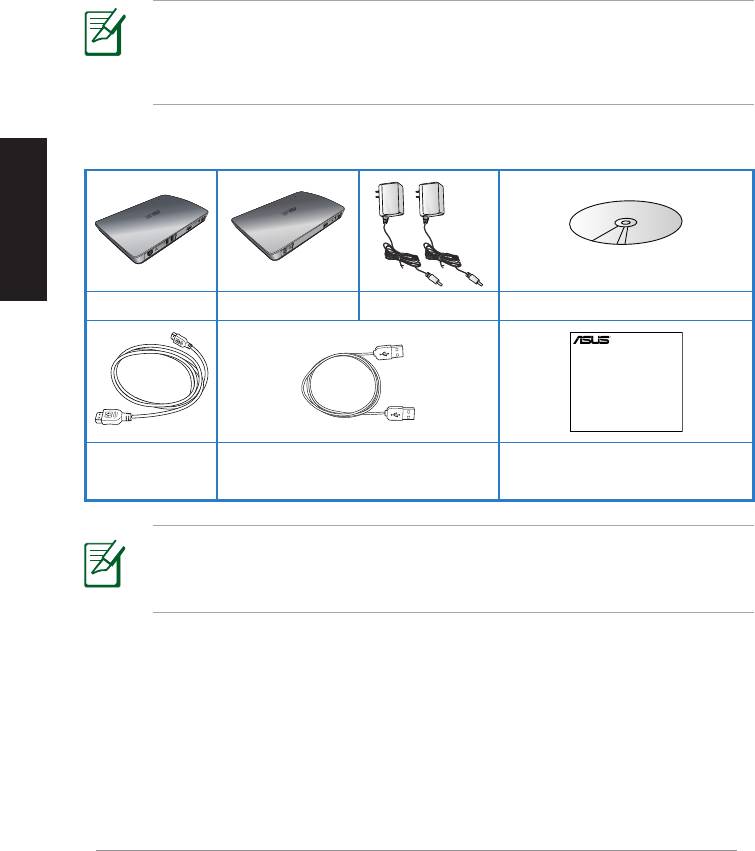
Українська
До комплекту входять
WAVI receiver WAVI transmitter AC adapter x 2 Support CD (User Manual & Driver)
190
ASUS WAVI
WAVI
3D Wireless PC-to-TV Kit
Quick Start Guide
Знайомство з ASUS WAVI
ASUS WAVI надає можливість розширення або спільного користування
джерелом аудіо/відео, виводячи, через бездротовий зв'язок, з
комп’ютера на зовнішній дисплей високої чіткості до 25 метрів (у межах
променю огляду) відео повної високої чіткості 1080р без затримки
(<1 мс) та кришталево чистий звук. Ви отримаєте задоволення від
захоплюючих тримірних відеоігор та показу фільмів на комп’ютері.
ПРИМІТКА: Щоб отримати якісну передачу повного
бездротового аудіо та відео високої чіткості 1080р до 25 метрів,
переконайтеся, що приймач розташований у межах променю
огляду передатчика.
Керівництво для швидкого
Кабель HDMI х 2 Кабель USB
початку експлуатації
ПРИМІТКИ:
• Якщо будь-який з предметів пошкоджений або відсутній,
зверніться до розповсюджувача.
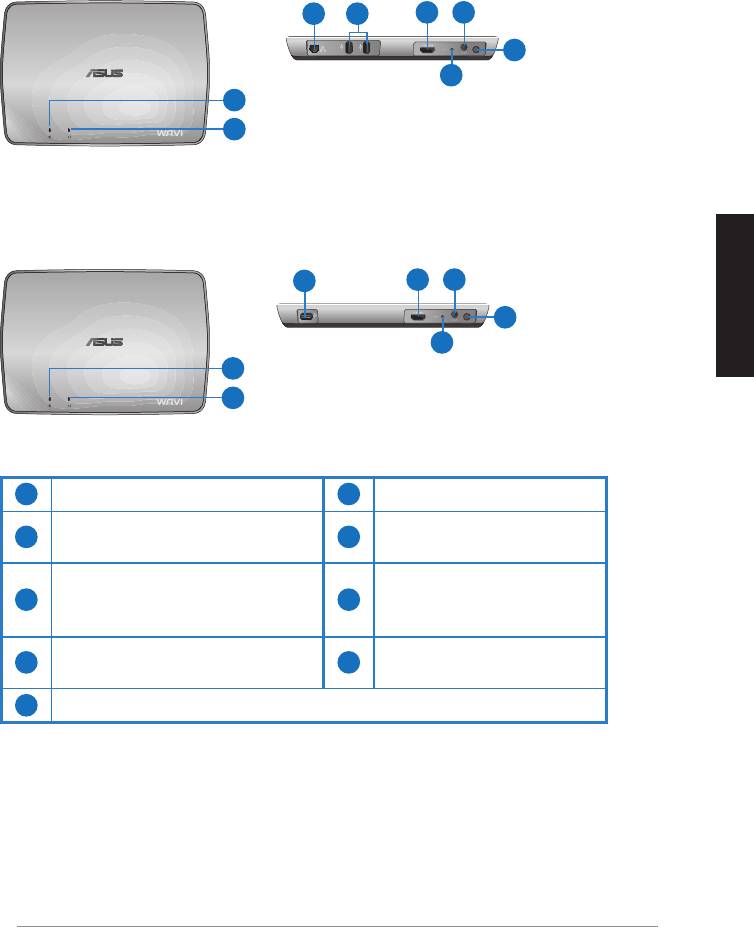
Особливі характеристики WAVI
Приймач
Вигляд спереду
Вигляд ззаду
3 5
6 7
8
9
1
2
Передатчик
Вигляд спереду
Вигляд ззаду
4
6 7
8
9
Українська
1
2
1
Світлодіод живлення
6
Порт HDMI
Світлодіод бездротового
Порт входу постійного
2
7
зв’язку
струму
Порт локальної мережі
3
(лише для поновлення
8
Кнопка живлення
«прошивки»)
Порт USB (підключення до
4
9
Кнопка «Скинути»
ПК)
5
Порти USB (підключення до інших пристроїв)
ASUS WAVI
191
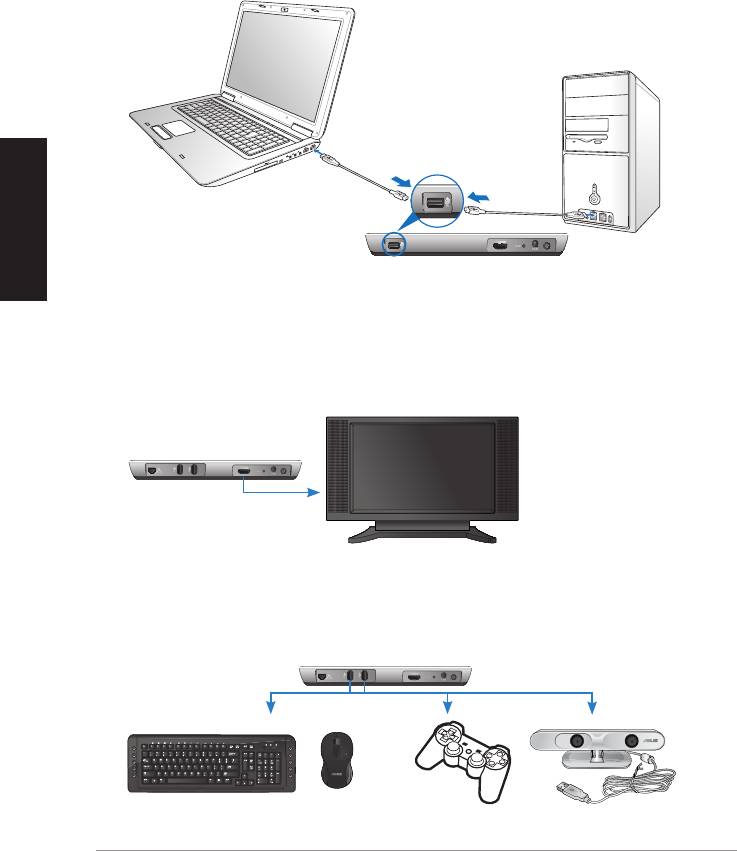
Українська
192
ASUS WAVI
ON
OFF
Порт USB
Передатчик
Приймач WAVI
HDTV
C
Користування ASUS WAVI
Щоб користуватися ASUS WAVI:
1. Інсталюйте драйвер WAVI з комплектуючого компакт-диску
підтримки.
2. Комплектуючим кабелем USB підключіть порт USB передатчика WAVI
до порту USB портативного або стаціонарного комп’ютера.
3. Комплектуючим кабелем HDMI підключіть порт HDMI передатчика
WAVI до порту HDMI портативного або стаціонарного комп’ютера.
4. Підключіть телевізор до приймача WAVI комплектуючим кабелем
HDMI, потім переведіть телевізор у режим HDMI.
5. Якщо Ви бажаєте користуватися іншими пристроями, підключіть їх
до приймача WAVI, як показано нижче.
Приймач WAVI
Клавіатура USB / Миша Джойстік ASUS Xtion
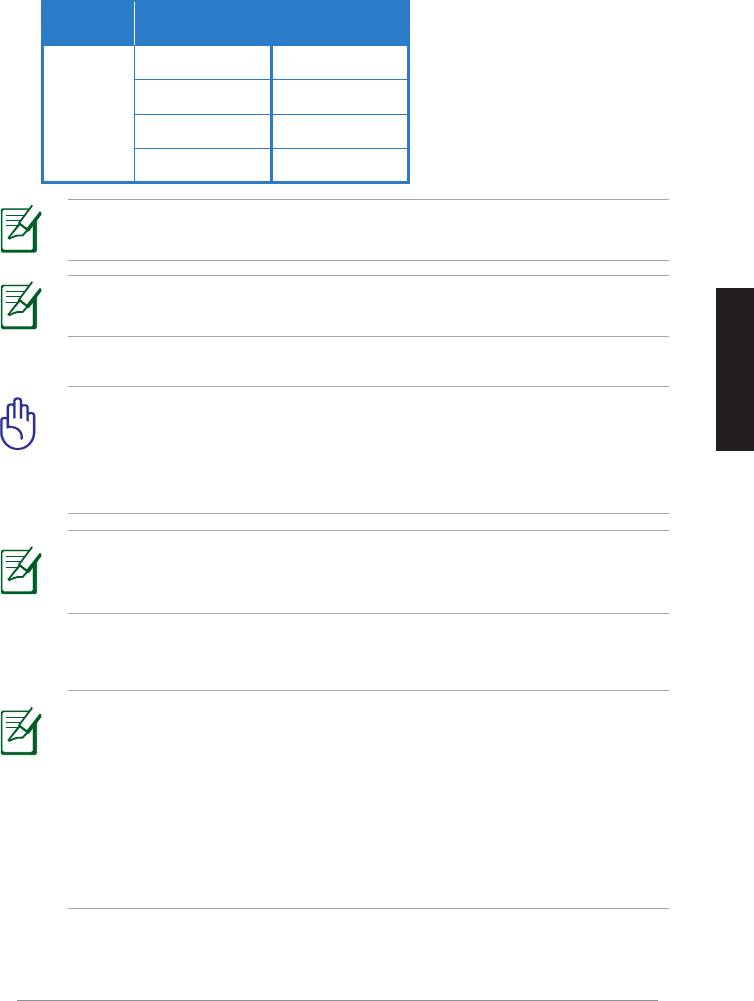
У таблиці нижче вказано підтримувані моделі бездротових клавіатури і миші.
Моделі бездротових клавіатури і
Марка
миші
WT400 WT410
WT45 WT450
ASUS
W4000 BX700
W4500 M-A65
ПРИМІТКА: Пункти наданого вище списку можуть змінюватися без
попередження.
ПРИМІТКА: Не підключайте пристрій пам’яті USB до приймача
WAVI.
6. Увімкніть передатчик і приймач WAVI.
ВАЖЛИВО! Переконайтеся, що Ви підключили поєднані у
пару адаптери змінного струму до передатчика і приймача
Українська
WAVI. Переконайтеся, що Ви увімкнули комплектуючі адаптери
змінного струму до джерел струму з правильною номінальною
потужністю.
ПРИМІТКА: Світлодіод живлення/світлодіод бездротового
зв’язку синіє, позначаючи успішне підключення, і стає оранжевим,
якщо підключення не встановлено.
7. Встановіть пристрій за замовчанням для відтворення звуку
стаціонарного ПК як вихід HDMI.
ПРИМІТКИ:
Щоб змінити налаштування аудіо:
• Для Windows 7 / Vista, клацніть по Control Panel (Контрольна
панель) > Hardware and Sound (Апаратне забезпечення і звук)
> Sound (Звук). На панелі Playback (Відтворення) виберіть вихід
HDMI як пристрій відтворення звуку за замовчанням.
• Для Windows XP, клацніть по Control Panel (Контрольна панель)
> Sounds and Audio devices (Пристрої звуку і аудіо) > Audio
(Аудіо). Виберіть вихід HDMI у Sound Playback (Відтворення звуку).
ASUS WAVI
193

Notices
REACH
Complying with the REACH (Registration, Evaluation, Authorisation, and
Restriction of Chemicals) regulatory framework, we published the chemical
substances in our products at ASUS REACH website at
http://csr.asus.com/english/REACH.htm.
Federal Communications Commission Interference Statement
This device complies with FCC Rules Part 15. Operation is subject to the
following two conditions:
• This device may not cause harmful interference.
• This device must accept any interference received, including
Українська
interference that may cause undesired operation.
This equipment has been tested and found to comply with the limits for a class
B digital device, pursuant to Part 15 of the Federal Communications Commission
(FCC) rules. These limits are designed to provide reasonable protection against
harmful interference in a residential installation. This equipment generates,
uses, and can radiate radio frequency energy and, if not installed and used
in accordance with the instructions, may cause harmful interference to radio
communications. However, there is no guarantee that interference will not occur
in a particular installation. If this equipment does cause harmful interference
to radio or television reception, which can be determined by turning the
equipment o and on, the user is encouraged to try to correct the interference
by one or more of the following measures:
• Reorient or relocate the receiving antenna.
• Increase the separation between the equipment and receiver.
• Connect the equipment into an outlet on a circuit dierent from that to
which the receiver is connected.
• Consult the dealer or an experienced radio/TV technician for help.
CAUTION: Any changes or modications not expressly approved
by the party responsible for compliance could void the user’s
authority to operate the equipment.
194
ASUS WAVI

FCC Radiation Exposure Statement
This equipment complies with FCC radiation exposure limits set forth for an
uncontrolled environment. This equipment should be installed and operated
with minimum distance 20cm between the radiator & your body.
This transmitter must not be co-located or operating in conjunction with any
other antenna or transmitter. If the device is going to be operated in 5.15 ~
5.25GHz frequency range, then it is restricted to an indoor environment only.
RF Exposure warning
• The equipment complies with FCC RF exposure limits set forth for an
uncontrolled environment.
• The equipment must be co-located or operated in conjunction with any
other antenna or transmitter.
IC Radiation Exposure Statement for Canada
This equipment complies with IC radiation exposure limits set forth for an
uncontrolled environment. To maintain compliance with IC RF exposure
compliance requirements, please avoid direct contact to the transmitting
antenna during transmitting. End users must follow the specic operating
Українська
instructions for satisfying RF exposure compliance.
Operation is subject to the following two conditions:
• This device may not cause interference.
• This device must accept any interference, including interference that
may cause undesired operation of the device.
This device should be used only as specied within this manual to meet RF
exposure requirements. Using this device in a manner inconsistent with this
manual could lead to excessive RF exposure conditions.
This device and its antenna(s) must not be co-located or operating in
conjunction with any other antenna or transmitter.
Country Code selection feature to be disabled for products marketed to the
US/CANADA.
If the device is going to be operated in 5.15 ~ 5.25GHz frequency range, then
it is restricted to an indoor environment only.
This Class [B] digital apparatus complies with Canadian ICES-003.
Cet appareil numérique de la classe [B] est conforme à la norme NMB-003 du
Canada
ASUS WAVI
195
NCC警語
Українська
Declaration of Conformity for R&TTE directive 1999/5/EC
Hereby, ASUS declares that this product is in compliance with the essential
requirements and other relevant provisions of Directive 1995/5/EC.
This device will be sold in the following EEA (European Economic Area)
countries: Austria, Italy, Belgium, Liechtenstein, Denmark, Luxembourg,
Finland, Netherlands, France, Norway, Germany, Portugal, Greece, Spain,
Iceland, Sweden, Ireland, United Kingdom, Cyprus, Czech Republic, Estonia,
Hungary, Latvia, Lithuania, Malta, Slovakia, Poland, and Slovenia.
CE Mark Warning
This is a Class B product, in a domestic environment, this product may cause
radio interference, in which case the user may be required to take adequate
measures.
CAUTION: The device for the band 5150-5350 MHz is only for indoor
use.
196
ASUS WAVI
Контактна інформація виробника
ASUSTeK COMPUTER INC. (Азіатсько-Тихоокеанський регіон)
Адреса компанії 15 Li-Te Road, Peitou, Taipei, Taiwan 11259
Телефон +886-2-2894-3447
Факс +886-2-2890-7798
Веб-сайт www.asus.com.tw
Технічна підтримкаt
Телефон +86-21-3842-9911
Технічна підтримка он-лайн support.asus.com
ASUS COMPUTER INTERNATIONAL (
Америка
)
Адреса компанії 800 Corporate Way, Fremont, CA 94539, USA
Телефон +1-510-739-3777
Факс +1-510-608-4555
Веб-сайт usa.asus.com
Технічна підтримкаt
Телефон +1-812-282-2787
Факс підтримки +1-812-284-0883
Технічна підтримка он-лайн support.asus.com
Українська
ASUS COMPUTER GmbH (Німеччина та Австрія)
Адреса компанії Harkort Str. 21-23, D-40880 Ratingen, Germany
Факс +49-2102-9599-11
З питань розповсюдження www.asus.com.de/sales
Технічна підтримкаt
Телефон (Компонентне) +49-1805-010923*
Телефон (Система/Портативний
комп’ютер/Еее/РК-екран) +49-1805-010920*
Факс підтримки +49-2102-959911
Технічна підтримка он-лайн www.asus.com.de/support
Веб-сайт www.asus.com.de/news
* 0,14 євро на хвилину зі стаціонарного телефону в Німеччині. 0,42 євро на хвилину з мобільного
телефону.
Виробник:
ASUSTeK Computer Inc.
Телефон: +886-2-2894-3447
Адреса
No. 150, LI-TE RD., PEITOU, TAIPEI 112, TAIWAN
компанії:
Авторизований
ASUS Computer GmbH
представник у
Адреса
HARKORT STR. 21-23, 40880 RATINGEN,
Європі:
компанії:
GERMANY
ASUS WAVI
197


