
Asus VB172D: Assembling the monitor base Connecting the cables
Assembling the monitor base Connecting the cables: Asus VB172D
Table of contents
English
3 Quick Start Guide
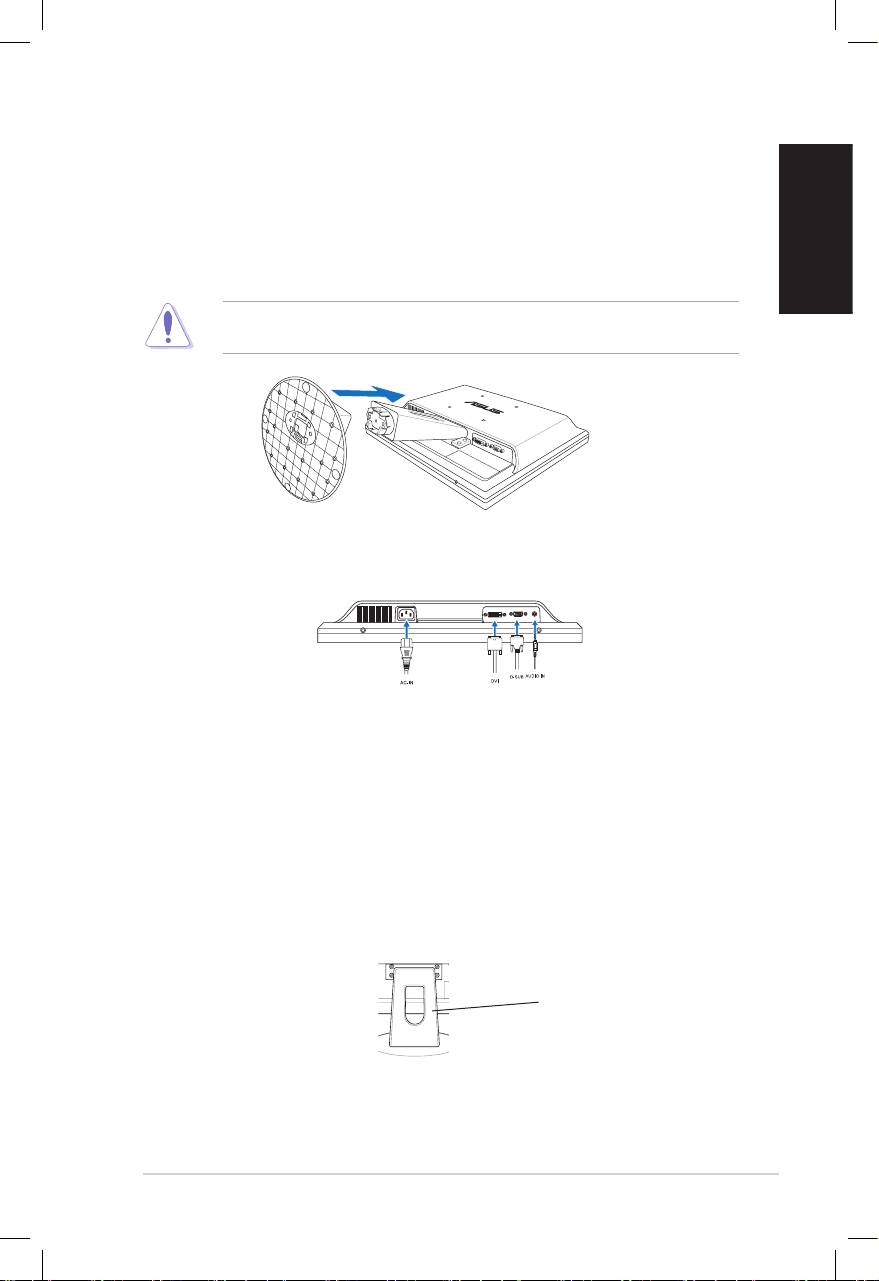
Assembling the monitor base
To assemble the monitor base:
1. Have the front of the monitor face down on a table.
2. Connect the base with the arm according to the below drawing. A click shows
that the base has been connected successfully.
We recommend that you cover the table surface with soft cloth to prevent
damage to the monitor.
Connecting the cables
1. Connect the cables as the following instructions:
•
To connect the audio cable
: connect one end of the audio cable to the
monitor’s Audio-in port, the other end to the computer's audio-out port.
•
To connect the power cord
: connect one end of the power cord securely to
the monitor’s AC input port, the other end to a power outlet.
•
To connect the VGA/DVI cable
:
a. PlugtheVGA/DVIconnectortotheLCDmonitor’sVGA/DVIport.
b. ConnecttheotherendoftheVGA/DVIcabletoyourcomputer’sVGA/
DVIport.
c. TightenthetwoscrewstosecuretheVGA/DVIconnector.
2. Gather all the cables by putting them through the cable hole.
Cable hole
