
Asus Silent Knight: - Before you proceed 3.Assemble the universal retention bracket : - Installation Procedures 5.Place the retention bracket on the motherboard.
- Before you proceed 3.Assemble the universal retention bracket : - Installation Procedures 5.Place the retention bracket on the motherboard.: Asus Silent Knight
Table of contents
- Welcome!
- - Before you proceed 3.Assemble the universal retention bracket : - Installation Procedures 5.Place the retention bracket on the motherboard.
- 6.Gently place the cooler on the retention bracket. 7.Fasten CPU cooler using the spring clips : 8.Connect fan cable to the CPU fan connector on the motherboard.
- Before you proceed
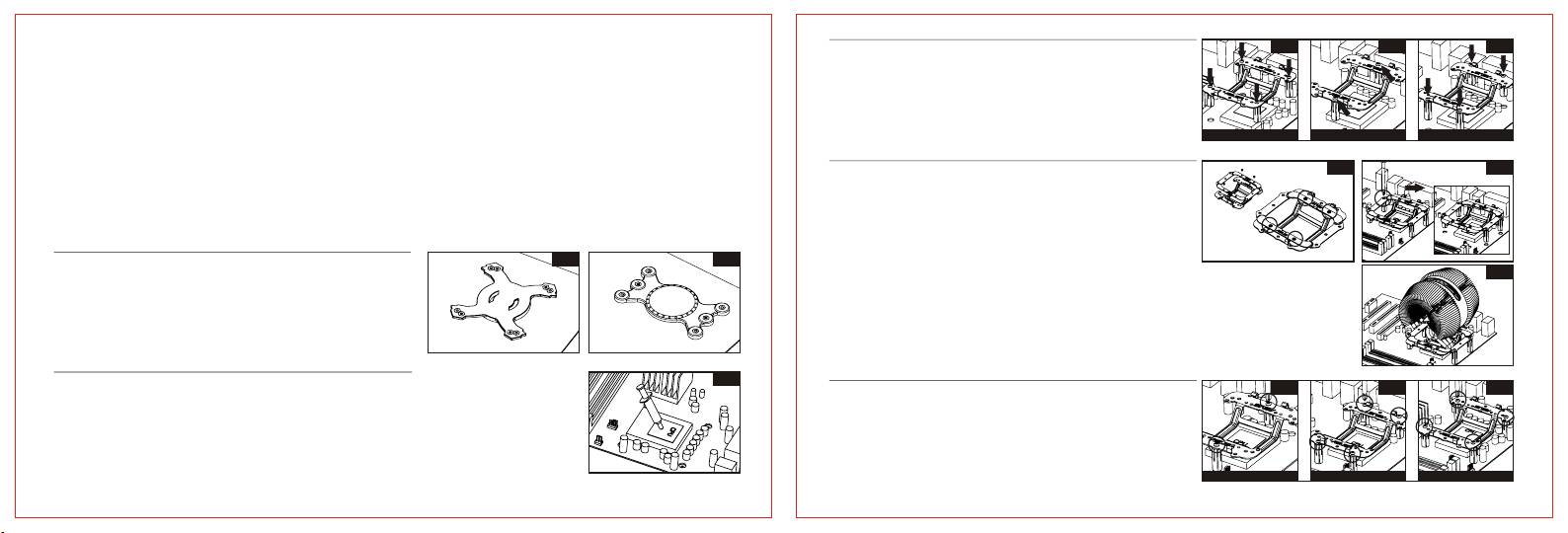
3.Assemble the universal retention bracket :
3.1
3.2 3.3
Insert the Stand-offs into the screw holes of retention bracket.
Take note of the following precautions before you install the Silent Knight CPU Cooler.
- Intel 478/775 processor :
1.Make sure to turn off your computer and unplug the cable from the power source before installing
use four Intel screws and stand-offs to 478/775 screw holes, as shown in figure 3.1.
- AMD 939/940 processor :
CPU Cooler.
use two 939/940 screws and stand-offs, as shown in figure 3.2.
- AMD AM2 processor :
Intel 478 / 775
AMD 939 / 940
AMD AM2
2.Install the CPU before you install the CPU Cooler.
use four AM2 screws and stand-offs, as shown in figure 3.3.
3.Remove the chassis fan or the air duct on the chassis side panel to clear the air path, if necessary.
Note :
4.1
4.2
4.Remove default retention socket on the motherboard, if there is any, before install the CPU cooler.
Since every Motherboard is designed differently, ASUS provides
you the AMD vertical converter as an option to reposition and
- Installation Procedures
guide hot air to the chassis, real panel.
1.1
1.2
(But only under the condition that there is no mechanical
1.Check the type of universal back plate for Intel/AMD.
Intel
AMD
interference; as shown in figure 4.1)
4.3
Aim for the 4 apertures to screw holes of Intel 478/775、
AM2;Aim for the 2 apertures to screw holes of
AMD 939/940, and position the back plate underneath the
motherboard.
(Note: Please skip this step if there is already a back plate
underneath the motherboard.)
2
2.Apply an adequate layer of the thermal grease onto
5.Place the retention bracket on the motherboard.
5.1 5.2 5.3
8
the surface of the installed CPU.
Fasten the retention module with screws. Use a
screw driver to tighten the screws in a diagonal
sequence until everything is firmly in place.
AMD 939 / 940
AMD AM2
Intel 478 / 775
-2- -3-
