
Asus PQ321QE: Contents
Contents: Asus PQ321QE
Table of contents
- Contents
Contents
[ENGLISH]
IMPORTANT INFORMATION .................................................. 1
Installing the stand (supplied) ............................................. 5
SAFETY PRECAUTIONS .......................................................... 2
Connections ........................................................................... 6
ENGLISH
SAFETY INSTRUCTION ........................................................... 3
Turning Power On/O ........................................................... 7
MOUNTING PRECAUTIONS ................................................... 4
Specications ......................................................................... 8
Supplied Components .......................................................... 4
Mounting Precautions ..............................................................................8
IMPORTANT INFORMATION
WARNING: TO REDUCE THE RISK OF FIRE OR ELECTRIC SHOCK, DO NOT EXPOSE THIS PRODUCT TO RAIN OR
MOISTURE.
The lightning ash with arrowhead symbol, within
a triangle, is intended to alert the user to the
CAUTION
presence of uninsulated “dangerous voltage” within
the product’s enclosure that may be of sucient
RISK OF ELECTRIC
magnitude to constitute a risk of electric shock to
SHOCK
persons.
DO NOT OPEN
The exclamation point within a triangle is intended
to alert the user to the presence of important
CAUTION: TO REDUCE THE RISK OF ELECTRIC SHOCK, DO
operating and maintenance (servicing) instructions
NOT REMOVE COVER.
in the literature accompanying the product.
NO USER-SERVICEABLE PARTS INSIDE.
REFER SERVICING TO QUALIFIED SERVICE
PERSONNEL.
1
E
E
2
SAFETY PRECAUTIONS
Electricity is used to perform many useful functions, but it can also cause personal injuries and property damage if improperly handled.
This product has been engineered and manufactured with the highest priority on safety. However, improper use can result in electric
shock and/or re. In order to prevent potential danger, please observe the following instructions when installing, operating and cleaning
the product. To ensure your safety and prolong the service life of your LCD product, please read the following precautions carefully
before using the product.
1. Read instructions — All operating instructions must be read and understood before the product is operated.
2. Keep this manual in a safe place — These safety and operating instructions must be kept in a safe place for future reference.
3. Observe warnings — All warnings on the product and in the instructions must be observed closely.
4. Follow instructions — All operating instructions must be followed.
5. Cleaning — Unplug the power cord from the AC outlet before cleaning the product. Use a dry cloth to clean the product. Do not use
liquid cleaners or aerosol cleaners.
6. Attachments — Do not use attachments not recommended by the manufacturer. Use of inadequate attachments can result in
accidents.
7. Water and moisture — Do not use the product near water. Do not install the product in a place where water may splash onto it. Be
careful of equipment which drains water such as an air-conditioner.
8. Ventilation — The vents and other openings in the cabinet are designed for ventilation.
Do not cover or block these vents and openings since insucient ventilation can cause overheating and/or shorten the life of the
product. Do not place the product on a sofa, rug or other similar surface, since they can block ventilation openings. Do not place the
product in an enclosed place such as a bookcase or rack, unless proper ventilation is provided or the manufacturer’s instructions are
followed.
9. Power cord protection — The power cords must be routed properly to prevent people from stepping on them or objects from
resting on them.
10. The LCD panel used in this product is made of glass. Therefore, it can break when the product is dropped or applied with impact. Be
careful not to be injured by broken glass pieces in case the LCD panel breaks.
11. Overloading — Do not overload AC outlets or extension cords. Overloading can cause re or electric shock.
12. Entering of objects and liquids — Never insert an object into the product through vents or openings. High voltage ows in the
product, and inserting an object can cause electric shock and/or short internal parts.
For the same reason, do not spill water or liquid on the product.
13. Servicing — Do not attempt to service the product yourself. Removing covers can expose you to high voltage and other dangerous
conditions. Request a qualied service person to perform servicing.
14. Repair — If any of the following conditions occurs, unplug the power cord from the AC outlet, and request a qualied service person
to perform repairs.
a. When the power cord or plug is damaged.
b. When a liquid was spilled on the product or when objects have fallen into the product.
c. When the product has been exposed to rain or water.
d. When the product does not operate properly as described in the operating instructions.
Do not touch the controls other than those described in the operating instructions. Improper adjustment of controls not
described in the instructions can cause damage, which often requires extensive adjustment work by a qualied technician.
e. When the product has been dropped or damaged.
f. When the product displays an abnormal condition. Any noticeable abnormality in the product indicates that the product needs
servicing.
15. Replacement parts — In case the product needs replacement parts, make sure that the service person uses replacement parts
specied by the manufacturer, or those with the same characteristics and performance as the original parts. Use of unauthorized
parts can result in re, electric shock and/or other danger.
16. Safety checks — Upon completion of service or repair work, request the service technician to perform safety checks to ensure that
the product is in proper operating condition.
17. Wall mounting — When mounting the product on a wall, be sure to install the product according to the method recommended by
the manufacturer.
18. Heat sources — Keep the product away from heat sources such as radiators, heaters, stoves and other heat-generating products
(including ampliers).
19. Usage of the monitor must not be accompanied by fatal risks or dangers that, could lead directly to death, personal injury, severe
physical damage or other loss, including nuclear reaction control in nuclear facility, medical life support system, and missile launch
control in a weapon system.
20. Do not stay in contact with the parts of the product that become hot for long periods of time. Doing so may result in
low-temperature burns.
ENGLISH
3
E
SAFETY PRECAUTIONS (Continued)
To maintain compliance with EMC regulations, use shielded cables to connect to the DisplayPort input terminal.
If a monitor is not positioned in a suciently stable location, it can be potentially hazardous due to falling. Many injuries, particularly
to children, can be avoided by taking simple precautions such as:
• Using xing devices like wall mount brackets recommended by the manufacturer.
• Only using furniture that can safely support the monitor.
• Ensuring the monitor is not overhanging the edge of the supporting furniture.
• Not placing the monitor on tall furniture (for example, cupboards or bookcases) without anchoring both the furniture and the
monitor to a suitable support.
• Not standing the monitors on cloth or other materials placed between the monitor and supporting furniture.
• Educating children about the dangers of climbing on furniture to reach the monitor or its controls.
Especially for child safety
- Don’t allow children to climb on or play with the monitor.
- Don’t place the monitor on furniture that can easily be used as steps, such as a chest of drawers.
- Remember that children can become excited while watching a program, especially on a “larger than life” monitor. Care should be
taken to place or install the monitor where it cannot be pushed, pulled over, or knocked down.
- Care should be taken to route all cords and cables connected to the monitor so that they cannot be pulled or grabbed by curious
children.
SAFETY INSTRUCTION
- Do not use the monitor where there is a lot of dust, where
The Power Cord and AC adapter
humidity is high, or where the monitor may come into contact
- Use only the power cord and AC adapter supplied with the
with oil or steam, as this could lead to re.
monitor.
- Ensure that the monitor does not come into contact with water
- When handling the AC adapter, observe the following:
or other uids. Ensure that no objects such as paper clips or pins
Incorrect handling may result in re, electric shock, or injury.
enter the monitor as this could lead to re or electric shock.
• Do not drop the AC adapter or subject it to impact.
- Do not place the monitor on top of unstable objects or in unsafe
• Never disassemble the AC adapter. It contains high voltage
places. Do not allow the monitor to receive strong shocks or to
parts that are dangerous to touch.
strongly vibrate. Causing the monitor to fall or topple over may
• The AC adapter is for indoor use only. Do not use it outside.
damage it.
• Do not use the supplied AC adapter with other devices.
- Do not use the monitor near heating equipment or in places
- Do not damage the power cord and AC adapter nor place heavy
where there is likelihood of high temperature, as this may lead to
objects on it, stretch it or over bend it. Also, do not add extension
generation of excessive heat and outbreak of re.
cords. Damage to the cord may result in re or electric shock.
- Do not use the monitor in places where it may be exposed to
- Do not use the power cord with a power tap.
direct sunlight.
Adding an extension cord may lead to re as a result of
- The AC outlet shall be installed near the equipment and shall be
overheating.
easily accessible.
- Do not remove or insert the power plug with wet hands.
Doing so could result in electric shock.
- Unplug the power cord if it is not used for a long time.
- Do not attempt to repair the power cord if it is broken or
malfunctioning. Refer the servicing to the service representative.
- Do not stay in contact with the parts of the product and the AC
adapter that become hot for long periods of time.
Doing so may result in low-temperature burns.
- Do not fasten the AC adapter to the monitor or other equipment.
Doing so may result in re and electrical shock.
E
4
MOUNTING PRECAUTIONS
• This product is for use indoors.
• A mounting bracket compliant with VESA specications is
required.
• To install on a stand (commercially available) or on a wall, or to
remove or move the monitor, consult your dealer.
•
Mounting the monitor on the wall requires special expertise
and the work must be performed by an authorized ASUS dealer.
You should never attempt to perform any of this work yourself.
Our company will bear no responsibility for accidents or injuries
caused by improper mounting or mishandling.
• Use the monitor with the surface perpendicular to a level
surface. If necessary, the monitor may be tilted up to 25
degrees upward or 5 degrees downward.
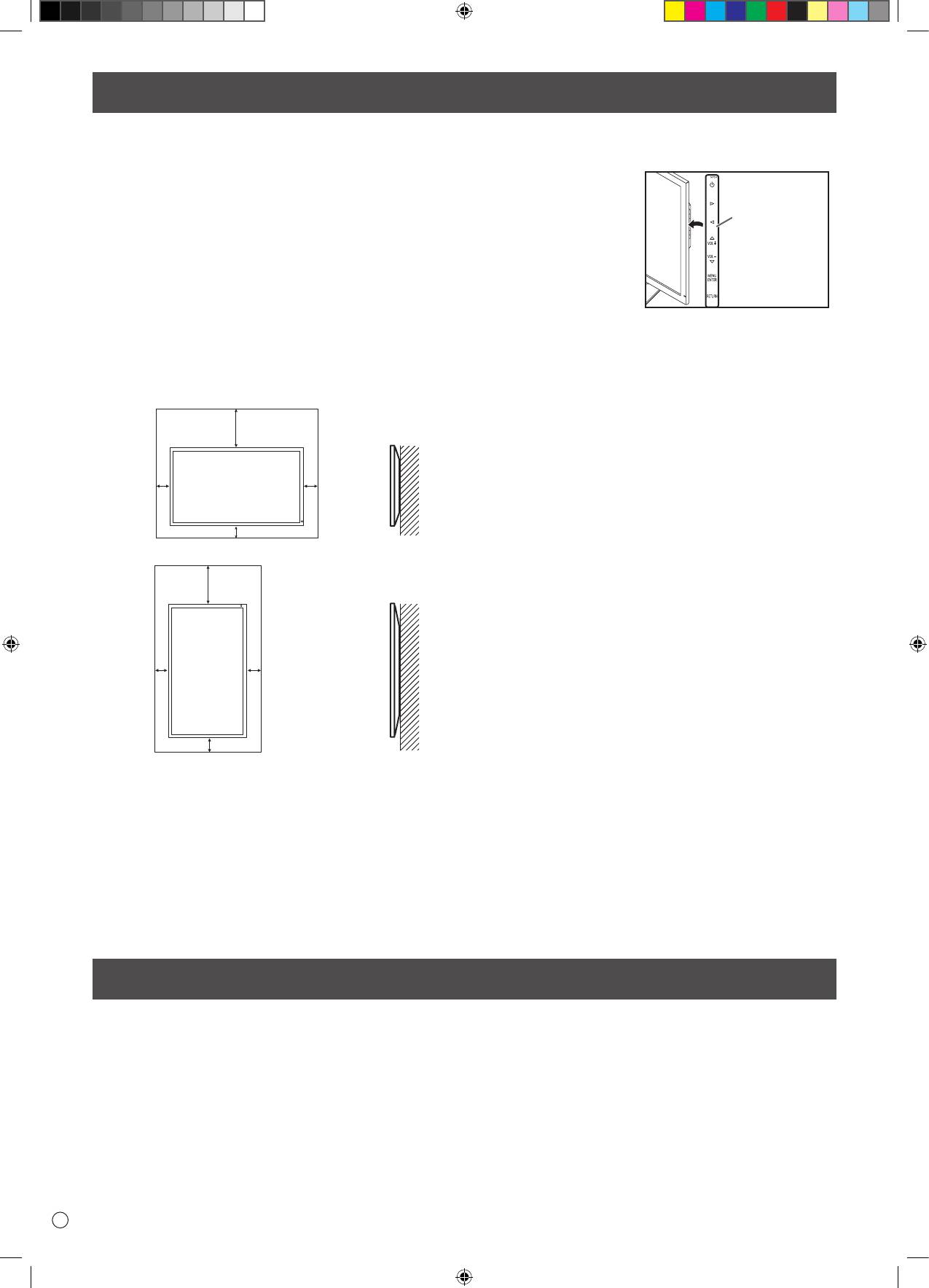
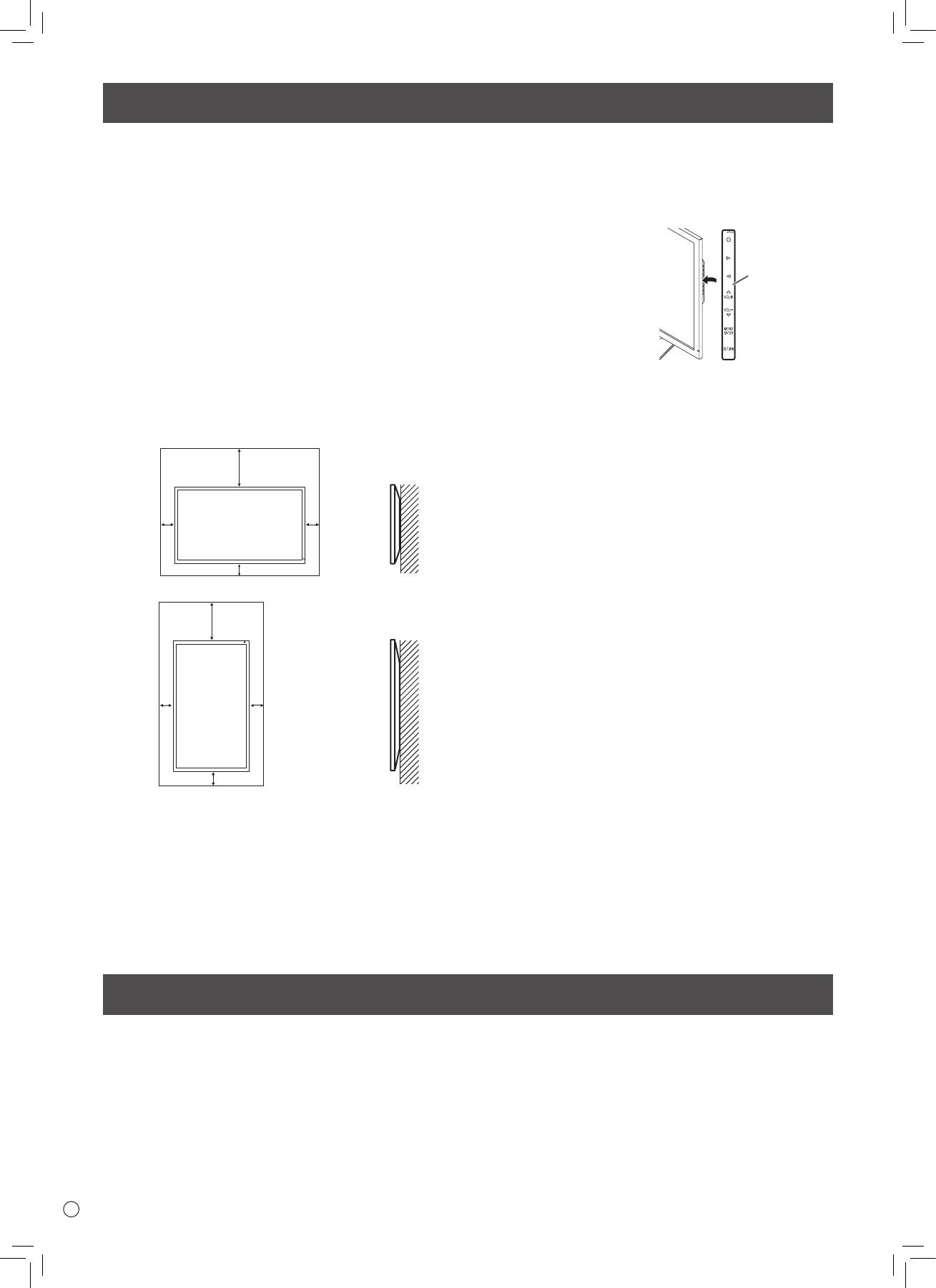
• This monitor should be used at an ambient temperature
between 32°F (0°C) and 104°F (40°C). Provide enough space
around the monitor to prevent heat from accumulating inside.
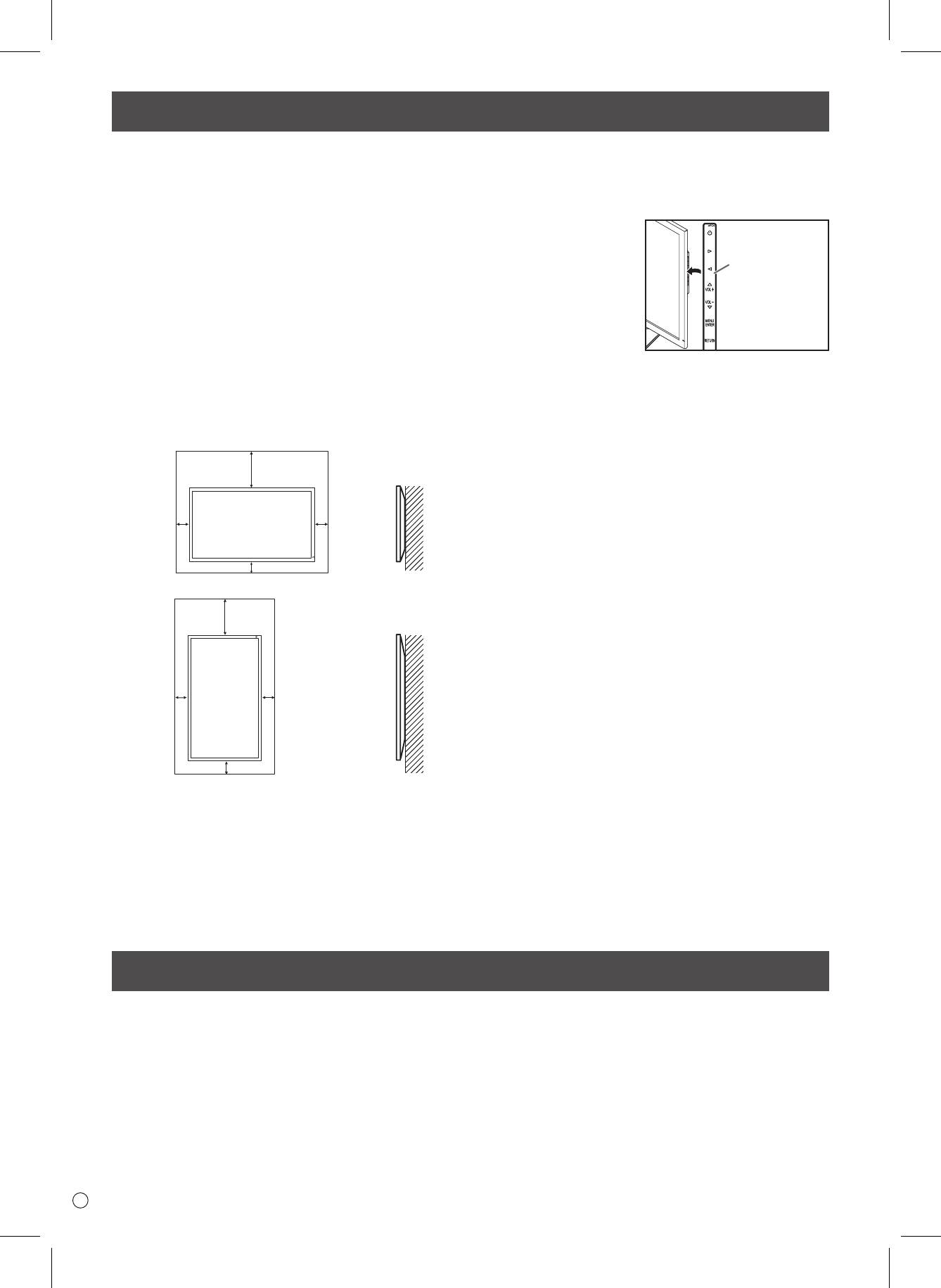
Supplied Components
For the monitor in landscape orientation
Unit: inch [cm]
7-7/8 [20]
*
2
2
[5]
[5]
2 [5]
For the monitor in portrait orientation
Unit: inch [cm]
7-7/8 [20]
*
2
2
[5]
[5]
2 [5]
• Do not place the monitor on a device which generates heat.
• When installing the monitor in landscape orientation, you
can attach the supplied
horizontal sticker
(Operation buttons) to the
right side.
* When you install this monitor on a wall, the monitor emits
heat during operation, please be aware that this heat may
discolor or alter the wall.
• If it is dicult to provide sucient space for any reason such
as the installation of the monitor inside a housing, or if the
ambient temperature may be outside of the range of 32°F (0°C)
to 104°F (40°C), install a fan or take other measures to keep the
ambient temperature within the required range.
• Do not block any ventilation openings. If the temperature
inside the monitor rises, this could lead to a malfunction.
If any component should be missing, please contact your dealer.
* Liquid Crystal Display Monitor: 1 * Power cord: 1 * AC adapter: 1
* Setup Manual (this manual): 1 * DisplayPort cable: 1 * RS-232C conversion cable (Φ3.5 mini-jack): 1
* Pedestal (for stand): 1 * Strut (for stand): 1 * Attachment plate (for stand): 1 (preinstalled on monitor)
* Countersunk screws (M4 x 6 without washers): 5 * Screws (M4 x 10 with washers): 4 * Hex wrench: 1
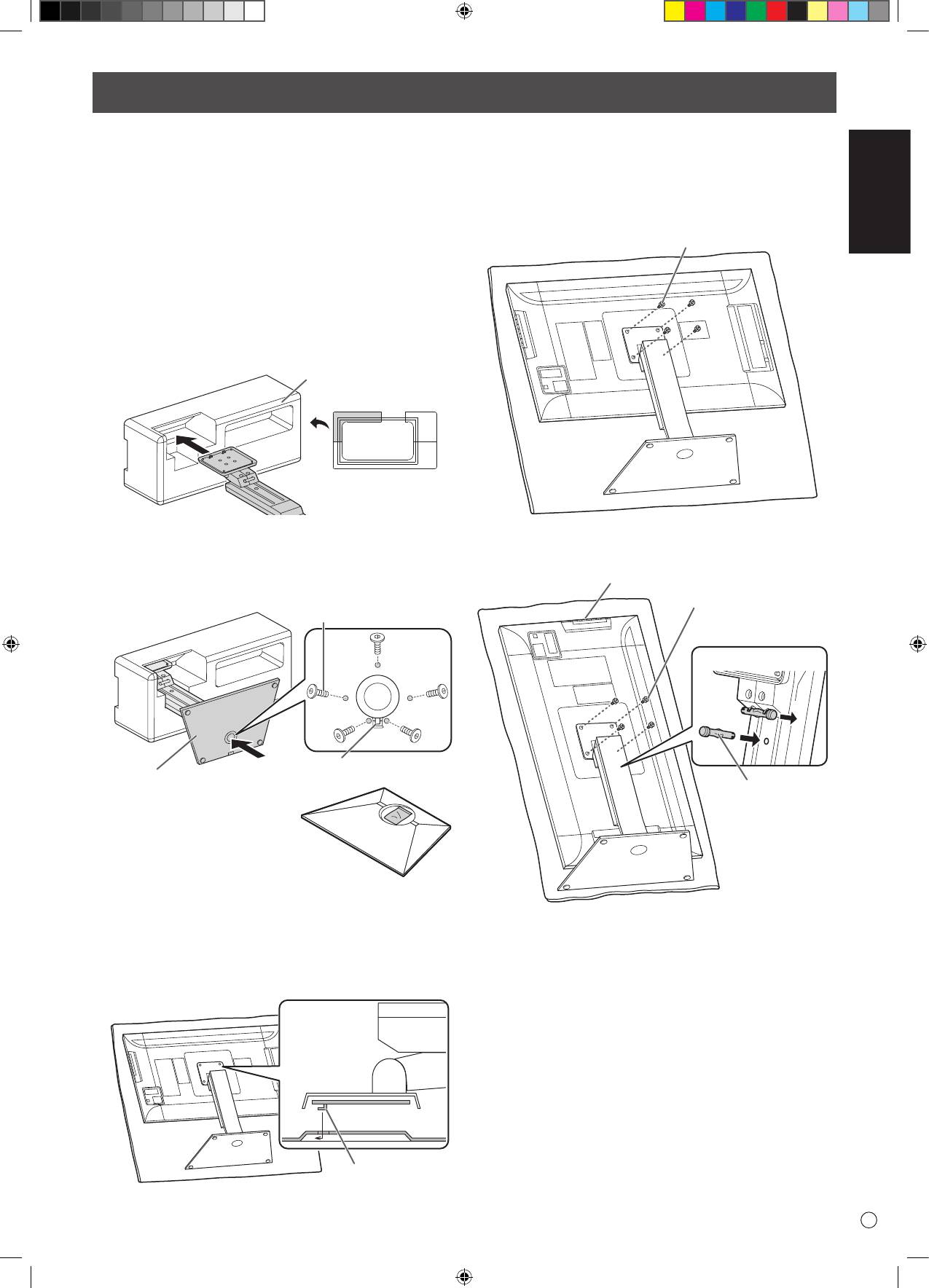
* Cable clamp: 2 * Cable clamp (small): 1 * Cable clamp (large): 2 * Horizontal Sticker (operation buttons): 1
Horizontal sticker
(Operation
buttons)
ENGLISH
5
E
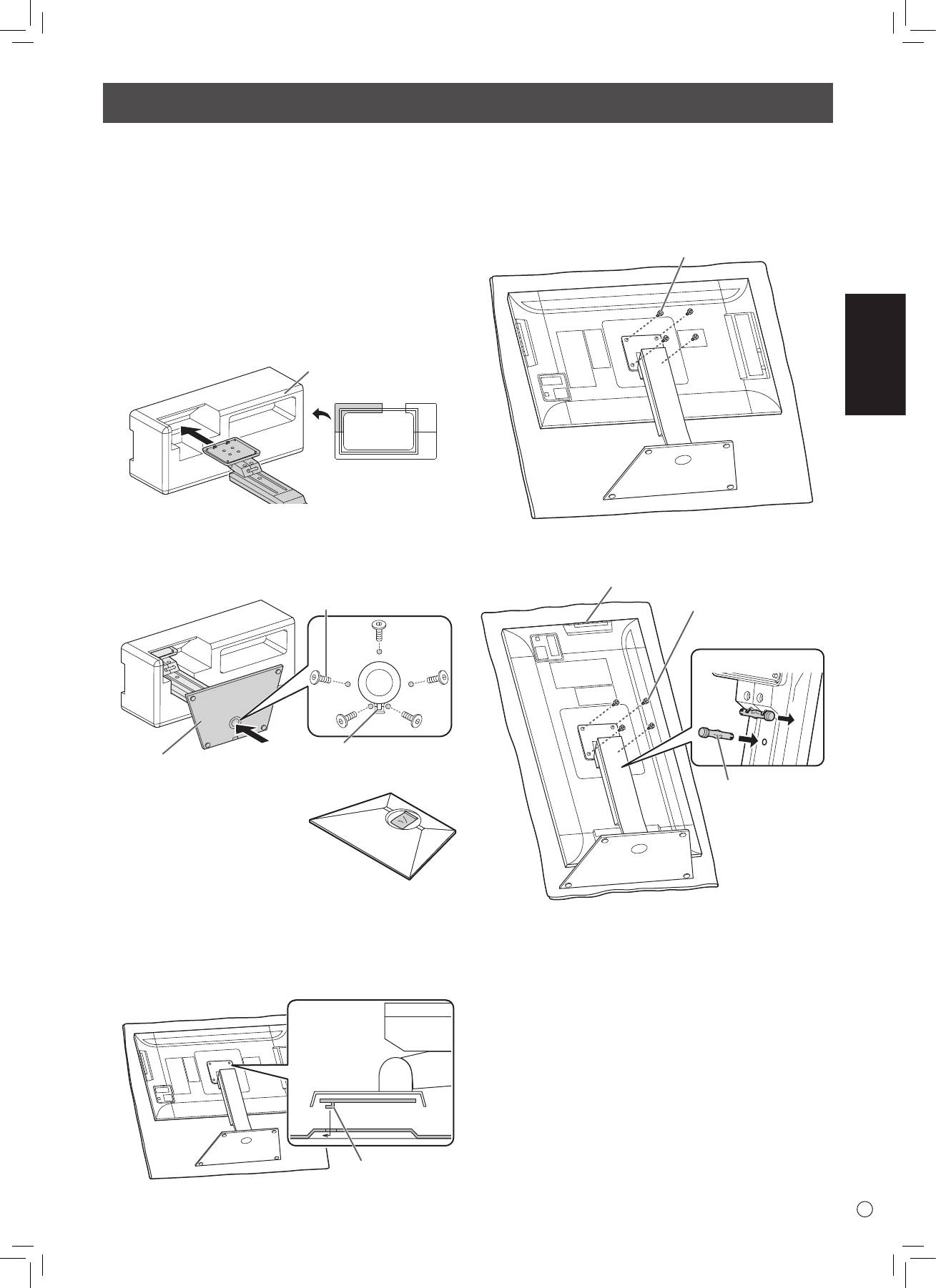
Installing the stand (supplied)
• Disconnect all cables from the monitor.
• Firmly tighten the installation screws (supplied) with the hex
wrench (supplied).
• Ensure that you have sucient space to work.
n
Attaching the stand
Remove all packaging materials before starting work.
To prevent the table (etc.) from being damaged by the stand
pedestal, spread a thick, soft cloth (blanket, etc.) and work on
the cloth.
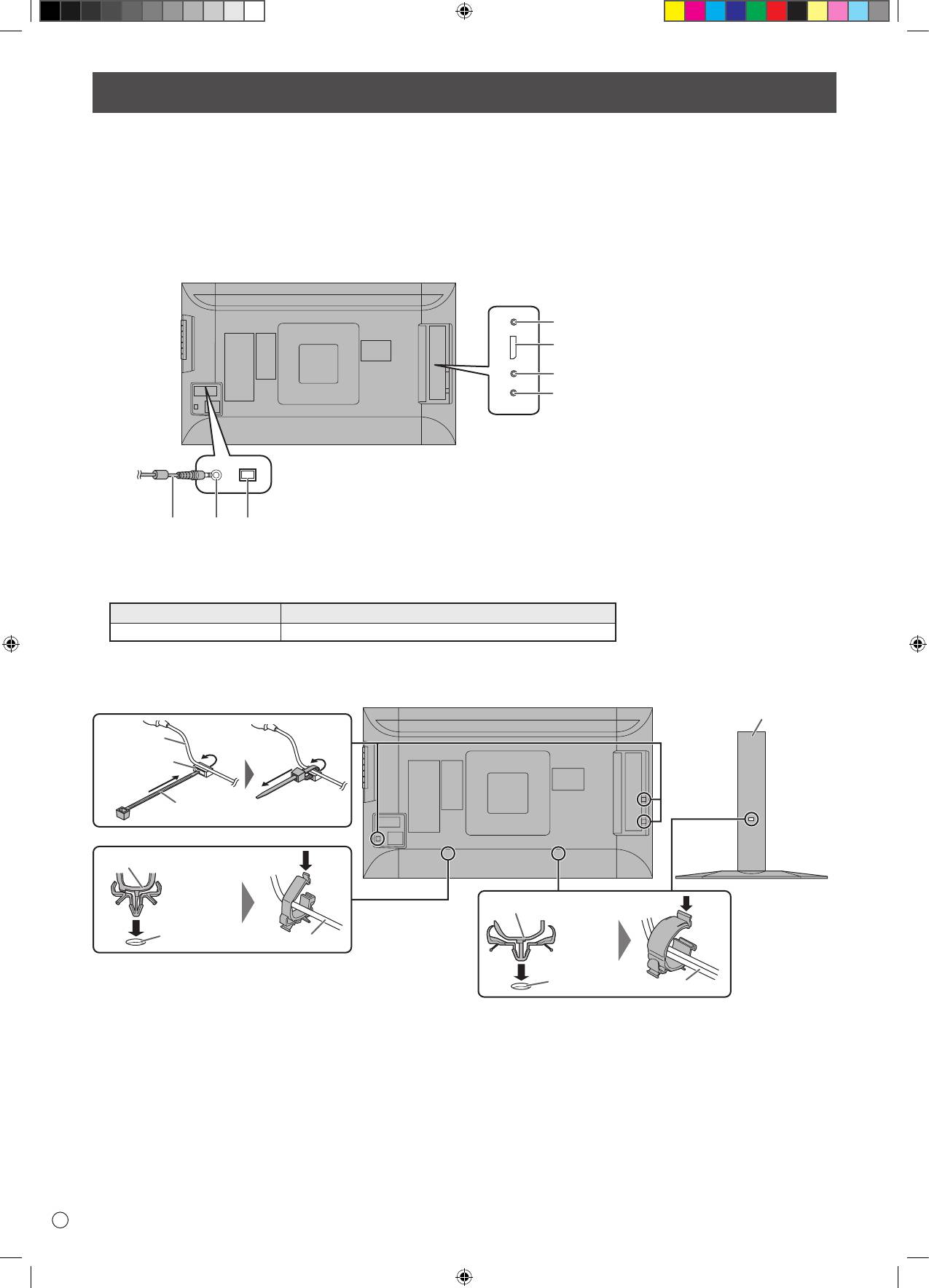
1. Insert the stand strut into the packaging material (upper
left) as shown.
Packing material
(upper left)
Front
2. While supporting the stand pedestal with your hand, fasten
to the stand strut with the supplied countersunk screws (M4
x 6 without washers) (x5).
Use the supplied hex wrench.
Countersunk screw
(M4 x 6 without washers)
Insert by hooking the tab
Pedestal
* A bag containing the screws
(supplied) and hex wrench
(supplied) is attached to the
round hole in the stand pedestal.
3. Spread a thick, soft cloth (blanket, etc.) that will prevent
damage to the LCD panel on a stable at surface where the
entire monitor can be placed, and place the monitor with
the LCD panel face down on the cloth.
4. Place the stand on the monitor.
Hook the tab on the stand under the mounting plate (pre-
installed on monitor).
Tab
5. Fasten the stand to the monitor with the supplied screws
(M4 x 10 with washers) (x4).
Use the supplied hex wrench.
• Landscape
Screw
(M4 x 10 with washers)
• Portrait
Operation buttons
Screw
(M4 x 10 with washers)
Front
1
2
Fixing pin
CAUTION!
* If the monitor will be used in the portrait orientation, pull
out the xing pin (1), and insert it into the hole (2) as shown
above.
* To remove the stand, place the monitor and stand as shown
above and remove the screws.
CAUTION!
• Adhere to the following when installing the monitor in its
portrait orientation. Failing to adhere to the following may
cause malfunctions.
- Install the monitor such that the operation buttons are
located on the top side.
- Set the MONITOR on the MONITOR menu to PORTRAIT.
(See
USER MANUAL.
)
E
6
Connections
• Be sure to turn o the main power switch and disconnect the plug from the power outlet before connecting/disconnecting cables.
Also, read the manual of the equipment to be connected.
• Be careful not to confuse the input terminal with the output terminal when connecting cables. Accidentally reversing cables
connected to the input and output terminals may cause malfunctions and the other problems.
• Do not use any cable that has a damaged or deformed terminal. Using such a cable may cause malfunctions.
• Images may not be displayed properly depending on the computer (video cards), cables, or peripheral devices to be connected.
4
5
6
7
For power outlet
23
1
• Set the audio input terminal used for each input mode in AUDIO SELECT on the SETUP menu. The factory settings are shown below.
Input mode Audio input terminal (Factory setting)
DisplayPort DisplayPort input terminal
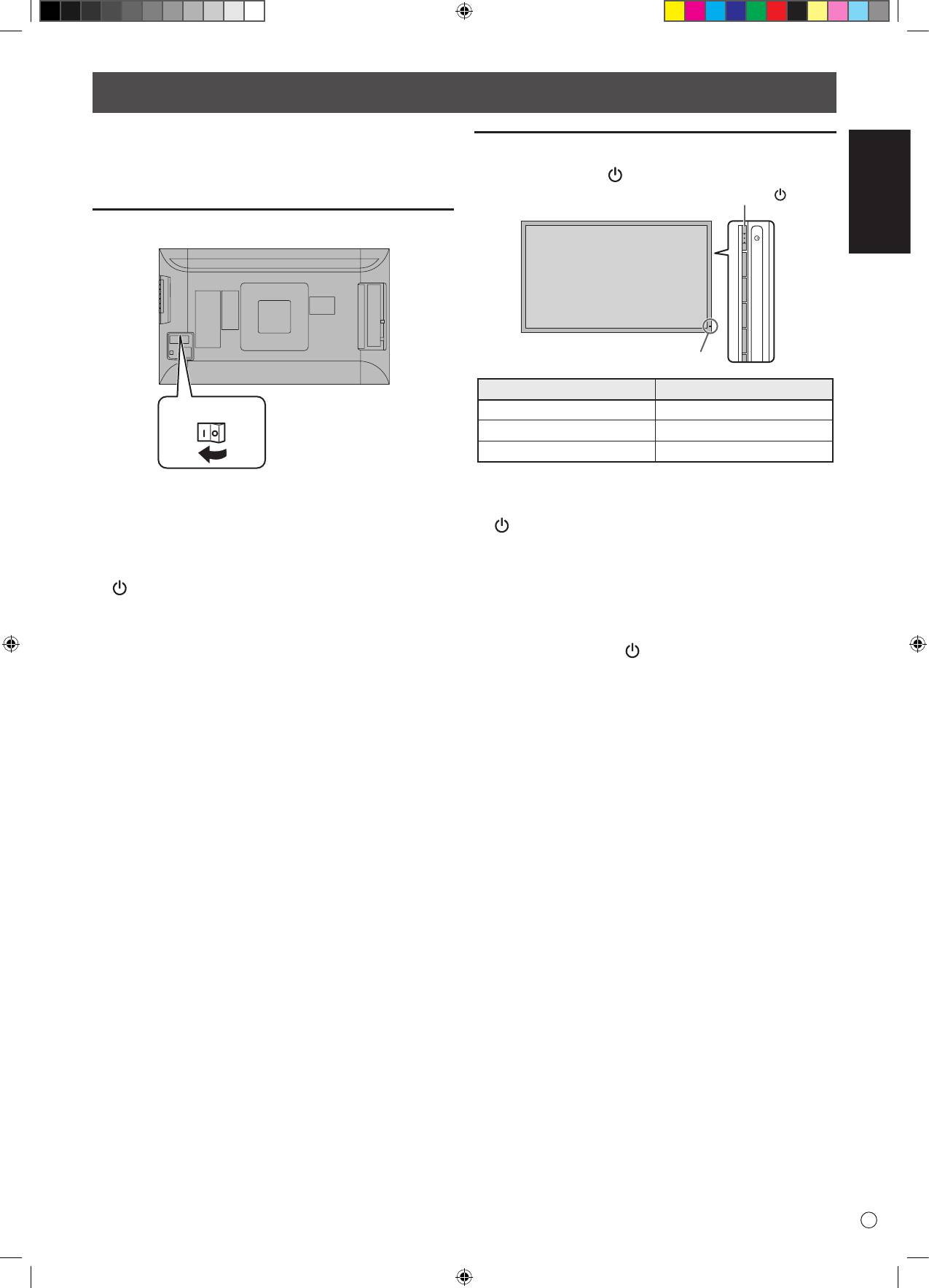
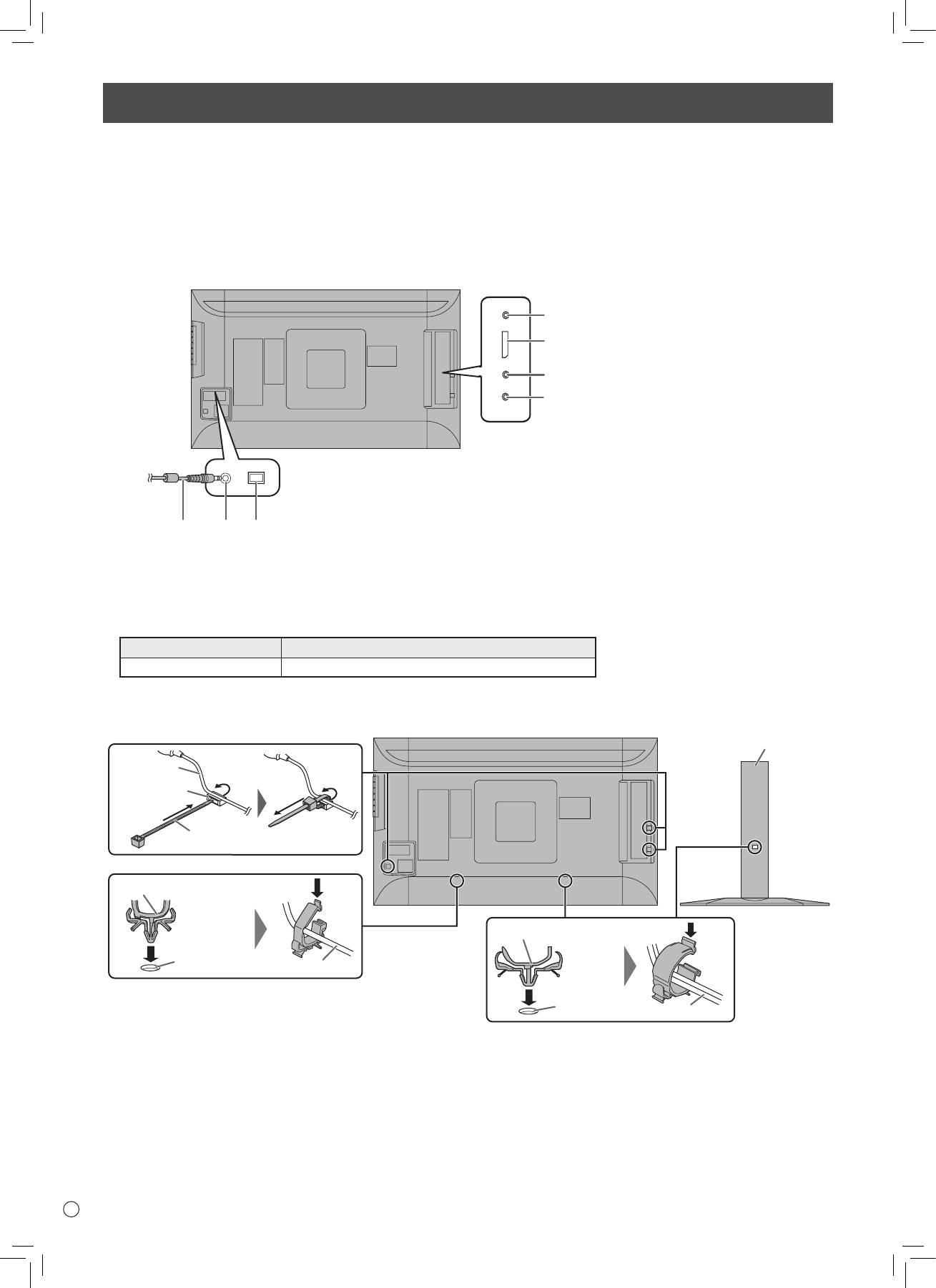
• The cables connected to the terminals on the rear of the monitor can be fastened with the cable clamp.
Attach the cable clamps to the attachment parts on the back of the monitor and the stand, and bind the cables.
Stand
Cable
Cable clamp
attachment
Cable clamp
Cable clamp (small)
Cable clamp (large)
Cable clamp
attachment
Cable
Cable clamp
attachment
Cable
CAUTION!
1. Main power switch
2. AC input terminal
3. Power cord (Supplied)
4. RS-232C input terminal
5. DisplayPort input terminal
6. Audio input terminal
7. Headphone terminal
NOTE:
• DisplayPort is a registered trademark of Video Electronics Standards Association.
ENGLISH
7
E
Turning Power On/O
Turning power on/o
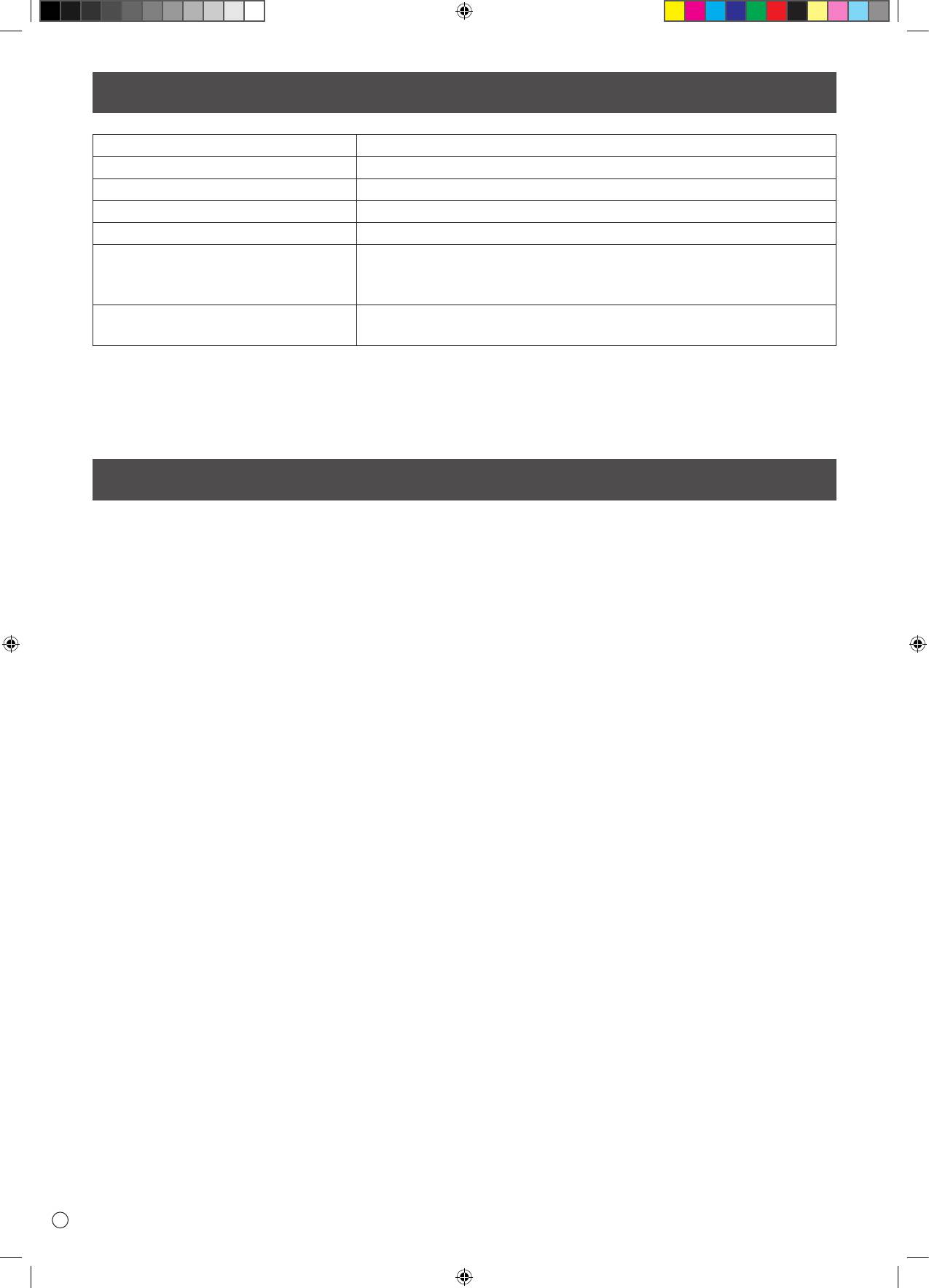
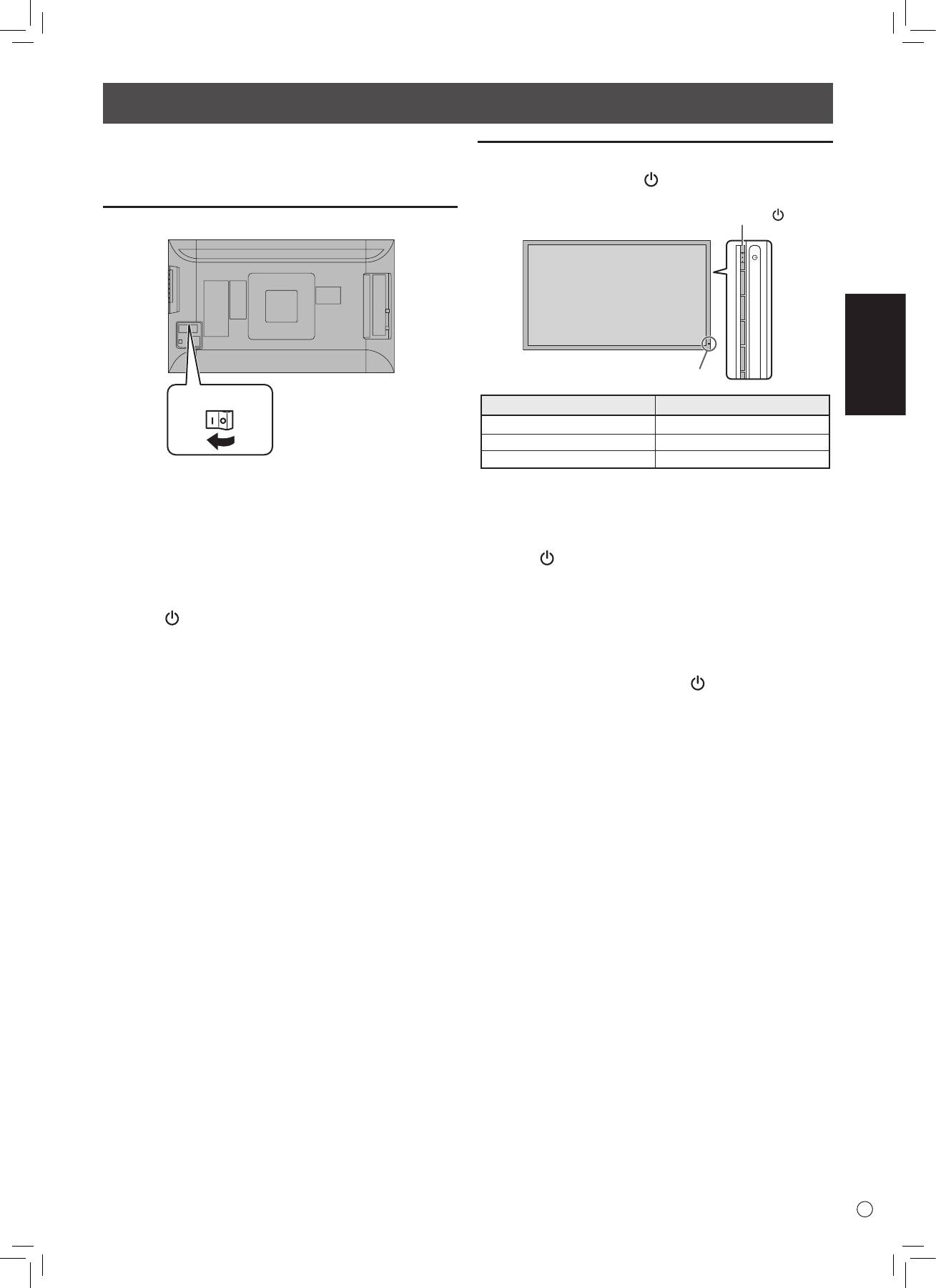
Press the power button ( ) to turn the power ON/OFF.
Power button ( )
Power LED
• Turn on the monitor rst before turning on the PC or playback
device.
Turning on the main power
Power lamp status Status of the monitor
Green lit Power on
O Power o (Standby mode)
Orange lit Input signal waiting mode
• When switching the main power switch or the power button
( ) o and back on, always wait for at least 5 seconds. A short
interval may result in a malfunction.
• When the main power switch is o, the monitor cannot be
turned on.
• If the monitor is in the input signal standby mode and you
press the power button ( ), the monitor enters standby mode.
Main power switch
CAUTION!
CAUTION!
CAUTION!
• The main power must be turned on/o with the main power
switch. Do not connect/disconnect the power cord or turn the
breaker on/o while the main power switch is on.
• When switching the main power switch or the power button
NOTE:
( ) o and back on, always wait for at least 5 seconds.
• For a complete electrical disconnection, pull out the main plug.
Specications
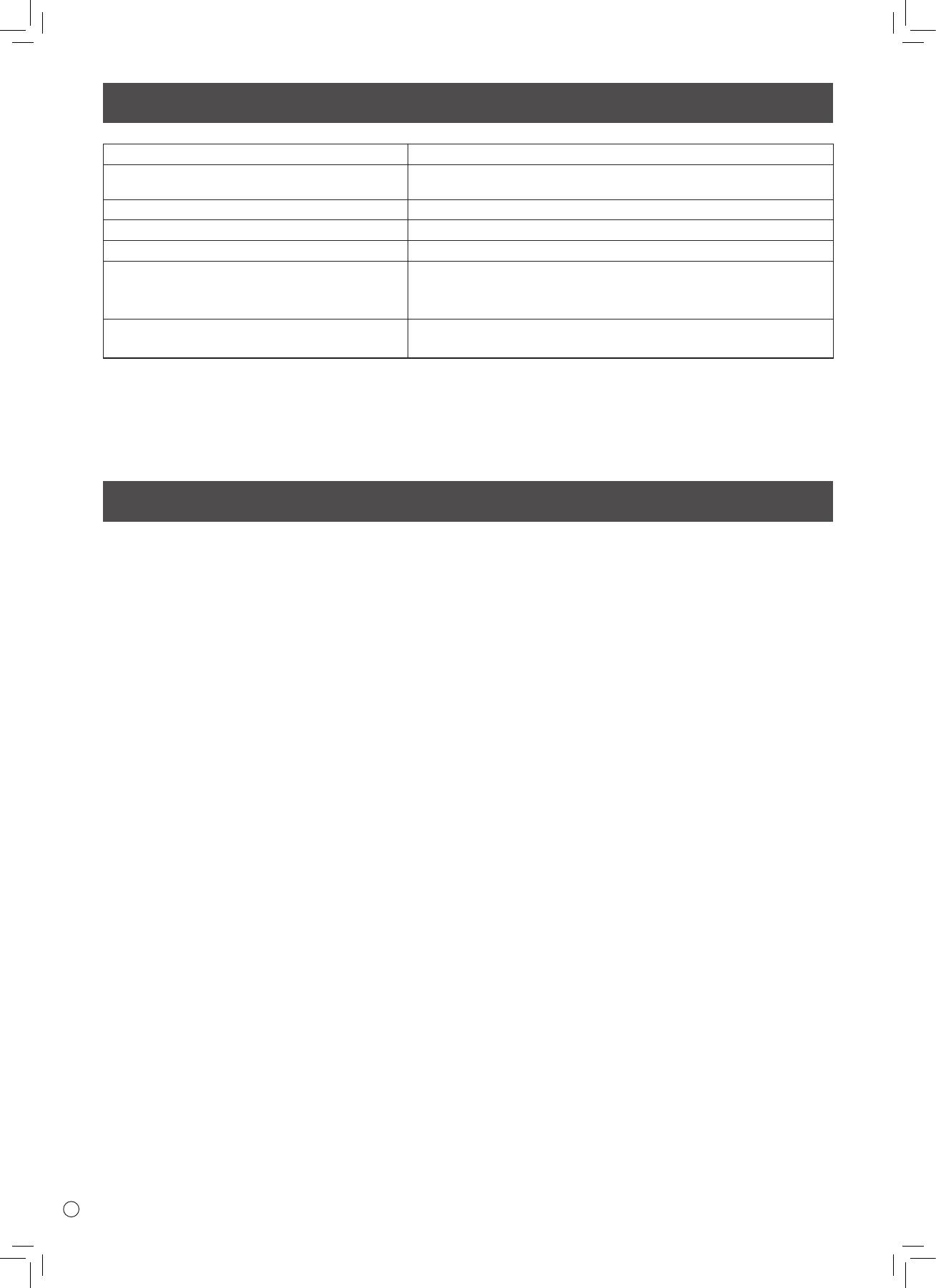
Model PQ321QE
Power requirement AC 100 V - 240 V, 50/60 Hz (when using the supplied AC adapter)
Operating temperature 32°F to 104°F (0°C to 40°C)
Operating humidity 20% to 80% (no condensation)
Power consumption 99 W * (when using the supplied AC adapter)
Dimensions Phys. Dimension with Stand(WxHxD) 750 x 489 x 256 mm
Phys. Dimension without Stand (WxHxD) 750 x 441 x 35 mm
Box Dimension (WxHxD) 990 x 558 x 230 mm
Weight Net Weight (Esti.) 13 Kg
Gross Weight (Esti.) 17 Kg
* When using the monitor in DC19 V : 88 W
As a part of our policy of continuous improvement, ASUS reserves the right to make design and specication changes for product improvement without
prior notice. The performance specication gures indicated are nominal values of production units. There may be some deviations from these values in
individual units.
Mounting Precautions
• When installing, removing or moving the monitor, ensure that this is carried out by at least 2 people.
• Be sure to use a wall-mount bracket designed or designated for mounting the monitor.
• This monitor is designed to be installed on a concrete wall or pillar. Reinforced work might be necessary for some materials such as
plaster / thin plastic board / wood before starting installation.
This monitor and bracket must be installed on a wall which can endure at least 4 times or more the weight of the monitor. Install by
the most suitable method for the material and the structure.
• To attach a VESA-compliant mounting bracket, use M6 screws that are 5/16 inch (8 mm) to 3/8 inch (10 mm) longer than the thickness
of the mounting bracket.
• Do not use an impact driver.
• When moving the monitor, be sure to hold it with the unit bottom and the side of unit. Do not hold the LCD panel or corners. This may
cause product damage, failure, or injury.
• Do not use any screw holes other than VESA holes for installation.
E
8
Table des matières
[FRANÇAIS]
INFORMATION IMPORTANTE ................................................ 1
Mise en place du support (fourni) ........................................ 5
CHER CLIENT .......................................................................... 1
Connexions ............................................................................ 6
PRÉCAUTIONS DE SÉCURITÉ ................................................. 2
Mise sous tension et hors tension ........................................ 7
MESURES DE SÉCURITÉ ......................................................... 3
Caractéristiques ..................................................................... 8
PRÉCAUTIONS POUR LE MONTAGE ...................................... 4
Précautions pour le montage ............................................... 8
Composants fournis .............................................................. 4
FRANÇAIS
INFORMATIONS IMPORTANTES
AVERTISSEMENT : POUR RÉDUIRE LE RISQUE D’INCENDIE OU DE DÉCHARGE ÉLECTRIQUE, NE PAS EXPOSER CE
PRODUIT À LA PLUIE OU À LA POUSSIÈRE.
Le symbole représenté par l’éclair à la tête en pointe
ATTENTION
de èche à l’intérieur d’un triangle, est placé pour
RISQUE DE DÉCHARGE
alerter l’utilisateur de la présence d’une “tension
ÉLECTRIQUE
dangereuse” non isolée à l’intérieur du produit.
Cette tension peut avoir une valeur susante pour
NE PAS OUVRIR
constituer un risque
d’électrocution à toute personne.
ATTENTION : POUR RÉDUIRE LE RISQUE DE
Le point d’exclamation à l’intérieur d’un triangle
DÉCHARGE ÉLECTRIQUE, NE PAS
est placé pour alerter l’utilisateur de la présence
RETIRER LE COUVERCLE. IL N’Y A
d’une procédure particulière ou d’une procédure
AUCUNE PIÈCE RÉPARABLE PAR
de maintenance (entretien) importante dans les
L’UTILISATEUR À L’INTÉRIEUR.
manuels accompagnant le produit.
AVERTIR LE PERSONNEL DE SERVICE
QUALIFIÉ POUR TOUTE PROCÉDURE
D’ENTRETIEN.
1
F
PRÉCAUTIONS DE SÉCURITÉ
L’électricité remplit de nombreuses fonctions utiles, mais elle peut provoquer des blessures et des dégâts matériels si elle n’est pas
utilisée correctement. Cet appareil a été conçu et fabriqué en attachant la plus grande importance à la sécurité. Cependant, une
utilisation inadéquate peut entraîner une décharge électrique et/ou un incendie. An d’éviter tout danger potentiel, veuillez respecter les
consignes suivantes lors de l’installation, de l’utilisation et du nettoyage de l’appareil. An d’assurer votre propre sécurité et de prolonger
la durée de service de votre moniteur LCD, veuillez lire attentivement les précautions ci-dessous avant
d’utiliser l’appareil.
1. Lisez ces explications — Vous devez lire et comprendre toutes les informations relatives au fonctionnement de l’appareil avant de
l’utiliser.
2. Conservez cette brochure dans un endroit sûr — Ces explications concernant la sécurité et le fonctionnement doivent être
conservées dans un endroit sûr pour vous y référer en cas de besoin.
3. Respectez les avertissements — Tous les avertissements gurant sur l’appareil et dans ce mode d’emploi doivent être strictement
respectés.
4. Suivez les instructions — Toutes les explications sur le fonctionnement doivent être respectées.
5. Nettoyage — Débranchez le cordon d’alimentation au niveau de la prise du secteur avant de nettoyer l’appareil.
Servez-vous d’un linge sec, et n’employez pas de détergents liquides ou en atomiseur.
6. Accessoires — N’utilisez pas d’accessoires non recommandés par le fabricant, car ceci pourrait provoquer des accidents.
7. Eau et humidité — N’utilisez pas cet appareil près de l’eau. N’installez pas le produit à un endroit où il pourrait recevoir de
l’eau. Évitez en particulier les emplacements sous les appareils à vidange d’eau tels que les climatiseurs.
8. Ventilation — Des ouïes et autres ouvertures sont prévues dans le coret de l’appareil pour sa ventilation. Ne recouvrez pas et ne
bouchez pas ces ouvertures car une ventilation insusante peut provoquer une surchaue et réduire la durée de vie de l’appareil.
Ne placez pas l’appareil sur un sofa, un tapis ou toute autre surface analogue car ceci pourrait obstruer les ouvertures de ventilation.
Cet appareil n’est pas conçu pour une installation encastrée; ne le placez donc pas dans un endroit fermé comme une bibliothèque
ou une baie à moins qu’une ventilation adéquate ne soit prévue et que les consignes du fabricant ne soient respectées.
9. Protection du cordon d’alimentation — Faites passer les cordons d’alimentation à un endroit où ils ne seront pas écrasés ou coincés
par d’autres objets.
10. Le panneau de l’écran à cristaux liquides (LCD) de cet appareil est fabriqué en verre et, par conséquent, il peut se briser si l’appareil
tombe ou s’il reçoit un fort impact. Veillez à ne pas vous blesser par les éclats de verre si le panneau LCD devait être brisé.
11. Surcharge — Ne surchargez pas les prises de courant ou les rallonges car ceci peut entraîner un risque d’incendie ou
d’électrocution.
12. Insertion de solides ou de liquides — N’introduisez jamais des objets par les orices de cet appareil, car ils pourraient provoquer
une électrocution et/ou un court-circuit en touchant des pièces internes sous haute tension.
Pour la même raison, ne renversez jamais de l’eau ou un liquide sur l’appareil.
13. Entretien — N’essayez pas de réparer vous-même l’appareil. La dépose des couvercles peut vous exposer à une haute tension ou à
d’autres dangers. Conez toute réparation à un personnel qualié.
14. Réparation — Dans les cas suivants, débranchez le cordon d’alimentation au niveau de la prise secteur et demandez à un personnel
qualié d’eectuer les réparations.
a. Dégât sur le cordon ou la prise de courant.
b. Inltration d’un liquide ou pénétration d’un objet à l’intérieur de l’appareil.
c. Exposition de l’appareil à la pluie ou à l’eau.
d. Fonctionnement anormal malgré une conformité aux explications du mode d’emploi.
Ne réglez que les commandes dont il est fait mention dans le mode d’emploi. Un réglage incorrect des autres commandes peut
provoquer des dégâts qui nécessiteraient des réparations complexes par un technicien spécialisé.
e. Chute ou dégâts subis par l’appareil.
f. Tout changement notoire ou situation anormale de l’appareil indique qu’une réparation est nécessaire.
15. Pièces de rechange — Lorsque des pièces doivent être remplacées, assurez-vous que le technicien a utilisé les pièces spéciées par
le fabricant ou des pièces dont les performances et les caractéristiques sont identiques. Des changements non autorisés de pièces
peuvent entraîner un incendie, une électrocution et/ou d’autres dangers.
16. Contrôles de sécurité — Après une intervention d’entretien ou de réparation, demandez au technicien de procéder à un contrôle
pour être sûr que l’appareil peut être utilisé en toute sécurité.
17. Installation sur paroi — Si l’appareil doit être xé sur une paroi, installez-le en respectant la méthode recommandée par le fabricant.
18. Sources de chaleur — Tenez l’appareil à l’écart de sources de chaleur, telles que radiateurs, dispositifs de chauage, poêles et autres
appareils dégageant de la chaleur (y compris les amplicateurs).
19. L’utilisation de ce moniteur ne doit pas entraîner des risques mortels ou des dangers qui pourraient provoquer directement la mort,
des blessures sur le personnel, des dommages physiques sévères ou d’autres destructions, y compris dans le contrôle des réactions
nucléaires dans les installations nucléaires, dans le système médical de réanimation, et dans le contrôle de lancement des missiles
dans les systèmes d’armes.
20. N’entrez pas en contact direct avec les parties du produit ayant chaué pendant de longues périodes. Il pourrait en résulter des
brûlures à basse température.
F
2
PRÉCAUTIONS DE SÉCURITÉ (Suite)
An de satisfaire aux normes EMC, utiliser des câbles blindés pour connecter les bornes suivantes : Borne d’entrée DisplayPort.
Un moniteur placé sur un support instable est dangereux en raison des risques de chute qu’il présente. De nombreuses blessures,
touchant en particulier les enfants, peuvent être évitées en prenant quelques précautions simples :
• Utiliser les dispositifs de xation tels que les supports muraux fournis par le fabricant.
• Utiliser uniquement des meubles capables d’accueillir le moniteur en toute sécurité.
• Vérier que le moniteur ne dépasse pas du bord du meuble sur lequel il est posé.
• Ne pas placer le moniteur sur des meubles hauts, armoires ou étagères, par exemple, sans xer le meuble concerné et le moniteur à
un support approprié.
• Ne pas intercaler de tissu ou toute autre matière entre le moniteur et le meuble sur lequel il est posé.
FRANÇAIS
• Expliquer aux enfants qu’il est dangereux de grimper sur les meubles pour atteindre le moniteur ou ses boutons de commande.
En particulier pour la sécurité des enfants
- Ne laissez pas les enfants grimper sur ou jouer avec le moniteur.
- Ne placez pas le moniteur sur des meubles qui peuvent facilement se transformer en marches comme une commode avec tiroirs.
- Souvenez-vous que les enfants s’excitent souvent en visionnant un programme, surtout sur un moniteur « plus grand que la normale ».
Il faut faire en sorte d’installer le moniteur là où il ne peut pas être poussé, tiré, ni basculé.
- Il faut faire en sorte de placer les ls et les câbles connectés au moniteur de façon à ce que des enfants curieux ne puissent pas les
tirer ni les saisir.
MESURES DE SÉCURITÉ
-
N’utilisez pas le moniteur dans un endroit où il y a beaucoup de
• L’adaptateur secteur est destiné à être utilisé à l’intérieur
poussières, où le degré d’humidité est élevé, ou encore là où il
uniquement. Ne l’utilisez pas à l’extérieur.
pourrait se trouver en contact avec de l’huile ou de la vapeur,
• N’utilisez pas l’adaptateur secteur fourni avec d’autres
car cela pourrait provoquer un début d’incendie.
appareils.
- Assurez-vous que le moniteur ne se trouve pas en contact avec
- N’endommagez pas le cordon d’alimentation, ni l’adaptateur
de l’eau ou d’autres uides. Assurez-vous qu’aucun objet tel
secteur, ne déposez pas d’objets lourds sur ceux-ci, ne tirez
que des agrafes et des trombones ne pénètre dans le moniteur,
pas dessus et ne les pliez pas de manière excessive. De même,
car cela pourrait provoquer un début
n’ajoutez pas de rallonges. Tout endommagement du cordon
d’incendie ou un choc électrique.
d’alimentation peut provoquer un début d’incendie ou un choc
- N’installez pas le moniteur au dessus des objets instables ou
électrique.
dans des endroits peu sûrs. Faites attention que le moniteur ne
-
Ne branchez pas le cordon d’alimentation sur une prise multiple.
reçoive pas de chocs violents ni de fortes vibrations. Provoquer
Ajouter une rallonge peut entraîner une surchaue et
la chute du moniteur ou le culbuter peut l’endommager.
provoquer un début d’incendie.
- N’utilisez pas le moniteur à proximité d’un appareil de
- Ne débranchez pas, ni ne branchez la prise d’alimentation avec
chauage ou dans des endroits où la température est élevée,
des mains humides.
car cela pourrait conduire à un dégagement excessif de chaleur
En ce faisant, vous risquez un choc électrique.
et provoquer un début d’incendie.
- N’utilisez pas le moniteur dans des endroits exposés
- Débranchez le cordon d’alimentation si l’équipement n’est pas
directement à la lumière du soleil.
utilisé pendant une longue période.
- La prise de secteur doit être installée près de l’équipement et
- Ne tentez pas de réparer le cordon d’alimentation s’il est coupé
être facilement accessible.
ou s’il ne fonctionne pas correctement. Veuillez prendre contact
avec le service après vente et suivre ses recommandations.
Le cordon d’alimentation et l’adaptateur secteur
- N’entrez pas en contact direct avec les parties du produit et
- Utilisez uniquement le cordon d’alimentation et l’adaptateur
de l’adaptateur secteur ayant chaué pendant de longues
secteur fournis avec le moniteur.
périodes.
- Lorsque vous manipulez l’adaptateur secteur, respectez les
Il pourrait en résulter des brûlures à basse température.
instructions suivantes :
- Ne xez pas l’adaptateur secteur au moniteur ou à un autre
Une mauvaise manipulation peut provoquer un incendie, un
matériel.
choc électrique ou des blessures.
Ceci pourrait provoquer un incendie ou un choc électrique.
• Ne laissez pas tomber l’adaptateur secteur ou ne le soumettez
pas à un choc.
• Ne démontez jamais l’adaptateur secteur. Il contient des
pièces sous haute tension dangereuses à toucher.
3
F
PRÉCAUTIONS POUR LE MONTAGE
• Ce produit est destiné à être utilisé en intérieur.
• Un support de montage conforme aux spécications VESA est
nécessaire.
•
Pour installer le moniteur sur un support (en vente dans le
commerce) ou sur un mur, ou pour le démonter ou le déplacer,
consultez votre revendeur.
• Le montage du moniteur sur le mur demande des compétences
techniques spéciales et le travail doit être fait par un revendeur
agréé par ASUS. Vous ne devez jamais tenter de faire ce travail
vous-même. Notre société déclinera toute responsabilité pour
les accidents ou blessures causés par un montage incorrect ou
par une mauvaise manipulation.
• Utilisez le moniteur perpendiculairement à la surface
horizontale. Si nécessaire, vous pouvez incliner le moniteur de
25 degrés vers le haut ou de 20 degrés vers le bas.
•
Ce moniteur doit être utilisé sous une température ambiante
entre 0°C et 40°C. Laissez assez d’espace autour du moniteur pour
empêcher que la chaleur ne s’accumule à l’intérieur.
Unité : cm
20
*
5 5
5
20
*
5 5
5
Composants fournis
Si un composant venait à manquer, veuillez contacter votre revendeur.
F
4
Pour le moniteur dans une direction horizontale
• Ne bloquez pas les ouvertures de ventilation. Si la
température dans le moniteur s’élève, ceci pourrait causer un
dysfonctionnement.
• Ne placez le moniteur sur un équipement qui dégage de la
chaleur.
• Lorsque vous installez le
moniteur dans la direction
horizontale, vous pouvez
Autocollant
horizontal
xer l’autocollant horizontal
(Boutons de
(Boutons de fonctionnement)
fonctionnement)
fourni sur le côté droit.
Pour le moniteur dans une direction verticale
Unité : cm
* Si vous installez ce moniteur au mur, le moniteur émet de la
chaleur pendant son fonctionnement ; cette chaleur peut
décolorer ou altérer le mur.
• S’il est difficile de laisser un espace suffisant pour une raison
ou pour une autre (installation du moniteur dans une enceinte,
par exemple) ou si la température ambiante est susceptible
de dépasser la plage de valeurs prévue (de 0 à 40°C), installez
un ventilateur ou prenez d’autres mesures appropriées pour
maintenir la température ambiante dans la plage de valeurs
requise.
Moniteur à cristaux liquides : 1
Cordon d’alimentation : 1
Adaptateur secteur : 1
Manuel d’Installation (ce manuel) : 1
Câble DisplayPort : 1
Câble de conversion RS-232C (mini-prise ø3,5) : 1
Socle (pour support) : 1
Montant (pour support) : 1
Plaque de xation (pour support) : 1 (pré-installée sur le moniteur)
Vis fraisées (M4 x 6 sans rondelles) : 5
Vis (M4 x 10 avec rondelles) : 4
Clé Allen : 1
Serre-câbles : 2
Serre-câble (petit) : 1
Serre-câble (grand) : 2
Autocollant vertical (Logo) : 1
Autocollant vertical (Vierge) : 1
Autocollant horizontal (Boutons de fonctionnement) : 1
Mise en place du support (fourni)
ATTENTION !
5. Fixez le support au moniteur avec les vis (M4 x 10 avec
rondelles) fournies (x4).
• Débranchez tous les câbles du moniteur.
Utilisez la clé Allen fournie.
• Serrez fermement les vis d’installation (fournies) avec la clé
Allen (fournie).
• Horizontal
• Assurez-vous d’avoir susamment d’espace pour travailler.
Vis
n
Fixation du support
(M4 x 10 avec rondelles)
Retirez tous les matériaux d’emballage avant d’entreprendre les
travaux.
Pour éviter que le socle du support n’abîme la table (etc.), étendez
FRANÇAIS
un tissu épais et doux (couverture, etc.) et travaillez sur ce tissu.
1. Insérez le montant du support dans le matériel d’emballage
(supérieur gauche) comme indiqué.
Matériau d’emballage
(supérieur gauche)
Face
2. Tout en maintenant le socle du support avec votre main,
xez-le au montant du support avec les vis fraisées fournies
(M4 x 6 sans rondelles) (x5).
• Vertical
Utilisez la clé Allen fournie.
Boutons de fonctionnement
Vis fraisées
Vis
(M4 x 6 sans rondelles)
(M4 x 10 avec rondelles)
Avant
1
Insérer en accrochant
2
Socle
la patte
* Un sachet contenant les vis
Broche de fixation
(fournies) et la clé Allen (fournie)
est attaché au trou rond sur le
socle du support.
3. Pour éviter tout dommage au
panneau LCD, étendez un tissu épais et doux (couverture,
etc.) sur une surface plane et stable sur laquelle le moniteur
* Si le moniteur est utilisé dans la direction verticale, retirez la
tout entier peut être placé, et placez le moniteur en
broche de xation (1), et insérez-la dans le trou (2) comme
orientant le panneau LCD vers le bas sur ce tissu.
indiqué ci-dessus.
4. Placez le support sur le moniteur.
* Pour démonter le support, placez le moniteur et le support
Accrochez la patte sur le support sous la plaque de xation
comme indiqué ci-dessus et retirez les vis.
(pré-installée sur le moniteur).
ATTENTION !
• Respectez la condition suivante quand vous installez le
moniteur dans la direction verticale. Le non respect de cette
condition peut causer des dysfonctionnements.
- Installez le moniteur de sorte que les boutons de
fonctionnement soient situés vers le haut.
- Réglez le MONITOR <MONITEUR> sur PORTRAIT dans le menu
MONITOR <MONITEUR>. (Voir le MODE D’EMPLOI.)
Patte
5
F
Connexions
ATTENTION !
• Veillez à bien mettre hors tension l’interrupteur principal puis débranchez la prise de l’alimentation secteur avant de connecter ou de
déconnecter les câbles. Lisez également le manuel de l’équipement à connecter.
• Veillez à ne pas confondre la borne d’entrée avec la borne de sortie quand vous connectez les câbles. En confondant les câbles
branchés aux bornes d’entrée et de sortie, vous pouvez causer des dysfonctionnements et d’autres problèmes.
• N’utilisez pas de câble ayant un terminal endommagé ou déformé. Cela pourrait causer des dysfonctionnements.
• Les images peuvent ne pas s’acher correctement selon l’ordinateur (cartes vidéo), les câbles ou les périphériques connectés.
Vers la prise
d’alimentation
secteur
F
6
4
5
6
7
1. Interrupteur principal
2. Borne d’entrée secteur
3. Cordon d’alimentation (fourni)
4. Borne d’entrée RS-232C
5. Borne d’entrée DisplayPort
6. Borne d’entrée audio
7. Borne des écouteurs
23 1
REMARQUE :
• Sélectionnez la borne d’entrée audio à utiliser dans AUDIO SELECT <SÉLECTION ENTRÉE AUDIO> du menu SETUP <INSTALLATION>.
Les réglages par défaut sont indiqués ci-dessous.
Mode d’entrée Borne d’entrée audio (paramètre d’origine)
DisplayPort Borne d’entrée DisplayPort
• Les câbles raccordés aux bornes situées à l’arrière du moniteur peuvent être attachés à l’aide du serre-câbles.
Fixez les serre-câbles dans les pièces de xation à l’arrière du moniteur et du support, et reliez les câbles.
Support
Câble
Fixation du
serre-câble
Serre-câbles
Serre-câble (petit)
Serre-câble (grand)
Fixation du
serre-câble
Câble
Fixation du
serre-câble
Câble
• DisplayPort est une marque déposée de Video Electronics Standards Association.
4
5
6
7
For power outlet
23
1
Mise sous tension et hors tension
ATTENTION !
Mise sous/hors tension
• Mettez sous tension le moniteur d’abord avant de mettre sous
Appuyez sur la bouton POWER ( ) ou sur l’interrupteur
tension le PC ou l’équipement de lecture.
d’alimentation pour mettre sous/hors tension.
Mise sous tension de l’interrupteur principal
FRANÇAIS
Interrupteur principal
ATTENTION !
• La mise sous/hors doit être eectuée à l’aide de l’interrupteur
d’alimentation. Ne branchez/débranchez pas le cordon
d’alimentation ou ne mettez pas le disjoncteur sous/hors
tension lorsque l’interrupteur d’alimentation est en position
marche.
• Lors de la mise hors tension et de la remise sous tension, ou
lorsque vous appuyez sur l’interrupteur principal ou le bouton
POWER ( ), attendez toujours au moins 5 secondes.
• Pour déconnecter complètement l’alimentation électrique,
retirez la che principale de la prise.
7
F
Bouton POWER ( )
Diode d’alimentation
État du témoin d’alimentation
État du moniteur
Allumé en vert Power en position marche
Éteint
Power en position arrêt (mode Veille)
Allumé en orange
Mode attente du signal d’entrée
ATTENTION !
• Lors de la mise hors tension et de la remise sous tension, ou
lorsque vous appuyez sur l’interrupteur principal ou le bouton
POWER ( ), attendez toujours au moins 5 secondes. Un court
intervalle peut entraîner un dysfonctionnement.
REMARQUES :
• Lorsque l’interrupteur principal est en position arrêt, il est
impossible de mettre le moniteur en marche.
• Si le moniteur est dans le mode veille du signal d’entrée et que
vous appuyez sur le bouton POWER ( ), le moniteur entre en
mode veille.
Caractéristiques
Modèle PQ321QE
CA 100 V - 240 V, 50/60 Hz (en utilisant l’adaptateur secteur
Alimentation
fourni)
Température de fonctionnement 0°C à 40°C
Hygrométrie de fonctionnement 20 % à 80 % (sans condensation)
Consommation électrique 99 W * (en utilisant l’adaptateur secteur fourni)
Dimensions (mm)
Dimensions physiques avec le socle (LxHxP) : 750 x 489 x 256 mm
(à l’exclusion des éléments qui dépassent)
Dimensions physiques sans le socle (LxHxP) : 750 x 441 x 35 mm
Dimensions de la boîte (LxHxP) : 990 x 558 x 230 mm
Poids (kg) Poids net (Estimé) : 13 Kg
Poids brut (Estimé) : 17 Kg
* Lors de l’utilisation du moniteur en 19Vcc : 88 W
ASUS se réserve le droit d’apporter des modications à la présentation et aux caractéristiques des appareils à n d’amélioration. Les valeurs indiquées
dans ce document sont les valeurs nominales des appareils de série mais de légères diérences peuvent être constatées d’un appareil à l’autre.
Précautions pour le montage
• L’installation, le démontage ou le déplacement du moniteur doit être fait par 2 personnes ou plus.
• Veillez à utiliser un support mural conçu ou prévu pour la xation du moniteur.
• Ce moniteur est prévu pour être installé sur un mur ou un pilier en béton. Un travail de renforcement pourrait s’avérer nécessaire pour
certains matériaux tels que le plâtre, un mince panneau de plastique ou le bois avant de commencer l’installation.
Le mur sur lequel ce moniteur et le support doivent être installés doit pouvoir supporter, au moins, 4 fois son poids ou davantage.
Installez de la manière qui convient le mieux en fonction du matériau et de la structure.
• Pour xer un support de montage compatible avec VESA, utilisez des vis M6 de 8 mm à 10 mm plus longues que l’épaisseur du
support de montage.
• N’utilisez pas de tournevis à percussion.
• Lorsque vous déplacez le moniteur, assurez-vous de le saisir sur le bas de l’unité et le côté de l’unité. Ne saisissez pas le panneau LCD
ou les angles. Ceci pourrait causer une panne, un dysfonctionnement ou une blessure.
•
N’utilisez pas de trous de vis autres que les trous standard VESA pour l’installation.
F
8
ESPAÑOL
Índice
[ESPAÑOL]
INFORMACIÓN IMPORTANTE .........................................1
Instalar el soporte (suministrado) ..................................5
PRECAUCIONES DE SEGURIDAD .................................2
Conexiones ......................................................................6
INSTRUCCIONES DE SEGURIDAD ................................3
Encendido/apagado ........................................................7
PRECAUCIONES DE MONTAJE ......................................4
Especicaciones ..............................................................8
Componentes suministrados .........................................4
Precauciones de montaje ...............................................8
INFORMACIÓN IMPORTANTE
ADVERTENCIA: PARA REDUCIR EL RIESGO DE INCENDIO O DESCARGAS ELÉCTRICAS, NO EXPONGA
ESTE PRODUCTO A LA LLUVIA NI A LA HUMEDAD.
El símbolo del rayo con cabeza de echa dentro
de un triángulo está concebido para avisar al
PRECAUCIÓN
usuario de la presencia de “tensión peligrosa” sin
RIESGO DE
aislamiento en el interior del producto que podría
DESCARGAS
ser de magnitud suciente para constituir un
ELÉCTRICAS
riesgo de descargas eléctricas a las personas.
NO ABRIR
El símbolo de exclamación dentro de un triángulo
PRECAUCIÓN: PARA REDUCIR EL RIESGO DE
está concebido para avisar al usuario de la
DESCARGAS ELÉCTRICAS, NO
presencia de instrucciones importantes de uso
RETIRE LA TAPA. EN EL INTERIOR
y mantenimiento (servicio) en la documentación
NO HAY PIEZAS QUE EL USUARIO
que acompaña al producto.
PUEDA REPARAR. SOLICITE
CUALQUIER REPARACIÓN A
UN TÉCNICO DE SERVICIO
CALIFICADO.
1
S
S
2
PRECAUCIONES DE SEGURIDAD
La electricidad se emplea para muchas funciones útiles pero también puede causar lesiones personales y daños en la
propiedad si se manipula de forma inadecuada. Este producto se ha diseñado y fabricado poniendo el máximo énfasis en la
seguridad. No obstante, el uso inadecuado podría tener como resultado descargas eléctricas y/o incendios. Para evitar peligros
potenciales, observe las siguientes instrucciones cuando instale, utilice y limpie el producto. Para garantizar su seguridad y
prolongar la vida de servicio de su producto de LCD, lea atentamente las siguientes precauciones antes de usar el producto.
1. Lea las instrucciones — Todas las instrucciones operativas deberán leerse y comprenderse antes de utilizar el producto.
2. Mantenga este manual en un lugar seguro — Estas instrucciones de seguridad y operativas deberán guardarse en un lugar
seguro para referencia en el futuro.
3. Tenga en cuenta las advertencias — Todas las advertencias e instrucciones del producto deberán observarse estrictamente.
4. Respete las instrucciones — Deberán respetarse todas las instrucciones operativas.
5. Limpieza — Desenchufe el cable de alimentación de la toma de alimentación de corriente antes de limpiar el producto.
Utilice un paño seco para limpiar el producto. No emplee limpiadores líquidos ni aerosoles.
6. Accesorios — No utilice accesorios no recomendados por el fabricante. El empleo de accesorios inadecuados podría
provocar accidentes.
7. Agua y humedad — No utilice el producto cerca del agua. No instale este producto en lugares donde puedan producirse
salpicaduras de agua. Preste especial atención a equipos que drenen agua, por ejemplo los de aire acondicionado.
8. Ventilación — Los respiraderos y otras ranuras de la caja están diseñados para ventilación.
No cubra ni bloquee dichos respiraderos y ranuras, ya que la ventilación insuciente podría provocar sobrecalentamiento
y/o acortar la vida operativa del producto. No coloque el producto sobre un sofá, una alfombra u otras supercies similares
ya que se podrían bloquear las ranuras de ventilación. No coloque el producto en un lugar cerrado como, por ejemplo,
una librería o una estantería, a menos que se proporcione una ventilación adecuada o se respeten las instrucciones del
fabricante.
9. Protección del cable de alimentación — Los cables de alimentación deberán ubicarse adecuadamente para evitar que las
personas puedan tropezar con ellos o que los objetos puedan descansar sobre éstos.
10. El panel de LCD utilizado en este producto está hecho de cristal. Consiguientemente, podría romperse si el producto cae al
suelo o recibe un golpe. Tenga cuidado de no herirse con los trozos de cristal en caso de rotura del panel de LCD.
11. Sobrecarga — No sobrecargue las tomas de corriente ni los cables alargadores o regletas. La sobrecarga podría provocar
incendios o descargas eléctricas.
12. Introducción de objetos y líquidos — No inserte nunca objetos en el producto a través de los respiraderos o las ranuras de
ventilación. El producto tiene altas tensiones en su interior y la inserción de objetos podría provocar descargas eléctricas
y/o cortocircuitar los componentes internos.
Por la misma razón, no derrame agua o líquidos sobre el producto.
13. Servicio — No intente reparar usted mismo el producto. La retirada de las tapas podría exponerle a alto voltaje y otras
circunstancias peligrosas. Solicite cualquier reparación a un técnico de servicio calicado.
14. Reparación — Si se produjera cualquiera de las circunstancias siguientes, desenchufe el cable de alimentación de la toma
de corriente y solicite la reparación a un técnico de servicio calicado.
a. Cuando el cable de alimentación o el enchufe esté dañado.
b. Cuando se haya derramado un líquido sobre el producto o hayan caído objetos al interior del producto.
c. Cuando se haya expuesto el producto a la lluvia o al agua.
d. Cuando el producto no funcione correctamente según lo descrito en las instrucciones operativas. No toque ningún
control aparte de los descritos en las instrucciones de uso. El ajuste inadecuado de controles no descritos en las
instrucciones podría provocar daños, lo que a menudo requiere un trabajo importante de ajuste por parte de un técnico
calicado.
e. Cuando el producto haya caído al suelo o se haya dañado.
f. Cuando el producto presente un estado anormal. Cualquier anormalidad perceptible en el producto indicará que éste
necesita servicio.
15. Repuestos — En caso de que el producto necesite repuestos, asegúrese de que el técnico de servicio utiliza las piezas de
sustitución especicadas por el fabricante, o unas con las mismas características y rendimiento que las piezas originales.
El uso de piezas no autorizadas podría tener como resultado incendio, descargas eléctricas y/u otros daños.
16. Comprobaciones de seguridad — Tras la nalización del trabajo de servicio o reparación, solicite al técnico de servicio que
lleve a cabo comprobaciones de seguridad para asegurarse de que el producto se encuentra en perfectas condiciones de
funcionamiento.
17. Montaje mural — Cuando monte el producto sobre una pared, asegúrese de instalarlo de acuerdo con el método
recomendado por el fabricante.
18. Fuentes de calor — Mantenga el producto alejado de fuentes de calor como pueden ser radiadores, calentadores, estufas y
otros productos que generen calor (incluyendo amplicadores).
19. El monitor no deberá utilizarse en lugares con riesgos o peligros fatales que pudieran provocar directamente la muerte,
lesiones personales, daños físicos graves u otras pérdidas, incluyendo control de reacción nuclear en instalaciones
nucleares, sistemas médicos de soporte vital y control de lanzamiento de misiles en sistemas armamentísticos.
20. No permanezca en contacto durante períodos prolongados de tiempo con componentes del producto que se recalienten.
Podrían producirse quemaduras de baja temperatura.
ESPAÑOL
3
S
PRECAUCIONES DE SEGURIDAD (Continuación)
Para cumplir la normativa sobre compatibilidad electromagnética (EMC), utilice cables blindados para conectar los siguientes
terminales: Terminal de entrada DisplayPort.
Si el monitor no se coloca en una ubicación lo sucientemente estable, podría resultar potencialmente peligroso debido
al riesgo de caída. Muchas lesiones, especialmente a los niños, pueden evitarse adoptando precauciones sencillas como
pueden ser:
• Utilizar dispositivos de jación como pueden ser soportes de montaje mural recomendados por el fabricante.
• Emplear únicamente muebles que puedan soportar de forma segura el monitor.
• Asegurarse de que el monitor no sobresale del borde del mueble que sirve de apoyo.
• No colocar el monitor sobre muebles altos (por ejemplo, armarios o librerías) sin anclar el mueble y el monitor a un soporte
adecuado.
• No colocar los monitores sobre paños u otros materiales ubicados entre el monitor y el mueble de apoyo.
• Educar a los niños sobre los peligros de trepar a los muebles para llegar al monitor o a sus controles.
Especialmente para la seguridad de los niños
- No permita que los niños trepen al monitor o jueguen con éste.
- No coloque el monitor sobre muebles que se puedan usar como peldaños, como pueden ser los cajones de una cómoda.
- Recuerde que los niños se pueden agitar mientras ven un programa, especialmente en un monitor en el que las cosas se
ven “más grandes que en la vida real”. Deberá tenerse cuidado de colocar o instalar el monitor en lugares en los que no se
pueda empujar, mover o tirar al suelo.
- Deberá procurarse enrutar todos los cables conectados al monitor de modo que los niños curiosos no puedan tirar de ellos
ni agarrarlos.
INSTRUCCIONES DE SEGURIDAD
- No emplee el monitor en lugares con un nivel elevado de
• El adaptador de corriente está pensado para un uso en
polvo o humedad ni donde éste pueda entrar en contacto
interior. No lo utilice en el exterior.
con aceite o vapor, ya que esto podría provocar un incendio.
• No utilice con otros aparatos el adaptador de corriente
- Asegúrese de que el monitor no entre en contacto con agua
suministrado.
ni otros líquidos. Asegúrese de no introducir en el monitor
- No deteriore el cable de alimentación eléctrica ni el
objetos como pueden ser clips o chinchetas, ya que esto
adaptador de corriente, tampoco ponga objetos pesados
podría causar incendios o descargas eléctricas.
sobre ellos, no los estire ni los doble. No añada cables
alargadores. Si el cable sufre deterioros pueden provocarse
- No coloque el monitor encima de objetos inestables ni en
incendios o choques eléctricos.
lugares inseguros. No permita que el monitor reciba golpes
- No utilice el cable de alimentación eléctrica con una regleta.
fuertes ni que vibre demasiado. La caída o pérdida de
Si añade un alargador puede provocarse un incendio como
equilibrio del monitor podría dañarlo.
resultado del sobrecalentamiento.
- No utilice el monitor cerca de aparatos de calefacción ni en
- No enchufe o desenchufe la clavija eléctrica con las manos
lugares donde puedan existir temperaturas elevadas, ya que
mojadas.
esto podría conducir a la generación de calor excesivo y
De lo contrario podría sufrir un choque eléctrico.
provocar un incendio.
- No utilice el monitor en lugares en los que pueda estar
- Desenchufe el cable de alimentación si no va a usarse
durante mucho tiempo.
expuesto a la luz solar directa.
- La toma de corriente deberá estar instalada cerca del equipo
- No intente reparar el cable de alimentación eléctrica si se
y ser accesible fácilmente.
rompe o funciona mal. Para cualquier reparación, contacte
con el representante de servicio técnico.
Cable de alimentación eléctrica y adaptador de
- No tenga contacto con las partes del producto o el adaptador
de corriente que permanecen calientes durante mucho
corriente
tiempo.
- Utilice exclusivamente el cable de alimentación eléctrica y el
De lo contrario, podría sufrir quemaduras leves.
adaptador de corriente suministrados con el monitor.
- No ate el adaptador de corriente al monitor u otro equipo.
- Cuando manipule el adaptador de corriente, tenga en cuenta
De lo contrario, podrían ocasionarse un incendio y descarga
lo siguiente:
eléctrica.
Una manipulación incorrecta puede provocar incendio,
choques eléctricos o heridas.
• Vigile que el adaptador de corriente no caiga o reciba algún
golpe.
• No desmonte el adaptador de corriente. Contiene partes de
alta tensión peligrosos al contacto.
S
4
PRECAUCIONES DE MONTAJE
• Este producto es para uso en interiores.
• Se requiere un soporte de montaje en conformidad con las
especicaciones VESA.
•
Para instalar el monitor sobre un soporte (de venta en
comercios) o en la pared, o para quitarlo o moverlo, consulte
con el proveedor.
• El montaje mural del monitor requiere un soporte especial
y el trabajo deberá ser efectuado por un distribuidor
autorizado de ASUS. Nunca deberá intentar realizar
este trabajo usted mismo. Nuestra empresa no se hace
responsable en caso de accidentes o lesiones causados
por un montaje o una manipulación inadecuados.
• Utilice el monitor perpendicular a una supercie nivelada.
Si es necesario, el monitor puede inclinarse hasta 25
grados hacia arriba o 20 grados hacia abajo.
•
Este monitor deberá utilizarse a una temperatura ambiente
de entre 0 y 40°C. Proporcione espacio suciente alrededor
del monitor para evitar que el calor se acumule en su interior.
Componentes suministrados
Si falta algún componente, póngase en contacto con su distribuidor.
For the monitor in landscape orientation
Unit: inch [cm]
7-7/8 [20]
*
2
2
[5]
[5]
2 [5]
For the monitor in portrait orientation
Unit: inch [cm]
7-7/8 [20]
*
2
2
[5]
[5]
2 [5]
• No bloquee ninguna ranura de ventilación. Si la temperatura
del interior del monitor aumentara, podrían producirse
malfuncionamientos.
•
No coloque el monitor sobre un dispositivo que genere calor.
•
Si instala el monitor en
orientación horizontal,
puede pegar la
etiqueta horizontal
suministrada (Botones
de funcionamiento) en la
parte derecha.
* Si instala el monitor en una pared, el monitor emite calor
durante el funcionamiento, por lo que podría decolorar o
alterar la pared.
• Si fuera difícil proporcionar suficiente espacio por cualquier
razón, como puede ser la instalación del monitor dentro de
una carcasa, o si la temperatura ambiente pudiera estar
fuera del rango de 0 a 40°C, instale un ventilador o adopte
otras medidas para mantener la temperatura ambiente
dentro del rango necesario.
Horizontal sticker
Horizontal sticker
(Operation
(Operation
buttons)
buttons)
* Monitor de pantalla de cristal líquido: 1 * Cable de alimentación: 1 * Adaptador de corriente: 1
* Manual de Instalación (este manual): 1 * Cable DisplayPort: 1 * Cable de conversión RS-232C (mini clavija de ø3,5): 1
* Base (para soporte): 1 * Columna (para soporte): 1 * Placa de unión (para soporte): 1 (preinstalada en el monitor)
* Tornillos avellanados (M4 x 6 sin arandelas): 5 * Tornillos (M4 x 10 con arandelas): 4 * Llave Allen: 1
* Abrazadera para cable: 2 * Abrazadera para cable (pequeña): 1 * Abrazadera para cable (grande): 2
* Etiqueta horizontal (Botones de funcionamiento): 1
ESPAÑOL
5
S
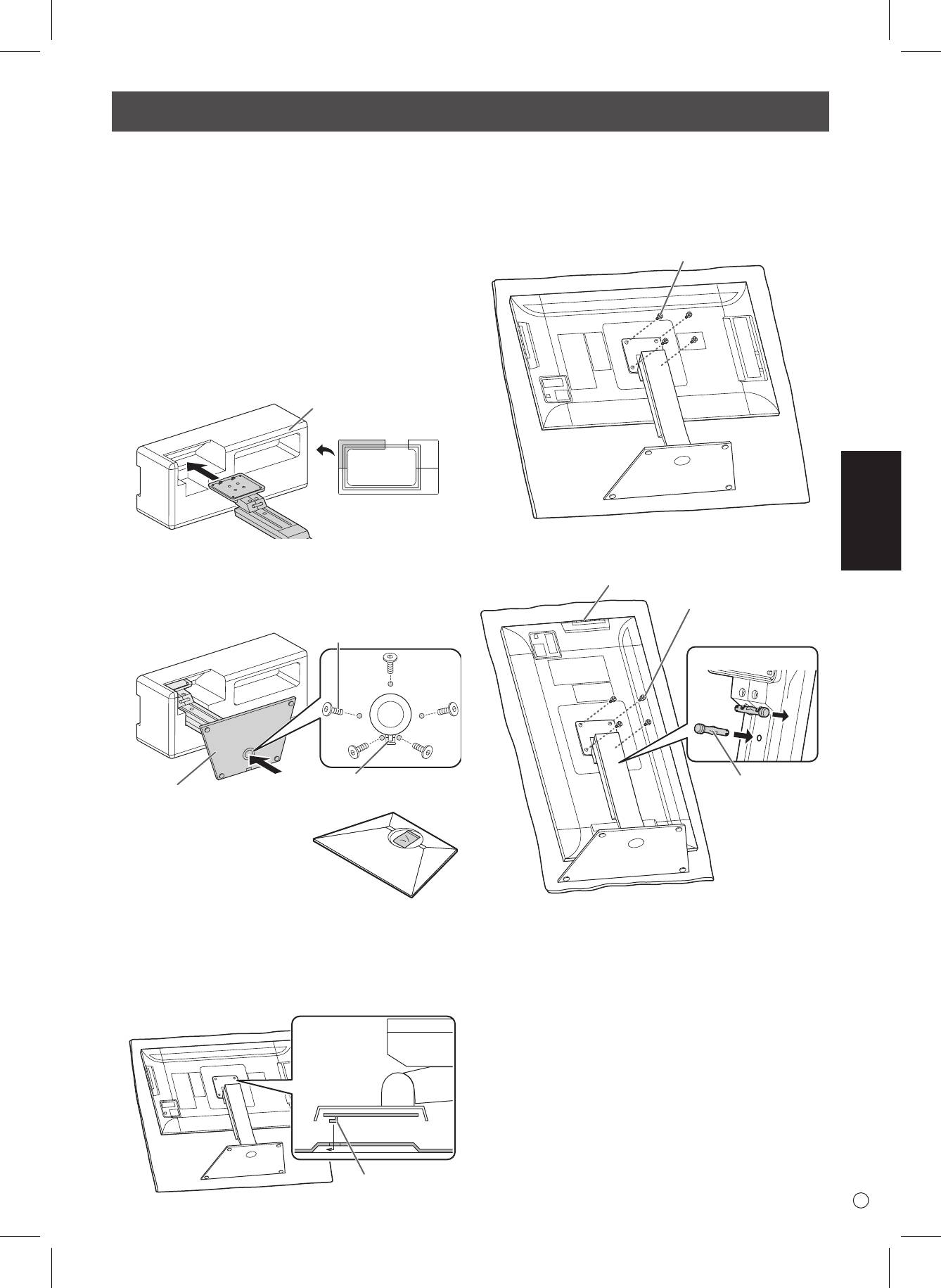
Instalar el soporte (suministrado)
¡PRECAUCIÓN!
• Desconecte todos los cables del monitor.
• Apriete rmemente los tornillos de jación (suministrados)
con la llave Allen (suministrada).
• Asegúrese de que dispone de suciente espacio para
trabajar.
n
Unir el soporte
Retire todos los materiales de embalaje antes de comenzar a
trabajar.
Para que la base del soporte no estropee la mesa (etc.),
extienda un tejido grueso y suave (manta, etc.) y trabaje sobre
el tejido.
1. Inserte la columna en el material de embalaje (superior
izquierdo) como se ilustra.
Packing material
(upper left)
Front
2. Mientras sostiene la base del soporte con la mano,
fíjela a la columna con los tornillos avellanados
suministrados (M4 x 6 sin arandelas) (x5).
Utilice la llave Allen suministrada.
Countersunk screw
(M4 x 6 without washers)
Insert by hooking the tab
Pedestal
* En el agujero redondeado
de la base del soporte hay
una bolsa con los tornillos
(suministrados) y la llave Allen
(suministrada).
3. Extienda un tejido grueso y suave (manta, etc.), para que
no se deteriore el panel LCD, sobre una supercie plana
donde quepa todo el monitor y coloque el monitor con el
panel LCD orientado hacia abajo encima del tejido.
4. Coloque el soporte en el monitor.
Enganche la pestaña del soporte por debajo de la placa de
unión (preinstalada en el monitor).
Tab
5. Fije el soporte al monitor con los tornillos (M4 x 10 con
arandelas) suministrados (x4).
Utilice la llave Allen suministrada.
• Horizontal
Screw
(M4 x 10 with washers)
• Vertical
Operation buttons
Screw
(M4 x 10 with washers)
Front
1
2
Fixing pin
* Si va a utilizar el monitor con la orientación vertical, tire
del pasador de jación (1), e insértelo en el agujero (2)
como se ilustra arriba.
* Para retirar el soporte, coloque el monitor y el soporte
como se ilustra arriba y retire los tornillos.
¡PRECAUCIÓN!
• Respete lo siguiente cuando instale el monitor en
orientación vertical. El incumplimiento de las siguientes
medidas podría provocar malfuncionamientos.
- Instale el monitor de modo que los botones de
funcionamiento queden arriba.
- Establezca la opción MONITOR del menú MONITOR en
PORTRAIT <MODO VERTICAL>. (Véase el MANUAL DE
INSTRUCCIONES.)
S
6
Conexiones
4
5
6
7
For power outlet
23
1
NOTA:
• Determine el terminal de entrada de audio que se utilizará en AUDIO SELECT <SELECCI�N DE AUDIO> del menú SETUPDetermine el terminal de entrada de audio que se utilizará en AUDIO SELECT <SELECCI�N DE AUDIO> del menú SETUP
<INSTALACI�N>. A continuación se muestran los ajustes de fábrica.
Modo de entrada Terminal de entrada de audio (ajuste de fábrica)
DisplayPort Terminal de entrada DisplayPort
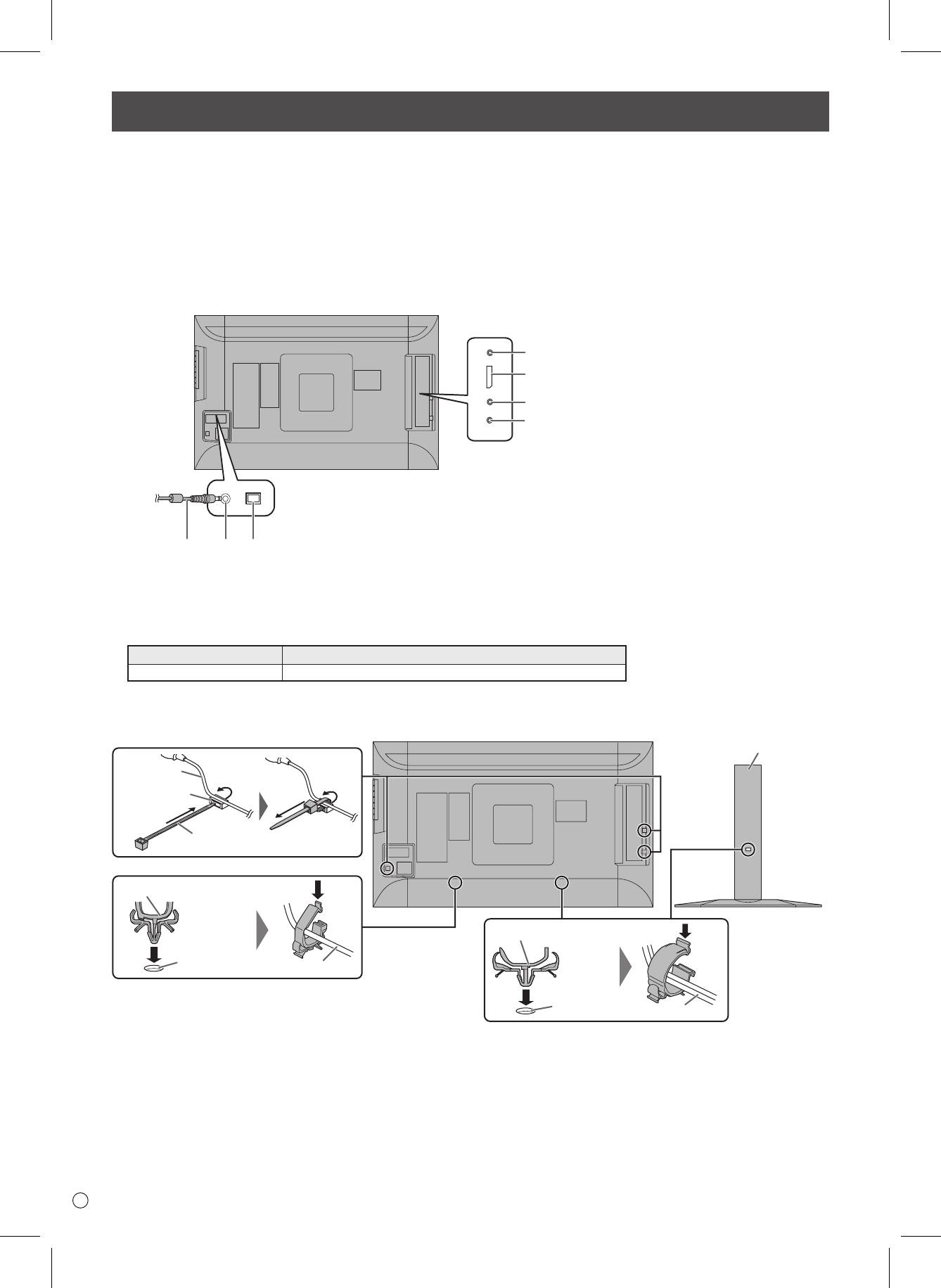
• Los cables conectados a los terminales de la parte posterior de monitor pueden apretarse con la abrazadera para cable.
Enganche las abrazaderas para cable en las partes de unión atrás del monitor y el soporte, y ate los cables.
Stand
Cable
Cable clamp
attachment
Cable clamp
Cable clamp (small)
Cable clamp (large)
Cable clamp
attachment
Cable
Cable clamp
attachment
Cable
¡PRECAUCIÓN!
• Asegúrese de apagar el interruptor primario y desconectar el enchufe de la toma de corriente antes de conectar/desconectar
los cables. Asimismo, lea el manual del equipo que desea conectar.
• Tenga cuidado de no confundir el terminal de entrada con el terminal de salida al conectar los cables. La inversión accidental
de los cables conectados a los terminales de entrada y salida podría causar malfuncionamientos y otros problemas.
• No use ningún cable que tenga dañado o deformado el terminal. Si usa este tipo de cables pueden generar fallos de
funcionamiento.
• Las imágenes podrían no visualizarse correctamente dependiendo del ordenador (tarjetas de vídeo), cables, o dispositivos
periféricos que se conecten.
1. Interruptor primario
2. Terminal de entrada de corriente
3. Cable de alimentación (suministrado)
4. Terminal de entrada RS-232C
5. Terminal de entrada DisplayPort
6. Terminal de entrada de audio
7. Terminal del auricular
• DisplayPort es una marca registrada de Video Electronics Standards Association.
ESPAÑOL
7
S
Encendido/apagado
¡PRECAUCIÓN!
• Encienda el monitor antes de encender el PC o el
dispositivo de reproducción.
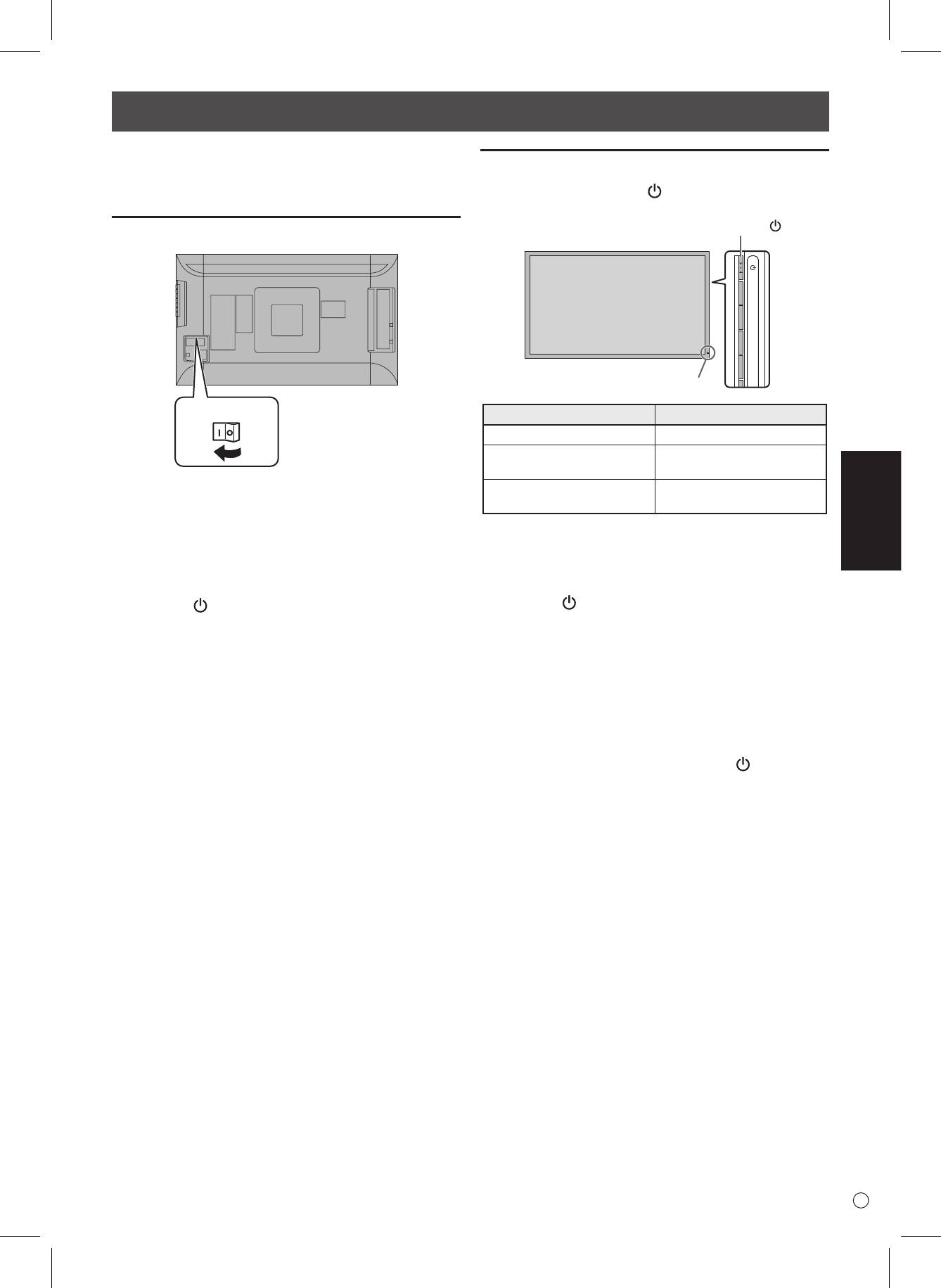
Encendido de la alimentación principal
Main power switch
Encendido/apagado
Pulse el botón de encendido ( ) para encender o apagar el
aparato.
¡PRECAUCIÓN!
• La alimentación principal deberá encenderse/apagarse con
el interruptor primario. No conecte/desconecte el cable de
alimentación ni active/desactive el disyuntor mientras el
interruptor primario está encendido.
• Cuando apague el interruptor primario o el botón de
encendido ( ) y lo vuelva a encender, espere siempre 5
segundos como mínimo.
• Para la desconexión eléctrica completa, desconecte el
enchufe principal.
Power button ( )
Power LED
Estado del piloto de alimentación
Estado del monitor
Encendido de verde Alimentación encendida
Alimentación apagada
Apagado
(modo de reposo)
Modo de espera de señal
Encendido de naranja
de entrada
¡PRECAUCIÓN!
• Cuando apague el interruptor primario o el botón de
encendido ( ) y lo vuelva a encender, espere siempre
5 segundos como mínimo. Un intervalo demasiado corto
podría provocar malfuncionamientos.
NOTA:
• Cuando el interruptor primario está apagado, el monitor no
funcionará.
• Si el monitor se encuentra en el modo en espera de señal
de entrada y pulsa el botón de encendido ( ), el monitor
entrará en modo de reposo.
Especicaciones
Modelo PQ321QE
Requisitos de alimentación 100 V - 240 V ca, 50/60 Hz (al usar el adaptador CA suministrado)
Temperatura de funcionamiento 0°C a 40°C
Humedad de funcionamiento 20% al 80% (sin condensación)
Consumo de energía 99 W * (al usar el adaptador CA suministrado)
Dimensiones
Dimensiones físicas con pedestal (ANxALxFO) 750 x 489 x 256 mm
Dimensiones físicas sin pedestal (ANxALxFO) 750 x 441 x 35 mm
Dimensiones de la caja (ANxALxFO) 990 x 558 x 230 mm
Peso
Peso neto (estimado) 13 Kg
Peso bruto (estimado) 17 Kg
* Al usar el monitor en CC19 V : 88 W
Como parte de la política de mejoras continuas, ASUS se reserva el derecho de realizar cambios en el diseño y especicaciones para la mejora
del producto sin previo aviso. Las guras indicadas que especican el rendimiento son valores nominales de los aparatos de producción. Puede
haber algunas desviaciones de estos valores en los aparatos individuales.
Precauciones de montaje
• Cuando instale, desinstale o traslade el monitor, asegúrese de sujetarlo entre 2 personas como mínimo.
• Asegúrese de utilizar un soporte de montaje mural diseñado para la instalación del monitor.
• Este monitor está diseñado para su instalación sobre un muro o pilar de hormigón. Tal vez resulte necesario realizar un
trabajo de refuerzo para ciertos materiales como pueden ser yeso, paneles de plástico nos o madera antes de iniciar la
instalación.
Este monitor y el soporte deberán instalarse en una pared con una resistencia de al menos 4 veces el peso del monitor.
Realice la instalación mediante el método más adecuado para el material y la estructura.
• Para colocar una ménsula de montaje compatible con VESA, use tornillos M6 que sean 8 mm a 10 mm más largos que la
ménsula de montaje.
• No utilice un taladro percutor.
• Cuando mueva el monitor, sujételo por la base y el lateral de la unidad. No lo agarre por el panel de LCD o las esquinas.
Esto podría provocar daños en el producto, fallos o lesiones.
• No utilice oricios de tornillos que no sean oricios VESA para la instalación.
S
8
Inhalt
[DEUTSCH]
WICHTIGE INFORMATIONEN ..........................................1
Anbringen des Ständers (im Lieferumfang enthalten)..5
SICHERHEITSVORKEHRUNGEN ....................................2
Anschlüsse .......................................................................6
SICHERHEITSANLEITUNG ..............................................3
Ein- und ausschalten .......................................................7
WICHTIGE HINWEISE ZUR BEFESTIGUNG ...................4
Technische Daten ............................................................8
Mitgelieferte Komponenten ............................................4
Wichtige Hinweise zur Befestigung ...............................8
WICHTIGE INFORMATIONEN
ACHTUNG: HALTEN SIE DAS GERÄT VON REGEN UND JEGLICHER ART VON FEUCHTIGKEIT FERN, UM DIE GEFAHR VON
BRAND ODER STROMSCHLAG ZU VERRINGERN.
Das Blitzsymbol innerhalb eines Dreiecks weist den
VORSICHT
Benutzer auf das Vorhandensein nicht isolierter
ELEKTROSCHOCK-
“gefährlicher Spannung” im Geräteinneren hin,
die ausreichend groß ist, um einen Elektroschock
GEFAHR
hervorzurufen.
NICHT ÖFFNEN
Das Ausrufezeichen innerhalb eines Dreiecks
VORSICHT: ABDECKUNG NICHT ENTFERNEN: GEFAHR
weist den Benutzer auf wichtige Betriebs- und
VON ELEKTROSCHOCK.
Wartungs- bzw. Serviceanweisungen in der
KEINE WARTUNGSTEILE IM INNEREN.
Produktdokumentation hin.
SERVICEARBEITEN NUR VON QUALIFIZIERTEM
FACHPERSONAL DURCHFÜHREN LASSEN.
DEUTSCH
1
D
G8416_PQ321QE_QSG_DE.indd 1 06.06.2013 16:31:40 Uhr
D
2
SICHERHEITSVORKEHRUNGEN
Elektrizität erfüllt viele nützliche Aufgaben, kann aber auch Personen- und Sachschäden verursachen, wenn sie unsachgemäß
gehandhabt wird. Dieses Produkt wurde mit Sicherheit als oberster Priorität konstruiert und hergestellt. Dennoch besteht bei
unsachgemäßer Handhabung u.U. Stromschlag- und Brandgefahr. Um mögliche Gefahren zu vermeiden, befolgen Sie beim Aufstellen,
Betreiben und Reinigen des Produkts bitte die nachstehenden Anleitungen. Lesen Sie im Interesse Ihrer eigenen Sicherheit sowie einer
langen Lebensdauer des LCD-Gerätes zunächst die nachstehenden Hinweise durch, bevor Sie das Produkt in Verwendung nehmen.
1. Bedienungsanleitungen lesen — Nehmen Sie das Produkt erst in Betrieb, nachdem Sie alle diesbezüglichen Hinweise gelesen und
verstanden haben.
2. Bedienungsanleitung aufbewahren — Diese Bedienungsanleitung mit den Sicherheits- und Bedienungshinweisen sollte
aufbewahrt werden, damit Sie im Bedarfsfall jederzeit darauf zurückgreifen können.
3. Warnungen beachten — Alle Warnungen auf dem Gerät und in den Bedienungsanleitungen sind genauestens zu beachten.
4. Anleitungen befolgen — Alle Anleitungen zur Bedienung müssen befolgt werden.
5. Reinigung — Ziehen Sie vor dem Reinigen des Produkts das Netzkabel. Reinigen Sie das Gerät mit einem trockenen Tuch.
Verwenden Sie keine flüssigen Reiniger oder Aerosol-Sprays.
6. Zusatzgeräte und Zubehör — Verwenden Sie ausschließlich vom Hersteller empfohlenes Zubehör. Bei Verwendung anderer
Zusatzgeräte bzw. Zubehörteile besteht evtl. Unfallgefahr.
7. Wasser und Feuchtigkeit — Benutzen Sie das Gerät nicht in der Nähe von Wasser. Montieren Sie das Gerät unter keinen Umständen
an einer Stelle, an der Wasser darauf tropfen kann. Achten Sie dabei besonders auf Geräte, aus denen zuweilen Wasser tropft, wie
etwa Klimaanlagen.
8. Belüftung — Die Belüftungsschlitze und andere Önungen im Gehäuse dienen der Belüftung des Geräts.
Halten Sie diese Önungen unbedingt frei, da eine unzureichende Belüftung zu einer Überhitzung bzw. Verkürzung der
Lebensdauer des Produkts führen kann. Stellen Sie das Gerät nicht auf ein Sofa, einen Lappen oder ähnliche Oberflächen, da die
Belüftungsschlitze dadurch blockiert werden können. Stellen Sie das Gerät auch nicht in ein umschlossenes Gehäuse, wie z.B. in ein
Bücherregal oder einen Schrank, sofern dort nicht für eine ausreichende Belüftung gesorgt ist oder die Anweisungen des Herstellers
befolgt werden.
9. Netzkabel-Schutz — Die Netzkabel sind so zu verlegen, dass sie vor Tritten geschützt sind und keine schweren Objekte darauf
abgestellt werden.
10. Das LCD-Panel ist ein Glasprodukt. Es kann daher brechen, wenn es zu Boden fällt oder einen Schlag oder Stoß erhält. Achtung: bei
einem Bruch des LCD-Panels besteht durch die Glasstücke Verletzungsgefahr.
11. Überlastung — Vermeiden Sie eine Überlastung von Netzsteckdosen und Verlängerungskabeln. Bei Überlastung besteht Brand- und
Stromschlaggefahr.
12. Eindringen von Gegenständen und Flüssigkeiten — Schieben Sie niemals irgendwelche Gegenstände durch die Gehäuseönungen
in das Innere des Geräts. Im Produkt liegen hohe Spannungen vor. Durch das Einschieben von Gegenständen besteht
Stromschlaggefahr bzw. die Gefahr von Kurzschlüssen zwischen den Bauteilen.
Aus demselben Grunde dürfen auch keine Flüssigkeiten auf das Gerät verschüttet werden.
13. Wartung — Versuchen Sie auf keinen Fall, selbst Wartungsarbeiten am Gerät durchzuführen. Durch das Entfernen von Abdeckungen
setzen Sie sich hohen Spannungen und anderen Gefahren aus. Lassen Sie sämtliche Wartungsarbeiten ausschließlich von
qualifiziertem Service-Personal ausführen.
14. Reparaturen — Ziehen Sie in den folgenden Situationen sofort das Netzkabel und lassen Sie das Produkt von qualifiziertem Service-
Personal reparieren:
a. Wenn das Netzkabel oder der Netzstecker beschädigt ist.
b. Wenn Flüssigkeit in das Gerät eingedrungen ist oder Gegenstände in das Gerät gefallen sind.
c. Wenn das Gerät nass geworden ist (z.B. durch Regen).
d. Wenn das Gerät nicht wie in der Bedienungsanleitung beschrieben funktioniert.
Nehmen Sie nur die in den Bedienungsanleitungen beschriebenen Einstellungen vor. Unsachgemäße Einstellungen an anderen
Reglern können zu einer Beschädigung führen und machen häufig umfangreiche Einstellarbeiten durch einen qualifizierten
Service-Techniker erforderlich.
e. Wenn das Produkt fallen gelassen oder beschädigt wurde.
f. Wenn das Gerät einen anormalen Zustand aufweist. Jedes erkennbare anormale Verhalten zeigt an, dass der Kundendienst
erforderlich ist.
15. Ersatzteile — Wenn Ersatzteile benötigt werden, stellen Sie bitte sicher, dass der Service-Techniker nur die vom Hersteller
bezeichneten Teile oder Teile mit gleichen Eigenschaften und gleichem Leistungsvermögen wie die Originalteile verwendet. Die
Verwendung anderer Teile kann zu einem Brand, zu Stromschlag oder anderen Gefahren führen.
16. Sicherheitsüberprüfungen — Lassen Sie vom Service-Techniker nach Service- oder Reparaturarbeiten eine Sicherheitsüberprüfung
vornehmen, um sicherzustellen, dass das Produkt in einem einwandfreien Betriebszustand ist.
17. Wandmontage — Bei der Montage des Gerätes an der Wand ist sicherzustellen, dass die Befestigung nach der vom Hersteller
empfohlenen Methode erfolgt.
18. Wärmequellen — Stellen Sie das Produkt nicht in der Nähe von Heizkörpern, Heizgeräten, Öfen oder anderen Geräten (wie z.B.
Verstärkern) auf, die Hitze abstrahlen.
19. Bei der Verwendung des Monitors ist darauf zu achten, dass Gefahren für Leib und Leben, Schäden an Gebäuden und anderen
Gegenständen sowie eine Beeinflussung von wichtigen oder gefährlichen Geräten, wie z.B. der
Nuklearreaktionssteuerung in Atomanlagen, lebenserhaltenden Geräten in medizinischen Einrichtungen oder
Raketenabschusssteuerungen in Waensystemen vermieden werden.
20 . Vermeiden Sie es, Teile des Produkts, die sich erwärmen, über längere Zeit hinweg zu berühren. Dies könnte zu leichten
Verbrennungen führen.
G8416_PQ321QE_QSG_DE.indd 2 06.06.2013 16:31:40 Uhr
DEUTSCH
3
D
SICHERHEITSVORKEHRUNGEN (Fortsetzung)
Um die EMV-Vorschriften einzuhalten, müssen für die Verbindung mit folgenden Anschlüssen geschirmte Kabel verwendet werden:
DisplayPort-Eingangsanschluss.
Wenn ein Monitor nicht auf einer stabilen Unterlage aufgestellt wird, besteht die Gefahr, dass er kippt oder fällt. Zahlreiche
Verletzungen, besonders bei Kindern, können durch einfache Vorsichtsmaßnahmen vermieden werden:
• Bei Verwendung der vom Hersteller empfohlenen Befestigungsvorrichtungen, wie z.B. Wandhaken.
• Stellen Sie den Monitor nur auf Möbelstücke, die ausreichend stark sind.
• Achten Sie darauf, dass der Monitor nicht über den Rand des Möbelstücks, auf dem er steht, vorsteht.
• Stellen Sie den Monitor niemals auf ein großes Möbelstück (z.B. einen Schrank oder in ein Bücherregal), ohne sowohl das Möbelstück
als auch den Monitor an einem geeigneten Element sicher zu verankern.
• Stellen Sie den Monitor niemals auf ein Tuch oder andere Materialen, die zwischen dem Monitor und dem Möbelstück, auf dem er
steht, liegen.
• Weisen Sie Kinder eindringlich darauf hin, dass es gefährlich ist, auf ein Möbelstück zu klettern, um an den Monitor oder seine Regler
zu gelangen.
Wichtige Hinweise für die Sicherheit von Kindern
- Lassen Sie Kinder niemals auf den Monitor klettern oder am Monitor spielen.
- Stellen Sie den Monitor nicht auf Möbelstücke, die leicht als Stufen verwendet werden könnten, wie zum Beispiel eine Truhe oder
Kommode.
- Bedenken Sie, dass Kinder bei Betrachtung eines Fernsehprogramms – und ganz besonders bei einem “überlebensgroßen” Monitor
– in starke Aufregung verfallen können. Der Monitor sollte so aufgestellt werden, dass er nicht umgestoßen oder gekippt werden
kann.
- Alle am Monitor angeschlossenen Kabel und Stränge sollten so verlegt werden, dass neugierige Kinder nicht daran ziehen oder sie
ergreifen können.
SICHERHEITSANLEITUNG
- Verwenden Sie den Monitor nicht an Orten mit hoher
•
Das Netzteil ist ausschließlich für einen Einsatz in Innenräumen
Staubentwicklung, hoher Luftfeuchtigkeit oder an Orten, an
vorgesehen. Verwenden Sie es nicht im Freien.
denen der Monitor mit Öl oder Dampf in Kontakt kommen
• Verwenden Sie das mitgelieferte Netzteil nicht an anderen
könnte, da dies zu einem Brand führen könnte.
Geräten.
- Achten Sie darauf, dass der Monitor nicht mit Wasser oder
- Beschädigen Sie das Netzkabel und das Netzteil nicht, stellen
anderen Flüssigkeiten in Berührung kommt. Achten Sie auch
Sie keine schweren Gegenstände darauf, und überdehnen oder
darauf, keine Gegenstände, wie z.B. Büroklammern oder sonstige
knicken Sie es nicht. Verwenden Sie keine Verlängerungskabel.
spitze Gegenstände, in den Monitor zu stecken. Die Folge könnte
Bei einer Beschädigung des Kabels besteht Feuer- oder
ein Brand oder Stromschlag sein.
Stromschlaggefahr.
- Stellen Sie den Monitor nicht auf instabile Gegenstände oder
- Verwenden Sie das Netzkabel nicht mit einer Mehrfachsteckdose.
an andere unsichere Stellen. Setzen Sie den Monitor keinen
Die Verwendung eines Verlängerungskabels kann aufgrund von
starken Stößen oder Erschütterungen aus. Wenn der Monitor
Überhitzung zu einem Brand führen.
hinunterfällt oder umkippt, könnte er Schaden nehmen.
- Achten Sie darauf, dass Sie beim Einstecken oder Ausstecken des
- Stellen Sie den Monitor nicht in der Nähe von Heizungen oder
Netzsteckers keine nassen Hände haben.
an anderen Stellen auf, an denen hohe Temperaturen auftreten,
Anderenfalls kann es zu einem Stromschlag kommen.
da dies zu einer übermäßig starken Erhitzung mit der Folge eines
- Ziehen Sie das Netzkabel aus der Steckdose, wenn Sie das Gerät
Brandes führen könnte.
längere Zeit nicht verwenden.
- Stellen Sie den Monitor nicht an Orten auf, an denen er direktem
- Führen Sie keine Reparaturversuche an einem beschädigten
Sonnenlicht ausgesetzt ist.
oder nicht funktionstüchtigen Netzkabel durch. Überlassen Sie
- Die Wandsteckdose sollte sich in der Nähe des Gerätes befinden
Reparaturarbeiten ausschließlich dem Kundendienst.
und leicht zugänglich sein.
- Vermeiden Sie es, die Teile des Produkts sowie des Netzteils, die
sich erwärmen, über längere Zeit hinweg zu berühren.
Das Netzkabel und das Netzteil
Dies könnte zu leichten Verbrennungen führen.
- Verwenden Sie nur das mit dem Monitor gelieferte Netzkabel
- Befestigen Sie das Netzteil nicht am Monitor oder an anderen
und Netzteil.
Geräten.
- Beachten Sie beim Umgang mit dem Netzteil Folgendes:
Anderenfalls kann es zu einem Brand oder Stromschlag kommen.
Bei einem unsachgemäßen Umgang besteht Feuer-,
Stromschlag- bzw. Verletzungsgefahr.
• Lassen Sie das Netzteil nicht fallen, und setzen Sie es keinen
Stößen aus.
• Zerlegen Sie niemals das Netzteil. Es enthält
Hochspannungsbauteile. Ein Berühren dieser ist gefährlich.
G8416_PQ321QE_QSG_DE.indd 3 06.06.2013 16:31:40 Uhr
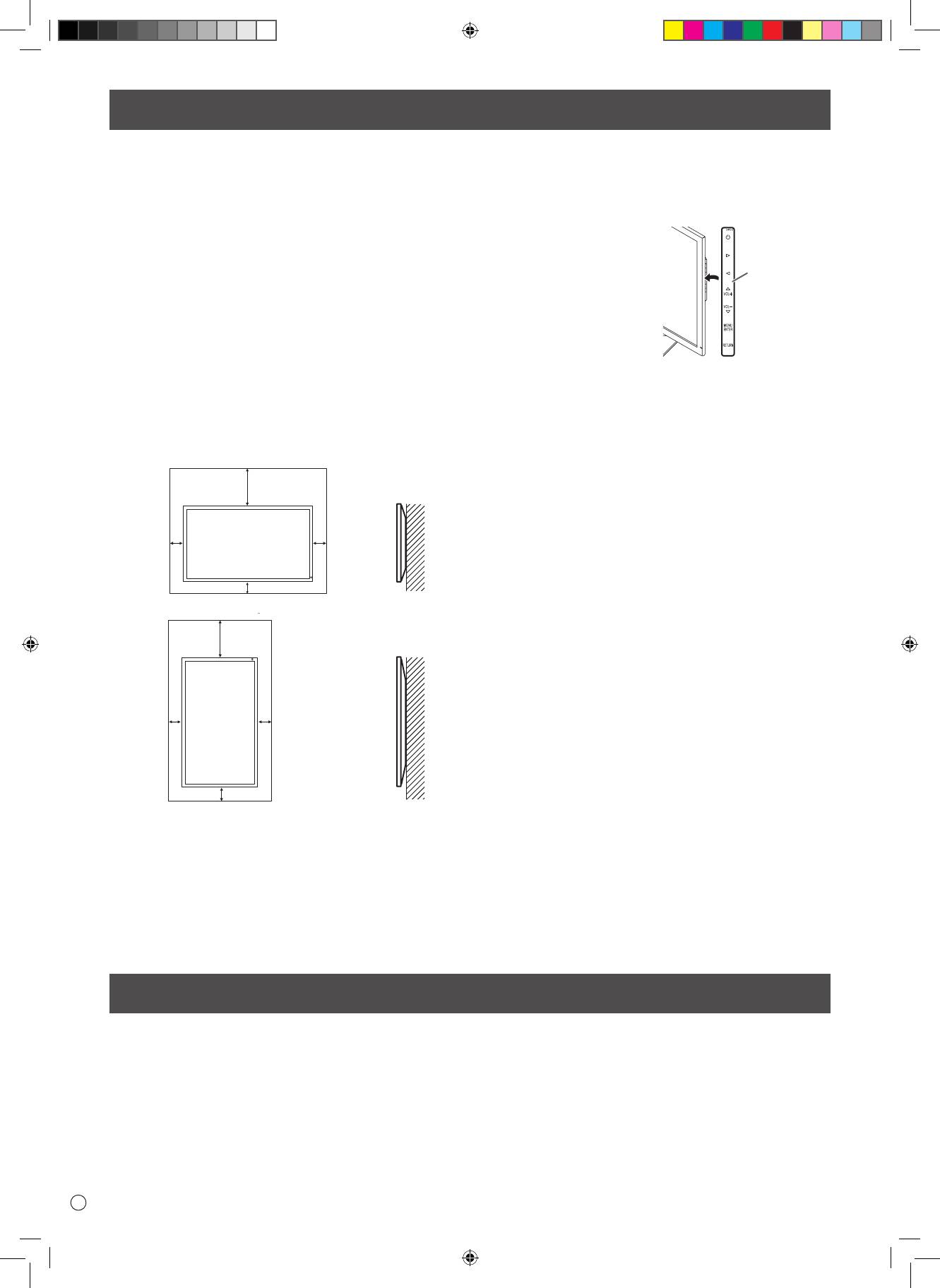
D
4
•
Dieses Produkt ist nicht für den Gebrauch im Freien gedacht.
• Ein Montagewinkel, der den VESA-Spezikationen entspricht,
ist erforderlich.
•
Fragen Sie Ihren Händler bei einer Montage auf einem
Ständer (im Handel erhältlich) oder an einer Wand bzw. beim
Abmontieren oder Transportieren des Monitors um Rat.
•
Für die Wandbefestigung des Monitors sind Spezialkenntnisse
erforderlich. Diese Arbeit darf daher nur von einem autorisierten
ASUS-Händler durchgeführt werden. Führen Sie diese Arbeit
niemals selbst durch. Unser Unternehmen übernimmt keine
Verantwortung für Unfälle oder Verletzungen, die sich durch
eine falsche Befestigung oder einen falschen Umgang mit dem
Gerät ergeben.
• Verwenden Sie den Monitor mit der Vorderseite senkrecht zu
einer ebenen Fläche auf. Der Monitor kann nötigenfalls bis zu
25 Grad nach oben oder bis zu 20 Grad nach unten gekippt
werden.
• Dieser Monitor sollte bei einer Umgebungstemperatur
zwischen 0°C und 40°C verwendet werden. Rund um den
Monitor muss genügend Luft sein, damit die Wärme aus dem
Geräteinneren gut entweichen kann.
For the monitor in landscape orientation
Unit: inch [cm]
7-7/8 [20]
*
2
2
[5]
[5]
2 [5]
For the monitor in portrait orientation
Unit: inch [cm]
7-7/8 [20]
*
2
2
[5]
[5]
2 [5]
• Alle Belüftungsönungen müssen stets frei bleiben. Wenn
die Temperatur innerhalb des Monitors ansteigt, kann dies zu
Fehlfunktionen führen.
• Stellen Sie den Monitor nicht auf ein anderes Gerät, das Wärme
erzeugt.
• Wenn der Monitor in der
horizontalen Ausrichtung
montiert wird, können Sie den
mitgelieferten horizontalen
Aufkleber (Bedientasten) an der
rechten Seite anbringen.
* Der Monitor kann ganz an einer Wand installiert werden.
Im Betrieb gibt der Monitor jedoch Wärme ab. Beachten
Sie, dass die vom Monitor abgegebene Wärme die Wand
verfärben oder verändern kann.
• Wenn es aus irgendeinem Grund schwierig ist, ausreichend
Platz frei zu lassen, etwa weil der Monitor in ein Gehäuse
eingebaut wird, oder wenn die Umgebungstemperatur
außerhalb des zulässigen Bereichs von 0°C bis 40°C liegen
könnte, so müssen Sie ein Gebläse installieren oder andere
Maßnahmen ergreifen, um die Umgebungstemperatur
innerhalb des vorgeschriebenen Bereichs zu halten.
Horizontaler
Aufkleber
(Bedientasten)
WICHTIGE HINWEISE ZUR BEFESTIGUNG
Monitor in horizontaler Ausrichtung
Einheit: cm
Monitor in vertikaler Ausrichtung
Einheit: cm
Mitgelieferte Komponenten
Sollte eine der angeführten Komponenten fehlen, kontaktieren Sie bitte Ihren Händler.
* LCD-Monitor: 1 * Netzkabel: 1
* Netzteil: 1
* Installationsanleitung (diese Anleitung): 1 * DisplayPort-Kabel: 1 *
RS-232C-Konvertierungskabel (ø3,5-mm-Miniklinke): 1
* Sockel (für Ständer): 1 * Strebe (für Ständer): 1 * Befestigungsplatte (für Ständer): 1 (am Monitor vormontiert)
*
Senkschrauben (M4 x 6 ohne Unterlegscheiben): 5
*
Schrauben (M4 x 10 mit Unterlegscheiben): 4
*
Sechskantschlüssel: 1
* Kabelbinder: 2 *Kabelbinder (klein): 1 * Kabelbinder (groß): 2 * Horizontaler Aufkleber (Bedientasten): 1
G8416_PQ321QE_QSG_DE.indd 4 06.06.2013 16:31:41 Uhr
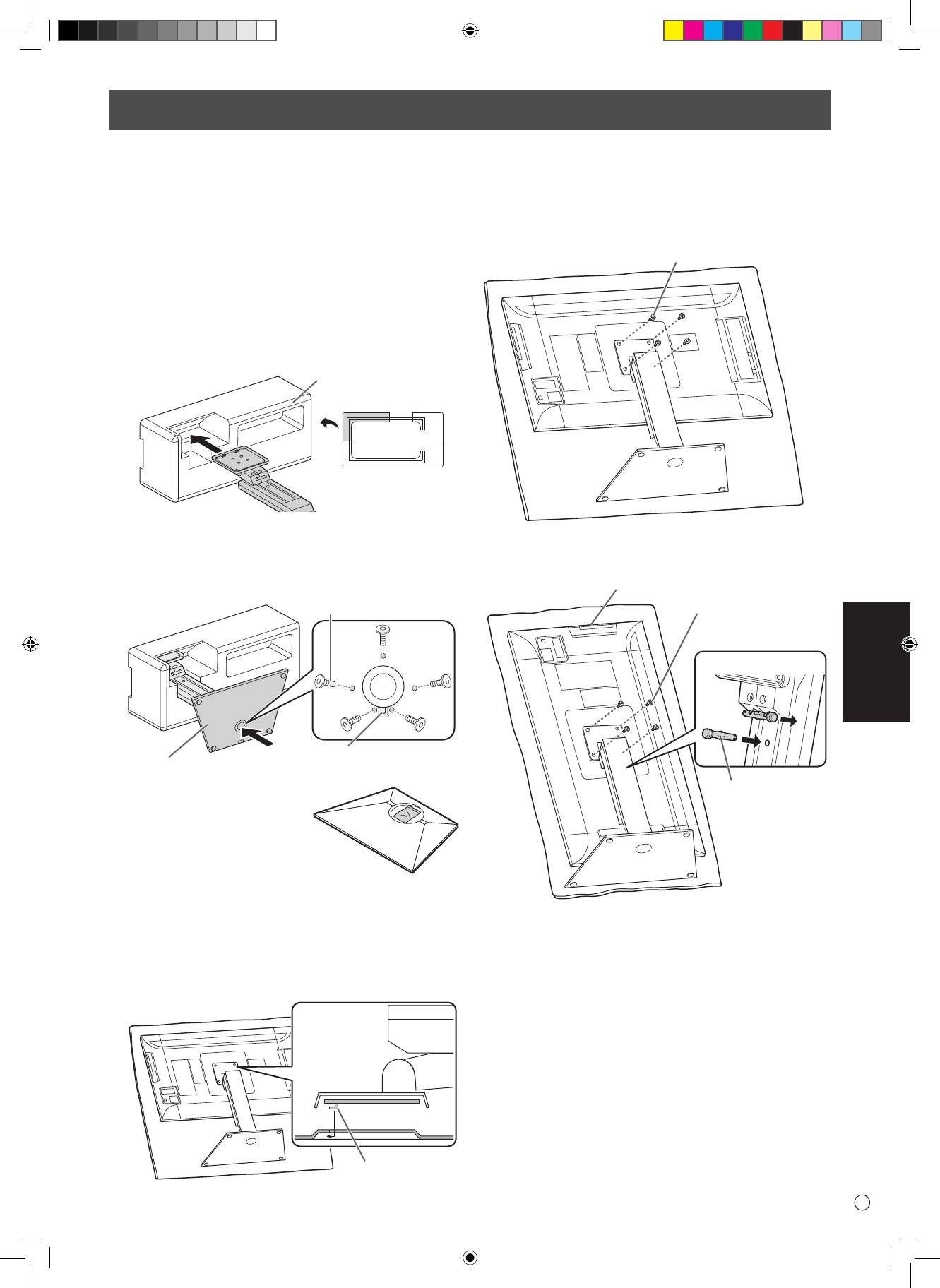
DEUTSCH
5
D
• Ziehen Sie alle Kabel vom Monitor ab.
• Ziehen Sie die Montageschrauben (im Lieferumfang enthalten)
mit dem Sechskantschlüssel (im Lieferumfang enthalten) fest
an.
•
Stellen Sie sicher, dass Sie genügend Platz zum Arbeiten haben.
n
Befestigen des Ständers
Entfernen Sie vor Beginn der Arbeiten jegliches Verpackungsmaterial.
Breiten Sie ein dickes, weiches Tuch (z. B. eine Decke) aus, um
eine Beschädigung des Tisches (usw.) durch den Ständersockel zu
verhindern, und arbeiten Sie auf dem Tuch.
1.
Stecken Sie die Ständerstrebe wie gezeigt in das
Verpackungsmaterial (oben links).
Verpackungsmaterial
(oben links)
Vorne
2. Halten Sie den Ständersockel mit der Hand fest, und
befestigen Sie ihn mit den mitgelieferten Senkschrauben (M4
x 6 ohne Unterlegscheiben) (x5) an der Ständerstrebe.
Verwenden Sie den mitgelieferten Sechskantschlüssel.
Senkschrauben
(M4 x 6 ohne Unterlegscheiben)
Zum Einsetzen den
Sockel
Zapfen einhaken
* Ein Beutel mit den Schrauben
(im Lieferumfang enthalten) und
einem Sechskantschlüssel (im
Lieferumfang enthalten) ist am
runden Loch des Ständersockels
befestigt.
3.
Breiten Sie zum Schutz des LCD-Panels vor Beschädigung
ein dickes, weiches Tuch (z. B. eine Decke) auf einer stabilen,
ebenen Fläche aus, auf welcher der gesamte Monitor abgelegt
werden kann, und legen Sie den Monitor mit dem LCD-Panel
nach unten gerichtet auf das Tuch.
4. Legen Sie den Ständer auf den Monitor.
Haken Sie den Zapfen des Ständers an der Befestigungsplatte
(am Monitor vormontiert) ein.
Zapfen
5. Befestigen Sie den Ständer mit den mitgelieferten
Schrauben (M4 x 10 mit Unterlegscheiben)(x4) am Monitor.
Verwenden Sie den mitgelieferten Sechskantschlüssel.
• Querformat
Schrauben
(M4 x 10 mit Unterlegscheiben)
• Hochformat
Bedientasten
Schrauben
(M4 x 10 mit
Unterlegscheiben)
Vorne
1
2
Fixierstift
Anbringen des Ständers (im Lieferumfang enthalten)
VORSICHTIG!
Vorne
* Ziehen Sie den Fixierstift (1) heraus und stecken Sie ihn wie
oben gezeigt in die Önung (2), wenn der Monitor in der
vertikalen Ausrichtung verwendet werden soll.
* Platzieren Sie zum Entfernen des Ständers den Monitor
und den Ständer wie oben gezeigt, und entfernen Sie die
Schrauben.
VORSICHTIG!
• Beachten Sie für die Installation des Monitors in vertikaler
Ausrichtung die folgenden Punkte. Werden die folgenden
Punkte nicht beachtet, kann dies zu Fehlfunktionen führen.
- Montieren Sie den Monitor so, dass sich die Bedientasten an
der Oberseite benden.
- Stellen Sie den MONITOR im Menü MONITOR auf PORTRAIT
<HOCHFORMAT>. (Siehe BENUTZERHANDBUCH
)
G8416_PQ321QE_QSG_DE.indd 5 06.06.2013 16:31:41 Uhr
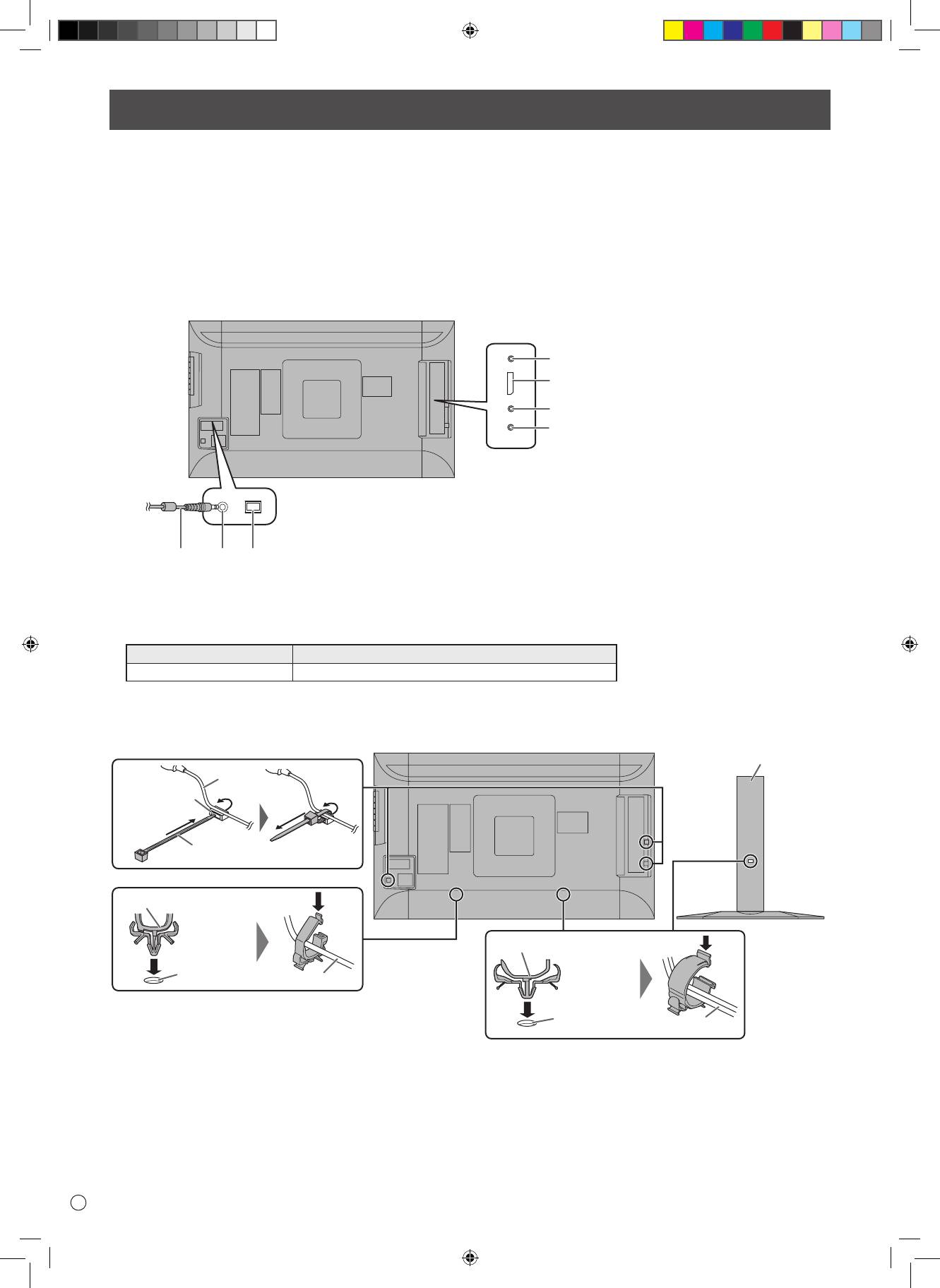
D
6
Anschlüsse
• Schalten Sie unbedingt den Hauptschalter aus und ziehen Sie den Netzstecker, bevor Sie Kabel anschließen oder abziehen. Lesen Sie
auch das Handbuch des Gerätes, das Sie an den Monitor anschließen möchten.
• Verwechseln Sie beim Anschließen nicht die Eingangsklemmen mit den Ausgangsklemmen. Dies könnte zu Fehlfunktionen und
anderen Problemen führen.
• Verwenden Sie kein Kabel mit einer beschädigten oder deformierten Anschlussklemme. Anderenfalls kann es zu Funktionsstörungen
kommen.
• Je nach Computer (Videokarten), Kabeln oder Peripheriegeräten, die angeschlossen werden, können Bilder unter Umständen nicht
korrekt angezeigt werden.
• Legen Sie den Audioeingangsanschluss, der verwendet werden soll, im Menü SETUP <KONFIG.> unter AUDIO SELECT <AUDIO
AUSWAHL> fest. Die Einstellungen bei der Auslieferung sind nachstehend gezeigt.
Eingangsmodus Audioeingangsanschluss (Werkseinstellung)
DisplayPort DisplayPort-Eingangsanschluss
• Die auf der Rückseite des Monitors mit den Anschlüssen verbundenen Kabel können mithilfe des Kabelbinders gebündelt und
befestigt werden.
Befestigen Sie die Kabelbinder an den Befestigungsteilen auf der Rückseite des Monitors und des Ständers, und binden Sie die Kabel
fest.
Ständer
Kabel
Befestigung des
Kabelbinders
Kabelbinder
Kabelbinder (klein)
Kabelbinder (groß)
Befestigung
des Kabelbinders
Kabel
Befestigung
des Kabelbinders
Kabel
VORSICHTIG!
1. Hauptnetzschalter
2. Netzsteckdose
3. Netzkabel (im Lieferumfang enthalten)
4. RS-232C-Eingangsanschluss
5. DisplayPort-Eingangsanschluss
6. Audio Eingangsanschlüsse
7. Kopfhöreranschluss
HINWEIS:
• DisplayPort ist ein eingetragenes Warenzeichen von Video Electronics Standards Association.
Zur Wandsteckdose
G8416_PQ321QE_QSG_DE.indd 6 06.06.2013 16:31:42 Uhr
4
5
6
7
23
1
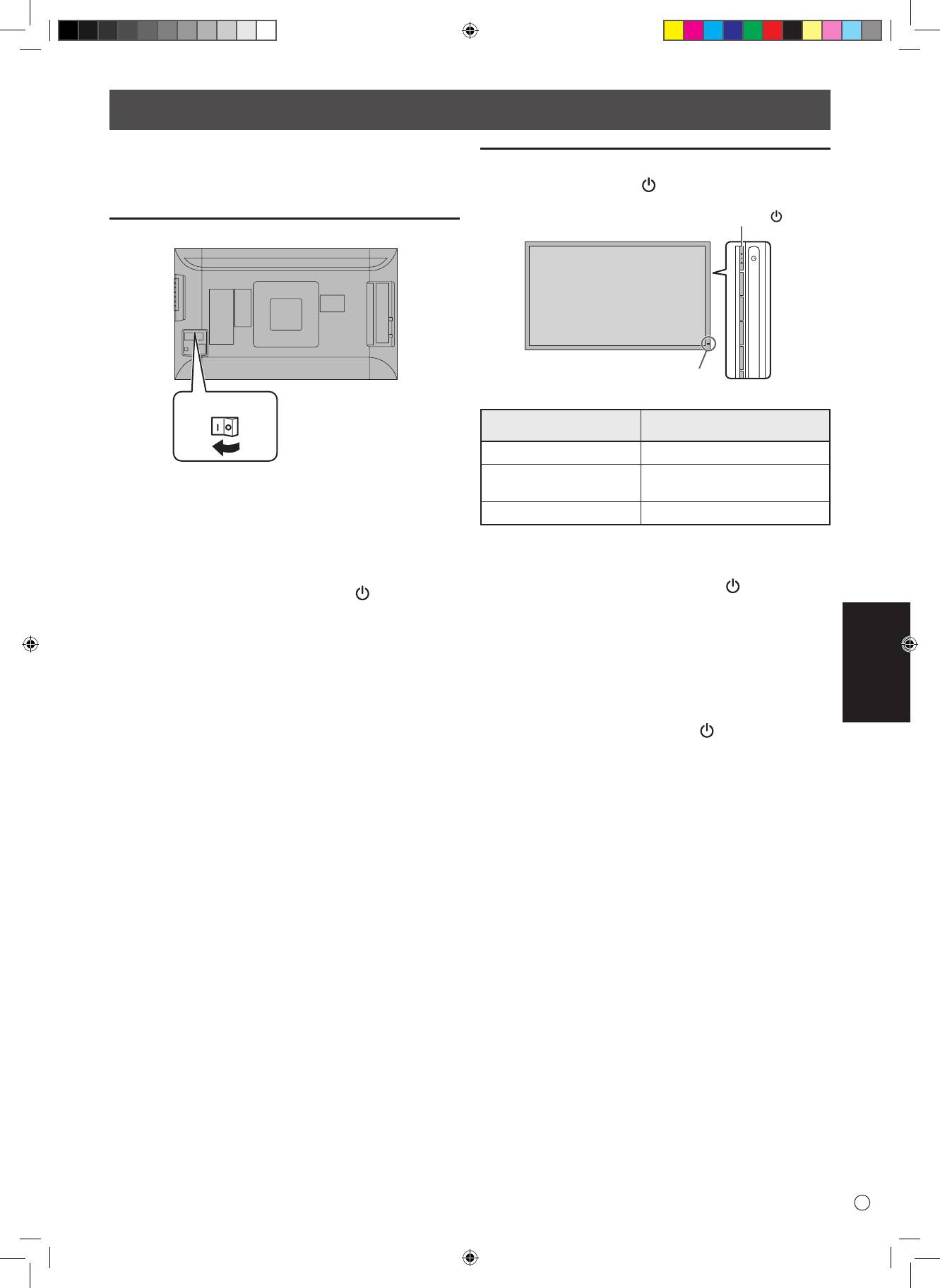
DEUTSCH
7
D
• Schalten Sie zuerst den Monitor und erst danach den PC oder
ein anderes Wiedergabegerät ein.
Einschalten des Netzstroms
Hauptnetzschalter
Ein- und ausschalten
Drücken Sie die Ein/Aus-Taste ( ), um die Stromversorgung ein-
oder auszuschalten.
• Die Hauptstromversorgung muss mithilfe des
Hauptnetzschalters ein- und ausgeschaltet werden. Während
der Hauptschalter eingeschaltet ist, darf das Netzkabel nicht
abgezogen/angeschlossen oder der Trennschalter ein- und
ausgeschaltet werden.
• Warten Sie zwischen dem Ein- und Ausschalten des
Hauptnetzschalters oder der Ein/Aus-Taste ( ) immer
mindestens 5 Sekunden.
• Für eine komplette elektrische Trennung muss der Netzstecker
abgezogen werden.
Ein/Aus-Taste ( )
Betriebs-LED
Ein- und ausschalten
VORSICHTIG!
Status der Betriebsleuchte
Betriebszustand des Monitors
Leuchtet grün Monitor eingeschaltet
Monitor ausgeschaltet (Standby-
Aus
VORSICHTIG!
Modus)
Leuchtet orange
Eingangssignal-Wartemodus
VORSICHTIG!
• Warten Sie zwischen dem Ein- und Ausschalten des
Hauptnetzschalters oder der Ein/Aus-Taste ( ) immer
mindestens 5 Sekunden.
Ist der zeitliche Anstand zu kurz, kann es zu Fehlfunktionen
kommen.
HINWEIS:
• Bei ausgeschaltetem Hauptnetzschalter lässt sich der Monitor
nicht einschalten.
• Bendet sich der Monitor im Eingangssignal-Standby-Modus
und Sie drücken auf die Ein/Aus-Taste ( ), wechselt der
Monitor in den Standby-Modus.
G8416_PQ321QE_QSG_DE.indd 7 06.06.2013 16:31:43 Uhr
Technische Daten
Technische Daten
Modell PQ321QE
AC 100 V - 240 V, 50/60 Hz (bei Verwendung des mitgelieferten
Leistungsaufnahme
Netzteils)
Betriebstemperatur 32°F bis 104°F (0°C bis 40°C)
Relative Luftfeuchtigkeit 20% bis 80% (Keine Kondensation)
Stromverbrauch 99 W * (bei Verwendung des mitgelieferten Netzteils)
Abmessungen (ohne Vorsprünge) (mm)
750 x 489 x 256 mm ( Monitor am mitgelieferten Ständer, WxHxD)
750 x 441 x 35 mm ( nur Monitor, WxHxD )
990 x 558 x 230 mm (Verpackung, WxHxD )
Gewicht (kg) 13kg ( Netto )
17kg ( Brutto )
* Bei Verwendung des Monitors mit 19 V Gleichstrom: 88 W
Bedingt durch fortlaufende technische Verbesserungen behält sich ASUS das Recht vor, das Design und die Spezifikationen ohne vorherige Ankündigung
ändern zu können. Die angegebenen Leistungswerte stellen die Nennwerte einer in Serienherstellung produzierten Einheit dar. Geringe Abweichungen
bei einzelnen Geräten sind möglich.
Wichtige Hinweise zur Befestigung
• Für das Befestigen, Abmontieren oder Transportieren des Monitors müssen mindestens 2 Personen zur Verfügung stehen.
• Verwenden Sie dazu eine Wandhalterung, die für die Befestigung des Monitors geeignet sind.
• Dieser Monitor wurde für die Befestigung an einer Betonwand oder an einer Betonsäule gebaut. Vor der Aufstellung des Monitors
kann es notwendig sein, Wände, die aus bestimmten Materialien (z.B. Gips, dünnem Kunststo usw.) bestehen, entsprechend zu
verstärken.
Der Monitor und der Befestigungswinkel dürfen nur an einer Wand montiert werden, die mindestens das vierfache Gewicht des
Monitors tragen kann. Wählen Sie das für Material und Wandstruktur jeweils am besten geeignete Befestigungsverfahren aus.
• Verwenden Sie die M6-Schrauben, die 8 bis 10 mm länger als die Dicke der Halterung sind, zum Befestigen der VESAkompatiblen
Halterung.
• Verwenden Sie keinen Schlagschrauber.
• Halten Sie den Monitor beim Tragen an der Unterseite und der Seite des Geräts. Fassen Sie den Monitor nicht am LCD-Panel oder die
Ecken an. Das Gerät könnte dadurch beschädigt werden, oder Sie könnten sich dabei verletzen.
• Verwenden Sie für die Installation nur VESA-Bohrungen.
D
8
G8416_PQ321QE_QSG_DE.indd 8 06.06.2013 16:31:43 Uhr
Содержание
[РУССКИЙ]
ВАЖНАЯ ИНФОРМАЦИЯ ...............................................1
Установка подставки (входит в комплект поставки)
...5
УВАЖАЕМЫЙ КЛИЕНТ КОМПАНИИ ASUS ..................1
Соединения .....................................................................6
ПРАВИЛА ТЕХНИКИ БЕЗОПАСНОСТИ ........................2
Включение/выключение питания ...............................7
Инструкции по безопасности .......................................3
Спецификации ................................................................8
МЕРЫ ПРЕДОСТОРОЖНОСТИ ПРИ КРЕПЛЕНИИ .....4
Меры предосторожности при креплении .................8
Комплектные принадлежности....................................4
ВАЖНАЯ ИНФОРМАЦИЯ
ПРЕДОСТЕРЕЖЕНИЕ: ДЛЯ УМЕНЬШЕНИЯ ОПАСНОСТИ ВОЗНИКНОВЕНИЯ ПОЖАРА ИЛИ ПОРАЖЕНИЯ ЭЛЕКТРИЧЕСКИМ ТОКОМ
НЕ ПОДВЕРГАЙТЕ ДАННОЕ ИЗДЕЛИЕ ВОЗДЕЙСТВИЮ ДОЖДЯ ИЛИ ВЛАГИ.
ВНИМАНИЕ
Знак молнии со стрелкой на конце
внутри треугольника предупреждает
ОПАСНОСТЬ
пользователя о наличии внутри корпуса
ПОРАЖЕНИЯ
неизолированного
ЭЛЕКТРИЧЕСКИМ
“опасного напряжения” такой величины,
ТОКОМ
что оно представляет угрозу поражения
НЕ ОТКРЫВАТЬ
электрическим током для людей.
ВНИМАНИЕ! НЕ УДАЛЯЙТЕ КРЫШКУ, ЧТОБЫ
Восклицательный знак внутри треугольника
СНИЗИТЬ ОПАСНОСТЬ ПОРАЖЕНИЯ
предупреждает пользователя о наличии
ЭЛЕКТРИЧЕСКИМ ТОКОМ.
важных инструкций по эксплуатации и
ВНУТРИ ПРИБОРА НЕТ ДЕТАЛЕЙ,
использованию (сервису) в литературе,
КОТОРЫЕ МОГУТ ОБСЛУЖИВАТЬСЯ
которая поставляется в комплекте с
ПОЛЬЗОВАТЕЛЕМ.
изделием.
ДЛЯ ОБСЛУЖИВАНИЯ ОБРАЩАЙТЕСЬ
К КВАЛИФИЦИРОВАННОМУ
ПЕРСОНАЛУ СЕРВИСНЫХ ЦЕНТРОВ.
РУССКИЙ
1
P
R8416_LCD_PQ321_SM.indb 1 6/6/13 5:23 PM
ПРАВИЛА ТЕХНИКИ БЕЗОПАСНОСТИ
Электричество используется для выполнения многих полезных функций, но оно также может причинять травмы
персоналу и быть причиной повреждения имущества в случае неправильного обращения с ним. Данное изделие
спроектировано и произведено с обеспечением максимальной безопасности. Однако неправильная эксплуатация может
привести к поражению электрическим током и/или возникновению пожара. В целях предотвращения потенциальной
угрозы соблюдайте следующие инструкции по установке, эксплуатации и чистке данного изделия. Для обеспечения
вашей безопасности и увеличения срока эксплуатации вашего ЖК монитора внимательно прочтите следующие правила,
прежде чем приступать к эксплуатации данного изделия.
1. Прочтите инструкции – Прежде чем начать эксплуатацию изделия, необходимо прочесть и понять все инструкции по
его эксплуатации.
2. Храните данное руководство в надежном месте – Данные инструкции по безопасности и эксплуатации следует
хранить в надежном месте, чтобы можно было обратиться к ним впоследствии.
3. Подчиняйтесь предостережениям – Все предостерегающие надписи и знаки, имеющиеся на изделии и в инструкции,
должны строго соблюдаться.
4. Следуйте инструкциям – Необходимо следовать всем инструкциям по эксплуатации.
5. Чистка – Прежде чем приступать к чистке изделия, необходимо достать вилку из розетки переменного тока. Для
чистки изделия необходимо использовать сухую тряпку. Запрещается использовать для этих целей жидкие или
аэрозольные чистящие средства.
6. Принадлежности – Запрещается использовать принадлежности, не рекомендованные производителем данного
изделия. Использование других принадлежностей может стать причиной несчастных случаев.
7. Вода и влага – Запрещается использовать изделия возле источников воды. Не размещайте монитор в месте, где
на него может попасть вода. При размещении обратите внимание на оборудование, использующее в работе воду,
например, кондиционер.
8. Вентиляция – Вентиляционные отверстия и другие отверстия в корпусе прибора предназначены для вентиляции.
Запрещается закрывать или блокировать эти вентиляционные отверстия или другие отверстия, поскольку
недостаточная вентиляция может привести к перегреву и/или сокращению срока службы изделия. Запрещается
устанавливать изделие на софу, ковер или другие аналогичные поверхности, поскольку они могут заблокировать
вентиляционные отверстия. Запрещается устанавливать изделие в закрытых пространствах, таких как книжный
шкаф или полка, если там не обеспечена надлежащая вентиляция, за исключением случаев, когда это
предусмотрено в инструкции производителя.
9. Защита шнура питания – Шнур питания должен размещаться таким образом, чтобы на него не наступали люди и не
устанавливались какие-либо предметы.
10. ЖК панель, которая используется в данном изделии, изготавливается из стекла. Следовательно, она может
разбиться в случае, если изделие уронят или нанесут по нему удар. Проявляйте осторожность, чтобы вас не
повредили осколки разбитого стекла в случае, если ЖК панель будет разбита.
11. Перегрузка – Запрещается перегружать розетку переменного тока и/или удлинительные кабели. Перегрузка может
привести к пожару или поражению электрическим током.
12. Попадание внутрь корпуса предметов и жидкостей – Категорически запрещается вставлять какие-либо предметы
внутрь изделия через вентиляционные или другие отверстия. Внутрь изделия подается высокое напряжение,
поэтому просовывание в его корпус через отверстие какого-либо предмета может привести к поражению
электрическим током и/или короткому замыканию некоторых деталей.
По той же причине запрещается допускать попадание внутрь изделия воды или других жидкостей.
13. Обслуживание – Запрещается заниматься обслуживанием изделия самостоятельно. Если вы будете снимать
крышки, то можете подвергнуться воздействию высокого напряжения и других опасных факторов. Обратитесь к
квалифицированному обслуживающему персоналу для выполнения обслуживания.
14. Ремонт – Если произойдет что-либо из перечисленного ниже, извлеките из розетки переменного тока вилку
шнура питания и обратитесь к квалифицированному обслуживающему персоналу за выполнением необходимых
ремонтных работ.
а. Поврежден шнур питания или вилка.
b. В случае попадания в изделие жидкости или каких-либо других предметов.
c. Когда изделие попало под дождь или в воду.
d. Когда изделие не работает так, как это описано в инструкции по эксплуатации.
Запрещается трогать органы управления помимо тех, что описаны в инструкциях по эксплуатации. Неправильная
регулировка органов управления, которая не описана в инструкциях, может привести к повреждениям, для
устранения которых зачастую требуется привлекать квалифицированных специалистов, которым приходится
выполнять большой объем работ по регулировке.
e. В случае, если изделие уронили или повредили.
f. В случае, если в рабочем изделии наблюдаются какие-либо отклонения. Явные отклонения в работе изделия
указывают на то, что требуется его обслуживание.
15. Запасные детали — Если для изделия потребуются запасные детали, убедитесь в том, что выполняющий
обслуживание человек использует запасные детали, указанные производителем или аналогичные детали с такими
же характеристиками и производительностью, как и оригинальные. Использование деталей, не рекомендованных
производителем, может привести к возгоранию, поражению электрическим током или созданию других опасных
ситуаций.
16. Проверки безопасности — После завершения работ по обслуживанию или ремонту попросите техника по
обслуживанию произвести проверку безопасности, чтобы убедиться, что изделие находится в надлежащем рабочем
состоянии.
17. Крепление на стену — При креплении изделия на стену необходимо убедиться в том, что оно установлено с
использованием метода, рекомендованного его производителем.
18. Источники тепла — Держите изделие вдали от источников тепла, таких как радиаторы, нагреватели, плиты и другое
оборудование, генерирующее тепло (включая усилители).
P
2
R8416_LCD_PQ321_SM.indb 2 6/6/13 5:23 PM
ПРАВИЛА ТЕХНИКИ БЕЗОПАСНОСТИ (Продолжение)
19. Использование монитора не должно сопровождаться созданием фатальных угроз или же опасностей, которые
могут непосредственно привести к смерти, получению травм, серьезных физических повреждений или потерь,
включая управление ядерной реакцией в ядерных установках, медицинских системах поддержания жизни, а также
управление запусками ракет в системах вооружений.
20. Не следует в течение длительного времени находиться в контакте с нагревающимися деталями изделия. Это может
привести к возникновению низкотемпературных ожогов.
Для соответствия нормативам по электромагнитной совместимости применяйте экранированные кабели для
подключения к следующим разъемам: вход DisplayPort.
Если монитор установлен на недостаточно стабильной поверхности, это может быть опасным, так как он
может упасть. Многие травмы, особенно детей, можно предотвратить с помощью следующих простых мер
предосторожности:
• использование настенных кронштейнов или опор, рекомендованных производителем монитора;
• использование только тех предметов мебели, которые могут выдержать вес монитора;
• монитор не должен нависать над краем предмета мебели, на котором он установлен;
• монитор не следует устанавливать на высокие предметы (например, шкафы или стеллажи) без соответствующего
крепления предмета мебели и монитора к подходящей основе;
• монитор не следует ставить на ткань или другие материалы, находящиеся между монитором и предметом мебели;
• объясняйте детям, что забираться на мебель, чтобы достать до монитора или его частей, может быть опасно.
Особые меры безопасности для детей
- Не позволяйте детям забираться на монитор или играть рядом с ним.
- Не устанавливайте монитор на мебели, которая может использоваться в качестве ступеней (например, комод).
- Помните, что дети выражать бурные эмоции во время просмотра программ, особенно на огромном мониторе.
Монитор следует устанавливать в месте, где дети не смогут его двигать, тянуть или уронить.
- Все шнуры и кабели должны быть подведены таким образом, чтобы любопытные дети не могли их тянуть и
хвататься за них.
Инструкции по безопасности
- Запрещается использовать монитор в запыленных
• Запрещается разбирать блок питания. В нем
местах, местах с высокой влажностью или же там, где
содержатся высоковольтные компоненты,
монитор может соприкасаться с маслами или паром,
прикосновение к которым опасно.
поскольку это может стать причиной возгорания.
• Блок питания предназначен для использования только
- Следите за тем, чтобы монитор не соприкасался с водой
внутри помещений. Не пользуйтесь им на улице.
или другими жидкостями. Следите за тем, чтобы никакие
предметы, такие как скрепки для бумаги, иголки, заколки,
• Не применяйте блок питания, который входит в
не попадали внутрь корпуса монитора, поскольку это
комплект поставки, с другими устройствами.
РУССКИЙ
может стать причиной пожара или привести к поражению
- Не допускайте повреждения шнура питания и блока
электрическим током.
питания, не ставьте на них тяжелых предметов, не тяните
- Запрещается устанавливать монитор сверху
за провода и не сгибайте их. Также, не пользуйтесь
неустойчивых предметов или же в местах, где не
удлинителями. Повреждение шнура может привести к
гарантируется его безопасность. Запрещается подвергать
пожару или поражению электрическим током.
монитор воздействию сильных ударов или вибрации.
- Не используйте шнур питания, обмотанный изоляционной
Если монитор упадет или опрокинется, это может его
лентой.
повредить.
Применение удлинителя может стать причиной пожара в
- Запрещается использовать монитор вблизи
результате перегрева.
нагревательного оборудования или в тех местах, где он
может подвергаться воздействию высокой температуры,
- Не вынимайте и не вставляйте электрическую вилку
поскольку это может привести к его избыточному нагреву
мокрыми руками.
и, как результат, к возгоранию.
Это может привести к поражению электрическим током.
- Не используйте монитор в местах, где на него могут
- Если вы не пользуетесь устройством в течение
попадать солнечные лучи.
длительного времени, вынимайте вилку из розетки.
- Розетка переменного тока должна находиться вблизи
- Не пытайтесь ремонтировать провод питания в случае
оборудования таким образом, чтобы к ней обеспечивался
его разрыва или неисправности. Обратитесь в службу
беспрепятственный доступ.
ремонта.
- Не касайтесь слишком долго частей изделия продукта
Шнур питания и блок питания
и блока питания, которые при продолжительной работе
- Используйте только кабель питания и блок питания,
могут нагреваться.
поставляемые в комплекте с этим монитором.
Это может стать причиной низкотемпературных ожогов.
- Пользуясь блоком питания, учтите следующее:
- Не прикрепляйте блок питания к монитору или другому
Неправильное обращение может стать причиной пожара,
оборудованию.
поражения электрическим током или травм.
Это может стать причиной пожара или поражения
• Не роняйте блок питания и не подвергайте его ударам.
электрическим током.
3
P
R8416_LCD_PQ321_SM.indb 3 6/6/13 5:23 PM
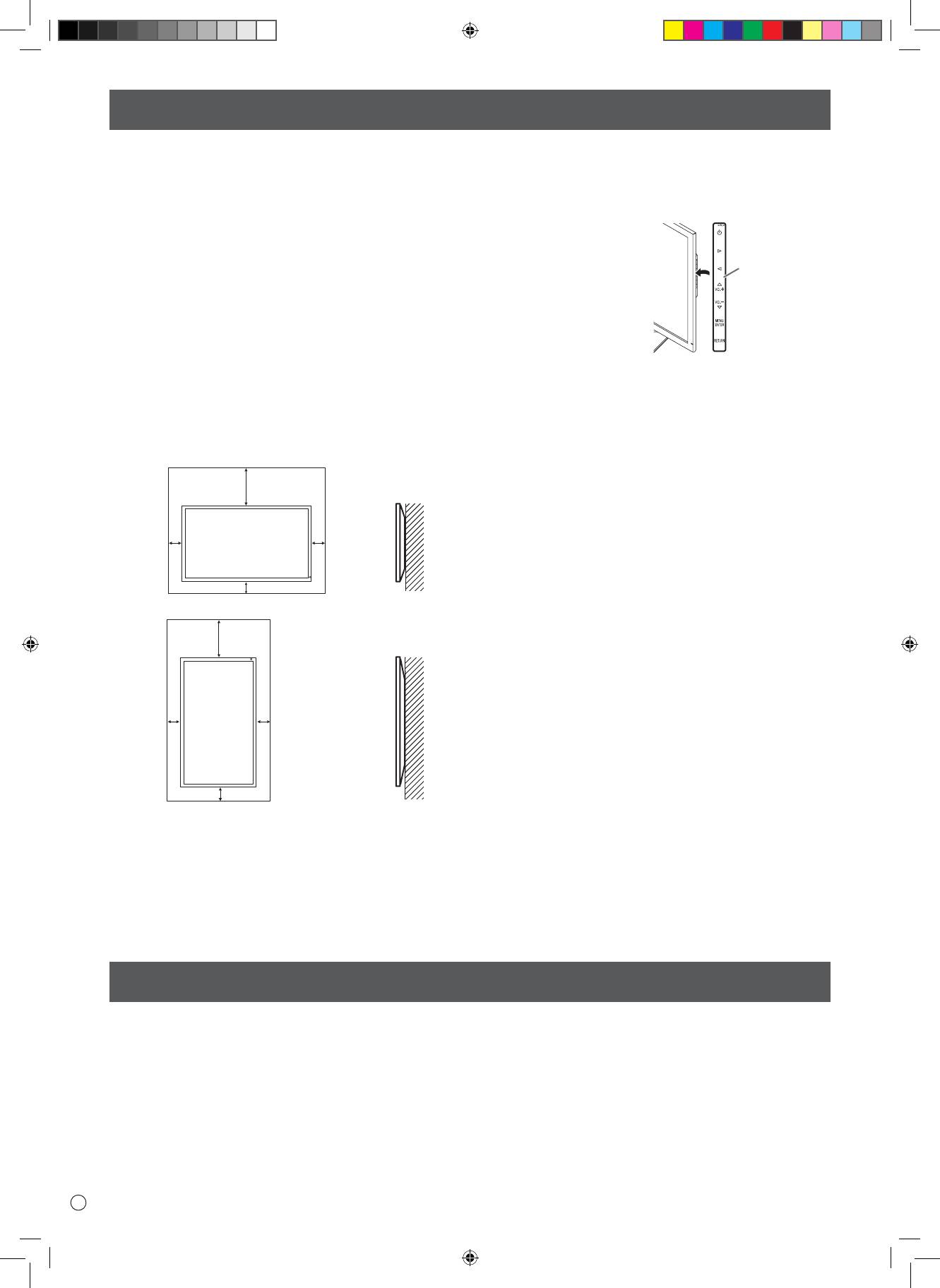
МЕРЫ ПРЕДОСТОРОЖНОСТИ ПРИ КРЕПЛЕНИИ
• Монитор предназначен для эксплуатации в помещении.
•
Запрещается блокировать вентиляционные отверстия
• Требуется крепежный кронштейн, соответствующий
монитора. Рост температуры внутри корпуса монитора
спецификации VESA.
может привести к его неправильному функционированию.
• Для установки на подставке (производится серийно)
• Запрещается размещать монитор на устройствах,
или на стене либо для демонтажа или перемещения
генерирующих тепло.
монитора обратитесь к своему дилеру.
• При установке монитора
•
Крепление монитора к стене требует специальных навыков,
в горизонтальной
поэтому такая работа должна выполняться специалистами
ориентации вы можете
компании ASUS. Вам не следует предпринимать попыток
прикрепить с правой
сделать эту работу самостоятельно. Наша компания
стороны поставляемый
не несет какой-либо ответственности за несчастные
в комплекте
случаи или травмы, вызванные плохим монтажом или
горизонтальный стикер
неправильным обращением.
(Кнопки управления).
• Монитор должен использоваться перпендикулярно по
отношению к поверхности, на которой он установлен.
При необходимости монитор можно наклонять на угол
до 25 градусов, обращая экран вверх, или на угол до 20
•
Используйте входящий в комплект поставки вертикальный
градусов, обращая экран вниз.
стикер при установке монитора в вертикальной ориентации.
•
Данный монитор должен эксплуатироваться при
температуре окружающей среды от 0°C до 40°C.
Обеспечьте вокруг монитора достаточно пространства,
чтобы предотвратить накопление тепла внутри его корпуса.
Блок: см
20
*
5 5
5
20
*
5 5
5
* Когда вы устанавливаете этот монитор к стене.
Однако поскольку во время работы монитор
генерирует тепло, это может привести к
деформированию или обесцвечиванию стены.
•
Если сложно обеспечить достаточное пространство по
той или иной причине, например, из-за того, что монитор
устанавливается внутри кожуха, или из-за того, что
температура окружающей среды выходит за диапазон
от 0°C до 40°C, установите вентилятор или примите
другие меры для того, чтобы температура окружающей
среды находилась в пределах требуемого диапазона.
Комплектные принадлежности
В случае отсутствия какого-либо компонента, свяжитесь со своим дилером.
Монитор с жидкокристаллическим дисплеем: 1
Шнур питания: 1
Блок питания: 1
Руководство по установке (это руководство): 1
Кабель DisplayPort: 1
Кабель-переходник RS-232C (мини-джек ø3,5): 1
Основание (подставки): 1
Стойка (подставки): 1
Соединительная пластина (подставки): 1 (предварительно установленная на мониторе)
Винты с потайной головкой (М4 x 6 без шайб): 5
Винты (М4 x 10 с шайбами): 4
Шестигранный ключ: 1
Зажим кабеля: 2
Зажим кабеля (малый): 1
Зажим кабеля (большой): 2
Горизонтальный стикер (кнопки
управления): 1
P
4
Для монитора в горизонтальной ориентации
Горизонтальный
стикер
(кнопки
управления)
Для монитора в вертикальной ориентации
Блок: см
R8416_LCD_PQ321_SM.indb 4 6/6/13 5:23 PM
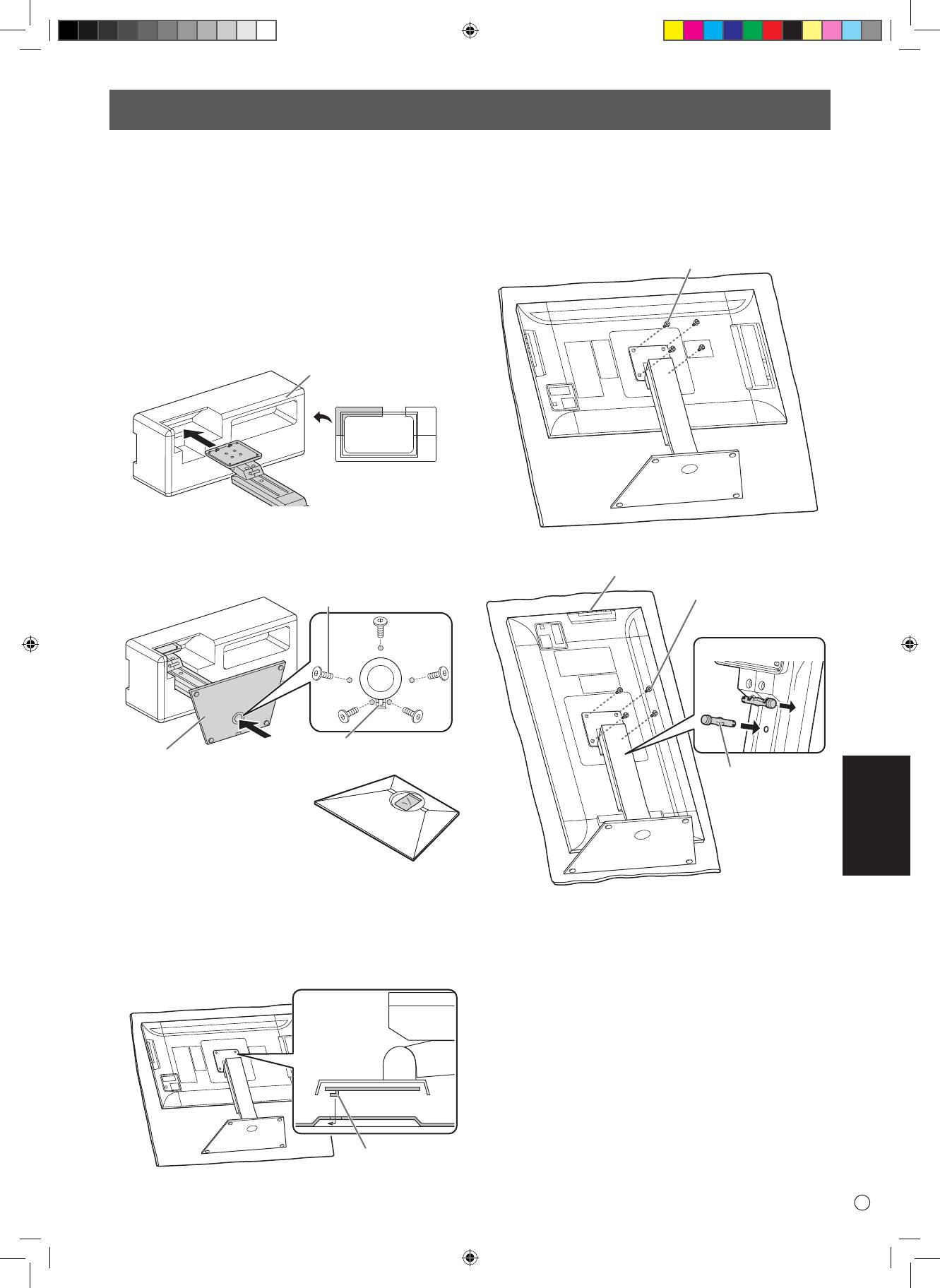
Установка подставки (входит в комплект поставки)
ВНИМАНИЕ!
• Отсоедините от монитора все кабели.
• Надежно затяните установочные винты (входят в
комплект поставки) с помощью шестигранного ключа
(входит в комплект поставки).
•
Обеспечьте наличие достаточного пространства для работы.
n
Прикрепите подставку
Прежде чем приступать к работе, снимите все
упаковочные материалы.
Чтобы защитить стол (и т.д.) от повреждений основанием
подставки, подстелите толстую мягкую ткань (например,
одеяло) и работайте на ней.
1.
Вставьте стойку подставки в упаковочный материал
(вверху слева), как показано на рисунке.
Упаковочный материал
(вверху слева)
Спереди
2.
Поддерживая рукой основание подставки, прикрепите
его к стойке подставки винтами с потайной головкой (М4
x 6 без шайб) (x5), которые входят в комплект поставки.
Используйте поставляемый в комплекте шестигранный ключ.
Винты с потайной головкой
(М4 x 6 без шайб)
Вставьте, зацепив ушко
РУССКИЙ
ВНИМАНИЕ!
5
P
Основание
5.
Прикрепите подставку к монитору с помощью
поставляемых в комплекте винты (М4 x 10 с шайбами)
(x4).
Используйте поставляемый в комплекте шестигранный
ключ.
• Горизонтальная ориентация
Винты
(М4 x 10 с шайбами)
• Вертикальная ориентация
Кнопки управления
Винты
(М4 x 10 с шайбами)
Вид спереди
1
2
* Пакет с винтами (входят
Фиксирующий
в комплект поставки) и
штифт
шестигранным ключом
(входит в комплект поставки)
прикреплен к основанию
подставки через круглое
отверстие.
3.
Расстелите толстую мягкую ткань (например,
одеяло), которая предотвратит повреждение ЖК-
* Если монитор будет использоваться в вертикальной
панели, на плоской поверхности, на которой
помещается весь монитор, и положите монитор на
ориентации, выньте фиксирующий штифт (1) и
ткань ЖК-панелью вниз.
вставьте его в отверстие (2), как показано выше.
4. Поместите подставку на монитор.
* Чтобы снять стойку, положите монитор и стойку, как
Введите ушко на подставке в зацепление с соединительной
показано выше, и снимите винты.
пластиной (предварительно установленной на мониторе).
• При установке монитора в вертикальной ориентации
придерживайтесь следующих рекомендаций.
Несоблюдение этих рекомендаций может привести к
возникновению неисправностей.
- Установите монитор так, чтобы кнопки управления
были расположены сверху.
- Задайте для опции MONITOR <МОНИТОР>
в меню MONITOR <МОНИТОР> установку
PORTRAIT <ПОРТРЕТ>. (Cм. РУКОВОДСТВО ПО
Ушко
ЭКСПЛУАТАЦИИ.)
R8416_LCD_PQ321_SM.indb 5 6/6/13 5:23 PM
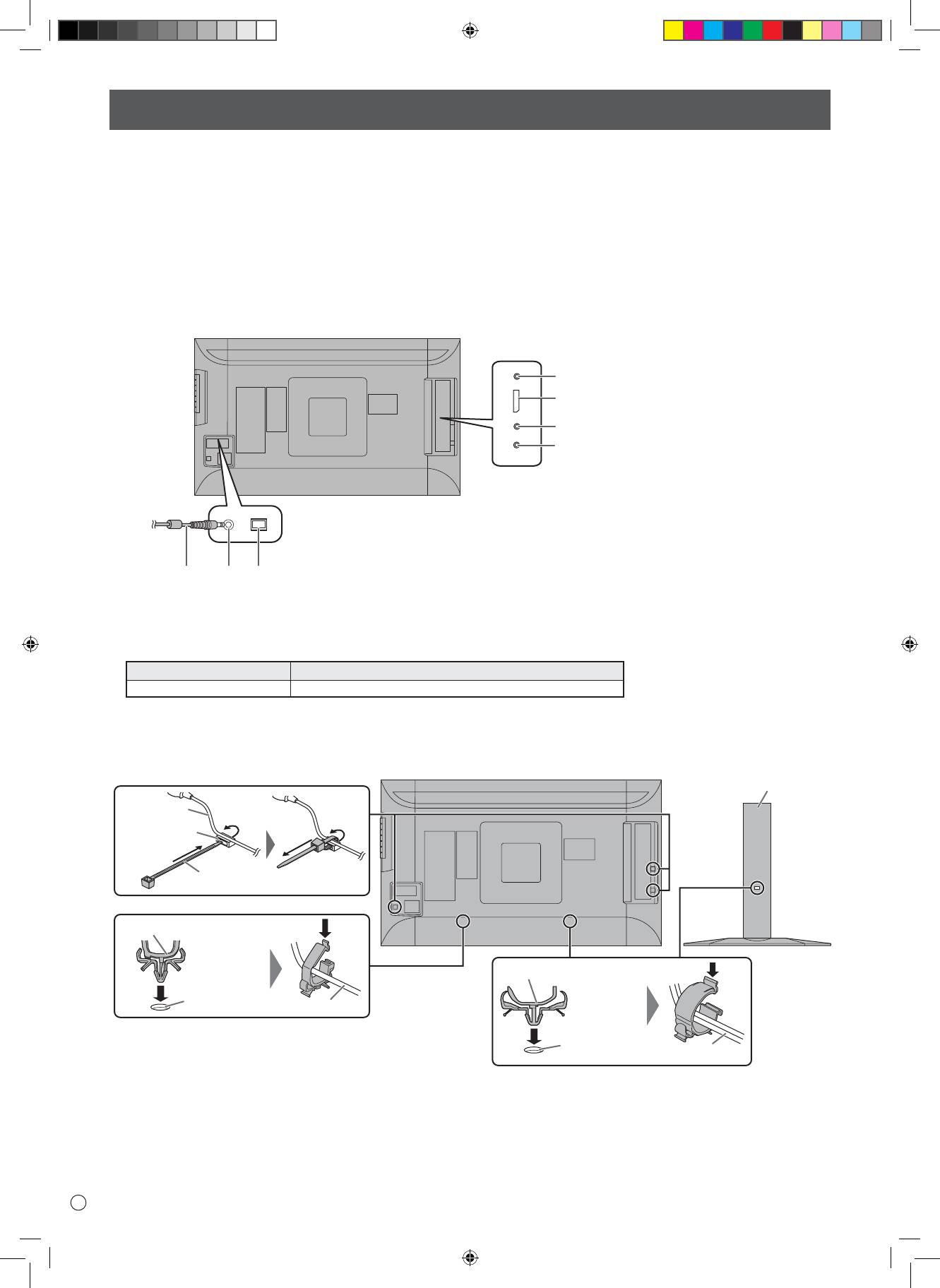
Соединения
ВНИМАНИЕ!
• Проверьте, что вы выключили главный выключатель питания и вынули вилку из электрической розетки, прежде чем
присоединять/отсоединять кабели. Также прочтите руководство пользователя того оборудования, которое будет
подсоединяться.
• Будьте внимательны и не перепутайте при подсоединении кабелей входной и выходной разъемы. Если кабели,
подсоединенные к входному и выходному разъемам, будут случайно перепутаны, это может стать причиной
возникновения неисправностей и других проблем.
• Не используйте кабели с поврежденными или деформированными разъемами. Применение такого кабеля может
стать причиной неисправностей.
• Возможность отображения зависит от компьютера (видеокарты), кабелей или подключаемых периферийных
устройств.
1. Главный выключатель питания
2. Входной разъем питания
переменного тока
3. Шнур питания
(входит в комплект поставки)
4. Входной разъем RS-232C
5. Входной разъем DisplayPort
6. Входные разъемы аудио
7. Разъем для наушников
Для
разъема питания
ПРИМЕЧАНИЕ:
• Задайте испольуемый входной аудиоразъем в разделе AUDIO SELECT <ВЫБРАТЬ АУДИОВХОД> меню SETUP
<УСТАНОВКА>. Указанные ниже параметры настройки устанавливаются на заводе.
Режим ввода
Входной разъем аудио (настройка по умолчанию)
DisplayPort Входной разъем DisplayPort
• Кабели, подсоединенные к разъемам на задней панели монитора, могут быть скреплены с помощью кабельного
зажима.
Прикрепите зажимы для кабеля к креплениям, расположенным на задней поверхности монитора и на подставке, и
закрепите кабели.
• DisplayPort является зарегистрированным товарным знаком Video Electronics Standards Association.
P
6
Подставки
Кабель
Прикрепление
зажима кабеля
Зажим кабеля
Зажим кабеля (малый)
Зажим кабеля (большой)
Прикрепление
зажима кабеля
Кабель
Прикрепление
зажима кабеля
Кабель
R8416_LCD_PQ321_SM.indb 6 6/6/13 5:23 PM
4
5
6
7
23
1
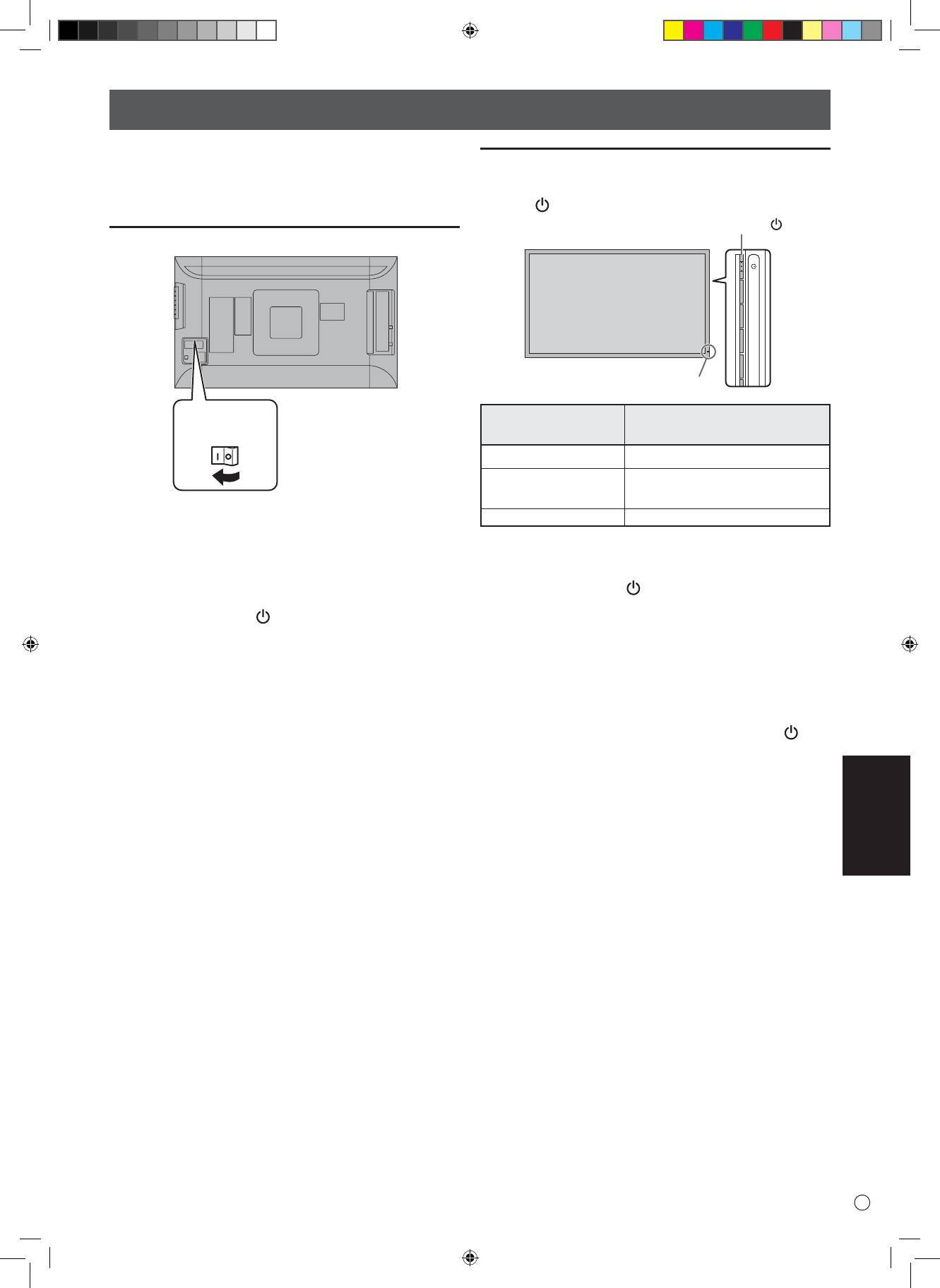
Включение/выключение питания
Включение/выключение питания
• Включите монитор до того, как будет включен ПК или
Чтобы включить/выключить питание, нажмите кнопку
устройство воспроизведения.
питания ( ).
Подключение электропитания
Главный
выключатель
питания
• Питание должно включаться и выключаться с
помощью основного выключателя. Не подсоединяйте/
отсоединяйте шнур питания и не меняйте положение
выключателя, когда основной выключатель питания
находится во включенном положении.
• Между выключением питания сетевым выключателем
или кнопкой питания ( ) и повторным включением
всегда делайте паузу не менее 5 секунд.
• Для полного отключения питания выдерните шнур
питания.
РУССКИЙ
7
P
Кнопка питания ( )
ВНИМАНИЕ!
LED- индикатор питания
Состояние
Статус монитора
индикатора питания
Зеленое свечение Питание вкл.
Питание выкл.
Выкл.
(Режим ожидания)
ВНИМАНИЕ!
Оранжевое свечение
Pежим ожидания входного сигнала
ВНИМАНИЕ!
• Между выключением питания сетевым выключателем
или кнопкой питания ( ) и повторным включением
всегда делайте паузу не менее 5 секунд.
Небольшой интервал может привести к возникновению
неисправности.
ПРИМЕЧАНИЕ:
• Когда отключен главный выключатель питания, монитор
нельзя включить.
• Если монитор находится в режиме ожидания подачи
входного сигнала и вы нажмете кнопку питания ( ),
монитор перейдет в режим ожидания.
R8416_LCD_PQ321_SM.indb 7 6/6/13 5:23 PM
Спецификации
Модель PQ321QE
AC 100 В - 240 В, 50/60 Гц
Требование к электропитанию
(при использовании поставляемого в комплекте блока питания)
Рабочая температура
0°C - 40°C
Рабочая влажность 20% - 80% (без конденсации)
Потребляемая мощность
99 Вт * (при использовании поставляемого в комплекте блока питания)
Размеры (исключая выступы) Прибл. 750 x 441 x 35 мм (только монитор)
Прибл. 750 x 489 x 256 мм
Размер коробки 990 x 558 x 230 мм
Вес Прибл. 13 (нетто)
Прибл. 17 (брутто)
* Когда монитор работает от 19 В пост. тока: 88 Вт
В соответствии с нашей политикой постоянного улучшения наших изделия, корпорация ASUS оставляет за собой право вносить
изменения в дизайн и спецификации изделия без предварительного уведомления.Указанные значения технических характеристик
являются номинальными значениями среднестатистического прибора. Возможны некоторые отклонения от этих значений у отдельных
приборов.
Меры предосторожности при креплении
• При установке, снятии или перемещении монитора следует убедиться, что эту работу выполняют не менее 2 человек.
• Убедитесь, что вы используете настенный кронштейн, спроектированный или предназначенный для крепления
данного монитора.
•
Данный монитор проектировался для установки на бетонные стены или колонны. Для крепления к конструкциям из
других материалов, таких как оштукатуренные стены/тонкие пластмассовые панели/ деревянные панели, необходимо
до установки выполнить определенные работы по их укреплению.
Данный монитор и крепежные кронштейны должны устанавливаться на стену, которая может выдержать как минимум
4-кратный вес монитора. Установку необходимо выполнять, используя подходящий для материала и конструкции метод.
• Для крепления кронштейнов, совместимые со стандартом VESA следует использовать винты М6, длина которых на
8-10 мм больше толщины крепежного кронштейна.
• Не используйте ударную отвертку.
• При перемещении монитора обязательно удерживайте его снизу и по бокам. Не держите монитор за ЖК панель или
углы. Это может привести к повреждению изделия, его неисправности или к травмированию людей.
• Запрещается использовать какие-либо другие отверстия для крепежных винтов, за исключением отверстий VESA.
P
8
R8416_LCD_PQ321_SM.indb 8 6/6/13 5:23 PM
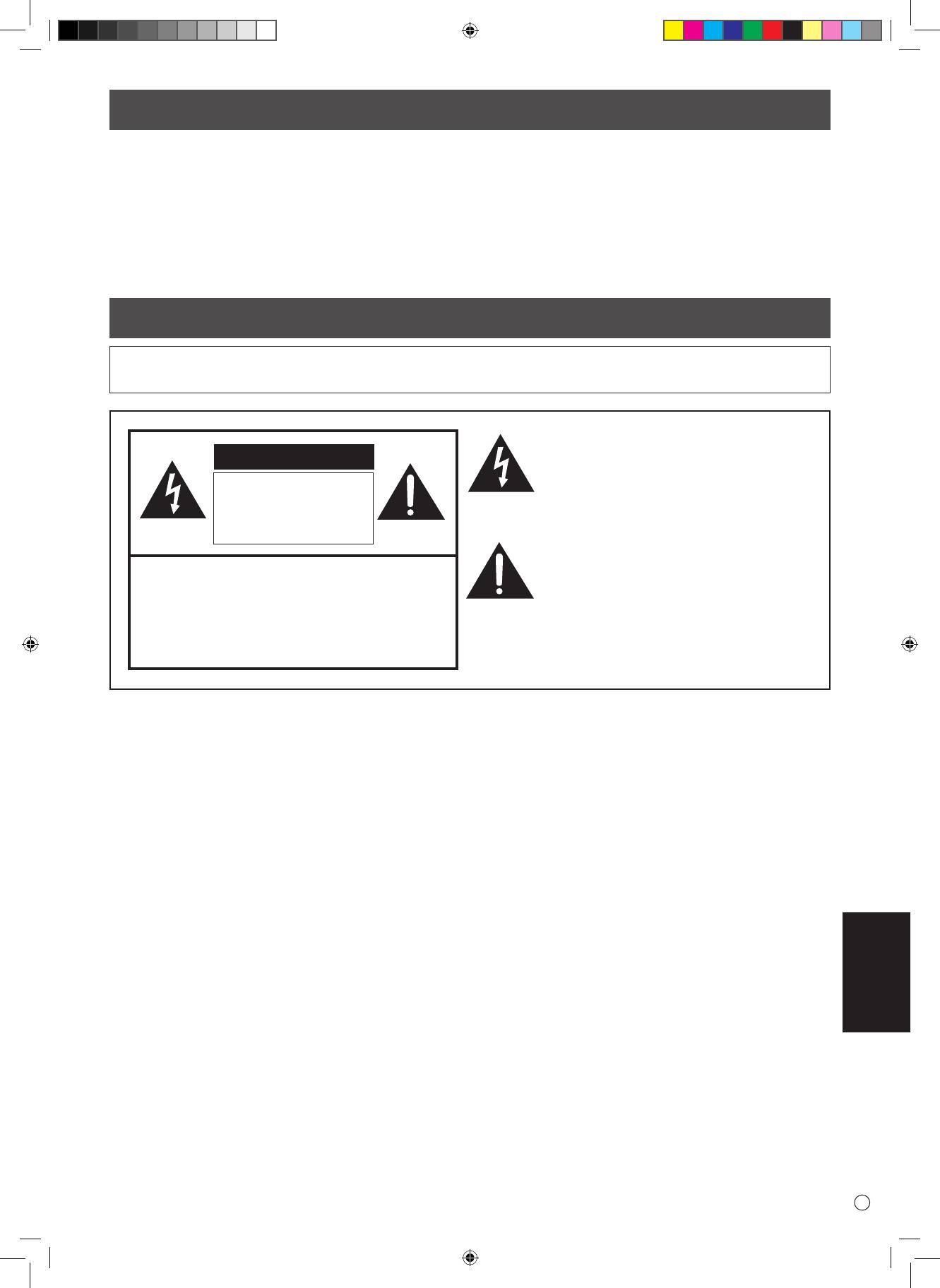
Indice
[ITALIANO]
INFORMAZIONI IMPORTANTI ............................................... 1
Installare il piedistallo (in dotazione) .................................. 5
PRECAUZIONI DI SICUREZZA ................................................ 2
Connessioni ............................................................................ 6
ISTRUZIONI DI SICUREZZA .................................................... 3
Accensione/Spegnimento ..................................................... 7
PRECAUZIONI DI MONTAGGIO ............................................. 4
Speciche ............................................................................... 8
Componenti in dotazione ..................................................... 4
Precauzioni per il montaggio ............................................... 8
INFORMAZIONI IMPORTANTI
ATTENZIONE: PER RIDURRE IL RISCHIO DI INCENDI O SHOCK ELETTRICI NON ESPONETE QUESTO PRODOTTO A
PIOGGIA O UMIDITÀ.
Il simbolo di una freccia (in un triangolo equilatero)
indica la presenza di un voltaggio pericoloso e non
ATTENZIONE
isolato (all'interno dell'apparecchio) che potrebbe
essere sucientemente elevato da provocare un
RISCHIO DI SHOCK
rischio di scosse elettriche o shock nei confronti
ELETTRICO
delle persone.
NON APRIRE
Il punto esclamativo (in un triangolo equilatero)
indica la presenza di importanti istruzioni sul
ATTENZIONE: PER RIDURRE IL RISCHIO DI SCOSSE
funzionamento e la manutenzione del dispositivo
ELETTRICHE NON RIMUOVETE LA COVER.
nella documentazione in dotazione con il prodotto.
ALL'INTERNO NON VI SONO PARTI RIPARABILI
DALL'UTENTE.
RICHIEDETE ASSISTENZA A PERSONALE
QUALIFICATO.
ITALIANO
1
I
PQ321_Setup_IT.indb 1 06.06.2013 15:47:50 Uhr
I
2
PRECAUZIONI DI SICUREZZA
L'elettricità viene usata per molte operazioni utili ma può anche essere fonte di infortuni o danni alla proprietà se non usata
correttamente. Questo prodotto è stato progettato e assemblato con la massima attenzione alla sicurezza. Tuttavia un uso improprio
potrebbe causare uno shock elettrico o un incendio. Per evitare rischi e pericoli osservate le istruzioni fornite per il montaggio, l'uso e la
pulizia del prodotto. Per garantire la vostra sicurezza e prolungare il più possibile la durata del vostro prodotto LCD leggete attentamente
le seguenti istruzioni di sicurezza prima di usare il prodotto.
1. Leggete le istruzioni - Tutte le istruzioni operative devono essere lette e comprese prima di utilizzare il prodotto.
2. Tenete il manuale in un posto sicuro - Queste istruzioni operative e di sicurezza devono essere conservate in un posto sicuro per un
eventuale utilizzo in futuro.
3. Osservate gli avvisi - Tutti gli avvisi presenti sul prodotto e nelle istruzioni devono essere osservati pienamente.
4. Seguite le istruzioni - Tutte le istruzioni operative devono essere seguite.
5. Pulizia - Scollegate il cavo di alimentazione dalla presa di corrente prima di pulire il prodotto. Usate un panno asciutto per la pulizia
del prodotto. Non usate detergenti liquidi o spray.
6. Accessori - Non usate accessori non raccomandati dal produttore. Usare accessori non adeguati potrebbe causare incidenti.
7. Acqua e umidità - Non usate il prodotto vicino all'acqua. Non installate il prodotto in un luogo soggetto a schizzi d'acqua. Fate
attenzione anche ai dispositivi che scaricano acqua come i condizionatori d'aria.
8. Ventilazione - Le prese d'aria e le altre fessure sono state progettate per la ventilazione.
Non coprite nè bloccate queste prese d'aria poiché una ventilazione non suciente potrebbe causare un surriscaldamento e/
o diminuire la vita del prodotto. Non posizionate il prodotto nelle vicinanze di divani, tappeti e simili per non rischiare di ostruire
le prese d'aria. A meno che una ventilazione adeguata sia possibile, e le istruzioni del produttore siano seguite in pieno, non
posizionate il prodotto all'interno di una libreria o uno scaale.
9. Protezione del cavo di alimentazione - Il cavo di alimentazione deve essere disposto correttamente impedendo alle persone di
passarci sopra ed evitando di posizionarvi oggetti sopra o in prossimità .
10. Il pannello LCD di questo prodotto è fatto di vetro. Di conseguenza è soggetto a rottura in caso di caduta o impatti. Fate attenzione a
non ferirvi con eventuali frammenti di vetro in caso di rottura del pannello LCD.
11. Sovraccarico - Non sovraccaricate le prese di corrente AC o le prolunghe di alimentazione. Un sovraccarico potrebbe generare
incendi o shock elettrici.
12. Oggetti e liquidi estranei - Non inserite oggetti nel prodotto attraverso le prese d'aria e le fessure. Nel prodotto c'è alta tensione e
inserendo oggetti all'interno potreste causare shock o cortocircuiti interni.
Per la stessa ragione non versate acqua o altri liquidi all'interno del prodotto.
13. Assistenza - Non provate a riparare il prodotto da soli. La rimozione della cover potrebbe esporvi ad elevato voltaggio e altre
situazioni pericolose. Se una riparazione fosse necessaria richiedete l'intervento di personale qualicato.
14. Riparazione - Se si vericasse una delle seguenti condizioni scollegate il cavo di alimentazione dalla presa di corrente AC e richiedete
assistenza a personale qualicato.
a. Il cavo di alimentazione o il connettore sono danneggiati.
b. Del liquido è stato versato nel prodotto o oggetti estranei vi sono niti dentro.
c. Il prodotto è stato esposto a pioggia o acqua.
d. Il prodotto non funziona correttamente così come descritto nelle istruzioni operative.
Non toccate comandi diversi da quelli descritti nelle istruzioni operative. Una regolazione impropria, non descritta nelle istruzioni,
potrebbe causare danni i quali, quasi sempre, richiedono una riparazione approfondita da parte di un tecnico qualicato.
e. Il prodotto è caduto o è danneggiato.
f. Il prodotto si presenta in condizioni anomale. Una qualsiasi condizione anomala e osservabile del prodotto indica che questo ha
bisogno di assistenza.
15. Parti di ricambio - Nel caso in cui il prodotto necessiti di parti di ricambio assicuratevi che chi vi fornisce assistenza utilizzi parti
suggerite dal produttore o, comunque, con le stesse caratteristiche e prestazioni delle parti originali. Un utilizzo di parti di ricambio
non compatibili potrebbe generare incendi, shock elettrici e/o altri pericoli.
16. Veriche di sicurezza - Una volta che la riparazione è completata chiedete al tecnico che ha eseguito la riparazione di eseguire una
verica di sicurezza per accertarvi che il prodotto sia nelle condizioni operative ottimali.
17. Montaggio a parete - Quando montate il prodotto a parete assicuratevi di installarlo seguendo il metodo consigliato dal produttore.
18. Fonti di calore - Tenete il prodotto lontano da fonti di calore come radiatori, caldaie, stufe o altri prodotti che generano calore (sono
inclusi gli amplicatori).
19. L'uso di questo monitor non deve essere accompagnato a condizioni di grave pericolo e conseguenti rischi di infortuni, morte, gravi
danni sici o altre perdite. Il suo utilizzo inoltre non è ammesso in centrali nucleari, centri di assistenza medica d'urgenza e basi
missilistiche.
20. Non rimanete in contatto con eventuali parti del prodotto che si scaldano per lunghi periodi di tempo. Ciò potrebbe provocare
ustioni a bassa temperatura.
PQ321_Setup_IT.indb 2 06.06.2013 15:47:50 Uhr
ITALIANO
3
I
PRECAUZIONI DI SICUREZZA (seconda parte)
Anché sia mantenuta la conformità con le disposizioni EMC è necessario usare cavi schermati per il collegamento all'ingresso
DisplayPort.
Se il monitor non è stabile potrebbe diventare potenzialmente pericoloso a causa del rischio di caduta. Per la garantire sicurezza
di tutti, e in particolare dei bambini, la maggior parte degli infortuni può essere evitata prendendo precauzioni semplici come, ad
esempio:
• Usare dispositivi di ssaggio, come stae per il montaggio a parete, raccomandati dal produttore.
• Usare solamente mobili che siano in grado di sostenere adeguatamente il monitor.
• Accertarsi che il monitor non sporga dai bordi del mobile su cui è poggiato.
• Non posizionare il monitor su un mobile molto alto (ad esempio armadi o librerie) senza prima ssare entrambi ad un supporto
adeguato.
• Non posizionare materiali scivolosi come tessuti o altro tra il monitor e il mobile di supporto.
• Educare i bambini in merito ai pericoli causati dall'arrampicarsi sui mobili per raggiungere il monitor o uno dei suoi tasti di controllo.
In particolare per la sicurezza dei bambini:
- Non permettete ai bambini di arrampicarsi o giocare con il monitor.
- Non posizionate il monitor su mobili sui quali è facile arrampicarsi come le cassettiere.
- Ricordatevi che i bambini sono molto attratti durante la visione di un programma, specialmente se il monitor è molto grande.
Prestate attenzione a posizionare il monitor in un posto in cui non possa essere spinto, sollevato o buttato sul pavimento.
- Fate molta attenzione al posizionamento dei cavi e al loro ordine. Fate in modo che non possano essere tirati o impugnati da
bambini curiosi.
ISTRUZIONI DI SICUREZZA
- Non usate il monitor in ambienti molto polverosi, umidi o dove
Adattatore AC e cavo di alimentazione
il monitor stesso potrebbe venire a contatto con olio o vapore
- Usate solamente il cavo di corrente e l'adattatore AC forniti con il
perchè potrebbe generarsi un incendio.
monitor.
- Assicuratevi che il monitor non entri in contatto con sporcizia,
- Quando maneggiate l'adattatore AC tenete presente che un
liquidi o lubricanti. Assicuratevi che nessun oggetto metallico
gesto sbagliato potrebbe causare incendi, infortuni o shock
come graette o puntine entri all'interno del monitor perchè
elettrici.
potrebbero generarsi incendi o shock elettrici.
• Non fate cadere l'adattatore AC e non sottoponetelo ad impatti.
- Non posizionate il monitor su superci insicure o oggetti
• Non smontate mai l'adattatore AC. Contiene parti soggette ad
instabili. Non permettete al monitor di ricevere urti violenti o
alto voltaggio e pericolose al tocco.
forti vibrazioni. Far cadere il monitor, o rovesciarlo, potrebbe
• L'adattatore AC è per uso esclusivamente interno. Non usate
danneggiarlo.
all'esterno.
- Non usate il monitor nei pressi di fonti di calore o in ambienti in
• Non usate l'adattatore AC con altri dispositivi.
cui la temperatura è notoriamente alta poiché questo potrebbe
- Non danneggiate il cavo di alimentazione e l'adattatore AC, non
generare surriscaldamenti e addirittura un principio d'incendio.
posizionate oggetti pensanti su di essi nè tantomeno tentate di
- Non usate il monitor a diretto contatto con la luce solare.
allungarli o piegarli in maniera innaturale. Non usate prolunghe
- La presa di corrente dovrebbe essere vicina al monitor e
di alimentazione. Un danno al cavo di alimentazione potrebbe
facilmente accessibile.
generare incendi o shock elettrici.
- Non usate il cavo di alimentazione con una ciabatta.
Aggiungere una prolunga potrebbe generare un rischio di
incendio a causa del surriscaldamento.
- Non collegate/scollegate il cavo di alimentazione con le mani
bagnate.
Se lo fate potreste generare shock elettrici.
- Scollegate il cavo di alimentazione se pensate di non usare il
prodotto per molto tempo.
- Non provate a riparare il cavo di alimentazione se è rotto o
malfunzionante. In questo caso richiedete assistenza.
- Non restate in contatto con parti del prodotto dell'adattatore AC
che si scaldano o restano calde per lungo tempo.
Ciò potrebbe provocare ustioni a bassa temperatura.
- Non ssate l'adattatore AC al monitor o ad altri dispositivi.
Farlo potrebbe generare incendi o shock elettrici.
PQ321_Setup_IT.indb 3 06.06.2013 15:47:50 Uhr
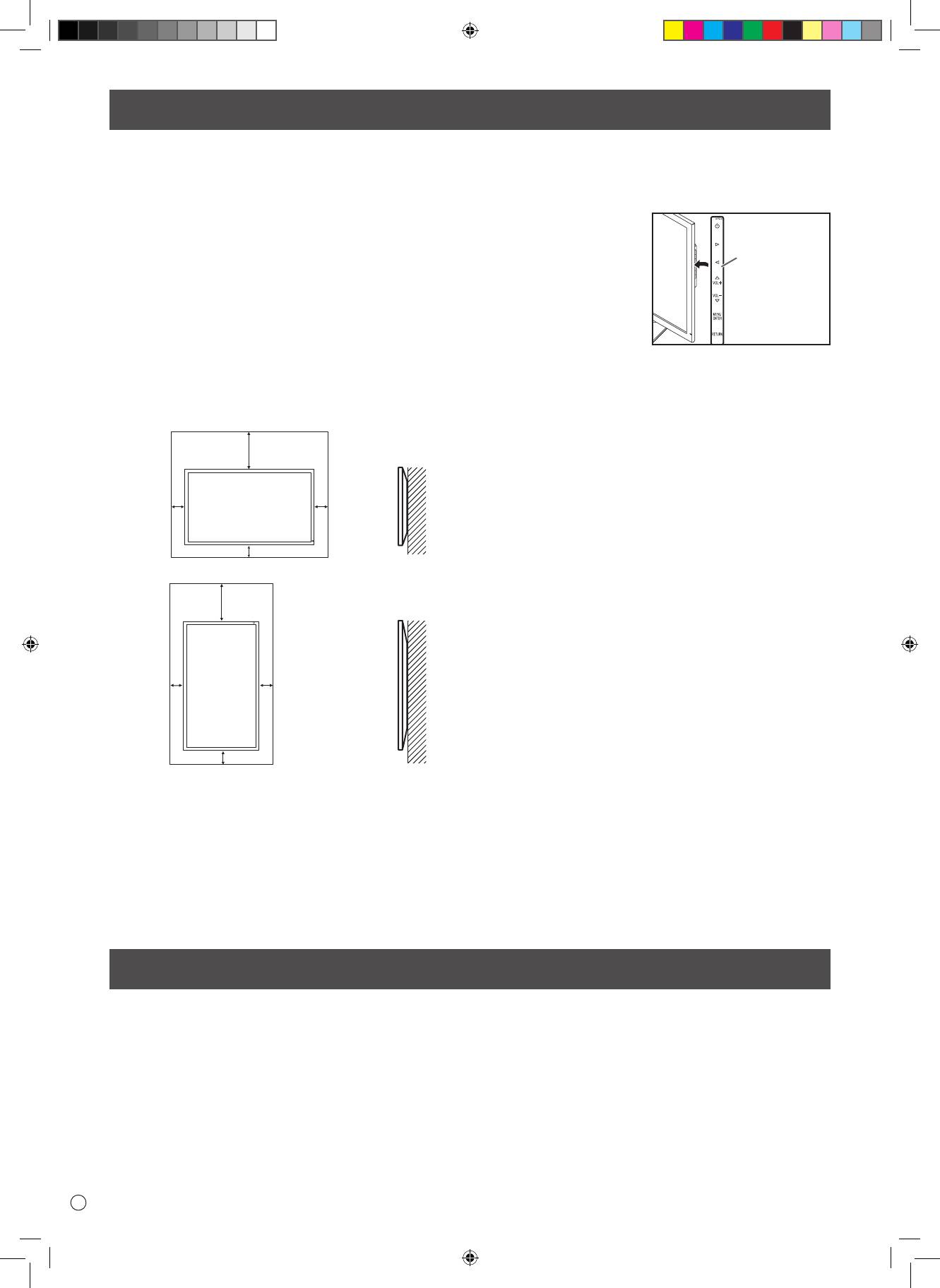
I
4
PRECAUZIONI DI MONTAGGIO
• Questo prodotto è stato progettato per uso interno.
• Per l'installazione è richiesto un supporto di montaggio
compatibile VESA.
• Per installare ad un piedistallo o a parete, o per spostare il
monitor, chiedete consiglio al vostro rivenditore.
•
Il montaggio del monitor a parete richiede una certa esperienza
e il lavoro deve essere fatto solamente da un tecnico ASUS
autorizzato. Non eseguite mai questa operazione da soli. ASUS
non si riterrà responsabile di eventuali incidenti o infortuni causati
da un montaggio o una manovra errati.
• Usate il monitor con la sua supercie perpendicolare al piano
d'appoggio. Se necessario il monitor può essere inclinato di 25
gradi all'indietro o di 5 gradi in avanti.
• Questo monitor deve essere usato in temperature comprese tra
gli 0°C (32°F) e i 40°C (104°F). Lasciate spazio suciente attorno
al monitor per garantire una ventilazione adeguata.
Componenti in dotazione
For the monitor in landscape orientation
Unit: inch [cm]
7-7/8 [20]
*
2
2
[5]
[5]
2 [5]
For the monitor in portrait orientation
Unit: inch [cm]
7-7/8 [20]
*
2
2
[5]
[5]
2 [5]
• Non bloccate le prese d'aria. Se la temperatura all'interno
del monitor non fosse adeguata potrebbero vericarsi dei
malfunzionamenti.
• Non posizionate il monitor su alcuna sorgente di calore.
• Quando installate il monitor
in posizione orizzontale
potete attaccare al lato destro
l'adesivo con le indicazioni
dei pulsanti (Operation
buttons).
* Il monitor, durante il suo funzionamento, produce calore.
Se il monitor è installato a parete la stessa parete potrebbe
perdere colore o modicarsi visibilmente.
• Se per qualunque ragione non fosse possibile fornire suciente
spazio al monitor, o se la temperatura fosse all'esterno
dell'intervallo raccomandato 0°C (32°F) e i 40°C (104°F), sarà
necessario dotarsi di misure adeguate per assicurarsi che il
monitor non sia soggetto a temperature troppo alte o troppo
basse.
Se qualche componente non fosse incluso nella confezione contattate il vostro rivenditore.
* Monitor a cristalli liquidi: 1 * Cavo di alimentazione: 1 * Adattatore AC: 1
* Manuale d'installazione (questo manuale): 1 * Cavo DisplayPort: 1 * Adattatore RS-232C (Φ3.5 mini-jack): 1
* Base (per il piedistallo): 1 * Supporto (per il piedistallo): 1 * Piastra di ancoraggio (per il piedistallo): 1 (preinstallata sul monitor)
* Viti a testa conica (M4 x 6 senza rondelle): 5 * Viti (M4 x 10 con rondelle): 4 * Chiave esagonale: 1
* Serracavi: 2 * Serracavi (piccolo): 1 * Serracavi (grande): 2 * Adesivo orizzontale (Operation buttons): 1
Horizontal sticker
(Operation
buttons)
PQ321_Setup_IT.indb 4 06.06.2013 15:47:51 Uhr
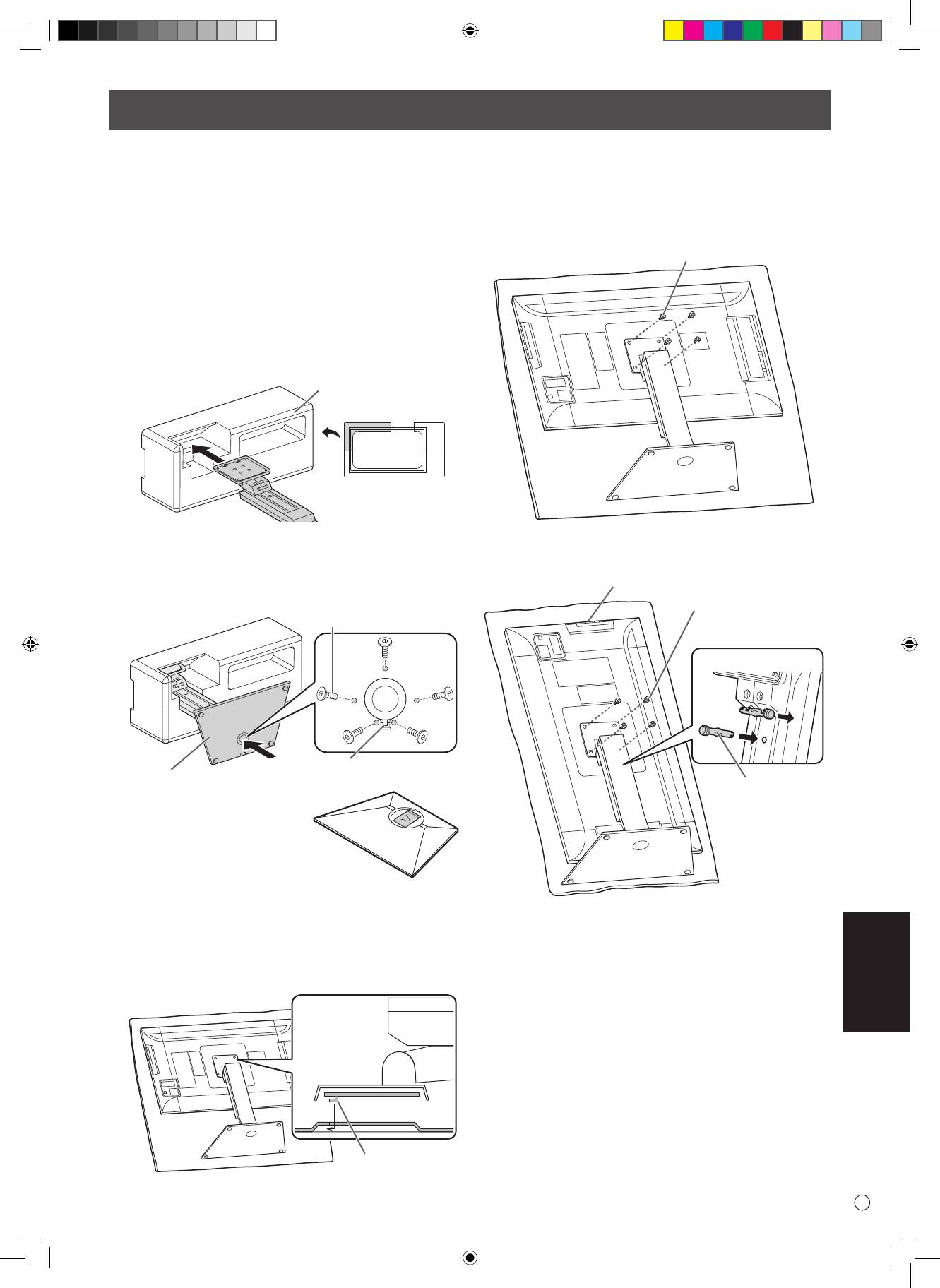
ITALIANO
5
I
Installare il piedistallo (in dotazione)
• Scollegate tutti i cavi collegati al monitor.
• Avvitate correttamente le viti d'installazione (in dotazione) con
la chiave esagonale (in dotazione).
• Assicuratevi di aver spazio suciente per l'operazione.
n
Attaccare il piedistallo
Rimuovete tutti i materiali usati per confezionare il prodotto
prima di cominciare.
Per evitare che il piano d'appoggio venga danneggiato dalla
base del piedistallo usate un tessuto morbido (ad es. una
coperta) e posizionate il monitor su di esso.
1. Inserite il supporto del piedistallo nel materiale
d'imballaggio (in alto a sinista) come da gura.
Packing material
(upper left)
Front
2. Tenendo fermo il supporto del piedistallo con una mano
ssate la base con le 5 viti a testa conica in dotazione (M4 x
6 senza rondelle).
Usate la chiave esagonale inclusa nella confezione.
Countersunk screw
(M4 x 6 without washers)
Insert by hooking the tab
Pedestal
* Nel foro rotondo della base del
piedistallo troverete un sacchetto
contenente le viti e la chiave
esagonale.
3. Posizionate un panno morbido (ad es. una coperta) su una
supercie stabile e omogenea per evitare di danneggiare
il pannello LCD e posizionate il monitor a faccia in giù su di
esso.
4. Attaccate il piedistallo al monitor.
Agganciate la fessura del supporto (sul monitor) alla linguetta
del piedistallo.
Tab
5. Assicurate il piedistallo al monitor con le 4 viti in dotazione
(M4 x 10 con rondelle).
Usate la chiave esagonale inclusa nella confezione.
• Orizzontale
Screw
(M4 x 10 with washers)
• Verticale
Operation buttons
Screw
(M4 x 10 with washers)
Front
1
2
Fixing pin
ATTENZIONE!
* Se intendete montare il monitor in verticale estraete il perno
di ssaggio dalla posizione 1 e inseritelo nella posizione 2.
* Per rimuovere il piedistallo posizionate il monitor e il
piedistallo come mostrato nella gura precedente e
rimuovete le viti.
ATTENZIONE!
• Seguite queste regole quando installate il monitor in verticale.
Se non lo fate potreste danneggiare il monitor o incorrere in un
malfunzionamento.
- Installate il monitor in modo che i pulsanti operativi siano
collocati in alto.
- Impostate la voce PORTRAIT alla voce MONITOR del menu
MONITOR.
(Vedi MANUALE UTENTE.)
PQ321_Setup_IT.indb 5 06.06.2013 15:47:52 Uhr
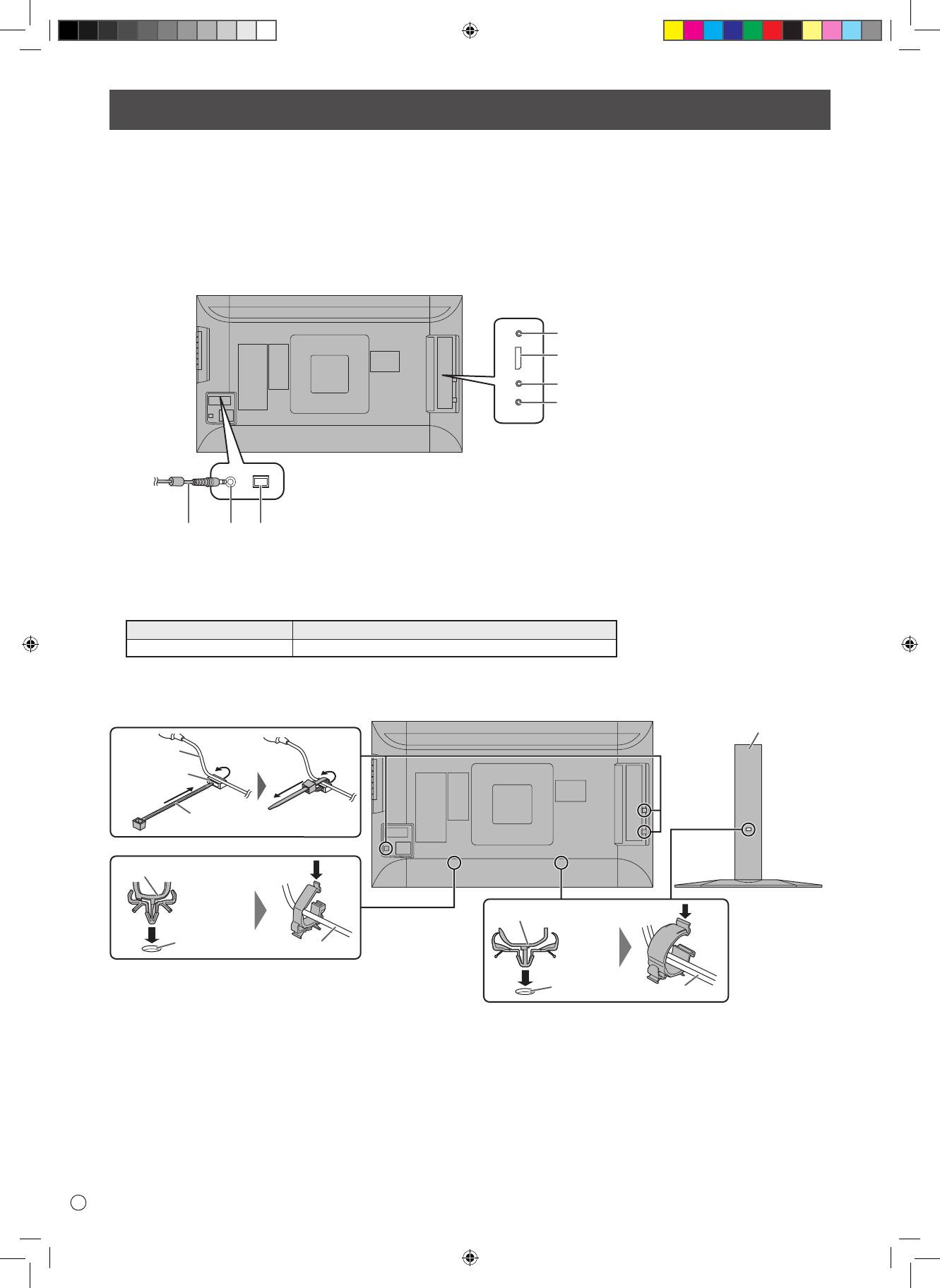
I
6
Connessioni
• Assicuratevi di posizionare l'interruttore principale su OFF e di scollegare il cavo di alimentazione prima di collegare/scollegare
qualsiasi altro cavo. Leggete il manuale del dispositivo che intendete collegare al monitor.
• Fate attenzione a non confondere i terminali di ingresso con i terminali di uscita quando state collegando uno o più cavi. In caso di
errore potreste causare malfunzionamenti e altri problemi.
• Non usate cavi con terminali danneggiati o deformati. Cavi in condizioni non ottimali potrebbero danneggiare il monitor.
• Le immagini potrebbero non essere visualizzate correttamente a seconda del tipo di computer (in particolare la scheda video), cavo o
periferica connesso.
4
5
6
7
For power outlet
23
1
• Selezionate l'ingresso audio che volete usare per ciascuna modalità di input nella sezione AUDIO SELECT del menu SETUP. Di seguito
le impostazioni predenite di fabbrica.
Ingresso video Ingresso audio (predenito)
DisplayPort Ingresso DisplayPort
• I cavi collegati al retro del monitor possono essere ordinati con un serracavi.
Fissate il serracavi agli appositi ganci che trovate nella parte posteriore del monitor e del piedistallo e poi ssate i cavi ad esso.
Stand
Cable
Cable clamp
attachment
Cable clamp
Cable clamp (small)
Cable clamp (large)
Cable clamp
attachment
Cable
Cable clamp
attachment
Cable
ATTENZIONE!
1. Interruttore principale
2. Ingresso alimentazione AC
3. Cavo di alimentazione (in dotazione)
4. Ingresso RS-232C
5. Ingresso DisplayPort
6. Ingresso audio
7. Uscita cue
NOTA:
• DisplayPort® è un marchio registrato di Video Electronics Standards Association.
PQ321_Setup_IT.indb 6 06.06.2013 15:47:52 Uhr
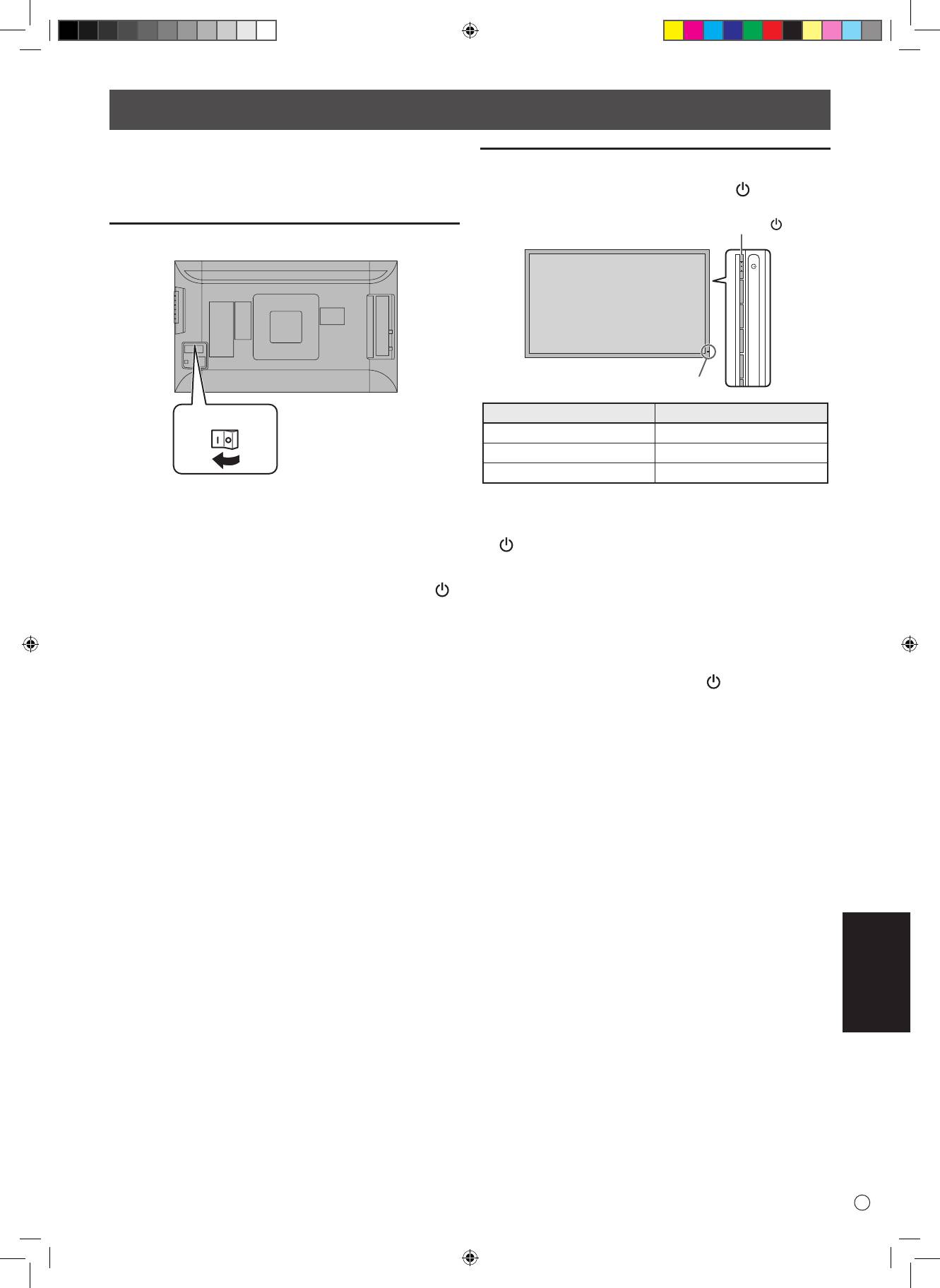
ITALIANO
7
I
Accensione/Spegnimento
Accensione/spegnimento
Premete il pulsante di accensione/spegnimento ( ) per accendere
o spegnere il monitor.
Power button ( )
Power LED
• Accendete il monitor prima di accendere il PC o il dispositivo di
riproduzione.
Attivare l'alimentazione principale
Stato LED di alimentazione Stato corrispondente monitor
Verde Acceso
O Spento (Standby)
Arancione Attesa segnale in ingresso
• Quando agite sull'interruttore principale di alimentazione
( ) aspettate almeno 5 secondi prima di azionarlo di nuovo. Un
intervallo più corto potrebbe causare un malfunzionamento.
• Quando l'interruttore principale di alimentazione è posizionato
su OFF il monitor non può essere acceso tramite il pulsante di
accensione/spegnimento.
• Quando il monitor è in attesa del segnale in ingresso, e premete
il pulsante di accensione/spegnimento ( ), il monitor entrerà
in standby.
Main power switch
ATTENZIONE!
ATTENZIONE!
ATTENZIONE!
• L'alimentazione principale può essere attivata/disattivata
tramite il relativo interruttore. Non collegate/scollegate il cavo
di alimentazione quando l'interruttore principale è posizionato
su ON.
• Quando agite sull'interruttore principale di alimentazione ( )
NOTA:
aspettate almeno 5 secondi prima di azionarlo di nuovo.
• Per una completa disconnessione dalla rete elettrica scollegate
il cavo di alimentazione dalla presa di corrente.
PQ321_Setup_IT.indb 7 06.06.2013 15:47:53 Uhr
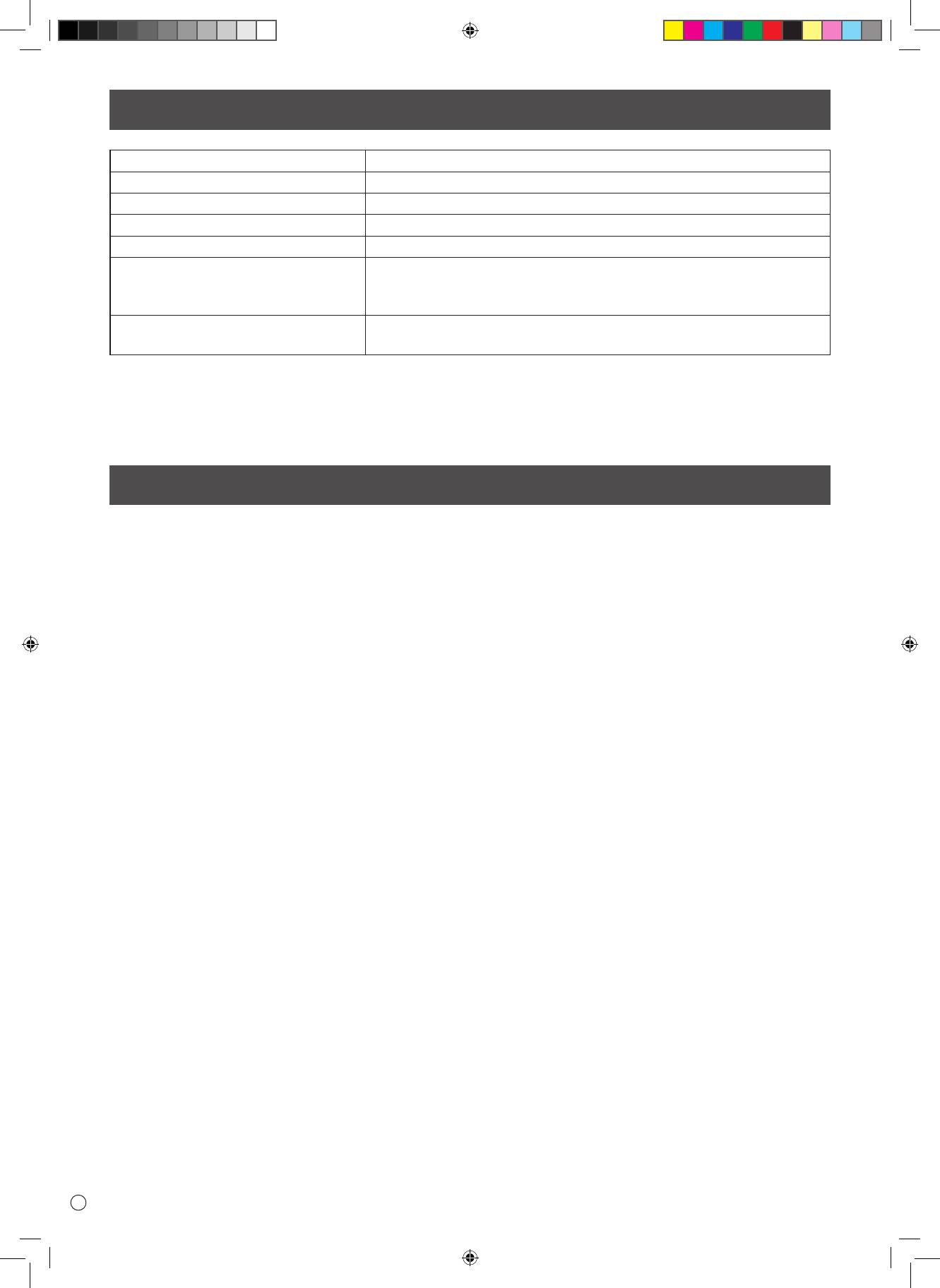
Speciche
Modello PQ321QE
Requisiti di alimentazione AC 100 V - 240 V, 50/60 Hz (se usate l'adattatore AC in dotazione)
Temperatura di esercizio da 0°C a 40°C (da 32°F a 104°F)
Umidità di esercizio dal 20% all'80% (senza formazione di condensa)
Consumo energetico 99 W* (se usate l'adattatore AC in dotazione)
Dimensioni Dimensioni siche con piedistallo (LxAxP) 750 x 489 x 256 mm
Dimensioni siche senza piedistallo (LxAxP) 750 x 441 x 35 mm
Dimensioni della confezione (LxAxP) 990 x 558 x 230 mm
Peso Peso netto (stimato) 13 Kg
Peso lordo (stimato) 17 Kg
* Quando usate il monitor in congurazione DC19 V: 88 W
A sostegno della sua politica di continuo miglioramento ASUS si riserva il diritto di apportare modiche all'aspetto e alle speciche per il miglioramento
del prodotto senza preavviso. Le speciche che indichiamo in merito alle prestazioni sono i valori nominali delle unità in produzione. Potrebbero esserci
alcune variazioni di questi valori nella singola unità.
Precauzioni per il montaggio
• Durante l'installazione, smontaggio o spostamento del monitor, assicuratevi che questo sia trasportato da almeno 2 persone.
• Accertatevi di usare una staa per il montaggio a parete adeguata a sostenere il vostro monitor.
• Questo monitor è stato pensato per essere installato ad una parete di cemento o ad una colonna. Se la vostra parete è in cartongesso/
plastica/legno potrebbero essere necessari lavori di rinforzo prima di cominciare l'installazione.
Il muro scelto per l'installazione deve essere in grado di reggere almeno 4 volte il peso totale di monitor e staa per il montaggio.
Individuate il metodo di installazione più adatto per il materiale e la struttura.
• Se usate una staa per il montaggio compatibile con lo standard VESA usate viti M6 che sporgano dagli 8 mm ai 10 mm oltre alla
staa di montaggio.
• Non usate un cacciavite a percussione.
• Quando spostate il monitor assicuratevi di reggerlo dalla parte inferiore e dalla parte laterale. Non reggete il monitor tramite il
pannello LCD o dagli angoli. Potreste danneggiare il prodotto o ferirvi.
• Non utilizzate fori delle viti diversi dai fori VESA per l'installazione.
I
8
PQ321_Setup_IT.indb 8 06.06.2013 15:47:53 Uhr
www.asus.com


