
Asus P5QLD PRO: instruction
Class: Computer equipment, hardware, accessories
Type: Motherboard
Manual for Asus P5QLD PRO
Table of contents
- Français

U4881
P5QLD PRO
Motherboard
Quick Start Guide
Français
Deutsh
Italiano
Español
Русский
Português
Polski
Česky
Magyar
Български
Română
Srpski
Türkçe
First Edition
July 2009
Copyright © 2009 ASUSTeK COMPUTER INC.
All Rights Reserved
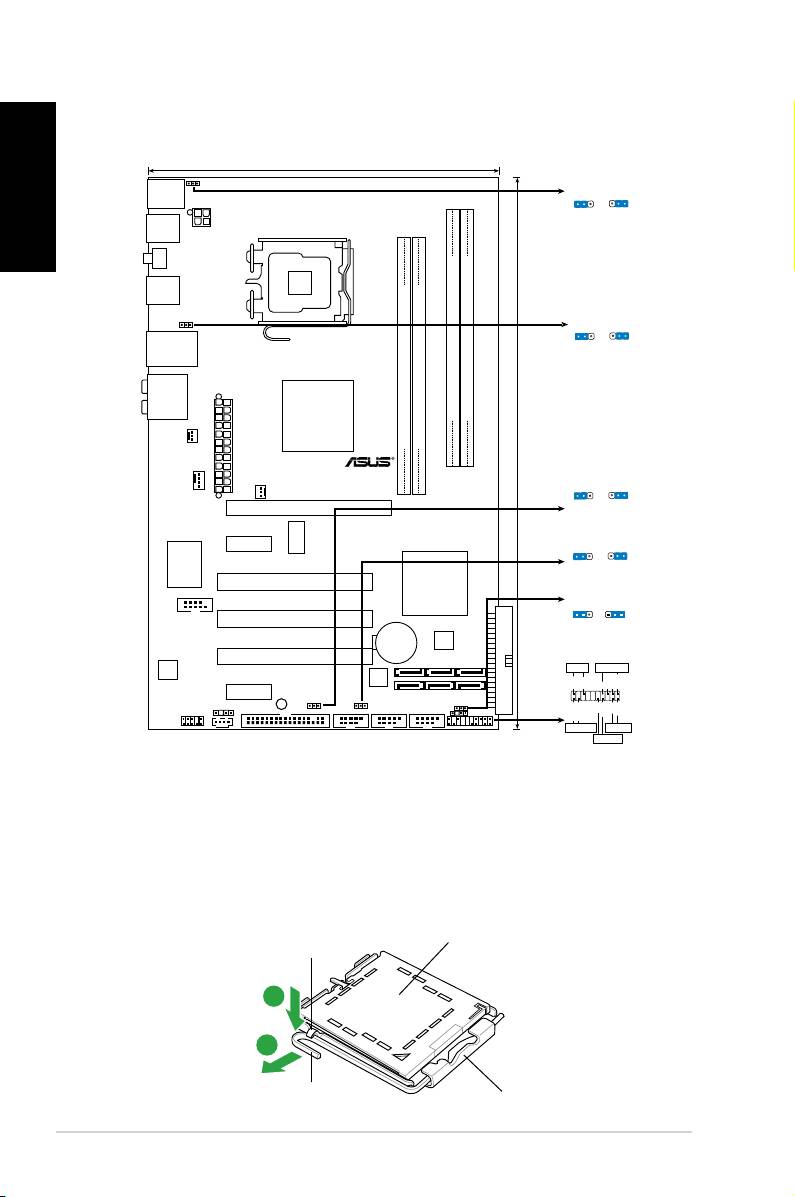
1. Schéma de la Carte Mère
Français
2. Installation du Processeur
®
Suivez cette procédure pour installer un processeur Intel
dans le paquet
775-land.
1. Appuyez sur le levier de chargement avec votre pouce (A), puis
déplacez-le vers le gauche (B) jusqu’à ce qu’il soit détaché de la
languette de retenue.
Capuchon PnP
Ce côté du boîtier cam doit
être face à vous.
ASUS P5QLD PRO
2
19.3cm (7.6in)
PS2_USBPW56
PS/2KBMS
PS2_USBPW56
T:Mouse
1
2
2
3
B:Keyboard
+5V
+5VSB
(D
e
fa
u
lt
)
USB56
ATX12V
LGA775
SPDIF_O1
USB34
USBPW1-4
1
2
2
3
+5V
+5VSB
LAN1_USB12
(Defau
lt
)
AUDIO
Intel
DDR2 DIMMB1 (64 bit,240-pin module)
DDR2 DIMMB2 (64 bit,240-pin module)
P43
DDR2 DIMMA1 (64 bit,240-pin module)
DDR2 DIMMA2 (64 bit,240-pin module)
CHA_FAN
TXPWR
EA
30.5cm (12in)
P5QLD PRO
USBPW1112
CPU_FAN
1
2
2
3
PWR_FAN
+5
V
+5VSB
PCIEX16
(D
e
fa
u
lt
)
ICS
PCIEX1_1
USBPW7-10
9LPRS916JGLF
1
2
2
3
+5
V
+5VSB
(Defau
lt
)
Super I/O
Intel
PCI1
ICH10
CLRTC
1 2 2 3
COM1
PCI2
Normal
Clear RTC
(Default)
CR2032 3V
4Mb
Lithium Cell
BIOS
CMOS Power
PCI3
PANEL
ALC
PLED SPEAKER
1200
Ground
JMB368
PLED+
PLED-
Ground
Speaker
+5V
PCIEX1_2
SB_PWR
SPDIF_OUT
USBPW1112
IDE_LED+
IDE_LED-
PWR
Ground
Reset
Ground
CD
USBPW7-10
CLRTC
AAFP
FLOPPY
USB1112 USB78 USB910
CHASSIS
PANEL
+IDE_LED
RESET
PWRSW
*
Requires an ATX power supply
Languette de
retenue
A
B
Levier de
chargement
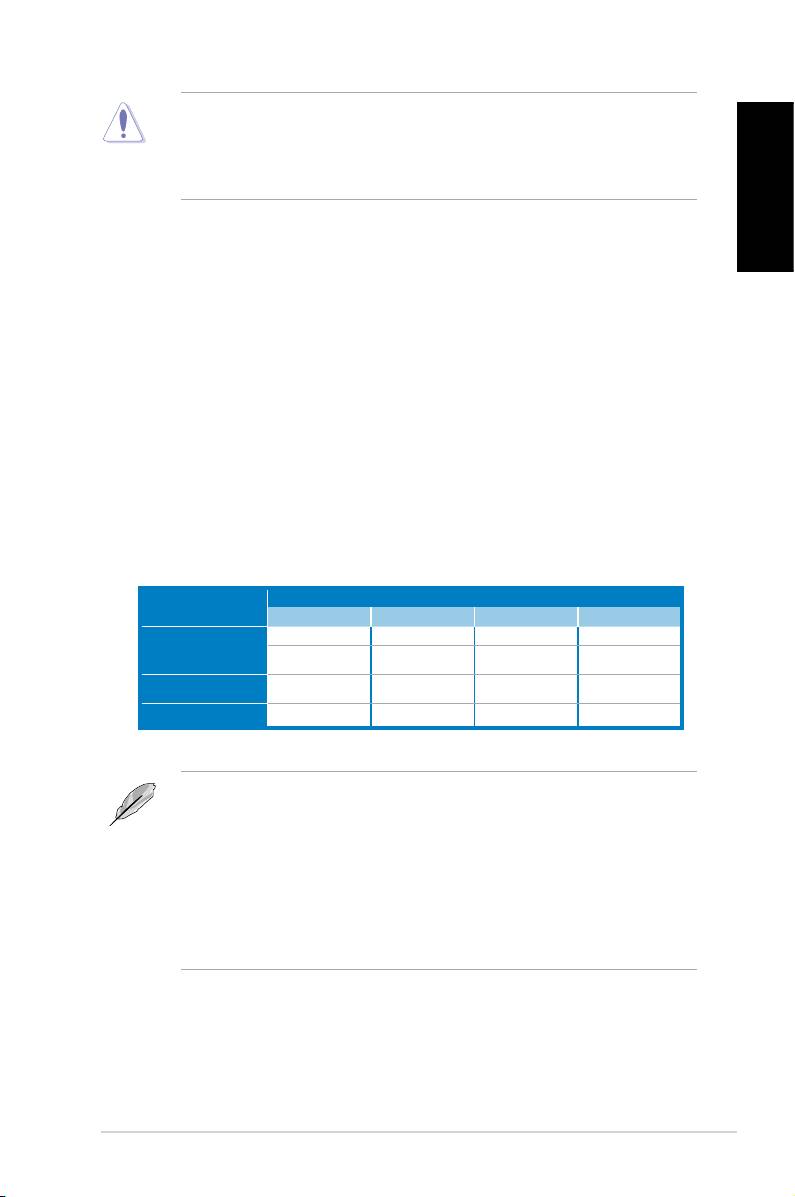
• Pour éviter d’endommager les broches du socle, n’enlevez le capuchon PnP
que si vous installez un processeur.
• Veuillez conserver le capuchon pour le renvoi du produit.
• La garantie du produit ne couvre pas des dommages liés aux broches du
support.
Français
2. Soulevez le levier de chargement en direction de la èche à un angle
de 135º.
3. Soulevez la plaque de chargement avec votre pouce et votre index à
un angle de 100º, puis poussez le capuchon PnP pour le faire sortir de
la fenêtre de la plaque de chargement.
4. Placez le processeur sur le socle, en vériant que le triangle doré est
bien sur le coin inférieur gauche du socle. Le détrompeur du socle doit
s’insérer dans l’encoche du processeur.
5. Fermez la plaque de chargement, puis poussez le levier de chargement
jusqu’à ce qu’il s’enclenche dans la languette de retenue.
3. Mémoire Système
Vous pouvez installer des modules DIMM DDR2 non ECC non tamponnés
de 512 Mo, 1 Go, 2 Go et 4Go dans les socles DIMM en utilisant les
congurations de mémoire données dans cette section.
Emplacements
Mode
DIMM_A1 DIMM_A2 DIMM_B1 DIMM_B2
- - Occupé -
Single canal
Occupé - - -
Double canal (1)
Occupé -
Occupé
-
Double canal (2)
Occupé Occupé Occupé Occupé
• Pour une conguration double canal, la taille totale des modules de mémoire
installés par canal doit être identique (DIMM_A1 = DIMM_B1).
• Installez toujours des DIMM dotés de la même valeur CAS latency. Pour une
compatibilité optimale, il est recommandé d’acheter des modules mémoire
de même marque.
• Lorsque vous installez un montant total de mémoire de 4 Go ou plus, les
®
systèmes d’exploitation Windows
32 bits peuvent reconnaître moins de 3
Go de mémoire. Il est donc recommandé d’installer un montant de mémoire
inférieur à 3 Go.
ASUS P5QLD PRO
3
4. Informations du BIOS
Français
La ROM Flash sur la carte mère contient un BIOS. Vous pouvez mettre à jour les
informations du BIOS ou congurer ses paramètres en utilisant l’utilitaire de Setup
du BIOS. Les écrans BIOS comprennent les clés de navigation et une courte aide
en ligne pour vous guider. Si vous rencontrez des problèmes liés au système ou si
le système devient instable une fois que vous aurez modié les paramètres, chargez
les Paramètres de Réglage Par Défaut. Rendez visite au site web d’ASUS (www.
asus.com) pour obtenir les mises à jour.
Pour accéder au Setup lors du démarrage:
Pressez <Suppr> lors du Test Automatique de Démarrage (POST : Power-On Self
Test ). Si vous ne pressez pas la touche <Suppr>, le POST continuera son programme
de test.
Pour accéder au Setup après le POST:
• Redémarrez le système en pressant <Ctrl> + <Alt> + <Suppr>, puis pressez
<Suppr> lors du POST, ou
• Pressez le bouton de réinitialisation situé sur le châssis puis pressez <Suppr>
lors du POST, ou
• Eteignez et rallumez le système puis pressez <Suppr> lors du POST.
Pour mettre à jour le BIOS avec AFUDOS:
Bootez le système à l’aide d’une disquette qui contient le dernier chier BIOS. A
l’ouverture de la session DOS, saisissez afudos /i<lename.rom> puis pressez Entrée.
Rebootez le système lorsque la mise à jour sera terminée.
Pour mettre à jour le BIOS avec ASUS EZ Flash 2:
Bootez le système puis pressez <Alt> + <F2> lors du POST pour lancer EZ Flash 2.
Insérez une disquette ou un disque ash USB qui contient le dernier chier BIOS. EZ
Flash 2 effectuera le processus de mise à jour du BIOS et rebootera automatiquement
le système une fois qu’il aura terminé.
Pour récupérer le BIOS avec CrashFree BIOS 3:
Démarrez le système. Si le BIOS est corrompu, l’outil de récupération automatique de
CrashFree BIOS 3 vous demande d’insérer une disquette, le DVD de support ou un
disque ash USB contenant le BIOS d’origine ou sa dernière mise à jour. Redémarrez
le système une fois le BIOS récupéré.
5. Informations sur le DVD technique
®
Cette carte mère supporte les systèmes d’exploitation Windows
XP / Vista. Installez
toujours la dernière version d’OS et les mises à jour correspondantes de manière à
maximiser les caractéristiques de votre hardware.
Le DVD technique livré avec la carte mère contient des logiciels et de nombreux
pilotes et utilitaires qui améliorent les fonctions de la carte mère. Pour utiliser le DVD
technique, insérez-le simplement dans votre lecteur DVD-ROM. si Autorun est activé
dans votre ordinateur, le DVD afche automatiquement l’écran de bienvenue et les menus
d’installation. Si l’écran de bienvenue n’apparaît pas automatiquement, localisez le chier
ASSETUP.EXE dans le dossier BIN du DVD technique et double-cliquez dessus.
ASUS P5QLD PRO
4

1. Motherboard-Layout
Deutsch
2. Installieren der CPU
®
Folgen Sie diesen Schritten, um einen Intel
Prozessor auf dem LGA 775-Sockel
zu installieren.
1. Drücken Sie den Ladehebel mit Ihrem Daumen (A) und schieben ihn nach links
(B), bis er von dem Halteriegel losgelassen wird.
Halteriegel
PnP-Kappe
A
B
Ladehebel
Diese Seite der Cam-Box
sollte zu Ihnen zeigen.
ASUS P5QLD PRO
5
19.3cm (7.6in)
PS2_USBPW56
PS/2KBMS
PS2_USBPW56
T:Mouse
1
2
2
3
B:Keyboard
+5V
+5VSB
(D
e
fa
u
lt
)
USB56
ATX12V
LGA775
SPDIF_O1
USB34
USBPW1-4
1
2
2
3
+5V
+5VSB
LAN1_USB12
(Defau
lt
)
AUDIO
Intel
DDR2 DIMMB1 (64 bit,240-pin module)
DDR2 DIMMB2 (64 bit,240-pin module)
P43
DDR2 DIMMA1 (64 bit,240-pin module)
DDR2 DIMMA2 (64 bit,240-pin module)
CHA_FAN
TXPWR
EA
30.5cm (12in)
P5QLD PRO
USBPW1112
CPU_FAN
1
2
2
3
PWR_FAN
+5
V
+5VSB
PCIEX16
(D
e
fa
u
lt
)
ICS
PCIEX1_1
USBPW7-10
9LPRS916JGLF
1
2
2
3
+5
V
+5VSB
(Defau
lt
)
Super I/O
Intel
PCI1
ICH10
CLRTC
1 2 2 3
COM1
PCI2
Normal
Clear RTC
(Default)
CR2032 3V
4Mb
Lithium Cell
BIOS
CMOS Power
PCI3
PANEL
ALC
PLED SPEAKER
1200
Ground
JMB368
PLED+
PLED-
Ground
Speaker
+5V
PCIEX1_2
SB_PWR
SPDIF_OUT
USBPW1112
IDE_LED+
IDE_LED-
PWR
Ground
Reset
Ground
CD
USBPW7-10
CLRTC
AAFP
FLOPPY
USB1112 USB78 USB910
CHASSIS
PANEL
+IDE_LED
RESET
PWRSW
*
Requires an ATX power supply
• Um Schäden an den Sockelpolen zu vermeiden, entfernen Sie bitte die PnP-
Kappe nicht vor dem Beginn der CPU-Installation.
• Bitte bewahren Sie die Abdeckung für den Fall einer Produktrückgabe auf.
• Die Garantie des Produkts deckt nicht die Schäden an Sockelpolen.
2. Heben Sie den Ladehebel in Pfeilrichtig bis zu einem Winkel von 135 Grad
hoch.
3. Heben Sie die Ladeplatte mit dem Daumen und dem Zeigenger bis zu
einem Winkel von 100 Grad hoch. Drücken Sie die PnP-Kappe von der
Deutsch
Ladeplattenaussparung, um sie zu entfernen.
4. Legen Sie die CPU auf den Sockel. Richten Sie dabei das goldene Dreieck
auf die untere linke Ecke des Sockels aus. Die Sockelausrichtungsmarkierung
muss in die CPU-Kerbe einpassen.
5. Machen Sie die Ladeplatte zu und drücken dann den Ladehebel, bis er in den
Halteriegel einrastet.
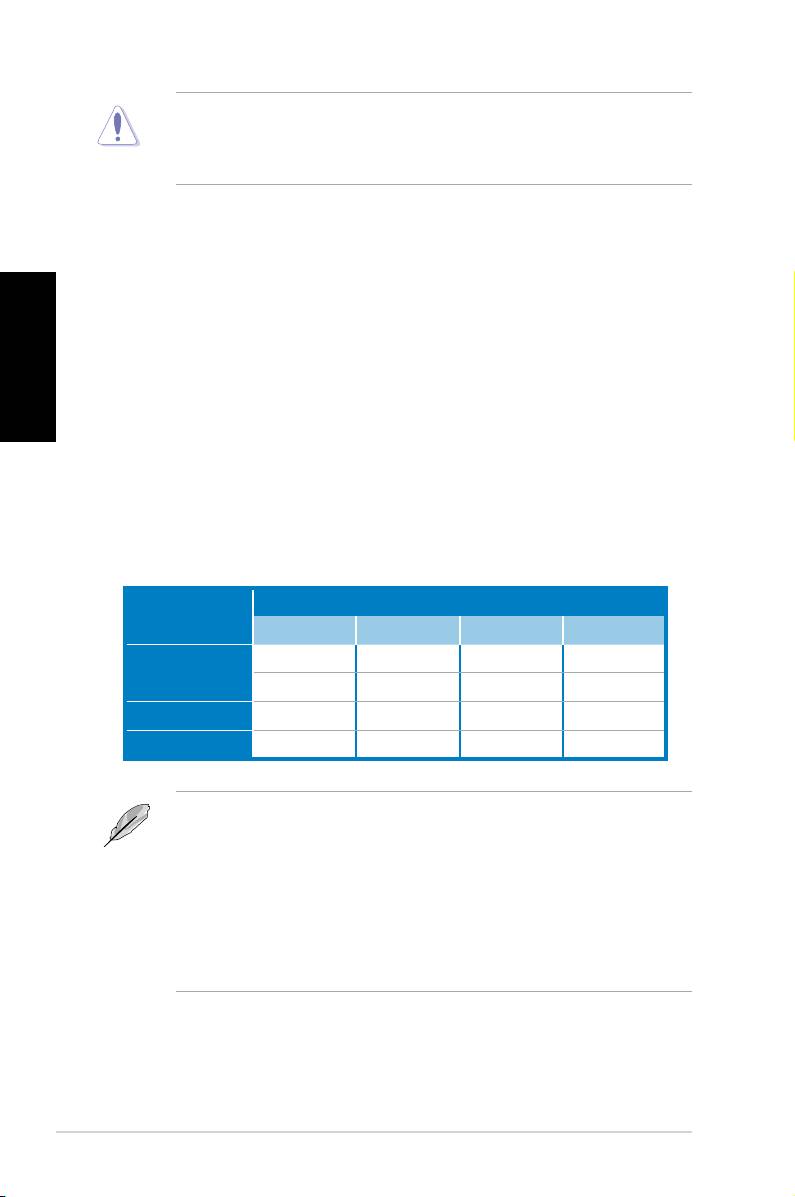
3. Arbeitsspeicher
Sie können 512 MB, 1 GB, 2 GB und 4 GB ungepufferte nicht-ECC DDR2 DIMMs in
den DIMM-Sockeln installieren.
Sockets
Modus
DIMM_A1 DIMM_A2 DIMM_B1 DIMM_B2
- - Installiert -
Ein-Kanal
Installiert - - -
Dual-Kanal (1) Installiert - Installiert -
Dual-Kanal (2) Installiert Installiert Installiert Installiert
• Bei Dual-Channel-Konfigurationen muss die Gesamtgröße der in den
jeweiligen Kanälen installierten Speichermodule identisch sein (DIMM_A1 =
DIMM_B1).
• Installieren Sie immer DIMMs mit der selben CAS-Latenz. Für eine optimale
Kompatibilität wird empfohlen, die Arbeitsspeichermodule von dem selben
Anbieter zu kaufen.
• Bei der Installation von 4GB Speicher oder mehr werden unter Windows
32-Bit-Betriebssystemen u.U. nur 3GB erkannt, daher wird empfohlen, nicht
mehr als 3GB Arbeitsspeicher zu installieren.
ASUS P5QLD PRO
6
4. BIOS-Informationen
Das BIOS ist in einem Flash-ROM auf dem Motherboard gespeichert. Sie können
mit Hilfe des BIOS-Setupprogramms die BIOS-Informationen aktualisieren oder die
Parameter kongurieren. Auf den BIOS-Seiten nden Sie Navigationstasten und
eine kurze Online-Hilfe. Laden Sie bitte die Standardwerte (Setup-Defaults), wenn
Systemprobleme auftreten oder das System unstabil geworden ist, nachdem die
Einstellungen geändert wurden. Besuchen Sie die ASUS-Website (www.asuscom.
de/bios) für die jeweils aktuellste BIOS-Version.
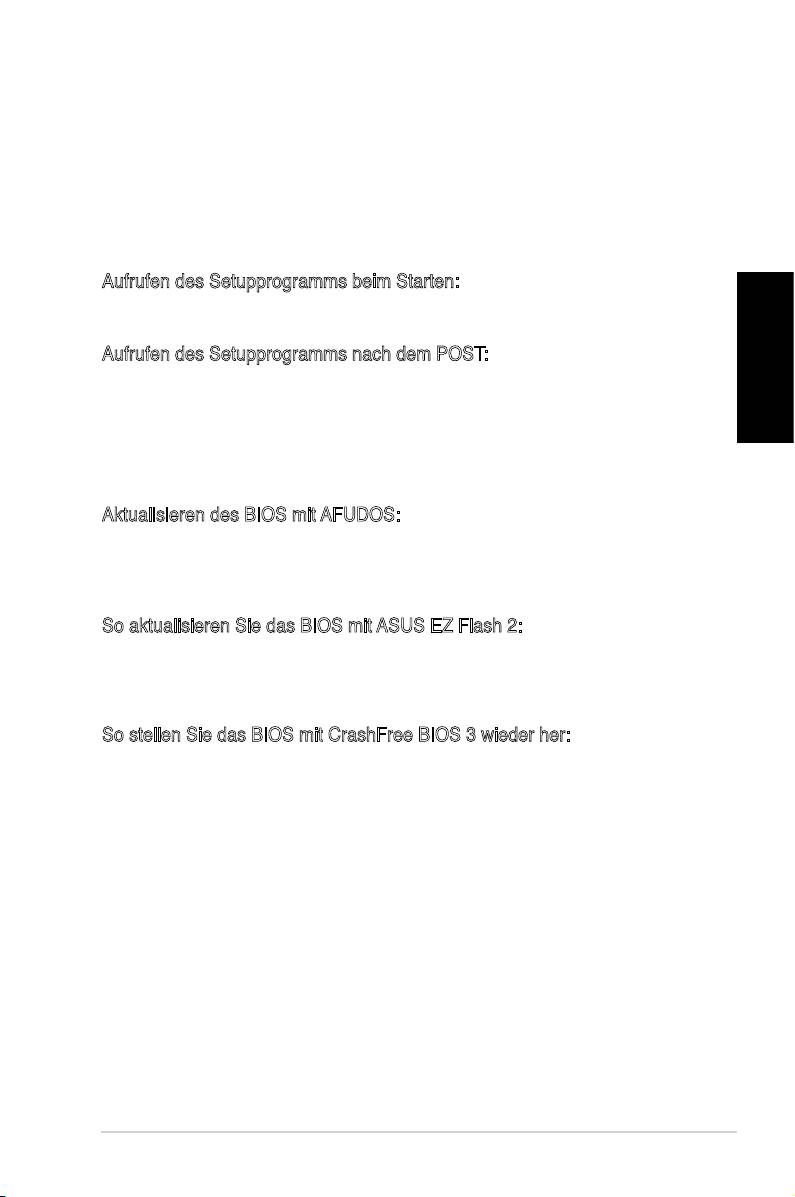
Aufrufen des Setupprogramms beim Starten:
Drücken Sie die Taste <Entf> während des Einschaltselbsttests (POST); ansonsten
setzt der POST seine Testroutinen fort.
Aufrufen des Setupprogramms nach dem POST:
• Starten Sie das System erneut, indem Sie <Strg> + <Alt> + <Entf> drücken.
Deutsch
Drücken Sie anschließend <Entf> während des POST.
• Oder drücken Sie die Reset-Taste am Computergehäuse. Drücken Sie
anschließend <Entf> während des POST.
• Oder schalten Sie das System aus und dann wieder ein. Drücken Sie anschließend
<Entf> während des POST.
Aktualisieren des BIOS mit AFUDOS:
Booten Sie das System von einer Diskette, die die neueste BIOS-Datei enthält.
Tippen Sie in die DOS-Eingabeaufforderung afudos /i<lename.rom> ein und
drücken anschließend die Eingabetaste. Starten Sie das System neu, nachdem die
Aktualisierung vervollständigt wurde.
So aktualisieren Sie das BIOS mit ASUS EZ Flash 2:
Starten Sie das System und drücken Sie <Alt> + <F2> während des POST, um EZ
Flash 2 zu starten. Legen Sie eine Diskette mit der neuesten BIOS-Datei ein. EZ
Flash 2 aktualisiert das BIOS und startet automatisch das System neu, wenn die
Aktualisierung beendet ist.
So stellen Sie das BIOS mit CrashFree BIOS 3 wieder her:
Starten Sie das System. Falls die BIOS-Datei beschädigt ist, sucht das CrashFree
BIOS 3-Wiederherstellungsprogramm nach einer Diskette oder DVD, mit der das BIOS
wieder hergestellt werden kann. Legen Sie die Support-DVD des Motherboards, oder
eine Diskette mit der ursprünglichen oder einer neueren BIOS-Datei ein. Starten Sie
das System neu, wenn das BIOS wieder hergestellt ist.
5. Informationen über die Software Support DVD
®
Das Motherboard unterstützt die Windows
XP / Vista-Betriebssysteme. Verwenden
Sie bitte immer die jeweils letzte Version des Betriebssystems und führen ggf. die
notwendigen Aktualisierungen durch, um die maximale Leistung Ihrer Hardware zu
erhalten.
Die dem Motherboard beigefügte Support DVD beinhaltet nützliche Software und
einige Utility-Treiber, die die Funktionen des Motherboards verstärken. Legen Sie
einfach die DVD in Ihr DVD-ROM-Laufwerk ein. Ein Begrüßungsbild, sowie ein
Installationsmenü, erscheinen automatisch, wenn die Autorun-Funktion in Ihrem
System aktiviert ist. Falls das Begrüßungsfenster nicht automatisch erscheint, klicken
Sie bitte doppelt auf die Datei ASSETUP.EXE in dem BIN-Ordner auf der Support
DVD, um das Installationsmenü aufzurufen.
ASUS P5QLD PRO
7
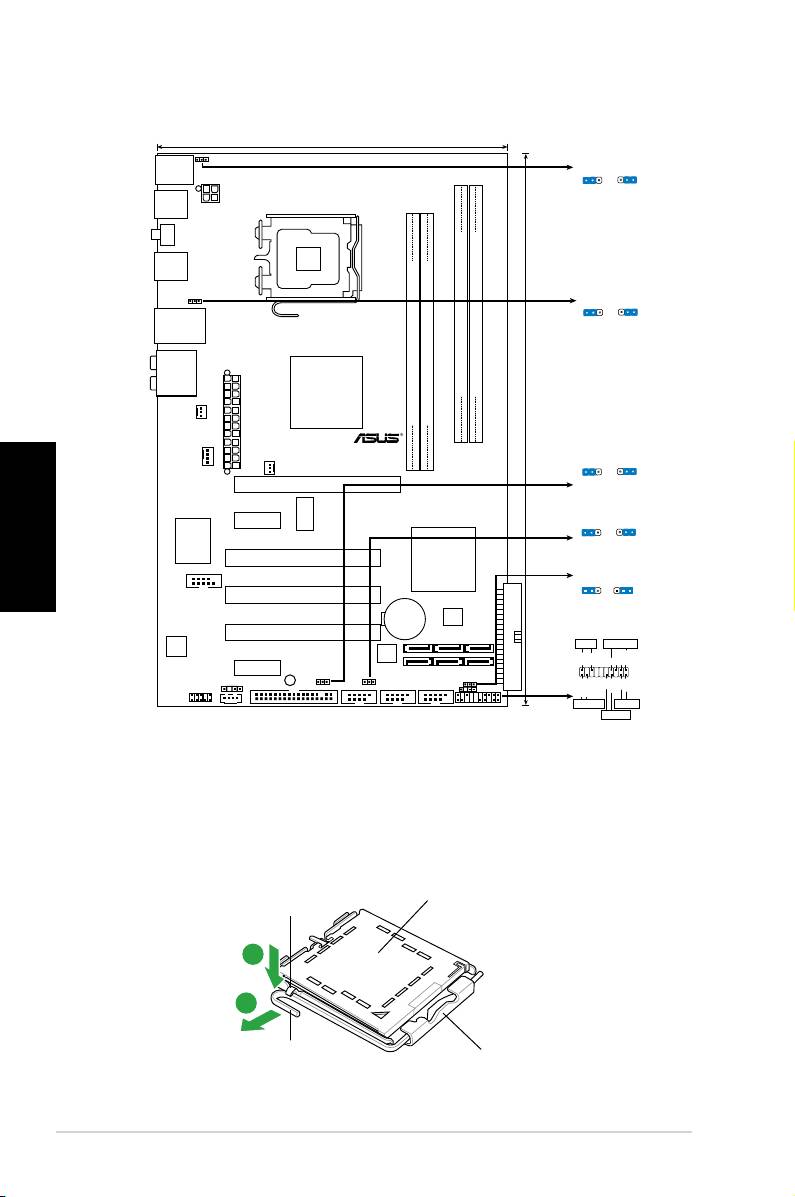
1. Diagramma disposizione scheda madre
Italiano
2. Installazione della CPU
®
Attenersi alle seguenti fasi per installare un processore Intel
nel pacchetto 775.
1. Premere la levetta di carico con il pollice (A), poi spostarla e sinistra (B) nché
è liberata dalla linguetta di trattenimento.
Linguetta di
Copertura PnP
trattenimento
A
B
Questo lato del modulo deve
Levetta di
essere rivolto verso sé stessi.
carico
ASUS P5QLD PRO
8
19.3cm (7.6in)
PS2_USBPW56
PS/2KBMS
PS2_USBPW56
T:Mouse
1
2
2
3
B:Keyboard
+5V
+5VSB
(D
e
fa
u
lt
)
USB56
ATX12V
LGA775
SPDIF_O1
USB34
USBPW1-4
1
2
2
3
+5V
+5VSB
LAN1_USB12
(Defau
lt
)
AUDIO
Intel
DDR2 DIMMB1 (64 bit,240-pin module)
DDR2 DIMMB2 (64 bit,240-pin module)
P43
DDR2 DIMMA1 (64 bit,240-pin module)
DDR2 DIMMA2 (64 bit,240-pin module)
CHA_FAN
TXPWR
EA
30.5cm (12in)
P5QLD PRO
USBPW1112
CPU_FAN
1
2
2
3
PWR_FAN
+5
V
+5VSB
PCIEX16
(D
e
fa
u
lt
)
ICS
PCIEX1_1
USBPW7-10
9LPRS916JGLF
1
2
2
3
+5
V
+5VSB
(Defau
lt
)
Super I/O
Intel
PCI1
ICH10
CLRTC
1 2 2 3
COM1
PCI2
Normal
Clear RTC
(Default)
CR2032 3V
4Mb
Lithium Cell
BIOS
CMOS Power
PCI3
PANEL
ALC
PLED SPEAKER
1200
Ground
JMB368
PLED+
PLED-
Ground
Speaker
+5V
PCIEX1_2
SB_PWR
SPDIF_OUT
USBPW1112
IDE_LED+
IDE_LED-
PWR
Ground
Reset
Ground
CD
USBPW7-10
CLRTC
AAFP
FLOPPY
USB1112 USB78 USB910
CHASSIS
PANEL
+IDE_LED
RESET
PWRSW
*
Requires an ATX power supply

• Per evitare di danneggiare i pin, non rimuovere la copertura PnP salvo si stia
installando una CPU.
• Conservare il cappuccio per eventuali restituzioni del prodotto.
• La garanzia del prodotto non copre i danni ai pin della presa.
2. Sollevare la levetta di carico nella direzione indicata dalla freccia ad un anglo
di 135°.
3. Sollevare la placca di carico con il pollice e l’indice ad un angolo di 100º, poi
spingere la copertura PnP dalla placca di carico per rimuoverla.
4. Collocare la CPU sopra la presa, assicurandosi che il triangolo dorato si trovi
nell’angolo in basso a sinistra della presa. Il tasto di allineamento della presa
deve adattarsi alla dentellatura della CPU.
5. Chiudere la placca di carico, poi spingere la leva di carico nché scatta nella
linguetta di trattenimento.
3. Memoria di sistema
Nelle prese per DIMM, si possono installare moduli di memoria DIMM DDR non-ECC,
senza buffer, da 512 MB, 1 GB, 2 GB e da 4 GB.
Italiano
Prese
Modalità
DIMM_A1 DIMM_A2 DIMM_B1 DIMM_B2
- - Corredato -
Canale singolo
Corredato - - -
Canale doppio (1) Corredato - Corredato -
Canale doppio (2) Corredato Corredato Corredato Corredato
• Per la congurazione a canale doppio le dimensioni totali dei moduli di memoria
installati per canale devono essere uguali (DIMM_A1= DIMM_B1).
• Utilizzare e installare sempre moduli DIMM con la stessa latenza CAS. Per
poter garantire la perfetta compatibilità dei moduli, si raccomanda di utilizzare
moduli di memoria acquistati presso lo stesso venditore.
• Quando la capacità della memoria totale installata è uguale o superiore a
®
4GB, il sistema operativo Windows
32 bit potrebbe riconoscere solo meno di
3GB. Pertanto, si consiglia di installare memoria per una capacità complessiva
inferiore a 3GB.
ASUS P5QLD PRO
9

4. Informazioni sul BIOS
La Flash ROM sulla scheda madre contiene il BIOS. È possibile aggiornare le
informazioni del BIOS, o congurare i parametri utilizzando l’utilità di congurazione
BIOS Setup. La schermata BIOS include tasti di navigazione ed una concisa
guida in linea. Se si riscontrano problemi con il sistema, oppure se questo diventa
instabile dopo avere modicato le impostazioni, caricare le impostazioni predenite
di congurazione Setup Defaults. Visitare la pagina Web ASUS (www.asus.com) per
gli aggiornamenti.
Per accedere al Setup all’avvio:
Premere il tasto <Delete> durante il POST (Power On Self Test). Se non si preme il
tasto <Delete>, il POST continua le sue routine di diagnostica.
Per accedere al Setup dopo il POST:
• Riavviare il sistema premendo i tasti <Ctrl> + <Alt> + <Delete>, poi premere il
tasto <Delete> durante il POST, oppure
• Premere il tasto di ripristino sul telaio, poi premere il tasto <Delete> durante il
POST, oppure
• Spegnere e riaccendere il sistema e poi premere il tasto <Delete> durante il
Italiano
POST
Per aggiornare il BIOS con AFUDOS:
Avviare il sistema da un dischetto oppy che contenga il le BIOS più aggiornato. Al
prompt di DOS, scrivere: afudos /i<lename.rom> poi premere il tasto Enter / Invio.
Riavviare il sistema quando l’aggiornamento è completato.
Per aggiornare il BIOS con ASUS EZ Flash 2:
Avviare il sistema e premere <Alt>+<F2> durante il POST per avviare EZ Flash
2. Inserire un dischetto oppy che contenga il le BIOS più aggiornato. EZ Flash
2 esegue le procedure d’aggiornamento del BIOS e, una volta completato, riavvia
automaticamente il sistema.
Per ripristinare il BIOS con CrashFree BIOS 3:
Avviare il sistema. Se il BIOS è corrotto lo strumento di ripristino automatico di
CrashFree BIOS 3 cerca un dischetto oppy o un DVD per ripristinare il BIOS. Inserire
il DVD di supporto della scheda madre, oppure un dischetto oppy che contenga il le
BIOS originale o più aggiornato. Riavviare il sistema quando il BIOS è ripristinato.
5. Informazioni sul DVD di supporto al Software
®
Questa scheda madre supporta un sistema operativo (OS) Windows
XP / Vista.
Installate sempre l’ultima versione OS e gli aggiornamenti corrispondenti, in modo
da massimizzare le funzioni del vostro hardware.
Il DVD di supporto in dotazione alla scheda madre contiene dei software utili e
diversi utility driver che potenziano le funzioni della scheda madre. Per cominciare
a usare il DVD di supporto, basta inserire il DVD nel DVD-ROM drive. Il DVD
mostra automaticamente lo schermo di benvenuto e i menu dell’installazione se
Autorun è attivato nel vostro computer. Se lo schermo di benvenuto non compare
automaticamente, trovate e cliccate due volte il le ASSETUP.EXE dalla cartella BIN
nel DVD di supporto per mostrare i menu.
ASUS P5QLD PRO
10
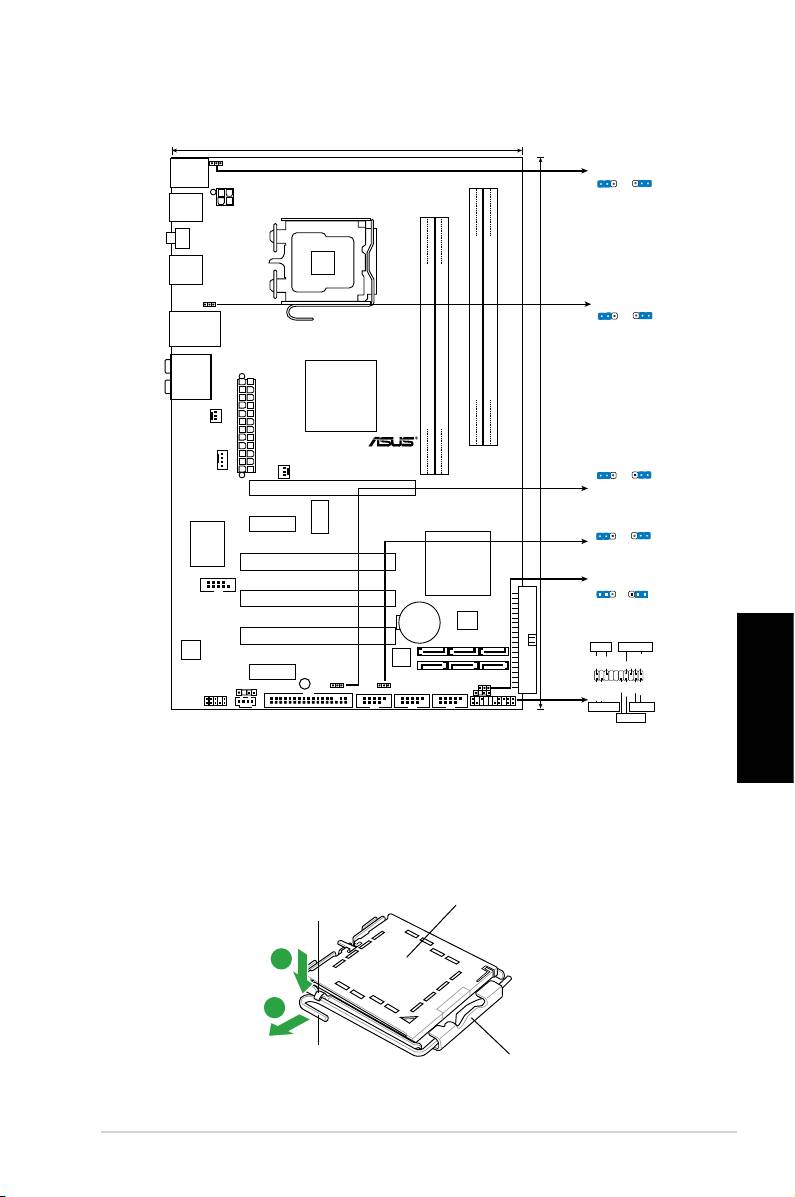
1. Distribución de la placa base
Español
2. Instalación de la CPU
®
Siga estos pasos para instalar un procesador Intel
en el paquete 775-land.
1. Pulse la palanca de carga con su pulgar (A), a continuación, muévala hacia la
izquierda (B) hasta que se suelte de la pestaña de retención.
Pestaña de
Tapa PnP
retención
A
B
Palanca de
Este lado de la caja cam
carga
debería mirar hacia usted.
ASUS P5QLD PRO
11
19.3cm (7.6in)
PS2_USBPW56
PS/2KBMS
PS2_USBPW56
T:Mouse
1
2
2
3
B:Keyboard
+5V
+5VSB
(D
e
fa
u
lt
)
USB56
ATX12V
LGA775
SPDIF_O1
USB34
USBPW1-4
1
2
2
3
+5V
+5VSB
LAN1_USB12
(Defau
lt
)
AUDIO
Intel
DDR2 DIMMB1 (64 bit,240-pin module)
DDR2 DIMMB2 (64 bit,240-pin module)
P43
DDR2 DIMMA1 (64 bit,240-pin module)
DDR2 DIMMA2 (64 bit,240-pin module)
CHA_FAN
TXPWR
EA
30.5cm (12in)
P5QLD PRO
USBPW1112
CPU_FAN
1
2
2
3
PWR_FAN
+5
V
+5VSB
PCIEX16
(D
e
fa
u
lt
)
ICS
PCIEX1_1
USBPW7-10
9LPRS916JGLF
1
2
2
3
+5
V
+5VSB
(Defau
lt
)
Super I/O
Intel
PCI1
ICH10
CLRTC
1 2 2 3
COM1
PCI2
Normal
Clear RTC
(Default)
CR2032 3V
4Mb
Lithium Cell
BIOS
CMOS Power
PCI3
PANEL
ALC
PLED SPEAKER
1200
Ground
JMB368
PLED+
PLED-
Ground
Speaker
+5V
PCIEX1_2
SB_PWR
SPDIF_OUT
USBPW1112
IDE_LED+
IDE_LED-
PWR
Ground
Reset
Ground
CD
USBPW7-10
CLRTC
AAFP
FLOPPY
USB1112 USB78 USB910
CHASSIS
PANEL
+IDE_LED
RESET
PWRSW
*
Requires an ATX power supply
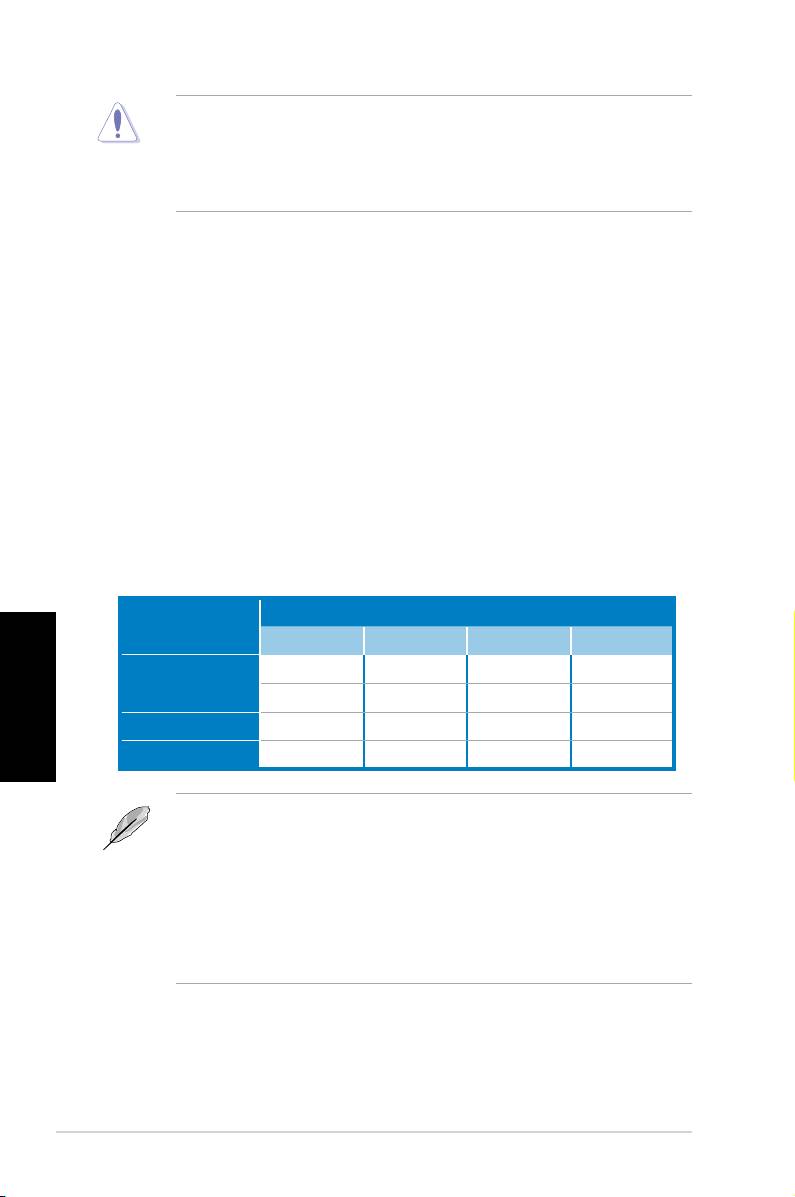
• Para evitar daños en los contactos del zócalo, no retire la tapa PnP, a menos
que se esté instalando una CPU.
• Conserve la tapa en caso de devolución del producto.
• La garantía del producto no cubre daños producidos en los contactos del
zócalo.
2. Levante la palanca de carga en la dirección de la echa, hasta llegar a un ángulo
de 135º.
3. Levante la placa de carga con el pulgar y con el índice hasta alcanzar un ángulo
de 100º, a continuación, presione la tapa PnP desde la ventana de la placa de
carga para extraerla.
4. Coloque la CPU sobre el zócalo, asegúrandose de que el triángulo dorado se
encuentra en la esquina inferior izquierda del zócalo. La llave de alineación
debería encajar en el oricio de la CPU.
5. Cierre la placa de carga, a continuación, pulse la palanca de carga hasta que
quede encajada en la pestaña de retención.
3. Memoria de sistema
Puede instalar módulos DIMM DDR2 de 512 MB, 1 GB, 2 GB y 4 GB sin ECC y sin
buffer en los zócalos DIMM.
Zócalo
Modo
DIMM_A1 DIMM_A2 DIMM_B1 DIMM_B2
Español
- - Poblado -
Canal sencillo
Poblado - - -
Canal dual (1) Poblado - Poblado -
Canal dual (2) Poblado Poblado Poblado Poblado
• Para conguraciones con canal dual, el tamaño total de los módulos de
memoria por canal debe ser el mismo (DIMM_A1= DIMM_B1).
• Instale siempre DIMMs con la misma latencia CAS. Para una compatibilidad
óptima, recomendamos obtener módulos de memoria del mismo
fabricante.
®
• Si instala una memoria total de 4GB o más, el sistema operativo Windows
de
32 bits sólo reconocerá 3GB. Por tanto, se recomienda instalar una capacidad
de memoria total inferior a 3GB.
ASUS P5QLD PRO
12

4. Información de la BIOS
La Flash ROM de la placa base contiene la BIOS. Puede actualizar la información de
la BIOS o congurar los parámetros utilizando la utilidad Conguración de la BIOS. Las
pantallas de la BIOS incluyen teclas de navegación y una breve ayuda en línea para
guiarle. Si encuentra algún problema con el sistema o si el sistema se vuelve inestable
tras cambiar la conguración, cargue los valores de conguración predeterminados.
Visite el sitio web ASUS (www.asus.com) para obtener actualizaciones.
Para entrar en la Conguración al inicio:
Pulse <Suprimir> durante la comprobación inicial (Power-On Self Test, POST). Si no
lo hace, POST continuará con las pruebas de rutina.
Para entrar en la Conguración tras el POST:
• Reinicie el sistema pulsando <Ctrl> + <Alt> + <Supr.> y, a continuación, pulse
<Suprimir> durante el POST, o
• Pulse el botón de reinicio del chasis y, a continuación, pulse <Suprimir> durante
el POST, o
• Apague el sistema y vuelva a encenderlo y pulse <Suprimir> durante el POST
Para actualizar la BIOS con AFUDOS:
Inicie el sistema desde un disquete que contenga, el último archivo de la BIOS. En
el símbolo de raíz, escriba afudos /i<lename.rom> y pulse Intro. Reinicie el sistema
cuando se haya completado la actualización.
Para actualizar la BIOS con ASUS EZ Flash 2:
Inicie el sistema y presione <Alt>+<F2> durante el proceso POST y ejecutar EZ
Flash 2. Inserte un diskette con un archivo BIOS actualizado. EZ Flash 2 realizará
el proceso de actualización de la BIOS y automáticamente reiniciará el sistema
cuando haya terminado.
Para actualizar la BIOS con CrashFree BIOS 3:
Inicie el sistema. Si la BIOS ha sido corrompida, la herramienta de auto recuperación
Español
CrashFree BIOS 3 buscará un diskette o DVD para restaurar la BIOS. Inserte el DVD
de soporte de la placa madre, o un diskette que contenga la BIOS original o una BIOS
actualizada. Una vez que la BIOS haya sido recuperada renicie el sistema.
5. Información del DVD de software
®
Esta placa base admite los sistemas operativos (SO) Windows
XP / Vista. Instale
siempre la versión más reciente del SO y las actualizaciones correspondientes para
maximizar las funciones del hardware.
El DVD que se suministra con la placa base contiene un útil software y varios
controladores para mejorar las características de la placa base. Para comenzar a
utilizar el DVD, simplemente tiene que introducirlo en la unidad de DVD-ROM. El
DVD mostrará automáticamente la pantalla de bienvenida y los menús de instalación
si su equipo tiene activada la función de reproducción automática. Si la pantalla de
bienvenida no aparece automáticamente, localice y haga doble clic sobre el archivo
ASSETUP.EXE de la carpeta BIN del DVD para mostrar los menús.
ASUS P5QLD PRO
13
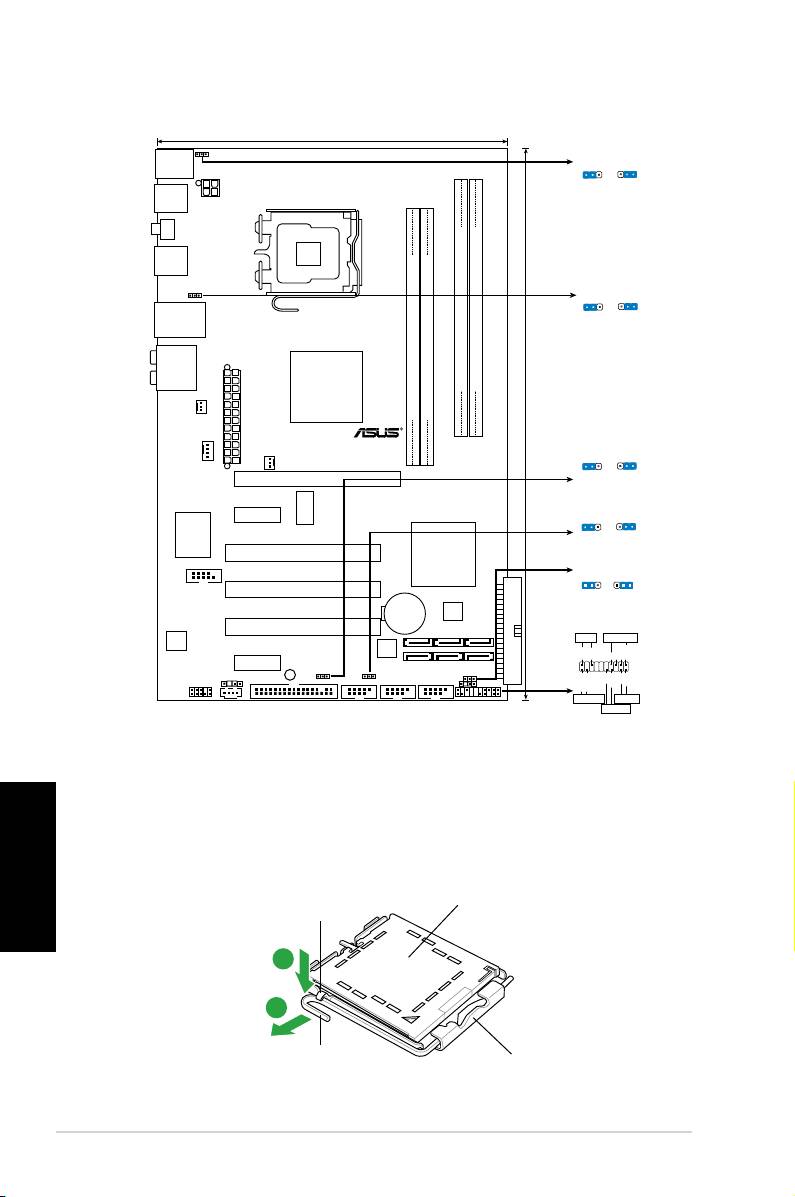
1. Схемасистемнойплаты
2. Установкапроцессора
Для установки процессора:
®
Русский
Выполните следующие действия для установки процессора Intel
в 775-контактное гнездо:
1. Нажмите на удерживающий рычаг большим пальцем (А), затем перемещайте его влево
(В) до тех пор, пока он не высвободится из-под фиксирующего язычка.
Фиксирующий
Отметка PnP
язычок
A
B
Эта сторона должна
Удерживающий
быть обращена к
рычаг
устанавливающему.
ASUS P5QLD PRO
14
19.3cm (7.6in)
PS2_USBPW56
PS/2KBMS
PS2_USBPW56
T:Mouse
1
2
2
3
B:Keyboard
+5V
+5VSB
(D
e
fa
u
lt
)
USB56
ATX12V
LGA775
SPDIF_O1
USB34
USBPW1-4
1
2
2
3
+5V
+5VSB
LAN1_USB12
(Defau
lt
)
AUDIO
Intel
DDR2 DIMMB1 (64 bit,240-pin module)
DDR2 DIMMB2 (64 bit,240-pin module)
P43
DDR2 DIMMA1 (64 bit,240-pin module)
DDR2 DIMMA2 (64 bit,240-pin module)
CHA_FAN
TXPWR
EA
30.5cm (12in)
P5QLD PRO
USBPW1112
CPU_FAN
1
2
2
3
PWR_FAN
+5
V
+5VSB
PCIEX16
(D
e
fa
u
lt
)
ICS
PCIEX1_1
USBPW7-10
9LPRS916JGLF
1
2
2
3
+5
V
+5VSB
(Defau
lt
)
Super I/O
Intel
PCI1
ICH10
CLRTC
1 2 2 3
COM1
PCI2
Normal
Clear RTC
(Default)
CR2032 3V
4Mb
Lithium Cell
BIOS
CMOS Power
PCI3
PANEL
ALC
PLED SPEAKER
1200
Ground
JMB368
PLED+
PLED-
Ground
Speaker
+5V
PCIEX1_2
SB_PWR
SPDIF_OUT
USBPW1112
IDE_LED+
IDE_LED-
PWR
Ground
Reset
Ground
CD
USBPW7-10
CLRTC
AAFP
FLOPPY
USB1112 USB78 USB910
CHASSIS
PANEL
+IDE_LED
RESET
PWRSW
*
Requires an ATX power supply
• Для предотвращения повреждения контактов разъема не удаляйте крышку PnP до
начала установки ЦПУ.
• Для возврата товара сохраняйте упаковку.
• Гарантия на товар не распространяется на случай повреждения контактов разъема.
2. Поднимите рычак в направлении, указанном стрелкой, до угла 135°.
3. Поднимите пластинку большим и указательным пальцами на угол 100°, затем выдавите
крышку PnP из окне пластинки.
4. Расположите ЦПУ над гнездом, убедившись, что золотой треугольник располагается над
нижним левым углом гнезда ЦПУ. Ключевой элемент гнезда должен соответствовать
вырезу на ЦПУ.
5. Закройте пластинку, затем нажимайте на рычаг, пока он не окажется под фиксирующим
выступом.
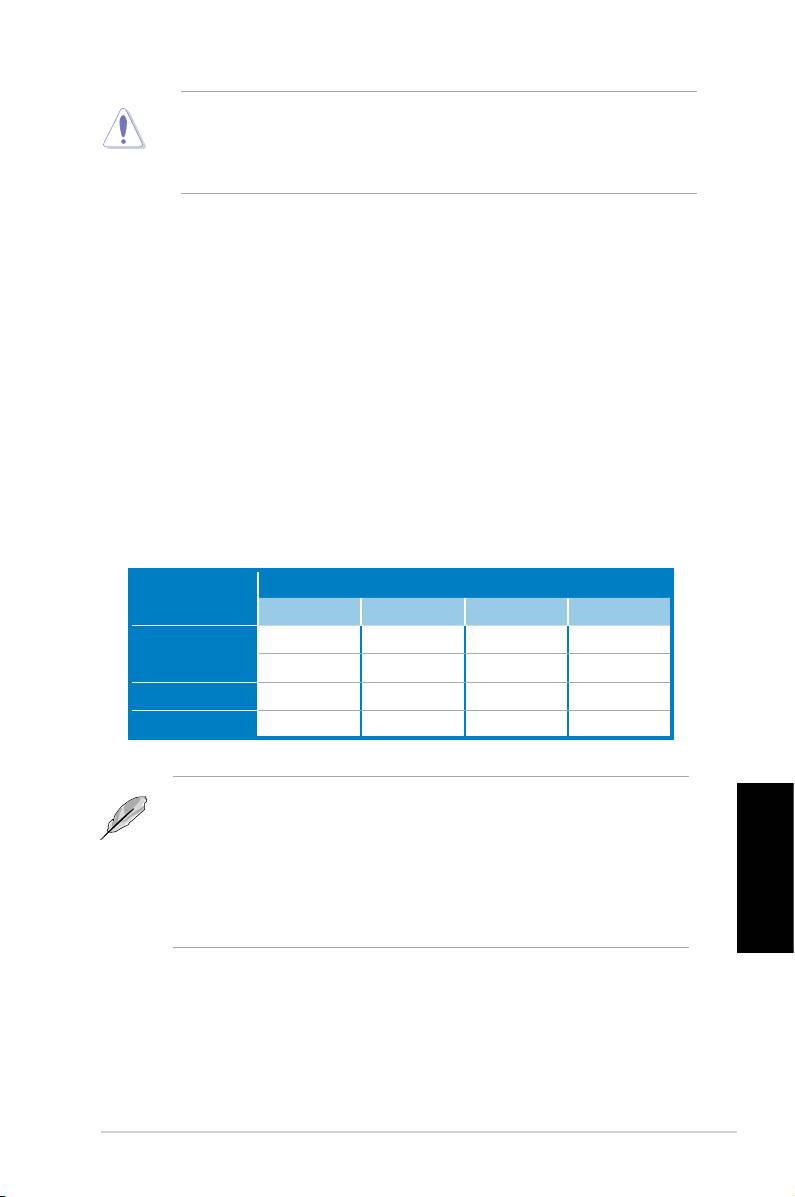
3. Системнаяпамять
Вы можете установить 512 Mб, 1 Гб, 2 Гб и 4 Гб небуферизированные non-ECC DDR
2 модули DIMM в слоты DIMM.
Заполнен
Mode
DIMM_A1 DIMM_A2 DIMM_B1 DIMM_B2
- - Заполнен -
Одноканальный
Заполнен - - -
Двуканальный(1) Заполнен - Заполнен -
Двуканальный(2) Заполнен Заполнен Заполнен Заполнен
• Для двухканальной конфигурации, объем памяти модулей, установленных в каждый
канал должен быть одинаковым (DIMM_A1= DIMM_B1).
• Всегда устанавливайте модули DIMM с одинаковыми характеристиками. Для
оптимальной совместимости, рекомендуется чтобы модули памяти были одного
производителя.
Русский
®
• При установке памяти общим объемом 4Гб и более, 32-битная ОС Windows
обнаружит
менее 3Гб памяти. В таких случаях рекомендуется устанавливать менее 3Гб памяти.
ASUS P5QLD PRO
15

4. Базовая система ввода/вывода (BIOS)
BIOS записан в микросхеме энергонезависимой памяти, находящейся на системной плате.
Используя утилиту настройки BIOS можно настроить или обновить BIOS. Экраны BIOS содержат
кнопки навигации и краткую справку. Если после изменения настроек BIOS система стала
работать нестабильно, восстановите настройки по умолчанию (Setup Defaults). Обновления
можно найти на веб-сайте компании ASUS (www.asus.com).
Чтобы войти в режим настройки при загрузке системы:
нажмите на клавишу Delete во время выполнения системой программы самотестирования
(POST). Если не нажимать на клавишу Delete, то продолжится выполнение программы
самотестирования.
Чтобы войти в режим настройки после завершения выполнения программы
самотестирования (POST):
• перезагрузите систему, используя клавиши Ctrl + Alt + Delete, затем нажмите на клавишу
Delete во время выполнения программы самотестирования или
• нажмите на кнопку reset (сброс) на корпусе, затем нажмите на клавишу Delete во время
выполнения программы самотестирования
• выключите и снова включите систему, затем нажмите на клавишу Delete во время
выполнения программы самотестирования.
Для обновления BIOS с помощью AFUDOS:
Загрузите систему с дискеты, на которой содержится последняя версия BIOS. В командной
строке DOS введите afudos /i<filename.rom> и нажмите Enter. После завершения обновления
перезапустите систему.
Для обновления BIOS с помощью ASUS EZ Flash 2:
Нажмите <Alt> + <F2> во время POST для запуска EZ Flash 2. Вставьте дискету,
которая содержит последний файл BIOS. EZ Flash 2 начнет процесс обновления BIOS
и потом перезагрузит систему.
Для восстановления BIOS с помощью CrashFree BIOS 3:
Включите систему. Если BIOS искажен, функция CrashFree BIOS 3 автоматически
восстановит BIOS с дискеты или DVD. Вставьте DVD от материнской платы или
дискету, которая содержит исходный или последний файл BIOS. Затем перезагрузите
Русский
систему.
5. Информация о компакт-диске с ПО
®
Данная системная плата поддерживается операционными системами Windows
XP / Vista.
Рекомендуется устанавливать наиболее новые операционные системы и соответствующие
обновления для полноценного использования возможностей аппаратного обеспечения.
Компакт-диск, поставляемый вместе с системной платой, содержит полезные программы и
утилиты, расширяющие возможности системной платы. Чтобы начать работу с этим компакт-
диском, вставьте его в привод Заполнен-ROM. Автоматически запустится экран приветствия и
установочные меню (если функция Автозапуск включена). Если экран приветствия не появился
автоматически, для его отображения найдите и запустите файл ASSETUP.EXE, находящийся
в каталоге BIN на компакт-диске.
ASUS P5QLD PRO
16
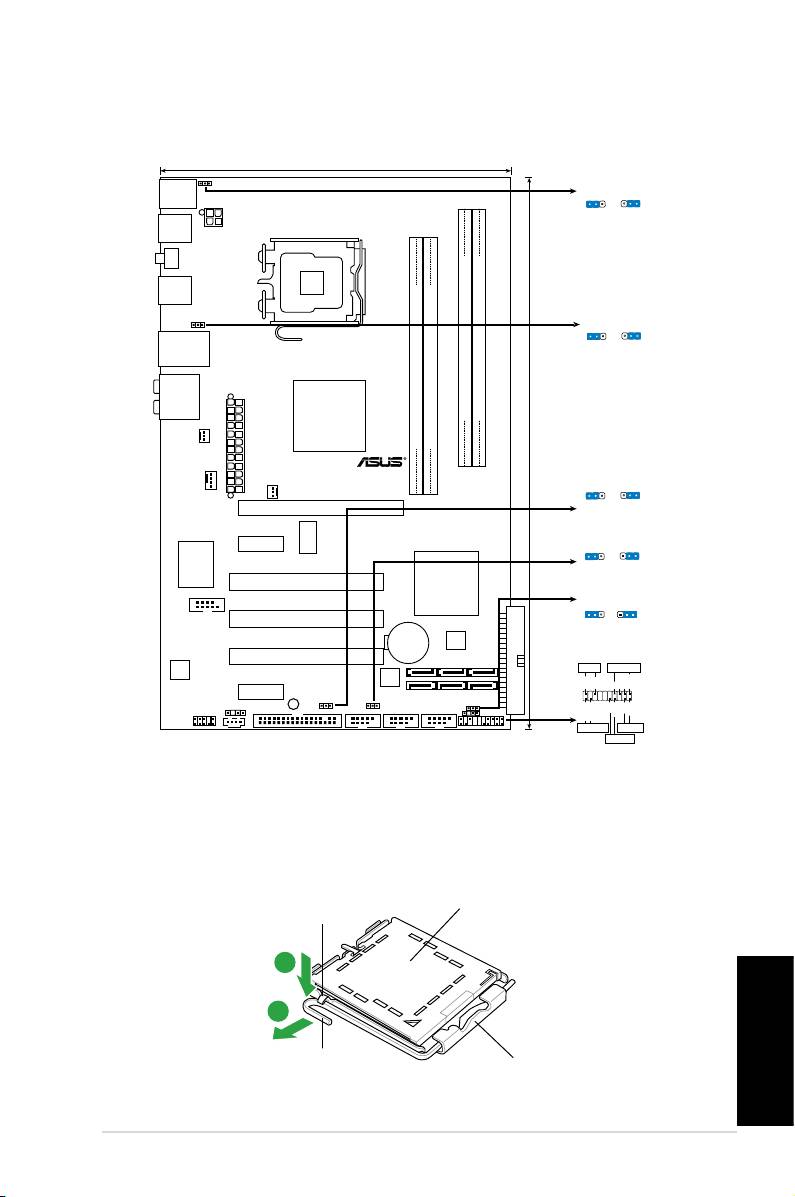
1. Disposição da placa-principal
2. Instalação da CPU
®
Siga estas etapas para instalar um processador Intel
no socket 775.
1. Exerça pressão sobre a alavanca com o seu polegar (A) e de seguida mova-a
para a esquerda (B) até car liberta da patilha de xação.
Tampa PnP
Patilha de xação
A
B
Este lado da “cam box”
Alavanca
deve car voltada para si.
Português
ASUS P5QLD PRO
17
19.3cm (7.6in)
PS2_USBPW56
PS/2KBMS
PS2_USBPW56
T:Mouse
1
2
2
3
B:Keyboard
+5V
+5VSB
(D
e
fa
u
lt
)
USB56
ATX12V
LGA775
SPDIF_O1
USB34
USBPW1-4
1
2
2
3
+5V
+5VSB
LAN1_USB12
(Defau
lt
)
AUDIO
Intel
DDR2 DIMMB1 (64 bit,240-pin module)
DDR2 DIMMB2 (64 bit,240-pin module)
P43
DDR2 DIMMA1 (64 bit,240-pin module)
DDR2 DIMMA2 (64 bit,240-pin module)
CHA_FAN
TXPWR
EA
30.5cm (12in)
P5QLD PRO
USBPW1112
CPU_FAN
1
2
2
3
PWR_FAN
+5
V
+5VSB
PCIEX16
(D
e
fa
u
lt
)
ICS
PCIEX1_1
USBPW7-10
9LPRS916JGLF
1
2
2
3
+5
V
+5VSB
(Defau
lt
)
Super I/O
Intel
PCI1
ICH10
CLRTC
1 2 2 3
COM1
PCI2
Normal
Clear RTC
(Default)
CR2032 3V
4Mb
Lithium Cell
BIOS
CMOS Power
PCI3
PANEL
ALC
PLED SPEAKER
1200
Ground
JMB368
PLED+
PLED-
Ground
Speaker
+5V
PCIEX1_2
SB_PWR
SPDIF_OUT
USBPW1112
IDE_LED+
IDE_LED-
PWR
Ground
Reset
Ground
CD
USBPW7-10
CLRTC
AAFP
FLOPPY
USB1112 USB78 USB910
CHASSIS
PANEL
+IDE_LED
RESET
PWRSW
*
Requires an ATX power supply
• Para evitar danicar os pinos do socket, não remova a tampa PnP a não ser
que esteja a instalar uma CPU.
• Guarde a tampa, caso seja necessário devolver o produto.
• A garantia do produto não cobre danos ao nível dos pinos do socket.
2. Levante a alavanca na direcção indicada pela seta e num ângulo de 135º.
3. Levante o prato de carregamento com o polegar e indicador num ângulo de 100º,
de seguida empurre a tampa PnP através da janela do prato de carregamento
para a remover.
4. Posicione a CPU por cima do socket, certicando-se de que o triângulo dourado
está no canto inferior esquerdo do socket. A chave de alinhamento do socket
deve encaixar no entalhe existente na CPU.
5. Feche o prato de carregamento, de seguida exerça pressão sobre a alavanca
de carregamento até esta encaixar com um estalido na patilha de xação.
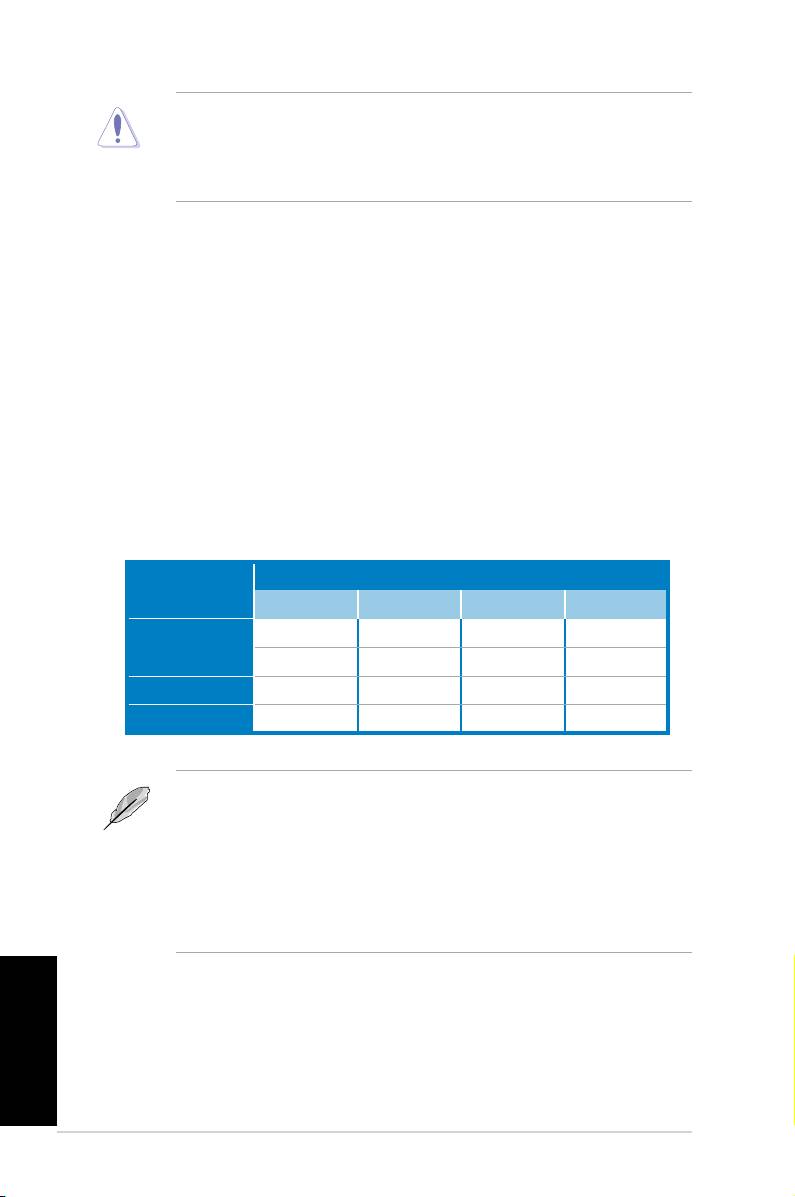
3. Memória do sistema
Pode instalar módulos DIMM DDR2 sem entreposição (unbuffered) e non-ECC de
512 MB, 1 GB, 2 GB e de 4 GB nos sockets DIMM.
Sockets
Modo
DIMM_A1 DIMM_A2 DIMM_B1 DIMM_B2
- - Ocupado -
Canal simples
Ocupado - - -
Dual-channel (1) Ocupado - Ocupado -
Dual-channel (2) Ocupado Ocupado Ocupado Ocupado
• Para uma conguração de canal duplo, o tamanho total do(s) módulo(s) de
memória instalado(s) por canal deve ser igual (DIMM_A1= DIMM_B1).
• Instale sempre DIMMs com a mesma latência CAS. Para uma óptima
compatibilidade, recomendamos-lhe a obtenção de módulos de memória
junto do mesmo vendedor.
• Aquando da instalação da memória total de 4GB ou superior, o sistema operativo
®
Windows
32-bit pode apenas reconhecer menos do que 3GB. Por conseguinte,
é recomendável uma memória total instalada inferior a 3GB.
Português
ASUS P5QLD PRO
18
4. Informação da BIOS
A memória ROM Flash existente na placa-principal contém a BIOS. Pode actualizar
a informação da BIOS ou congurar os seus parâmetros utilizando o utilitário de
conguração da BIOS. Os ecrãs da BIOS incluem teclas de navegação e uma
breve ajuda online que lhe servirão de guia. Se se deparar com problemas ao nível
do sistema, ou se o sistema car instável após alteração das denições, carregue
as predenições de conguração. Visite o web site da ASUS (www.asus.com) para
obter as actualizações.
Para aceder ao utilitário de conguração aquando do arranque:
Prima a tecla <Delete> durante a rotina POST (Power-On Self Test). Se não premir a tecla
<Delete>, a rotina POST prossegue com as suas rotinas de teste.
Para aceder ao utilitário de conguração após a rotina POST:
• Reinicie o sistema premindo as teclas <Ctrl> + <Alt> + <Delete>, de seguida
prima a tecla <Delete> durante a rotina POST, ou
• Prima o botão Reiniciar existente no chassis, de seguida prima a tecla <Delete>
durante a rotina POST, ou
• Desligue o sistema e volte a ligá-lo, de seguida prima a tecla <Delete> durante
a rotina POST
Para actualizar a BIOS com o AFUDOS:
Proceda ao arranque do sistema a partir de uma disquete que contenha o mais recente
cheiros da BIOS. Na linha de comandos do DOS, digite afudos/i<lename.rom> e
prima a tecla Enter. Reinicie o sistema após conclusão da actualização.
Para actualizar a BIOS com o ASUS EZ Flash 2:
Proceda ao arranque do sistema e prima <Alt>+<F2> durante a rotina POST para abrir
o EZ Flash 2. Introduza uma disquete que contenha o mais recente cheiro da BIOS.
O EZ Flash 2 procede à actualização da BIOS e reinicia o sistema automaticamente
após concluída a operação.
Para recuperar a BIOS com o CrashFree BIOS 3:
Proceda ao arranque do sistema. Se a BIOS estiver corrompida, a ferramenta de
recuperação automática do CrashFree BIOS 3 verica se existe uma disquete ou DVD
a partir do qual possa restaurar a BIOS. Introduza o DVD da placa-principal, ou uma
disquete que contenha o cheiro da BIOS original ou o mais recente. Proceda ao arranque
do sistema após recuperação da BIOS.
5. Informação do DVD de suporte ao softwareß
®
Esta placa-principal suporta o sistema operativo Windows
XP / Vista. Instale sempre
a versão mais recente do sistema operativo e respectivas actualizações para que
possa maximizar as capacidades do seu hardware.
O DVD de suporte que acompanha a placa-principal contém software útil e vários
controladores que melhoram as capacidades da placa-principal. Para utilizar o
DVD de suporte, basta introduzi-lo na unidade de DVD-ROM. O DVD apresenta
automaticamente o ecrã de boas-vindas e os menus de instalação caso a função de
execução automática esteja activada no computador. Se o ecrã de boas-vindas não
aparecer automaticamente, procure e faça um duplo clique sobre o cheiro ASSETUP.
EXE existente na pasta BIN do DVD de suporte para poder aceder aos menus.
Português
ASUS P5QLD PRO
19
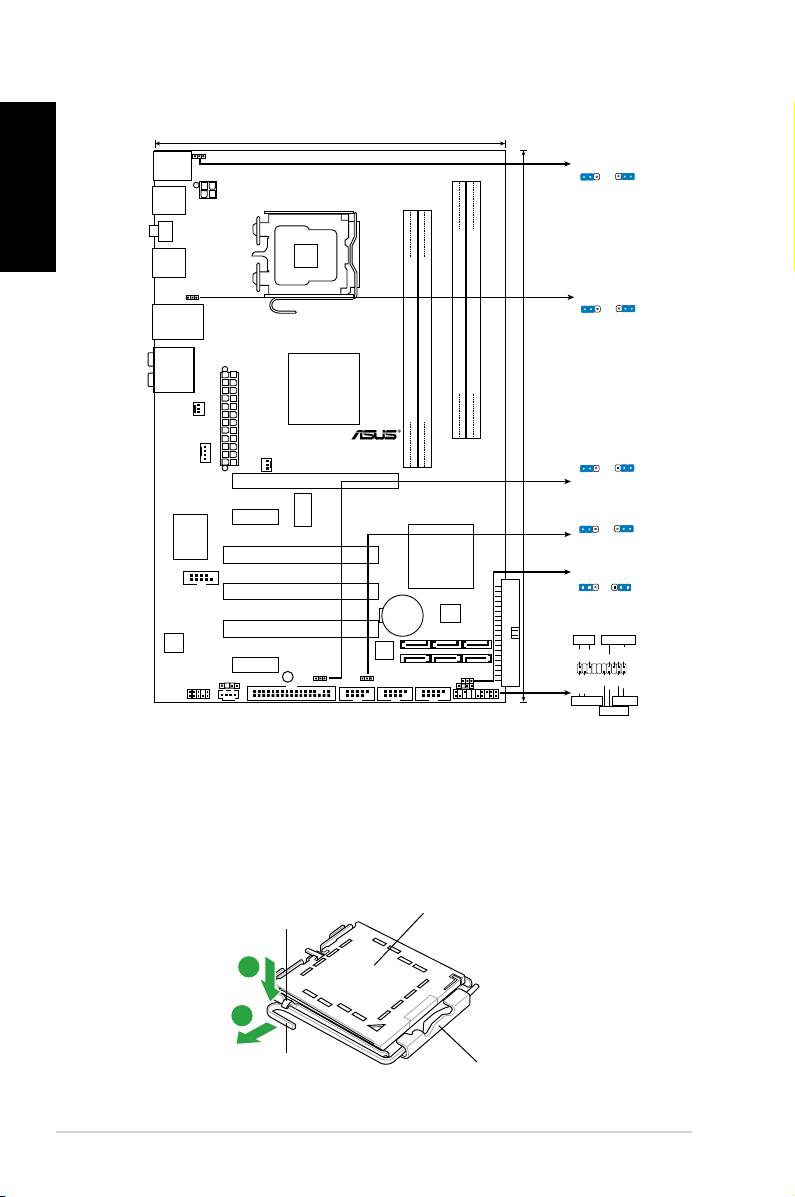
1. Plan płyty głównej
Polski
2. Instalacja procesora
®
Wykonaj podane czynności w celu zainstalowania procesora Intel
w obudowie
775-land.
1. Naciśnij kciukiem (A) dźwignię ładowania, a następnie przesuń ją w lewo (B),
aż do jej zwolnienia z zatrzasku mocującego.
Zatrzask
Pokrywka PnP
podtrzymujący
A
B
Ta strona obudowy
Dźwignia
mimośrodowej powinna być
ładowania
skierowana do użytkownika.
ASUS P5QLD PRO
20
19.3cm (7.6in)
PS2_USBPW56
PS/2KBMS
PS2_USBPW56
T:Mouse
1
2
2
3
B:Keyboard
+5V
+5VSB
(D
e
fa
u
lt
)
USB56
ATX12V
LGA775
SPDIF_O1
USB34
USBPW1-4
1
2
2
3
+5V
+5VSB
LAN1_USB12
(Defau
lt
)
AUDIO
Intel
DDR2 DIMMB1 (64 bit,240-pin module)
DDR2 DIMMB2 (64 bit,240-pin module)
P43
DDR2 DIMMA1 (64 bit,240-pin module)
DDR2 DIMMA2 (64 bit,240-pin module)
CHA_FAN
TXPWR
EA
30.5cm (12in)
P5QLD PRO
USBPW1112
CPU_FAN
1
2
2
3
PWR_FAN
+5
V
+5VSB
PCIEX16
(D
e
fa
u
lt
)
ICS
PCIEX1_1
USBPW7-10
9LPRS916JGLF
1
2
2
3
+5
V
+5VSB
(Defau
lt
)
Super I/O
Intel
PCI1
ICH10
CLRTC
1 2 2 3
COM1
PCI2
Normal
Clear RTC
(Default)
CR2032 3V
4Mb
Lithium Cell
BIOS
CMOS Power
PCI3
PANEL
ALC
PLED SPEAKER
1200
Ground
JMB368
PLED+
PLED-
Ground
Speaker
+5V
PCIEX1_2
SB_PWR
SPDIF_OUT
USBPW1112
IDE_LED+
IDE_LED-
PWR
Ground
Reset
Ground
CD
USBPW7-10
CLRTC
AAFP
FLOPPY
USB1112 USB78 USB910
CHASSIS
PANEL
+IDE_LED
RESET
PWRSW
*
Requires an ATX power supply
