
Asus EA-N66: Q2: When I set my EA-N66 to Repeater Mode, should I use the same SSID with my parent AP?
Q2: When I set my EA-N66 to Repeater Mode, should I use the same SSID with my parent AP?: Asus EA-N66
Table of contents
- Package contents A quick look
- Operation modes Ethernet Adapter mode
- Frequently Asked Questions
- Q2: When I set my EA-N66 to Repeater Mode, should I use the same SSID with my parent AP?
English
9
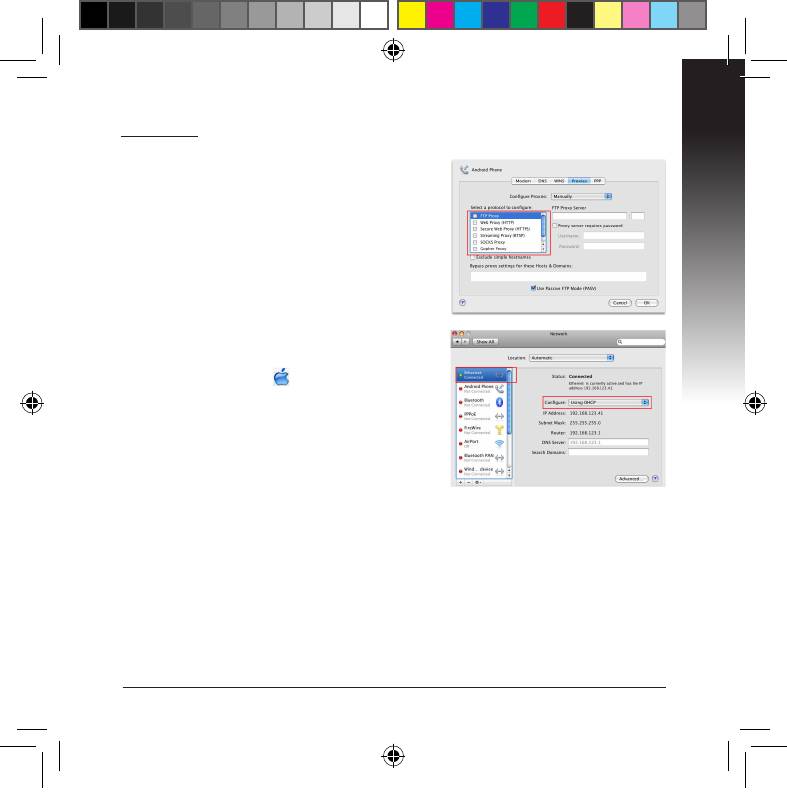
Mac 10.5.8
A. Disable the proxy server, if enabled.
1. From the menu bar, click Safari >
Preferences... > Advanced tab.
2. Click Change Settings... in the Proxies eld.
3. From the list of protocols, deselect FTP Proxy
and Web Proxy (HTTP).
4. Click OK when done.
B. Set the TCP/IP settings to automatically
obtain an IP address.
1. Click the Apple icon > System Prefer-
ences > Network.
2. Select Ethernet and select Using DHCP in
the Congure eld.
3. Click Apply when done.
Q2: When I set my EA-N66 to Repeater Mode, should I use the same
SSID with my parent AP?
• We recommend the you use a dierent SSID for your EA-N66 so you can
choose the one with the best signal strength (between your EA-N66 and your
parent AP).
U7020_EA-N66_QSG.indb 9 2012.2.29 2:44:54 PM



