
Asus EA-N66: Frequently Asked Questions
Frequently Asked Questions: Asus EA-N66
Table of contents
English
8
Frequently Asked Questions
Q1: I cannot access the web GUI to congure the EA-N66 settings.
• Close all running web browsers and launch again.
• Follow the steps below to congure your computer settings based on its
operating system.
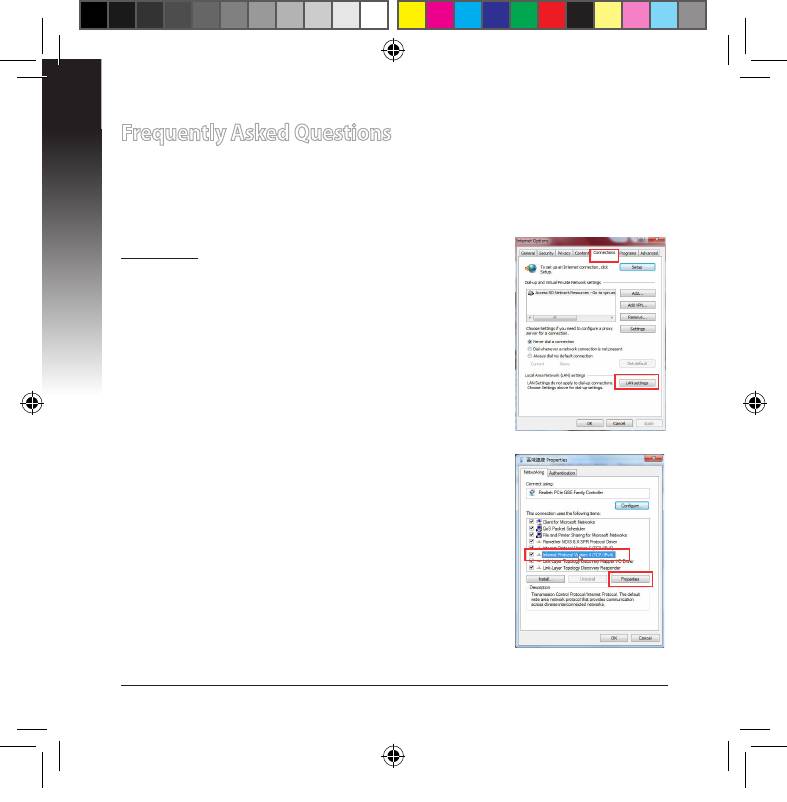
Windows 7
A. Disable the proxy server, if enabled.
1. Click Start > Internet Explorer to launch the web
browser.
2. Click Tools > Internet options > Connections tab >
LAN settings.
3. From the Local Area Network (LAN) Settings screen,
untick Use a proxy server for your LAN.
4. Click OK when done.
B. Set the TCP/IP settings to automatically obtain an
IP address.
1. Click Start > Control Panel > Network and Internet
> Network and Sharing Center > Manage network
connections.
2. Select Internet Protocol Version 4 (TCP/IPv4), then
click Properties.
3. Tick Obtain an IP address automatically.
4. Click OK when done.
U7020_EA-N66_QSG.indb 8 2012.2.29 2:44:53 PM



