
Pioneer DJM-900SRT: Operating an external MIDI sequencer
Operating an external MIDI sequencer: Pioneer DJM-900SRT
Table of contents
- Contents
- Before start
- Installing the software
- Installation Procedure (Windows) Installing the Serato DJ software Installation procedure (Mac OS X)
- Installation Procedure (Windows) Installation procedure (Mac OS X) 9 Log in.
- 11 Read the terms of the license agreement carefully, and if you agree, click [Agree].
- Connections Rear panel
- Connecting input terminals Connecting output terminals
- Connecting to the control panel Connecting this unit and computer
- Operation Control Panel
- Basic Operation
- Advanced Operations About PRO DJ LINK Using the QUANTIZE function
- Using the FADER START function Using the SOUND COLOR FX function Using the BEAT EFFECT function Using the LINK MONITOR function
- Operating DJ software using the MIDI function Operating the [X-PAD]
- Operating an external MIDI sequencer
- Types of effects Types of SOUND COLOR FX effects Types of BEAT EFFECT
- MIDI assignment map Category
- Category
- Changing the settings About the auto standby function About the talk over function Setting preferences About the setting utility software
- Adjusting the buffer size (when using Windows ASIO) Setting the audio data output from this unit to the computer Checking the version of the driver software Checking the latest information on the driver software
- Additional information Troubleshooting
- Block Diagram
- Acquiring the manual About trademarks and registered trademarks
- Specifications
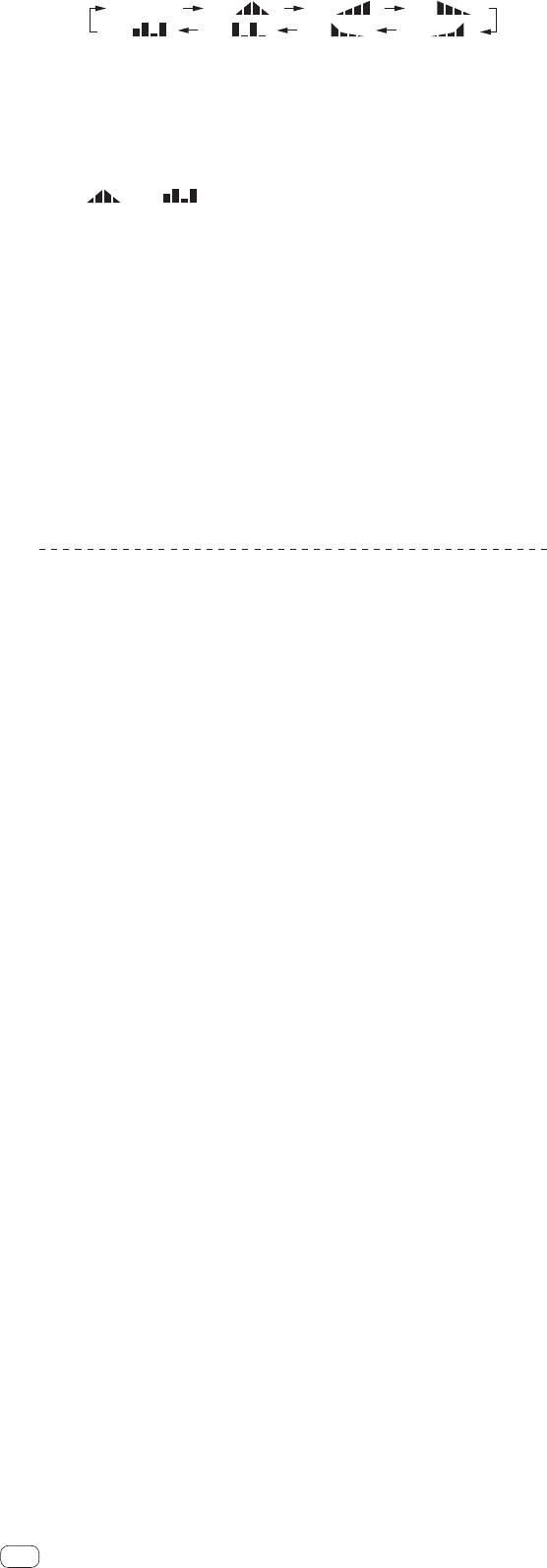
[
SND/RTN
] [
1/7
] [
2/7
] [
3/7
]
7/7
]
6/7
][
5/7
][
[
4/7
][
3 Press the [BEAT , ] button.
Set the MIDI signal’s waveform output time.
4 Press the [ON/OFF] button of [BEAT EFFECTS] or touch the
[X-PAD].
The MIDI message for turning the effect on is sent.
When the [LFO FORM (WAKE UP)] button is pressed and a setting from
[1/7 ] – [7/7 ] is selected, the MIDI message for the buttons and con-
trols below can be sent even when the MIDI mode is turned off.
— [X-PAD] (Touch K Release)
— [CUE] button of [BEAT EFFECTS]
— Effect channel selector switch
— [LEVEL/DEPTH] control
— [ON/OFF] button of [BEAT EFFECTS]
When the [LFO FORM (WAKE UP)] button is pressed to switch between
[SND/RTN] and [MIDI LFO], BEAT EFFECT automatically turns off.
It is not possible to switch between [SND/RTN] and [MIDI LFO] while touching
the [X-PAD].
䢢 Sending the MIDI start and MIDI stop messages
Press the [START/STOP] button for [MIDI].
The MIDI start and MIDI stop messages are sent alternatively each time the
[START/STOP] button is pressed, regardless of whether the MIDI function is on
or off.
Operating an external MIDI sequencer
This unit outputs the operation information of buttons and controls in universal MIDI
format.
This unit sends the tempo of the currently playing source (BPM information) as the
MIDI timing clock. This can be used to synchronize an external MIDI sequencer with
the tempo of the source.
For the messages output by this unit, see MIDI assignment map on page 22.
External MIDI sequencers not supporting MIDI timing clocks cannot be
synchronized.
External MIDI sequencers cannot be synchronized for sources for which the
BPM cannot be measured stably.
The MIDI timing clock is output even with BPM values input manually by tapping
the [TAP] button with a finger. The MIDI timing clock output range is 40 BPM to
250 BPM.
1 Connect the [MIDI OUT] terminal to the external MIDI
sequencer’s MIDI IN terminal using a commercially available
MIDI cable.
2 Set the external MIDI sequencer’s sync mode to Slave.
3 Press the [START/STOP] button for [MIDI].
The MIDI start message is sent.
4 Press [ON/OFF] in the [MIDI] section.
Transmission of the MIDI messages begin.
18
En
