
Pioneer CDJ-400: Track cueing Jog dial functions Rotary search Fast-forward/fast-reverse
Track cueing Jog dial functions Rotary search Fast-forward/fast-reverse: Pioneer CDJ-400
Table of contents
- IMPORTANT VENTILATION CAUTION Operating Environment
- FEATURES
- BEFORE OPERATING (FEATURES) CONTENTS
- DISCS USABLE WITH THIS UNIT Types of discs playable on this unit Playing MP3 files
- BEFORE OPERATING (DISCS USABLE WITH THIS UNIT)
- CAUTIONS REGARDING HANDLING Location Storing Discs Installation Guidelines Condensation Cleaning and Handling Compact Discs Cleaning the Player CD Lens Cleaner
- CONNECTIONS 2. Connecting control cable for relay play
- 3. Connecting to other devices 4. Connecting the power cord
- PANEL FACILITIES 7. HOLD button
- 30. Jog touch indicators Rear Panel
- About TEXT display Removing the jog sheet
- DISC LOADING/UNLOADING
- DJ PLAYER OPERATIONS Starting playback Auto cue function Resume function To stop playback To temporarily interrupt playback
- Track cueing Jog dial functions Rotary search Fast-forward/fast-reverse
- Scratch Jog Effect Digital Jog Break Change playback speed Applying master tempo
- Mixing different tracks Cue point settings
- ADVANCED OPERATIONS Fader start playback Loop playback Scratch play Spin play Reverse play
- Relay play using two players Cue point/loop point memory Writing and reading data
- MIDI SETTING
- TROUBLESHOOTING Symptom
- Error message display
- SPECIFICATIONS
OPERATIONS (DJ PLAYER OPERATIONS)
7 Super-Fast search
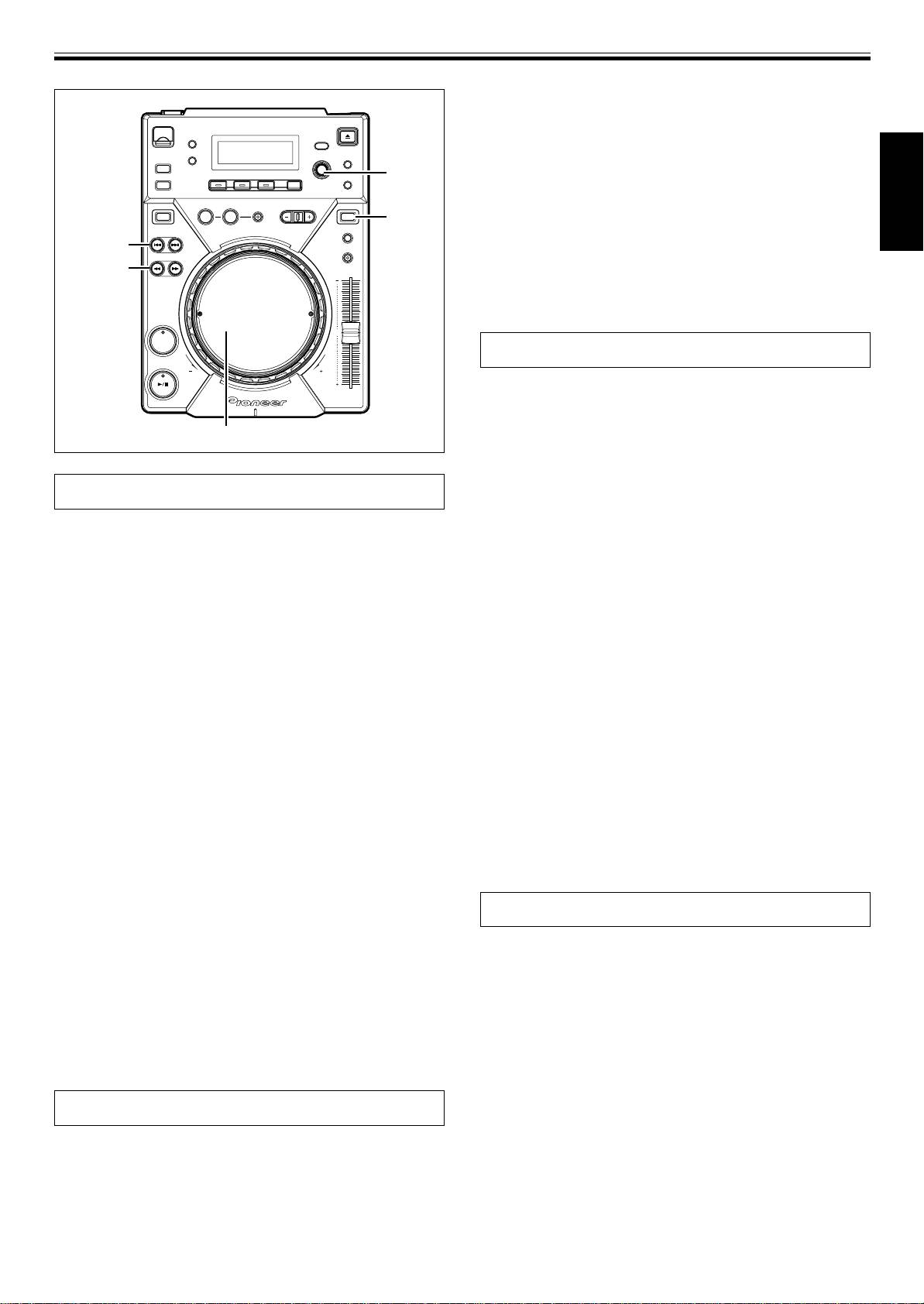
Rotate the jog dial while pressing one of the SEARCH but-
tons (1, ¡).
¶ Hold down one of the SEARCH buttons (1, ¡) while turning
SELECT
the jog dial in the desired direction to enter super-fast forward
PUSH
or super-fast reverse mode.
4, ¢
¶ During Super-Fast search, the search direction is determined
by the direction the jog dial is turned. The direction of the
REV
VINYL
VINYL
pressed SEARCH button (1, ¡) is ignored.
English
TRACK
¶ When the jog dial rotation stops, the unit returns to playback
SEARCH
4, ¢
mode.
SEARCH
¶ When the SEARCH button (1, ¡) is released, Super-Fast
1, ¡
search is canceled.
¶ During playback of MP3s, fast-forward/fast-reverse is sup-
ported only tracks inside the same folder.
CUE
Track cueing
7 TRACK SEARCH buttons (4, ¢)
Press one of the TRACK SEARCH buttons (4, ¢).
¶ Each time the button is pressed, the track is cued in the direction
corresponding to the arrow on the button (during playback of a
Jog dial
track, to cue playback to the beginning of the preceding track,
press the 4 button twice). During playback of MP3s, the first
track found in the direction pressed will be cued, and only those
tracks inside the same folder are searched.
Jog dial functions

When the Auto Cue function is turned ON, the track will be set in
cue standby position at the beginning of the track after cueing.
[Pitch Bend]
¶ When the TRACK SEARCH button (4, ¢) is held depressed,
Rotate jog dial during playback.
cueing is performed continuously. If the button is held de-
When jog mode is set to [VINYL], operate the jog dial by touching
pressed for two seconds or more, the cue speed increases.
only the beveled sides of the dial. Different functions are enabled if
¶ By pressing the 4 button twice at the beginning of the first
the top surface is touched.
track (Track NO.1), the last track will be cued. During playback
¶ In proportion to the amount of rotation, the playback speed is ac-
of MP3s, when the 4 button is pressed the track with the
celerated (FWD+) or decelerated (REV–). When in the reverse
smallest number, the last track in the same folder will be cued.
mode, the playback speed accelerates when the dial is rotated in
¶ By pressing the ¢ button at the last track, the first track (Track
NO.1) will be cued. During playback of MP3s, when the ¢
the REV– direction, and decelerates when rotated in the FWD+ di-
button is pressed at the last track, the track with the smallest
rection.
number in the same folder will be cued.
¶ When dial rotation is stopped, playback reverts to the previous
speed.
7 Super-Fast track search
Rotate the jog dial while pressing one of the TRACK
[Scratch play]
SEARCH buttons (4, ¢).
Rotate jog dial during playback.
¶ By turning the jog dial in the desired search direction while
See “Scratch play” in the ADVANCED OPERATIONS.
pressing either of the TRACK SEARCH buttons (4, ¢), the
[Frame search]
track number will be searched corresponding to the turning of
Rotate jog dial during pause.
the jog dial.
When jog mode is set to CDJ, the audible pause mode is enabled and
¶ During Super-Fast track search, the search direction is deter-
when set to [VINYL], inaudible pause is performed; the audio is
mined by the direction of rotation of the jog dial. The direction
played at a speed corresponding to the speed of jog dial rotation.
of the pressed TRACK SEARCH button (4, ¢) is ignored.
¶ The pause position will change in units of one frame.
¶ When the TRACK SEARCH button (4, ¢) is released, Super-
¶ One rotation of the jog dial corresponds to 1.8 seconds of play-
Fast track search will be ended.
back (135 frames).
[Cue point adjust]
Rotary search
☞P.17 “Changing the cue point”
1. Turn the rotary dial (SELECT PUSH 4, ¢).
[Super-Fast Search]
¶ The search will move one track for each calibration unit the dial
☞P.15 “Super-Fast search”
is rotated, corresponding to the direction of rotation. If the
[Super-Fast track search]
search arrives at the root directory, the folder name [ROOT]
☞P.15 “Super-Fast track search”
will be displayed.
¶ When text mode is selected, the folder name will be displayed
[Digital Jog Break]
after rotary search, followed by the folder’s beginning track
☞P.16 “Digital Jog Break”
number and file name.
[Scratch Jog Effect]
¶ Turn the rotary dial during playback to select tracks while the
☞P.16 “Scratch Jog Effect”
track is being played. Turn the rotary dial before inserting discs
or a USB memory device to preset the track number.
2. Press the rotary dial (SELECT PUSH 4, ¢).
Fast-forward/fast-reverse
¶ The playback of the selected track will begin. If a folder is se-
lected, the hierarchy of that folder will be entered. Press the
7 SEARCH buttons (1, ¡)
BACK button to return one level higher in the folder hierarchy.
Press one of the SEARCH buttons (1, ¡) during playback.
Press and hold the ¡ button for fast forward the disc; press and
hold the 1 button for fast reverse.
¶ During playback of MP3s, fast-forward/fast-reverse are sup-
ported only for tracks inside the same folder.
15
<DRB1451>
En


