
Pioneer CDJ-400: ADVANCED OPERATIONS Fader start playback Loop playback Scratch play Spin play Reverse play
ADVANCED OPERATIONS Fader start playback Loop playback Scratch play Spin play Reverse play: Pioneer CDJ-400
Table of contents
- IMPORTANT VENTILATION CAUTION Operating Environment
- FEATURES
- BEFORE OPERATING (FEATURES) CONTENTS
- DISCS USABLE WITH THIS UNIT Types of discs playable on this unit Playing MP3 files
- BEFORE OPERATING (DISCS USABLE WITH THIS UNIT)
- CAUTIONS REGARDING HANDLING Location Storing Discs Installation Guidelines Condensation Cleaning and Handling Compact Discs Cleaning the Player CD Lens Cleaner
- CONNECTIONS 2. Connecting control cable for relay play
- 3. Connecting to other devices 4. Connecting the power cord
- PANEL FACILITIES 7. HOLD button
- 30. Jog touch indicators Rear Panel
- About TEXT display Removing the jog sheet
- DISC LOADING/UNLOADING
- DJ PLAYER OPERATIONS Starting playback Auto cue function Resume function To stop playback To temporarily interrupt playback
- Track cueing Jog dial functions Rotary search Fast-forward/fast-reverse
- Scratch Jog Effect Digital Jog Break Change playback speed Applying master tempo
- Mixing different tracks Cue point settings
- ADVANCED OPERATIONS Fader start playback Loop playback Scratch play Spin play Reverse play
- Relay play using two players Cue point/loop point memory Writing and reading data
- MIDI SETTING
- TROUBLESHOOTING Symptom
- Error message display
- SPECIFICATIONS
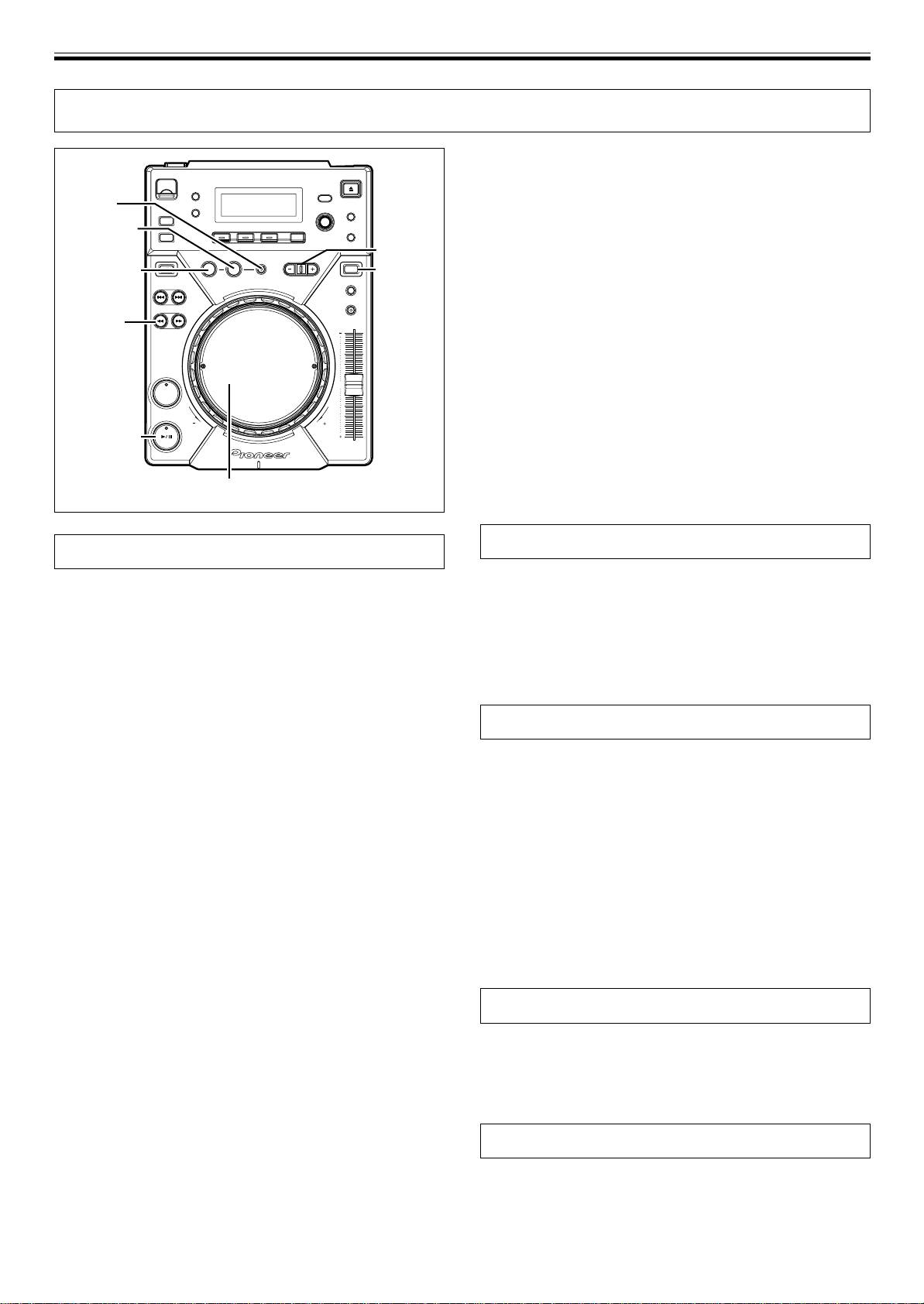
OPERATIONS (ADVANCED OPERATIONS)
ADVANCED OPERATIONS
7 Changing the loop-out point
1. Press the OUT/OUT ADJUST button during loop playback.
¶ The time of the out point is shown in the display, the OUT/OUT
RELOOP/
ADJUST button starts to flash rapidly and the IN/REALTIME
EXIT
CUE/HOT LOOP button indicator turns off.
OUT/
2. Press one of the SEARCH buttons (1, ¡) or turn the jog
OUT ADJUST
BEAT LOOP/
LOOP DIVIDE
dial.
IN/
REV
VINYL
JOG MODE
¶ The loop-out point is moved forwards or backwards in one-
REALTIME CUE/
VINYL
HOT LOOP
frame units.
¶ The loop-out point cannot be moved before the loop-in point.
¶ During playback of MP3s, loop adjustment is only possible
SEARCH
1, ¡
within one and the same track set having a cue point.
¶ Pressing the OUT/OUT ADJUST button or waiting 30 seconds
or longer will cause the player to exit from the loop-out adjust
mode and to resume loop playback.
CUE
7 Returning to loop playback (RELOOP)
After loop playback has been stopped, press the RELOOP/
EXIT button during playback.
PLAY/PAUSE
¶ Returns to the previously set loop-in point, and restarts loop
playback. If the loop is divided with loop divide, the loop will
return to its original length.
¶ During playback of MP3s, re-looping is possible only within the
Jog dial
same folder.
Fader start playback
Loop playback
The supplied control cable may be used to connect the CONTROL
7 Creating a loop
connector of the CDJ-400 to the matching CONTROL connector on a
1. Press the PLAY/PAUSE button (6) button to start play-
Pioneer DJ mixer, thus making it possible to exit from cueing standby
back.
mode and start playback immediately by raising the channel fader on
the DJ mixer. The cross fader may also be used to perform fade-in
2. During playback, press the IN/REALTIME CUE/HOT LOOP
starts on the player as well. The fader may also be returned to its
button at the loop-in point.
original position to return the player to the cueing point (back
¶ Note that this operation is not needed if a prerecorded cue
cueing.) (See P.8 for instructions on connecting the units.)
point is to be used as the start of the loop.
3. During playback, press the OUT/OUT ADJUST button at
the desired loop-out point.
Scratch play
¶ Loop playback will start between the loop-in point and loop-out
point.
When jog mode is set to [VINYL], pressing the top surface of the jog
¶ By using the frame search, the loop-out point can be set in
dial and turning it causes playback to occur in proportion to the speed
units of frames.
and direction of jog dial rotation.
¶ During playback of MP3s, looping is only possible within one
1. Press the JOG MODE VINYL button so the button indica-
and the same track set having a cue point.
tor lights.
7 To start loop playback with automatically set
2. During playback, press the top surface of the jog dial.
loop-out point (Auto BEAT LOOP)
¶ The playback will stop and become playback corresponding to
Press the BEAT LOOP/LOOP DIVIDE during playback or
the rotation of the jog dial (as explained in step 3).
pause mode.
3. Rotate the jog dial in the direction and at the speed you
¶ The point at which the button is pressed will be set as the loop-
wish playback to be performed.
in point, and a loop-out point will automatically be set based on
¶ Playback will be heard in the direction and speed proportional
the track’s BPM; loop playback will then start.
to the jog dial rotation.
¶ If the numerical BPM value is not displayed, loop play will be-
4. Remove hand from jog dial.
gin based on BPM=130.
¶ Returns to original playback.
7 To divide loops (LOOP DIVIDE)
Press the BEAT LOOP/LOOP DIVIDE buttons during loop
Spin play
playback.
¶ Pressing the – button will divide the playback loop, and press-
During playback in VINYL mode, either press the surface of the jog
ing the + button will return the playback loop to its original
dial or press the PLAY/PAUSE button (6) to pause playback, then
length.
rotate the jog dial quickly; playback will occur in the direction and at a
7 Returning to loop-in point during loop playback
speed proportional to the direction and speed of jog dial rotation,
to start over the loop playback (HOT LOOP)
even if you then release your hand from the jog dial.
Press IN/REALTIME CUE/HOT LOOP button during loop play-
back.
¶ Returns to loop-in point and restarts loop playback.
Reverse play
7 To exit loop playback
Press the DIRECTION REV button. The button indicator will light.
Press RELOOP/EXIT button during loop playback.
Playback will begin in the reverse direction.
¶ The track will continue playback in sequence from the loop out
¶ Playback acceleration/deceleration produced with jog dial rotation
point without returning to the loop-in point.
will operate in reverse.
¶ Reloop cannot be performed during reverse playback.
18
<DRB1451>
En


