
Pioneer CDJ-400: CAUTIONS REGARDING HANDLING Location Storing Discs Installation Guidelines Condensation Cleaning and Handling Compact Discs Cleaning the Player CD Lens Cleaner
CAUTIONS REGARDING HANDLING Location Storing Discs Installation Guidelines Condensation Cleaning and Handling Compact Discs Cleaning the Player CD Lens Cleaner: Pioneer CDJ-400
Table of contents
- IMPORTANT VENTILATION CAUTION Operating Environment
- FEATURES
- BEFORE OPERATING (FEATURES) CONTENTS
- DISCS USABLE WITH THIS UNIT Types of discs playable on this unit Playing MP3 files
- BEFORE OPERATING (DISCS USABLE WITH THIS UNIT)
- CAUTIONS REGARDING HANDLING Location Storing Discs Installation Guidelines Condensation Cleaning and Handling Compact Discs Cleaning the Player CD Lens Cleaner
- CONNECTIONS 2. Connecting control cable for relay play
- 3. Connecting to other devices 4. Connecting the power cord
- PANEL FACILITIES 7. HOLD button
- 30. Jog touch indicators Rear Panel
- About TEXT display Removing the jog sheet
- DISC LOADING/UNLOADING
- DJ PLAYER OPERATIONS Starting playback Auto cue function Resume function To stop playback To temporarily interrupt playback
- Track cueing Jog dial functions Rotary search Fast-forward/fast-reverse
- Scratch Jog Effect Digital Jog Break Change playback speed Applying master tempo
- Mixing different tracks Cue point settings
- ADVANCED OPERATIONS Fader start playback Loop playback Scratch play Spin play Reverse play
- Relay play using two players Cue point/loop point memory Writing and reading data
- MIDI SETTING
- TROUBLESHOOTING Symptom
- Error message display
- SPECIFICATIONS
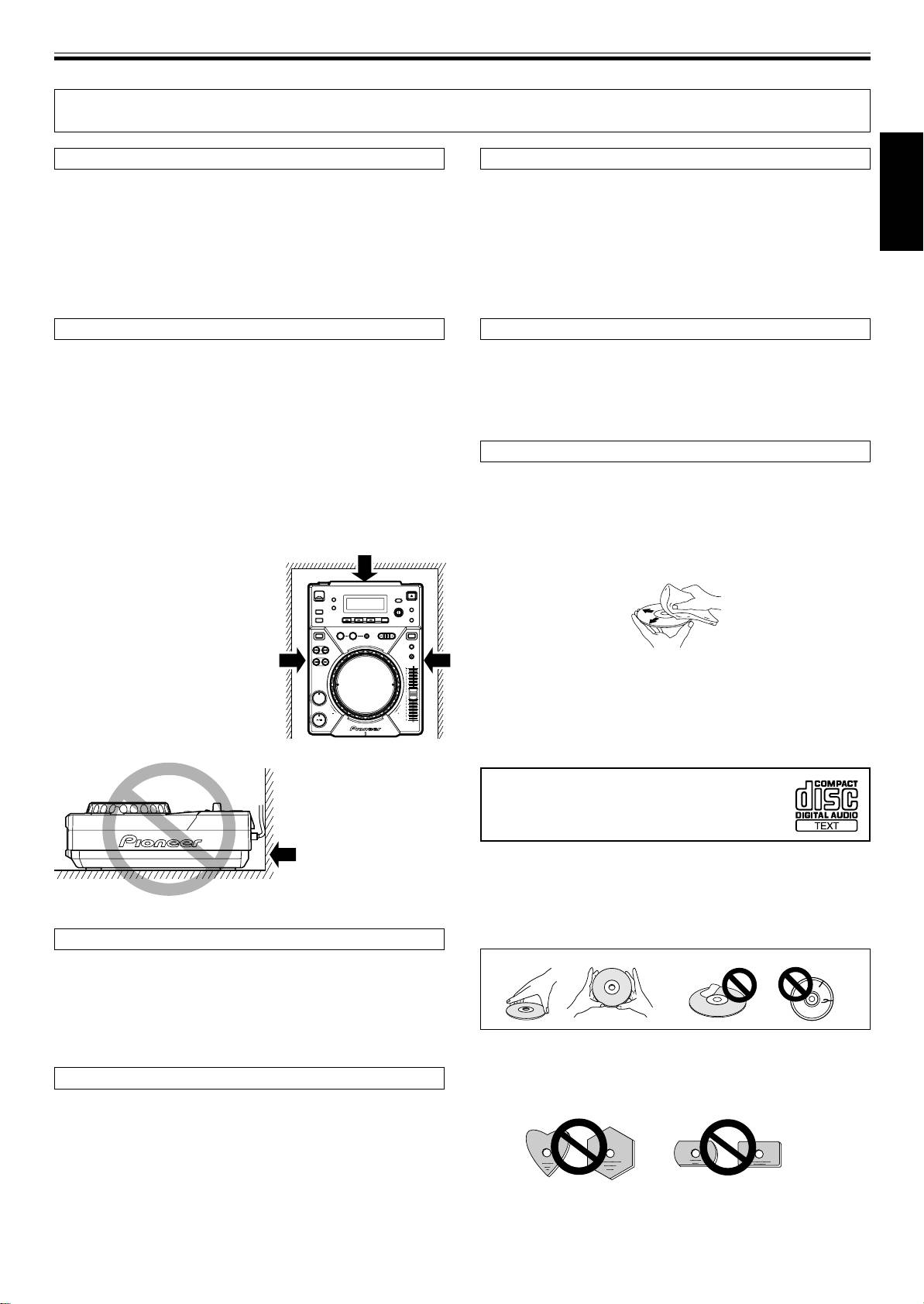
BEFORE OPERATING (CAUTIONS REGARDING HANDLING)
CAUTIONS REGARDING HANDLING
Location
Storing Discs
Install the player in a well-ventilated location where it will not be
÷ Discs are made of the same kinds of plastic used for conventional
exposed to high temperatures or humidity.
analog audio records. Be careful not to allow discs to warp. Al-
Do not install the player in a location which is exposed to direct sun-
ways store discs in their cases vertically, avoiding locations with
English
light, or near stoves or radiators. Excessive heat can adversely affect
high heat, humidity, or extremely low temperatures. Avoid leav-
the cabinet and internal components. Installation of the player in a
ing discs in cars; the interior of a car in direct sunlight can become
damp or dusty environment may aiso result in a malfunction and can
extremely hot.
be hazardous. Avoid installation near cookers etc., where the player
÷ Always read and abide by the precautionary notes listed on disc
may be exposed to oily smoke, steam or heat.
labels.
Installation Guidelines
Condensation
÷ Placing and using the compact disc player for long periods on
When this unit is brought into a warm room from previously cold
heat-generating sources such as amplifiers or near spotlights, etc.
surroundings or when the room temperature rises sharply, conden-
will affect product performance. Avoid placing the player on heat-
sation may form inside the unit and impair its performance. In such
generating sources.
cases, allow the unit to stand for about an hour or raise the room
÷
Install this compact disc player as far as possible away from tuners
temperature gradually.
and TV sets. A compact disc player installed in close proximity to
such equipment may cause noise or degradation of the picture.
Cleaning and Handling Compact Discs
÷ Noise may be noticeable when an indoor antenna is used. In such
cases, make use of an outdoor antenna or turn off power to the
÷ The presence of fingerprints or smudges on the surface of the disc
compact disc player.
will not directly affect the recorded signals, but, depending on the
÷ When the unit is used in a loud-sound environment, e.g., near a
degree of contamination, the brightness of the light reflected from
speaker, sound skip may occur. Install the unit away from the
the signal surfaces may be reduced causing degradation of sound
speaker or reduce the listening vol-
quality. Always keep your discs clean by wiping them gently with
ume.
a soft cloth from the inner edge toward the outer edge.
÷ Place this unit on a level surface
and a stable platform.
÷ Be sure the player, including its au-
dio and power supply cords, does
not touch vibrating materials. Any
cause of vibration other than the in-
sulators may cause the disc to skip.
÷ If a disc becomes very dirty, dampen a soft cloth with water, (be
Take special care when using the
sure to wring it out well) and wipe the away dirt gently. Remove
player while it is installed in a carry-
any water drops with another soft, dry cloth.
ing case.
÷ Do not use record cleaning sprays or anti-static agents on discs.
Never clean discs with benzene, thinner, or other volatile solvents
¶ Please be sure to leave
or damage to the disc surface may result.
a space to allow for
heat radiation.
÷ With this player, use only those discs
which display the mark shown right
'
(Optical audio digital discs).
÷ SACD hybrid discs cannot be played.
Do not place on or
against vibrating
÷ When holding discs, do not touch their signal surfaces. Hold by
materials!
the edges, or by one edge and the center hole.
÷ Do not affix gummed labels or tape to the disc surface. Also, do
not scratch or damage the label.
÷ Discs rotate at high speeds inside the player. Do not use damaged,
cracked or warped discs.
Cleaning the Player
To clean the PLAYER wipe with a polishing or a soft, dry cloth. For
stubborn dirt, moisten a soft cloth with a weak solution of neutral
detergent (diluted in five to six parts water), wring the cloth well, and
wipe away the dirt. Use a dry cloth to wipe the surface dry. Do not use
volatile liquids such as benzene or thinner which will damage the
unit.
Do not play a CD with a special shape
CD Lens Cleaner
Do not play a CD having other shape than a circular disc, such as
heart shaped disc. Otherwise malfunction may occur.
The player’s pickup lens should not become dirty in normal use. If for
some reason, the lens becomes soiled and malfunctions, contact
your nearest PIONEER authorized service center. Lens cleaners for
CD players are commercially available, but special care should be
exercised in their use as some may cause damage to the lens.
7
<DRB1451>
En


