
Pioneer CDJ-400: About TEXT display Removing the jog sheet
About TEXT display Removing the jog sheet: Pioneer CDJ-400
Table of contents
- IMPORTANT VENTILATION CAUTION Operating Environment
- FEATURES
- BEFORE OPERATING (FEATURES) CONTENTS
- DISCS USABLE WITH THIS UNIT Types of discs playable on this unit Playing MP3 files
- BEFORE OPERATING (DISCS USABLE WITH THIS UNIT)
- CAUTIONS REGARDING HANDLING Location Storing Discs Installation Guidelines Condensation Cleaning and Handling Compact Discs Cleaning the Player CD Lens Cleaner
- CONNECTIONS 2. Connecting control cable for relay play
- 3. Connecting to other devices 4. Connecting the power cord
- PANEL FACILITIES 7. HOLD button
- 30. Jog touch indicators Rear Panel
- About TEXT display Removing the jog sheet
- DISC LOADING/UNLOADING
- DJ PLAYER OPERATIONS Starting playback Auto cue function Resume function To stop playback To temporarily interrupt playback
- Track cueing Jog dial functions Rotary search Fast-forward/fast-reverse
- Scratch Jog Effect Digital Jog Break Change playback speed Applying master tempo
- Mixing different tracks Cue point settings
- ADVANCED OPERATIONS Fader start playback Loop playback Scratch play Spin play Reverse play
- Relay play using two players Cue point/loop point memory Writing and reading data
- MIDI SETTING
- TROUBLESHOOTING Symptom
- Error message display
- SPECIFICATIONS
BEFORE OPERATING (PANEL FACILITIES)
1 2 3 4 5 6 7 8
9
1214 13
11
10
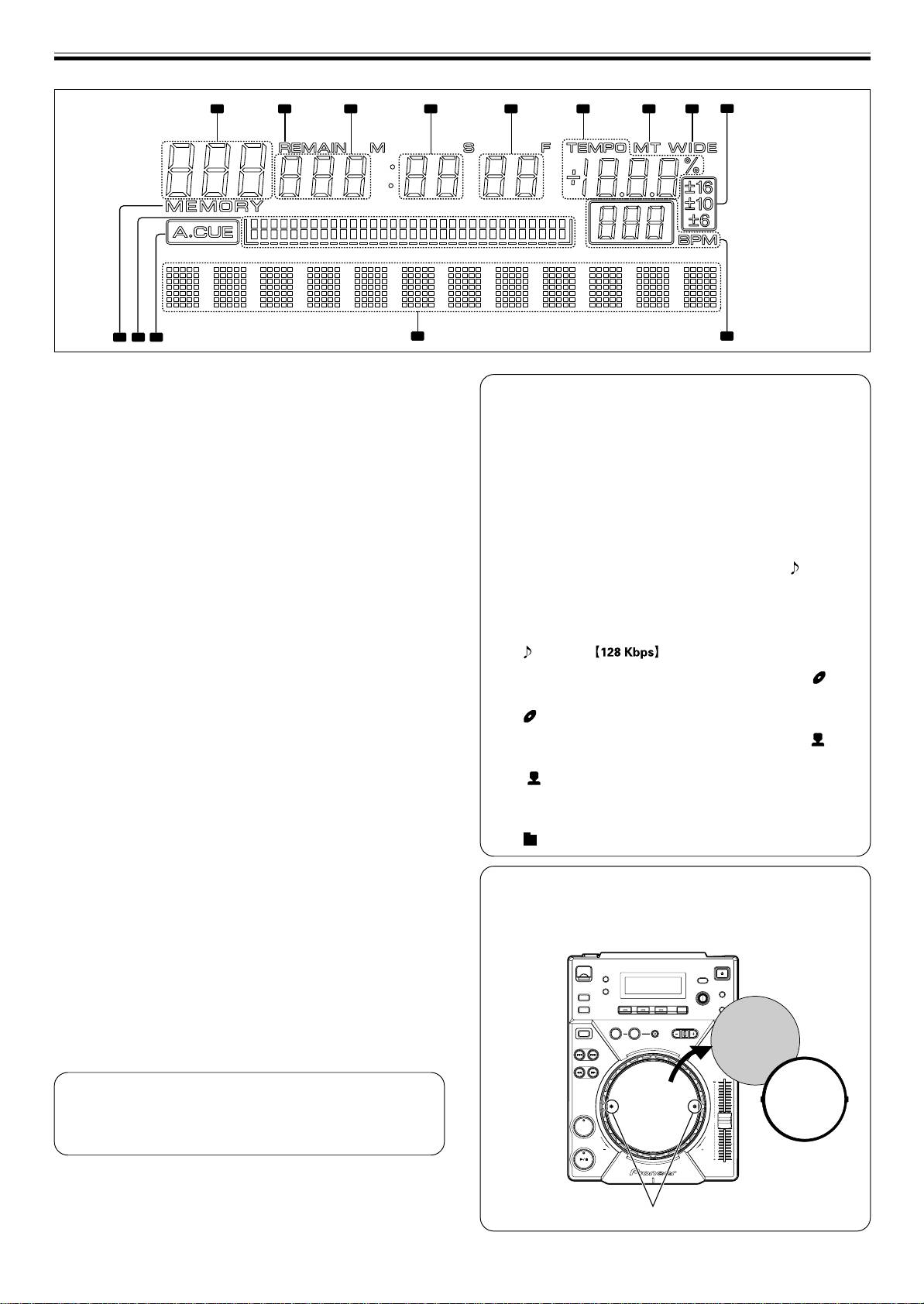
Display
About TEXT display
1. Segment display x3
Press the TEXT MODE button to switch the display between
Displays folder number, track number, or alphanumeric data.
track name/album name/artist name for CD-TEXT. During MP3
playback, the display shows ID3 tag track name (if no ID3 tag is
2. REMAIN
recorded, the display shows the file name) /ID3 tag album name/
Lights when the track remaining time is displayed.
ID3 tag artist name.
3. Segment display x3
¶ Each item can display up to 48 characters of text; text longer
Displays time (minutes) or alphanumeric data.
than 10 characters is scrolled.
¶ Text may include alphanumerics and some symbols.
4. Segment display x2
¶ If no text is available, the [NO TEXT] message will be dis-
Displays time (seconds) or alphanumeric data.
played.
5. Segment display x2
When a track name is selected in TEXT display, the [ ] icon will
Displays time (frame) or alphanumeric data.
be displayed followed by the track name (with MP3, the ID3 tag’s
6. TEMPO
title name or file name will be displayed).
Displays the change rate of tempo.
Also, during MP3 play, the bit rate will be displayed following the
track name.
7. MT
Lights when Master Tempo function is ON.
CDJ-400
8. WIDE
When an album name is selected in TEXT display, the [ ] icon
Lights when the TEMPO control range button is set to WIDE.
will be displayed followed by the album name.
9. ±6, ±10, ±16
Pioneer
Lights to display tempo range.
When an artist name is selected in TEXT display, the [ ] icon
10. BPM
will be displayed followed by the artist’s name.
Displays the BPM of the track displayed.
Pioneer PRO DJ
11. Dot matrix display (7x5) x12
When folder search is performed with MP3, the folder name is
Displays text.
displayed during the search.
12. A.CUE
Pioneer DJ
Lights when Auto Cue function is turned on.
13. Playing address display
Displays the current playback position in a one-track full-scale
Removing the jog sheet
graph.
Using the furnished screwdriver, remove the two screws and the
When displaying elapsed time, the graph lights from the left,
jog plate. The inner jog sheet can then be replaced with another
and when displaying the remaining time the graph light turns
supplied jog sheet or a graphic of your choice.
off from the left.
When remaining time is less than 30 seconds, the graph
flashes slowly, and when remaining time is less than 15 se-
Jog sheet
conds the graph flashes rapidly.
14. MEMORY
REV
VYNIL
Lights when a cue/loop point is saved.
Time display
¶ Press the TIME MODE button to alternate between elapsed
time (TIME) and the track’s remaining time (REMAIN).
CUE
¶ The display mode is saved when the power is turned off.
Jog plate
Screws
12
<DRB1451>
En


